
這是歷史版本頁面 — 看 Qt Creator 最新版本
寫 Qt 程式一定要用 Qt Creator 嗎
 Qt Creator 9.0.0
資料更新 2022-11-24
閱讀約 6 分鐘
寫 C++ 或 Qt 程式時,最常卡住的一刻不是程式碼寫不出來,而是專案一變大,編輯、編譯、除錯、看 UI 畫面這些事分散在好幾個工具裡,切來切去就亂了。你只是想改個按鈕文字,卻得先打開設計工具、再回編輯器、再跑一次建置,然後才看到結果。時間都花在工具之間的往返,不是花在寫程式。
一般人的習慣是開一個文字編輯器寫程式,再用命令列下指令編譯,出錯時靠印訊息慢慢找問題。這個做法在幾百行的程式還行,但專案一超過幾千行、或開始有 UI 設計需求時,就會發現缺少一個把編輯、建置、除錯、介面設計整合在一起的工作環境。這類工具切入的點,就是把這些流程收進同一個介面,讓你在同一個視窗裡完成從寫碼到測試的整個循環。
01Qt Creator 到底能拿來做什麼?
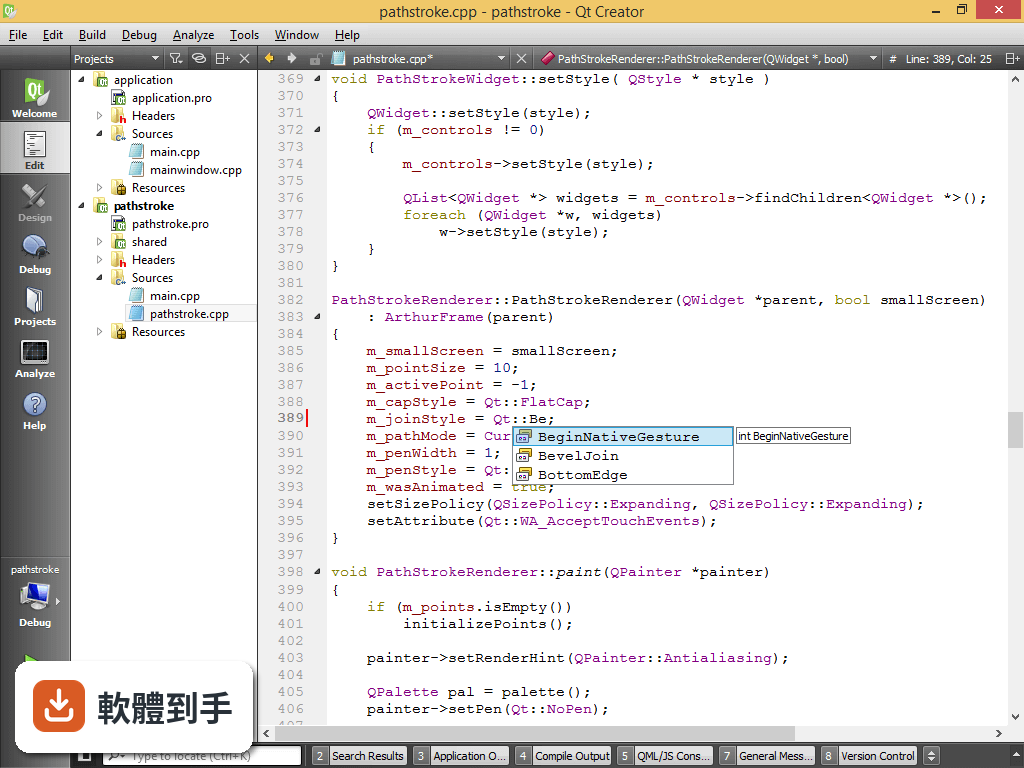
它是一套整合開發環境,主要用途是開發 Qt 應用程式,涵蓋桌面、嵌入式與行動裝置。內建程式碼編輯器、除錯器、版本控制整合,以及圖形化的 UI 設計工具。支援 CMake、QMake、Meson 三種建置系統,也整合了 Git、Subversion、Perforce。簡單說,從開新專案、寫程式、設計介面、編譯、除錯到部署,都在同一個工具裡完成。
02它能不能拿來寫 Python?
可以,但定位上 C++ 才是主要語言。它支援 Python 搭配 PyQt 或 PySide 開發,編輯器也有語法標示和自動補全。不過如果你主要寫 Python,而不是 Qt 相關應用,其他專門的 Python IDE 或編輯器可能更順手。資料中沒有提到它對 Python 的除錯或專案管理支援到什麼程度,這部分需要自己實際測試。
03它支援哪些建置系統?
支援 CMake、QMake 和 Meson 三種。CMake 是現代 C++ 專案最常用的選擇,QMake 是 Qt 傳統的建置工具,Meson 則用於需要高效能建置的專案。在建立新專案時,精靈會讓你選要用哪一種,之後也可以切換。如果你原本的專案已經用某一種建置系統,它可以直接讀取,不需要重寫設定檔。
04除錯功能是怎麼運作的?
內建除錯器支援 GDB、LLDB 和 Microsoft Debugger,可以設定中斷點、逐步執行、檢視變數值。對 C++ 應用程式來說,這些是基本的除錯需求。它把除錯整合在編輯器介面裡,不用另外開終端機或外部工具。資料沒有提到遠端除錯或效能分析工具的細節,如果你需要這些功能,要另外確認。
05能不能拿來寫非 Qt 的 C++ 專案?
可以。它本身是通用的 C++ IDE,即使專案完全沒用到 Qt 函式庫,也能用它來編輯、建置和除錯。CMake 支援讓它可以讀取一般 C++ 專案的設定。不過它的 UI 設計工具和 Qt 相關功能在非 Qt 專案中就用不到,等於只用到編輯器和除錯器部分。如果你只是要寫純 C++,市面上有更多輕量的選擇。
06新手適合用這套軟體嗎?
資料中明確提到,新手可能會覺得它比 Eclipse 或 Visual Studio Code 複雜。它的功能多,介面也比較密集,需要一段時間熟悉專案精靈、建置設定、除錯器操作這些概念。如果你完全沒寫過 C++,或沒用過任何 IDE,建議先從簡單的編輯器搭配命令列開始,等理解程式怎麼編譯和執行後,再回來用這套會比較順。
07做嵌入式開發的人適合嗎?
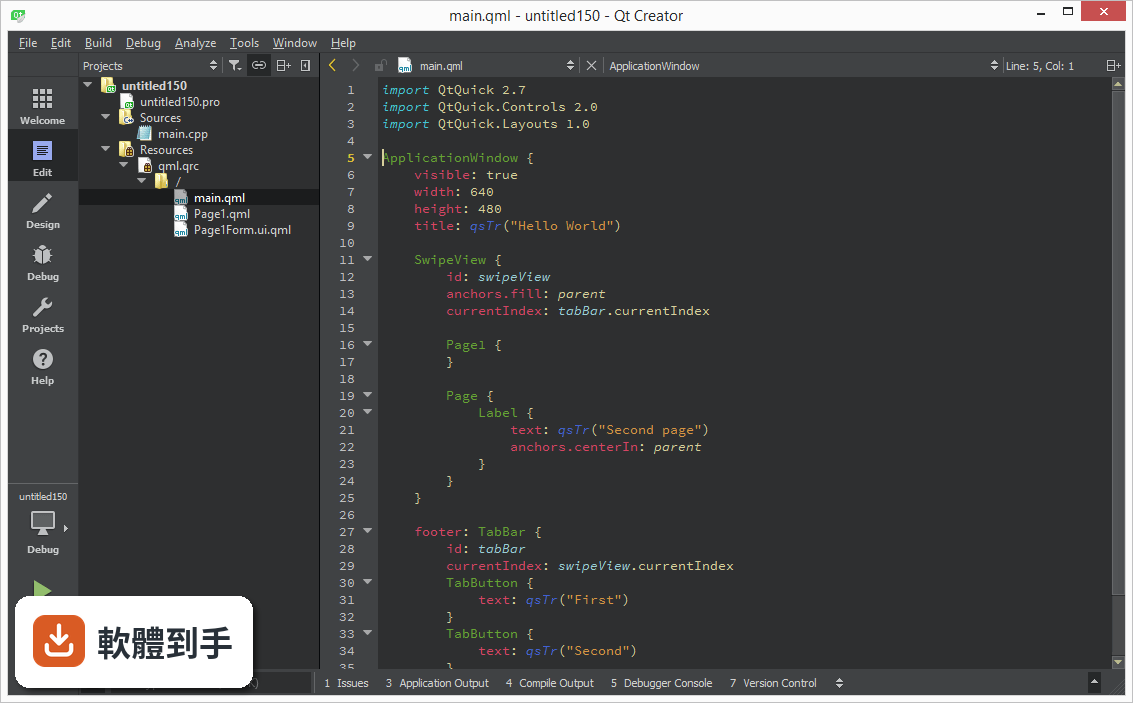
資料提到它支援嵌入式平台,例如 Raspberry Pi 和 MCU,可以針對這些平台進行除錯和部署。如果你開發的目標是嵌入式裝置,而且用的是 Qt 框架,那這套工具會比一般 C++ IDE 更貼近需求,因為它整合了 Qt 的跨平台建置和部署流程。不過具體支援哪些開發板或工具鏈,資料沒有列出,需要自行確認。
08跟 Visual Studio 比起來,什麼人會選它?
如果你的專案是 Qt 應用程式,它對 Qt 的整合是主要優勢,包括 UI 設計工具、Qt 專案精靈、以及 Qt 相關的建置設定。Visual Studio 是通用的 C++ IDE,除錯和編輯功能很強,但對 Qt 的支援需要另外裝擴充套件。資料也提到它的第三方外掛生態系比 Visual Studio 小,所以如果你很依賴外掛,Visual Studio 可能更合適。
09免費版有什麼限制?
它是開源軟體,免費版本可以個人和非商業使用。但資料提到免費版缺少一些商業功能,而且 Qt 框架本身有免費和商業兩種授權選項。如果你開發的是商業軟體,需要確認 Qt 框架的授權條件,以及免費版缺少哪些功能。資料沒有具體列出免費版和商業版的差異,這部分要上 Qt 官網查授權說明。
10它的外掛生態系夠用嗎?
資料明確指出,它的第三方外掛生態系比 Visual Studio 小。這代表你需要的某些功能可能沒有現成外掛,得自己寫或改用其他工具。如果你習慣靠外掛擴充編輯器功能,這點要列入考量。不過內建功能已經涵蓋編輯、除錯、版本控制、UI 設計,一般 Qt 開發流程不太需要外掛。
11它會不會很吃資源?
資料提到它對大型專案來說可能比較耗資源,系統需求是 4GB RAM(建議 8GB)、2GB 磁碟空間、需要 OpenGL 2.0 支援。如果你電腦規格比較舊,或同時開很多大型專案,可能會覺得卡頓。Qt Quick 的 UI 預覽需要 OpenGL 支援,沒有獨立顯卡的機器可能跑不動。建議先確認電腦規格再安裝。
12商業授權會很貴嗎?
資料說商業授權的價格會依 The Qt Company 的授權模式而變,但沒有給出具體數字。如果你只是個人開發或學習,用開源版本就夠。如果是公司要商用,需要直接向 Qt 公司詢價。資料也提到商業授權可能比較貴,但實際費用取決於你的使用情境和授權範圍,這部分只能自己聯絡官方取得報價。
下載與官方連結
qt-creator-opensource-windows-x86_64-9.0.0.exe · 連結指向軟體原廠
版本紀錄
- 2026-09-24 Qt Creator 20.0.2 381 MB
- 2026-07-31 Qt Creator 20.0.1 381 MB
- 2026-06-17 Qt Creator 20.0.0 382 MB
再看 5 筆
- 2026-05-13 Qt Creator 19.0.2 371 MB
- 2026-04-24 Qt Creator 19.0.1 371 MB
- 2026-03-12 Qt Creator 19.0.0 367 MB
- 2026-01-26 Qt Creator 18.0.2 360 MB
- 2025-12-11 Qt Creator 18.0.1 360 MB
這一版改了什麼
What's new in this version:
General:
- Added change log browser `Help > Change Log` (`Qt Creator > Change Log` on
- macOS)
- Added option for showing locator as a centered popup
Locator `t` filter:
- Added non-menu actions
- Added fuzzy matching
- Added `Remove Folder` to `File System` view
- Fixed that clipboard was cleared on shutdown
Help:
- Added support for dark themes to Qt documentation
- Fixed that Qt 6 documentation was shown for Qt 5 based projects
-
Editing:
- Added option for visualizing indentation
- Added option for `Tint whole margin area`
- Added option for line spacing
- Added `Create Cursors at Selected Line Ends`
- Added support for character encoding in binary/memory editor
- Improved UI for multiple markers on the same line
- Fixed performance issue with large selections
- Fixed saving files with non-breaking spaces
- Fixed `Rewrap Paragraph` for Doxygen comments
- Fixed MIME type matching for generic highlighting with MIME type aliases
- Fixed annotation painting when scrolling horizontally
C++:
- Moved code style editor from dialog directly into the preferences page
- Added `Show Preprocessed Source`
- Added `Follow Symbol Under Cursor to Type`
- Added `Follow Symbol` for QRC files in string literals
- Added option for returning only non-value types by const reference
-
- Added option for using `auto` in `Assign to Local Variable` refactoring
- action
- Fixed that selection was not considered for refactoring actions
-
- Fixed generation of function definitions with `unsigned`
- Fixed code style preview editor size
Clanged:
- Added option for using single Clangd instance for the whole session
-
- Added option for indexing priority (`--background-index-priority`)
- Added option for maximum number of completion results (default 100)
-
- Added `"`, `<` and `/` to auto-completion triggers
- Added option for document specific preprocessor directives
-
- Fixed semantic highlighting for `__func__`
- Fixed double items in outline after switching Clangd off and on
-
Built-in:
- Added support for structured bindings
- Fixed that document specific preprocessor directives were not used aftersession load
ClangFormat:
- Moved settings back to top level preferences page
- Updated formatting options
- Fixed indentation of comments
Language Server Protocol:
- Improved performance for large documents
- Fixed that server was not restarted after 5 times, even if a long time passed after the last time
QML:
- Fixed that `Follow Symbol` could open file from build directory
-
- Fixed cursor position and breakpoints after reformatting
- QTCREATORBUG-28349)
Image Viewer:
- Made `Fit to Screen` sticky and added option for the default
-
- Cleaned up tool bar
Diff Viewer:
- Fixed that calculating differences blocked Qt Creator
- Fixed that description widget height was not persistent
Projects:
- Added option for hiding build system output with `Show Right Sidebar`
-
- Fixed that opening terminal from build environment settings did not change directory to build directory
- Fixed that local environment was used when inspecting GCC toolchain on remote
- Fixed stopping terminal process
- Fixed automatic popup of `Issues`
CMake:
- Moved settings from `Kits` and `Build & Run` into their own `CMake` category
- Turned `Package manager auto setup` off by default
- Added support for CMake configure and build presets, including conditions and toolchain files
- Added option for changing environment for configure step
- Added option for hiding subfolders in source groups
- Added support for `Build File` also from header files
- Fixed that `PATH` environment variable was not completely set up during first
CMake run:
- Fixed issues with importing builds using Visual C++ generator
Qbs:
- Fixed that `qbs.sysroot` was not considered
Qmake:
- Added workaround for `mkspec`s that add compiler flags to `QMAKE_CXX`
-
- Fixed unnecessary updates after project build
Python:
- Adapted to move of project tool to `PySide6-Essentials` package
Debugging:
C++:
- Improved type name lookup performance for heavily templated code
- Improved display performance for large array-like data
- Added warning for missing QML debugging functionality for mobile and embedded devices
- Fixed display of strings with characters more than 2 bytes long
QML:
- Fixed interrupting
Analyzer:
Clang:
- Fixed error when analyzing non-desktop targets
- Fixed wrong failure count display
Perf:
- Fixed wrong working directory
Version Control Systems:
- Fixed that `--password` argument was shown in plain text
Git:
- Added support for user-configured comment character
- Improved matching of commit hashes
- Fixed adding or deleting files in nested directories
- Fixed that text encoding in project settings was not respected on diff
-
Test Integration:
Added support for Squish:
- Fixed handling of exceptions
- Fixed crash
- Fixed handling of `WARN`, `FAIL` and `INFO`
Platforms:
Windows:
- Improved detection of MinGW and LLVM ABI
- Fixed wrong debugger when importing build
- Fixed issues when drives are mapped
- Fixed that output could be missing for Qt based external tools
- Fixed that Clink and other applications could increase startup time for toolchain detection
- Fixed that running Qt Creator from a MSVC environment could interfere with MSVC auto-detection
Remote Linux:
- Enable usage as build device
- Added option for SSH port to wizard
- Added fallback for devices without `base64`
- Added experimental support to user remote linux build devices
Boot to Qt:
- Fixed that `rsync` was not available for deployment
- Fixed default deployment method
Docker:
- Added option for `docker` command
- Added detection of Python
- Added option to auto-detect in PATH plus additional directories
- Added option for overwriting `ENTRYPOINT` of docker container
- Added automatic mounting of source and build directory before building
Improved device wizard:
- Added sorting of images
- Added option to hide images without tag
- Added double-click for selecting image
- Fixed `Browse` button for build directory for remote directories
- Fixed interrupting and pausing of GDB
- Fixed running `ctest` on device
- Fixed mounting paths with spaces or colons
- Fixed opening remote text files without extension