
這是歷史版本頁面 — 看 Remote Desktop Manager Enterprise 最新版本
遠端連線一多就亂?Remote Desktop Manager 能幫你管什麼
 Remote Desktop Manager Enterprise 8.3.0.0
資料更新 2013-06-11
閱讀約 7 分鐘
你手上同時管著十幾台伺服器、幾台虛擬機器,還有同事臨時要你開個遠端桌面進去處理問題。每次都要從記事本翻IP、找密碼,不同機器用不同協定,有的走RDP、有的走SSH、有的還要先連VPN才能進去。連線一多,光是在一堆視窗和分頁之間切換就耗掉大半時間,更別說同事跟你借帳號密碼時,你根本搞不清楚誰用過哪台機器。
一般人習慣的做法,是把所有連線資訊記在Excel或記事本裡,密碼貼在共用文件,要用時再複製貼上。但這樣一來,密碼散落各處、權限無法控管、誰連過哪台機器完全沒有紀錄。這類工具的切入點,是把所有遠端連線的設定、帳號密碼、連線方式集中到同一個地方,讓你用一套軟體統一開啟各種遠端連線,同時把團隊共用的權限和稽核紀錄一起管起來。
01Remote Desktop Manager 到底能拿來做什麼?
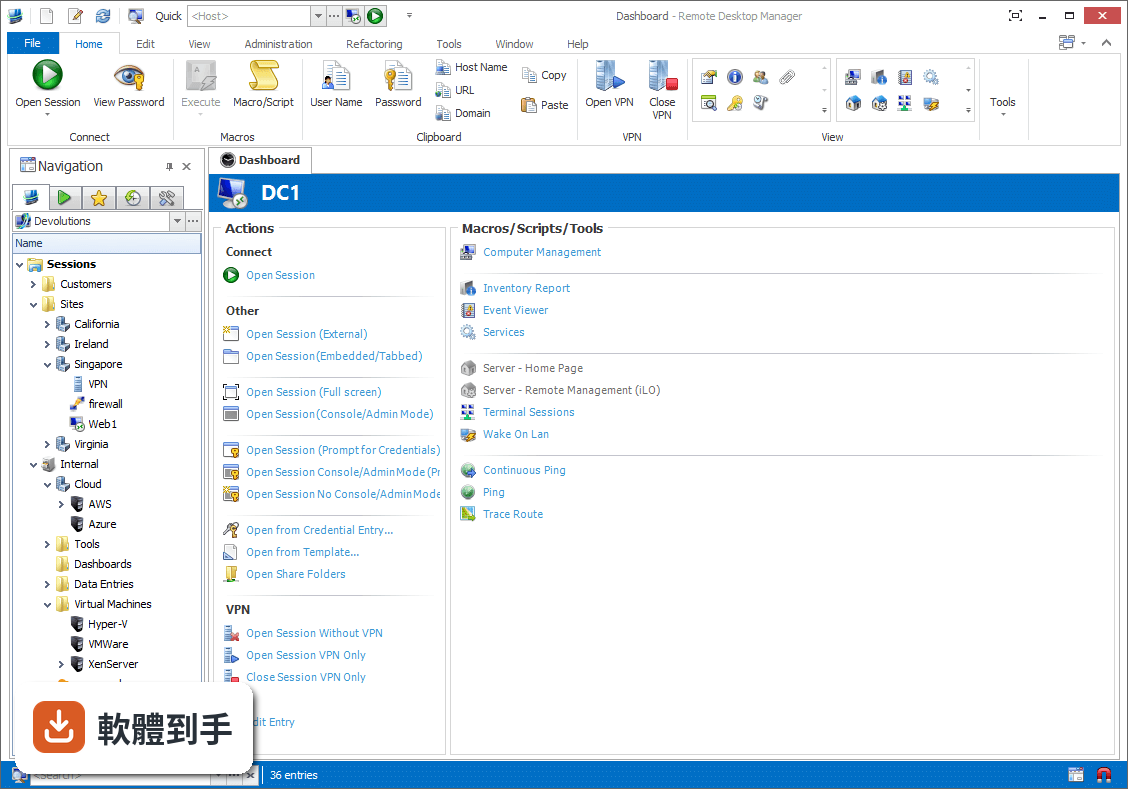
它是一套把各種遠端連線集中管理的工具。你可以把RDP、SSH、VNC、Telnet、FTP、VPN等不同協定的連線設定全部建在同一個介面裡,之後要連哪台機器,直接從清單點一下就會呼叫對應的程式開啟。它同時具備密碼管理、資料庫共用、角色權限控管和稽核報表功能,適合需要管理大量連線的IT人員。
02它支援哪些遠端連線類型?
官方說明列出支援的協定和程式相當多,包括VPN、FTP、SSH、Telnet,以及LogMeIn、VNC、Terminal Services、TeamViewer、Microsoft Remote Desktop、VMware、VirtualPC、X Window、Dameware、Citrix、Hyper-V、Oracle VirtualBox、Radmin、PC Anywhere等。也就是說,你原本習慣用的遠端工具,大多可以從這套軟體直接呼叫啟動。
03密碼管理是怎麼運作的?
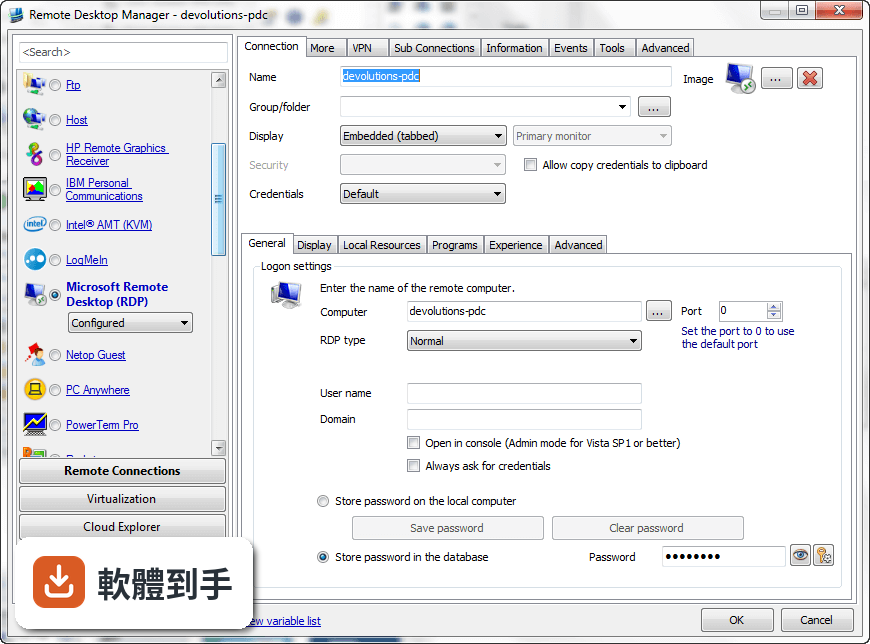
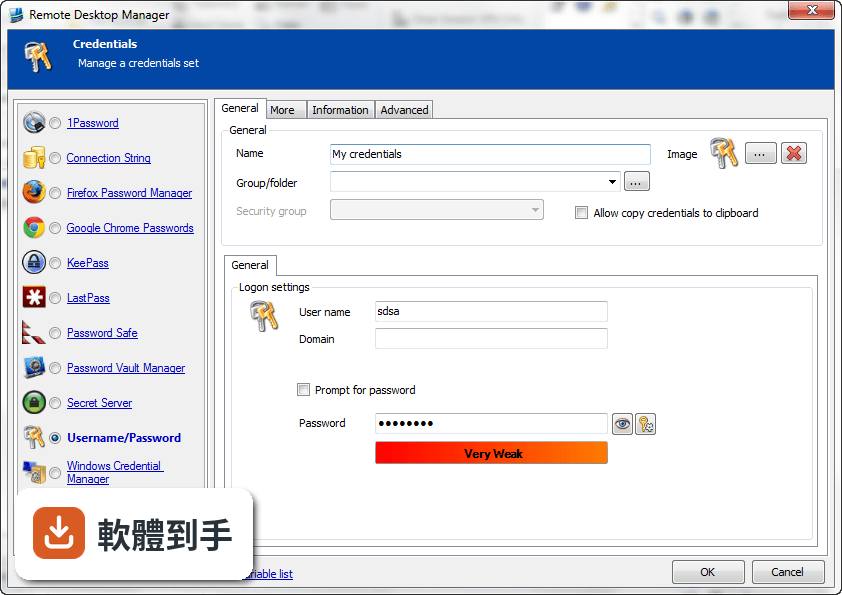
它內建密碼管理功能,可以把各台機器的登入帳號密碼儲存在加密的資料庫裡,連線時自動帶入,不需要每次手動輸入。加密方式採用AES 256位元金鑰,結合使用者自訂的私鑰和主密碼。不過實際使用上,密碼庫的建立、備份和還原流程,建議先看官方文件確認細節。
04多人協作時,權限怎麼控制?
它支援共用資料庫和角色權限控管(Role-Based Access Control),可以設定不同成員只能看到或操作特定資料夾與連線。另外也提供兩步驟驗證(2FA)和稽核報表,能記錄誰在什麼時間連了哪台機器。這些功能在官方說明中都有提到,但實際設定步驟和權限細部選項,需要安裝後自行摸索。
05快速連線功能怎麼用?
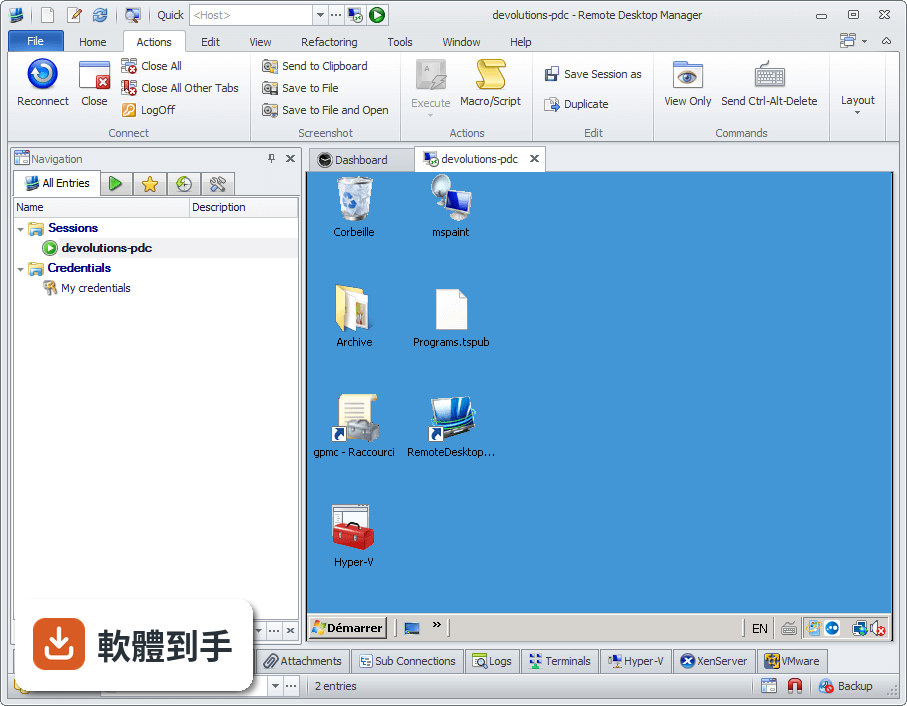
它提供Quick Connect功能,只要輸入主機名稱或IP位址,就能快速用Microsoft Remote Desktop、VNC或網頁方式連線,不需要事先建立完整的連線設定。另外也支援範本(Template),可以把常用的連線參數存成範本,之後套用即可。系統匣圖示的右鍵選單也能快速開啟連線、檢視目前工作階段或切換資料來源。
06什麼樣的人適合用這套軟體?
官方說明指出,它的主要使用者是專業人士、網路管理員和IT部門,用來管理虛擬機器和各種遠端連線。如果你日常工作需要同時維護多台伺服器或虛擬機器,而且連線方式混雜多種協定,這套軟體能幫你把連線資訊集中管理。如果只是偶爾遠端連一兩台電腦,用系統內建的遠端桌面就夠了。
07個人使用者用得上嗎?
官方說明提到它可以在免費模式下使用,且「幾乎所有專業使用者都會滿意」,只有需求較高的人才需要升級到Enterprise方案。不過要注意,這套軟體的授權型式是Trial,也就是試用版,官方註明30天試用期。免費模式具體能用哪些功能、試用期滿後是否還能繼續用,需要自行向開發商確認。
08新手容易上手嗎?
官方列出的缺點之一就是「對初學者來說設定可能較複雜」。它需要先建立或開啟資料庫,再逐一新增連線、設定帳號密碼、組織資料夾,對沒接觸過集中管理概念的人來說,學習曲線比較陡。如果你只是要連一兩台機器,直接用Windows內建的遠端桌面或PuTTY會簡單很多。
09介面只有英文,看不懂怎麼辦?
這套軟體的介面語系是English,沒有繁體中文介面。如果你對英文介面不熟悉,操作上會比較吃力,尤其是權限設定、資料庫管理這類進階功能,選項多且用語專業。這種情況下,可以考慮改用有中文介面的遠端連線工具,或先看官方文件確認每個欄位的意思再動手設定。
10只有 Windows 版,用 Mac 的人能用嗎?
官方資料顯示它支援的作業系統是Windows 7到Windows 11,以及Windows Server系列。雖然官方頁面有「Download Remote Desktop Manager for Mac」的連結,但那是另一個產品,功能可能與Windows版有差異。如果你主要使用Mac,建議先確認Mac版的功能是否完整,或考慮其他跨平台的遠端連線管理工具。
11免費版和付費版差在哪?
官方說明指出,進階功能需要付費授權,免費模式適合一般專業使用者,而Enterprise方案是為「有數百名使用者的大型企業」設計,解鎖更多工具和服務。具體哪些功能被鎖住、付費方案怎麼計價,官方頁面沒有列出細節,需要到Devolutions官網查詢或聯絡銷售人員。
12和 PuTTY、MobaXterm 比起來,它有什麼不同?
PuTTY是單一的SSH和Telnet用戶端,MobaXterm則整合了多種網路工具和Unix命令,兩者都偏重「連線工具」本身。Remote Desktop Manager的定位不太一樣,它比較像「連線的總管」——本身不取代PuTTY或VNC,而是把這些程式的連線設定、帳號密碼、使用權限集中管理。如果你只需要連SSH,PuTTY就夠;如果連線很多且要管權限,才需要這種集中管理工具。
下載與官方連結
前往官方網站 下載 Remote Desktop Manager Enterprise
setup.remotedesktopmanager.8.3.0.0.exe · 20.33 MB · 連結指向軟體原廠
版本紀錄
- 2026-11-02 Remote Desktop Manager Enterprise 2026.3.16.0 223 MB
- 2026-10-16 Remote Desktop Manager Enterprise 2026.3.15.0 222 MB
- 2026-10-10 Remote Desktop Manager Enterprise 2026.3.13.0 222 MB
再看 5 筆
- 2026-10-01 Remote Desktop Manager Enterprise 2026.3.12.0 217 MB
- 2026-09-26 Remote Desktop Manager Enterprise 2026.3.10.0 216 MB
- 2026-09-24 Remote Desktop Manager Enterprise 2026.3.9.0 215 MB
- 2026-09-20 Remote Desktop Manager Enterprise 2026.3.8.0 162 MB
- 2026-09-17 Remote Desktop Manager Enterprise 2026.3.5.0 162 MB
這一版改了什麼
What's new in this version:
- Added "Go Online" button in the status bar
- Added .rdm and .pvm support in the Xml data source
- Added a cell phone field in contact
- Added a login retry for RDMS
- Added a prompt for password with RDP when the password is empty but not the user
- Added a validation message for an empty group name
- Added allow multi resurect in the entry history dialog
- Added an action to view the contact
- Added an option to disable lock SQL Server user
- Added an option to disable the reveal password with a Xml data source
- Added an option to include the group name in the tab page
- Added an option to prompt for a KeePass entry on connect
- Added basic support for Royal TSX file format
- Added batch edit for open undocked
- Added compatibility for ScreenConnect 3.2
- Added encryption (masterkey) support for FTP and SFTP data source
- Added in reset layout the reset of the filter and the view to tree
- Added Intel AMT KVM specific password support
- Added Kitty support
- Added maps button in contact
- Added MariaDB support
- Added more AWS diagnostic information
- Added Secret Server Windows authentication support
- Added SFTP and FTPS support for the FTP data source
- Added SFTP data source support
- Added single group support for template
- Added sub-group selection in batch edit credentials
- Added support for external mode with RDP azure
- Added Terminals 3.0 import support
- Added the Italian translation
- Added the last comment while warning for an opened RDP session
- Added the possibility to enter the RDMO serial when the data source is expired
- Added the quick toolbar in the reset layout
- Added user specific setting override support while using a session tool
- Added variable support for Secret Server
- Changed the default ping settings to match the one from ping.exe
- Changed the Telnet login string to be case insensitive
- Disabled the security group combo in sub connection (not supported)
- Fixed a bug with the wrong color depth when reconnecting an RDP session
- Fixed a minor issue with the web session and the credential repository
- Fixed a possible error when an invalid connection string is specified
- Fixed a possible Filezilla import issue
- Fixed a possible filter issue when changing from recently used to tree list
- Fixed a possible issue with IPv6 and RDP
- Fixed a possible issue with the default group while creating a new entry
- Fixed a possible issue with the inventory report save
- Fixed a possible issue with the logoff when the tools credentials
- Fixed a possible issue with the prompt for password/user in RDMS data source
- Fixed a possible issue with the RDP remote program and a batch file
- Fixed a possible issue with the registration parameter command line
- Fixed a possible issue with the show footer in an open session
- Fixed a possible issue with utf8 in the Inventory report
- Fixed a possible PowerShell issue with the template
- Fixed a possible refresh bug when selecting another entry in the group dashboard
- Fixed a reconnect issue with the username
- Fixed a S3 bug (was listing only 1000 objects)
- Fixed a variable issue in the trayicon
- Fixed an an issue with the site license variable in group
- Fixed an issue with Dropbox and the offline mode
- Fixed an issue with the Focus Dashboard shortcut mapping
- Fixed an issue with the save of the group dashboard list mode
- Fixed an issue with the SSH comment not saved
- Fixed an issue with the top pane context menu in classic mode
- Fixed some memory issue with SecureString
- Fixed the installer for the automatic start-up
- Improved S3 folder management
- Improved the email dashboard to hide empty sections
- Improved the import of web sessions from a csv file
- Improved the KeePass update notification
- Improved the LogMeIn rss import
- Minor UI improvements
- Optimized the FTP data source and FTP explorer
- Simplified the application password UI
- Simplified the error dialog
- Simplified the SQLite data source management and UI
- Small UI fixes for the special export
- VERSION 8.2.0.0 (April 7th 2013)
- Added "Allow Password in Variable" to credential entries
- Added a "View Password" action for session entries with the Copy password to clipboard enabled
- Added a Always ask for password for the VMware console
- Added a context menu to the view secure note
- Added a profiling dialog
- Added a setting to change the default timeout of an SSH session
- Added a setting to use the system proxy for SSH built-in
- Added Close session in PowerShell
- Added Confirmation message for LogOff
- Added credential repository support for SSH/Telnet proxy
- Added Google Authenticator support
- Added multi query support for the data report
- Added new variables $DATE$, $DATE_TEXT$, $TIME$, $TIME_TEXT$
- Added other parameters for embedded UltraVNC
- Added Secret Server credential dynamic selection using secret name with variables like $HOST$ in it
- Added sqlLite online backup support
- Added support for multi selection with remote shutdown
- Added the batch edit for the host name
- Added the tab char support in the secure note
- Added the username and domain in the view password dialog
- Added Thinstuff TSX Connection Client support
- Domain variable is now resolved before the ping
- Fixed a possible freeze with Dropbox after an hibernate
- Fixed a possible issue with a locked KeePass database
- Fixed a possible issue with import and sub connections
- Fixed a search shortcut tooltip label
- Fixed an issue with special chars in variables
- Fixed an issue with the connection string when SQL Compact is not installed
- Fixed an issue with the merge credentials in session list and the sorting
- Fixed an issue with the virtual group and edit
- Fixed an issue with the wait time for VPN when using Putty
- Fixed MySQL data source issue where user has create db rights but is non a "real" admin of the server
- Fixed PowerShell IpcChannel bug
- Improved the data source settings dialog
- Improved the error handling when no Internet is found
- Improved the html note style
- Improved the Windows credentials lock
- Renamed Allow copy credentials to clipboard for Allow show credentials
- Variables are now resolved export (rdp/csv/html/xml)