
這是歷史版本頁面 — 看 Remote Desktop Manager Enterprise 最新版本
遠端連線一多就亂?Remote Desktop Manager 能幫你管什麼
 Remote Desktop Manager Enterprise 9.0.0.0
資料更新 2013-10-02
閱讀約 7 分鐘
你手上同時管著十幾台伺服器、幾台虛擬機器,還有同事臨時要你開個遠端桌面進去處理問題。每次都要從記事本翻IP、找密碼,不同機器用不同協定,有的走RDP、有的走SSH、有的還要先連VPN才能進去。連線一多,光是在一堆視窗和分頁之間切換就耗掉大半時間,更別說同事跟你借帳號密碼時,你根本搞不清楚誰用過哪台機器。
一般人習慣的做法,是把所有連線資訊記在Excel或記事本裡,密碼貼在共用文件,要用時再複製貼上。但這樣一來,密碼散落各處、權限無法控管、誰連過哪台機器完全沒有紀錄。這類工具的切入點,是把所有遠端連線的設定、帳號密碼、連線方式集中到同一個地方,讓你用一套軟體統一開啟各種遠端連線,同時把團隊共用的權限和稽核紀錄一起管起來。
01Remote Desktop Manager 到底能拿來做什麼?
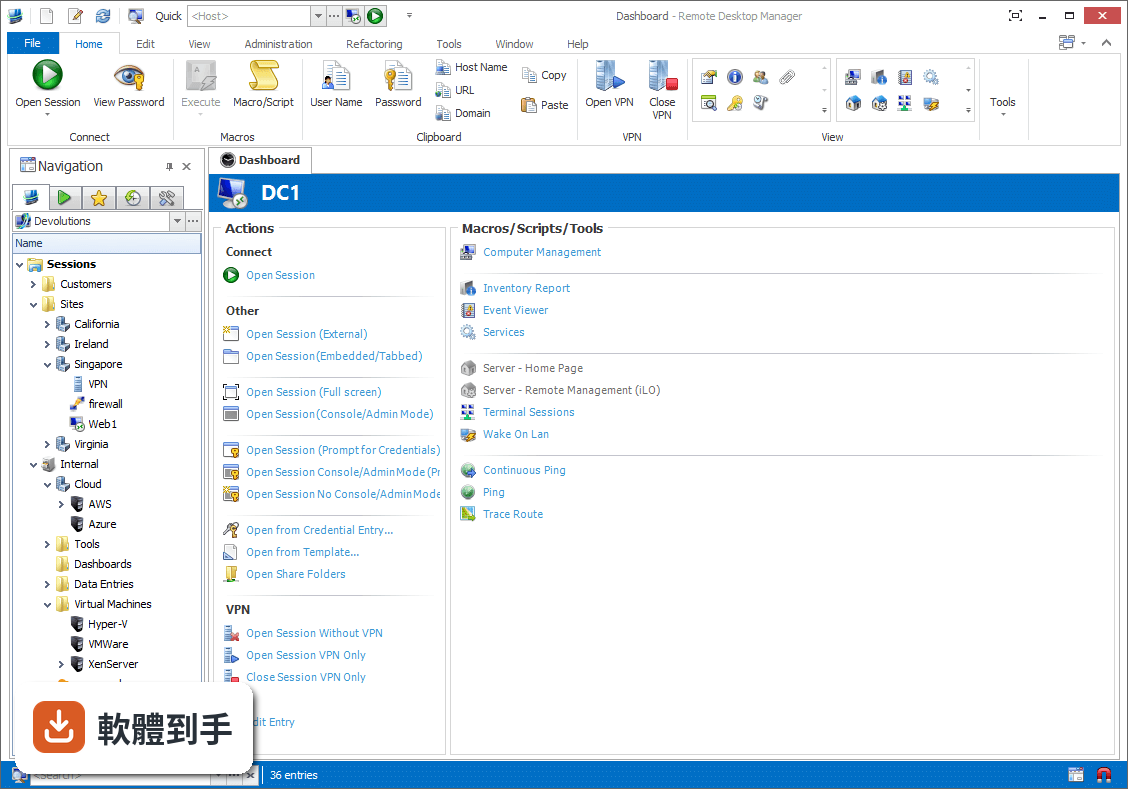
它是一套把各種遠端連線集中管理的工具。你可以把RDP、SSH、VNC、Telnet、FTP、VPN等不同協定的連線設定全部建在同一個介面裡,之後要連哪台機器,直接從清單點一下就會呼叫對應的程式開啟。它同時具備密碼管理、資料庫共用、角色權限控管和稽核報表功能,適合需要管理大量連線的IT人員。
02它支援哪些遠端連線類型?
官方說明列出支援的協定和程式相當多,包括VPN、FTP、SSH、Telnet,以及LogMeIn、VNC、Terminal Services、TeamViewer、Microsoft Remote Desktop、VMware、VirtualPC、X Window、Dameware、Citrix、Hyper-V、Oracle VirtualBox、Radmin、PC Anywhere等。也就是說,你原本習慣用的遠端工具,大多可以從這套軟體直接呼叫啟動。
03密碼管理是怎麼運作的?
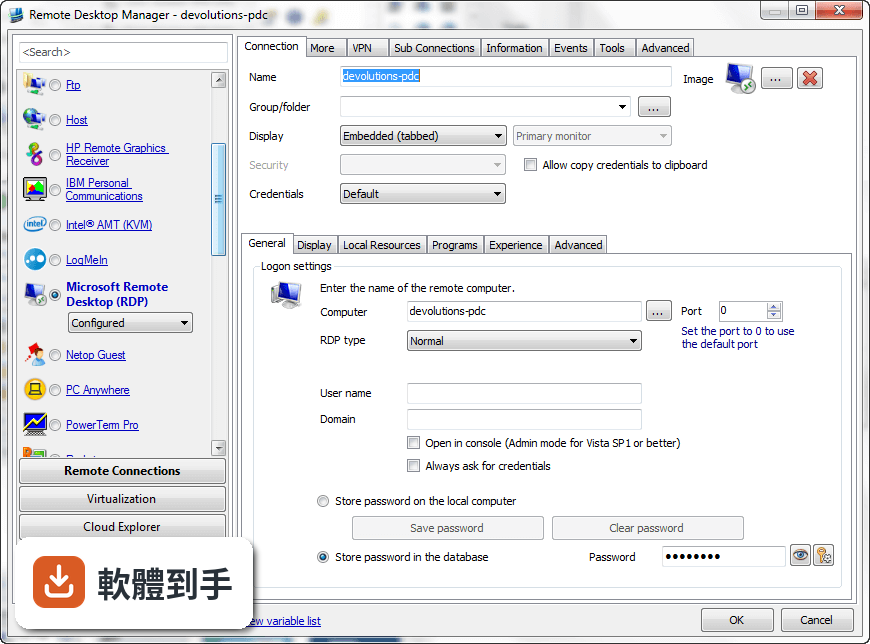
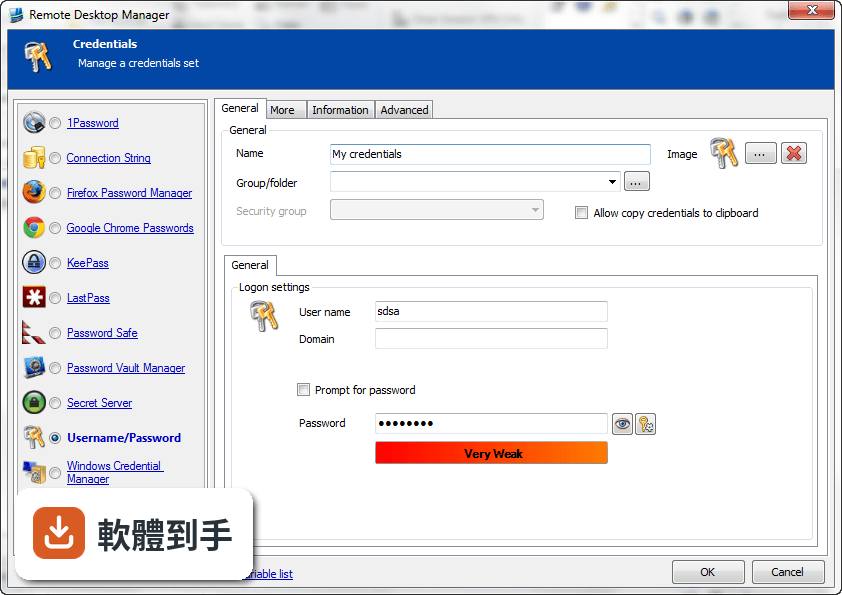
它內建密碼管理功能,可以把各台機器的登入帳號密碼儲存在加密的資料庫裡,連線時自動帶入,不需要每次手動輸入。加密方式採用AES 256位元金鑰,結合使用者自訂的私鑰和主密碼。不過實際使用上,密碼庫的建立、備份和還原流程,建議先看官方文件確認細節。
04多人協作時,權限怎麼控制?
它支援共用資料庫和角色權限控管(Role-Based Access Control),可以設定不同成員只能看到或操作特定資料夾與連線。另外也提供兩步驟驗證(2FA)和稽核報表,能記錄誰在什麼時間連了哪台機器。這些功能在官方說明中都有提到,但實際設定步驟和權限細部選項,需要安裝後自行摸索。
05快速連線功能怎麼用?
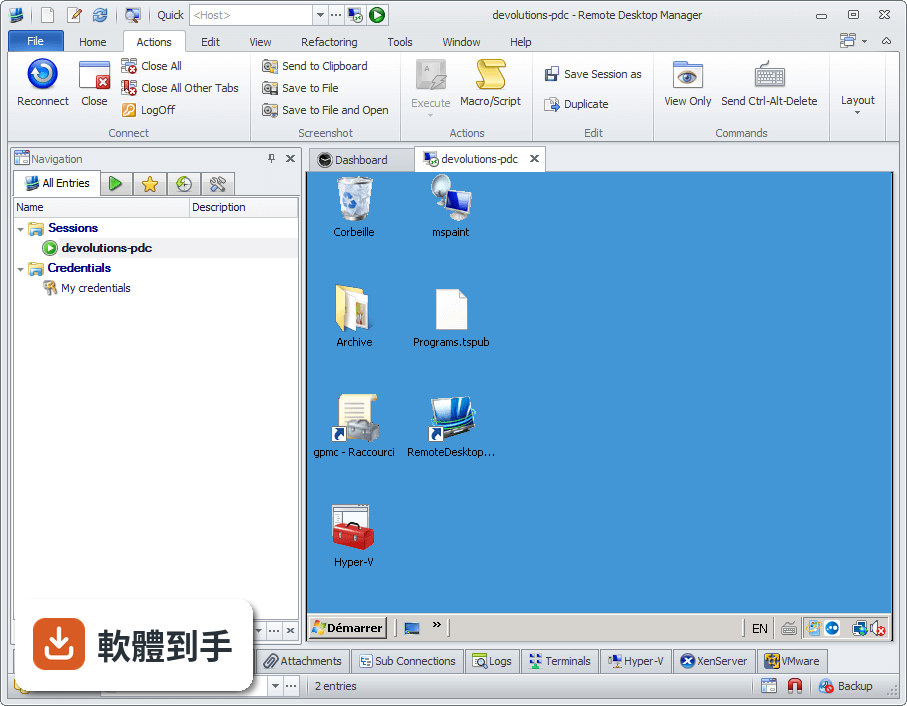
它提供Quick Connect功能,只要輸入主機名稱或IP位址,就能快速用Microsoft Remote Desktop、VNC或網頁方式連線,不需要事先建立完整的連線設定。另外也支援範本(Template),可以把常用的連線參數存成範本,之後套用即可。系統匣圖示的右鍵選單也能快速開啟連線、檢視目前工作階段或切換資料來源。
06什麼樣的人適合用這套軟體?
官方說明指出,它的主要使用者是專業人士、網路管理員和IT部門,用來管理虛擬機器和各種遠端連線。如果你日常工作需要同時維護多台伺服器或虛擬機器,而且連線方式混雜多種協定,這套軟體能幫你把連線資訊集中管理。如果只是偶爾遠端連一兩台電腦,用系統內建的遠端桌面就夠了。
07個人使用者用得上嗎?
官方說明提到它可以在免費模式下使用,且「幾乎所有專業使用者都會滿意」,只有需求較高的人才需要升級到Enterprise方案。不過要注意,這套軟體的授權型式是Trial,也就是試用版,官方註明30天試用期。免費模式具體能用哪些功能、試用期滿後是否還能繼續用,需要自行向開發商確認。
08新手容易上手嗎?
官方列出的缺點之一就是「對初學者來說設定可能較複雜」。它需要先建立或開啟資料庫,再逐一新增連線、設定帳號密碼、組織資料夾,對沒接觸過集中管理概念的人來說,學習曲線比較陡。如果你只是要連一兩台機器,直接用Windows內建的遠端桌面或PuTTY會簡單很多。
09介面只有英文,看不懂怎麼辦?
這套軟體的介面語系是English,沒有繁體中文介面。如果你對英文介面不熟悉,操作上會比較吃力,尤其是權限設定、資料庫管理這類進階功能,選項多且用語專業。這種情況下,可以考慮改用有中文介面的遠端連線工具,或先看官方文件確認每個欄位的意思再動手設定。
10只有 Windows 版,用 Mac 的人能用嗎?
官方資料顯示它支援的作業系統是Windows 7到Windows 11,以及Windows Server系列。雖然官方頁面有「Download Remote Desktop Manager for Mac」的連結,但那是另一個產品,功能可能與Windows版有差異。如果你主要使用Mac,建議先確認Mac版的功能是否完整,或考慮其他跨平台的遠端連線管理工具。
11免費版和付費版差在哪?
官方說明指出,進階功能需要付費授權,免費模式適合一般專業使用者,而Enterprise方案是為「有數百名使用者的大型企業」設計,解鎖更多工具和服務。具體哪些功能被鎖住、付費方案怎麼計價,官方頁面沒有列出細節,需要到Devolutions官網查詢或聯絡銷售人員。
12和 PuTTY、MobaXterm 比起來,它有什麼不同?
PuTTY是單一的SSH和Telnet用戶端,MobaXterm則整合了多種網路工具和Unix命令,兩者都偏重「連線工具」本身。Remote Desktop Manager的定位不太一樣,它比較像「連線的總管」——本身不取代PuTTY或VNC,而是把這些程式的連線設定、帳號密碼、使用權限集中管理。如果你只需要連SSH,PuTTY就夠;如果連線很多且要管權限,才需要這種集中管理工具。
下載與官方連結
前往官方網站 下載 Remote Desktop Manager Enterprise
Setup.RemoteDesktopManager.9.0.0.0.exe · 33.44 MB · 連結指向軟體原廠
版本紀錄
- 2026-11-02 Remote Desktop Manager Enterprise 2026.3.16.0 223 MB
- 2026-10-16 Remote Desktop Manager Enterprise 2026.3.15.0 222 MB
- 2026-10-10 Remote Desktop Manager Enterprise 2026.3.13.0 222 MB
再看 5 筆
- 2026-10-01 Remote Desktop Manager Enterprise 2026.3.12.0 217 MB
- 2026-09-26 Remote Desktop Manager Enterprise 2026.3.10.0 216 MB
- 2026-09-24 Remote Desktop Manager Enterprise 2026.3.9.0 215 MB
- 2026-09-20 Remote Desktop Manager Enterprise 2026.3.8.0 162 MB
- 2026-09-17 Remote Desktop Manager Enterprise 2026.3.5.0 162 MB
這一版改了什麼
What's new in this version:
- Added "Allow view credentials action" for KeePass
- Added "Always prompt with list" for PVM
- Added "Always prompt with list" for SecretServer
- Added "Open with Custom Parameters" menu for Team Viewer and Radmin
- Added a after connection passcode validation option
- Added a better error handling when the SQL Server database is unavailable
- Added a button to add a new VPN group
- Added a clear password history button
- Added a context menu to open the connection the ping/continuous ping tool
- Added a credential reference report
- Added a credit card expiration notification
- Added a disable stack trace policy in the data source settings
- Added a Find action in embedded terminal
- Added a fullscreen (no border) mode for Putty
- Added a menu to assign the user rights in a security group
- Added a minimize button in the full current work area mode
- Added a My Personal Credentials default values
- Added a new default setting for the check is online
- Added a new VPN open mode which ask a confirmation message
- Added a ping online feature to detect the offline mode
- Added a private connection list per user with SQL Server
- Added a prompt for connection type in Radmin
- Added a purchase date field in information
- Added a reset layout dialog
- Added a self signed certificate generator tool
- Added a service tag field in information
- Added a shortcut to focus the tab page content (Ctrl+Shift+Up)
- Added a specific field for the Mastercard secure code
- Added a SQLite vaccum functionnality to pack the database
- Added a stop button in the ping/tracecrt tool
- Added a support contact type
- Added a view log tab page when an opened connection is detected
- Added a VPN usage report
- Added a warranty field in information
- Added administration management log support
- Added an architecture field in information
- Added an audit log when exporting an entry
- Added an better error handling for XulRunner
- Added an entry information report
- Added an icon in the dashboard when the entry contains an open todo, any attachments or user specific settings
- Added an import contact from Outlook and from vcard
- Added an option per session to open multiple connections
- Added an option to ask for the last good credentials before going offline (RDMS)
- Added an option to automatically go back online when the VPN is closed
- Added an option to block the add of an entry in a group
- Added an option to clear the filter on open
- Added an option to disable the stack trace
- Added an option to disable the Team Viewer ID formatting
- Added an option to disconnect the SSH connection without exiting
- Added an option to keep the tab open on disconnect
- Added an option to only open the RDP gateway if the application is unable to ping the host
- Added an option to re-open last data source on startup
- Added an option to select a play list on open
- Added an option to specify the batch open interval
- Added application and version fields in logs
- Added attachment and sub-connection support for contact
- Added basic role management with SQL Server data source
- Added batch user edit properties
- Added Certificate Manager in application tools
- Added clear scrollback action in embedded terminal
- Added contact management
- Added copy all to clipboard in embedded terminal
- Added default setting for credentials, group, document and contact
- Added document management
- Added export phonebook when it's embedded
- Added import from KeePass Xml
- Added intelligent cache to increase the performance
- Added message when an invalid rtf is loaded
- Added more custom installer options
- Added more diagnostic details (is Internet connected and allow multi instance)
- Added more location options for the data source combobox
- Added more security validation for groups
- Added more warranty and invoice information
- Added multi open RDP embedded/external
- Added multi-select support for Open from Credential Entry
- Added native support for 1Password
- Added native support for LastPass
- Added new field for the blade/rack server in information
- Added new fields for the serial/software entry (purchase date, associated email and renewal date)
- Added Passwordstate support
- Added play list support to group entry together
- Added png support for rtf text
- Added proxy support for embedded UltraVNC
- Added read/write support for the offline mode
- Added reset terminal in embedded terminal
- Added Screen Connect 4 support
- Added security access for attachment
- Added support for dynamic credential in session (1Password)
- Added support for dynamic credential in session (keepass)
- Added support for dynamic credential in session (LassPass)
- Added support for dynamic credential in session (Passwordstate)
- Added support for dynamic credential in session (PVM)
- Added support for dynamic credential in session (Secret Server)
- Added support for embedded WinSCP
- Added syntax highlight for SQL in Data Report
- Added tab bookmarks(Ctrl+Shift+1 to assign and Ctrl+1 to goto)
- Added the 64bit version of application
- Added the batch edit of the default tab title
- Added the cache size setting for the RDP
- Added the comment in the warning dialog when a user is already connected
- Added the connection type name in the shared log grid
- Added the domain field in the filter
- Added the edit text document on double click
- Added the editable description on double click
- Added the embedded IE 32 bit in RDM 64 bit
- Added the expiring notication configurable
- Added the passport data entry type
- Added the posibility to specify the monitor for the undocked display mode
- Added the possibility lock RDMS data source
- Added the possibility to add add-hoc log comment
- Added the possibility to change the default session shortcut name
- Added the possibility to change the filter bar location in the navigation pane
- Added the possibility to completely hide the filter bar
- Added the possibility to create the playlist from the current opened tab list
- Added the possibility to deny the add in the root folder
- Added the possibility to edit the comment and an option to enable this feature
- Added the possibility to exclude some specific characters in the password generator
- Added the possibility to exclude the xml invalid characters in the password generator
- Added the possibility to import/export .rdm and .pvm file with a masterkey
- Added the possibility to override the default tab title
- Added the possibility to select a serial number from the list when copying to clipboard
- Added the possibility to specify a monitor #5 and #6
- Added the printer group type
- Added the private vault support for RDMS
- Added the private vault support for user specific settings
- Added the run as support for the command line
- Added the security question information in the web data entry
- Added the shared log column customization
- Added the start and end date information in the close comment
- Added the status text in the dashboard
- Added the sub connection support for document and contact
- Added the sub-connection in the export
- Added the toggle keyboard redirection for the embedded RDP
- Added the undocked item in the display mode combo
- Added the view security rights in each entry dialog
- Added the VPN category in the security group report
- Added the VPN list in the Add new entry
- Added the writable offline mode with sync
- Added todo management
- Added todo multi status filter support
- Added todo multi user filter support
- Added two shortcuts to navigate the tab page (Ctrl+Shft+Left and Ctrl+Shft+Right)
- Added user specific setting support for more types
- Added username format option
- Added VMware Player as alternative executabe to WMware Remote Control
- Changed the inventory report design
- Changed the View Password dialog to be in the taskbar
- Enhanced the todo search
- Entry setting UI cosmetic changes
- Excluded the window position and size from the custom installer
- Fixed a bug with an empty command line shortcut for the sub connection
- Fixed a duplicate sub connection issue
- Fixed a lock issue with sqLite when no password is specified
- Fixed a parent refactoring focus bug
- Fixed a possible bug with the refactoring applied to the wrong selection
- Fixed a possible current work area full screen mode issue
- Fixed a possible filter and sub connection selection issue
- Fixed a possible issue when creating multi shortcut (related to database group size)
- Fixed a possible issue when the application is maximized and a shortcut is executed
- Fixed a possible issue with non-ascii char and the ftp data source
- Fixed a possible issue with RDM 64bit and the quick access toolbar
- Fixed a possible issue with the add attachment and virtual folder
- Fixed a possible issue with the batch edit in the group dashboard
- Fixed a possible issue with the group creation access validation
- Fixed a possible issue with the parent variable and the inherited credentials
- Fixed a possible issue with the RDMS offline security not loading groups
- Fixed a possible issue with the right click on the tree view image
- Fixed a possible issue with the SQLite data source and the saved password
- Fixed a possible performance issue with Access
- Fixed a possible recursive trigger bug
- Fixed a possible security issue with the drag and drop destination
- Fixed a possible selection problem with the double click of an entry
- Fixed a sorting issue with the VPN group name
- Fixed an export sftp data source configuration error
- Fixed an issue with the lock without a masterkey in Dropbox
- Fixed an issue with the PVM credential entry and the PVM lock
- Fixed an issue with the Quick access toolbar location on saved
- Fixed an issue with the selection while the tree is filtered and refreshed
- Fixed an issue with the send key of a password containing a %
- Fixed an mRemote import issue
- Fixed bug with not flushing connections when changing to BAD data source
- Fixed Left, right, + & - keys now work as expected in the treeview
- Fixed some minor possible issues in the TeamViewer import
- Fixed some possible security validation issues
- Fixed some RDMS session state setting saving issues
- Improved the attachment management with more settings including the embedded view
- Improved the embedded Firefox with XulRunner automatically deployed
- Improved the opened VPN ping detection with 3 packets
- Improved the SQL Azure data source configuration UI
- Improved the sqlLite integration
- Minor UI redesign
- Moved the iLO and home server information in tools
- New data entry dashboard design
- Offline mode enhanced security with double password
- Optimized the loading of a large data source with the offline file
- Option dialog redesign
- Performance optimization with multithread processing of the data
- Reorganized the data source configuration dialogs
- Saved the filter and sort settings for the shared logs
- Select group now open collapsed with the default selected
- SQLite is now the new default data source type