
這是歷史版本頁面 — 看 Remote Desktop Manager Enterprise 最新版本
遠端連線一多就亂?Remote Desktop Manager 能幫你管什麼
 Remote Desktop Manager Enterprise 13.5.0.0
資料更新 2018-03-21
閱讀約 7 分鐘
你手上同時管著十幾台伺服器、幾台虛擬機器,還有同事臨時要你開個遠端桌面進去處理問題。每次都要從記事本翻IP、找密碼,不同機器用不同協定,有的走RDP、有的走SSH、有的還要先連VPN才能進去。連線一多,光是在一堆視窗和分頁之間切換就耗掉大半時間,更別說同事跟你借帳號密碼時,你根本搞不清楚誰用過哪台機器。
一般人習慣的做法,是把所有連線資訊記在Excel或記事本裡,密碼貼在共用文件,要用時再複製貼上。但這樣一來,密碼散落各處、權限無法控管、誰連過哪台機器完全沒有紀錄。這類工具的切入點,是把所有遠端連線的設定、帳號密碼、連線方式集中到同一個地方,讓你用一套軟體統一開啟各種遠端連線,同時把團隊共用的權限和稽核紀錄一起管起來。
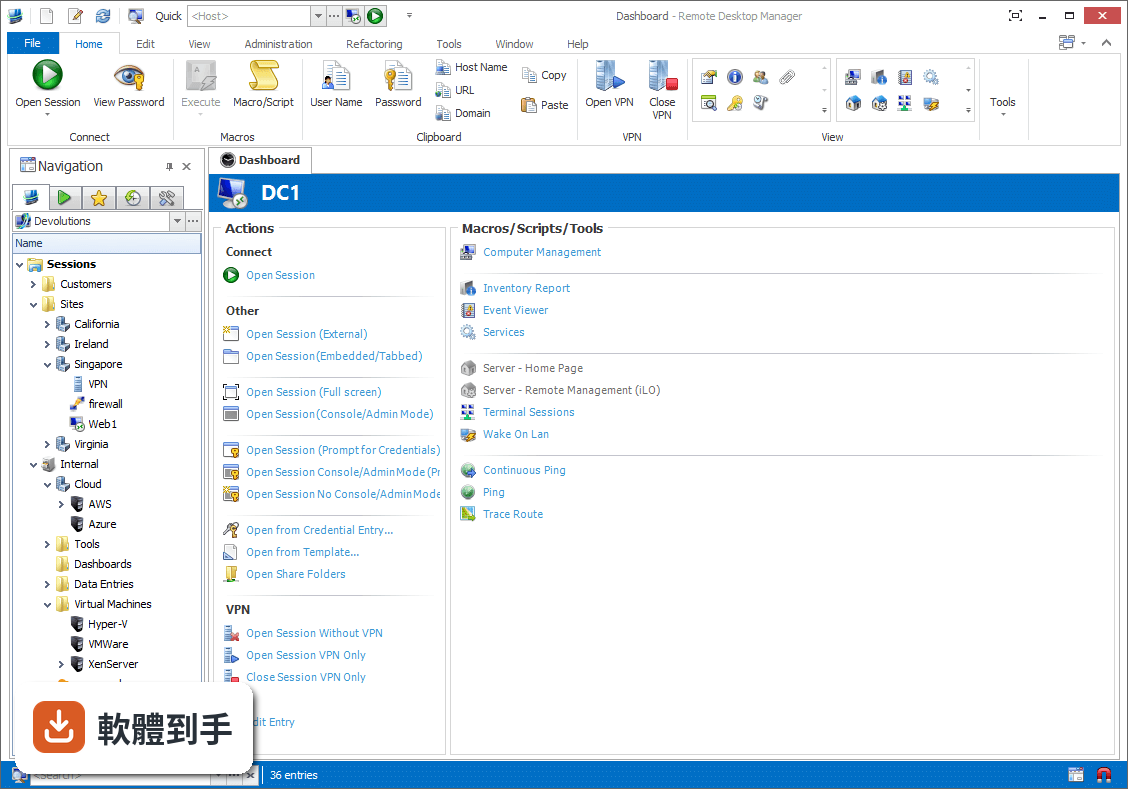
01Remote Desktop Manager 到底能拿來做什麼?
它是一套把各種遠端連線集中管理的工具。你可以把RDP、SSH、VNC、Telnet、FTP、VPN等不同協定的連線設定全部建在同一個介面裡,之後要連哪台機器,直接從清單點一下就會呼叫對應的程式開啟。它同時具備密碼管理、資料庫共用、角色權限控管和稽核報表功能,適合需要管理大量連線的IT人員。
02它支援哪些遠端連線類型?
官方說明列出支援的協定和程式相當多,包括VPN、FTP、SSH、Telnet,以及LogMeIn、VNC、Terminal Services、TeamViewer、Microsoft Remote Desktop、VMware、VirtualPC、X Window、Dameware、Citrix、Hyper-V、Oracle VirtualBox、Radmin、PC Anywhere等。也就是說,你原本習慣用的遠端工具,大多可以從這套軟體直接呼叫啟動。
03密碼管理是怎麼運作的?
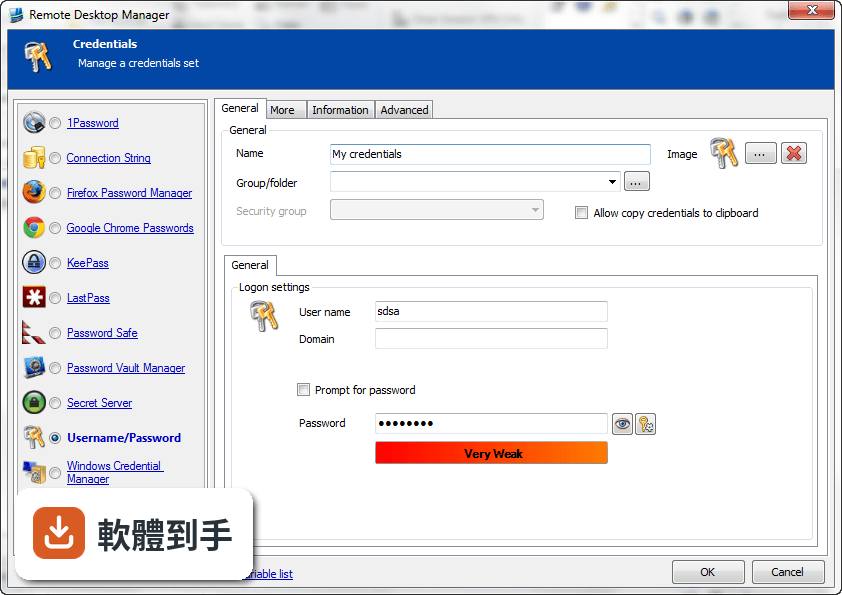
它內建密碼管理功能,可以把各台機器的登入帳號密碼儲存在加密的資料庫裡,連線時自動帶入,不需要每次手動輸入。加密方式採用AES 256位元金鑰,結合使用者自訂的私鑰和主密碼。不過實際使用上,密碼庫的建立、備份和還原流程,建議先看官方文件確認細節。
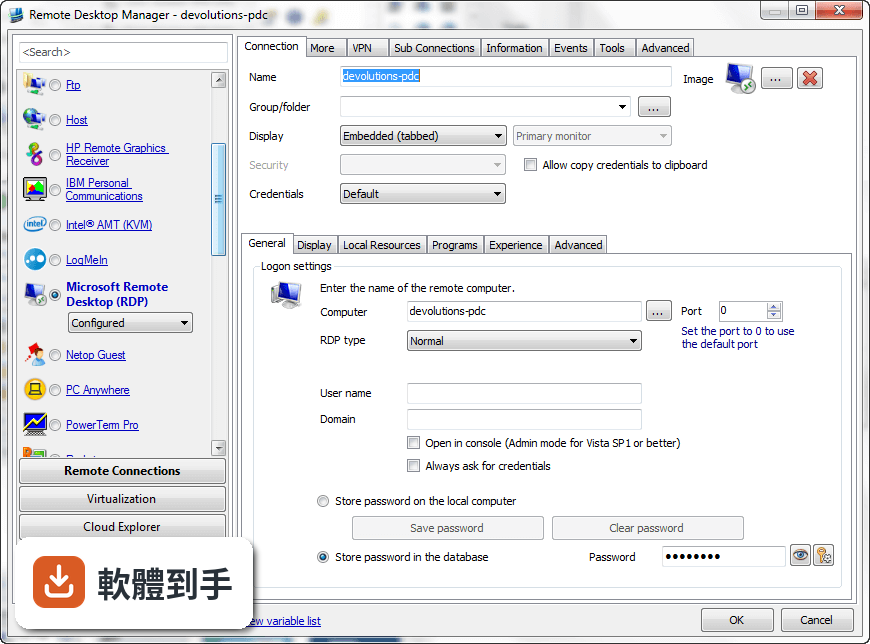
04多人協作時,權限怎麼控制?
它支援共用資料庫和角色權限控管(Role-Based Access Control),可以設定不同成員只能看到或操作特定資料夾與連線。另外也提供兩步驟驗證(2FA)和稽核報表,能記錄誰在什麼時間連了哪台機器。這些功能在官方說明中都有提到,但實際設定步驟和權限細部選項,需要安裝後自行摸索。
05快速連線功能怎麼用?
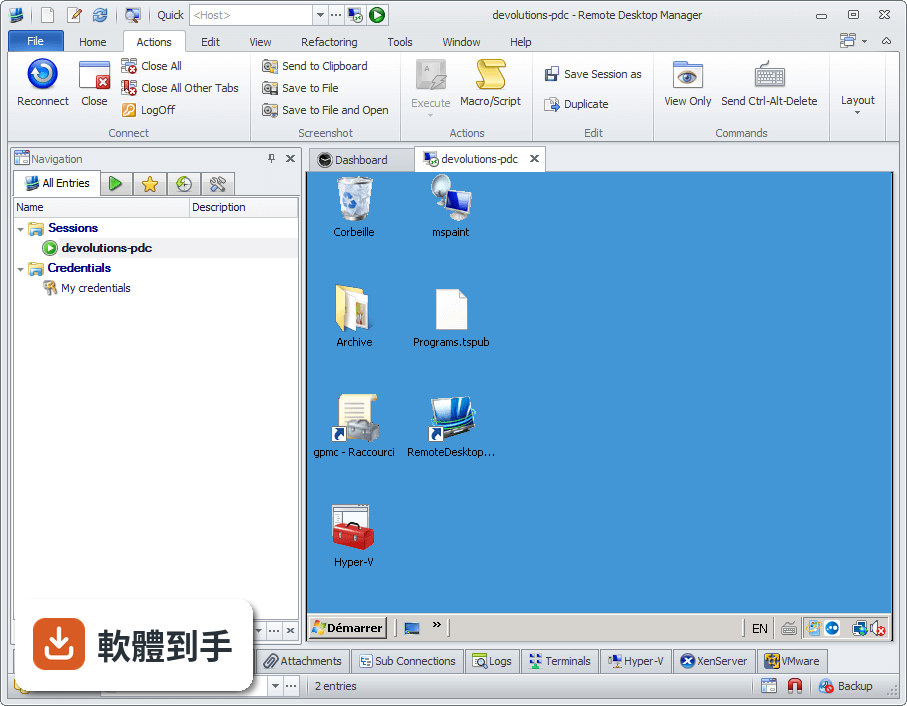
它提供Quick Connect功能,只要輸入主機名稱或IP位址,就能快速用Microsoft Remote Desktop、VNC或網頁方式連線,不需要事先建立完整的連線設定。另外也支援範本(Template),可以把常用的連線參數存成範本,之後套用即可。系統匣圖示的右鍵選單也能快速開啟連線、檢視目前工作階段或切換資料來源。
06什麼樣的人適合用這套軟體?
官方說明指出,它的主要使用者是專業人士、網路管理員和IT部門,用來管理虛擬機器和各種遠端連線。如果你日常工作需要同時維護多台伺服器或虛擬機器,而且連線方式混雜多種協定,這套軟體能幫你把連線資訊集中管理。如果只是偶爾遠端連一兩台電腦,用系統內建的遠端桌面就夠了。
07個人使用者用得上嗎?
官方說明提到它可以在免費模式下使用,且「幾乎所有專業使用者都會滿意」,只有需求較高的人才需要升級到Enterprise方案。不過要注意,這套軟體的授權型式是Trial,也就是試用版,官方註明30天試用期。免費模式具體能用哪些功能、試用期滿後是否還能繼續用,需要自行向開發商確認。
08新手容易上手嗎?
官方列出的缺點之一就是「對初學者來說設定可能較複雜」。它需要先建立或開啟資料庫,再逐一新增連線、設定帳號密碼、組織資料夾,對沒接觸過集中管理概念的人來說,學習曲線比較陡。如果你只是要連一兩台機器,直接用Windows內建的遠端桌面或PuTTY會簡單很多。
09介面只有英文,看不懂怎麼辦?
這套軟體的介面語系是English,沒有繁體中文介面。如果你對英文介面不熟悉,操作上會比較吃力,尤其是權限設定、資料庫管理這類進階功能,選項多且用語專業。這種情況下,可以考慮改用有中文介面的遠端連線工具,或先看官方文件確認每個欄位的意思再動手設定。
10只有 Windows 版,用 Mac 的人能用嗎?
官方資料顯示它支援的作業系統是Windows 7到Windows 11,以及Windows Server系列。雖然官方頁面有「Download Remote Desktop Manager for Mac」的連結,但那是另一個產品,功能可能與Windows版有差異。如果你主要使用Mac,建議先確認Mac版的功能是否完整,或考慮其他跨平台的遠端連線管理工具。
11免費版和付費版差在哪?
官方說明指出,進階功能需要付費授權,免費模式適合一般專業使用者,而Enterprise方案是為「有數百名使用者的大型企業」設計,解鎖更多工具和服務。具體哪些功能被鎖住、付費方案怎麼計價,官方頁面沒有列出細節,需要到Devolutions官網查詢或聯絡銷售人員。
12和 PuTTY、MobaXterm 比起來,它有什麼不同?
PuTTY是單一的SSH和Telnet用戶端,MobaXterm則整合了多種網路工具和Unix命令,兩者都偏重「連線工具」本身。Remote Desktop Manager的定位不太一樣,它比較像「連線的總管」——本身不取代PuTTY或VNC,而是把這些程式的連線設定、帳號密碼、使用權限集中管理。如果你只需要連SSH,PuTTY就夠;如果連線很多且要管權限,才需要這種集中管理工具。
下載與官方連結
前往官方網站 下載 Remote Desktop Manager Enterprise
Setup.RemoteDesktopManager.13.5.0.0.exe · 165 MB · 連結指向軟體原廠
版本紀錄
- 2026-11-02 Remote Desktop Manager Enterprise 2026.3.16.0 223 MB
- 2026-10-16 Remote Desktop Manager Enterprise 2026.3.15.0 222 MB
- 2026-10-10 Remote Desktop Manager Enterprise 2026.3.13.0 222 MB
再看 5 筆
- 2026-10-01 Remote Desktop Manager Enterprise 2026.3.12.0 217 MB
- 2026-09-26 Remote Desktop Manager Enterprise 2026.3.10.0 216 MB
- 2026-09-24 Remote Desktop Manager Enterprise 2026.3.9.0 215 MB
- 2026-09-20 Remote Desktop Manager Enterprise 2026.3.8.0 162 MB
- 2026-09-17 Remote Desktop Manager Enterprise 2026.3.5.0 162 MB
這一版改了什麼
What's new in this version:
- Added 1Password web support
- Added Box cloud explorer support
- Added CyberArk Vault integration
- Added new data source permissions for the Remote Tools, Web Management Tools, Console Management Tools and Macros/Scripts/Tools
- Added repository switch support
- Added RoboForm credential entry
- Added thumbnail overview
- Added "always ask for password" in SSH Shell proxy. This is to allow sending an empty password, which can be required sometimes
- Added "Download and install now" option for the update dialog
- Added "execution mode" to the typing macro settings ("Execute in previous window" and Execute in Current Tab)
- Added "Name" field for contacts to avoid outlook import problems and inconsistencies
- Added "ping online method" and "auto refresh interval" to the "my datasource information" window and the diagnostic report
- Added "Wait for exit" for custom VPN
- Added a button to generate a Report from the entry logs
- Added a button to remove the assigned user to a task
- Added a button to save the message in the Send Diagnostic to Support dialog
- Added a context menu to hide the data entry dashboard tab pages
- Added a data source setting to disable the connecton state (lock, edit, checkout)
- Added a functionality to switch the viewed screen in ARD
- Added a new Repository shortcut connection type
- Added a rebuild indexes in Pack Data Source to optimize the database indexes
- Added a search in the batch edit dialogs
- Added a validation message when deleting a documentation page
- Added after login commands in native Telnet terminal
- Added an option (Font size) to increase the navigation tree font
- Added an option in AD sync to change if you need to ping the domain before sync
- Added an option in the data source settings to merge the credential in the tree view
- Added an option to bring back the legacy favorite UI (no custom folder)
- Added an option to disable the usage of the ScreenConnect sync's credentials in the resulting entries
- Added an option to Expand all folders on filter
- Added an option to Hide the Macro/Script/Tool in the dashboard
- Added an option to reduce the navigation tree font size
- Added an option to set the maximum item count in the filter combobox
- Added an option to treat the space in the filter as AND or as OR
- Added an option to view the logs in all repository
- Added Batch Action into the Refactoring section
- Added button to browse for private key
- Added button to change the log settings while the session is running for SSH native
- Added cache for PassPortal user request to avoid double prompts
- Added clear cache button for Chrome in File>Options
- Added custom field support in the User Specific Settings
- Added Data Source Setting management in the DVLS console
- Added Database username in the "Username" search selection of the usage logs
- Added deleted to task list status in multi select
- Added DisableImportInPrivateVault policy
- Added favorite cross repository support
- Added folder download support to Google Drive
- Added Force reset password on always ask for password for LastPass credentials
- Added ForceDefaultConfigurationLoading policy
- Added Get-RDMCurrentRepository, Set-RDMCurrentRespository, New-RDMTemplate and Remove-RDMTemplate cmdlets
- Added host, url and ip columns in XLS special export
- Added in the MRU the newly added or edited entry
- Added logs for attachment add/edit/delete/updatedocument
- Added minimum comment length setting in data source setting
- Added multi repository support for the MRU
- Added multiple "Root Filter" support
- Added multiple options in the template to simplify the usage (Available in Quick Connect, Available in Add Entry, Available in Host entry and Available in Macro/Script/Tool)
- Added My Account settings for Passwordstate
- Added My Personal Credentials to SSH Gateway
- Added OnlyAllowCredentialsInPrivateVault policy
- Added option in SSH shell for the scroll reset on display
- Added Passportal 2FA support
- Added port selector for WinSCP and Filezilla
- Added quick connect with stored credentials in AWS Console
- Added RoboForm V8 CSV importer
- Added search to VMWare and HyperV consoles
- Added Services to inventory report
- Added support for "Allow password in variable" option work properly for tool variables
- Added support for azerty keyboard layout in ARD
- Added support for Microphone permission in Chrome embedded
- Added support for multi instance with the Open from Template
- Added support for My Personal Credentials in the Prompt for Credentials
- Added support for PromptForCredsOnClient in RDP (used for BeyondTrust)
- Added support for subconnection with the refactoring (change type)
- Added support for the password history in the private vault
- Added support for UltraVNC password in external mode
- Added support in synchronizers to support group template
- Added template selection when adding a new entry
- Added the data source permissions in the DVLS Console
- Added the database diagnostic for the DVLS console
- Added the Database user in My Account Settings
- Added the entry state list (checkout, locked, running) in Opened Connection tab
- Added the repository name in the tree view root if it's not the default
- Added the User Activity report in the user administration dialog
- Added the username format in the macro/script/tools
- Added time based usage in batch edit
- Added URL search in the advanced search
- Added user and password prompt string fields for telnet native
- Added VPN groups to Confirm on disconnect
- Added VPN Reconnect options
- Added Wayk and Apple Remote Desktop in the quick connect menu
- Added Wayk Den (Cloud) support for Wayk
- Added zoom factor option for Google Chrome embedded
- Administration logs now compare both username and loggedusername
- Amazon S3 datasource now shows an error message when the secret is wrong
- Changed the Advanced Search to no longer be modal
- Changed the Batch Edit to only be visible if more than one entry is selected
- Changed the before connection prompt to allow multiline
- Changed the quick connect dialog to no longer be modal
- Changed the ScreenConnect extension ID
- Completely redesigned the email notification settings for DVLS (moved in the user profile)
- Deprecated the property detail view panel
- Hide auto update options in File>Options when the DisableAutoUpdate policy is active
- Improved connection VPN settings to allow different credentials when using inherited
- Improved Intel AMT proxy with embedded32.exe
- Improved Remote Desktop Connection Manager import to consider selected folder
- Improved security group advanced search to be easier to use for the user
- Improved the Cleanup Activity logs to support All repositories and Administration Logs
- Improved the Documentation UI
- Improved the Intel AMT stack
- Improved the password usage report
- Improved the performance of the connection states
- Improved the performance with the connection state
- Improved the reconnect with the tabbed form
- Improved the tab group navigation (remember the last tabs)
- Improved the tabbed view selected document title
- Improved the update dialog with an option to install on close
- Keep the backstage view opened on cancel in the option dialog
- Keep the playlist item selected when changing the order
- Made the "Display error" checkbox for Devolutions Terminal entries become a combobox with a default settable in File>Options
- Merged Refactoring and Batch Actions into Edit (Special Actions)
- Merged the Analyze and datase diagnostic in the Diagnostic dialog
- Moved Change Current User Password from Administration to File
- Moved Login Attempts (DVLS) menu to the report section
- Moved many tools into More Tools (Ansi Player, RDM Agent, RDP Config, Putty Manager)
- Now allow sending the API key through the header for passwordstate and improved the UI
- Optimized the tree context menu when the root is selected
- Passportal added support for folder filtering when selecting credentials
- Remember the full screen mode in the Last saved start up window style
- Removed DVLS Console from RDM. Use the external application instead
- Removed restriction on citrix URL to allow the usage of variables
- Removed the allow AllowTreeViewcolumnSorting option
- Renamed View Usage Logs for Activity Logs
- Reorganized the Data Source Settings to split what is related to the application vs the database
- Root is no longer editable in offline mode
- ScreenConnect update for version 6.6 (and extension 2.1)
- Select Credential Prompt form now remembers which tab was last used
- Shared templates are now available in all repositories
- Toolbar pinned status is now remembered for RDP undocked mode
- Fix Load from inventory not displaying certain properties properly
- Fixed a confusing ok/cancel button in the default entry settings
- Fixed a crash in VNC when remote changes screen orientation
- Fixed a possible cache reset issue (impacting the performance)
- Fixed a possible DNS issue with the add-on download and Google Analytics
- Fixed a possible focus issue with SSH Rebex
- Fixed a possible freeze problem on focus change with the SSH
- Fixed a possible freeze with the Cisco Swtich
- Fixed a possible infinite focus loop issue with FreeRDP tabs
- Fixed a possible issue when creating a user in integrated security
- Fixed a possible issue with the check browser extension version and the no internet connection setting
- Fixed a possible issue with the import and the master key
- Fixed a possible issue with the local password template
- Fixed a possible issue with the Macro permission and DVLS
- Fixed a possible issue with the system message
- Fixed a possible issue with the Telnet connection sequence
- Fixed a possible issue with the Unhide tab and the undocked mode
- Fixed a possible issue with the user specific setting and the undocked setting
- Fixed a possible issue with the web browser focus content
- Fixed a possible lock with the SSH Terminal
- Fixed a possible performance issue with the cache after a full reload
- Fixed a possible Telnet issue with the ping
- Fixed a refresh issue with the description dock panel in auto hide mode
- Fixed a resize column issue with the Disable tree view horizontal scroll bar
- Fixed an issue with FreeRDP and TLS
- Fixed an issue with LastPass and the device ID
- Fixed an issue with Secret Server fixed and the dynamic credential when used with VPN
- Fixed an issue with the Add entry and the Import permission
- Fixed an issue with the automatic synchronization
- Fixed an issue with the Clear Password History
- Fixed an issue with the collapse on clear filter
- Fixed an issue with the Data Source Setting history and SQL Server
- Fixed an issue with the Enter key pressed and the navigation pane undocked
- Fixed an issue with the group templates
- Fixed an issue with the Icon/Details/Tile view and the merge credentials in session setting
- Fixed an issue with the import Csv and Dropbox
- Fixed an issue with the Invoke-RDMParentSession cmdlet to be conform with the way it's done in the UI
- Fixed an issue with the List Sessions
- Fixed an issue with the report visibility
- Fixed an issue with the runas and Devolutions Jump
- Fixed an issue with the S3 copy/paste
- Fixed an issue with the Skype button in view mode
- Fixed an issue with the tabbed form and close with the X
- Fixed an quick toolbar unwanted reset bug
- Fixed an S3 issue with new bucket and new folder context menu
- Fixed being able to rename a documentation page with an existing page name
- Fixed credential issue with existing VPN entries
- Fixed file explorer sorting by date
- Fixed filter not keeping selected entry on clear
- Fixed issue with batch edit (change credentials) where the switch from two credential repository entries didn't work
- Fixed issue with dynamic credentials browsing not using My Account Settings in Secret Server
- Fixed issue with keepass filter and backslash
- Fixed issue with RDM Jump not working properly on the second connection
- Fixed issue with sub connections in Devolutions Web Login
- Fixed issue with the virtual folders not appearing in the folder selection window
- Fixed possible crash in ARD/VNC session due to non null terminated strings
- Fixed possible issue with empty tree when offline mode with non-admin user
- Fixed possible issue with the form search
- Fixed save issue with the move permission in user info
- Fixed small UI issue with vendor not saving properly
- Fixed some possible issue with the lost focus when a connection is closed
- Fixed the Active Directory sync when "Create groups from OU/containers" isn't checked and a group template is being used
- Fixed the http browser linker when the url has a port
- Fixed UI issue in PVM where the View Password button was missing for the credential dashboard
- Fixed UI issue with permission panel in batch edit
- Fixed UI issue with secret server private key mode
- Fixed wrong check for the ignore certificate authentication for Google Chrome embedded
- Include the group content in the dashboard when it's filtered