
這是歷史版本頁面 — 看 Remote Desktop Manager Enterprise 最新版本
遠端連線一多就亂?Remote Desktop Manager 能幫你管什麼
 Remote Desktop Manager Enterprise 13.6.0.0
資料更新 2018-06-18
閱讀約 7 分鐘
你手上同時管著十幾台伺服器、幾台虛擬機器,還有同事臨時要你開個遠端桌面進去處理問題。每次都要從記事本翻IP、找密碼,不同機器用不同協定,有的走RDP、有的走SSH、有的還要先連VPN才能進去。連線一多,光是在一堆視窗和分頁之間切換就耗掉大半時間,更別說同事跟你借帳號密碼時,你根本搞不清楚誰用過哪台機器。
一般人習慣的做法,是把所有連線資訊記在Excel或記事本裡,密碼貼在共用文件,要用時再複製貼上。但這樣一來,密碼散落各處、權限無法控管、誰連過哪台機器完全沒有紀錄。這類工具的切入點,是把所有遠端連線的設定、帳號密碼、連線方式集中到同一個地方,讓你用一套軟體統一開啟各種遠端連線,同時把團隊共用的權限和稽核紀錄一起管起來。
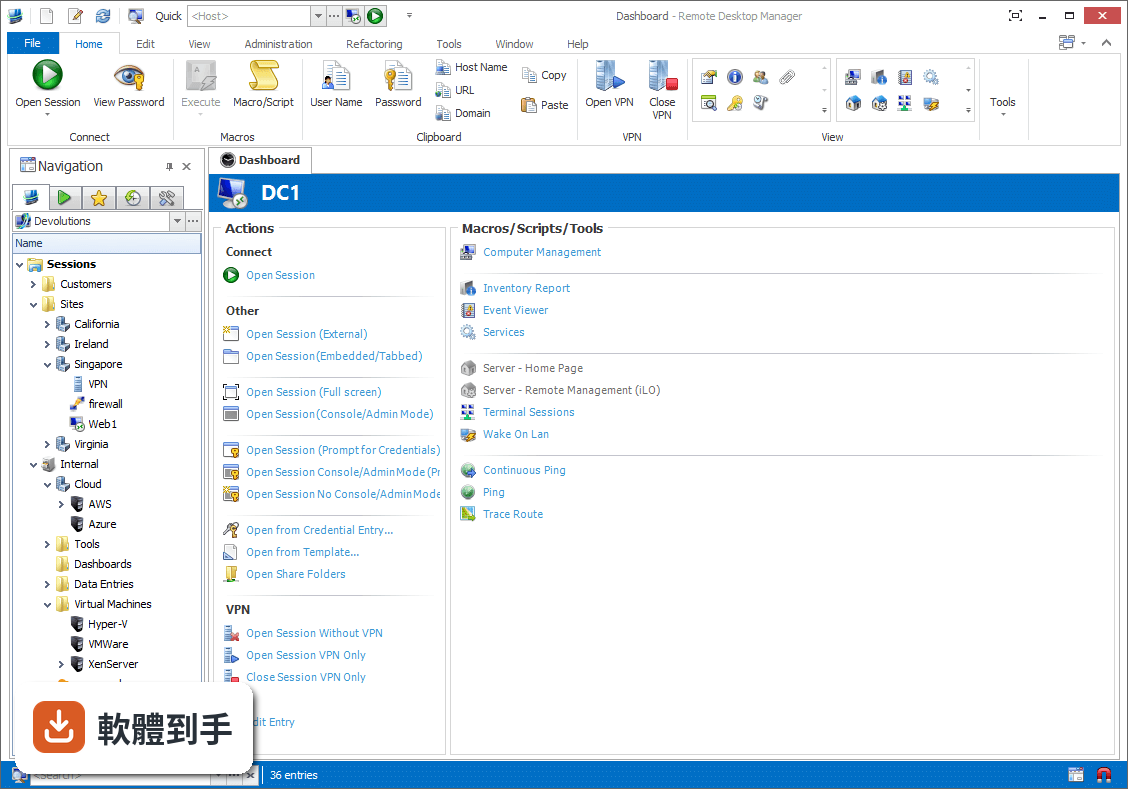
01Remote Desktop Manager 到底能拿來做什麼?
它是一套把各種遠端連線集中管理的工具。你可以把RDP、SSH、VNC、Telnet、FTP、VPN等不同協定的連線設定全部建在同一個介面裡,之後要連哪台機器,直接從清單點一下就會呼叫對應的程式開啟。它同時具備密碼管理、資料庫共用、角色權限控管和稽核報表功能,適合需要管理大量連線的IT人員。
02它支援哪些遠端連線類型?
官方說明列出支援的協定和程式相當多,包括VPN、FTP、SSH、Telnet,以及LogMeIn、VNC、Terminal Services、TeamViewer、Microsoft Remote Desktop、VMware、VirtualPC、X Window、Dameware、Citrix、Hyper-V、Oracle VirtualBox、Radmin、PC Anywhere等。也就是說,你原本習慣用的遠端工具,大多可以從這套軟體直接呼叫啟動。
03密碼管理是怎麼運作的?
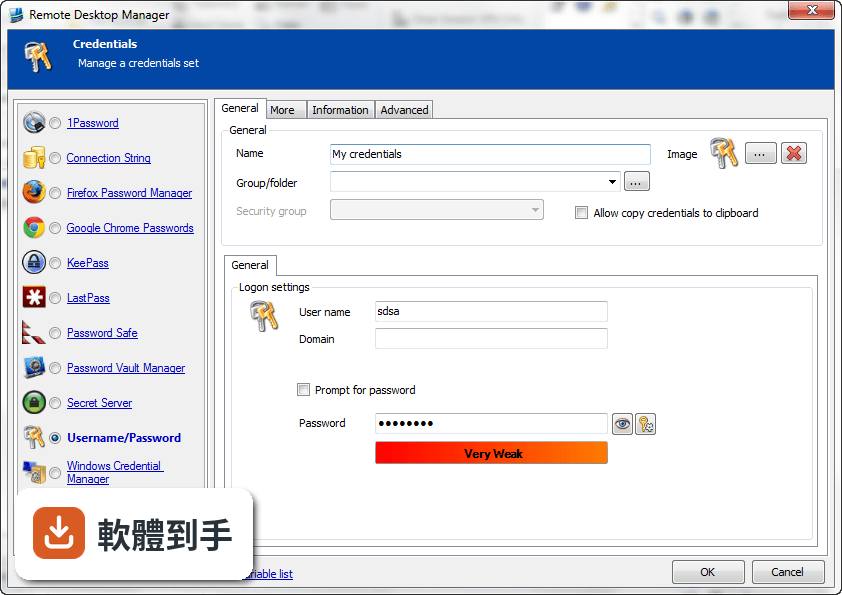
它內建密碼管理功能,可以把各台機器的登入帳號密碼儲存在加密的資料庫裡,連線時自動帶入,不需要每次手動輸入。加密方式採用AES 256位元金鑰,結合使用者自訂的私鑰和主密碼。不過實際使用上,密碼庫的建立、備份和還原流程,建議先看官方文件確認細節。
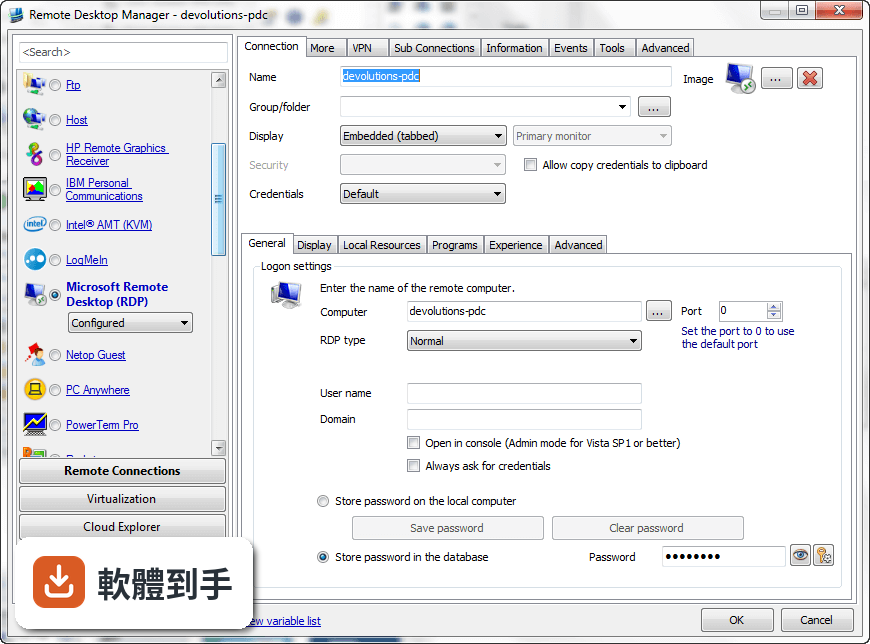
04多人協作時,權限怎麼控制?
它支援共用資料庫和角色權限控管(Role-Based Access Control),可以設定不同成員只能看到或操作特定資料夾與連線。另外也提供兩步驟驗證(2FA)和稽核報表,能記錄誰在什麼時間連了哪台機器。這些功能在官方說明中都有提到,但實際設定步驟和權限細部選項,需要安裝後自行摸索。
05快速連線功能怎麼用?
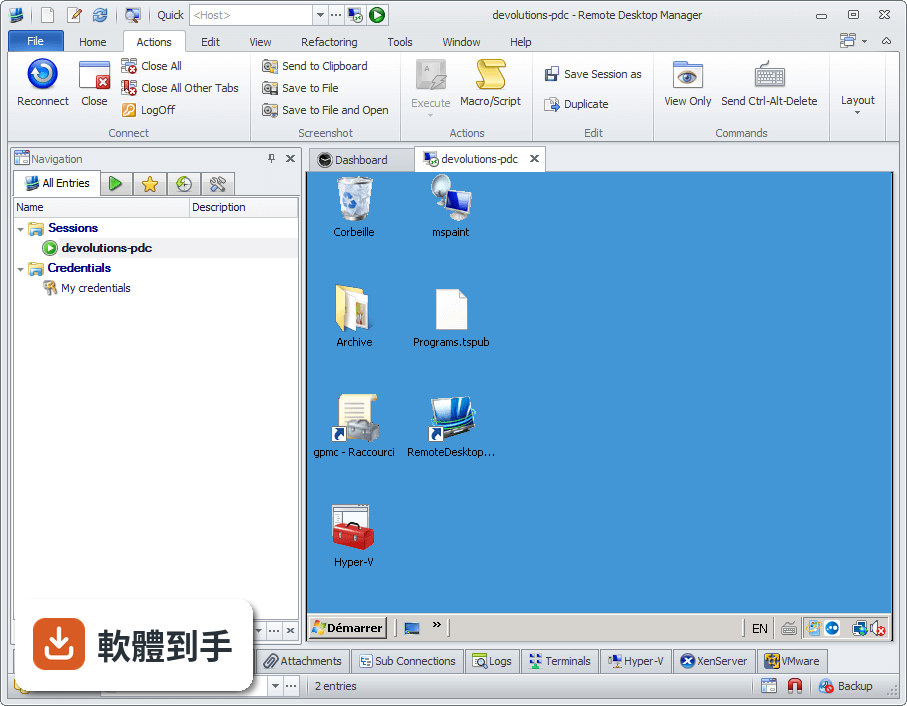
它提供Quick Connect功能,只要輸入主機名稱或IP位址,就能快速用Microsoft Remote Desktop、VNC或網頁方式連線,不需要事先建立完整的連線設定。另外也支援範本(Template),可以把常用的連線參數存成範本,之後套用即可。系統匣圖示的右鍵選單也能快速開啟連線、檢視目前工作階段或切換資料來源。
06什麼樣的人適合用這套軟體?
官方說明指出,它的主要使用者是專業人士、網路管理員和IT部門,用來管理虛擬機器和各種遠端連線。如果你日常工作需要同時維護多台伺服器或虛擬機器,而且連線方式混雜多種協定,這套軟體能幫你把連線資訊集中管理。如果只是偶爾遠端連一兩台電腦,用系統內建的遠端桌面就夠了。
07個人使用者用得上嗎?
官方說明提到它可以在免費模式下使用,且「幾乎所有專業使用者都會滿意」,只有需求較高的人才需要升級到Enterprise方案。不過要注意,這套軟體的授權型式是Trial,也就是試用版,官方註明30天試用期。免費模式具體能用哪些功能、試用期滿後是否還能繼續用,需要自行向開發商確認。
08新手容易上手嗎?
官方列出的缺點之一就是「對初學者來說設定可能較複雜」。它需要先建立或開啟資料庫,再逐一新增連線、設定帳號密碼、組織資料夾,對沒接觸過集中管理概念的人來說,學習曲線比較陡。如果你只是要連一兩台機器,直接用Windows內建的遠端桌面或PuTTY會簡單很多。
09介面只有英文,看不懂怎麼辦?
這套軟體的介面語系是English,沒有繁體中文介面。如果你對英文介面不熟悉,操作上會比較吃力,尤其是權限設定、資料庫管理這類進階功能,選項多且用語專業。這種情況下,可以考慮改用有中文介面的遠端連線工具,或先看官方文件確認每個欄位的意思再動手設定。
10只有 Windows 版,用 Mac 的人能用嗎?
官方資料顯示它支援的作業系統是Windows 7到Windows 11,以及Windows Server系列。雖然官方頁面有「Download Remote Desktop Manager for Mac」的連結,但那是另一個產品,功能可能與Windows版有差異。如果你主要使用Mac,建議先確認Mac版的功能是否完整,或考慮其他跨平台的遠端連線管理工具。
11免費版和付費版差在哪?
官方說明指出,進階功能需要付費授權,免費模式適合一般專業使用者,而Enterprise方案是為「有數百名使用者的大型企業」設計,解鎖更多工具和服務。具體哪些功能被鎖住、付費方案怎麼計價,官方頁面沒有列出細節,需要到Devolutions官網查詢或聯絡銷售人員。
12和 PuTTY、MobaXterm 比起來,它有什麼不同?
PuTTY是單一的SSH和Telnet用戶端,MobaXterm則整合了多種網路工具和Unix命令,兩者都偏重「連線工具」本身。Remote Desktop Manager的定位不太一樣,它比較像「連線的總管」——本身不取代PuTTY或VNC,而是把這些程式的連線設定、帳號密碼、使用權限集中管理。如果你只需要連SSH,PuTTY就夠;如果連線很多且要管權限,才需要這種集中管理工具。
下載與官方連結
前往官方網站 下載 Remote Desktop Manager Enterprise
Setup.RemoteDesktopManager.13.6.0.0.exe · 172 MB · 連結指向軟體原廠
版本紀錄
- 2026-11-02 Remote Desktop Manager Enterprise 2026.3.16.0 223 MB
- 2026-10-16 Remote Desktop Manager Enterprise 2026.3.15.0 222 MB
- 2026-10-10 Remote Desktop Manager Enterprise 2026.3.13.0 222 MB
再看 5 筆
- 2026-10-01 Remote Desktop Manager Enterprise 2026.3.12.0 217 MB
- 2026-09-26 Remote Desktop Manager Enterprise 2026.3.10.0 216 MB
- 2026-09-24 Remote Desktop Manager Enterprise 2026.3.9.0 215 MB
- 2026-09-20 Remote Desktop Manager Enterprise 2026.3.8.0 162 MB
- 2026-09-17 Remote Desktop Manager Enterprise 2026.3.5.0 162 MB
這一版改了什麼
What's new in this version:
New Features:
- Added documentation search
Improvements:
- Add New Container option in Azure Storage session
- Added "Prompt for password before going offline" to SQLServer, MySQL & MariaDB data sources
- Added 1Password support for custom URL mode
- Added 2FA support for Pleasant Password
- Added a check for RDM locked in Devolutions Web Login
- Added a new default setting for the undocked display monitor
- Added an export data for the duplicate entry report
- Added an option to hide the Open (Prompt for credentials)
- Added an option to prompt or not for the checkout comment
- Added Convert to Password list special action
- Added custom user authentication when unlocking SQL server data source
- Added description import to folders synced from AD and changing the "Move" mismatch action to remember the group path of the session
- Added disconnect option to SSH Shell
- Added download support using drag and drop to Azure Storage, FTP, SFTP, SCP, S3 and WebDAV
- Added EC2 Sync Import Settings
- Added EnPass CSV Import
- Added FreeRDP smart card redirection support
- Added host to password list
- Added Include Diagnostic option to error reports
- Added inherited checkout mode support
- Added Inherited mode support to Batch edit, Application send key and web data entry
- Added inherited mode to RDP gateway
- Added inherited offline mode support
- Added Keep selection on clear filter option
- Added masterkey support to Dropbox
- Added Move To New Folder in special actions
- Added new columns (Rack, Site and Server features)
- Added new Mac specific "ARDAltKeySymbol" for vnc connection
- Added option to change between 1Password NA and 1Password Europe
- Added option to filter only on enter for keypass
- Added overrides and credential repository credentials to Overview. Setting to turn it off added in datasource settings
- Added Parent /Unparent edit actions
- Added password list password history support
- Added Pause/Resume transfer support for FTP SCP WebDAV
- Added S3 storage explorer Amazon region endpoint
- Added support for Citrix ICA in 64 bits by using Embedded32
- Added support for password list expiration
- Added support for TLS Option (None/SSL/X509) with MySQL/MariaDB
- Added the "select" action to the web url (select a tab in the dashboard)
- Added the email as username for the Copy username and the email account
- Added the folder column for the Recent view
- Added the logged username in the password history and moved the copy username from the data grid
- Added the session context menu in the Recent entry list
- Added Update-RDMRepository cmdlet for the PowerShell module
- Added Wayk Tool
- Changed check outs for documents to make them readonly instead of blocking them
- Changed the auto update to be async
- Changed VPN Opened detection with a legacy settings
- CyberArk added settings for domain searching
- Deprecated the mobile list view
- Improved Amazon S3 browser
- Improved the Azure Table Storage explorer type
- Improved the error handling for Devolutions Online Drive
- Improved the handbook templates management (Rename, confirmation on delete, sorting)
- Improved the LastPass integration
- Improved the LastPass integration
- Improved the SSH to keep session history after disconnect
- Improved the user loading performance
- Minor UI fixes
- Moved the contact header (name, folder and image) to the top
- Per google chrome session, now save the last download path
- Possible fix for the double click issue with the navigation tree view
- Replaced the required checkout by a new Optional checkout mode
- ScreenConnect added support for Cookies when using the new option Trust This Device
- Web browser find shortcut now takes into consideration the "enable keyboard shortcuts" option
Fixes:
- Fixed a 1Password Web issue
- Fixed a crash with the edit security group in SQL Server
- Fixed a possible duplication issue with the synchronizer
- Fixed a possible issue with ghost folders in the filtered tree
- Fixed a possible issue with the add in the private vault
- Fixed a possible issue with the offline mode and the role cache
- Fixed a possible issue with the undocked mode and the default monitor configured
- Fixed an issue where domain in Active Directory Console was not saved
- Fixed an issue where editing an entry coming from a synchronizer wouldn't add it to the MRU
- Fixed an issue where synchronizers include the added connections in the MRU (recent)
- Fixed an issue with 1Password web
- Fixed an issue with blank screen when using WebRTC and Google Chrome embedded
- Fixed an issue with check outs on sub connections
- Fixed an issue with Chrome Remote Desktop
- Fixed an issue with Passportal and added support for the custom url
- Fixed an issue with syntax editor license
- Fixed an issue with the database templates
- Fixed an issue with the Documentation tab visible and the private vault
- Fixed an issue with the dynamic proxy (SSH)
- Fixed an issue with the host name and the database entry
- Fixed an issue with the new Dameware version
- Fixed an issue with the save in the private vault with the HttpBrowserLinker
- Fixed an issue with the self signing certificate dialog
- Fixed an issue with View password not saving the Open comment when using "Prompt for comment on open"
- Fixed an thumbnail issue with RDP fullscreen
- Fixed and improved the account name for Google Authenticator when setup on an SQL server
- Fixed another case with the root is empty
- Fixed application lock SQL Server Datasource login always failing
- Fixed documentation history in dark theme being really hard to see
- Fixed escaping quote issue in Team Viewer password
- Fixed Google Cloud Log to file
- Fixed Google Cloud potential error
- Fixed HTML export where username was shown even when the value was empty
- Fixed inconsistency/issue with Specify at Execution option in management tools credentials
- Fixed issue in Deskroll entry where using the GUID feature was impossible
- Fixed issue when RDP connection using IP address also used custom domain override
- Fixed issue where pressing the cancel button of Apple Remote Desktop entry's credential prompt causes an unnecessary error message
- Fixed issue with "use template credentials" in host entry type
- Fixed issue with credential templates not saving the name properly
- Fixed issue with password prompt in DODB when the credentials are wrong
- Fixed issue with ScreenConnect sync importing credentials
- Fixed issue with web browser template selection
- Fixed minor issues for Wayk and prompt for permission auth type
- Fixed passportal issue with view password
- Fixed Password Analyser column filter lost on refresh
- Fixed Password History being disabled for folders
- Fixed Powershell escaping issue
- Fixed PVM credentials Prompt for list Cancel still opening the connection
- Fixed rename issue with SCP
- Fixed scp, sftp unable to resolve private key when it is inherited from a folder's credential repository
- Fixed search problem in 1Password
- Fixed shortcut creation losing selected entry
- Fixed WinSCP directory download issue
- Fixing issue with group properties being affected by check outs