
這是歷史版本頁面 — 看 Remote Desktop Manager Enterprise 最新版本
遠端連線一多就亂?Remote Desktop Manager 能幫你管什麼
 Remote Desktop Manager Enterprise 2019 2.14.0
資料更新 2019-11-01
閱讀約 7 分鐘
你手上同時管著十幾台伺服器、幾台虛擬機器,還有同事臨時要你開個遠端桌面進去處理問題。每次都要從記事本翻IP、找密碼,不同機器用不同協定,有的走RDP、有的走SSH、有的還要先連VPN才能進去。連線一多,光是在一堆視窗和分頁之間切換就耗掉大半時間,更別說同事跟你借帳號密碼時,你根本搞不清楚誰用過哪台機器。
一般人習慣的做法,是把所有連線資訊記在Excel或記事本裡,密碼貼在共用文件,要用時再複製貼上。但這樣一來,密碼散落各處、權限無法控管、誰連過哪台機器完全沒有紀錄。這類工具的切入點,是把所有遠端連線的設定、帳號密碼、連線方式集中到同一個地方,讓你用一套軟體統一開啟各種遠端連線,同時把團隊共用的權限和稽核紀錄一起管起來。
01Remote Desktop Manager 到底能拿來做什麼?
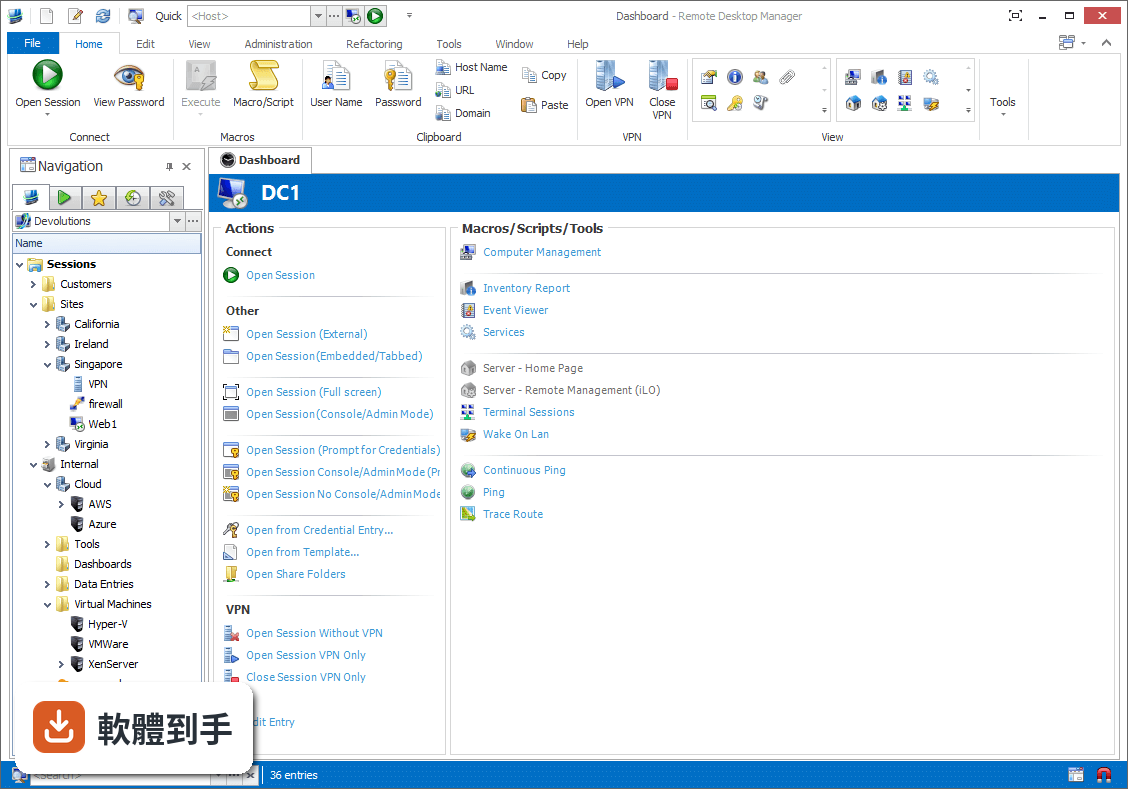
它是一套把各種遠端連線集中管理的工具。你可以把RDP、SSH、VNC、Telnet、FTP、VPN等不同協定的連線設定全部建在同一個介面裡,之後要連哪台機器,直接從清單點一下就會呼叫對應的程式開啟。它同時具備密碼管理、資料庫共用、角色權限控管和稽核報表功能,適合需要管理大量連線的IT人員。
02它支援哪些遠端連線類型?
官方說明列出支援的協定和程式相當多,包括VPN、FTP、SSH、Telnet,以及LogMeIn、VNC、Terminal Services、TeamViewer、Microsoft Remote Desktop、VMware、VirtualPC、X Window、Dameware、Citrix、Hyper-V、Oracle VirtualBox、Radmin、PC Anywhere等。也就是說,你原本習慣用的遠端工具,大多可以從這套軟體直接呼叫啟動。
03密碼管理是怎麼運作的?
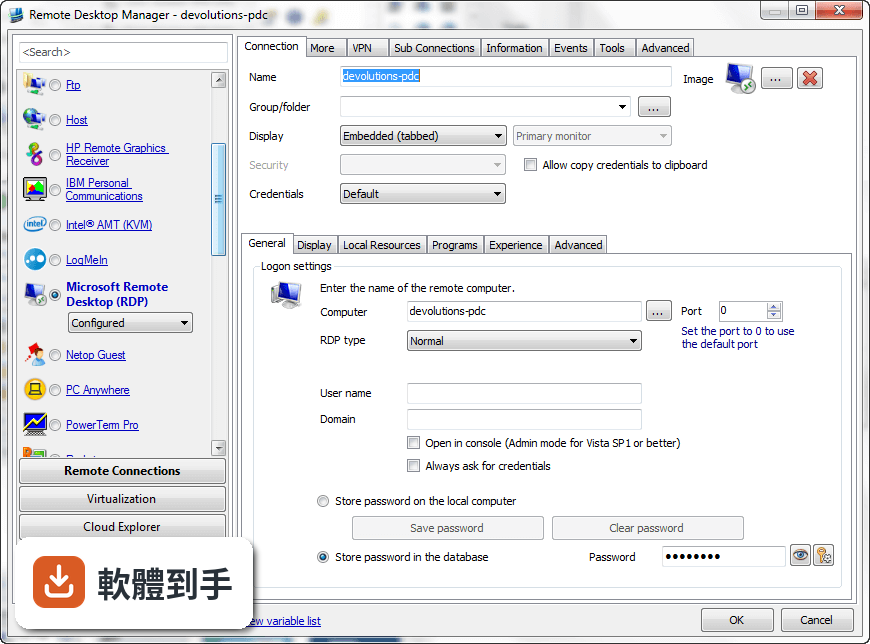
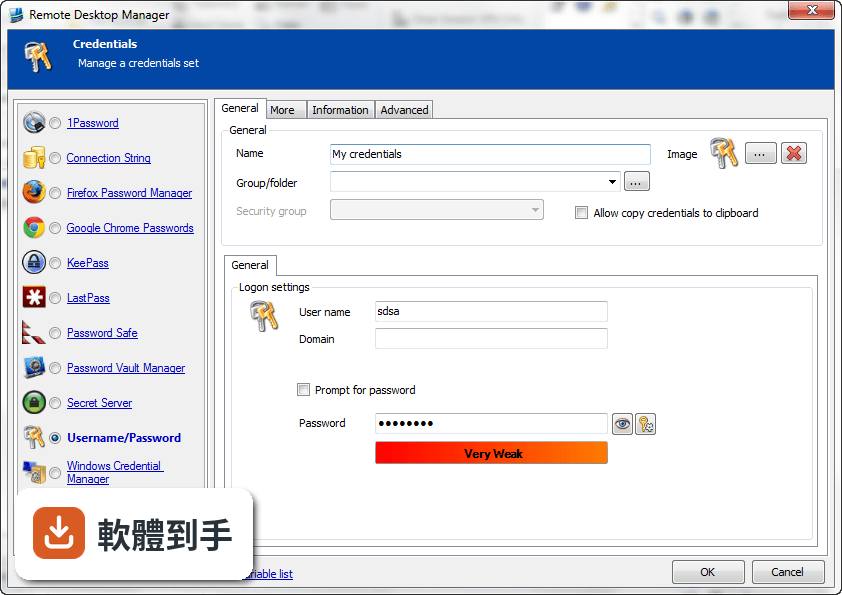
它內建密碼管理功能,可以把各台機器的登入帳號密碼儲存在加密的資料庫裡,連線時自動帶入,不需要每次手動輸入。加密方式採用AES 256位元金鑰,結合使用者自訂的私鑰和主密碼。不過實際使用上,密碼庫的建立、備份和還原流程,建議先看官方文件確認細節。
04多人協作時,權限怎麼控制?
它支援共用資料庫和角色權限控管(Role-Based Access Control),可以設定不同成員只能看到或操作特定資料夾與連線。另外也提供兩步驟驗證(2FA)和稽核報表,能記錄誰在什麼時間連了哪台機器。這些功能在官方說明中都有提到,但實際設定步驟和權限細部選項,需要安裝後自行摸索。
05快速連線功能怎麼用?
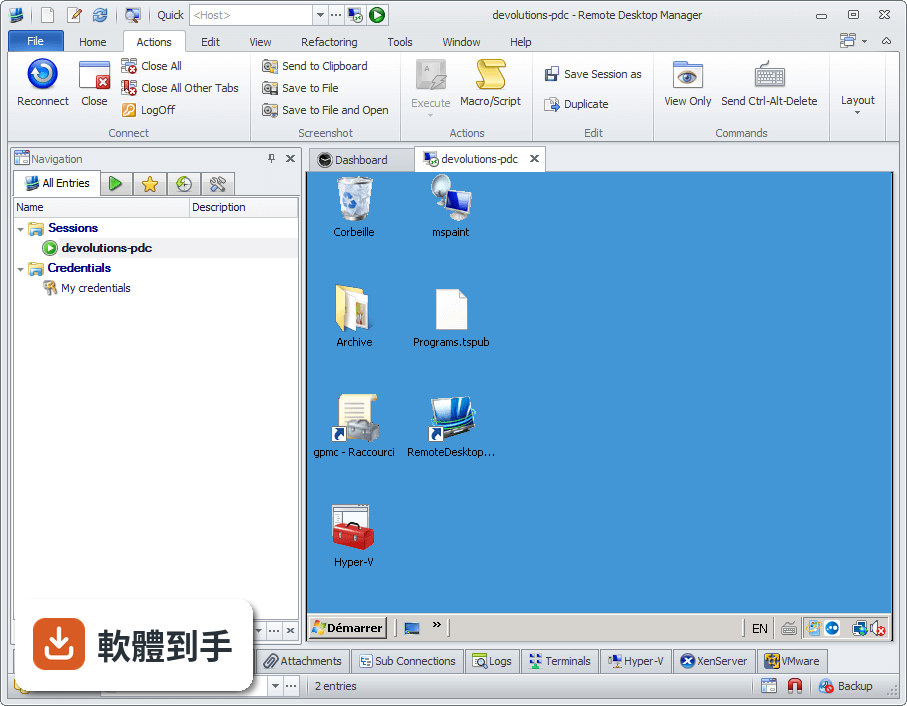
它提供Quick Connect功能,只要輸入主機名稱或IP位址,就能快速用Microsoft Remote Desktop、VNC或網頁方式連線,不需要事先建立完整的連線設定。另外也支援範本(Template),可以把常用的連線參數存成範本,之後套用即可。系統匣圖示的右鍵選單也能快速開啟連線、檢視目前工作階段或切換資料來源。
06什麼樣的人適合用這套軟體?
官方說明指出,它的主要使用者是專業人士、網路管理員和IT部門,用來管理虛擬機器和各種遠端連線。如果你日常工作需要同時維護多台伺服器或虛擬機器,而且連線方式混雜多種協定,這套軟體能幫你把連線資訊集中管理。如果只是偶爾遠端連一兩台電腦,用系統內建的遠端桌面就夠了。
07個人使用者用得上嗎?
官方說明提到它可以在免費模式下使用,且「幾乎所有專業使用者都會滿意」,只有需求較高的人才需要升級到Enterprise方案。不過要注意,這套軟體的授權型式是Trial,也就是試用版,官方註明30天試用期。免費模式具體能用哪些功能、試用期滿後是否還能繼續用,需要自行向開發商確認。
08新手容易上手嗎?
官方列出的缺點之一就是「對初學者來說設定可能較複雜」。它需要先建立或開啟資料庫,再逐一新增連線、設定帳號密碼、組織資料夾,對沒接觸過集中管理概念的人來說,學習曲線比較陡。如果你只是要連一兩台機器,直接用Windows內建的遠端桌面或PuTTY會簡單很多。
09介面只有英文,看不懂怎麼辦?
這套軟體的介面語系是English,沒有繁體中文介面。如果你對英文介面不熟悉,操作上會比較吃力,尤其是權限設定、資料庫管理這類進階功能,選項多且用語專業。這種情況下,可以考慮改用有中文介面的遠端連線工具,或先看官方文件確認每個欄位的意思再動手設定。
10只有 Windows 版,用 Mac 的人能用嗎?
官方資料顯示它支援的作業系統是Windows 7到Windows 11,以及Windows Server系列。雖然官方頁面有「Download Remote Desktop Manager for Mac」的連結,但那是另一個產品,功能可能與Windows版有差異。如果你主要使用Mac,建議先確認Mac版的功能是否完整,或考慮其他跨平台的遠端連線管理工具。
11免費版和付費版差在哪?
官方說明指出,進階功能需要付費授權,免費模式適合一般專業使用者,而Enterprise方案是為「有數百名使用者的大型企業」設計,解鎖更多工具和服務。具體哪些功能被鎖住、付費方案怎麼計價,官方頁面沒有列出細節,需要到Devolutions官網查詢或聯絡銷售人員。
12和 PuTTY、MobaXterm 比起來,它有什麼不同?
PuTTY是單一的SSH和Telnet用戶端,MobaXterm則整合了多種網路工具和Unix命令,兩者都偏重「連線工具」本身。Remote Desktop Manager的定位不太一樣,它比較像「連線的總管」——本身不取代PuTTY或VNC,而是把這些程式的連線設定、帳號密碼、使用權限集中管理。如果你只需要連SSH,PuTTY就夠;如果連線很多且要管權限,才需要這種集中管理工具。
下載與官方連結
前往官方網站 下載 Remote Desktop Manager Enterprise
Setup.RemoteDesktopManager.2019.2.14.0.msi · 196 MB · 連結指向軟體原廠
版本紀錄
- 2026-11-02 Remote Desktop Manager Enterprise 2026.3.16.0 223 MB
- 2026-10-16 Remote Desktop Manager Enterprise 2026.3.15.0 222 MB
- 2026-10-10 Remote Desktop Manager Enterprise 2026.3.13.0 222 MB
再看 5 筆
- 2026-10-01 Remote Desktop Manager Enterprise 2026.3.12.0 217 MB
- 2026-09-26 Remote Desktop Manager Enterprise 2026.3.10.0 216 MB
- 2026-09-24 Remote Desktop Manager Enterprise 2026.3.9.0 215 MB
- 2026-09-20 Remote Desktop Manager Enterprise 2026.3.8.0 162 MB
- 2026-09-17 Remote Desktop Manager Enterprise 2026.3.5.0 162 MB
這一版改了什麼
What's new in this version:
New:
- Added "broadcast action" in SSH shell entry
- Added badge information in dashboard about attachment and documentation count
- Added Devolutions Password Server (DPS) credential entry
- Added Password Hub credential entry
- Added privileged access credentials for DPS
- Added session recording support for Chrome embedded entries
- Added system settings for default tags
Improvements:
- "Hide sub-connections on filter" changed to "Collapse sub-connections on filter"
- 1Password view password now prompts the My Account Settings window if account setting are empty
- Add support for synchronizing folders in VMWare synchronizer
- Added "expected prompt" feature in SSH Shell
- Added "Expiration" column in password list entry
- Added "Private Vault" option in credential mode in entries in private vault
- Added "send break" command for SSH shell entry
- Added /noconsentprompt to shadow RDP
- Added 1Password to My Account Settings
- Added a "Domain" text field in quickconnect
- Added a "Find" button in web browser entries in the toolbar
- Added a new permission to edit information without having the global edit permission
- Added a setting to aumatically close RDM on idle
- Added a setting to enable form border effects in terminal services
- Added an add-on manager to the system settings
- Added an option "Use taskkill to close the VPN"
- Added an option to control how copy treats lines in Terminal (either preserve wrapping or preserve formatting)
- Added an option to hide sub connections when filtering the treeview
- Added an option to keep the alternate host of an entry when converting with template
- Added an option to keep the existing tags of a Web Browser when doing a conversion with template
- Added an option to keep the template name when creating an entry
- Added domain field to the 1Password import
- Added duplicate user account creation
- Added email column to the user section of the security management window
- Added extension for Bitvise
- Added fallback if gravatar call fails in security management
- Added file transfer via SSH connection
- Added GPO "Disable Analytics"
- Added hyperlinks to more easily copy/paste commands in the macro window
- Added import of email and custom fields for Mateso Password Safe CSV import. Also fixed possible issue with the import due to quote characters
- Added informative label for Chocolatey install status
- Added lock screen to RDM
- Added Mac Address in filter and Advanced search
- Added minimizing options (taskbar and trayicon visiblity) on application start and close
- Added missing column in connection grid view
- Added multi-selection for add-on installation
- Added new centralized subscription model support
- Added new option to verify if the user has checked out entries on close
- Added option to disable autofill on new tab in Chrome embedded
- Added option to keep the "check if online" window on top
- Added policy to force Windows username and password
- Added port to Overview when it is different from the default port
- Added possibility entry management such as "Delete" and "Move to vault" to the last usage report
- Added possibility reset user passwords with MySQL/MariaDB data sources
- Added possibility to "throw" a message with an hyperlink in a custom credential's PowerShell
- Added possibility to ignore the session type on the duplicate check of a VMWare Synchronizer
- Added prompt for comment for credentials viewed logs
- Added Server Start Command setting for SFTP entry
- Added Session tab name field for SecureCRT
- Added specific settings for RDP multimonitor/span settings
- Added support for 256 and true color modes in Terminal
- Added support for batch RDP reconnect
- Added support for CJK wide characters in Terminal
- Added support for proportional fonts in Terminal
- Added support for rectangle selection in Terminal
- Added support monitor selection to document types
- Added system settings for default tags
- Added the option (permission) to disable the documentation tab on selective entries
- Added the option to logoff (multi-select or specific) RDP entries from the thumbnails view
- Added the option to verify the folders on mismatch for AD Synchronizer
- Added the possibility to add Alternate Hosts field as a column on Dashboard and tab Entries
- Added the possibility to keep the Navigation Panel Structure in Entry Information Report
- Added the possibility to sort by column in TS session
- Added the TAG column in export
- Added timeout for pwned password checks in case the site is unreachable
- Added toggle option to preserve formatting on copy in SSH shell
- Added triple click support for full line selection and corrected some selection bugs and flickering in Terminal
Attachments features can no longer be used for ReadOnly users (could previously be attempted but would result in crashes). The Save As button for attachments - is now linked to the Allow Export setting inside the attachment
- Changed pwned password behavior when unable to reach the server
- Changed the edit rights on logs. Users can now only edit their own logs. Administrators can edit all logs
- Changed the maximum value for RDP custom width/height to 8192 as it's the Windows 10 maximum
- Created a "Disable quick connect" policy
- Deprecated Azure Table Explorer
- Entry variables in the description will now resolve in the tooltip
- Excluded version from multivault search
- Folders now keep their last position when switching repository
- Implemented VM path in backend for VMware Dashboard
- Improved Mateso PasswordSafe CSV import
- Improved query performance of some actions on a database with a large number of connection history rows
- Improved the display of FreeRDP, VNC, ARD and VNRC
- Improved the private vault filtering when entry set to "prompt on connection"
- Improved the sort column in import
- Improved the VPN glyph in the status bar to select the opened VPN
- Improved user cancel and connection to DODB and DOD datasource
- In the password analyzer, Password Strength sorts from weak to perfect and Since sorts from shortest to longest
- Integration of Viscosity VPN
- Keep folder structure in entry information report
- Marked BeyondTrust entry types as deprecated
- Minor UI improvements
- Opening a second WinSCP window in embedded mode will embed it as expected
- Quick Connect now logs open session in the Activity log
- Rename Root Settings for Vault Settings
- Renamed CyberArk AIM to CyberArk AAM (Application Access Manager)
- Reset layout now also resets the Private Vault
- SSH Agent forwarding will work even if "use agent" is not specified
- Starting a session through Quick Connect with the enter key now has priority over the website field in the dashboard
- Support force refresh in Chrome embedded (Ctrl+F5 and Ctrl+click on the button)
- Update SecureVNCPlugin to the version distributed by UltraVNC
- Updated Azure Blog Storage Explorer
- Updated Bitwarden integration to hopefully fix cipher issue
- Updated Firefox embedded
- Updated Wayk integration
- When opening a session from another repository in the favorites view, the favorites tab will stay opened
Fixes:
- Added a "create" command in Remote Utilities
- Fixed "Copy Username/Password" issue when enabling Windows 10 Clipboard History
- Fixed "Tab page title" option with an HyperV Console entry
- Fixed "unable to change the current vault with Set-RDMCurrentRepository"
- Fixed 401 error on DODB cloud access token id expiring
- Fixed a Clouberry Remote Assistance installation path
- Fixed a performance problem with the thumbnails
- Fixed a possible upgrade issue with SQL Server
- Fixed a potential hang on connection close in SSH
- Fixed a potential hang when the server issues extended data in SFTP
- Fixed a potential issue with Lastpass credential
- Fixed All vaults search. Clear filter and display problem when filter is on top
- Fixed Alternate host field wasn't emptied when saving with setting disabled
- Fixed an issue with folder entries to display the correct inherited permissions
- Fixed an issue with Google Drive
- Fixed an issue with MySQL/MariaDB change password
- Fixed an issue with smart Folders sub-connections and "Show sub-connections" unchecked
- Fixed auto focus item on tab select for favorites tab
- Fixed bug with iDrac. iDrac now renames the "viewer.jnlp" file if it doesn't end with ".jnlp" to fix known issue with iDrac 6
- Fixed check out required bypass by using the properties shortcut on a folder (entry selected in Dashboard)
- Fixed color issue with website entry
- Fixed entry using bitwarden still opening even if canceled
- Fixed entry using lastpass still opening even if canceled
- Fixed error when using file transfer in a Wayk session
- Fixed for activity log times when in DODB
- Fixed inconsistency with templates and credentials in VMWare synchronizer
- Fixed issue creating an AD role in a multi-domain environment
- Fixed issue doing batch actions in the private vault
- Fixed issue not using the group tab with website and account entries
- Fixed issue saving properties of MobaXTerm entry
- Fixed issue where batch editing credentials on data entries wouldn't work
- Fixed issue where prompt for comment when credential viewed didn't work
- Fixed issue where the group dashboard didn't handle the visibility of the clipboard buttons when they didn't respect the check out requirements
- Fixed issue where the treeview becomes undocked when minimizing the application if it's supposed to go to the trayicon
- Fixed issue where VPN Add-Ons were visible even if they weren't activated
- Fixed issue with "required" session recording in entries that don't support it
- Fixed issue with 1Password (web) returning only the first 200 entries
- Fixed issue with convert with template
- Fixed issue with deletion in private vault in offline mode
- Fixed issue with Keeper saving password
- Fixed issue with macros in SSH when multiple of the same entry is opened
- Fixed issue with password analyzer listing main vault entries when you aren't an administrator
- Fixed issue with private vault in offline mode not saving changes properly
- Fixed issue with the Last Usage Report editor's information tab not handling the export options properly
- Fixed issue with unlock in offline mode for SQL Server and MySQL
- Fixed issue with VPNs not showing the green play button properly
- Fixed issue with Windows Admin Center not sending the port properly
- Fixed issues with multivault search allowing actions like checkout and specific settings on entries you don't have the view rights to
- Fixed issues with the change credential batch edit action
- Fixed issues with Windows 10 Clipboard History & Copy Username & Password not working
- Fixed jump host connectionSSH ( host address is now resolved on the jump host)
- Fixed last line feed gets copied now if selected in Terminal
- Fixed management tool credential resolving issue when using the credential repository
- Fixed password manager pro call stack error on wrong host
- Fixed possible "discover" issue in web browser entries
- Fixed possible comparison issue when trying to get user from cache
- Fixed possible crash if loading a vault that has leading spaces
- Fixed possible crash in SSH Tunnel
- Fixed possible crash when importing in addons
- Fixed possible crash with WinSCP
- Fixed possible issue with 1Password web not being able to fetch from certain accounts
- Fixed possible performance issue data source contained many users and vaults
- Fixed possible security flaws with the reconnects / keep tab open on disconnect
- Fixed RDM export duplicating sub connections
- Fixed RDP smartreconnect issue that occured when splitting the view between multiple entries
- Fixed Select in Navigation Pane for Playlists and Advanced Search
- Fixed some UI for bitwarden duo 2FA
- Fixed SSH RSA key validation
- Fixed telnet post login commands
- Fixed the "Use my RD Gateway credentials for remote computer" option in the RDP Gateway session type
- Fixed the issue where entries in a playlist wasn't log with the desired account whit "Select Credentials" option
- Fixed the issue where entries in recent are not shown as their sub entries type
- Fixed the issue where logs are not shown properly with "Optimize All" in Pack Database
- Fixed the processing of an escape sequence that caused display errors in Terminal
- Fixed Typos in Welcome Page
- Fixed wrong values in OpenVPN and SophosVPN for auth-retry parameter
- Fixed Zoho vault 2FA double prompt
- Force us layout to prevent problem when connected to a vmrc server
- Improved the loading icon in Chrome embedded to be based on the status message update instead of the page loading, as it seems more reliable
- Minor fixes
- Possible fix for 1Password not showing the correct vault data
- Potential fix for the certificate validation freeze
- Prevent possible Exceptions $DATA_SOURCE_USERPROFILE_*$ variables
- Reconnect from title bar clears the disconnected status properly
- Removed the possibility to use different view types in the folder dashboard
- Removed unnecessary buttons from Playlist (had bugs with data entries anyway)
- Tried possible fix for F5 Firepass SSL VPN not logging "Open Session"
- Updated codebase for bitwarden/zoho to fix issue with mobile platforms
- Updated EssentialObjects to 19.2.30 to fix issue with SaveAs