
這是歷史版本頁面 — 看 Remote Desktop Manager Enterprise 最新版本
遠端連線一多就亂?Remote Desktop Manager 能幫你管什麼
 Remote Desktop Manager Enterprise 2020.1.10.0
資料更新 2020-02-20
閱讀約 7 分鐘
你手上同時管著十幾台伺服器、幾台虛擬機器,還有同事臨時要你開個遠端桌面進去處理問題。每次都要從記事本翻IP、找密碼,不同機器用不同協定,有的走RDP、有的走SSH、有的還要先連VPN才能進去。連線一多,光是在一堆視窗和分頁之間切換就耗掉大半時間,更別說同事跟你借帳號密碼時,你根本搞不清楚誰用過哪台機器。
一般人習慣的做法,是把所有連線資訊記在Excel或記事本裡,密碼貼在共用文件,要用時再複製貼上。但這樣一來,密碼散落各處、權限無法控管、誰連過哪台機器完全沒有紀錄。這類工具的切入點,是把所有遠端連線的設定、帳號密碼、連線方式集中到同一個地方,讓你用一套軟體統一開啟各種遠端連線,同時把團隊共用的權限和稽核紀錄一起管起來。
01Remote Desktop Manager 到底能拿來做什麼?
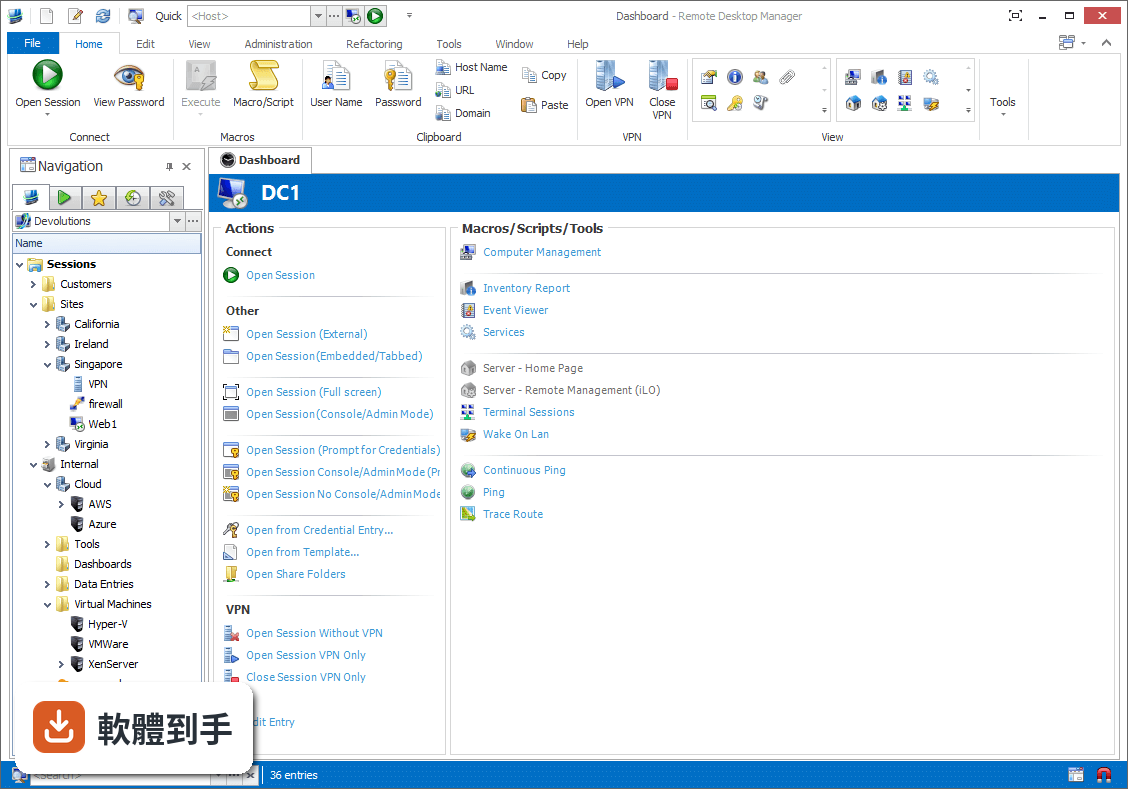
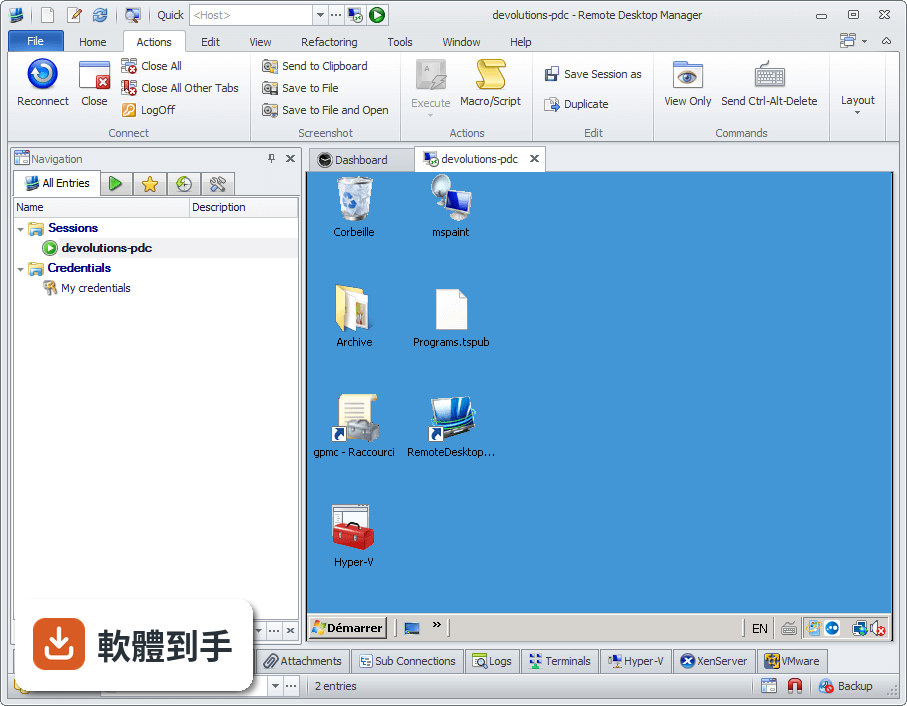
它是一套把各種遠端連線集中管理的工具。你可以把RDP、SSH、VNC、Telnet、FTP、VPN等不同協定的連線設定全部建在同一個介面裡,之後要連哪台機器,直接從清單點一下就會呼叫對應的程式開啟。它同時具備密碼管理、資料庫共用、角色權限控管和稽核報表功能,適合需要管理大量連線的IT人員。
02它支援哪些遠端連線類型?
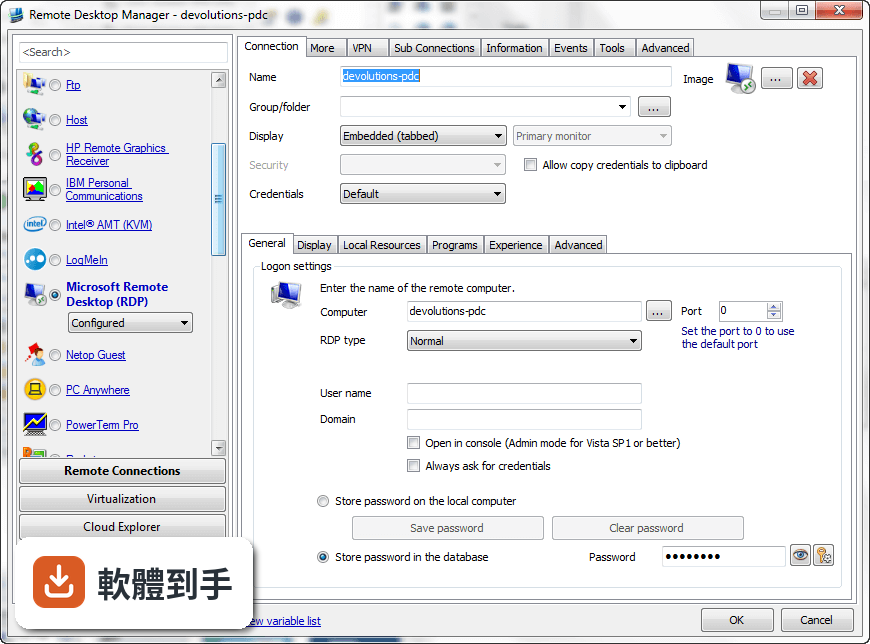
官方說明列出支援的協定和程式相當多,包括VPN、FTP、SSH、Telnet,以及LogMeIn、VNC、Terminal Services、TeamViewer、Microsoft Remote Desktop、VMware、VirtualPC、X Window、Dameware、Citrix、Hyper-V、Oracle VirtualBox、Radmin、PC Anywhere等。也就是說,你原本習慣用的遠端工具,大多可以從這套軟體直接呼叫啟動。
03密碼管理是怎麼運作的?
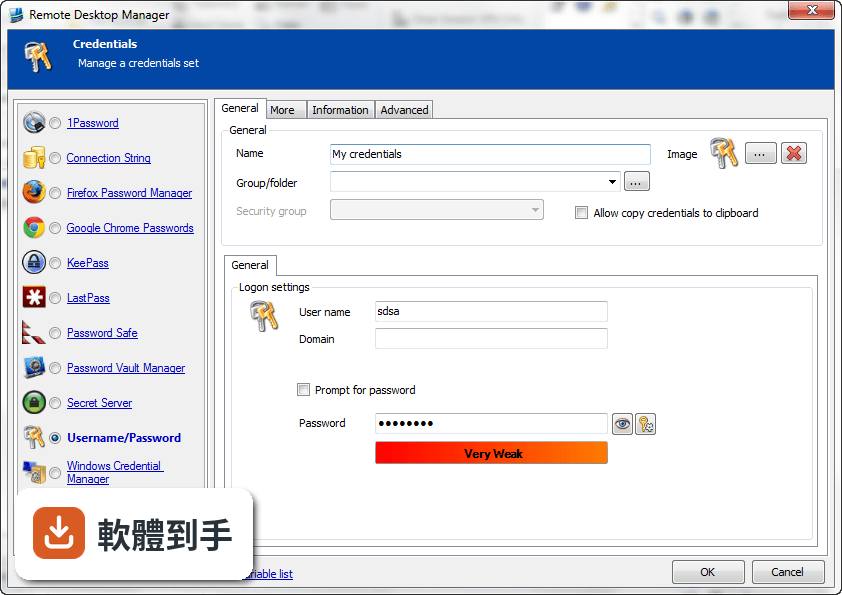
它內建密碼管理功能,可以把各台機器的登入帳號密碼儲存在加密的資料庫裡,連線時自動帶入,不需要每次手動輸入。加密方式採用AES 256位元金鑰,結合使用者自訂的私鑰和主密碼。不過實際使用上,密碼庫的建立、備份和還原流程,建議先看官方文件確認細節。
04多人協作時,權限怎麼控制?
它支援共用資料庫和角色權限控管(Role-Based Access Control),可以設定不同成員只能看到或操作特定資料夾與連線。另外也提供兩步驟驗證(2FA)和稽核報表,能記錄誰在什麼時間連了哪台機器。這些功能在官方說明中都有提到,但實際設定步驟和權限細部選項,需要安裝後自行摸索。
05快速連線功能怎麼用?
它提供Quick Connect功能,只要輸入主機名稱或IP位址,就能快速用Microsoft Remote Desktop、VNC或網頁方式連線,不需要事先建立完整的連線設定。另外也支援範本(Template),可以把常用的連線參數存成範本,之後套用即可。系統匣圖示的右鍵選單也能快速開啟連線、檢視目前工作階段或切換資料來源。
06什麼樣的人適合用這套軟體?
官方說明指出,它的主要使用者是專業人士、網路管理員和IT部門,用來管理虛擬機器和各種遠端連線。如果你日常工作需要同時維護多台伺服器或虛擬機器,而且連線方式混雜多種協定,這套軟體能幫你把連線資訊集中管理。如果只是偶爾遠端連一兩台電腦,用系統內建的遠端桌面就夠了。
07個人使用者用得上嗎?
官方說明提到它可以在免費模式下使用,且「幾乎所有專業使用者都會滿意」,只有需求較高的人才需要升級到Enterprise方案。不過要注意,這套軟體的授權型式是Trial,也就是試用版,官方註明30天試用期。免費模式具體能用哪些功能、試用期滿後是否還能繼續用,需要自行向開發商確認。
08新手容易上手嗎?
官方列出的缺點之一就是「對初學者來說設定可能較複雜」。它需要先建立或開啟資料庫,再逐一新增連線、設定帳號密碼、組織資料夾,對沒接觸過集中管理概念的人來說,學習曲線比較陡。如果你只是要連一兩台機器,直接用Windows內建的遠端桌面或PuTTY會簡單很多。
09介面只有英文,看不懂怎麼辦?
這套軟體的介面語系是English,沒有繁體中文介面。如果你對英文介面不熟悉,操作上會比較吃力,尤其是權限設定、資料庫管理這類進階功能,選項多且用語專業。這種情況下,可以考慮改用有中文介面的遠端連線工具,或先看官方文件確認每個欄位的意思再動手設定。
10只有 Windows 版,用 Mac 的人能用嗎?
官方資料顯示它支援的作業系統是Windows 7到Windows 11,以及Windows Server系列。雖然官方頁面有「Download Remote Desktop Manager for Mac」的連結,但那是另一個產品,功能可能與Windows版有差異。如果你主要使用Mac,建議先確認Mac版的功能是否完整,或考慮其他跨平台的遠端連線管理工具。
11免費版和付費版差在哪?
官方說明指出,進階功能需要付費授權,免費模式適合一般專業使用者,而Enterprise方案是為「有數百名使用者的大型企業」設計,解鎖更多工具和服務。具體哪些功能被鎖住、付費方案怎麼計價,官方頁面沒有列出細節,需要到Devolutions官網查詢或聯絡銷售人員。
12和 PuTTY、MobaXterm 比起來,它有什麼不同?
PuTTY是單一的SSH和Telnet用戶端,MobaXterm則整合了多種網路工具和Unix命令,兩者都偏重「連線工具」本身。Remote Desktop Manager的定位不太一樣,它比較像「連線的總管」——本身不取代PuTTY或VNC,而是把這些程式的連線設定、帳號密碼、使用權限集中管理。如果你只需要連SSH,PuTTY就夠;如果連線很多且要管權限,才需要這種集中管理工具。
下載與官方連結
前往官方網站 下載 Remote Desktop Manager Enterprise
Setup.RemoteDesktopManager.2020.1.10.0.msi · 209 MB · 連結指向軟體原廠
版本紀錄
- 2026-11-02 Remote Desktop Manager Enterprise 2026.3.16.0 223 MB
- 2026-10-16 Remote Desktop Manager Enterprise 2026.3.15.0 222 MB
- 2026-10-10 Remote Desktop Manager Enterprise 2026.3.13.0 222 MB
再看 5 筆
- 2026-10-01 Remote Desktop Manager Enterprise 2026.3.12.0 217 MB
- 2026-09-26 Remote Desktop Manager Enterprise 2026.3.10.0 216 MB
- 2026-09-24 Remote Desktop Manager Enterprise 2026.3.9.0 215 MB
- 2026-09-20 Remote Desktop Manager Enterprise 2026.3.8.0 162 MB
- 2026-09-17 Remote Desktop Manager Enterprise 2026.3.5.0 162 MB
這一版改了什麼
What's new in this version:
New features:
- Added virtual desktop open destination
Improvements:
Added:
- "details" column to the "Referenced by" window
- "Direct mode" and "Session tab name" setting to SecureCRT sessions
- $ALTERNATE_HOST$ and $PARENT_ALTERNATE_HOST$
- (parent) $DESCRIPTION$ variable
- a "reconnect all" button above the "close all" one
- a button to generate a private key in the connection settings
- a filter in Terminal Console sessions
- a Max scrollback lines setting for Telnet entry
- a setting to modify the notification balloon delay and an option to allow the close button on the balloon
- a user/local specific setting and a global option for the Remote sound setting
- ability to enable/disable a terminal highlighting syntax
- an option to exclude specified characters in Default password generator
- authentication type handling with external Wayk session
- default and global values for Remote sound settings
- inheritance options to tab groups as well as connection color
- IP addresses to VMware virtual machines
- logs for SFTP File Transfer within SSH entry
- new custom image "Disk Storage"
- options to the advanced search. (does not contain and operator OR)
- parent TAB_TITLE variable
- Port column in the gridviews
- possibility to configure a "connect when available delay"
- possibility to export multiple RDP connections at the same time
- private vault credentials to the SSH gateway authentication
- progress bar to the Hyper-V Console when loading sessions
- Spanish language
- support for "Terminal->General" and "Keyboard" tabs in Telnet entry
- support for 2FA in openVPN and sophosVPN
- support for more addons to have their port properly displayed in the overview
- support for native ssh terminal text search
- support for remote-controlled window title changing in SSH shell
- support for Sophos Connect Client
- support for window title change and icon name change in Terminal
- text search in Terminal
- the ability to execute macros by doubleclick from the Macro/scripts/tools list popup
- the option to add VPN routes in batch
- the possibility to Extract Credential Entry from Website information type entry
- the possibility to return "Password list" entry in advanced search using the description of his own password list items
- URL column in dashboards, treeview and in advanced search
- Allow searching for empty fields in advanced search
Improved:
- dynamic port to check if the port is opened before using it
- multi-account support for DOD, DODB and "My Devolutions Account"
- SQLite datasource load time
- SSH robustness on private/public key loading and saving
- the dashboard overview
- the google drive import to do it in batch
- UI for Chrome embedded settings
- Wayk Now Chat UI/UX
- Made Wayk entry scaled option true by default
- Renamed Analytic for Telemetry in options to avoid confusion
Fixed:
- a display bug correction (scroll region) in Terminal
- a display corruption bug in terminal
- a freeze issue with failed recording in SSH
- a listing entry issue in Google Cloud
- a null reference error with My Data Source Information -> Print Report (export)
- a possible issue with entry text staying bold after disconnect
- a Terminal issue with dead keys (accents) that resulted in an extra "D"
- a visual bug when combining thumbnails view and keep tab on disconnect
- an issue with fingerprint check in SSH that uses SFTP for file transfer
- an issue with keep connection string when copy/pasting a connection string entry
- an issue with line ended with empty spaces in Terminal
- an issue with spaces in filter for Web protocol handler
- an issue with the enter in the grant permission dialog
- Apple VPN entry in connection tree slowing down the application
- bug with focus in favorites tab jumping to the first entry of the list when a session is launched
- clean up deleted history in a DPS datasource
- Ctrl + insert copy from the terminal
- cursor visibility on focus change and disconnection in terminal
- custom field advanced search to allow for custom names
- default value for Chrome download path
- deleted entries stay in the tree view when offline
- execute macro from Macros/scripts/tools list
- export password list to xls
- export password list to xls. Now all password list items will be exported without the need of a prompt
- extension to saving SSH Private Key
- favorite column size not saved
- favorites view sorting
- for after disconnect events being called twice in the case of VPNs
- hide the top pane when restoring from trayicon
- Http Browser Linker activity log issue
- Http Browser Linker and native messaging not using credentials if URL inherited from folder's $COMPUTER_IP$ value
- iDrac "viewer.jnlp" file renaming
- initialization issue with openvpn / sophos two factor
- issue sending macros to SSH that already has post-login commands configured
- issue where Disable RDP scale Factor (HDPI) didn't prompt for restart
- issue with Help button in backups
- issue with renaming folders wiping settings while in offline mode
- issues with Devolutions Online Database and Devolutions Online Drive offline mode when no internet is available
- keep the connection string when copy/pasting a connection string entry
- Mouse scroll in Wayk Now sessions
- OTP window opening multiple times on consecutive view password clicks
- page up/down keys handling in Terminal
- Password Generator's default mode's restriction so that they cannot be set to a negative value
- Password List not prompting when getting credentials from Http Browser Linker
- permission tab page visible (in the dashboard) when the private vault is selected
- possible crash in Wayk
- possible crash with "Save as template"
- possible issue where Go Offline didn't work on some vaults
- possible netstat freeze
- possible null reference exception with keep tab open on disconnect's "Connect when available"
- quick connect "Auto connect on select template" when citrix netscaler is open
- RDM Free registration with rdmo account
- rdp view wrongly trying the display the image non scaled under certain conditions
- RDS Dashboard not using session credentials
- S3 custom URL
- S3 preventing save when not in custom url and cred repo from entering an access and secret key
- scroll behavior in Wayk
- sessions with OpenGL rendering engine (RDP, ARD, VNC and Wayk) not rendiring properly
- sizing and QR code issues with OTP window
- some issues with Key Agent
- Telnet bug that happens on certain basic servers
- the CSV sync creating templates when a template was specified in the .csv
- the issue when double clicking in text document
- the issue where Reconnect with undocked entry was not working properly
- the issue with convert Login (Account) to a Website
- the issue with KeyAgent not using the passphrase already entered in RDM
- the login procedure from desktop shortcuts to prevent a datasource wipe
- the red X issue in HDPI
- the window title of SSH shell undocked sessions with the option "Allow remote controlled window title changing"
- to disable the Password analyzer and activity logs when switching to a user that doesn't have rights
- to select the first connection in the favorites tab instead of the root on RDM open
- upload/download direct from/to memory in SFTP
- VPN/SSH/Gateway with custom port and "Connect if unable to ping" making rdm freeze
- wayk file transfer remote cancel
- Wayk view only mode checkbox