
這是歷史版本頁面 — 看 Remote Desktop Manager Enterprise 最新版本
遠端連線一多就亂?Remote Desktop Manager 能幫你管什麼
 Remote Desktop Manager Enterprise 2020.3.12.0
資料更新 2020-10-28
閱讀約 7 分鐘
你手上同時管著十幾台伺服器、幾台虛擬機器,還有同事臨時要你開個遠端桌面進去處理問題。每次都要從記事本翻IP、找密碼,不同機器用不同協定,有的走RDP、有的走SSH、有的還要先連VPN才能進去。連線一多,光是在一堆視窗和分頁之間切換就耗掉大半時間,更別說同事跟你借帳號密碼時,你根本搞不清楚誰用過哪台機器。
一般人習慣的做法,是把所有連線資訊記在Excel或記事本裡,密碼貼在共用文件,要用時再複製貼上。但這樣一來,密碼散落各處、權限無法控管、誰連過哪台機器完全沒有紀錄。這類工具的切入點,是把所有遠端連線的設定、帳號密碼、連線方式集中到同一個地方,讓你用一套軟體統一開啟各種遠端連線,同時把團隊共用的權限和稽核紀錄一起管起來。
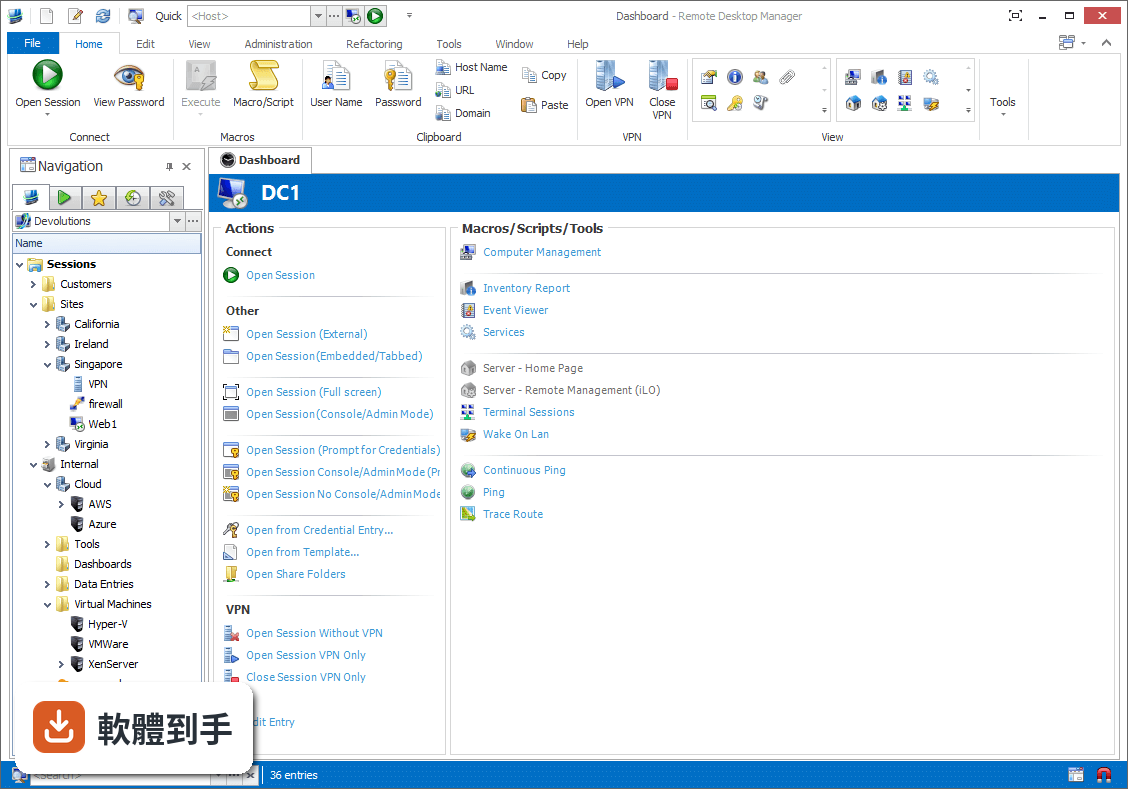
01Remote Desktop Manager 到底能拿來做什麼?
它是一套把各種遠端連線集中管理的工具。你可以把RDP、SSH、VNC、Telnet、FTP、VPN等不同協定的連線設定全部建在同一個介面裡,之後要連哪台機器,直接從清單點一下就會呼叫對應的程式開啟。它同時具備密碼管理、資料庫共用、角色權限控管和稽核報表功能,適合需要管理大量連線的IT人員。
02它支援哪些遠端連線類型?
官方說明列出支援的協定和程式相當多,包括VPN、FTP、SSH、Telnet,以及LogMeIn、VNC、Terminal Services、TeamViewer、Microsoft Remote Desktop、VMware、VirtualPC、X Window、Dameware、Citrix、Hyper-V、Oracle VirtualBox、Radmin、PC Anywhere等。也就是說,你原本習慣用的遠端工具,大多可以從這套軟體直接呼叫啟動。
03密碼管理是怎麼運作的?
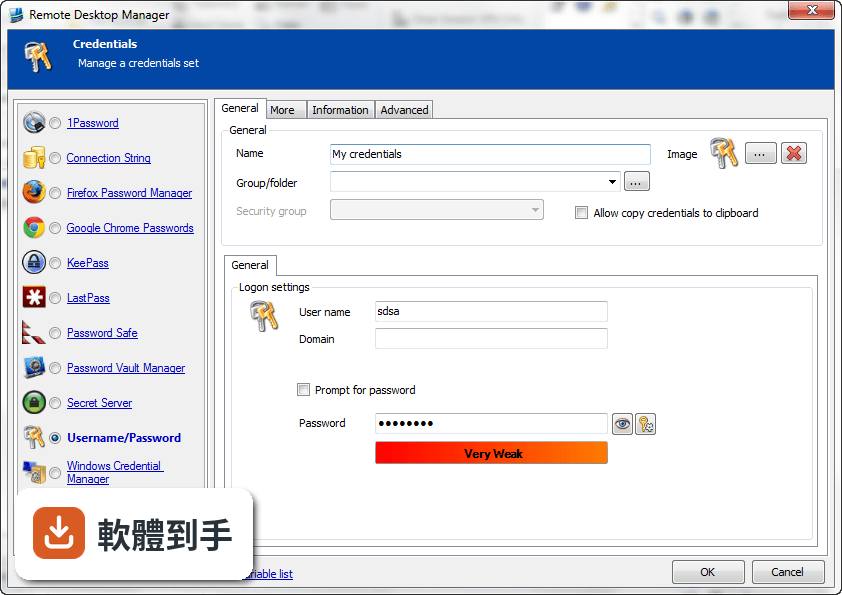
它內建密碼管理功能,可以把各台機器的登入帳號密碼儲存在加密的資料庫裡,連線時自動帶入,不需要每次手動輸入。加密方式採用AES 256位元金鑰,結合使用者自訂的私鑰和主密碼。不過實際使用上,密碼庫的建立、備份和還原流程,建議先看官方文件確認細節。
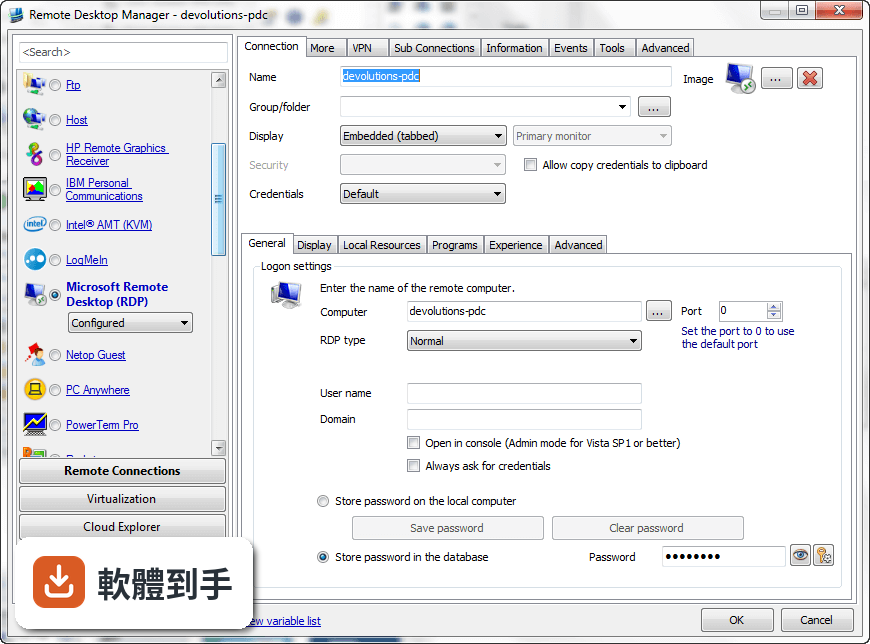
04多人協作時,權限怎麼控制?
它支援共用資料庫和角色權限控管(Role-Based Access Control),可以設定不同成員只能看到或操作特定資料夾與連線。另外也提供兩步驟驗證(2FA)和稽核報表,能記錄誰在什麼時間連了哪台機器。這些功能在官方說明中都有提到,但實際設定步驟和權限細部選項,需要安裝後自行摸索。
05快速連線功能怎麼用?
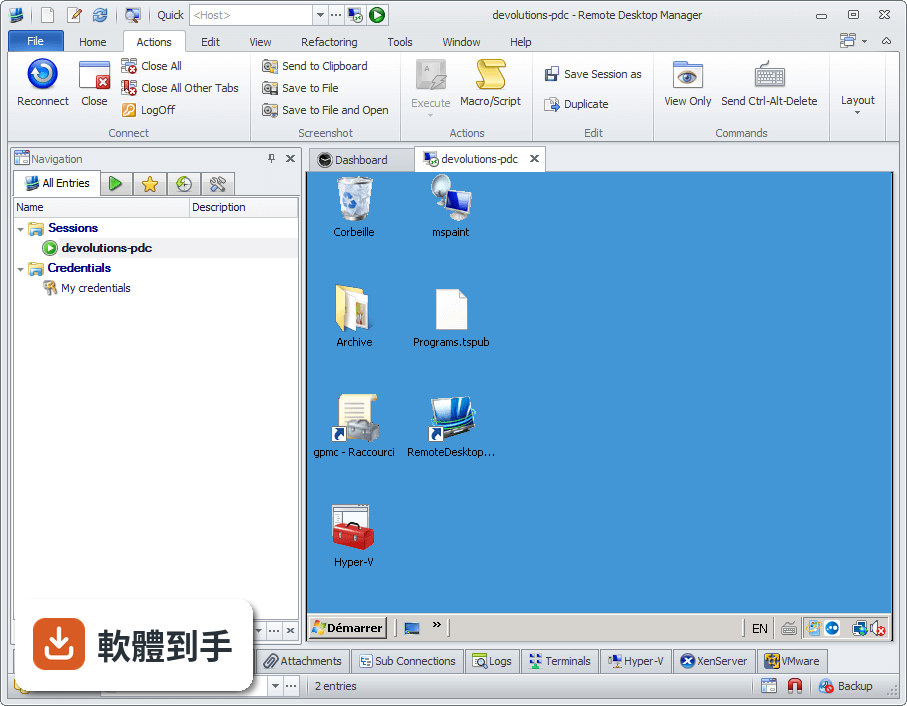
它提供Quick Connect功能,只要輸入主機名稱或IP位址,就能快速用Microsoft Remote Desktop、VNC或網頁方式連線,不需要事先建立完整的連線設定。另外也支援範本(Template),可以把常用的連線參數存成範本,之後套用即可。系統匣圖示的右鍵選單也能快速開啟連線、檢視目前工作階段或切換資料來源。
06什麼樣的人適合用這套軟體?
官方說明指出,它的主要使用者是專業人士、網路管理員和IT部門,用來管理虛擬機器和各種遠端連線。如果你日常工作需要同時維護多台伺服器或虛擬機器,而且連線方式混雜多種協定,這套軟體能幫你把連線資訊集中管理。如果只是偶爾遠端連一兩台電腦,用系統內建的遠端桌面就夠了。
07個人使用者用得上嗎?
官方說明提到它可以在免費模式下使用,且「幾乎所有專業使用者都會滿意」,只有需求較高的人才需要升級到Enterprise方案。不過要注意,這套軟體的授權型式是Trial,也就是試用版,官方註明30天試用期。免費模式具體能用哪些功能、試用期滿後是否還能繼續用,需要自行向開發商確認。
08新手容易上手嗎?
官方列出的缺點之一就是「對初學者來說設定可能較複雜」。它需要先建立或開啟資料庫,再逐一新增連線、設定帳號密碼、組織資料夾,對沒接觸過集中管理概念的人來說,學習曲線比較陡。如果你只是要連一兩台機器,直接用Windows內建的遠端桌面或PuTTY會簡單很多。
09介面只有英文,看不懂怎麼辦?
這套軟體的介面語系是English,沒有繁體中文介面。如果你對英文介面不熟悉,操作上會比較吃力,尤其是權限設定、資料庫管理這類進階功能,選項多且用語專業。這種情況下,可以考慮改用有中文介面的遠端連線工具,或先看官方文件確認每個欄位的意思再動手設定。
10只有 Windows 版,用 Mac 的人能用嗎?
官方資料顯示它支援的作業系統是Windows 7到Windows 11,以及Windows Server系列。雖然官方頁面有「Download Remote Desktop Manager for Mac」的連結,但那是另一個產品,功能可能與Windows版有差異。如果你主要使用Mac,建議先確認Mac版的功能是否完整,或考慮其他跨平台的遠端連線管理工具。
11免費版和付費版差在哪?
官方說明指出,進階功能需要付費授權,免費模式適合一般專業使用者,而Enterprise方案是為「有數百名使用者的大型企業」設計,解鎖更多工具和服務。具體哪些功能被鎖住、付費方案怎麼計價,官方頁面沒有列出細節,需要到Devolutions官網查詢或聯絡銷售人員。
12和 PuTTY、MobaXterm 比起來,它有什麼不同?
PuTTY是單一的SSH和Telnet用戶端,MobaXterm則整合了多種網路工具和Unix命令,兩者都偏重「連線工具」本身。Remote Desktop Manager的定位不太一樣,它比較像「連線的總管」——本身不取代PuTTY或VNC,而是把這些程式的連線設定、帳號密碼、使用權限集中管理。如果你只需要連SSH,PuTTY就夠;如果連線很多且要管權限,才需要這種集中管理工具。
下載與官方連結
前往官方網站 下載 Remote Desktop Manager Enterprise
Setup.RemoteDesktopManagerFree.2020.3.12.0.msi · 216 MB · 連結指向軟體原廠
版本紀錄
- 2026-11-02 Remote Desktop Manager Enterprise 2026.3.16.0 223 MB
- 2026-10-16 Remote Desktop Manager Enterprise 2026.3.15.0 222 MB
- 2026-10-10 Remote Desktop Manager Enterprise 2026.3.13.0 222 MB
再看 5 筆
- 2026-10-01 Remote Desktop Manager Enterprise 2026.3.12.0 217 MB
- 2026-09-26 Remote Desktop Manager Enterprise 2026.3.10.0 216 MB
- 2026-09-24 Remote Desktop Manager Enterprise 2026.3.9.0 215 MB
- 2026-09-20 Remote Desktop Manager Enterprise 2026.3.8.0 162 MB
- 2026-09-17 Remote Desktop Manager Enterprise 2026.3.5.0 162 MB
這一版改了什麼
What's new in this version:
New:
- Added Password Hub Business data source
- Added Password Hub Personal data source
- Added support for HashiCorp Vault
- Added support for temporary access requests
- Added Topicus credential entry type
Improved:
- Deprecated AuthAnvil credential type
- Deprecated Chrome Remote Desktop in 32 bit
- Deprecated Firefox in 32bit
- Deprecated Secret Server version 8 and 9
- Removed Access data source support
- Added "de" endpoint for Passportal, and added default value of "us"
- Added "Disable vault dashboard overview" option in File > Options > User Interface > Dashboard
- Added "required (when available)" option for session recording
- Added $GROUP$ variable to the list
- Added a customizable timeout to before connection PowerShell events. The default 10sec timeout was not enough for certain operations
- Added a policy to disable the Azure interactive persistent login option on DPS data sources
- Added a way to be able to add custom properties objects in a PasswordList item with the PowerShell module
- Added an option in RDP entries to send credentials in Azure AD format
- Added an option in the before connection message prompt event to prompt for the value of a variable
- Added an option to set the tabbed view at the bottom of the main window
- Added Associated Email and UPN values to the username/password entry and made them usable through the Username Format field
- Added automatic check for update every every 12 hours
- Added clipboard features for credit cards
- Added description field for port forward entry
- Added Edit Permissions menu
- Added enable/disable SSH algorithm option
- Added error message to VMWare synchronizer when unable to connect properly
- Added filter to Select Template window
- Added 'find' and other toolbar functionalities to Telnet entry
- Added folder path from file explorer to overview
- Added global event log for terminals (DevolutionsTerminal.log)
- Added GPO to prevent reveal password under all circumstances (including admin)
- Added group host and IP to overview
- Added home page display to the overview of Web Browser entries
- Added import and export for "My personal credentials"
- Added key shortcuts ctrl + shift + c | v for copy and paste
- Added license expiration warnings in the root dashboard and in the notifications
- Added logs when changing file content of Spreadsheet Editor, Rich Text Editor and Text Editor
- Added multi-select and multi-launch option to Hyper V Console
- Added My Account Settings for Bitwarden credential
- Added non standard shell support in SCP
- Added option to bypass Firefox prompt when using basic authentication
- Added option to disable clipboard clear on copy username and copy password actions
- Added OU column to AD computer grid
- Added paste delay to SSH Shell
- Added permission check for PAM approval and check in through the root overview
- Added policy to force default system proxy
- Added possibility to use either the default port, the entry's port or the template's port when opening with a template
- Added refresh of root overview on a timer and with a button
- Added search in tree based on the selection
- Added session recording for FTP, SFTP, WebDav, S3 and SCP
- Added Shell to SCP for commands
- Added Silent Mode to all Synchronizer entries
- Added Slider confirmation for Copy Name
- Added Sort Priority selection to Synchronizer type entries
- Added specific monitor support to RDP
- Added support for connecting to MySQL data sources via SSH tunnels
- Added support for mandatory session properties
- Added support for non-latin keyboards in VNC
- Added support for password list item in password usage report
- Added support for Secure Gateway for SFTP, FTP and SCP entries
- Added support for the resurrection of attachments
- Added templates description
- Added the "Add to favorite" option to private vault entries
- Added the categories from Management tools in the custom UI settings
- Added the folder column to the Secret Server credential selection
- Added the import/export feature to the terminal colors settings
- Added the option to exclude shortcuts when exporting connections
- Added the option to search for entries in sub-folders in Secret Server
- Added the option to select in navigation pane for the multi vault search
- Added the port knock feature to SSH shell, SSH tunnel and Port Forward entries
- Added the variables button to the Synchronizer entries properties
- Added variables for $DATE_YEAR$, $DATE_MONTH$ and $DATE_DAY$
- Added wait progress to applying security provider changes
- Added window for Background Services in menu mode
- Changed how 1Password (web) works to better support large amounts of vaults and accounts
- Changed in Terminal the order of preference between the usertauth methods "password" and "keyboard-interactive" for better 2FA support
- Clear Remote Desktop Gateway credentials when they aren't used to prevent possible issues
- Disabled view documentation button when offline
- Having the [Ctrl] key pressed while starting RDM will force show data source select prompt
- Improved Mateso Password Safe so logins are remembered avoiding repeated MFA prompts in the same usage of RDM
- Improved New-RDMUser cmdlet when creating a new user with AzureAD authentication that was inconsistent from creating the user from the UI
- Improved performance when changing the status on a folder or on multiple entries
- Improved Supremo add-on
- Improved the ARD lock screen feature
- Improved the behavior when connecting with a user that has no access to shared vaults
- Improved the navigation for the documentation pages
- Improved the private vault search to show a credential selection prompt when more than one result is found
- Improved Vault dashboard performance
- Improved View Entry History to allow revert if the user has the Edit permission
- Improved VNC and ARD integration
- Made the Paste Delay option minimal value 0ms, to allow mimicking PuTTY
- Removed "Email required" in user management for SQL Server/MySQL/MariaDB data sources
- Removed Add and View attachment for Macros
- Removed the EnableCredSSPSupport option to get rid of the confusion with the NLA option
- Resolved possible issue with the default admin not created in a new empty data source
- Resolved possible performance issue when editing a session for non-admin users with many entries
- SophosVPN and OpenVPN now refer to the proper temporary file path
- SophosVPN now properly sends the OTP in "authentication file" mode-
Fixed:
- Fixed /silent argument
- Fixed a bug on a hidden session that had multiple connection
- Fixed a bug preventing reports to be exported from the command line when connecting to a DPS datasource
- Fixed a few issues when saving Secure Gateway settings
- Fixed a possible authentication problem with SSH
- Fixed an issue in Terminal for the 256 colors mode support
- Fixed an issue where viewing the password of a data entry connection in the user vault wouldn't prompt for credentials when set to Prompt on connection
- Fixed an issue with Set-RDMSession in the PowerShell Module when saving an entry from a vault in another vault that would throw an error
- Fixed an issue with the close View Password with the Escape key
- Fixed an issue with the pin to taskbar during the application update
- Fixed an issue with the progress report on multiple file transfers in SCP
- Fixed attachment not working properly on SQLite
- Fixed Bank address showing line breaks in properties and in overview
- Fixed CapsLock not working in VNC
- Fixed Create Web URL for credentials
- Fixed CSV export displaying description on multiple lines
- Fixed CSV Importer not supporting slash in folder name
- Fixed documentation pages getting mixed when there are more than 16 pages
- Fixed Domain in rdm:// URL not being passed to connection
- Fixed how Sophos VPN sends the OTP
- Fixed import for mRemote to target current folder
- Fixed inline certificate parameters not saving properly in OpenVPN entries
- Fixed issue loading from inventory in RAdmin entry
- Fixed issue not showing blank template when available
- Fixed issue opening multiple WinSCP embedded entries that use a private key
- Fixed issue saving entry in inherited mode prompting for credentials
- Fixed issue saving shortcuts when you have restricted rights
- Fixed issue setting host of inventory report template
- Fixed issue when creating spreadsheet with the same name as a previous one
- Fixed issue where doing a batch edit in offline mode could wipe data
- Fixed issue where doing a status change on a folder in offline mode could wipe data
- Fixed issue where doing a status change on a folder in the private vault could wipe data
- Fixed issue where invalid Boolean values in mRemoteNG XML would cause the import to fail and an error prompt
- Fixed issue with Chrome session recording freezing RDM in certain cases
- Fixed issue with Data source diagnostic not showing connections in the "Size" tab in SQL Server
- Fixed issue with EC2 synchronizer when using templates
- Fixed issue with Jump and specific settings needing a refresh before applying properly. Also fixed small UI issue in jump settings window
- Fixed issue with Passportal IDs not being an Int32
- Fixed issue with SCP not taking the private key passphrase correctly
- Fixed issue with the user name format when there is no domain in the credential
- Fixed issue with username format not working when linking an existing SSH in VPN/SSH/Gateway tab
- Fixed issues with Amazon S3 endpoints
- Fixed modified date log issue on documentation on the first update
- Fixed multi vault description search
- Fixed multiple DODB issues, including issues with expired license
- Fixed New-RDMUser to create new user with Domain authentication with the PowerShell module
- Fixed password analyzer not showing forbidden password
- Fixed possible crash saving Hyper-V synchronizer entry
- Fixed possible crash when browsing dynamic value for Passwordstate entry
- Fixed possible crash when using Azure AD format in RDP
- Fixed possible issue where vault selector was missing
- Fixed possible issue with Add-in-root not allowed for restricted users assigned to groups
- Fixed PowerShell module couldn't be loaded when the option "Use application password" was used with "Encrypt local files using the application password"
- Fixed proxy settings in SCP
- Fixed select all / unselect all button in role vault assignment
- Fixed Sophos Connect client not working with credentials from repository
- Fixed sort priority issue in Password list
- Fixed SSH Tunnel VPN mode being applied even when the Tunnel itself is launched as the VPN of another entry
- Fixed the Add-RDMRoleToUser cmdlet that was allowing to add an user to a role several times to a role
- Fixed the Add-RDMRoleToUser cmdlet that was allowing to add an user to a role several times to a role
- Fixed the prompt for comment on password revealed showing the password before the comment was entered
- Fixed UI issue with template settings tab appearing when unsupported
- Fixed Web data source not connecting properly
- Fixed X2Go combobox text issue