
這是歷史版本頁面 — 看 SiSoftware Sandra Lite 最新版本
電腦跑分想比一比,SiSoftware Sandra Lite 能測什麼
 SiSoftware Sandra Lite 2011 (17.15)
資料更新 2010-11-09
閱讀約 7 分鐘
你剛組好新電腦,或是覺得舊電腦最近跑起來卡卡的,想知道問題到底出在 CPU、記憶體還是硬碟。你打開工作管理員看了半天,只知道使用率很高,卻看不出是哪個零件在拖後腿。你想跑個分數跟別人的電腦比一比,又不想花錢買貴鬆鬆的測試軟體,於是開始找免費的效能測試工具,但下載了一堆來路不明的軟體,怕中毒又怕測出來不準。
一般人最直覺的做法是上網找「某某軟體評測」,但那些文章多半是講新手機或新顯卡,跟你的電腦型號對不上。不然就是裝了試用版,跑完一次就鎖住進階功能,想看詳細報告還要付費解鎖。這類系統診斷工具的切入點,是直接讀取你電腦裡每個零件的真實型號、時脈、溫度和實際跑分,讓你能拿這些數據去跟別人的電腦比對,找出效能瓶頸在哪。它不負責幫你變快,而是負責告訴你「現在這台電腦到底是什麼狀態」。
01SiSoftware Sandra Lite 這套軟體到底能測什麼東西?
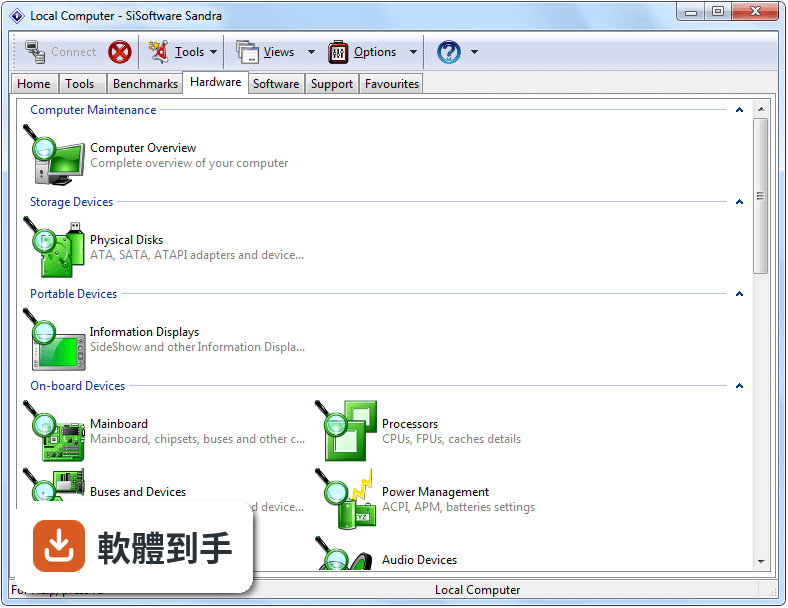
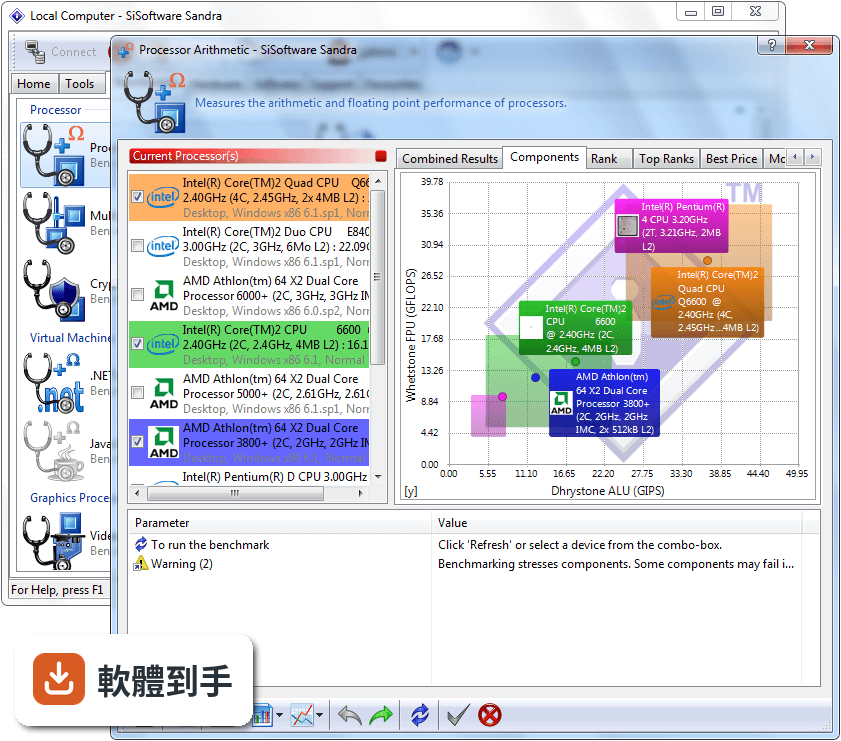
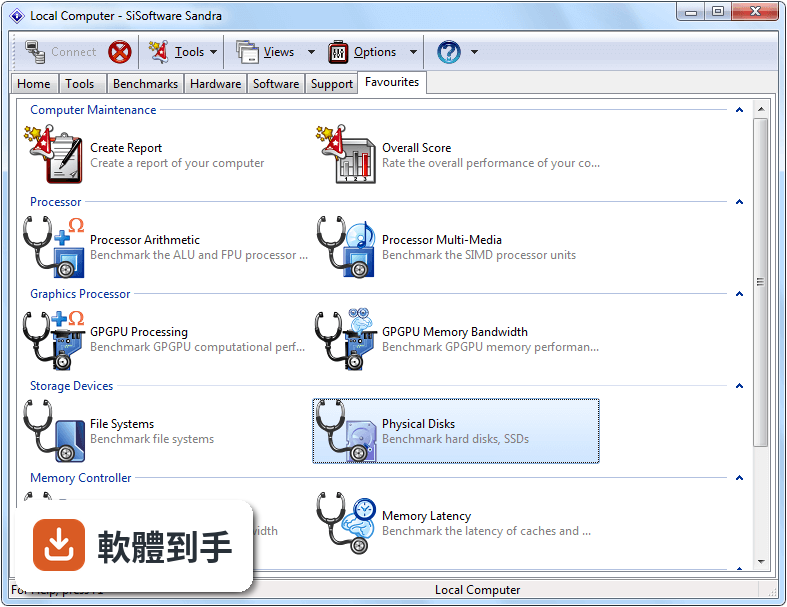
它主要做兩件事:一是列出電腦的詳細硬體資訊,包括 CPU、顯示卡、記憶體、主機板、硬碟、網路裝置的型號與規格;二是提供效能測試,針對 CPU、GPU、記憶體和儲存裝置跑分,跑完可以跟資料庫裡其他使用者的成績比較。另外也有溫度監控和網路速度測試的功能,算是把「看規格」和「測效能」包在一起的工具。
02我電腦開機很慢,用這套軟體找得出原因嗎?
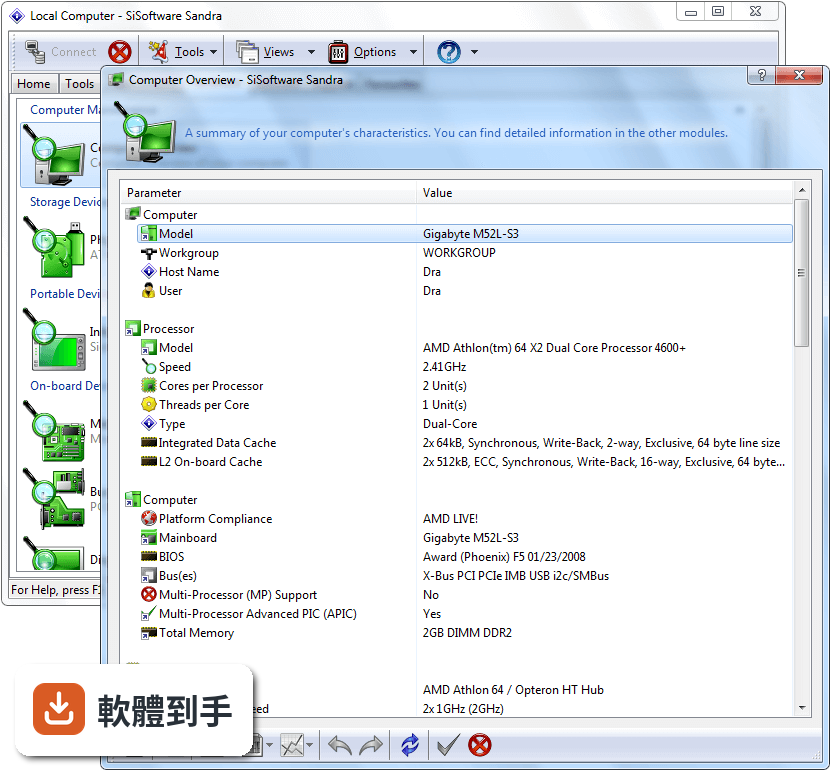
它可以幫你縮小範圍。先到「System Summary」看整體規格,確認硬碟是不是傳統機械式、記憶體容量夠不夠,再到「Benchmark」分別測試 CPU 和儲存裝置的效能。如果儲存裝置的分數明顯偏低,那開機慢很可能就是硬碟造成的。不過它不會直接告訴你「哪個程式拖慢開機」,這部分還是要配合工作管理員或開機啟動管理來判斷。
03跑分出來的數字我看不懂,要怎麼知道自己的電腦算強還是算弱?
跑完每一項測試後,軟體會顯示一個分數,旁邊通常有比較基準,可以對照同型號或相近規格的硬體成績。你也可以把分數記下來,上網搜尋「你的CPU型號 + Sandra 分數」,看看別人的測試結果。要注意的是,分數會受當下溫度、背景程式和驅動版本影響,所以跑分前最好關掉其他應用程式,讓數據比較有參考價值。
04這套軟體可以監控 CPU 或顯示卡的溫度嗎?
可以。在「Cooling Information」或溫度相關的模組裡,可以看到 CPU、主機板等元件的溫度讀數,也能觀察系統在負載下的溫度變化。不過它的溫度顯示是即時讀取,不像專門的監控軟體那樣有長時間的曲線記錄。如果你需要持續記錄溫度變化,可能還是要搭配其他工具。
05我想知道這台電腦能不能跑某個新遊戲,用它可以測嗎?
它沒有直接跑遊戲來測幀數的功能,但可以透過效能測試來推估。例如 GPU 的運算測試分數如果偏低,跑大型 3D 遊戲可能就會吃力。另外它有「Compatibility Testing」功能,可以檢查硬體和軟體的相容性,協助你判斷升級方向。但最準確的方式還是直接看遊戲的建議配備,再對照你電腦的規格。
06這套軟體適合完全不懂電腦的人用嗎?
介面是英文的,但每個測試和功能旁邊都有簡短說明,分類也算清楚,照著點就能跑完基本測試。如果你只是想看電腦規格,進「System Summary」就能看到重點資訊,不需要懂太多技術名詞。不過如果你連「CPU」和「記憶體」是什麼都不太確定,那這套軟體對你來說可能還是太硬,建議先找中文的硬體教學文章補點基礎。
07它跟 AIDA64 或 Speccy 比起來,差在哪裡?
這三套都是看硬體資訊的工具,但定位不太一樣。Speccy 比較單純,主要就是列出規格,操作簡單;AIDA64 的資訊深度和測試項目都很完整,但付費版才解鎖全部功能;Sandra Lite 則是免費版就提供不少測試項目,但介面比較老派,而且只有英文。如果你主要是想跑分比較,Sandra Lite 的免費功能會比 Speccy 多;如果你要的是最完整的硬體資訊,AIDA64 的付費版會更全面。
08我只有一台舊電腦,跑得動這套軟體嗎?
它支援 Windows 7 到 Windows 11,也有 32 位元版本,所以老電腦基本上都能安裝。安裝時可以只選需要的模組,不需要全部裝,能省點空間。不過它本身佔用約 150 MB 的磁碟空間,跑測試時會讓 CPU 和記憶體滿載一段時間,舊電腦跑起來可能會覺得卡,這是正常的,測完就恢復了。
09這套軟體是免費的嗎?會不會用一用要付錢?
Lite 版是免費的,授權型式是 Freeware,提供個人和教學用途免費使用。但它的功能比付費的 Professional 版少,某些進階分析工具和更深入的測試項目在 Lite 版可能沒有。如果你只是要基本規格和跑分,免費版夠用;如果之後需要更專業的分析,才需要考慮升級。
10這套軟體有中文介面嗎?
官方說明提到安裝程式內含多種語言版本,包括繁體中文和簡體中文,但介面語系欄位標示為 English,實際安裝時能不能切換成中文,需要自己下載安裝確認。如果你完全無法接受英文介面,這點要先有心理準備,可能得花點時間摸索選單位置。
11我聽說這套軟體很久沒更新了,現在還適合用嗎?
它的版本紀錄顯示近兩年內仍有更新,不是放著不管的軟體,但更新頻率不算高。如果你只是要測一般電腦效能,它支援的 Windows 7 到 11 涵蓋了大多數人的系統,基本功能都還正常。不過如果你用的是最新的硬體或 Windows 版本,建議先確認它能不能正確辨識你的裝置,再決定要不要用它當主要測試工具。
12什麼樣的情況不建議用這套軟體?
如果你只需要看硬體規格、不想跑分,那 Speccy 這類更簡單的工具會更省事;如果你要的是長時間溫度記錄或完整的遊戲效能測試,它也不是適合的工具。另外它只有 Windows 版本,macOS 或 Linux 使用者完全無法使用。介面只有英文這點,對不習慣英文介面的人來說也是個門檻,安裝前要考慮清楚。
下載與官方連結
前往官方網站 下載 SiSoftware Sandra Lite
san1715.exe · 56.53 MB · 連結指向軟體原廠
版本紀錄
- 2025-11-17 Sandra Lite 31.137 191.9 MB
- 2023-08-08 Sandra Lite 2021 31.133
- 2023-04-02 Sandra Lite 2021 31.119
再看 5 筆
- 2022-12-16 Sandra Lite 2021 31.115
- 2022-11-19 Sandra Lite 2021 31.112
- 2022-10-18 Sandra Lite 2021 31.109
- 2022-09-07 Sandra Lite 2021 31.104
- 2022-07-28 Sandra Lite 2021 31.99
這一版改了什麼
What's new in this version:
# New Benchmark: Media Transcode
- Measures the transcoding bandwidth converting media from one format to another.
* Why? Most devices cannot play video recorded by a camcorder. Such media would most likely require to be edited first and then to be transcoded (possibly transparently) when copied to a device for playback. With current high-definition media such an operation can be a lenghthy process, thus any performance improvements will save a lot of time.Using the new Media Foundation in Windows 7, we measure WMV (e.g. Movie Maker) > MP4/H264 and MP4/H264 (e.g. phone video) > MP4/H264 using various profiles (HD TV 720p, SD TV 480p, tablet, phone, etc.).The benchmark can compare the performance of hardware accelerated media transcoders (e.g. GPUs) with multi-threaded software (CPU) transcoders.
# New Benchmark: GPGPU Cryptography
- Measures the encryption, decryption and hashing bandwidth of GPGPUs
* Why? While modern CPUs include special instruction sets (Intel AES, VIA PadLock) to accelerate cryptographic operations, are they a match for modern GPGPUs? The benchmark uses the same workload as the CPU Cryptography benchmark allowing direct comparison of modern CPUs and GPGPUs of the most common algorithms in use today (AES256, AES128, SHA256, SHA1).OpenCL 1.x, DirectX 11 Compute Shader and CUDA3 3.x are supported. Multiple video cards are supported and CPUs can also be used in parallel in OpenCL. The benchmark allocates workload based on the respective processing power of GPGPUs and CPUs.
# New Benchmark: Blu-ray
- Measures the performance of Blu-ray optical drives
* Why? While Blu-ray won the high-definition war some time ago, it has finally become affordable for computer users as a replacement for DVD. We have thus added a brand new Blu-ray Test Disk to measure the performance of the latest drives on the market, adding to the existing DVD and CD Test Disks which are still required to measure DVD and CD disk performance.
# Updates:
- AVX/FMA instruction set support for future CPUs
- Processor Multi-Media, Processor Cryptography, Memory Bandwidth, Cache and Memory Benchmarks
* Using 256-bit register width (instead of 128-bit of SSE/2/3/4) yields further performance gains through greater parallelism in most algorithms. Combined with the increase in processor cores and threads we will soon have CPUs rivaling GPGPUs in performance.
# Measure each operation report min-max score as well as average
* Why? The maximum time an operation can take is just as important as the average time; if the measured performance varies greatly from test to test, the response time is not consistent and thus the performance unreliable. If a minimum performance is required, then a slower but consistent device would be preferable to a faster but inconsistent one.Using the submitted scores to the Ranker, we further measure the consistency of the performance of a device; we can also verify whether the measured performance falls between the range of performance expected for the tested device.
# Geometric mean for aggregate scores
* Why? When combining components of very different magnitudes, a geometric mean is more meaningful than an arithmetic one. This makes comparing the relative performance of very different devices much fairer, especially between platforms (e.g. desktop to mobile or to server).
# Ranker Engine: more useful
* Why? The Ranker provides additional reference results by aggregating submitted results from users - which are downloaded by Sandra automatically. We had over 200,000 submissions just for one benchmark in 2010 which allowed the generation of 1,000s of new results. The Ranker can also be searched for specific results.By creating an account, the Ranker automatically backs-up and restores user scores to any installation.
# Price Engine: very much useful
* Why? The Price engine enhances the experience by providing product pictures and additional specifications - as well as the the latest price. It allows the calculation of important metrics like Performance vs. Price and Capacity vs. Price (for storage media) which are extremely useful when making comparisons. All this is done automatically rather than manually searching for pricing on stores.
- Key features
* 3 native architectures support (x86, x64, ARM).
* 5 native virtualisation technologies support (Virtual PC 7, Virtual Server 2005, Hyper-V Server2, VMware Server2, VMware WorkStation/Player)
* 5 native GPGPU platforms support (OpenCL, DirectX 11 Compute Shader/DirectCompute, CUDA, STREAM1).
* 4 native Graphics platforms support (DirectX 11, DirectX 10/10.1, DirectX 9, OpenGL 2.0).
* Huge official hardware support through technology partners (Intel, AMD/ATI, SiS, VIA).
* 6 language versions (English, German3, French3, Italian3, Russian3, Japanese3) in a single installer.
* Enhanced Sandra Lite version (free for personal/educational use)
- Notes:
* Deprecated, will be removed in the next release.
* Enterprise versions only.
*Not available at publication, will be updated later on.