
這是歷史版本頁面 — 看 SmartFTP 最新版本
SmartFTP 要收費,為什麼還有人用它
 SmartFTP 10.0.3105.0 (32-bit)
資料更新 2023-05-21
閱讀約 6 分鐘
你手上有一批檔案要傳到遠端伺服器,可能是網站要更新、資料要備份,也可能是要把幾個 GB 的檔案丟到雲端空間。你打開平常慣用的免費 FTP 軟體,連線、上傳,一開始還算順利,但檔案一多、連線一久,就開始卡住、斷線,甚至傳到一半整個程式沒有回應。你重新連線再傳一次,結果又斷在同一個地方,一整個下午就耗在這上面,檔案還沒傳完。
免費的 FTP 工具確實能解決「偶爾傳個檔案」的需求,但當你每天都要傳、一次傳上百個檔案、或者需要固定時間自動同步的時候,那些工具就顯得不太夠用。有的不支援排程,有的連線不穩,有的介面太陽春,連資料夾比對都要手動慢慢看。於是有人轉向功能更完整的付費軟體,這類工具的切入點不是「能不能傳檔案」,而是「能不能穩定、自動、安全地把傳輸這件事管理好」。
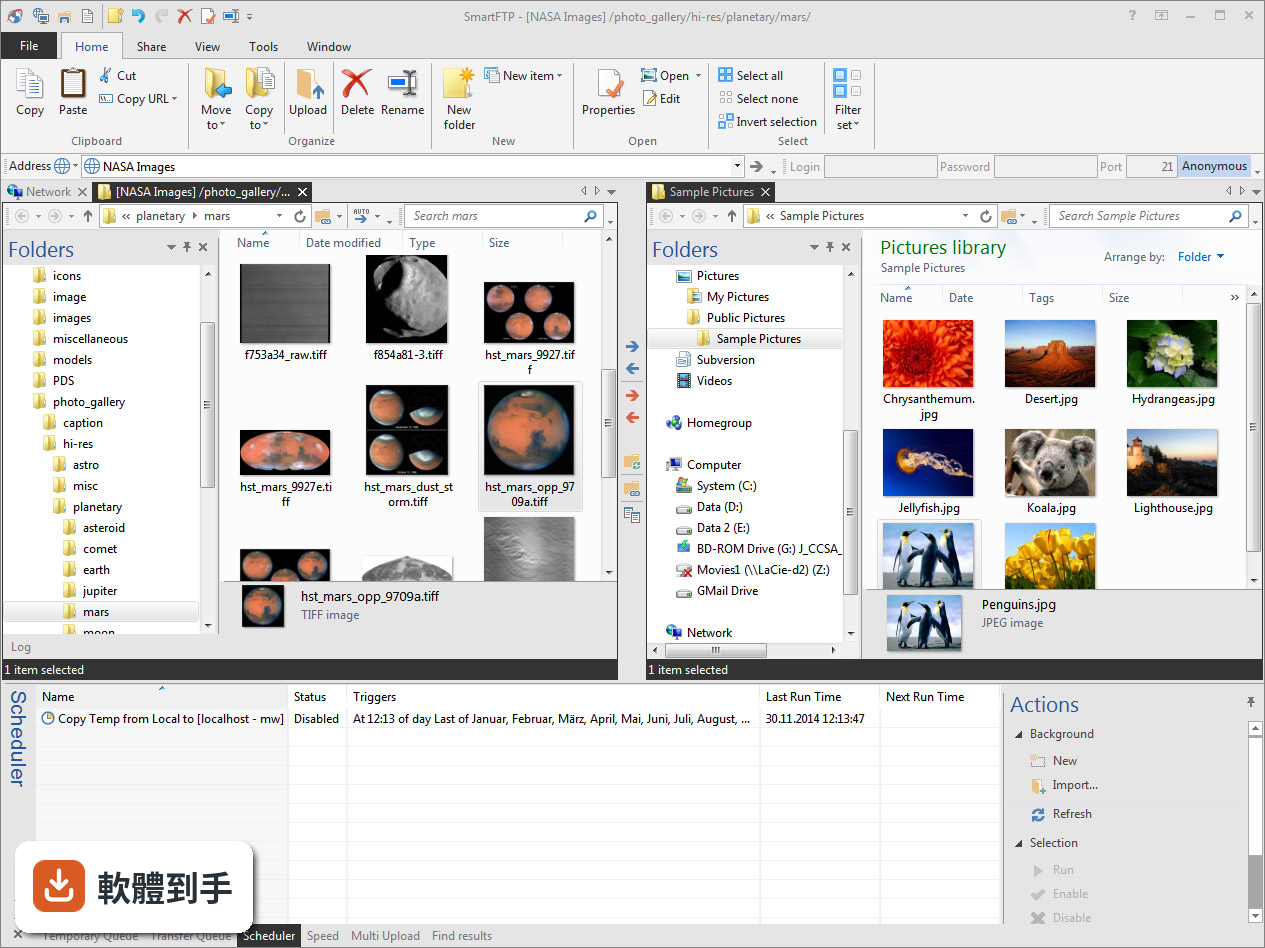
01SmartFTP 到底能做什麼,跟一般免費 FTP 軟體有什麼不同?
它是一套 Windows 上的 FTP 用戶端,除了基本的 FTP 傳輸,還支援 FTPS、SFTP、WebDAV,以及 Amazon S3、Google Drive、OneDrive 等雲端儲存服務。也就是說,它不只是連傳統 FTP 伺服器,也能直接存取多種雲端空間,在同一個介面裡管理不同類型的遠端位置。
02它可以自動排程傳輸嗎?我每天都要固定備份一次網站資料。
可以。它具備任務排程和同步功能,你可以設定時間讓軟體自動執行上傳或下載,不需要每天手動打開程式按傳輸。這對定期備份、定時同步這類重複性工作來說,是它比免費軟體明顯多出來的能力。
03傳輸過程的安全性怎麼處理?我不想檔案在網路上裸奔。
它支援 TLS/SSL 加密,FTPS 和 SFTP 都有涵蓋,傳輸過程中的資料會經過加密處理。如果你連的是不支援加密的傳統 FTP 伺服器,那就無法靠用戶端強制加密,這點要看你伺服器端的設定。
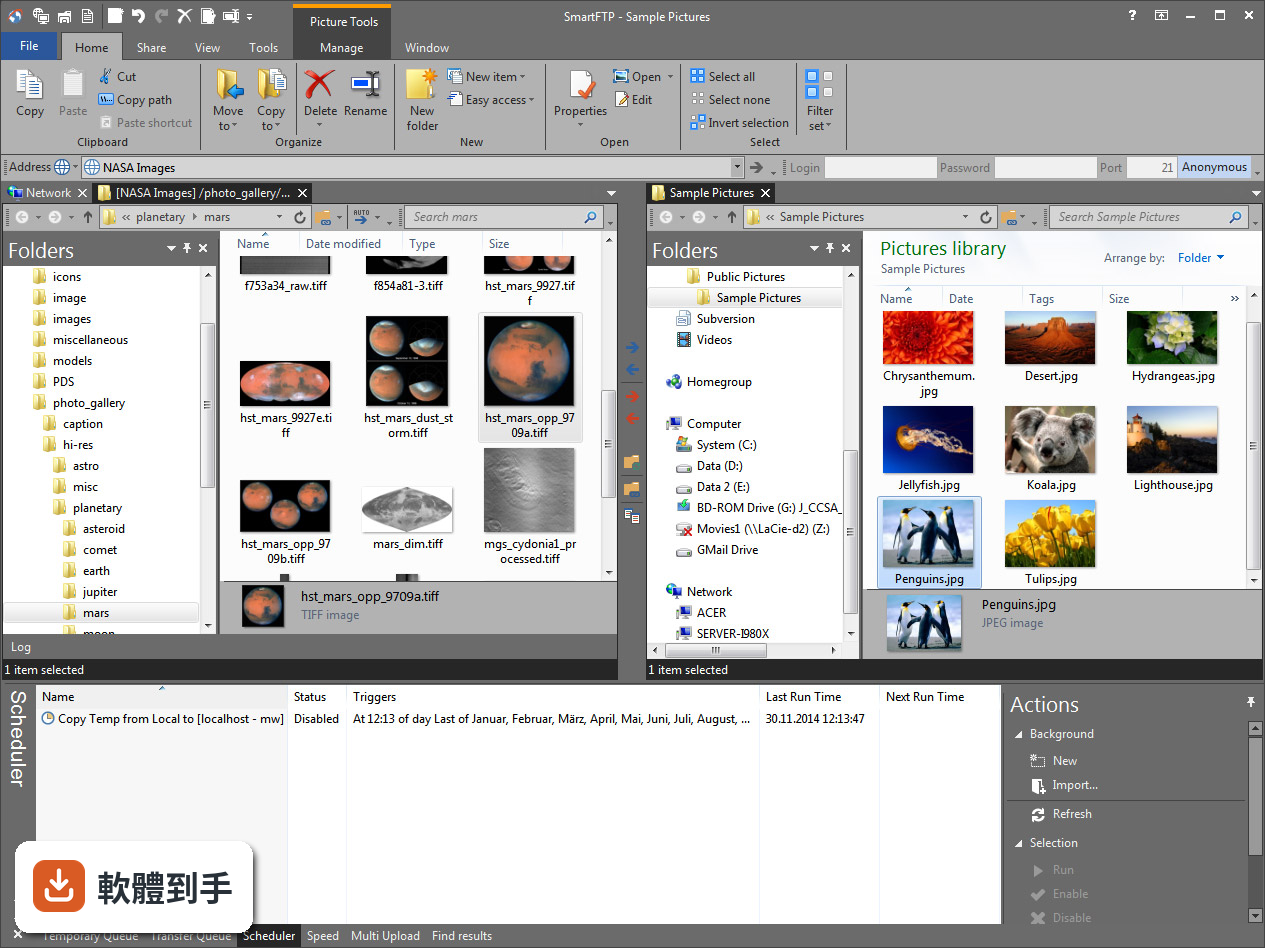
04它能不能同時傳多個檔案?一次傳一百個小檔案會不會很慢?
它支援多連線同時傳輸,可以同時處理多個檔案的上傳或下載,也有傳輸佇列功能,讓你把大量檔案排進佇列依序處理。實際速度取決於你的網路頻寬和伺服器端的連線數限制,軟體本身有頻寬控制功能,可以調整上下傳速度。
05除了傳檔案,它還有什麼附加功能?
它內建圖片縮圖預覽,可以在下載前先看檔案內容;也有整合編輯器,可以直接從伺服器開啟檔案修改後存回,不需要先下載到本機再上傳。另外介面是分頁式的,類似 Windows 檔案總管,可以同時開多個連線分頁切換操作。
06我是只會用 FileZilla 的初學者,這套軟體會不會太難?
基本操作邏輯跟一般 FTP 用戶端差不多:開啟新連線、輸入伺服器位址和帳號密碼、左右兩個視窗拖曳檔案。官方說明表示它適合初學者,但進階功能如排程、同步、多協定管理需要一些時間學習。介面是英文的,如果對英文介面不熟悉,初期會需要適應。
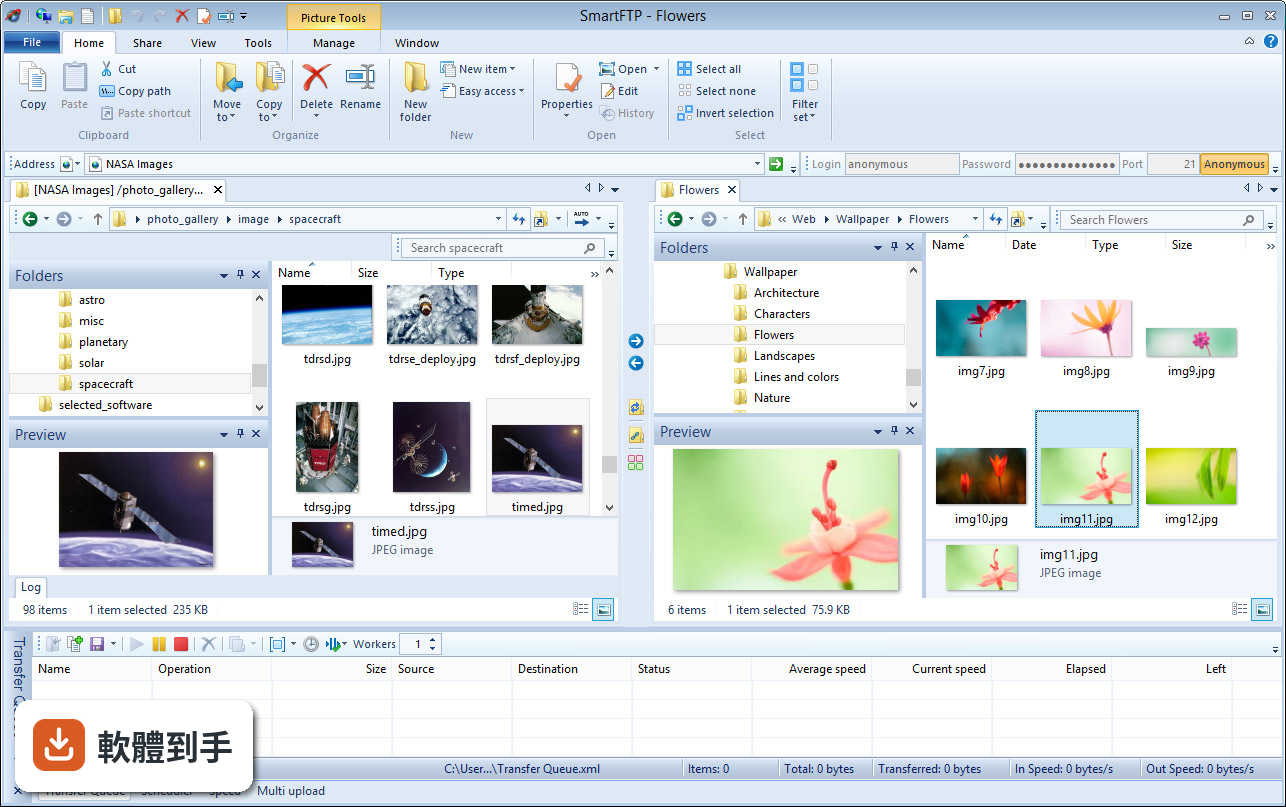
07它支援哪些雲端服務?我主要用 Google Drive 和 OneDrive。
官方資料顯示它支援 Amazon S3、Backblaze B2、Google Drive、OneDrive 等雲端儲存服務。你可以用同一套軟體連線這些雲端空間,不需要分別安裝各自的桌面應用程式。不過實際連線設定方式,需要以官方文件為準。
08我平常只傳幾個檔案到學校的 FTP,偶爾用一次,適合買嗎?
如果你的需求就是偶爾傳幾個檔案,免費的 FileZilla 或 WinSCP 就能滿足,不需要付費。這套軟體是付費授權,只有 30 天試用期,之後要繼續使用就得買授權,對輕度使用者來說成本偏高。
09它跟 WinSCP 比起來,哪個比較好?
兩者定位不同。WinSCP 是免費開源軟體,支援 SFTP 和 SCP,在檔案傳輸和腳本自動化方面很成熟,而且有 60 人評分。SmartFTP 是付費軟體,支援的協定和雲端服務種類較多,但介面只有英文,且試用期後需付費。如果你只需要 SFTP 傳檔,WinSCP 是免費且足夠的選擇。
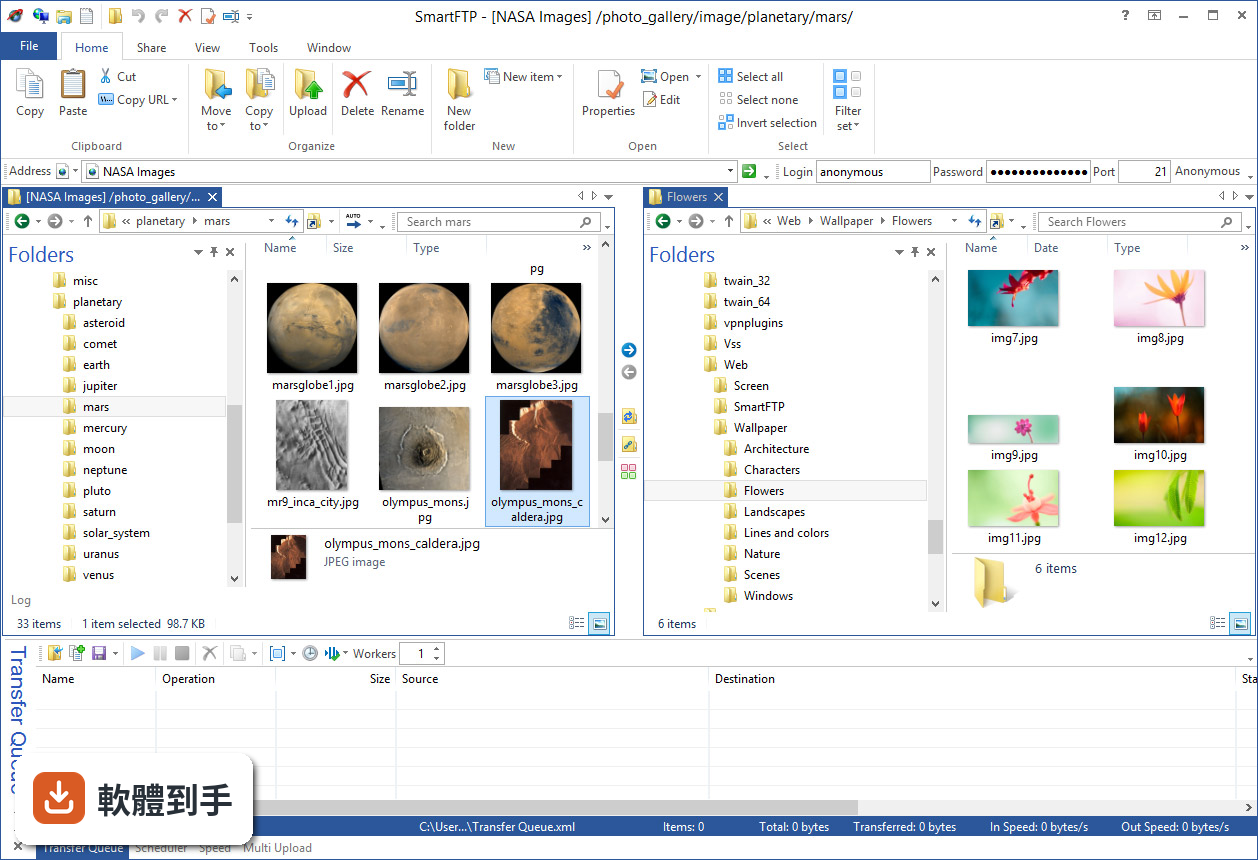
10它的介面只有英文,對看不懂英文的人來說會很吃力嗎?
介面確實只有英文,沒有中文語系。基本操作如連線、拖曳上傳下載的按鈕位置不難辨認,但進階功能如排程設定、同步規則、頻寬控制這些,需要閱讀英文介面和說明文件。如果英文閱讀有困難,操作門檻會明顯提高。
11這套軟體是不是很久沒更新了?我擔心買了之後沒人維護。
根據收錄的版本紀錄,它近 12 個月有 2 次更新,近 24 個月也是 2 次,更新頻率不算頻繁,但也不是完全停滯。如果你很在意軟體維護狀況,可以到官方網站確認最新版本和更新日誌,再決定是否購買。
12我看到有人說 FileZilla 是免費的,功能也夠用,那 SmartFTP 的優勢到底在哪?
FileZilla 是免費開源軟體,在 FileHorse 上有 316 人評分,是這幾套 FTP 用戶端中評分人數最多的,代表使用者基數大、討論多。SmartFTP 的優勢在於多協定支援、雲端服務整合、排程自動化這些進階功能,但這些功能是否值得付費,取決於你的使用頻率和需求複雜度。如果只是基本 FTP 傳檔,免費工具確實足夠。
下載與官方連結
SFTPMSI86.exe · 連結指向軟體原廠
版本紀錄
- 2026-10-29 SmartFTP 10.0.3334.0 (64-bit) 10.8 MB
- 2026-10-15 SmartFTP 10.0.3333.0 (64-bit) 10.8 MB
- 2026-10-07 SmartFTP 10.0.3332.0 (64-bit) 10.8 MB
再看 5 筆
- 2026-09-27 SmartFTP 10.0.3331.0 (64-bit) 10.8 MB
- 2026-09-23 SmartFTP 10.0.3330.0 (64-bit) 10.6 MB
- 2026-09-13 SmartFTP 10.0.3328.0 (64-bit) 10.5 MB
- 2026-09-05 SmartFTP 10.0.3326.0 (64-bit) 10.5 MB
- 2026-06-19 SmartFTP 10.0.3325.0 (64-bit) 10.5 MB
這一版改了什麼
What's new in this version:
SmartFTP 10.0.3105.0 (32-bit)
- Change log not available for this version
SmartFTP 10.0.3104.0 (32-bit)
- Change log not available for this version
SmartFTP 10.0.3091.0 (32-bit)
- Change log not available for this version
SmartFTP 10.0.3088.0 (32-bit)
- Change log not available for this version
SmartFTP 10.0.3081.0 (32-bit)
- Change log not available for this version
SmartFTP 10.0.3071.0 (32-bit)
- Change log not available for this version
SmartFTP 10.0.3070.0 (32-bit)
- UI: Improved keyboard navigation
- Updated Scintilla to 5.3.3
- UI: Added dark mode for native dialogs and common controls (Windows 10 19H1 or newer)
- HTTP Digest Access Authentication: Added support for SHA-256 and SHA-512-256 algorithms
SmartFTP 10.0.3060.0 (32-bit)
- Change log not available for this version
SmartFTP 10.0.3054.0 (32-bit)
- Change log not available for this version
SmartFTP 10.0.3053.0 (32-bit)
- Change log not available for this version
SmartFTP 10.0.3052.0 (32-bit)
- Change log not available for this version
SmartFTP 10.0.3051.0 (32-bit)
- Change log not available for this version
SmartFTP 10.0.3037.0 (32-bit)
- Visual Compare: Added a max items threshold. Views with more than 50'000 items will not be compared
- File Monitor pane: Added Size and Date modified columns
- UI: Floating docking panes show an icon in the title bar now
- UI: Controls get clipped instead of compressed when there isn't sufficient space
- UI: Content in a split container is proportionally resized now
- Favorites: Plesk importer updated to support the latest Plesk version
- UI: Improved brower's address band control
SmartFTP 10.0.3036.0 (32-bit)
- Change log not available for this version
SmartFTP 10.0.3035.0 (32-bit)
- Change log not available for this version
SmartFTP 10.0.3030.0 (32-bit)
- Favorites: Removed DreamHost importer as the API to retrieve accounts is no longer availabl
- UI: Improved responsiveness
- Browser: Added "Compare result" column which shows the result of a visual compare operation
- Added ability to associate a Local favorite with a transfer queue task. This is only relevant when scheduling Local to Local transfers
- UI: Added key tip direct access without pressing the Alt key first. Alt+F to open the File menu, Alt+H for the Home tab, Alt+V for the View tab, etc
SmartFTP 10.0.3022.0 (32-bit)
- UI: Added Shift + mouse wheel to scroll horizontally
- Text Editor: Added support for large files (>2GB)
- UI: Storage property page: Replaced 3D pie chart with 2D version for improved readability
- Text Editor: Allow multi selection in file open dialog
- UI: Improved responsiveness, especially with a lot of open tabs
- Updated zlib to 1.2.13
- Text Editor: Improved loading and saving of documents, especially of UTF16 encoded files
- Text Editor: Ctrl+C/Ctrl+X/Ctrl+Ins/Shift+Del now support rectangular selections and copy data in multiple formats (text, rtf, html) to the clipboard
- Text Editor: RTF converter supports 4 byte UTF8 codepoints (e.g. ❤️) now
- Text Editor: The view state (scrollbar, cursor position) is now restored when a document is being reloaded due to an external modification
- Terminal: Ctrl+Tab / Ctrl+Shift+Tab keys to switch to the next/previous tab are no longer sent to the terminal emulator
SmartFTP 10.0.3009.0 (32-bit)
- S3: Added support for SigV4A authentication
- UI: Improved high contrast theme
- Box: Added support to resume broken uploads
SmartFTP 10.0.3008.0 (32-bit)
- S3: Added support for SigV4A authentication
- UI: Improved high contrast theme
SmartFTP 10.0.3006.0 (32-bit)
- Change log not available for this version
SmartFTP 10.0.3005.0 (32-bit)
- Change log not available for this version
SmartFTP 10.0.3003.0 (32-bit)
- Change log not available for this version
SmartFTP 10.0.3002.0 (32-bit)
- Change log not available for this version
SmartFTP 10.0.3001.0 (32-bit)
- UI: Applied fluent design language to menus
- Windows 11 22H2: Middle clicking a folder in the body of remote-/localbrowser will now open it in a new tab
- SFTP: Added support for openssh
SmartFTP 10.0.3000.0 (32-bit)
- Change log not available for this version
SmartFTP 10.0.2999.0 (32-bit)
- Change log not available for this version
SmartFTP 10.0.2997.0 (32-bit)
- Change log not available for this version
SmartFTP 10.0.2993.0 (32-bit)
- Change log not available for this version
SmartFTP 10.0.2990.0 (32-bit)
- Change log not available for this version
SmartFTP 10.0.2986.0 (32-bit)
- Change log not available for this version
SmartFTP 10.0.2977.0 (32-bit)
- Change log not available for this version
SmartFTP 10.0.2972.0 (32-bit)
- Change log not available for this version
SmartFTP 10.0.2970.0 (32-bit)
- Terminal: Replaced the user configurable regular expression to match URLs with a compiled regular expression
- Favorites: Added new Equals type for the the filters (priority, ASCII, compression) and for the Auto Rename rules
- FTPShellExtension: Reduced memory allocations for certain item operations. This in particular improves performance when listing / sorting huge folders (>10k items) in the Remote Browser.
SmartFTP 10.0.2964.0 (32-bit)
- sntrup761: Added AVX2 code path
- New Hungarian localization
- Transfer Queue: Streamlined file integrity check for uploads
- Setup: The 64-bit setup is now compatible with the "Mandatory ASLR" system setting
- Transfer Queue: No longer acquires file hash lock when the protocol is guaranteed to return pre-cached file hash values
SmartFTP 10.0.2954.0 (32-bit)
- Adds preliminary support for Windows 11 version 22H2
- AddToQueue.exe: Added --service and --quiet option
- UI: Added "Background Transfer Queue" pane. It can be enabled in the View tab, under Panes using the Application drop-down button.
- Transfer Queue: The performance counter manifest (TransferQueue.Counter.man) is available now. For more details: KB: Transfer Queue Performance Counters
SmartFTP 10.0.2948.0 (32-bit)
- Transfer Queue: Improved error logging for pre and post process events
- UI: Improved mouse wheel support for certain UI elements
- UI: Replaced menu items with a checked state (Enabled) with dynamic menu items (Enable/Disable). This works around a regression in Windows 11's native menu implemenation.
- Transfer Queue: A warning is logged when the Post Process plugin is enabled but not configured
- Updated zlib to version 1.2.12
- UI: Improvements (e.g. Esc key support) for the edit control in the browser Filter tool bar
SmartFTP 10.0.2946.0 (32-bit)
- Change log not available for this version
SmartFTP 10.0.2945.0 (32-bit)
- Change log not available for this version
SmartFTP 10.0.2943.0 (32-bit)
- UI: Added black color scheme
- TBD
SmartFTP 10.0.2942.0 (32-bit)
- Change log not available for this version
SmartFTP 10.0.2941.0 (32-bit)
- Visual refresh using the Fluent Design principles
- Transfer Queue: Added OAuth2 authentication (for Google, Microsoft, Yandex, Mail.ru) to Email Notification Plugin
SmartFTP 10.0.2937.0 (32-bit)
- Added setting (Settings - Connection) to control how long a connection from the connection pool will be reused after inactivity
SmartFTP 10.0.2935.0 (32-bit)
- Windows 11: Added support for snap layouts
SmartFTP 10.0.2929.0 (32-bit)
- SSH: Added support for PuTTY v3 key files
- Improved docking pane system. Floating panes are docked to the previous container. The previous floating pane size is restored.
SmartFTP 10.0.2926.0 (32-bit)
- Change log not available for this version
SmartFTP 10.0.2923.0 (32-bit)
- Separated service from main application. Important: The service must be recreated in the Settings - Scheduler dialog.
SmartFTP 10.0.2920.0 (32-bit)
- Windows 11: menus use native border (rounded corners) and shadows
SmartFTP 10.0.2917.0 (32-bit)
- Main frame uses native frame borders (rounded corners on Windows 11) and shadows
- SSH: Added support for proprietary OpenSSH certificates
SmartFTP 10.0.2916.0 (32-bit)
- Change log not available for this version
SmartFTP 10.0.2915.0 (32-bit)
- UI: Added function to toggle Actions task panel in Scheduler pane
- Added support for regular expressions in Transfer Auto Rename rules
SmartFTP 10.0.2914.0 (32-bit)
- Change log not available for this version
SmartFTP 10.0.2914.0 (32-bit)
- UI: Added status bar to Multi Upload and Scheduler panes
SmartFTP 10.0.2911.0 (32-bit)
- UI: Windows 11: Added "Compact" view option to ribbon
- Improved path validation in Quick Connect and Favorite Properties dialogs
- Addressed an issue where the application would crash if there were no items in the history and the user was pressing a key
SmartFTP 10.0.2909.0 (32-bit)
- BulkRename: Added support for regular expressions in replace/remove text rule
- S3: Fixed cross region object copy
- Support for Windows 10 Version 21H2
- UI: Favorite history control: Added support for backspace to remove the last typed character
- Corrected case conversion (upper/lower) of non-ASCII characters
SmartFTP 10.0.2908.0 (32-bit)
- Windows 11: Addressed an issue where the columns in the shell items view could no longer be resized
- Text Editor: Added document modified indicator back
- Text Editor: Fixed the issue where the cursor position and focus were not restored
- Text Editor: Fixed the broken "stream comment" command
- FTP Shell Extension: Made various minor performance optimizations
- UI: Added "Copy path" to tab context menu
- Local Browser: HTTP urls are now delegated to the default web browser
- OneDrive: Added support for SharePoint Online (sites and document libraries)
- OneDrive: Reauthentication is necessary for all existing favorites
SmartFTP 10.0.2907.0 (32-bit)
- SmartFTP is now available on winget. To install it, run this command: winget install smartftp
SmartFTP 10.0.2905.0 (32-bit)
- Change log not available for this version
SmartFTP 10.0.2902.0 (32-bit)
- Change log not available for this version
SmartFTP 10.0.2901.0 (32-bit)
- Change log not available for this version
SmartFTP 9.0.2900.0 (32-bit)
- Change log not available for this version
SmartFTP 9.0.2853.0 (32-bit)
- Change log not available for this version
SmartFTP 9.0.2850.0 (32-bit)
- Improved performance when the text editor control (Scintilla) is resized
SmartFTP 9.0.2849.0 (32-bit)
- Change log not available for this version
SmartFTP 9.0.2848.0 (32-bit)
- Change log not available for this version
SmartFTP 9.0.2847.0 (32-bit)
- Enabled Hardware-enforced Stack Protection (cetcompat) for all modules
SmartFTP 9.0.2846.0 (32-bit)
- Change log not available for this version
SmartFTP 9.0.2845.0 (32-bit)
- UI: Added vertical tabs sidebar
- Transfer Queue: Separation of client and server data model
- Support for Windows 10 Version 21H1
SmartFTP 9.0.2842.0 (32-bit)
- Change log not available for this version
SmartFTP 9.0.2840.0 (32-bit)
- Change log not available for this version
SmartFTP 9.0.2839.0 (32-bit)
- Updated Scintilla to version 5.0
- Improved Custom Commands editor
SmartFTP 9.0.2838.0 (32-bit)
- Change log not available for this version
SmartFTP 9.0.2837.0 (32-bit)
- Change log not available for this version
SmartFTP 9.0.2836.0 (32-bit)
- The recently used download folders can now be removed/renamed in the Settings - Quick Folders dialog
SmartFTP 9.0.2835.0 (32-bit)
- Change log not available for this version
SmartFTP 9.0.2831.0 (32-bit)
- UI: Added tab/panes selector, use Ctrl+Tab
SmartFTP 9.0.2829.0 (32-bit)
- Change log not available for this version
SmartFTP 9.0.2828.0 (32-bit)
- Updated German translation
- UI: Improved Statistics popup
SmartFTP 9.0.2826.0 (32-bit)
- Change log not available for this version
SmartFTP 9.0.2821.0 (32-bit)
- Change log not available for this version
SmartFTP 9.0.2818.0 (32-bit)
- UI: Reduced total memory usage by over 10%
SmartFTP 9.0.2817.0 (32-bit)
- Change log not available for this version
SmartFTP 9.0.2816.0 (32-bit)
- Change log not available for this version
SmartFTP 9.0.2815.0 (32-bit)
- Change log not available for this version
SmartFTP 9.0.2813.0 (32-bit)
- Change log not available for this version
SmartFTP 9.0.2811.0 (32-bit)
- Change log not available for this version
SmartFTP 9.0.2810.0 (32-bit)
- UI: Improved startup time
SmartFTP 9.0.2809.0 (32-bit)
- Change log not available for this version
SmartFTP 9.0.2807.0 (32-bit)
- Change log not available for this version
SmartFTP 9.0.2803.0 (32-bit)
- Change log not available for this version
SmartFTP 9.0.2802.0 (32-bit)
- Change log not available for this version
SmartFTP 9.0.2800.0 (32-bit)
- Change log not available for this version
SmartFTP 9.0.2799.0 (32-bit)
- UI: Significantly reduced GDI handle usage
SmartFTP 9.0.2797.0 (32-bit)
- Change log not available for this version
SmartFTP 9.0.2795.0 (32-bit)
- FTP: Removed support for UPnP, NetSharing manager which was only used for the deprecated active mode (PORT)
SmartFTP 9.0.2792.0 (32-bit)
- Change log not available for this version
SmartFTP 9.0.2791.0 (32-bit)
- Change log not available for this version
SmartFTP 9.0.2788.0 (32-bit)
- Change log not available for this version
SmartFTP 9.0.2787.0 (32-bit)
- Change log not available for this version
SmartFTP 9.0.2783.0 (32-bit)
- Change log not available for this version
SmartFTP 9.0.2781.0 (32-bit)
- Change log not available for this version
SmartFTP 9.0.2778.0 (32-bit)
- Change log not available for this version
SmartFTP 9.0.2775.0 (32-bit)
- Change log not available for this version
SmartFTP 9.0.2774.0 (32-bit)
- Change log not available for this version
SmartFTP 9.0.2773.0 (32-bit)
- Google Drive: Added "Shared with me" virtual folder
SmartFTP 9.0.2769.0 (32-bit)
- Change log not available for this version
SmartFTP 9.0.2768.0 (32-bit)
- SmartFTP uses Segment Heap on Windows 10 Version 2004 or newer
SmartFTP 9.0.2767.0 (32-bit)
- Change log not available for this version
SmartFTP 9.0.2766.0 (32-bit)
- Internal: Completely removed MFC dependency
SmartFTP 9.0.2764.0 (32-bit)
- Change log not available for this version
SmartFTP 9.0.2762.0 (32-bit)
- Change log not available for this version
SmartFTP 9.0.2760.0 (32-bit)
- Change log not available for this version
SmartFTP 9.0.2759.0 (32-bit)
- UI: Added function to add commands from the application menu to the Quick Access toolbar
SmartFTP 9.0.2758.0 (32-bit)
- Change log not available for this version
SmartFTP 9.0.2756.0 (32-bit)
- Change log not available for this version
SmartFTP 9.0.2751.0 (32-bit)
- SSH: Removed proprietary cruve25519 and ed25519 implementation
SmartFTP 9.0.2750.0 (32-bit)
- Support for Windows 10 Version 2004
SmartFTP 9.0.2746.0 (32-bit)
- UI: Improved accessibility in text editor
SmartFTP 9.0.2745.0 (32-bit)
- UI: More accessibility improvements
SmartFTP 9.0.2742.0 (32-bit)
- Bitwarden CLI version 1.9 and newer is required now
- UI: Replaced common controls list-view with new DUI based list-view implementation
- The text editor is now long path aware
SmartFTP 9.0.2739.0 (32-bit)
- Change log not available for this version
SmartFTP 9.0.2737.0 (32-bit)
- Improved accessibility
- SSH: Always use bcrypt (instead of openssl) for DH key exchange
SmartFTP 9.0.2736.0 (32-bit)
- Change log not available for this version
SmartFTP 9.0.2735.0 (32-bit)
- Change log not available for this version
SmartFTP 9.0.2734.0 (32-bit)
- Change log not available for this version
SmartFTP 9.0.2732.0 (32-bit)
- Change log not available for this version
SmartFTP 9.0.2731.0 (32-bit)
- Change log not available for this version
SmartFTP 9.0.2730.0 (32-bit)
- Change log not available for this version
SmartFTP 9.0.2729.0 (32-bit)
- Change log not available for this version
SmartFTP 9.0.2728.0 (32-bit)
- Change log not available for this version
SmartFTP 9.0.2725.0 (32-bit)
- Change log not available for this version
SmartFTP 9.0.2723.0 (32-bit)
- Change log not available for this version
SmartFTP 9.0.2721.0 (32-bit)
- Change log not available for this version
SmartFTP 9.0.2718.0 (32-bit)
- Change log not available for this version
SmartFTP 9.0.2716.0 (32-bit)
- Change log not available for this version
SmartFTP 9.0.2713.0 (32-bit)
- Change log not available for this version
SmartFTP 9.0.2709.0 (32-bit)
- New simplified ribbon (optional)
SmartFTP 9.0.2707.0 (32-bit)
- Change log not available for this version
SmartFTP 9.0.2705.0 (32-bit)
- Change log not available for this version
SmartFTP 9.0.2703.0 (32-bit)
- Change log not available for this version
SmartFTP 9.0.2700.0 (32-bit)
- Change log not available for this version
SmartFTP 9.0.2698.0 (32-bit)
- Change log not available for this version
SmartFTP 9.0.2692.0 (32-bit)
- Change log not available for this version
SmartFTP 9.0.2685.0 (32-bit)
- Change log not available for this version
SmartFTP 9.0.2680.0 (32-bit)
- Change log not available for this version
SmartFTP 9.0.2670.0 (32-bit)
- Adds support for Bitwarden password management service
SmartFTP 9.0.2669.0 (32-bit)
- Change log not available for this version
SmartFTP 9.0.2665.0 (32-bit)
- Change log not available for this version
SmartFTP 9.0.2663.0 (32-bit)
- Change log not available for this version
SmartFTP 9.0.2660.0 (32-bit)
- Updated Scintilla to version 4.1.5
SmartFTP 9.0.2657.0 (32-bit)
- Change log not available for this version
SmartFTP 9.0.2654.0 (32-bit)
- Change log not available for this version
SmartFTP 9.0.2653.0 (32-bit)
- Change log not available for this version
SmartFTP 9.0.2650.0 (32-bit)
- Change log not available for this version
SmartFTP 9.0.2648.0 (32-bit)
- Change log not available for this version
SmartFTP 9.0.2647.0 (32-bit)
- UI: New docking pane implementation
SmartFTP 9.0.2646.0 (32-bit)
- Change log not available for this version
SmartFTP 9.0.2644.0 (32-bit)
- FTP/SFTP/SSH: Modernized async socket executor implementation
- Security: Enabled additional process mitigations (DisableExtensionPoints, NoRemoteImages, NoLowMandatoryLabelImages) by default
SmartFTP 9.0.2641.0 (32-bit)
- Change log not available for this version
SmartFTP 9.0.2640.0 (32-bit)
- Change log not available for this version
SmartFTP 9.0.2639.0 (32-bit)
- Change log not available for this version
SmartFTP 9.0.2637.0 (32-bit)
- Transfer Queue: Improved performance when using transfer filters, rename filters, priority list or an ASCII file list
- Transfer Queue: The file exist action (e.g. overwrite) is only evaluated once, the first time the item is processed. This avoids repeated and possible expensive hash integrity checks, in case the transfer fails for other reasons (e.g. transfer quota exceeded)
SmartFTP 9.0.2636.0 (32-bit)
- Change log not available for this version
SmartFTP 9.0.2634.0 (32-bit)
- Change log not available for this version
SmartFTP 9.0.2633.0 (32-bit)
- Change log not available for this version
SmartFTP 9.0.2630.0 (32-bit)
- Change log not available for this version
SmartFTP 9.0.2629.0 (32-bit)
- Change log not available for this version
SmartFTP 9.0.2628.0 (32-bit)
- UI: New implementation for MDI tab manager
- Updated Scintilla to version 4.1.3
SmartFTP 9.0.2627.0 (32-bit)
- Change log not available for this version
SmartFTP 9.0.2626.0 (32-bit)
- Change log not available for this version
SmartFTP 9.0.2625.0 (32-bit)
- Transfer Queue: In the General dialog, the source and destination paths are validated now
- Updated vcredist to the latest version (14.16.27024)
- Google Drive: Improved error handling. Rate limit errors are reported now.
- Terminal: Optimization: Do not redraw non-visible windows
SmartFTP 9.0.2624.0 (32-bit)
- Change log not available for this version
SmartFTP 9.0.2623.0 (32-bit)
- Change log not available for this version
SmartFTP 9.0.2622.0 (32-bit)
- Change log not available for this version
SmartFTP 9.0.2621.0 (32-bit)
- Change log not available for this version
SmartFTP 9.0.2619.0 (32-bit)
- Change log not available for this version
SmartFTP 9.0.2617.0 (32-bit)
- Change log not available for this version
SmartFTP 9.0.2616.0 (32-bit)
- Change log not available for this version
SmartFTP 9.0.2615.0 (32-bit)
- Change log not available for this version
SmartFTP 9.0.2614.0 (32-bit)
- Change log not available for this version
SmartFTP 9.0.2613.0 (32-bit)
- Support for Windows 10 Version 1809
- UI: New ribbon implementation for main window
- PGPDecrypt: Added support for GnuPG 2.2.10
SmartFTP 9.0.2612.0 (32-bit)
- Change log not available for this version
SmartFTP 9.0.2611.0 (32-bit)
- Change log not available for this version
SmartFTP 9.0.2610.0 (32-bit)
- Change log not available for this version
SmartFTP 9.0.2609.0 (32-bit)
- Change log not available for this version
SmartFTP 9.0.2608.0 (32-bit)
- Change log not available for this version
SmartFTP 9.0.2607.0 (32-bit)
- UI: Added navigation history to settings property sheets
SmartFTP 9.0.2606.0 (32-bit)
- Change log not available for this version
SmartFTP 9.0.2605.0 (32-bit)
- Change log not available for this version
SmartFTP 9.0.2604.0 (32-bit)
- Replaced legacy json library with taocpp/json
- zlib: improved deflate performance. This mainly affects compressed uploads with SSH
- SSH: Reduced memory allocations and copy operations
SmartFTP 9.0.2603.0 (32-bit)
- Change log not available for this version
SmartFTP 9.0.2602.0 (32-bit)
- Change log not available for this version
SmartFTP 9.0.2601.0 (32-bit)
- Change log not available for this version
SmartFTP 9.0.2600.0 (32-bit)
- Change log not available for this version
SmartFTP 9.0.2598.0 (32-bit)
- Change log not available for this version
SmartFTP 9.0.2597.0 (32-bit)
- Change log not available for this version
SmartFTP 9.0.2596.0 (32-bit)
- Change log not available for this version
SmartFTP 9.0.2594.0 (32-bit)
- Change log not available for this version
SmartFTP 9.0.2592.0 (32-bit)
- Change log not available for this version
SmartFTP 9.0.2591.0 (32-bit)
- Change log not available for this version
SmartFTP 9.0.2590.0 (32-bit)
- Change log not available for this version
SmartFTP 9.0.2589.0 (32-bit)
- Change log not available for this version
SmartFTP 9.0.2588.0 (32-bit)
- Change log not available for this version
SmartFTP 9.0.2587.0 (32-bit)
- Change log not available for this version
SmartFTP 9.0.2586.0 (32-bit)
- Change log not available for this version
SmartFTP 9.0.2584.0 (32-bit)
- Change log not available for this version
SmartFTP 9.0.2583.0 (32-bit)
- Change log not available for this version
SmartFTP 9.0.2582.0 (32-bit)
- Change log not available for this version
SmartFTP 9.0.2580.0 (32-bit)
- Windows 10 (Version 1607 and newer): HTTP2 is enabled for all HTTP requests
SmartFTP 9.0.2579.0 (32-bit)
- Change log not available for this version
SmartFTP 9.0.2578.0 (32-bit)
- Change log not available for this version
SmartFTP 9.0.2577.0 (32-bit)
- Favorites: cPanel importer uses UAPI now
- Windows 10: use toast notifications
SmartFTP 9.0.2576.0 (32-bit)
- Change log not available for this version
SmartFTP 9.0.2575.0 (32-bit)
- Change log not available for this version
SmartFTP 9.0.2574.0 (32-bit)
- Spring cleanup: Removed light gray and dark gray color schemes
- OAuth: Authorization uses external browser instead of internal web control. This improves the security as the application never has access to the user credentials.
- Corrected minor UI issues
SmartFTP 9.0.2573.0 (32-bit)
- Change log not available for this version
SmartFTP 9.0.2571.0 (32-bit)
- Change log not available for this version
SmartFTP 9.0.2570.0 (32-bit)
- Change log not available for this version
SmartFTP 9.0.2569.0 (32-bit)
- Change log not available for this version
SmartFTP 9.0.2568.0 (32-bit)
- Change log not available for this version
SmartFTP 9.0.2567.0 (32-bit)
- Change log not available for this version
SmartFTP 9.0.2566.0 (32-bit)
- Change log not available for this version
SmartFTP 9.0.2565.0 (32-bit)
- Change log not available for this version
SmartFTP 9.0.2564.0 (32-bit)
- Change log not available for this version
SmartFTP 9.0.2563.0 (32-bit)
- Change log not available for this version
SmartFTP 9.0.2562.0 (32-bit)
- Support for Windows 10 Version 1803
SmartFTP 9.0.2561.0 (32-bit)
- Change log not available for this version
SmartFTP 9.0.2560.0 (32-bit)
- Change log not available for this version
SmartFTP 9.0.2559.0 (32-bit)
- Change log not available for this version
SmartFTP 9.0.2558.0 (32-bit)
- Change log not available for this version
SmartFTP 9.0.2557.0 (32-bit)
- Change log not available for this version
SmartFTP 9.0.2556.0 (32-bit)
- Change log not available for this version
SmartFTP 9.0.2555.0 (32-bit)
- Change log not available for this version
SmartFTP 9.0.2554.0 (32-bit)
- Change log not available for this version
SmartFTP 9.0.2553.0 (32-bit)
- Transfer Queue: Added new "Transfers" view which shows all running transfers
- When the application is pinned to the taskbar, the shortcut is no longer broken after an upgrade
- Google Drive: Added Copy Url function for download and web view links
- OneDrive, Google Drive, Box: Minimized the number of requests
SmartFTP 9.0.2552.0 (32-bit)
- Change log not available for this version
SmartFTP 9.0.2551.0 (32-bit)
- Change log not available for this version
SmartFTP 9.0.2550.0 (32-bit)
- Change log not available for this version
SmartFTP 9.0.2549.0 (32-bit)
- Change log not available for this version
SmartFTP 9.0.2548.0 (32-bit)
- Change log not available for this version
SmartFTP 9.0.2547.0 (32-bit)
- Change log not available for this version
SmartFTP 9.0.2546.0 (32-bit)
- Change log not available for this version
SmartFTP 9.0.2544.0 (32-bit)
- Change log not available for this version
SmartFTP 9.0.2543.0 (32-bit)
- Change log not available for this version
SmartFTP 9.0.2542.0 (32-bit)
- Change log not available for this version
SmartFTP 9.0.2541.0 (32-bit)
- Change log not available for this version
SmartFTP 9.0.2540.0 (32-bit)
- Change log not available for this version
SmartFTP 9.0.2539.0 (32-bit)
- Change log not available for this version
SmartFTP 9.0.2538.0 (32-bit)
- Change log not available for this version
SmartFTP 9.0.2536.0 (32-bit)
- Change log not available for this version
SmartFTP 9.0.2535.0 (32-bit)
- Change log not available for this version
SmartFTP 9.0.2533.0 (32-bit)
- Change log not available for this version
SmartFTP 9.0.2532.0 (32-bit)
- Change log not available for this version
SmartFTP 9.0.2531.0 (32-bit)
- Change log not available for this version
SmartFTP 9.0.2530.0 (32-bit)
- Adds native Box cloud storage client
SmartFTP 9.0.2529.0 (32-bit)
- Change log not available for this version
SmartFTP 9.0.2528.0 (32-bit)
- Change log not available for this version
SmartFTP 9.0.2527.0 (32-bit)
- Change log not available for this version
SmartFTP 9.0.2526.0 (32-bit)
- Change log not available for this version
SmartFTP 9.0.2525.0 (32-bit)
- Change log not available for this version
SmartFTP 9.0.2525.0 (32-bit)
- Change log not available for this version
SmartFTP 9.0.2524.0 (32-bit)
- Change log not available for this version
SmartFTP 9.0.2522.0 (32-bit)
- Transfers: Refactored list control
SmartFTP 9.0.2521.0 (32-bit)
- Change log not available for this version
SmartFTP 9.0.2520.0 (32-bit)
- Change log not available for this version
SmartFTP 9.0.2519.0 (32-bit)
- Change log not available for this version
SmartFTP 9.0.2518.0 (32-bit)
- Change log not available for this version
SmartFTP 9.0.2517.0 (32-bit)
- Change log not available for this version
SmartFTP 9.0.2516.0 (32-bit)
- Change log not available for this version
SmartFTP 9.0.2515.0 (32-bit)
- Change log not available for this version
SmartFTP 9.0.2513.0 (32-bit)
- Adds support for 1Password online service
SmartFTP 9.0.2512.0 (32-bit)
- Change log not available for this version
SmartFTP 9.0.2511.0 (32-bit)
- Change log not available for this version
SmartFTP 9.0.2510.0 (32-bit)
- Change log not available for this version
SmartFTP 9.0.2509.0 (32-bit)
- Change log not available for this version
SmartFTP 9.0.2508.0 (32-bit)
- Change log not available for this version
SmartFTP 9.0.2507.0 (32-bit)
- Change log not available for this version
SmartFTP 9.0.2506.0 (32-bit)
- Change log not available for this version
SmartFTP 9.0.2505.0 (32-bit)
- Change log not available for this version
SmartFTP 9.0.2504.0 (32-bit)
- Change log not available for this version
SmartFTP 9.0.2503.0 (32-bit)
- Change log not available for this version
SmartFTP 9.0.2502.0 (32-bit)
- Change log not available for this version
SmartFTP 9.0.2501.0 (32-bit)
- Change log not available for this version
SmartFTP 9.0.2499.0 (32-bit)
- Change log not available for this version
SmartFTP 9.0.2498.0 (32-bit)
- Change log not available for this version
SmartFTP 9.0.2497.0 (32-bit)
- Change log not available for this version
SmartFTP 9.0.2496.0 (32-bit)
- Support for Windows 10 (Version 1709) aka Fall Creators Update
SmartFTP 9.0.2495.0 (32-bit)
- Change log not available for this version
SmartFTP 9.0.2494.0 (32-bit)
- Change log not available for this version
SmartFTP 9.0.2493.0 (32-bit)
- Change log not available for this version
SmartFTP 9.0.2491.0 (32-bit)
- Terminal: Improved drawing of Unicode symbols
- Favorites: Removed FTP Proxy page
SmartFTP 9.0.2490.0 (32-bit)
- Change log not available for this version
SmartFTP 9.0.2488.0 (32-bit)
- Change log not available for this version
SmartFTP 9.0.2486.0 (32-bit)
- Change log not available for this version
SmartFTP 9.0.2485.0 (32-bit)
- Change log not available for this version
SmartFTP 9.0.2484.0 (32-bit)
- Change log not available for this version
SmartFTP 9.0.2482.0 (32-bit)
- Change log not available for this version
SmartFTP 9.0.2481.0 (32-bit)
- Favorites: New binary serialization format improves performance.
- UI: New Welcome view
SmartFTP 9.0.2479.0 (32-bit)
- Change log not available for this version
SmartFTP 9.0.2478.0 (32-bit)
- Change log not available for this version
SmartFTP 9.0.2477.0 (32-bit)
- Change log not available for this version
SmartFTP 9.0.2476.0 (32-bit)
- Change log not available for this version
SmartFTP 9.0.2475.0 (32-bit)
- Change log not available for this version
SmartFTP 9.0.2474.0 (32-bit)
- Change log not available for this version
SmartFTP 9.0.2473.0 (32-bit)
- Change log not available for this version
SmartFTP 9.0.2472.0 (32-bit)
- Change log not available for this version
SmartFTP 9.0.2471.0 (32-bit)
- Change log not available for this version
SmartFTP 9.0.2470.0 (32-bit)
- Change log not available for this version
SmartFTP 9.0.2469.0 (32-bit)
- Change log not available for this version
SmartFTP 9.0.2468.0 (32-bit)
- Transfer Queue: Improved error reporting for PGP Encrypt, PGP Decrypt, Post Process plugins
SmartFTP 9.0.2467.0 (32-bit)
- Change log not available for this version
SmartFTP 9.0.2466.0 (32-bit)
- Change log not available for this version
SmartFTP 9.0.2465.0 (32-bit)
- Change log not available for this version
SmartFTP 9.0.2464.0 (32-bit)
- Change log not available for this version
SmartFTP 9.0.2463.0 (32-bit)
- Change log not available for this version
SmartFTP 9.0.2461.0 (32-bit)
- WebDAV: Improved interoperability
SmartFTP 9.0.2461.0 (32-bit)
- Windows 10 Support
- Support for Windows 10 (Version 1703) aka Creators Update
- Text editor
- Spell checker, new quick find & replace, clipboard ring, indicator bar, ...
- Google Cloud Storage and Google Drive
- Support for Google Cloud Storage and Google Drive
- Microsoft OneDrive
- Support for Microsoft OneDrive and OneDrive for Business
- Many other improvements and enhancements
- Check the full changelog for details
SmartFTP 9.0.2460.0 (32-bit)
- Change log not available for this version
SmartFTP 9.0.2459.0 (32-bit)
- Change log not available for this version
SmartFTP 9.0.2458.0 (32-bit)
- Change log not available for this version
SmartFTP 9.0.2457.0 (32-bit)
- Change log not available for this version
SmartFTP 9.0.2456.0 (32-bit)
- Change log not available for this version
SmartFTP 9.0.2455.0 (32-bit)
- Change log not available for this version
SmartFTP 9.0.2454.0 (32-bit)
- Change log not available for this version
SmartFTP 9.0.2453.0 (32-bit)
- Change log not available for this version
SmartFTP 9.0.2452.0 (32-bit)
- Change log not available for this version
SmartFTP 9.0.2451.0 (32-bit)
- Change log not available for this version
SmartFTP 9.0.2450.0 (32-bit)
- Change log not available for this version
SmartFTP 9.0.2449.0 (32-bit)
- Change log not available for this version
SmartFTP 9.0.2448.0 (32-bit)
- Change log not available for this version
SmartFTP 9.0.2447.0 (32-bit)
- Change log not available for this version
SmartFTP 9.0.2446.0 (32-bit)
- Change log not available for this version
SmartFTP 9.0.2445.0 (32-bit)
- Change log not available for this version
SmartFTP 9.0.2444.0 (32-bit)
- FTP, SFTP: UTF-8 is the default fallback character encoding now
- UI: Improved auto suggest in history combo box
SmartFTP 9.0.2443.0 (32-bit)
- Google Drive: Added support for Team Drives
SmartFTP 9.0.2442.0 (32-bit)
- Change log not available for this version
SmartFTP 9.0.2441.0 (32-bit)
- Change log not available for this version
SmartFTP 9.0.2440.0 (32-bit)
- Change log not available for this version
SmartFTP 9.0.2439.0 (32-bit)
- Change log not available for this version
SmartFTP 9.0.2437.0 (32-bit)
- Change log not available for this version
SmartFTP 9.0.2436.0 (32-bit)
- Change log not available for this version
SmartFTP 9.0.2434.0 (32-bit)
- Change log not available for this version
SmartFTP 9.0.2431.0 (32-bit)
- Change log not available for this version
SmartFTP 9.0.2430.0 (32-bit)
Windows 10 Support:
- Support for Windows 10 (Version 1703) aka Creators Update
Text editor:
- Spell checker, new quick find & replace, clipboard ring, indicator bar, ...
Google Cloud Storage and Google Drive:
- Support for Google Cloud Storage and Google Drive
Microsoft OneDrive:
- Support for Microsoft OneDrive and OneDrive for Business
Many other improvements and enhancements:
- Check the full changelog for details
SmartFTP 9.0.2428.0 (32-bit)
- Change log not available for this version
SmartFTP 9.0.2426.0 (32-bit)
- Change log not available for this version
SmartFTP 9.0.2425.0 (32-bit)
- Change log not available for this version
SmartFTP 9.0.2424.0 (32-bit)
- Change log not available for this version
SmartFTP 9.0.2423.0 (32-bit)
- Change log not available for this version
SmartFTP 9.0.2422.0 (32-bit)
- Change log not available for this version
SmartFTP 9.0.2421.0 (32-bit)
- Change log not available for this version
SmartFTP 9.0.2420.0 (32-bit)
- Change log not available for this version
SmartFTP 9.0.2419.0 (32-bit)
- Change log not available for this version
SmartFTP 9.0.2418.0 (32-bit)
- Change log not available for this version
SmartFTP 9.0.2417.0 (32-bit)
- Change log not available for this version
SmartFTP 9.0.2416.0 (32-bit)
- Quality improvements
SmartFTP 9.0.2415.0 (32-bit)
- Change log not available for this version
SmartFTP 9.0.2414.0 (32-bit)
- Change log not available for this version
SmartFTP 9.0.2413.0 (32-bit)
- Change log not available for this version
SmartFTP 9.0.2412.0 (32-bit)
- Change log not available for this version
SmartFTP 9.0.2411.0 (32-bit)
- Change log not available for this version
SmartFTP 9.0.2410.0 (32-bit)
- Support for Windows 10 (Version 1703) aka Creators Update
- B2: Added Copy Url - HTTP context menu item to get the download url of files
- Note: All versions before this version are incompatible with Windows 10 (Version 1703)
SmartFTP 9.0.2409.0 (32-bit)
- Change log not available for this version
SmartFTP 9.0.2408.0 (32-bit)
- Change log not available for this version
SmartFTP 9.0.2407.0 (32-bit)
- Change log not available for this version
SmartFTP 9.0.2405.0 (32-bit)
- Change log not available for this version
SmartFTP 9.0.2402.0 (32-bit)
- Change log not available for this version
SmartFTP 9.0.2401.0 (32-bit)
- Preliminary support for Windows 10 (Version 1703)
SmartFTP 9.0.2400.0 (32-bit)
- Change log not available for this version
SmartFTP 8.0.2302.0 (32-bit)
- Change log not available for this version
SmartFTP 8.0.2301.0 (32-bit)
- Added support for Backblaze B2 Cloud Storage
SmartFTP 8.0.2300.0 (32-bit)
- Change log not available for this version
SmartFTP 8.0.2299.0 (32-bit)
- Transfer Queue: New Post Process plugin
SmartFTP 8.0.2298.0 (32-bit)
- Change log not available for this version
SmartFTP 8.0.2297.0 (32-bit)
- Change log not available for this version
SmartFTP 8.0.2296.0 (32-bit)
- Change log not available for this version
SmartFTP 8.0.2295.0 (32-bit)
- Change log not available for this version
SmartFTP 8.0.2294.0 (32-bit)
- Change log not available for this version
SmartFTP 8.0.2293.0 (32-bit)
- Change log not available for this version
SmartFTP 8.0.2292.0 (32-bit)
- Change log not available for this version
SmartFTP 8.0.2291.0 (32-bit)
- Change log not available for this version
SmartFTP 8.0.2290.0 (32-bit)
- Favorites: Refactored manager and storage
SmartFTP 8.0.2289.0 (32-bit)
- Change log not available for this version
SmartFTP 8.0.2288.0 (32-bit)
- Change log not available for this version
SmartFTP 8.0.2285.0 (32-bit)
- Change log not available for this version
SmartFTP 8.0.2284.0 (32-bit)
- Change log not available for this version
SmartFTP 8.0.2283.0 (32-bit)
Windows 10 Support:
- Support for Windows 10 Anniversary Update
Text editor:
- Spell checker, new quick find & replace, clipboard ring, indicator bar, ...
Google Cloud Storage and Google Drive:
- Support for Google Cloud Storage and Google Drive
Microsoft OneDrive:
- Support for Microsoft OneDrive and OneDrive for Business
Many other improvements and enhancements:
- Check the full changelog for details
SmartFTP 8.0.2282.0 (32-bit)
- The single instance option is always enabled now
- Remote Edit: Duplicate file change notifications within a time span of 250 ms are ignored now
- Pre-Windows 10: Added check for outdated Adobe Flash version
- Transfer Queue: New OpenPGP encrypt and decrypt plugin
SmartFTP 8.0.2280.0 (32-bit)
- Change log not available for this version
SmartFTP 8.0.2277.0 (32-bit)
- Change log not available for this version
SmartFTP 8.0.2276.0 (32-bit)
- Transfer Queue: New data model
SmartFTP 8.0.2275.0 (32-bit)
- Change log not available for this version
SmartFTP 8.0.2274.0 (32-bit)
- Amazon S3: dualstack endpoints are used now
SmartFTP 8.0.2273.0 (32-bit)
- Change log not available for this version
SmartFTP 8.0.2272.0 (32-bit)
- Change log not available for this version
SmartFTP 8.0.2271.0 (32-bit)
- OneDrive for Business: Added support for data integrity check
SmartFTP 8.0.2270.0 (32-bit)
- Change log not available for this version
SmartFTP 8.0.2269.0 (32-bit)
- Change log not available for this version
SmartFTP 8.0.2268.0 (32-bit)
- Built with Visual Studio 2017 RC
- UI: Improved accessibility
- SSH: Removed insecure algorithms
SmartFTP 8.0.2267.0 (32-bit)
- Change log not available for this version
SmartFTP 8.0.2265.0 (32-bit)
- Change log not available for this version
SmartFTP 8.0.2264.0 (32-bit)
- Change log not available for this version
SmartFTP 8.0.2263.0 (32-bit)
- Change log not available for this version
SmartFTP 8.0.2262.0 (32-bit)
- Change log not available for this version
SmartFTP 8.0.2261.0 (32-bit)
- Change log not available for this version
SmartFTP 8.0.2260.0 (32-bit)
- Change log not available for this version
SmartFTP 8.0.2259.0 (32-bit)
- Change log not available for this version
SmartFTP 8.0.2256.0 (32-bit)
- Transfer Queue: Added per favorite Email Notifier settings
- Transfer Queue: Added PGP Encrypt File plugin
- Transfer Queue: Removed scripting feature (ole automation)
- Transfer Queue: Added Move Source File plugin
SmartFTP 8.0.2255.0 (32-bit)
- Change log not available for this version
SmartFTP 8.0.2250.3 (32-bit)
- Change log not available for this version
SmartFTP 8.0.2250.0 (32-bit)
- Maintenance release
SmartFTP 8.0.2249.0 (32-bit)
- Change log not available for this version
SmartFTP 8.0.2248.0 (32-bit)
- Change log not available for this version
SmartFTP 8.0.2247.0 (32-bit)
- Change log not available for this version
SmartFTP 8.0.2246.0 (32-bit)
- Change log not available for this version
SmartFTP 8.0.2245.0 (32-bit)
- Updated Norwegian Bokmål localization
SmartFTP 8.0.2244.0 (32-bit)
- Change log not available for this version
SmartFTP 8.0.2243.0 (32-bit)
- Change log not available for this version
SmartFTP 8.0.2242.0 (32-bit)
- Change log not available for this version
SmartFTP 8.0.2241.0 (32-bit)
- Change log not available for this version
SmartFTP 8.0.2240.0 (32-bit)
- Change log not available for this version
SmartFTP 8.0.2239.0 (32-bit)
- Change log not available for this version
SmartFTP 8.0.2238.0 (32-bit)
- Change log not available for this version
SmartFTP 8.0.2237.0 (32-bit)
- Change log not available for this version
SmartFTP 8.0.2236.0 (32-bit)
- Change log not available for this version
SmartFTP 8.0.2235.0 (32-bit)
- Change log not available for this version
SmartFTP 8.0.2234.0 (32-bit)
- OneDrive: Added support for shared folders
- Browsers: Changed how the navigation, preview, details panes are integrated into the browser.
- Support for Windows 10 Anniversary Update (Version 1607)
SmartFTP 7.0.2232.0 (32-bit)
- Reliability and performance improvements
SmartFTP 7.0.2231.0 (32-bit)
- Change log not available for this version
SmartFTP 7.0.2230.0 (32-bit)
- S3: Added Multi part uploads. This is the default for files greater than 100 MB
SmartFTP 7.0.2229.0 (32-bit)
- S3: Added Asia Pacific (Mumbai) region
SmartFTP 7.0.2228.0 (32-bit)
- Transfer Queue: Multi part transfers no longer write .section files to the file system
SmartFTP 7.0.2227.0 (32-bit)
- Change log not available for this version
SmartFTP 7.0.2226.0 (32-bit)
- Transfer Queue: Multi part transfers no longer write .section files to the file system
SmartFTP 7.0.2225.0 (32-bit)
- S3: Retain date modified, dated created
- Google Cloud Storage: Retain date modified, dated created
- Favorites: New dedicated settings page for SSH compression settings
- Favorites: Removed support for legacy transfer filters
- UI: Improved oauth authorization dialog
- UI: Stricter host name check
- UI: New implementation for Transfer Queue pane
- UI: New popup menu implementation in browsers
SmartFTP 7.0.2223.0 (32-bit)
- Change log not available for this version
SmartFTP 7.0.2222.0 (32-bit)
- Google Drive: Migrated to api v3. Adds ability to synchronize and set last modified time. Improves performance.
- UI: New implementation for Multi Upload and Source Items panes
SmartFTP 7.0.2219.0 (32-bit)
- Change log not available for this version
SmartFTP 7.0.2218.0 (32-bit)
- Change log not available for this version
SmartFTP 7.0.2217.0 (32-bit)
- Change log not available for this version
SmartFTP 7.0.2216.0 (32-bit)
- Added support for Google Cloud Storage
- Preliminary support for Windows 10 Anniversary update
SmartFTP 7.0.2215.0 (32-bit)
- Change log not available for this version
SmartFTP 7.0.2214.0 (32-bit)
- New high contrast theme
SmartFTP 7.0.2213.0 (32-bit)
- Change log not available for this version
SmartFTP 7.0.2212.0 (32-bit)
- Change log not available for this version
SmartFTP 7.0.2211.0 (32-bit)
- Change log not available for this version
SmartFTP 7.0.2209.0 (32-bit)
- Change log not available for this version
SmartFTP 7.0.2208.0 (32-bit)
- Change log not available for this version
SmartFTP 7.0.2207.0 (32-bit)
- Change log not available for this version
SmartFTP 7.0.2206.0 (32-bit)