
這是歷史版本頁面 — 看 Stickies 最新版本
桌面便簽貼了又亂?Stickies能做什麼
 Stickies 8.0a
資料更新 2014-06-17
閱讀約 5 分鐘
臨時記個電話號碼、待辦事項、客戶交代的事,隨手打開系統內建的小工具或記事本,但便簽一多,螢幕上到處是黃色小方塊,想找某一條卻怎麼也找不到,關掉又怕忘記。明明只是想要一張「貼在螢幕上不會掉」的紙條,最後卻變成在管理一堆視窗。
系統內建的便箋功能陽春,不能設提醒、不能貼在特定視窗上、關掉就消失;手機便簽不同步,紙本便條又容易掉。這類工具的切入點,是把便簽變成螢幕上的小視窗,可以自訂外觀、設提醒、貼附到特定程式,甚至同步到別台電腦——讓「貼便簽」這件事真正像在桌上貼紙條,而不是開一個記事本。
01Stickies和一般便簽軟體有什麼不同?
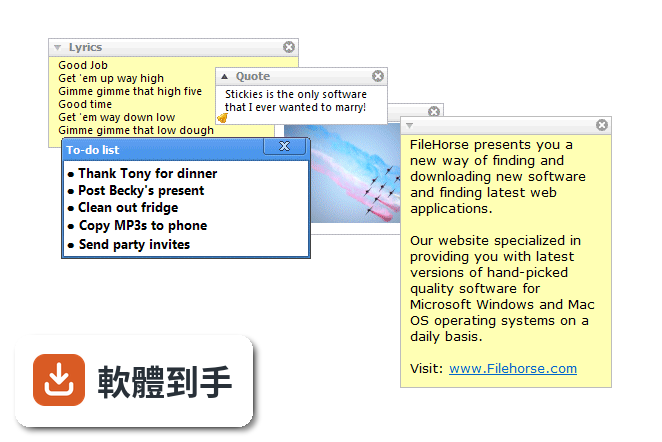
Stickies是輕量級桌面便簽工具,特色是便簽可貼附到特定應用程式或視窗,只有該視窗在螢幕上時才顯示;可設提醒、可同步、可自訂外觀。資料提到它不寫註冊表、單一ini檔儲存,設計目標是小而簡單。和系統內建便箋比起來,多了貼附視窗和提醒功能,但沒有雲端同步或手機版。
02這套軟體能設提醒嗎?怎麼設?
可以。便簽可隱藏一段時間、到指定日期時間,或每天、每週、每月喚醒,作為提醒。設定方式是在便簽上設定時間條件,時間到了就會顯示。資料沒有提到鈴聲或彈出視窗以外的通知方式,實際提醒效果需要自行安裝測試。
03便簽可以貼在特定視窗上嗎?
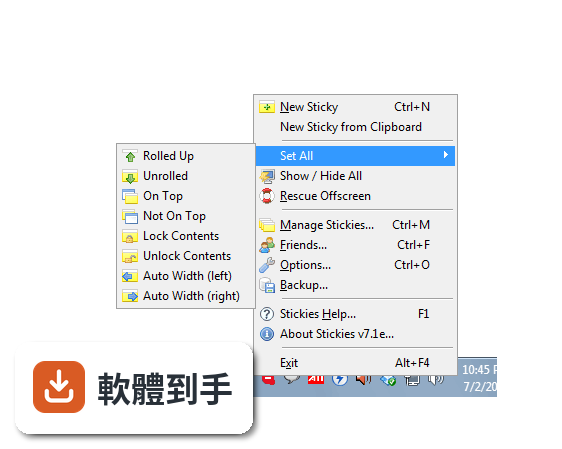
可以。便簽可貼附到應用程式、網站、文件或資料夾,只有該項目在螢幕上時才顯示。例如貼在瀏覽器上,瀏覽器開啟時便簽才出現,關掉瀏覽器便簽就隱藏。這對需要跟著某個工作視窗一起出現的提醒很方便。
04便簽能同步到另一台電腦嗎?
可以。透過TCP/IP網路連線,或使用SMTP郵件伺服器、MAPI客戶端,將便簽從一台電腦轉移到另一台。資料沒有提到雲端同步,這是區域網路或郵件方式的同步,需要自己設定傳輸方式,不像雲端服務那樣自動同步。
05便簽能放圖片嗎?
可以。便簽可以儲存文字或圖片,圖片可以直接放在便簽上,不限於純文字。資料沒有提到圖片格式或大小限制,但既然能存圖片,貼個截圖或照片當參考資料應該沒問題。
06我只有偶爾記點東西,這套軟體會不會太複雜?
不會。設計目標就是小而簡單,不寫註冊表、不影響系統檔案,儲存在單一ini檔。安裝後直接貼便簽就能用,不需要設定資料庫或帳號。資料提到它不會有動畫或音樂,就是單純的黃色矩形視窗,適合輕量使用。
07公司電腦能裝嗎?IT管得嚴。
可以。支援群組原則(Group Policy)控制,AD網路管理員可以設定。而且不寫註冊表,對系統影響小,不會動到系統檔案。但介面只有英文,IT人員需要能接受英文介面。資料沒有提到企業授權或大量部署方式,實際安裝可能需要自行確認。
08我習慣用英文介面,這套軟體有中文嗎?
介面只有英文,沒有中文介面。但支援Unicode和RTL文字,便簽內容可以顯示中文、日文等文字,只是操作介面是英文。如果英文介面不習慣,需要考慮其他選項。資料提到支援國際語言和Unicode,但那是針對便簽內容,不是介面。
09我需要雲端同步,這套軟體有嗎?
資料沒有提到雲端同步。只有網路同步(TCP/IP或SMTP),需要自己架設或設定傳輸方式,不是登入帳號就自動同步的雲端服務。如果依賴雲端同步,這套軟體可能不符合需求,需要自行確認是否有其他方式達到你要的效果。
10我用手機也要看便簽,這套軟體有手機版嗎?
資料沒有提到手機版或行動裝置整合。只有Windows桌面版,手機上看不到便簽。如果需要在手機上查看或編輯便簽,這套軟體不適合。資料提到可以透過網路傳輸便簽到另一台電腦,但那是電腦對電腦,不是手機。
11這套軟體安全嗎?防毒軟體會擋嗎?
開發者表示防毒軟體誤報是誤判,已聯繫防毒廠商,並在乾淨機器上重建執行檔。但使用者應自行判斷,資料也提供手動安裝選項,可下載檔案手動安裝,不執行安裝程式。如果對執行檔有疑慮,可選擇手動安裝方式。
12這套軟體更新頻率高嗎?
近12個月更新1次,近24個月1次,更新頻率不高,但開發商持續維護。資料顯示版本紀錄從2010年開始,最近更新在2026年,算是長期維護的軟體。如果在意更新頻率,需要自行評估是否接受這種節奏。
下載與官方連結
stickies_setup_8.0a.exe · 1.35 MB · 連結指向軟體原廠
版本紀錄
- 2026-02-12 Stickies 10.2a 2.8 MB
- 2023-04-04 Stickies 10.1d
- 2022-10-16 Rufffle
再看 5 筆
- 2022-10-16 Stickies 10.1c
- 2022-03-25 Stickies 10.1b
- 2021-05-29 Stickies 10.1a
- 2020-02-26 Stickies 10.0d 2.68 MB
- 2020-01-21 Stickies 10.0c 2.68 MB
這一版改了什麼
What's new in this version:
New features:
- Images can be inserted into text stickies
- Stacks for desktop stickies
- Friendly name hyperlinks
- Periodic automatic full backups
- Properties dialog added for all stickies in all categories
- Screen grab directly to an image sticky
- Skin browser dialog
- Stored sticky category icons
- Image undo levels can be configured
- Restore from backup
- Solo' a sticky to work with just that one
- Option to offset screen position of new stickies to prevent overlap
- New image editing operations: rotate, greyscale, invert, flip, mirror, border, blur, jitter, flood fill, border
- Configurable tab stops
- Feature to move data file location
- Save image stickies as JPG
- Show recurring parent
- Default note content files for text and image notes
Changes:
- Stickies is now fully Unicode, supporting all languages throughout
- Stored stickies retain many more attributes, like create time, position, read only, source
- New data storage format, RTF split into separate files, settings, options and friends into their own files
- Rescue offscreen' command now also fixes the Manage dialog
- Manage dialog has been optimised, and so is less 'flickery'
- Hotkey functionality built into the exe file, the DLL is no longer required
- Text desktop note contents can be edited in the Manage dialog
- Hold shift while attaching a sticky to attach it relative to the position of the window
- Option to disable RTL shortcut keys
- All tray icons can now be changed
- Choose a place to create a new store category when storing a sticky
- Set all' checkbox on the Recurring dialog
- rescue command line parameter added
- Defaul text highlight colours made a little less harsh, users can now change them
- Title items on menus are now bold, not grey
- All numeric values in Options have spin controls
- At startup, the stickies.exe path is checked for data files as well as the CWD
- Maximum size of stickies raised to 614,400
- Image sticky pen now shrinks to single pixel width
- All icons changed to include an alpha-channel
- Shift-context menu key opens the content menu, not the sticky menu
- Removed: recover dialog
- Removed: Palm and PPC support
- Removed: -registry, -recover, -norecover command line parameters
- Removed: import/export store categories in Manage
Fixes:
- User values (user1/2/3) are now correctly initialised for new notes
- Bug when moving a note from Stores to Closed to Desktop fixed
- Sending from a Stored category to the Desktop no longer decrements the count by two
- After choosing the pen colour, the original input focus is restored
- Paste buttons on skins can now convert a RTF note to an image note
- New notes set to appear in the center of the screen now do so correctly
- WM_QUERYENDSESSION messages handled
- Fixed English text "Snooze alarm for X minutes" fixed
- sti file loading no longer affected by setting an incoming network style
- On-top setting is no longer lost by using the menu to set another note not-on-top