
這是歷史版本頁面 — 看 Syncovery 最新版本
多台電腦檔案同步老是亂掉?Syncovery 能怎麼救
 Syncovery 8.67 (32-bit)
資料更新 2020-04-29
閱讀約 6 分鐘
電腦裡同時有桌機、筆電、甚至一台工作用的伺服器,檔案散在好幾個地方,常常搞不清楚哪一份才是最新的。今天在辦公室改完的報表,回家打開筆電發現還是昨天的版本;想整理一下資料夾,把檔案移到新的分類,結果另一台電腦一同步又把舊結構複製回來。你只是想讓所有裝置的檔案保持一致,卻發現手動複製又慢又容易漏。
一般人最直覺的做法是隨身碟或雲端硬碟手動上傳下載,但檔案一多、改動一頻繁,很快就會忘記哪邊更新過,而且來回覆製根本不知道哪些檔案被覆蓋掉了。另一種常見做法是丟進雲端同步資料夾,但雲端同步是「即時雙向」,不小心刪掉檔案也會同步刪除,想保留舊版本還得另外想辦法。這類檔案同步工具的切入點,就是讓你先定義好規則——誰是來源、誰是目的地、衝突時聽誰的——然後交給軟體去比對和執行,而不是靠人腦記住所有變動。
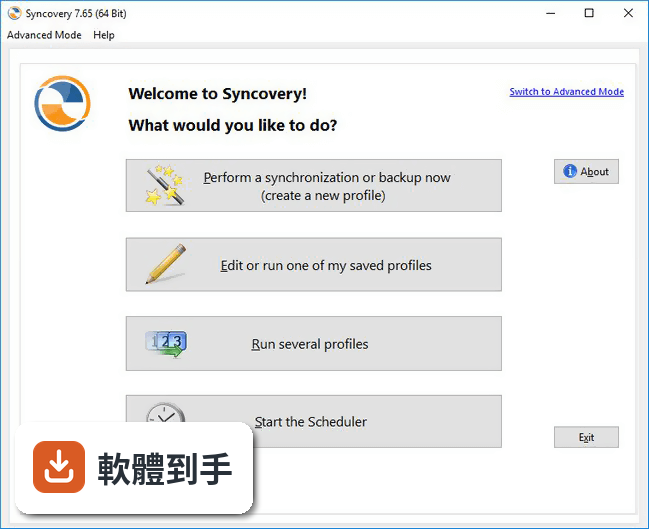
01Syncovery 到底能拿來做什麼?
它是 Windows 上的檔案同步與備份工具,核心工作是讓兩台電腦(或電腦與雲端空間)之間的資料夾內容保持一致。你可以設定一個「設定檔」,指定來源資料夾和目的地資料夾,再選擇同步模式,例如鏡像(讓目的地完全等於來源)或雙向同步(兩邊互相合併)。它也能排程自動執行,適合每天定時備份到外接硬碟或網路磁碟。
02我常常把檔案在資料夾之間搬來搬去,同步會不會又把舊位置複製回來?
它有一個「偵測移動檔案」的功能。如果你在某台電腦上把檔案從 A 資料夾移到 B 資料夾,它會認出這是「移動」而不是「刪除加新增」,在另一台電腦上也會執行同樣的移動動作,不會多餘地重新複製整個檔案。這樣整理資料夾結構時,同步後兩邊的配置會一致,不會出現舊位置檔案被補回來的情況。
03同步到一半硬碟滿了怎麼辦?要全部重來嗎?
不需要。它可以在檔案複製到一半時暫停,等你清出空間後,再請它繼續複製。它會從中斷的地方接著做,而不是整個重新跑一遍。這在備份到快滿的外接硬碟時特別實用,不用擔心一次沒跑完就前功盡棄。
04有些檔案正在被其他程式使用,複製時會失敗嗎?
它會先跳過那些被鎖定的檔案,繼續處理其他可以複製的檔案,然後再回頭重試那些鎖住的檔案,直到全部成功為止。你也可以設定重試時間的上限。在重試階段,它只會使用極少的 CPU 資源,不會拖慢你正在做的工作。不過如果檔案一直被獨占,最終還是會失敗,這點要先有心理準備。
05它能不能保留舊版本的檔案?我怕同步覆蓋掉重要的東西。
可以。它有「保留多個備份版本」的選項,被覆蓋的檔案不會直接消失,而是會被重新命名保留,你可以設定要留幾個舊版本,以及要放在原資料夾、子資料夾、還是統一放在某個資料夾。另外,它也能把覆蓋掉的舊版本丟到資源回收筒,而不是永久刪除,這對誤覆蓋的情況多了一層保障。
06我只有一台電腦,單純想備份到外接硬碟,這套軟體適合嗎?
適合。它的核心功能之一就是備份,你可以設定一個鏡像模式,讓外接硬碟的內容完全等於電腦上的資料夾。搭配排程功能,設定每天某個時間自動執行,接上硬碟就自動備份。它也能處理超過 4GB 的大檔案,所以影片或磁碟映像檔這類大型檔案也備份得起來。
07它支援雲端儲存空間嗎?我想同步到 Google Drive 或 Dropbox。
官方說明提到它支援線上儲存空間,但具體支援哪些服務、以及設定的方式,文件裡沒有細講。如果你主要用特定一家雲端服務,建議先確認它的官方文件或試用版能不能連上你要用的那個服務,再決定是否購買。
08這套軟體有中文介面嗎?
沒有,它的介面語言是英文。如果你對英文介面不熟悉,操作上會需要一些時間摸索。不過它的功能名稱和選項大多是常見的同步術語,搭配線上翻譯或教學文章,還是有辦法上手。但如果你完全無法接受英文介面,這會是一個需要考慮的門檻。
09它跟 FreeFileSync 比起來,差在哪裡?
FreeFileSync 是免費開源軟體,提供基本的同步功能,而 Syncovery 是付費試用軟體,功能更進階,例如多版本備份、資料庫感知複製、排程、偵測移動檔案等。如果你的需求只是簡單的雙向同步,FreeFileSync 可能就夠用;但如果你需要自動化排程、保留多版本、或處理資料庫檔案,Syncovery 的這些功能才有意義。兩者的評分人數都不多,參考價值有限。
10我用的資料庫檔案(SQL Server)可以直接備份嗎?
它有一個「資料庫感知」的技術,會等到完全獨占檔案時才開始複製,避免複製到一半的損毀資料。但前提是資料庫在備份期間必須沒有被使用,例如夜間離峰時段。如果你的資料庫是 24 小時都在服務,它就無法在正常運作時安全備份,這點要特別注意。
11什麼樣的人不適合用這套軟體?
如果你只需要偶爾手動同步一次、不想花時間設定規則,那這套軟體對你來說太複雜,免費的 FreeFileSync 可能更直接。另外,它沒有免費版本,只有 30 天試用,試用期過後就要付費。如果你不能接受英文介面,或需要中文技術支援,它也不是理想的選擇。最後,它的評分人數只有 35 人,樣本數不多,穩定性與口碑還需要更多使用者驗證。
12它的更新頻率如何?會不會買了之後就沒人維護?
根據收錄的版本紀錄,它從 2019 年到現在持續有更新,近一年內更新了 5 次,代表開發商還在積極維護。這點對於依賴同步工具的人來說是正面的訊號,至少短期內不用擔心軟體被放棄。不過實際的更新內容和品質,還是要自己安裝試用版才能確認。
下載與官方連結
SyncoverySetup.exe · 連結指向軟體原廠
版本紀錄
- 2026-10-26 Syncovery 12.9.7 (64-bit) 74.7 MB
- 2026-10-15 Syncovery 12.9.5 (64-bit) 74.7 MB
- 2026-10-11 Syncovery 12.9.3 (64-bit) 74.7 MB
再看 5 筆
- 2026-10-08 Syncovery 12.9.1 (64-bit) 72.6 MB
- 2026-10-04 Syncovery 12.8.9 (64-bit) 72.6 MB
- 2026-09-30 Syncovery 12.8.5 (64-bit) 72.6 MB
- 2026-09-26 Syncovery 12.8.0 (64-bit) 72.6 MB
- 2026-09-22 Syncovery 12.7.5 (64-bit) 72.6 MB
這一版改了什麼
What's new in this version:
Syncovery 8.67 (32-bit)
- Uses the latest Mega SDK to work with newer Mega accounts
- Can set last modification timestamps when updating files to Mega
- Faster Mega Login at the beginning of a profile run
- Less memory usage when uploading to Mega
- Can now rename and move files and folders on Mega
- Fixes problems with folder names with leading or trailing spaces
- Fixes Mega related crashes and other bugs (such as when canceling a download)
Syncovery 8.66 (32-bit)
- Reduces excessive logging of some non-fatal exceptions, such as cloud server rate limiting and other errors that just need a retry
- Fixes some encrypted file names not being compatible with DropBox and Box
Syncovery 8.65 (32-bit)
- Change log not available for this version
Syncovery 8.63 (32-bit)
- Change log not available for this version
Syncovery 8.62 (32-bit)
- Implements a new job splitting algorithm for Amazon S3 so that jobs upwards of 10 million files can now be processed without excessive memory usage
Syncovery 8.61 (32-bit)
- Change log not available for this version
Syncovery 8.60 (32-bit)
- Duplicate folders with different case spelling can now automatically be merged and resolved when a job runs in Exact Mirror mode (without user confirmation)
- Fixes an error “file has become smaller during copying” when using block level copying with file system monitoring and the file has become smaller during the monitoring period
Syncovery 8.59 (32-bit)
- Fixes Synthetic Backup Checkpoints being excessively large
Syncovery 8.58 (32-bit)
- Various bug fixes and improvements related to Versioning and moving to an “older” folder
- Avoids unnecessary lines about free space in the Daily Summary
Syncovery 8.57 (32-bit)
- Adds a checkmark “Keep one version of deleted files” to the Versioning tab sheet. The default (ticked) corresponds to the behavior in previous versions so far. Turning this off will make sure that no orphaned versions remain in the Older folders. To clean up existing versioned mirrors, you can choose the setting “Clean up all older versions” under Versioning->More (scroll down within this tab sheet)
- A few very minor improvements
Syncovery 8.56 (32-bit)
- Profiles that use Backblaze B2 can now be run in parts more efficiently to save memory and to allow an unlimited number of files in the bucket. The number of entries after which a job is split is specified on the Program Settings dialog, tab sheet Advanced. It’s the same setting that is used for all profiles, but it is now implemented more efficiently for Backblaze B2
- Various bug fixes and improvements
Syncovery 8.55 (32-bit)
- Change log not available for this version
Syncovery 8.52 (32-bit)
- Email protocol connector completely rewritten and now usable for multiple different purposes, including exchanging files with other email addresses (customers), or downloading raw emails. Multiple attachments per received mail are now supported. Subject and body can be configured for sent mails
- A global PascalScript for all profiles can be specified on the Program Settings dialog, tab sheet Advanced
Syncovery 8.51 (32-bit)
- Adds a watchdog mechanism to detect hanging jobs. The option is on the “Event Log” tab sheet on the Program Settings dialog
Syncovery 8.50 (32-bit)
- Will no longer do lengthy history processing for Google Drive and SharePoint/OneDrive – if the folder on the cloud is empty or doesn’t contain subfolders yet
- The initial history processing can be skipped and the changes based listing can still be used to speed up future profile runs
- History processing can now be skipped for background jobs too
- Adds an option to the Gears toolbar button menu to show only recently used profiles (such as within 1 day or week etc.)
- These options, including “Show Scheduled Profiles Only”, will now be remembered when Syncovery is closed and reopened
- Additional improvements and bug fixes
Syncovery 8.43 (32-bit)
- Notifies the user that Amazon drive is no longer supported.
- A few bug fixes
Syncovery 8.42 (32-bit)
- It should now be possible to upload all folder and file names allowed on Windows to SharePoint Online. Syncovery now allows folder names ending in “_files”, and automatically replaces leading and trailing spaces, as well as trailing periods
- Fixes a few minor issues
Syncovery 8.41 (32-bit)
- Adds additional thread safety measures to prevent duplicate folders from being created on Google Drive
- Avoids notification emails about a problem accessing Syncovery.ini which could occur when a great number of profiles is scheduled
- Fixes notification digests not being sent when SyncoveryCL is used for background jobs
- Avoids delays caused by inefficient processing of rename events in realtime especially when Filename Encoding or Encryption is used
- You can now add KeepCloudHistoryFiles=1 to the [Main] section of the INI file to avoid any zipping and unzipping of JSON files
- Additional minor improvements
Syncovery 8.40 (32-bit)
- Adds multi-user capability with different user names, passwords, and permissions. This is especially useful for the browser based GUI, but also for the normal Windows GUI. Choose it on the Program Settings dialog, tab sheet Misc. Assign individual profile rights in each profile via the small “Users” link at the bottom. The user management dialogs are only available in the Windows GUI, not the browser based GUI yet
- Fixes incorrect temporary filenames being used for the auto-resume feature, which may have had an impact on the resuming ability in some cases.
- Improvements to the XWorks API
- Various additional improvements and bug fixes
Syncovery 8.39 (32-bit)
- Adds the capability to update real-time monitoring threads when profiles are modified, renamed or deleted. So in most cases, the scheduler doesn’t have to be restarted any more
- Fixes occasional missing profile status for real-time profiles
Syncovery 8.38 (32-bit)
- Adds a new “Remember Results” mode for Binary Comparison. Files that have ben successfully verified will not be verified again until you delete the profile’s database. Successful verification after copying a file will also save the file’s comparison status as successful
- Implements “Adjust Case Spelling At Destination” for Filename Encryption
- Fixes bugs related to Filename Encryption
- Fixes bugs related to folder timestamps on Google Drive
Syncovery 8.37 (32-bit)
- Jobs can now be paused in the middle of file transfers, and during the folder scanning phase. You can even remove a USB storage medium while paused and reattach it when you want to continue
- Handles the increasingly frequent “Service Unavailable” error from SharePoint servers better and fixes authentication loss in such cases
- Improves stability of large Backblaze B2 listings
Syncovery 8.35 (32-bit)
- Includes an updated Remote Service that uses the Backup Privilege to be able to scan folders regardless of permissions
- Will log details on whether the Backup Privilege is being used by Syncovery and by the Remote Service
Syncovery 8.34 (32-bit)
- Fixes transfers to and from Microsoft Azure using more memory the longer the job runs
- Can now check for free space on Amazon Cloud Drive and will mention the free space in the log file
- Makes PascalScript hooks for manipulating file names compatible with unzipping when copying from right to left
Syncovery 8.33 (32-bit)
- Adds the ability two have two or more redundant Syncovery installations on different machines or VMs. Using a common folder for status files, the installations monitor each other’s status and only one will execute the jobs. When it stops for some reason, another scheduler will take over. The new redundant installation settings are on the Program Settings dialog, tab sheet “Advanced”. The configuration must be identical for all installations which are part of the redundancy pool.
- Enhances the FTP browse for folder dialog with an edit field and a history.
- Enhances the browsing dialogs used when booting a USB recovery Windows, where the standard Windows dialogs are not available.
- Reinstates the /O command line parameter, which had been missing in 8.32.
Syncovery 8.32 (32-bit)
- Adds the option to use the Windows 10 File History filename encoding format (under Versioning->More)
- Adds the option to use SecureBlackBox SSL/TLS rather than OpenSSL on the Cloud tab sheet of the Program Settings dialog. On Windows, this affects https based cloud services only. On other platforms, it also affects FTP
- Fixes an AV when uploading larger files to Amazon S3 with the storage class “Intelligent Tiering” selected
Syncovery 8.30 (32-bit)
- Adds a “copying order” option on the Special tab sheet with the choices
- Standard (Alphanumerically), Smallest First, Largest First, Oldest First, Newest First
- Adds a checkmark “Never Delete Folders (only Files)”
- Fixes possible hangs uploading to Google Drive
- Fixes SyncoveryCL not working on Windows Server 2003 or Windows XP
Syncovery 8.27 (32-bit)
- Adds the OnCloudConnect PascalScript hook and the ConnProcessWebForm function, allowing you to process a form based login on a web site before downloading files
- Fixes real-time sync copying files in subfolders even if the subfolder selection is set to “None”
- Fixes a “Parent missing” error when changes occur in the topmost folder of a real-time profile that uses filename encryption
Syncovery 8.26 (32-bit)
- Adds the option to enlarge the GUI (click the Gears icon)
- You can now specify an individual TEMP path for each profile, using a PascalScript function that sets the ProfileTempDir variable
- Background job optimization for jobs that run in the main scheduler thread (if parallel execution is disabled)
Syncovery 8.25 (32-bit)
- Adds the Deep Archive storage class to Amazon S3
- Upload bandwidth limits for Amazon S3, Google Drive, and other clouds can now be much smaller and still work correctly (such as 0.05 MB/sec)
- Fixes a problem that could cause repeated execution of a profile in real-time mode if one side of the sync is a drive or UNC path that does not support file system events (such as a WebDAV path)
- Fixes WebDAV and HTTP compatibility with some servers
Syncovery 8.23 (32-bit)
- Change log not available for this version
Syncovery 8.22 (32-bit)
- Adds XWorks, directBOX, KomfortCloud, and topfarmplan cloud storages
- Improves error handling when listing Backblaze B2 buckets, and fixes possible “Duplicate item detected” messages in the log file
Syncovery 8.21 (32-bit)
- A major operational improvement and bug-fix release for two-way SmartTracking and Real-Time synchronization (in “Process Complete Folder” mode)
- Bug fixes include deleted folders reappearing, unjustified “Waiting for availability” status, problems renaming files and folders in real-time mode (especially if one side is some cloud storage or Internet Protocol), unnecessary repeated profile runs in real-time mode, and more
Syncovery 8.20 (32-bit)
- The Web GUI now supports SSL/TLS
- Fixes a possible OpenSSL related error or hang
Syncovery 8.19 (32-bit)
- Downloading and processing the history for some cloud services can now be skipped
Syncovery 8.18 (32-bit)
- Change log not available for this version
Syncovery 8.17 (32-bit)
- Change log not available for this version
Syncovery 8.16 (32-bit)
- Adds the option to use the Glacier storage class via Amazon S3
- Adds support for restoring files from Glacier via Amazon S3, including expedited restore (in attended mode)
- Fixes a possible upload error message to Microsoft Graph which caused files of certain sizes to be uploaded twice (the second time with success). This could happen only to the first file in an upload thread and only if it was between 4 MB and 64MB in size
Syncovery 8.15 (32-bit)
- Fixes bugs with the new changes based listing for SharePoint Online, Graph, and OneDrive. Most importantly, a listing problem was fixed when multiple files have the same root folder ID
Syncovery 8.12g (32-bit)
- Improvements for SharePoint Online and OneDrive
- The setting “If the Destination Machine Modifies Received Files, Changing Their Sizes Upon Reception, Then Copy Such Updated Files Back” now works with SharePoint Online. For example, SharePoint may add metadata to uploaded Office documents.
Syncovery 8.12f (32-bit)
- Fixes an issue where browsing Azure containers would not work unless a container was already specified
- Fixes a bug that could cause Syncovery not to be able to open its GUI on some rare systems
Syncovery 8.12d (32-bit)
- Change log not available for this version
Syncovery 8.12c (32-bit)
- Improved upload speed and reliability with Google Drive
- Fixes a situation where Zip Packages were only created in the TEMP folder and not been copied to the destination (depending on the settings)
Syncovery 8.11b (32-bit)
- Improvements with browser based progress reporting for background jobs
- Minor bug fixes
Syncovery 8.11a (32-bit)
- Fixes some issues with the new feature “Show detailed progress or results in browser”
- Now shows a clickable “Click here to authorize Syncovery with the cloud service” link in the GUI, for background jobs that need authorization, rather than the old “Visit Auth URL:”
Syncovery 8.11 (32-bit)
- Adds an optional browser based GUI. Enable it from the Cloud tab sheet of the Program Settings dialog
- Fixes a problem where the progress and/or run times were not updated in the GUI if your machine is in a timezone to the west of UTC
Syncovery 8.06 (32-bit)
- Adds support for PCloud
- Improved MTP copying speed
- Raw image files uploaded to Amazon drive are now recognized and counted as photos
Syncovery 8.05 (32-bit)
- Change log not available for this version
Syncovery 8.04 (32-bit)
- Improves handling of incorrect passwords when comparing or restoring Sz compressed files
- Additional fields in XML file list export
- Now compatible with stdout redirection of SyncoveryCL command line tool
Syncovery 8.03 (32-bit)
- Adds XML export of the file list (see Database tab sheet)
- WebDAV can now handle HTTP redirects
Syncovery 8.02 (32-bit)
- The importer can now import profile settings from log files
- Adds PascalScript hook OnGetCustomHeaders to set custom headers for Amazon S3 uploads
- Source file deletion at the end of a file move operation is now retried for a number of minutes if you specify “Wait for Access” on the File Access tab sheet
Syncovery 8.01 (32-bit)
- The option “Detect Renamed Files” in conjunction with Block Level Copying and File System Monitoring can now detect files with have been both renamed and modified
- Fixes a problem where the Execute before/after command lines could not deal with paths to the EXE file or script that had spaces
- Features new toolbar icons, which had a brief appearance during beta phase but weren’t included in v8.00
To avoid the DEL character for Filename Encoding, you can add the following line to the Main section of the INI file:
- AvoidDELForFilenameEncryption=1
Syncovery 8.00 (32-bit)
New features:
- The subfolder selection dialog has a new checkmark “Automatically Add Future New Folders and Files to Selection”.
- OneDrive and SharePoint folder listings are now done via fast “changes” based technology, rather than scanning the complete folder hierarchy every time.
- Adds Block Level Copying based on our new File System Monitor Service (for Windows only, see separate section below).
- Adds PascalScript as an integrated scripting language which allows you to customize and add profile behavior in many ways.
- Adds direct compression and AES encryption to cloud storage with the new .sz file format. No temporary files, no disk space needed. The .sz format is an optional alternative to the existing .zip format. The .sz format features optional ultrafast compression, or extra strong compression, and huge AES encryption speeds.
- No longer needs temporary files when doing a binary comparison or verification of a file via Internet protocol, including .sz compressed files.
- AES encryption speed with zip files also much improved.
- Uploads to Google Drive can now preserve folder timestamps (Comparison->More->Folder Timestamps).
- New icon
- Supports Amazon S3 Inventories
- Updated libraries (such as SFTP with more algorithms)
The new File System Monitoring Service (Windows only):
- The new File System Monitoring Service can record a list of changed blocks in order to improve block level updating of mirrored files
- Choose this new feature on the Special tab sheet
- Block level copying is now fast, without the need for tedious MD5 checksum calculations. When Syncovery starts the job, it will already know which blocks need to be copied
- The new setting “Detect Changes Via File System Monitoring Even If Timestamps Unchanged” can now be used instead of “Always copy, even if timestamp unchanged”
- The Remote Service Control Panel is now the Auxiliary Services Control Panel, where you can configure the File System Monitoring service too. In most cases, you do not have to make any settings there
- See also the new “Mode 0” on our documentation on block level copying
Syncovery 7.98p (32-bit)
- Fixes getting the file listing via rsync protocol
- Fixes creating subfolders via Mega protocol
Syncovery 7.98o (32-bit)
- Contains updated OpenSSL libraries and trusted certificate list
- Fixes some minor issues
Syncovery 7.98h (32-bit)
- fixes the Move Files Mode Configuration dialog which sometimes showed the wrong radio button chosen
- Move Files Mode will now double-check if the source file still exists before deleting a destination file with the same name
- bug fix for AWS KMS Server Side Encryption
Syncovery 7.98g (32-bit)
- Fixes a possible endless loop processing json files with cloud services such as Amazon Drive and DropBox
Syncovery 7.98d (32-bit)
- includes an updated Syncovery VSS Service to fix a potential compatibility issue with Windows 10 April 2018 and custom fonts
- additional minor fixes
Syncovery 7.98c (32-bit)
- when attaching log files to notification emails, Syncovery will now zip them if over 2MB large, and totally avoid the attachment if even the zipped log is over 6MB
- fixes last modification timestamps with uploaded files to Backblaze B2, which despite our best intentions were not compatible with other apps
Syncovery 7.98b (32-bit)
- contains another Remote Service update that fixes delays when the global log file syncoveryremserv.log was deleted
Syncovery 7.98 (32-bit)
- Change log not available for this version
Syncovery 7.97g (32-bit)
- fixes a bug where Syncovery may leave temporary files behind on DropBox. These files were older versions of replaced files, and had a GUID plus _syncovery filename extension. They were not in the same folder as the actual uploaded file
Syncovery 7.97c (32-bit)
- Change log not available for this version
Syncovery 7.97a (32-bit)
- automatically skips OneNote files which cannot be downloaded from OneDrive / Sharepoint
- fixes a SmartTracking case where a newer file would not be copied if an older version of the same file was previously deleted from the destination
Syncovery 7.96 (32-bit)
- Introduces multithreaded folder scanning for cloud services such as Box and OneDrive, which do not support scanning the full hierarchy recursively
- Various cloud processing efficiency improvements and fixes
- Stability fixes for OneDrive for Business and possible other OneDrive or Sharepoint drives
Syncovery 7.95g (32-bit)
- Change log not available for this version
Syncovery 7.94 (32-bit)
- suppresses a Windows prompt that sometimes appeared when Syncovery was looking for a volume label and tried to access drives with no media (such as an SD card slot)
- fixes an error message in a few previous versions that occurred when real-time jobs used volume labels to identify the drive (SERVICE ERROR: A base path in the profile is invalid)
Syncovery 7.93h (32-bit)
- Change log not available for this version
Syncovery 7.93g (32-bit)
- Change log not available for this version
Syncovery 7.93e (32-bit)
- fixes an incompatibility between Amazon S3 with Folder Name Encryption and Cache Destination File List
- Zip Packages now take the option “Limit Zip File Size” into account again even if Filename Encryption is used
Syncovery 7.93b (32-bit)
- fixes a problem where zipping, encryption, or Filename Encryption could cause two versions of a file being kept in the backup even if Versioning settings are off
- small fix with case sensitivity mode when Filename Encryption is used to allow case duplicates on storages that are case insensitive
Syncovery 7.93a (32-bit)
- fixes an authentication problem with Amazon Drive (and possibly others) introduced in 7.93
Syncovery 7.93 (32-bit)
- the Graph protocol can now access Office 365 Groups
- completes compliance with Backblaze B2 integration checklist
- adds Strict Case Sensitive Mode on Mac and Windows (under Comparison->More)
- on Windows, you can use case sensitive mode when copying between case sensitive Internet protocols, or when using Filename Encryption on a local volume
- on Mac, you can also use case-sensitive local volumes
- improves uploading to MediaFire
- sets content type for files being uploaded to Azure BLOB storage
- speeds up finding moved or renamed folders
Syncovery 7.90 (32-bit)
- uploads to Sharepoint and OneDrive for Business now preserve modification timestamps
- Syncovery can now access any document library and sub-site of a Sharepoint site. Use the Browse button to choose the library to sync with
Syncovery 7.89a (32-bit)
- implements the chunked upload API for Box, making large file uploads more reliable
- fixes possible Time Window bugs where manual profile runs could be affected too and scheduled ones sometimes not
Syncovery 7.89 (32-bit)
- Corrected authentication token handling for cloud services (especially Box)
- Uploading split files now skips previously uploaded parts even if the setting “Filename Encoding” is used
Syncovery 7.88i (32-bit)
- Reinstates access to OneDrive for Business and Sharepoint. Unfortunately a secret API key expired today, making this update necessary
Syncovery 7.88f (32-bit)
- Fixes various bugs with cloud storages
Syncovery 7.88d (32-bit)
- Change log not available for this version
Syncovery 7.87f (32-bit)
- Change log not available for this version
Syncovery 7.87e (32-bit)
- fixes an error about missing parts when restoring from a Synthetic backup
Syncovery 7.87d (32-bit)
- the changes-based cloud logic (for Box, DropBox, Google Drive, Amazon Drive) will now avoid re-scanning all folders if there are only minor inconsistencies in the cache database
- smaller fixes
Syncovery 7.87c (32-bit)
- Change log not available for this version
Syncovery 7.87b (32-bit)
- uploads to Amazon drive are now always verified with MD5 checksums, and the verification is logged. The option “Verify copied files” should no longer be used, as it causes an additional redundant check
- cloud uploads use a bit less CPU
Syncovery 7.87a (32-bit)
- Change log not available for this version
Syncovery 7.87 (32-bit)
Improvements for copying NTFS Security Settings (aka permissions):
- the option “Strip Unknown SIDs” is not applied to files and folders too (not only file shares, as previously)
- when processing the base folder, it is now optional to allow Syncovery to disable inheritance if necessary to make an exact mirror of the permissions (previously, Syncovery disabled inheritance whenever necessary)
Syncovery 7.86d (32-bit)
- fixes an AV when installing an update via “Check for update”
Syncovery 7.86c (32-bit)
- fixes a Unicode related bug that could surface with cloud storage
Syncovery 7.86 (32-bit)
- changes the default FTP library to #3
- fixes a rare acess violation error with cloud storage
Syncovery 7.85 (32-bit)
- uses the new Google Drive API V3 with support for Team Drives
- uses much less memory when processing cloud folder listings (such as Google Drive, Amazon drive, DropBox and Box)
- produces much smaller databases (factor 4-10 reduction)
- in many cases, existing databases can be deleted in order to get the new smaller databases. Except if you depend on Synthetic Backup / Block Level Copying or Cache Destination File List