
這是歷史版本頁面 — 看 TrueCrypt 最新版本
TrueCrypt 停更多年,現在拿來加密硬碟還行嗎
 TrueCrypt 6.0
資料更新 2008-07-05
閱讀約 7 分鐘
你手上有一顆裝著舊資料的外接硬碟,或是一支不想被別人亂翻的隨身碟。你想把裡面的東西鎖起來,但 Windows 內建的加密功能不是要轉成特定格式,就是步驟繁瑣,而且換一台電腦讀取就卡關。你上網找「硬碟加密軟體」,看到 TrueCrypt 這個名字,但它最後更新停在好多年前,心裡難免猶豫:這套東西現在還能用嗎?用了會不會有風險?
一般人遇到這種狀況,第一個念頭是找免費軟體,但免費的加密工具不是功能太陽春、只能鎖單一檔案,就是介面全是英文、設定複雜。更麻煩的是,很多軟體加密之後,換台電腦就讀不到,等於把自己鎖在門外。這類工具真正的切入點,是讓你把整個磁碟或隨身碟變成一個加密的容器,只要記得密碼,插到哪台電腦都能解開,而且加解密在背景自動進行,不需要每次手動處理。
01TrueCrypt 現在還能用嗎?它到底能做什麼?
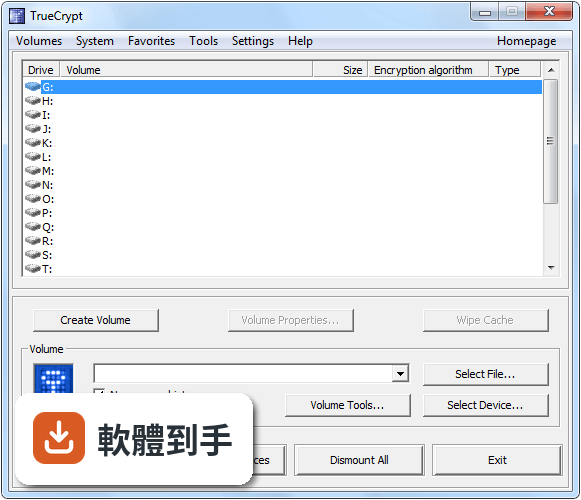
TrueCrypt 最後一次更新是 2014 年 5 月,官方在當時就宣布停止開發,所以它是一套已經停止維護的軟體。它能做的事包括:把一個檔案變成虛擬加密磁碟、加密整個隨身碟或硬碟分割區、加密 Windows 系統碟(開機時要輸入密碼),以及建立隱藏磁區。如果你只是要加密檔案或隨身碟,它仍然可以運作,但因為沒有後續更新,使用前要自己衡量風險。
02它跟一般把檔案壓縮加密碼有什麼不同?
壓縮檔加密是把檔案打包成一個壓縮檔,每次要讀取都得先解壓縮,而且壓縮檔裡的檔名、資料夾結構還是看得見。TrueCrypt 的做法是建立一個加密的磁碟,掛載之後就像多了一顆硬碟,你可以直接在裡面新增、刪除、修改檔案,所有動作在背景即時加解密,不需要手動解開再壓回去。整個磁碟的內容,包括檔名、資料夾名稱、剩餘空間,全部都是加密的。
03它能不能加密整顆隨身碟?插到別台電腦讀得到嗎?
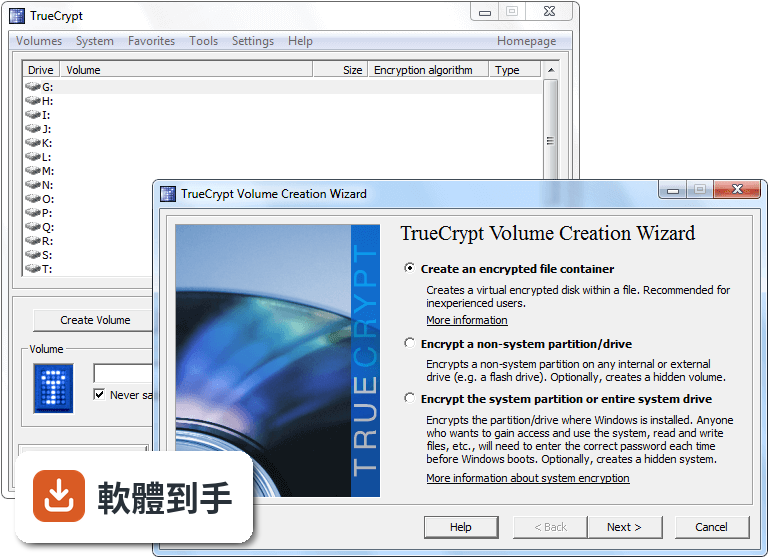
可以。TrueCrypt 可以對整個隨身碟或外接硬碟進行加密,加密之後,這顆隨身碟在沒有安裝 TrueCrypt 的電腦上,會被辨識成「未格式化的磁碟」,看不到任何檔案。要讀取的話,那台電腦必須安裝 TrueCrypt,然後用密碼掛載。如果你常需要在不同電腦之間使用,記得隨身攜帶 TrueCrypt 的安裝檔,或是使用它提供的「隨身碟攜帶模式」功能。
04它有所謂的「隱藏磁區」,那是什麼?真的有用嗎?
隱藏磁區是 TrueCrypt 的一個特殊功能,讓你在加密磁碟裡面再建立一個隱藏的加密區。當有人脅迫你說出密碼時,你可以交出外層的密碼,對方只會看到你放在外層的普通檔案,而隱藏區的內容不會被發現。這個功能在資料上確實存在,但它的使用條件比較嚴格,例如寫入外層磁區時要小心不要覆蓋到隱藏區,需要照著官方文件的操作步驟來做。
05加密之後,讀寫速度會不會變很慢?
TrueCrypt 的官方說明提到,它使用了平行化和管線化技術,讓資料讀寫速度接近未加密的狀態。實際速度取決於你的電腦硬體、加密演算法和磁碟類型。它支援 AES、Serpent、Twofish 三種演算法,其中 AES 通常最快。如果你用的是舊電腦或 USB 2.0 的隨身碟,瓶頸可能出現在硬體本身,而不是加密過程。
06這套軟體適合什麼樣的人用?
適合手上還有 Windows 7 或更舊系統電腦的人,或是需要加密隨身碟、外接硬碟、但不想花錢買商業軟體的人。它也適合對隱私要求比較高、願意花時間研究文件、照著步驟操作的人。因為它已經停止更新,使用前最好先確認你的系統版本在它支援的範圍內(Windows 2000 到 Windows 7),而且你願意承擔沒有後續修補程式的風險。
07我電腦是 Windows 10 或 11,可以用 TrueCrypt 嗎?
官方支援的系統只到 Windows 7,包含 64 位元版本。在 Windows 10 或 11 上安裝,可能會遇到驅動程式不相容或系統安全性原則阻擋的問題,官方文件沒有提供這些新系統的支援資訊。如果你用的是新系統,建議直接找其他有在維護的加密軟體,不要冒險安裝一套停止開發多年的工具。
08它跟 VeraCrypt 有什麼關係?我該直接改用 VeraCrypt 嗎?
VeraCrypt 是 TrueCrypt 的分支,由不同的開發團隊接手維護,功能上很接近,而且持續有更新。VeraCrypt 可以讀取 TrueCrypt 建立的加密磁碟,但反過來 TrueCrypt 無法讀取 VeraCrypt 的格式。如果你要加密的是新資料,直接選 VeraCrypt 會是比較合理的選擇;如果你已經有 TrueCrypt 加密的舊磁碟,可以用 VeraCrypt 把它們轉換過來。
09什麼情況不該選 TrueCrypt?
如果你用的是 Windows 10 或 11,不該選,因為它不支援。如果你需要加密的是整顆系統碟、而且電腦是每天要用的主力機,也不建議,因為停止維護的軟體若出現安全性漏洞,不會有人修補。另外,如果你對電腦操作不熟、不想看英文文件,TrueCrypt 的介面和設定流程對新手不太友善,這種情況也別選它。
10它的評價好像不高,是不是代表不好用?
在收錄的資料中,TrueCrypt 的使用者評分是 6.32/10,只有 57 人評分,樣本數不多。這個分數反映的是少數使用者的主觀經驗,可能包含對它停止開發的不滿,或是操作上遇到的問題。評分低不一定代表功能差,但搭配「長期沒有新版本」這個事實來看,它確實不是一個還在活躍發展的軟體,選擇前要理解這點。
11我只是想簡單加密幾個檔案,有更適合的選擇嗎?
官方在停止開發的公告中,自己就提到:如果你只是想加密一批檔案,可以考慮 AxCrypt。AxCrypt 在收錄資料中有 99 人評分,比 TrueCrypt 多,而且它的定位就是簡化檔案加密流程。TrueCrypt 的強項是整顆磁碟或分割區的加密,拿來加密單一檔案反而有點殺雞用牛刀,操作也比較複雜。
下載與官方連結
TrueCrypt Setup 6.0.exe · 2.99 MB
版本紀錄
- 2014-05-29 TrueCrypt 7.2
- 2012-02-08 TrueCrypt 7.1a 3.31 MB
- 2011-09-02 TrueCrypt 7.1 3.31 MB
再看 5 筆
- 2010-09-06 TrueCrypt 7.0a 3.33 MB
- 2010-07-20 TrueCrypt 7.0 3.3 MB
- 2009-11-25 TrueCrypt 6.3a 3.2 MB
- 2009-10-22 TrueCrypt 6.3 3.2 MB
- 2009-06-16 TrueCrypt 6.2a 3.04 MB
這一版改了什麼
What's new in this version:
New features:
*Parallelized encryption/decryption on multi-core processors (or multi-processor systems). Increase in encryption/decryption speed is directly proportional to the number of cores and/or processors.
For example, if your computer has a quad-core processor, encryption and decryption will be four times faster than on a single-core processor with equivalent specifications (likewise, it will be twice faster on dual-core processors, etc.)
[View benchmark results]
*Ability to create and run an encrypted hidden operating system whose existence is impossible to prove (provided that certain guidelines are followed). For more information, see the section Hidden Operating System. (Windows Vista/XP/2008/2003)
For security reasons, when a hidden operating system is running, TrueCrypt ensures that all local unencrypted filesystems and non-hidden TrueCrypt volumes are read-only. (Data is allowed to be written to filesystems within hidden TrueCrypt volumes.)
Note: We recommend that hidden volumes are mounted only when a hidden operating system is running. For more information, see the subsection Security Precautions Pertaining to Hidden Volumes.
*On Windows Vista and Windows 2008, it is now possible to encrypt an entire system drive even if it contains extended/logical partitions. (Note that this is not supported on Windows XP.)
*New volume format that increases reliability, performance and expandability:
o Each volume created by this or later versions of TrueCrypt will contain an embedded backup header (located at the end of the volume). Note that it is impossible to mount a volume when its header is damaged (the header contains an encrypted master key). Therefore, embedded backup headers significantly reduce this risk. For more information, see the subsection Tools > Restore Volume Header.
Note: If the user fails to supply the correct password (and/or keyfiles) twice in a row when trying to mount a volume, TrueCrypt will automatically try to mount the volume using the embedded backup header (in addition to trying to mount it using the primary header) each subsequent time that the user attempts to mount the volume (until he or she clicks Cancel). If TrueCrypt fails to decrypt the primary header and then decrypts the embedded backup header successfully (with the same password and/or keyfiles), the volume is mounted and the user is warned that the volume header is damaged (and informed as to how to repair it).
o The size of the volume header area has been increased to 128 KB. This will allow implementation of new features and improvements in future versions and ensures that performance will not be impaired when a TrueCrypt volume is stored on a file system or device that uses a sector size greater than 512 bytes (the start of the data area will always be aligned with the start of a host-filesystem/physical sector).
For more information about the new volume format, see the section TrueCrypt Volume Format Specification.
Note: Volumes created by previous versions of TrueCrypt can be mounted using this version of TrueCrypt.
* Parallelized header key derivation on multi-core processors (one algorithm per core/thread). As a result, mounting is several times faster on multi-core processors. (Windows)
*Ability to create hidden volumes under Mac OS X and Linux.
*On Linux, TrueCrypt now uses native kernel cryptographic services (by default) for volumes encrypted in XTS mode. This increases read/write speed in most cases. However, the FUSE driver must still be used when the volume is encrypted in a deprecated mode of operation (LRW or CBC), or when mounting an outer volume with hidden-volume protection, or when using an old version of the Linux kernel that does not support XTS mode. (Linux)
Improvements:
*Up to 20% faster resuming from hibernation when the system partition/drive is encrypted. (Windows Vista/XP/2008/2003)
*Many other improvements. (Windows, Mac OS X, and Linux)
Removed features:
*Encrypted system partitions/drives can no longer be permanently decrypted using the TrueCrypt Boot Loader (however, it is still possible using the TrueCrypt Rescue Disk). (Windows Vista/XP/2008/2003)
Note: This was done in order to reduce the memory requirements for the TrueCrypt Boot Loader, which was necessary to enable the implementation of support for hidden operating systems.
Bug fixes:
*When Windows XP was installed on a FAT16 or FAT32 partition (as opposed to an NTFS partition) and the user attempted to encrypt the system partition (or system drive), the system encryption pretest failed. This will no longer occur.
*Many other minor bug fixes and security improvements (preventing e.g. denial-of-service attacks). (Windows, Mac OS X, and Linux)