
這是歷史版本頁面 — 看 Viber for Windows 最新版本
手機訊息想同步到電腦繼續聊,Viber for Windows 能做什麼
 Viber for Windows 10.0.0
資料更新 2019-01-28
閱讀約 5 分鐘
手機打字回訊息回到手痠,明明電腦就在面前,卻只能低頭一個字一個字慢慢敲。尤其群組聊天一多,手機通知響個不停,想坐下來好好回覆,卻發現對話記錄、聯絡人全鎖在手機裡,換到電腦就要重新來過,乾脆放棄。
有些人會開網頁版湊合著用,但每次都要重新登入、掃 QR Code,對話記錄也不見得完整同步。這類工具的切入點,是把手機上的通訊體驗搬到電腦桌面:你不需要重新建立聯絡人,也不用擔心兩邊訊息對不上,登入之後,手機上聊到一半的對話,直接接著講。
01Viber for Windows 到底能拿來做什麼?
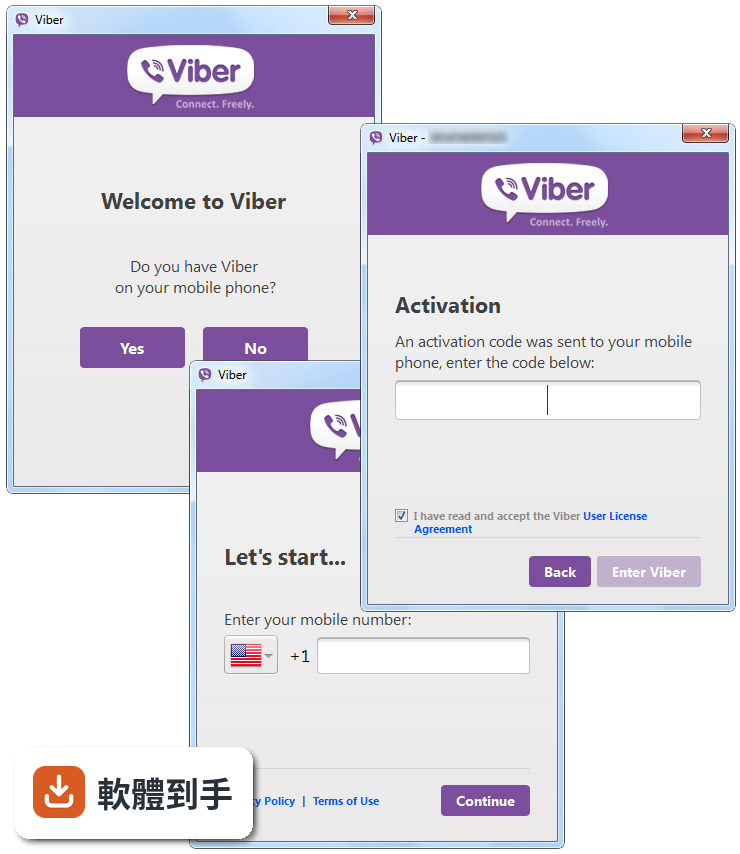
它是一套安裝在 Windows 電腦上的訊息與通話軟體,主要功能是傳免費訊息、打免費語音電話和視訊電話給其他 Viber 使用者。它會把手機上的聯絡人、訊息和通話記錄同步到電腦,讓你可以從手機開始對話,回到電腦前繼續聊,不用重新找人、重新開話題。
02它和手機上的 Viber 是什麼關係?
電腦版不是獨立的一套軟體,它需要你先在手機上安裝 Viber 並完成帳號設定,電腦版是跟著手機帳號走的。官方說明明確寫著「必須先在手機上安裝 Viber」,所以如果你沒有手機、或不想綁定手機號碼,這套軟體就不適合你。
03傳檔案給朋友有什麼限制?
它支援拖曳檔案到對話視窗直接傳送,幾乎任何檔案類型都可以,單檔上限 200 MB。照片也可以拖進去,而且可以選擇要傳原始未壓縮的檔案,或是一般壓縮後的尺寸。如果你常常要傳大量照片或文件給同一個人,這個功能會比開 Email 附件方便。
04通話品質和安全性如何?
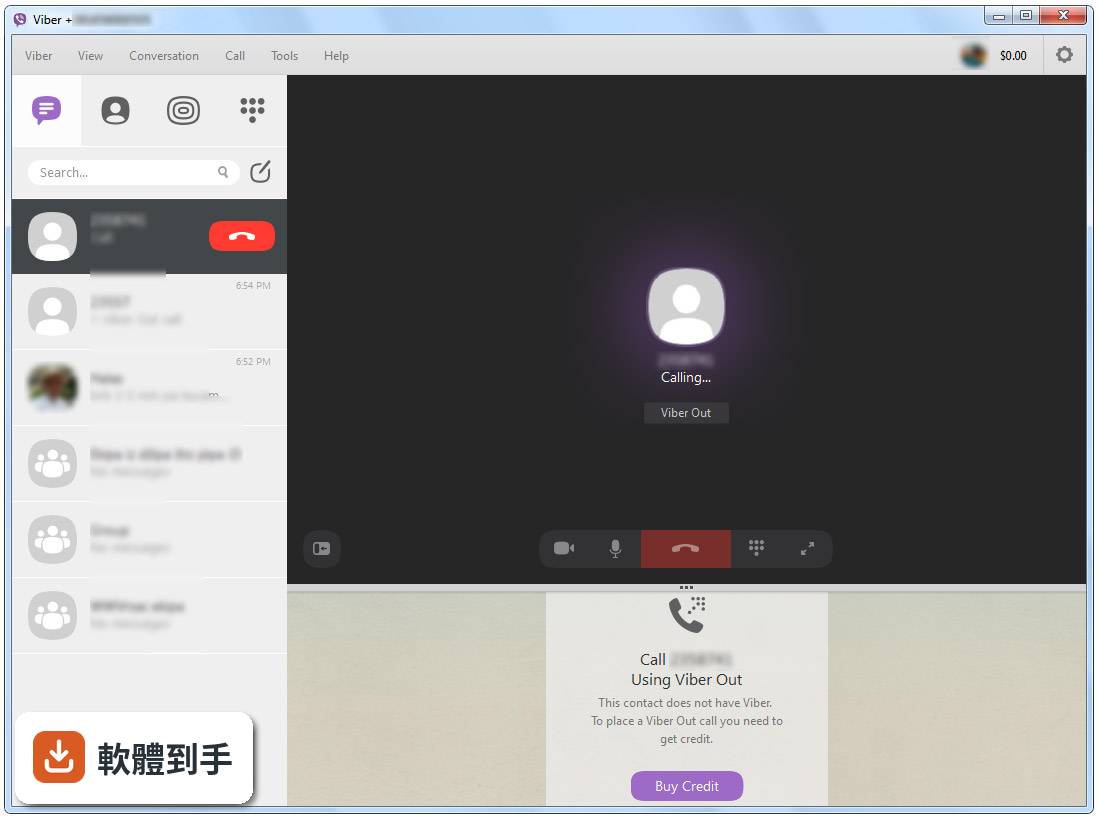
官方宣稱提供高品質的語音通話和 HD 視訊通話,而且所有通話和訊息都有端到端加密,加密金鑰只存在使用者裝置上,連 Viber 本身都無法讀取內容。另外還有「信任聯絡人」功能,可以交換密鑰來驗證對方身分,如果對方資料有變動,App 會通知你。
05群組聊天有什麼特別的功能?
群組對話可以容納不限人數的成員,管理員有較多的控制權限。你可以直接把聯絡人拖進對話視窗的標題列,就能把對方加入群組。另外還有「回覆」功能,可以針對群組裡一段時間之前發送的訊息做回覆,不會因為訊息洗版就跟不上話題。
06除了聊天和通話,還有什麼額外功能?
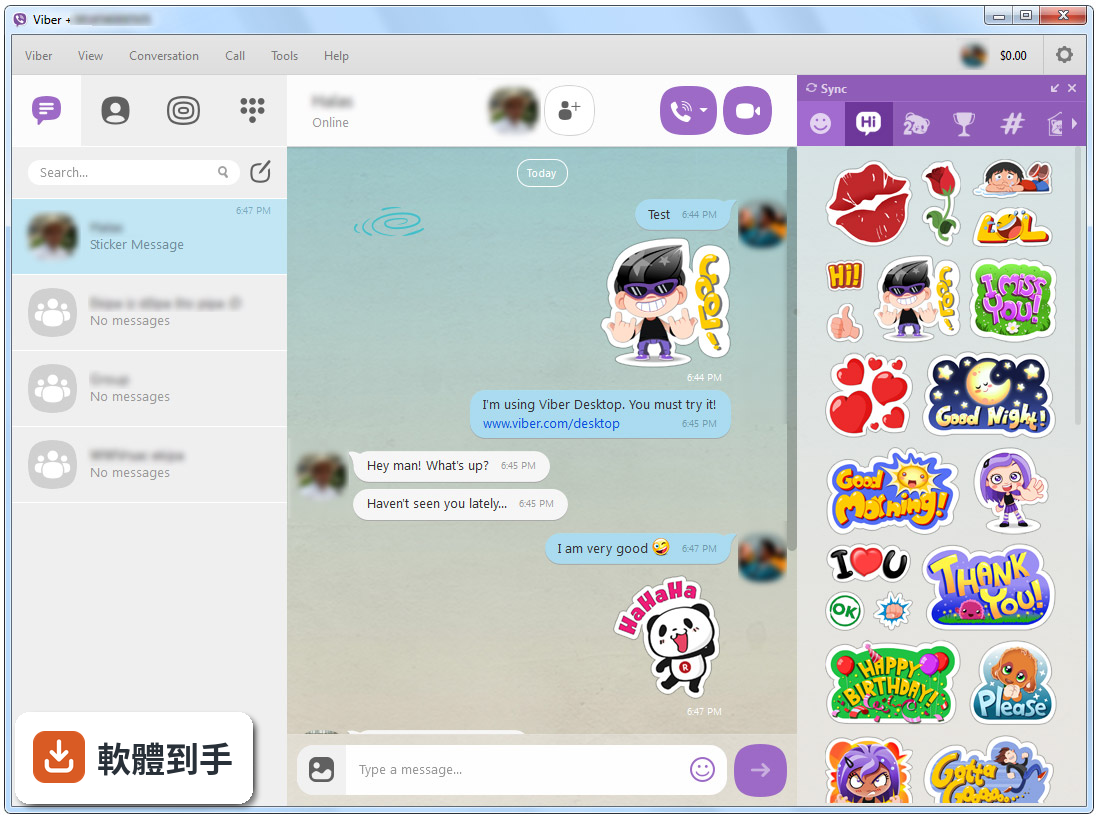
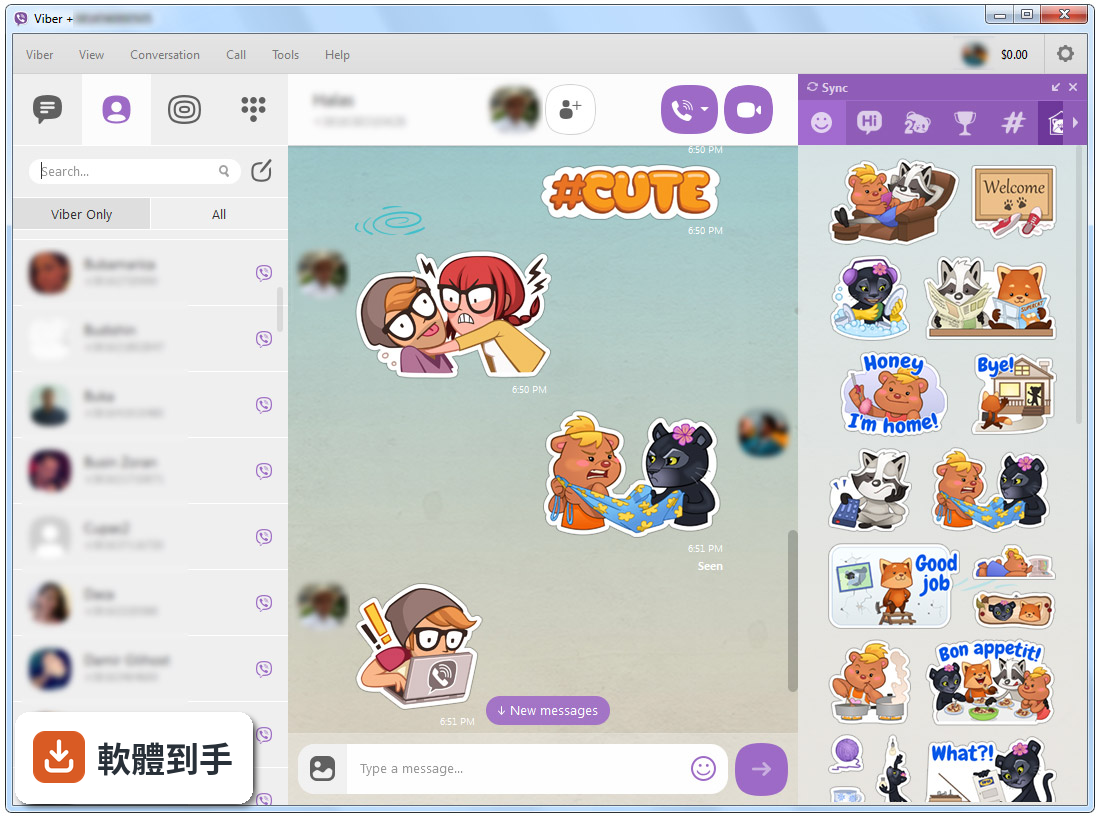
它內建「Chat Extensions」,可以在對話中直接搜尋並分享音樂、GIF、影片、餐廳、活動、飯店等內容,不用離開聊天視窗。也有「Public Accounts」,可以追蹤品牌或公眾人物的帳號,看他們發布的獨家內容。貼圖功能也跟手機同步,手機上有的貼圖,電腦版點一下就能用。
07什麼樣的人適合用這套軟體?
如果你身邊的親友、同事本來就在用手機版 Viber,而你一天有大量時間坐在電腦前,這套軟體就很實用。它特別適合需要同時處理多個對話、或是在群組裡長時間討論事情的人,因為用電腦鍵盤打字、看大螢幕,比手機輕鬆很多,而且對話記錄無縫接軌。
08需要什麼條件才能安裝使用?
電腦必須是 Windows 10 或 Windows 11 的 64 位元系統,官方也提到支援 Windows 11 on ARM。另外,你必須先有一支安裝了 Viber 的手機,因為帳號是綁定手機號碼的。介面是英文,沒有中文語系,如果你不習慣看英文介面,使用上會比較吃力。
09這套軟體有中文介面嗎?
沒有。官方列出的介面語系只有 English,安裝後的操作介面、選單、設定都是英文。如果你對英文介面不熟悉,可能會需要花一點時間摸索按鈕位置。這點在安裝前要先想清楚,尤其你每天都要打開來用的話,介面語言會直接影響使用意願。
10我的舊電腦可以跑得動嗎?
官方明確表示不支援舊版 Windows,只支援 Windows 10 和 Windows 11。如果你的電腦還在用 Windows 8 或更舊的系統,官方有另外提供 32 位元版本和 Windows 8 以下專用的安裝檔,但功能可能不完整。建議先確認自己的系統版本再下載,免得裝了打不開。
11它和 WhatsApp、Facebook Messenger 比起來如何?
這三套都是免費的訊息通話軟體,功能上很接近,都有端到端加密。差別在於 Viber 在台灣的使用者數量相對少,評分人數只有 741 人,而 WhatsApp 有 2970 人、Facebook Messenger 有 1781 人。如果你主要聯絡的對象都用 WhatsApp,那裝 Viber 可能找不到人聊天。
12這套軟體還有人在維護更新嗎?
根據版本紀錄,它收錄了 144 個版本,最近一年內更新了 4 次,最近兩年也是 4 次,代表開發商持續在維護,不是放著不管的軟體。不過更新頻率不算高,如果你很在意新功能是否即時跟上,可以觀察一下官方後續的更新節奏。
下載與官方連結
ViberSetup.exe · 85.5 MB · 連結指向軟體原廠
版本紀錄
- 2026-10-28 Viber for Windows 29.3.0.0 2.6 MB
- 2026-10-15 Viber for Windows 29.1.0.0 2.6 MB
- 2026-10-01 Viber for Windows 28.11.0.0 2.6 MB
再看 5 筆
- 2026-09-24 Viber for Windows 28.10.0.0 2.6 MB
- 2026-09-17 Viber for Windows 28.9.0.0 2.6 MB
- 2026-09-09 Viber for Windows 28.8.0.0 2.6 MB
- 2026-09-02 Viber for Windows 28.7.0.0 2.6 MB
- 2026-08-26 Viber for Windows 28.6.1.0 2.6 MB
這一版改了什麼
What's new in this version:
Viber for Windows 10.0.0
- Change log not available for this version
Viber for Windows 9.9.6
- Change log not available for this version
Viber for Windows 9.9.5
- Change log not available for this version
Viber for Windows 9.9.4
- Change log not available for this version
Viber for Windows 9.9.1
- Change log not available for this version
Viber for Windows 9.9.0
- Change log not available for this version
Viber for Windows 9.8.5
- Change log not available for this version
Viber for Windows 9.8.1
- Change log not available for this version
Viber for Windows 9.8.0
- Change log not available for this version
Viber for Windows 9.7.5
- Change log not available for this version
Viber for Windows 9.7.0
- Change log not available for this version
Viber for Windows 9.6.5
- Change log not available for this version
Viber for Windows 9.6.0
- Change log not available for this version
Viber for Windows 9.5.0
- Change log not available for this version
Viber for Windows 9.4.0
- Change log not available for this version
Viber for Windows 9.3.0
- Update your Viber for Desktop for the latest performance improvements and bug fixes
Viber for Windows 9.2.0
- Change log not available for this version
Viber for Windows 9.1.0
- Change log not available for this version
Viber for Windows 9.0.0
- Change log not available for this version
Viber for Windows 8.8.0
- Change log not available for this version
Viber for Windows 8.7.1
- Change log not available for this version
Viber for Windows 8.7.0
- Change log not available for this version
Viber for Windows 8.6.0
- Change log not available for this version
Viber for Windows 8.5.0
- Change log not available for this version
Viber for Windows 8.4.0
- Change log not available for this version
Viber for Windows 8.3.0
- Change log not available for this version
Viber for Windows 8.2.0
- Change log not available for this version
Viber for Windows 8.0.0
- Change log not available for this version
Viber for Windows 7.9.5
- Change log not available for this version
Viber for Windows 7.9.0
- Change log not available for this version
Viber for Windows 7.8.0
- Change log not available for this version
Viber for Windows 7.7.1
- Change log not available for this version
Viber for Windows 7.7.0
- Change log not available for this version
Viber for Windows 7.6.0
- Change log not available for this version
Viber for Windows 7.5.0
- Change log not available for this version
Viber for Windows 7.0.0
- Change log not available for this version
Viber for Windows 6.9.6
- Change log not available for this version
Viber for Windows 6.9.5
- Change log not available for this version
Viber for Windows 6.9.1
- Change log not available for this version
Viber for Windows 6.9.0
- Change log not available for this version
Viber for Windows 6.8.6
- Change log not available for this version
Viber for Windows 6.8.5
- Change log not available for this version
Viber for Windows 6.8.2
- Change log not available for this version
Viber for Windows 6.8.1
- Change log not available for this version
Viber for Windows 6.8.0
- Change log not available for this version
Viber for Windows 6.7.2
- Change log not available for this version
Viber for Windows 6.7.1
- Change log not available for this version
Viber for Windows 6.7.0
- Change log not available for this version
Viber for Windows 6.6.1
- Change log not available for this version
Viber for Windows 6.6.0
- Change log not available for this version
Viber for Windows 6.5.5
- Change log not available for this version
Viber for Windows 6.5.4
- Change log not available for this version
Viber for Windows 6.5.3
- Change log not available for this version
Viber for Windows 6.4.2
- Change log not available for this version
Viber for Windows 6.4.1
- Change log not available for this version
Viber for Windows 6.4.0
- Change log not available for this version
Viber for Windows 6.3.1
- Change log not available for this version
Viber for Windows 6.3.0
- Added a favorite chats section so now you can always quickly access your favorite chats at anytime
Viber for Windows 6.2.0
- Change log not available for this version
Viber for Windows 6.1.2
- Change log not available for this version
Viber for Windows 6.1.1
- Change log not available for this version
Viber for Windows 6.1.0
- Change log not available for this version
Viber for Windows 6.0.5
1-on-1 Chat Info Screen Options:
- Media gallery: displays all photos and videos sent in the conversation. Learn more.
- Files: displays all files sent in the conversation. Learn more.
- Links: displays all link sent in the conversation. Learn more.
- Participants: shows the particpants in the conversation.
- Delete Conversation: deletes the conversation from all of your devices.
Additional Group Chat Info Screen Options:
- Mute Group: mute group notifications from your Desktop.
- Leave and Delete: leave the group and delete the conversation from only your devices.
Viber for Windows 6.0.1
Easier access to alternates:
- Many of you asked for this, and here it is!
- You can now select alternates easily both from the navigator menu and the fullscreen navigator menu.
New, more android-y options for controls:
- So we heard this Android thing is getting popular and it looks like it might be here to stay ;) so we thought we'd make it easier to wireframe Android applications without having to use an external symbol library.
- This release includes a first batch of changes, more will come in the future.
New Search Options
- We added a shape option to make the Search control have Rounded Corners or be Rectangular, made the search icon optional, and added an option to show or hide a microphone icon.
New text input border options:
- We added an option to have the border of a Text Input control be only the bottom line, instead of a rectangle. Android-y! :)
- New Progress Bar Options
- We added a thin style and support for color to the Progress Bar. Nice and flexible.
- We added a different style for the buttons (without a border), and added support for button color.
Other improvements / bug fixes:
- Fixed an error when removing overridden properties of a stretched symbol instance.
- Fixed an error when dragging symbols between libraries in some rare cases.
- In our web-based versions, we improved the UX of downloading BMPRs and assets to your computer in Chrome (they fixed their bug). This was released as version 3.3.13 on March 25th.
- Fixed an error when exporting arrows with default control properties to BMML.
- Fixed an issue with restored mockups not ending up in their previous position in some cases.
- Fixed the sorting of Quick Add to be case-insensitive.
- Fixed an issue with us ignoring tab characters in some cases. Thanks Lesani for reporting it!
- We now add the current date to the top of our log file (helps with debugging)
- Fixed an error when undoing the transformation of a group to another control type. Thanks so much Stewart M. for reporting this!
- Fixed a regression, where the ENTER key no longer entered a group or symbol instance.
- Fixed a cosmetic issue with drawing a block of text while editing a group.
- We changed the algorithm that decides to scroll content to the right when showing the right panel. It should happen less frequently now. Thanks Robson for reporting it!
- Fixed a bug with CTRL+Z not working when editing text in some cases.
- You can now copy/paste mockup and project notes without having to edit them. Thanks Stromatolyte and Liubi for requesting this!
- We made it easier to rearrange mockups by dragging thumbnails. Thanks Aras_Kannu for requesting this!
- Fixed an annoying "jump" when switching between mockups while in fullscreen. Thanks Marc P. for reporting this!
Viber for Windows 6.0.0
- Change log not available for this version
Viber for Windows 5.9.1
- Change log not available for this version
Viber for Windows 5.9.0
- Share and view files
- Like messages in your group chats
- View the seen status of messages you have sent
- Completely delete messages you have sent from a conversation
Viber for Windows 5.4.0
- Screen Sharing. This new feature allows you to share what you are doing on your Desktop screen during a Viber call.
- Enhanced Viber Search Tools. New displayed search results allows you to find contacts, certain conversations, or searched words within your conversations.
New and Improved Sticker Menu:
- Enhanced way to view your sticker pack
- New location of the sticker menu
- Ability to easily scroll through and view all of your sticker packs
- New sticker menu settings section
- Change the order of your sticker packs
- Hide or un-hide sticker packs from the menu
- And much more!
Viber for Windows 5.3.0
- Change log not available for this version
Viber for Windows 5.2.0
- Change log not available for this version
Viber for Windows 5.1.2
- Change log not available for this version
Viber for Windows 5.1.1
- Change log not available for this version
Viber for Windows 5.1.0
- Public Chats Explore. You can now explore, search, and follow Public Chats all from your Desktop!
- Simplified Search Feature. Find your one-on-one conversations faster with a more efficient search.
- Spell Check. We’ve got your back with spell check in your conversations.
- More Emoticons. Express yourself with even more emoticons.
- Localization: Spanish, Brazilian Portuguese, Italian, Croatian, Chinese (Simplified and Traditional)
Viber for Windows 5.0.1
- Change log not available for this version
Viber for Windows 5.0.0
- Change log not available for this version
Viber for Windows 4.4.0
- Change log not available for this version
Viber for Windows 4.1.0
- Change log not available for this version
Viber for Windows 4.0.0
- Change log not available for this version
Viber for Windows 3.1.1
- Change log not available for this version
Viber for Windows 3.1.0
- Change log not available for this version
Viber for Windows 3.0.0
- Change log not available for this version