
這是歷史版本頁面 — 看 VyprVPN 最新版本
VyprVPN 付費 VPN 英文介面,Windows 用戶該不該買單
 VyprVPN 2.11.0.7650
資料更新 2017-09-30
閱讀約 6 分鐘
你剛換了一台 Windows 11 電腦,想找一套 VPN 來保護公共 Wi-Fi 的連線,或是想跨區看串流。你爬了一堆文,看到 VyprVPN 這個名字,官網說得天花亂墜,但介面是英文的,而且要先付費才能用,你不確定它到底適不適合你,怕買了之後才發現不好用,又不知道怎麼退。
免費 VPN 通常速度慢、有流量限制,甚至可能記錄你的瀏覽紀錄,拿來應急可以,長期用不放心。付費 VPN 選擇很多,但每一家都說自己最快最安全,你只能從評分、更新頻率、介面語言這些線索去判斷。這類工具的切入點,是讓你在連線前先搞清楚:它解決了什麼問題、限制在哪裡、以及你是不是它設定的目標用戶。
01VyprVPN 在 Windows 上主要能幫我做到什麼事?
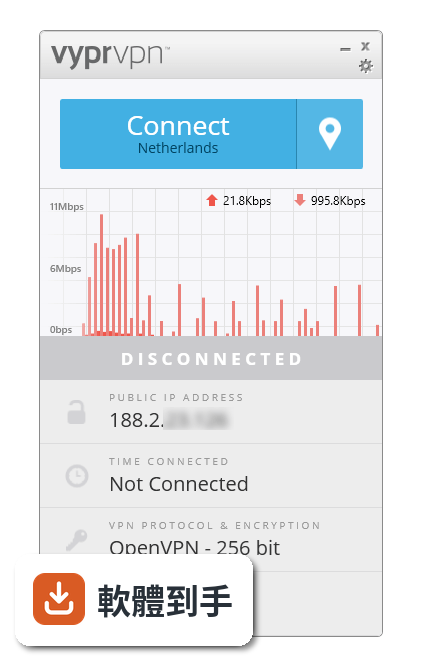
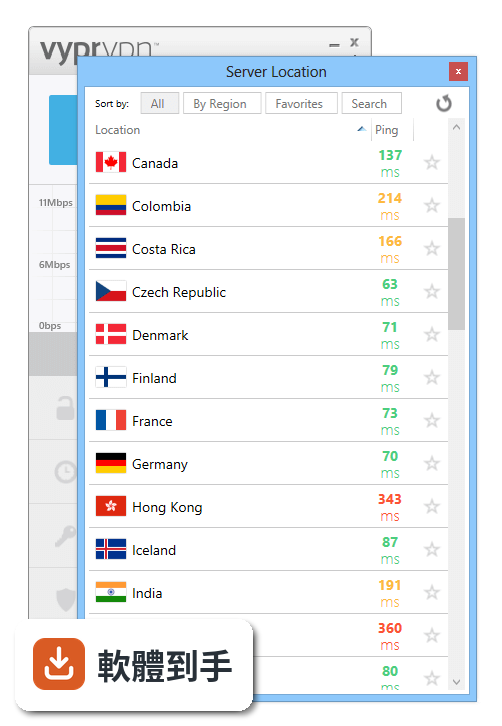
它是一套付費 VPN,安裝後可以一鍵連線,自動幫你選最快的伺服器,也有自動連線功能,可以設定在開機時或連上陌生 Wi-Fi 時自動啟動。它提供 50 多個國家的伺服器位置,你可以手動挑選或加到最愛。另外有 Kill Switch,斷線時會自動封鎖所有網路流量,避免你的真實 IP 在 VPN 斷掉時露出去。
02它有所謂的「自動連線」,實際用起來是什麼感覺?
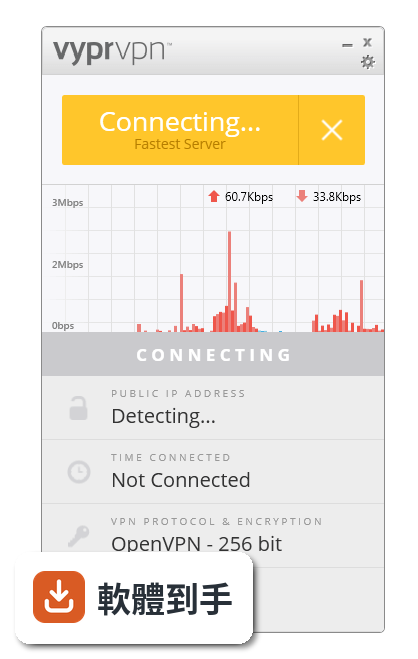
它的自動連線有幾種觸發方式:一種是當你連上沒用過的 Wi-Fi 網路時,它會自動啟動 VPN 並加密流量;另一種是開機或開啟應用程式時自動連線;還有一種是自動重新連線,也就是 VPN 非自願斷線時,它會自己嘗試接回去。這些功能加起來,就是讓你在不知不覺中保持連線狀態,不用每次手動打開。
03我常出國,去中國或俄羅斯這種網路管制比較嚴的地方,它有用嗎?
官方資料特別提到它的 Chameleon™ 協定,是為了應付 VPN 被封鎖的狀況設計的,例如中國、俄羅斯、印度、土耳其、伊朗等地。它號稱可以繞過這類限制,也能應付因為頻寬限速造成的連線問題。不過實際效果會受到當地網路環境影響,官方說法僅供參考,出發前最好先在當地測試看看。
04它能不能拿來看 Netflix 或 Hulu 這類串流平台?
官方 FAQ 明確說可以,因為它的全球伺服器網路可以存取受地區限制的內容。不過要注意,串流平台本身也會偵測 VPN,所以能不能成功解鎖,取決於當下伺服器有沒有被平台封鎖。如果你很在意這點,建議先利用 30 天退款保證,實際訂閱後測試你常看的平台,確認沒問題再留下。
05它的 Kill Switch 和 DNS 洩漏保護,具體是怎麼運作的?
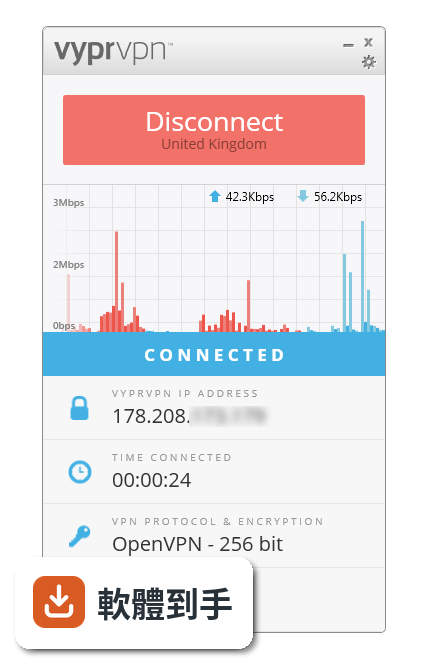
Kill Switch 是當 VPN 連線中斷時,自動阻斷所有網路流量,避免你的裝置在沒有 VPN 保護的狀態下繼續上網。DNS 洩漏保護則是確保你的 DNS 查詢不會被第三方看到,防止你的瀏覽紀錄被追蹤。這兩個功能加起來,是為了避免 VPN 失效時,你的真實 IP 或上網活動不小心暴露。
06我只有 Windows 電腦,這套軟體適合我嗎?
它支援 Windows 10 和 Windows 11,介面是英文,如果你看得懂基本操作,那在系統相容性上沒問題。不過要注意,它沒有提供免費試用,只有 30 天退款保證,等於你要先刷卡才能用。如果你只是想在 Windows 上偶爾連一下,不確定自己會不會長期用,這個付費門檻要想清楚。
07它跟其他 VPN 比起來,有什麼比較特別的地方?
官方資料強調三點:一是 Chameleon™ 協定,專門繞過 VPN 封鎖;二是無日誌政策,不儲存使用者流量紀錄;三是自有伺服器基礎設施,強調效能和安全性。另外它支援 WireGuard® 協定,這是目前公認速度較快的 VPN 協定。不過這些都是官方說法,實際體驗還是要自己用了才知道。
08我同時有手機、平板、電腦,一台訂閱夠用嗎?
官方資料說,一個訂閱方案可以同時連 5 台裝置,支援 Windows、macOS、Android、iOS、路由器等平台。如果你手邊裝置不超過 5 台,那一個帳號就夠了。如果你有遊戲主機或電視這類不支援原生 VPN 的裝置,可以透過設定路由器的方式,讓這些裝置也走 VPN 連線。
09它的評分好像不高,這樣是不是代表不好用?
它的使用者評分是 6.6/10,樣本數 107 人,不算多。對比同類軟體,IPVanish 有 189 人評分、Windscribe 有 106 人評分,分數可以參考,但樣本數都不大,代表性有限。另外它的更新頻率偏低,近兩年只更新了一次,這可能意味著開發步調較慢。建議你多看看近期使用者的具體評論,了解低分的原因是什麼。
10什麼樣的人不適合選這套軟體?
如果你看不懂英文介面,那操作上會比較吃力,因為它沒有中文。如果你預算有限,想先試用再決定,它沒有免費試用,只有 30 天退款保證,等於要先付錢。如果你很在意軟體是否頻繁更新,它的更新頻率偏低,可能不適合你。另外,如果你只需要偶爾連一次,免費 VPN 或手機內建 VPN 可能就夠了,不需要花錢訂閱。
11它的 30 天退款保證,實際申請退款會很麻煩嗎?
官方資料只說所有訂閱方案都有 30 天退款保證,但沒有說明退款的申請流程和條件。一般來說,這類保證通常要寫信給客服,而且可能會有使用量限制之類的條件。建議你在訂閱前先看清楚官網的退款政策條款,確認自己符合資格,免得之後想退卻被拒絕。
12我主要是想玩遊戲,它適合嗎?
官方資料提到,它可以透過路由器設定,保護不支援原生 VPN 的遊戲主機。但對於遊戲來說,延遲和連線穩定度比加密強度更重要,VPN 通常會增加延遲,所以如果你很在意遊戲速度,用 VPN 可能反而會變慢。官方沒有提供遊戲專用伺服器或低延遲的相關數據,這部分需要你自己實測。
下載與官方連結
VyprVPN-2.11.0.7650-installer.exe · 連結指向軟體原廠
版本紀錄
- 2025-12-16 VyprVPN 6.0.4 17.3 MB
- 2023-11-16 VyprVPN 5.1.0
- 2022-01-28 VyprVPN 4.3.1
再看 5 筆
- 2021-11-18 VyprVPN 4.3.0
- 2021-06-18 VyprVPN 4.2.3
- 2021-02-27 VyprVPN 4.2.2
- 2021-02-03 VyprVPN 4.2.1
- 2020-12-23 VyprVPN 4.2.0
這一版改了什麼
What's new in this version:
VyprVPN 2.11.0.7650
- Minor app updates
- Minor defect fixes
VyprVPN 2.10.0.7514
- Fix: Minor app updates
- Fix: Fixed issue with "Connect on Untrusted Wi-Fi" connecting on trusted networks
- Fix: Updated web links within Settings menu
- Fix: Added error messaging relating to connections
VyprVPN 2.9.6.7227
- Fix: Simplified error messaging
- Fix: Expanded TAP adapter options
- Fix: Implemented new version of OpenVPN TAP adapter for 32-bit operating systems
- Fix: Minor app updates
VyprVPN 2.9.5.7028
- Fix: Improved application stability
- Fix: Changed state handling of TAP adapter
VyprVPN 2.9.1.6923
- Fix: Resolved issue creating a problem for some users when connecting or logging in
VyprVPN 2.9.0.6857
- New: In-app account confirmation for sign-ups through the app
- Fix: Improved handling of issues related to VyprVPN Windows service
- Fix: Fixed authentication issues occurring for some users
- Fix: Minor UI defects
VyprVPN 2.8.1.6658
- Minor app updates
VyprVPN 2.8.0.6614
- New: Updates to OpenVPN & OpenSSL
- New: Added support for Arabic language
- New: Added "Forgot Password" option
- Fix: Fixed some minor crashes
- Fix: Minor UI improvements
VyprVPN 2.7.10.6417
- Made improvements to DNS functionality over OpenVPN for newer versions of Windows
- Fixed some issues with DNS leak prevention causing browsing issues
VyprVPN 2.7.9.6349
- New: Improved server list functionality to support VyprVPN Server
- Fix: Fixed an issue that sometimes prevented connections using OpenVPN or Chameleon while Kill Switch is active
VyprVPN 2.7.8.6317
- New: Customize your OpenVPN connection! Under the new Advanced tab you can better troubleshoot connection issues, set up MTU tests for optimized connection quality, manually add parameters for any OpenVPN setting, and more.
- New: Italian and Turkish language support
- New: IPv6 traffic is now blocked while connected to the VPN and while Kill Switch is enabled
- New: Updated UI log to record property changes for better Support assistance
- New: Language is now included in app-tracking for better reporting
- Fix: Updated installer to use Unicode NSIS so that the translated strings will render correctly in languages not supported by the ANSI character set
- Fix: Customer IP address no longer logged locally while VPN is not connected
- Fix: Chameleon encryption level is displayed in the main UI
- Fix: Added network stabilizer check to prevent connect but cannot browse issues
- Fix: Unconfirmed account messaging now in main UI
- Fix: Manually saved port settings no longer being overwritten
- Fix: Updated copyright year in the installer and various project files
- Fix: Translation defects
- Fix: Certification Install Tool
- Fix: In-app upgrade Install Tool
- Fix: Stand alone TAP Install Tool
- Fix: Resolved service crash
VyprVPN 2.8.1.6658
- Change log not available for this version
VyprVPN 2.8.0.6614
- New Updates to OpenVPN & OpenSSL
- New Added support for Arabic language
- New Added "Forgot Password" option
- Fix Fixed some minor crashes
- Fix Minor UI improvements
VyprVPN 2.7.10.6417
- Made improvements to DNS functionality over OpenVPN for newer versions of Windows
- Fixed some issues with DNS leak prevention causing browsing issues
VyprVPN 2.7.9.6349
- New: Improved server list functionality to support VyprVPN Server
- Fix: Fixed an issue that sometimes prevented connections using OpenVPN or Chameleon while Kill Switch is active
VyprVPN 2.7.8.6317
New:
- Customize your OpenVPN connection! Under the new Advanced tab you can better troubleshoot connection issues, set up MTU tests for optimized connection quality, manually add parameters for any OpenVPN setting, and more.
- Italian and Turkish language support
- IPv6 traffic is now blocked while connected to the VPN and while Kill Switch is enabled
- Updated UI log to record property changes for better Support assistance
- Language is now included in app-tracking for better reporting
Fix:
- Updated installer to use Unicode NSIS so that the translated strings will render correctly in languages not supported by the ANSI character set
- Customer IP address no longer logged locally while VPN is not connected
- Chameleon encryption level is displayed in the main UI
- Added network stabilizer check to prevent connect but cannot browse issues
- Unconfirmed account messaging now in main UI
- Manually saved port settings no longer being overwritten
- Updated copyright year in the installer and various project files
- Translation defects
- Certification Install Tool
- In-app upgrade Install Tool
- Stand alone TAP Install Tool
- Resolved service crash