
這是歷史版本頁面 — 看 Winamp 最新版本
Winamp 這款老播放器現在還能做什麼
 Winamp 5.51 Full
資料更新 2007-12-21
閱讀約 5 分鐘
你剛從舊電腦翻出一堆 MP3,想找個播放器好好聽音樂,卻發現系統內建的播放器介面陽春、功能陽春,連歌詞都不會顯示。你試過線上音樂平台,但有些歌就是沒上架,或者你根本不想再辦一個會員。你只想把電腦裡的音樂檔案整理好、順順地播出來,但試了幾個播放器,不是介面太花俏,就是功能少得可憐,最後還是回到資料夾裡手動點檔案。
一般人遇到這種狀況,會直接換一套播放器,但換來換去總有哪裡不對勁:有的播放器太吃資源,有的介面設計得很奇怪,有的連基本的等化器都沒有。其實這類工具的核心切入點很簡單——把「播放音樂」這件事做好,同時讓你能管理自己的音樂庫、調整聲音、換外觀,而不是逼你接受一套固定的使用方式。你需要的不是一個華麗的介面,而是一個能配合你習慣、不會礙事的工具。
01Winamp 能播放哪些音樂格式?
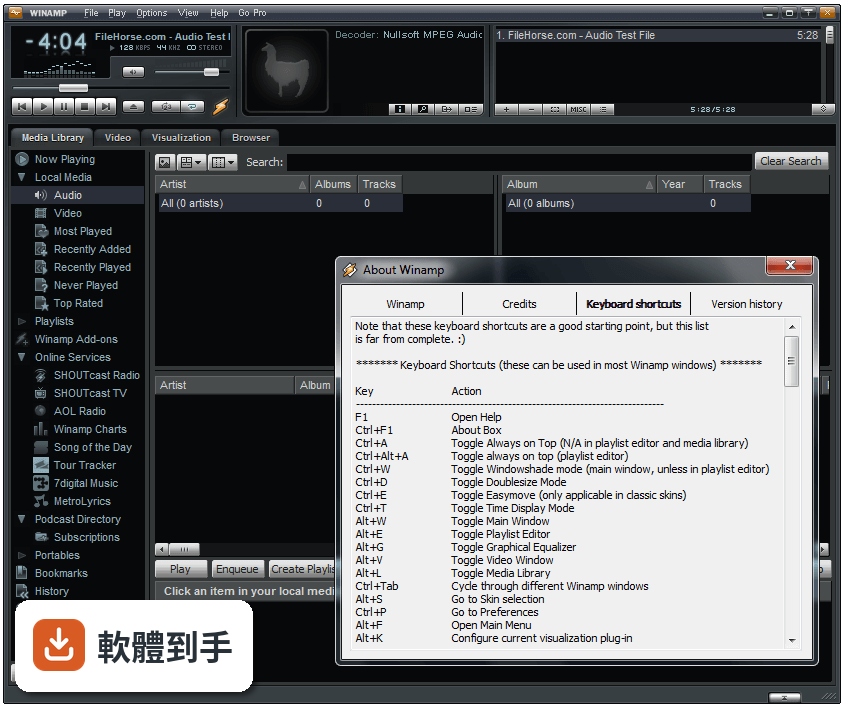
它支援 MP3、OGG、AAC、WAV、MOD、XM、S3M、IT、MIDI 等常見音訊格式,也支援 AVI、ASF、MPEG、NSV 等影片類型。如果你手邊的音樂檔案是這些格式,直接拖進視窗就能播。比較冷門的格式建議先確認是否在支援清單內,免得裝了才發現不能播。
02它能整理電腦裡的音樂庫嗎?
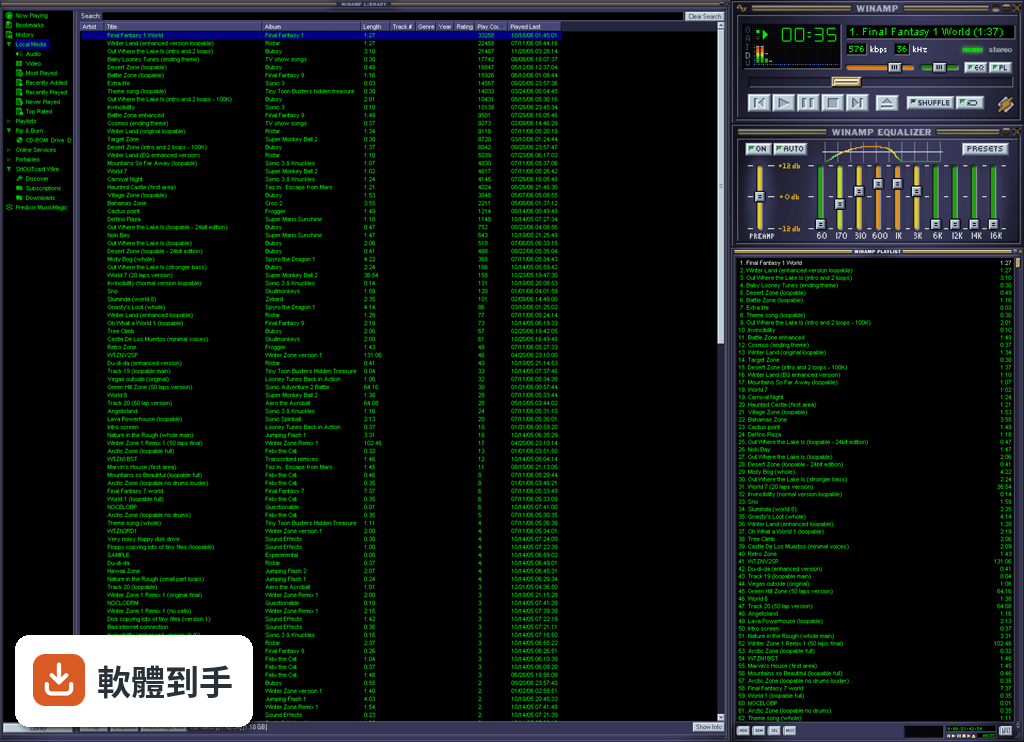
可以。它有內建的媒體庫功能,你可以把音樂檔案或整個資料夾拖進去,它會自動建立索引,之後要搜尋、排序、建立播放清單都方便。播放清單可以存檔,下次要聽同一批歌不用重新拉一次。如果你習慣用資料夾分類音樂,它也能照你的資料夾結構來顯示。
03可以聽網路電台嗎?
可以。它支援 SHOUTcast Radio 和 AOL Radio 的線上電台,可以直接在軟體裡搜尋頻道、收聽,甚至錄音下來。不過官方說明有提到,網站改版期間部分服務可能暫時無法使用,如果你很依賴某個特定電台,建議先確認它還在不在。
04能把 CD 轉成 MP3 嗎?
可以。它有 CD 抓軌功能,能把音樂 CD 轉成檔案存到電腦裡,也有燒錄功能,可以把音樂檔案燒回 CD。如果你手邊有一批老 CD 想數位化,這套軟體可以一次搞定。不過燒錄功能要看你光碟機有沒有支援,硬體不支援的話軟體也幫不上忙。
05介面可以換嗎?
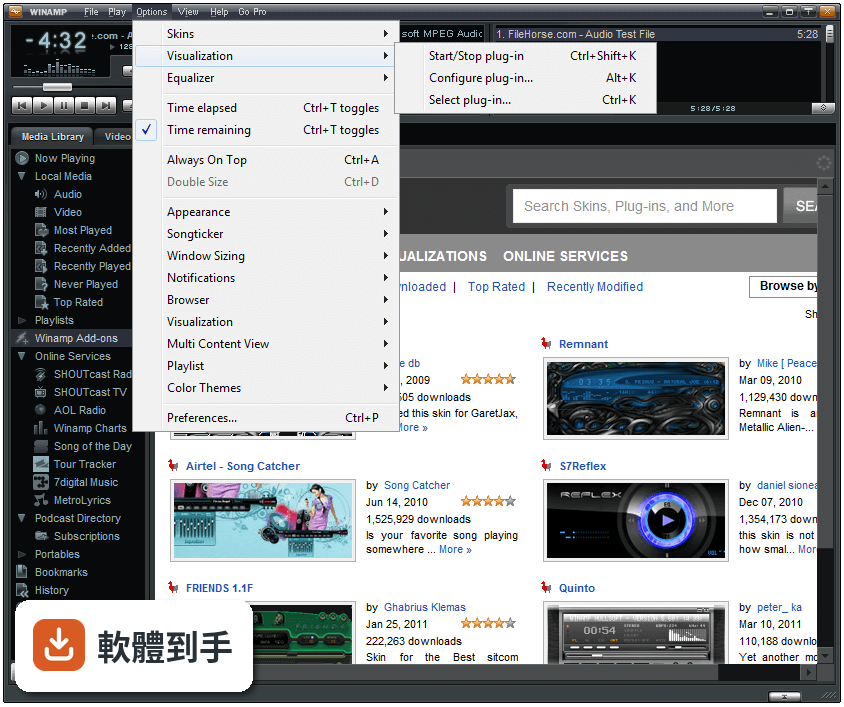
可以。它支援兩種類型的皮膚:經典的 Winamp 1.x/2.x 皮膚,以及 Winamp 3 的自由形式皮膚。前者是傳統的長條面板,後者可以做出各種形狀和佈局。網路上有大量皮膚可以下載,裝上去就能改變外觀。如果你對預設介面看膩了,換皮膚是最快的調整方式。
06這套軟體適合什麼樣的人用?
適合手邊有一批本地音樂檔案、想用一套軟體管理並播放的人。它不需要連網就能播歌,也不會有串流平台那種「這首歌要會員才能聽」的限制。如果你習慣自己收集音樂、整理資料夾,而且不想被平台綁架,它的媒體庫和播放清單功能會很實用。
07我電腦很舊,跑得動嗎?
它支援 Windows XP 到 Windows 11,官方說明強調它「快速、靈活」,而且這類播放器本來就設計成輕量執行。不過實際效能還是要看你的硬體和同時開多少功能,如果你開了一堆視覺效果外掛,老電腦可能還是會喘。建議先裝起來試播幾首歌看看順不順。
08介面只有英文,看不懂怎麼辦?
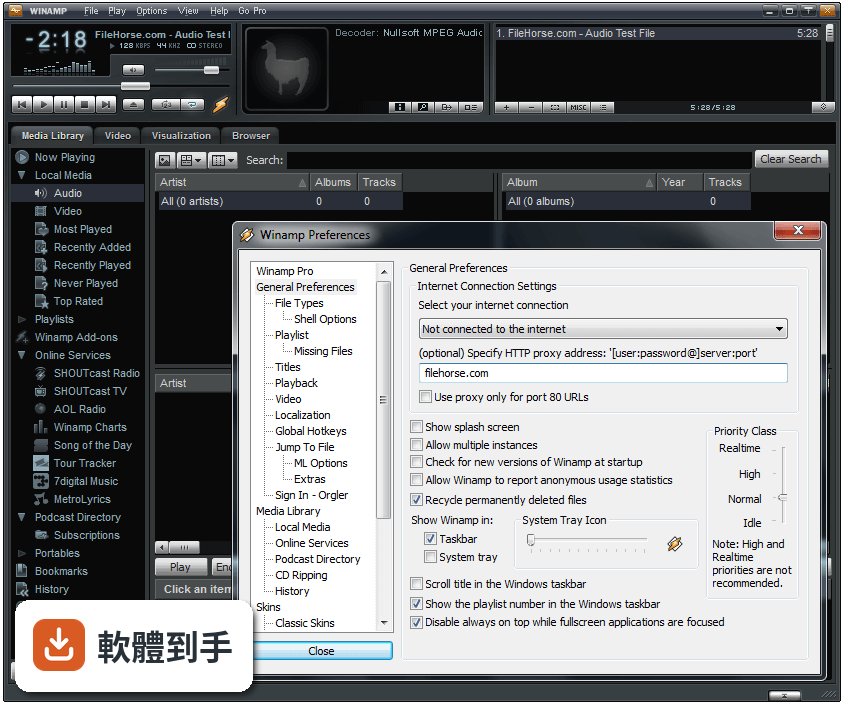
官方說明提到有語言包可以下載,但預設介面是英文。如果你英文不熟,操作上會需要花點時間摸索,尤其是設定選單那一塊。不過播放、暫停、下一首這些基本按鈕的圖示很直覺,不太會英文也能上手。如果你連基本操作都覺得吃力,可能要考慮其他有中文介面的播放器。
09它很久沒更新了,會不會有問題?
官方說明自己承認,最新版本「不算穩定,不提供官方支援,可能有很多 bug 並導致意外崩潰」。而且從版本紀錄來看,近兩年都沒有更新。如果你要拿它當日常主力播放器,要有遇到問題時沒人幫你修的準備。如果你只是偶爾開來聽歌,風險相對低,但重要資料記得先備份。
10有比它更多人用的替代品嗎?
有。資料中列出的 Foobar2000 和 MusicBee 都是功能相近的播放器,雖然評分人數比 Winamp 少,但更新較頻繁、介面也有中文。如果你在意長期維護和穩定性,這兩個可以考慮。如果你只是懷念 Winamp 的操作手感,那它還是可以裝來用,只是要有心理準備它可能不會再有大更新。
下載與官方連結
winamp551_full_en-us.exe · 8.35 MB · 連結指向軟體原廠
版本紀錄
- 2023-04-27 Winamp 5.9.2 Build 10042
- 2022-12-22 Winamp 5.9.1 Build 10029
- 2022-08-02 Winamp 5.9 Build 9999
再看 5 筆
- 2018-11-10 Winamp 5.8 Build 3660 Beta 7.8 MB
- 2016-10-26 Winamp 5.8 Build 3653 Beta 7.6 MB
- 2015-01-22 Winamp 5.666 Full Build 3516 (patched)
- 2013-12-13 Winamp 5.666 Full Build 3516 16.37 MB
- 2013-11-21 Winamp 5.66 Full 11.85 MB
這一版改了什麼
What's new in this version:
* New: Autoplay Handlers for Audio, MP3 and Video CD's on WinXP & Vista
* New: Default Programs registration for installations on Windows Vista
* New: Optional Constant-Q Equalizer and optional ISO Standard frequency bands
* New: [in_flv] Flash Video decoder (vp6 only, not h.263)
* Improved: Browser download manager now uses CD Ripping destination folder
* Improved: Deletion of embedded album art via Artwork tab in File Info
* Improved: More accurately translated Language Packs
* Improved: More miscellaneous UI/dialog tweaks & improvements
* Improved: Option to set the number of pixels to scroll for modern songticker
* Improved: [Gracenote/MusicID] Better error checking & memory cache optimizations
* Improved: [gen_ff] More miscellaneous freeform skinning engine optimizations
* Improved: [gen_hotkeys] Added optional WM_APPCOMMAND support for media keys
* Improved: [gen_hotkeys] Added increase + decrease rating on current track
* Improved: [in_dshow] Reading of length and bitrate for non-default video formats
* Improved: [in_flac] Optimized disk caching for increased performance
* Improved: [in_mp3] Better optimization for older Pentium Pro/2/3 cpu's
* Improved: [in_mp3] Support for reading ALBUM ARTIST field if TPE2 not present
* Improved: [in_mp4] Better Unicode support and metadata read optimizations
* Improved: [in_mp4] Optimized disk caching/reading
* Improved: [in_vorbis] Support for reading YEAR field if DATE not present
* Improved: [ml_disc/in_cdda] Disc reading tweaks and other general optimizations
* Improved: [ml_history] New tracking control options
* Improved: [ml_local] Added column for BPM
* Improved: [ml_local] Album column sorting order logic
* Improved: [ml_local] Better playlist handling
* Improved: [ml_local] Bumped track# metadata guessing limit from 130 to 999
* Improved: [ml_local] Database query and memory optimizations
* Improved: [ml_pmp] Support for drag&drop from Explorer into portable device view
* Improved: [ml_transcode] Prompt to delete aborted transcodes
* Fixed: Artwork not found if .nfo filename contains a period
* Fixed: ASX Parser converting all stream links in .asx playlists to upper case
* Fixed: Classic songticker wraparound glitchiness
* Fixed: Dragging/scrolling of songticker text after resize
* Fixed: Global Hotkeys list destroyed when changing language packs
* Fixed: Gracenote CDDB Editor genre selection glitches
* Fixed: Gracenote/MusicID not using Winamp's proxy setting
* Fixed: Parsing of ansi ASX playlists containing non-standard characters
* Fixed: Restore from System Tray if previously closed in a minimized state
* Fixed: Setup resetting desktop icons :-o
* Fixed: Spectrum vis incompatibility crash with some 3rd-party input plugins
* Fixed: Truetype replacement font alignment in Winamp Modern winshade songticker
* Fixed: Various miscellaneous keyboard shortcut issues
* Fixed: Winamp Agent registry entry typo (wianmpa.exe)
* Fixed: [Bento] Collapse/Expand Playlist not respecting 'Show Album Art' setting
* Fixed: [gen_ff] Potential high CPU usage of songticker object
* Fixed: [gen_ff] TrueType replacement font change not updating in real-time
* Fixed: [gen_hotkeys] Restore from minimized state whilst About dialog is open
* Fixed: [gen_ml] Blank ML when restarting Winamp from a minimized state
* Fixed: [gen_ml] Cancelling Online Media password prompt clears password & filters
* Fixed: [in_dshow] Miscalculation of some mpeg video lengths
* Fixed: [in_flac] Divide-by-zero crash on corrupt files
* Fixed: [in_mp3] Deleting Lyrics3 tag in Alt+3 Editor also deletes ID3v1 tag
* Fixed: [in_mp3] Handling of ID3v2 with bad version/revision #'s
* Fixed: [in_mp3] ID3v2 parsing crash with some mp3's
* Fixed: [in_mp3] ID3v2 tag not showing when ID3v1 tag reading is disabled in config
* Fixed: [in_mp3] MPEG Info not showing in Alt+3 for files with large ID3v2 tags
* Fixed: [in_mp3] Now only reads first ID3v2 tag if more than one is present
* Fixed: [in_mp3] Winamp UI freezes when loading certain corrupt mp3's
* Fixed: [in_mp4] Playback of mp3 in mp4 container
* Fixed: [in_mp4] Seeking when paused
* Fixed: [in_mp4/jpeg.w5s] Crash when Art field is in metadata with no embedded art
* Fixed: [in_vorbis] UTF8->UTF16 optimized (fixes File Info delay bug)
* Fixed: [libmp4v2] Corrupt m4a's not playing, better handling of ones beyond repair
* Fixed: [ml_autotag] Crash when track isn't part of a disc, eg. internet-only releases
* Fixed: [ml_autotag] Stops processing when switching to another ml view
* Fixed: [ml_disc] CD view/titles not refreshing when ejecting old/inserting new CD
* Fixed: [ml_disc] Crash when using invalid strings in playlist filename generation
* Fixed: [ml_disc] No Burn button under some system configurations
* Fixed: [ml_disc/ml_pmp/ml_transcode] Processing of # in Destination Folder path
* Fixed: [ml_local] Artist column in descending order when sorting by Year
* Fixed: [ml_local] Down key in Search field not focusing the Simple View list
* Fixed: [ml_local] Last Updated, Album Gain & Podcast column sorting orders
* Fixed: [ml_local] Two filters always checkmarked in Edit View for Simple views
* Fixed: [ml_playlists] Shift+Enter hotkey to Enqueue playlist
* Fixed: [ml_plg] Crash when stopping Playlist Generator scan or resetting database
* Fixed: [ml_pmp] Column sorting orders
* Fixed: [ml_rg] Restore from minimized state whilst rg results dialog is open
* Fixed: [ml_transcode] Restore from minimized state whilst config dialog is open
* Fixed: [ml_wire] Podcasts not being downloaded if
* Fixed: [ml_wire] Lockup when encountering scripts in field
* Fixed: [out_disk] Output folder always resetting to My DocumentsMy Music
* Fixed: [pmp_ipod] 'Add album art' option always checkmarked
* Fixed: [tataki] Potential crash when encountering an invalid/superficial error
* Fixed: [vis_milk2] Crash when exiting fullscreen back to attached Modern skin window
* Misc: Alt+3 Auto-Tag now saves Gracenote FileId and ExtData fields
* Misc: Double-click Stereo indicator to open Playback prefs (Bento & Modern skins)
* Misc: Installation is now prevented on Win9x
* Misc: Made Milkdrop2 the default vis plugin
* Misc: Split the Playback prefs into 3 tabs: Playback, Equalizer & Replay Gain
* Misc: Various installer setup & localization translation tweaks
* Misc: Various Bento skin fixes, tweaks and improvements
* Misc: Various Winamp Modern skin 5.5-related updates
* Misc: [ml_local] Removed deprecated 'Show album gain values' option in Prefs
* Updated: Bento skin #117
* Updated: Gracenote MusicID/CDDB v2.5.1
* Updated: libpng 1.2.22
* Updated: [vis_milk2] MilkDrop 2.0c