
這是歷史版本頁面 — 看 Winstep Nexus Dock 最新版本
Windows 工作列不夠用?Winstep Nexus Dock 能做什麼
 Winstep Nexus Dock 16.5
資料更新 2016-05-29
閱讀約 6 分鐘
你每天打開電腦,工作列上擠滿了釘選的程式、開著的視窗,右下角還有一堆常駐圖示。想快速啟動常用軟體,得在密密麻麻的圖示裡找半天;開了很多視窗時,工作列上的按鈕小到難以分辨。你只是想讓桌面乾淨一點、啟動東西快一點,卻發現 Windows 內建的工作列怎麼調整都不太順手。
一般人會試著把工作列圖示變小、釘選更多捷徑,但空間就那麼多,塞越多越難找。也有人改用桌面捷徑,可是桌面被圖示淹沒,反而更亂。這類工具的切入點是:把常用的應用程式、檔案、資料夾集中到一條可自訂的長條上,放在螢幕邊緣,需要時才出現,不需要時自動隱藏,讓工作區保持清爽,同時用視覺化的方式快速啟動東西。
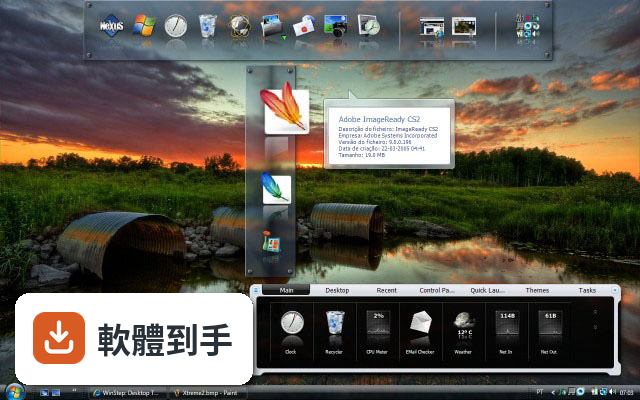
01Winstep Nexus Dock 是什麼?它能取代工作列嗎?
它是一套 Windows 桌面 Dock 工具,提供一條可自訂的長條,讓你放應用程式捷徑、檔案和資料夾,也能顯示正在執行的任務。它定位為 Windows 預設工作列的替代方案,但官方說明也提到缺乏深度的工作列整合,所以它比較像是工作列之外的輔助啟動列,而不是完全取代工作列。
02這套軟體除了放捷徑,還能做什麼?
它內建多種小工具,包含 CPU、RAM、網路監控、天氣和時鐘。圖示有即時反射效果,支援拖放新增捷徑,也有多種滑鼠懸停和點擊動畫。付費的 Ultimate 版本額外支援多個 Dock、分頁式 Dock 和進階自訂選項,免費版則提供基本 Dock 功能和自訂能力。
03它支援多螢幕嗎?我雙螢幕想兩邊都放一條 Dock。
支援。官方說明明確指出它支援多螢幕設定,可以在不同螢幕上放置 Dock。你可以在每個螢幕的邊緣各自放一條 Dock,各自獨立設定內容和位置,方便在不同螢幕上快速啟動常用程式。
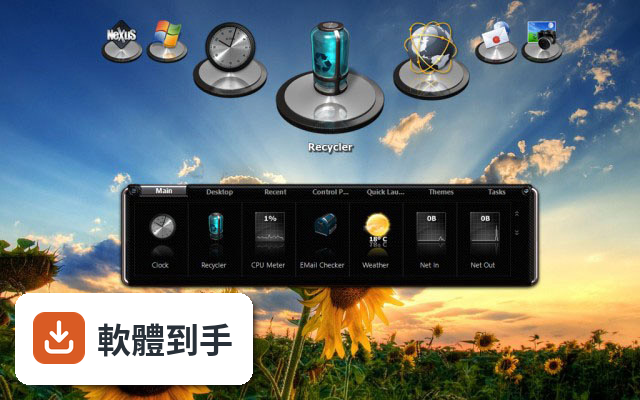
04介面只有英文,會不會很難上手?
介面語系只有英文,但操作邏輯不算複雜。安裝後 Dock 會出現在螢幕底部,右鍵點 Dock 選「Insert New Dock Item」就能新增捷徑,進到 Preferences 可以調整主題、透明度和圖示大小。如果你對英文介面不熟悉,初期可能需要花點時間摸索選單位置,但基本操作沒有太多障礙。
05這套軟體會很吃資源嗎?我電腦比較舊。
官方說明它本身輕量,系統需求是 1 GHz 處理器、512 MB 記憶體(建議 1 GB)、50 MB 磁碟空間,並需要支援 DirectX 的顯示卡。但要注意,過多的動畫效果和小工具會增加系統資源使用,舊電腦上如果開太多特效,可能會感到卡頓,建議關閉部分動畫或減少小工具數量。
06免費版和付費版差在哪?我該先從哪個開始?
免費版包含基本 Dock 功能、自訂選項和內建小工具,對多數人來說已經夠用。付費的 Nexus Ultimate 版本要價 24.95 美元,額外提供多個 Dock、分頁式 Dock 和進階自訂功能。建議先試用免費版,確認它符合你的使用習慣,再考慮是否需要付費功能。
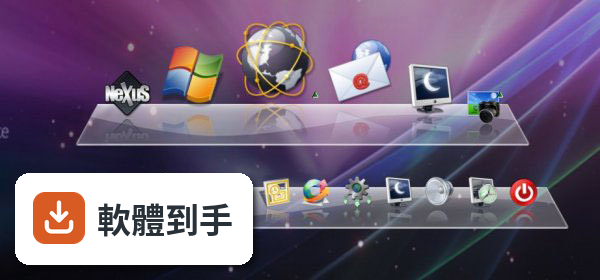
07我可以在多台電腦之間同步我的 Dock 設定嗎?
軟體內建備份和還原功能,可以將 Dock 設定儲存起來,之後在另一台電腦上還原。但官方說明沒有提到自動雲端同步,所以你需要手動備份設定檔,再搬到另一台電腦上還原。如果你習慣多台電腦用一樣的配置,這功能可以省去重新設定的時間。
08這套軟體適合什麼樣的人用?
適合覺得 Windows 預設工作列不夠用、想要更多自訂彈性的人。如果你常用小工具監控系統狀態、需要快速啟動大量應用程式、或有多螢幕需求,它提供的自訂性和小工具會比較符合你的需求。它也適合喜歡美化桌面、調整介面外觀的人。
09什麼情況下不該選它?
如果你期待它能深度整合 Windows 工作列,例如完整管理系統通知、時間軸或虛擬桌面,它做不到。另外,它介面只有英文,如果你完全無法接受英文介面,使用上會比較吃力。還有,如果你只是想要一個簡單的應用程式啟動器,不太需要自訂或小工具,免費版的功能可能超過你的需求,但也不構成障礙。
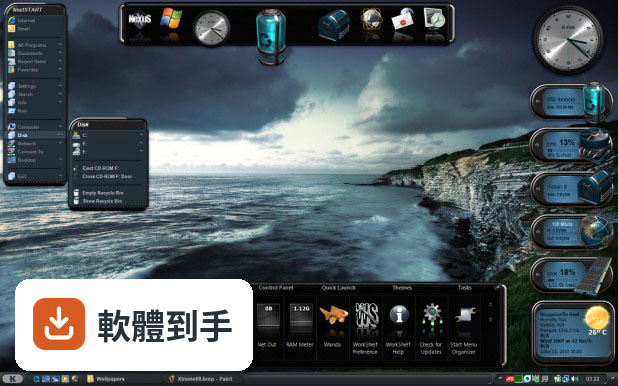
10它和 ObjectDock、RocketDock 比起來如何?
這三套都是 Windows 上的 Dock 工具,功能定位相近。Winstep Nexus Dock 的評分人數(147 人)比 ObjectDock(67 人)和 RocketDock(125 人)多,分數也略高。但評分人數都不算多,參考價值有限。實際使用感受會因個人需求而異,建議都裝來試試看,看哪一套的操作邏輯和自訂方式比較順手。
11我擔心動畫特效太多會拖慢電腦,可以關掉嗎?
可以。在 Preferences 設定中可以調整動畫效果,包含滑鼠懸停和點擊的特效,也能調整透明度、主題和圖示大小。如果你覺得動畫影響效能,把特效關掉或調低就能減少資源消耗。官方說明也提到過度使用動畫和小工具可能影響效能,所以這部分是可以自行控制的。
12這套軟體還在持續更新嗎?會不會裝了之後沒人維護?
根據收錄的版本紀錄,它從 2013 年開始持續更新,最近一年內有 4 次更新、兩年內有 7 次,顯示開發團隊仍持續維護。不過軟體授權型式是 Demo,免費版可以一直用,但部分進階功能需要付費解鎖。如果你在意長期維護,目前看起來更新狀況是正常的。
下載與官方連結
nexus.zip · 41.89 MB · 連結指向軟體原廠
版本紀錄
- 2026-09-22 Winstep Nexus Dock 26.9 40.94 MB
- 2026-06-28 Winstep Nexus Dock 26.6 40.11 MB
- 2026-04-07 Winstep Nexus Dock 26.4 38.26 MB
再看 5 筆
- 2026-01-28 Winstep Nexus Dock 26.1 39.96 MB
- 2025-09-30 Winstep Nexus Dock 25.9 39.55 MB
- 2025-07-30 Winstep Nexus Dock 25.7 39.2 MB
- 2025-06-29 Winstep Nexus Dock 25.6 37.97 MB
- 2025-02-18 Winstep Nexus Dock 25.2 37.92 MB
這一版改了什麼
What's new in this version:
- Updated Russian language file.
- File format of screenshots taken by the 'Capture Desktop' internal command can now be set as either JPG or PNG.
- Filled histogram colors used for the CPU, Net and RAM Meter icon modules are now a bit transparent so the background of the icon can still be seen.
- URLs dragged from all browsers should now use the web page title for the item's label instead of the actual URL domain address.
- Added new 'Overlap information on battery icon' option to the battery module, enabled by default. Controls whether the AC Power symbol, charge percentage and battery runtime values are drawn on top of the battery icon or next to it. This allows using customized multi-state battery images that wouldn't look good with battery information overlapping the battery image.
- The 'Most Active Programs', 'Power Events Log' and 'Battery Information' dialogs now show a button on the taskbar.
- Since it's global, also added the 'Do not launch multiple sessions of the same application' setting to the More Options dialog in the General tab of Preferences. Also renamed the dialog from 'Advanced Settings' to 'More Options' for consistency with the button that invokes it.
- The Animation Speed slider in a dock Auto-Hide Settings dialog is now disabled if the auto-hide animation is set to No Animation.
- Added new 'Auto Backup Settings' internal command. Intended to be used with the built-in Alarm Manager to make automatic scheduled backups, it makes a backup of the application's settings without prompting the user for a filename. It creates the filename based on the current date and time and stores the backup in the last used backup folder (or C:UsersPublicDocumentsWinStepBackup by default).
- The battery in the Battery Information dialog now displays the style and settings currently selected by the user and glows with the dominant color of the battery image.
- The 'Colorize low and critical battery states' battery module setting now also properly colorizes customized multi-state battery images.
- Added new alternative 'Hue Shift' colorization method which allows color information to be preserved and whites to remain white.
- Changed the Hue shift colorization algorithm to one that is more accurate than Microsoft's solution. This can affect colorization of the Battery Monitor and Wanda fish modules.
- The 'Edge Swipe Settings' buttons in the Behavior tab of the Shelf and Dock Properties panels are now grayed out if the user is using edge bumps instead of edge swipes to activate the dock/Shelf.
- A theme validation is now performed when Restoring settings from a previous backup, so the user doesn't end up with a blank theme if the theme used at the time of the backup no longer exists.
- Added 'Most Active Programs' button to the CPU module settings dialog, to make this feature more visible.
- The Colorize settings are now also directly available in the Themes tab by sliding the UI with the arrow. This allows quick preview of colorization changes without having to constantly open and close the Colorization Settings dialog.
- The Winstep Update Manager now uses the currently selected settings when you click the 'Check for Updates' button in the Advanced tab of Preferences.
- Increased the interpolation quality used to render dock backgrounds.
- The 'Minimize to dock' and 'Combine dock icons with running applications' settings are now only available when 'Show running applications in this dock' is selected.
- Improved the color hot-track algorithm so it also takes into account the average background color when it can't calculate a proper dominant color.
- A black or gray scale tint color now grayscales the bitmap for both the Tint and Hue shift colorizing modes.
- Tweaked the vertical position of the text in the Shelf tabs when running under high-DPI settings.
- Added a new 'Colorize text' option to the Color Settings, enabled by default. Text can now be optionally colorized as well. Disabling this option allows the user to colorize a theme but still be able to tweak text colors manually via the theme 'Fonts' dialog.
- Replaced the Shelf and dock images used in the Docks & Shelves tab in Preferences so they can scale up properly on high DPI displays.
- Added 'Flip Dock Background' option to the Appearence sub-menu of the dock's right-click context menu. Equivalent to toggling the 'Do not flip background for docks at the top of the screen' setting but with immediate effect.
- Added 'Show Container' and 'Browse Container' options to the right-click context menu of the 'Restore Wallpaper' internal command. Allows you to open or browse the folder where the Windows wallpaper is stored.
- Fixed malformed request to GeoIP location server that caused GeoIP location to stop working after 2016/03/17.
- The 'Lookup IP address' internal command would fail if the GeoIP information was not already in the cache.
- The 'Show full right click context menu options?' setting in the More Options dialog of the General tab in Preferences was not sticking.
- The dock could crop the number of visible tray icons in grouped mode when changing the iconsize of the dock.
- Pseudo-3D dock backgrounds like the Leopard theme no longer appear heavilly distorted at certain icon/icon reflection sizes.
- The 'Capture Desktop Settings' dialog, when invoked from a right click context menu, was not saving the settings to the proper location.
- The Shelf could auto-hide while a item delete confirmation dialog was still on screen if the user moved the mouse pointer over the Shelf.
- If the auto-hide delay was too short, the Shelf could auto-hide while it was still performing unrelated animations such as shifting icons after deleting an item, etc...
- Synchronization of the system clock with the Internet Time Servers failed if the regional settings for the SYSTEM account (used by the Winstep Helper Service) used a difference decimal point character than the user account under which the application run (e.g.; "123,4" instead of "123.4" or vice-versa).
- Some routines were still using bilinear instead of bicubic transformations for rescaling bitmaps, which caused the bitmaps to look blurrier than they should.
- Nexus Ultimate would crash if a dock was set to auto-hide when selecting a new theme in the Dock Properties dialog and the user clicked outside the Dock Properties window (which would cause the dock to hide) and then on the themes list.
- Certain dock backgrounds could cause visual glitches when mousing over near the position of a dock that was hidden into a screen edge.
- A dock set to hide/collapse automatically after launching an application (or a sub-dock set to close automatically after launching an application) would fail to do so if the item being launched required admin privileges (i.e.; UAC prompt).
- Always on top docks set to auto-hide for maximized applications will now only do so if they are not reserving screen space (maximized applications would not be overlapped by the dock in this case) and will only auto-hide for full screen applications.
- The preview of the Destop Module Battery Monitor on the Modules tab of Preferences would show a disabled battery if the battery module was not currently in use.
- Fixed some Shelf tab width issues that could occur if the tab font size was too large to fit.
- Drag & Drop of URLs was not working with certain browsers (e.g.; Waterfox) that did not supply the ANSI UniformResourceLocator format. ANSI and Unicode formats are now correctly accepted.
- Changing units of the weather module from C to F or vice-versa only became effective after the cached weather information became stale and the weather information was refreshed.
- The 'Colorize animated fish style' and 'Hue' values for the Wanda module were not being saved under the free version of Nexus and Nexus Ultimate.
- Sub-dock indicators were overlapping other icons and causing visual glitches if the icon spacing was less than 8 pixels.
- The 'Popup delay' slider in the Activation Settings dialog of the Dock Properties Behavior tab appeared enabled even if 'Bring dock forward on mouseover' was not selected.
- With very short auto-hide delays, or under certain circunstances when a dock was set to auto-hide for maximized applications, a dock could auto-hide in the middle of a resize/move animation, which would cause it to glitch.
- Clicking an icon to open an in-Shelf sub-dock could cause a persistent blank white box to appear if in-shelf sub-docks were set to open on mouse over and the sub-dock had started playing the open animation just prior to the click.
- The Winstep Update Manager always failed to download updates with a 'file size mimatch' error on East Asian systems.
- A sub-dock opening animation would briefly flash the full glass blur region at the begining if the 'Aero Glass Blur' effect was enabled.
- A dock would keep bouncing up and down if 'Auto hide for maximized applications' was enabled and the user tried to drag a shortcut from a maximized window into the dock.
- The 'Colorize low and critical battery states' battery module setting was not 'sticking' between restarts of the application.
- The 'Aero Glass' (non-Windows 10) balloon tooltip style was blurring the tooltip window background on Windows 10 systems.
- Under certain circumstances, if a theme's original font style did not exist on the system, text width could be calculated as zero and cause visual glitches.
- Winstep applications should now display the high-resolution icon in Explorer on high-DPI/large icon systems.
- Docks should now be a bit less 'jittery' when inserting items into them via drag & drop.
- A Shelf attached to the top screen edge with the tabs set to appear at the top of the Shelf, was not hiding the tabs properly when collapsed if the 'Hide tabs' setting was enabled.
- The 'Auto Hide at Startup' option could sometimes fail to hide the dock, leaving it visible and in an unresponsive state until you activated it.
- It was very easy (and very annoying!) to accidentally activate a dock at the bottom of the screen via an edge bump when going for the last option in a context menu. This could make the dock cover the menu(s). Edge bumps are now ignored if the mouse pointer is over a menu.
- Getting the current wallpaper to use as the background in certain dialogs with result previews could sometimes fail under Windows 8.x and 10. This could cause changes in previews to overwrite instead of replacing each other (Dock Icon Spacing and Dock Transparency dialogs, for instance).
- The 'Colorize with dominant color of desktop background' feature could stop working properly after going to the Themes tab in Preferences.
- Shelf tab overlay bitmaps (used in the DarkTech theme, for instance) were not obeying the user specified transparency settings.
- The Themes tab in Preferences, unlike the Themes tab in a dock Properties dialog, was unable to display RK Launcher Nexus themes.
- Fixed slow memory leak in the Shelf that occured whenever an icon in the Global icon cache was changed or a Shelf tab was deleted.
- 'Colorize with the dominant color of the desktop background' now works properly with the Windows 7 wallpaper slideshow.
- Fixed another memory leak that occured when switching tabs in the Shelf if one of the tabs contained Winstep modules.
- The Battery Monitor Event Actions dialog would not properly display the background image if the Low Battery alarm was set to 'Do Nothing' and the Critical Battery alarm was set to something other than 'Do Nothing'.
- Fixed some issues displaying and correctly applying RK Launcher dock backgrounds in the Themes tab of Preferences.
- Closing Preferences could interfere with the Windows wallpaper slideshow feature if Windows changed the wallpaper while the Preferences window was still open.
- The application crashed if a context menu got repainted while a thumbnail preview of a document in the menu was being shown.