
這是歷史版本頁面 — 看 Wise Care 365 Free 最新版本
電腦卡頓垃圾清不完,Wise Care 365 Free能做什麼
 Wise Care 365 Free 4.77
資料更新 2017-12-29
閱讀約 6 分鐘
電腦用久了,開機越來越慢,磁碟空間莫名其妙變少,瀏覽器紀錄和暫存檔堆了一大堆,想整理卻不知道從哪裡下手。每次想清垃圾,打開磁碟清理掃半天,清完感覺也沒差多少;想手動刪暫存資料夾,又怕刪錯東西讓系統出問題。這種卡在「知道該清但不敢亂動」的狀態,其實很多人都有。
一般人遇到這種狀況,最直覺的做法是裝防毒軟體掃一輪,或是用 Windows 內建的工具加減清。但防毒軟體主要管安全,不管垃圾檔和登錄檔;內建工具能清的項目有限,啟動項管理、隱私痕跡清除這些事還是得另外想辦法。於是就出現一類工具,把清理垃圾、修登錄檔、管啟動項、清瀏覽紀錄這些事集中到同一個介面,讓使用者按幾個按鈕就能完成例行維護,不用自己記住每個功能藏在系統的哪裡。
01Wise Care 365 Free 到底能幫我清哪些東西?
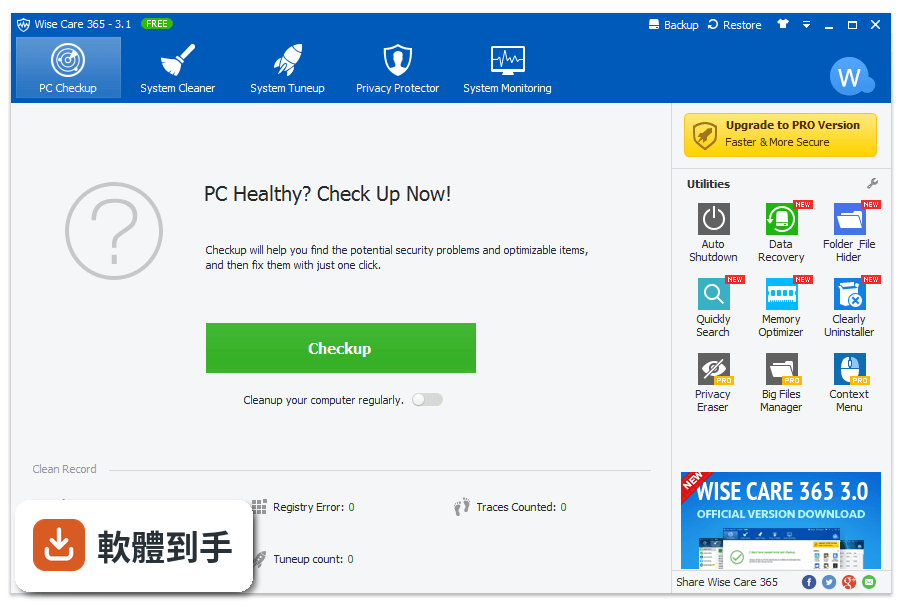
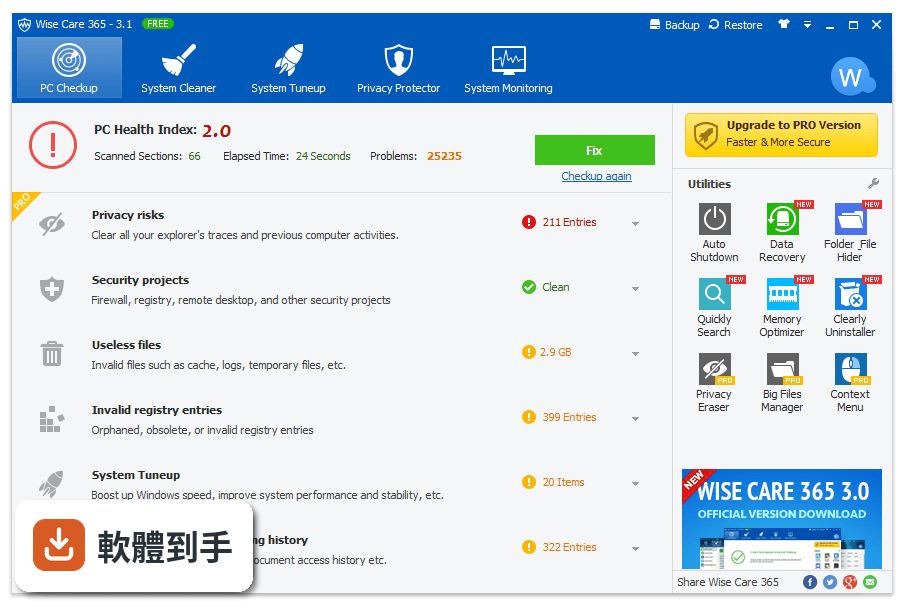
它主要分幾個區塊:System Cleaner 負責清暫存檔、瀏覽器快取、下載紀錄、無效捷徑這類佔空間的垃圾;Registry Cleaner 掃描並修復登錄檔錯誤;Startup Manager 讓你看開機時自動啟動的程式並停用不需要的;Privacy Protector 可以刪瀏覽紀錄和 Cookie,也有檔案粉碎功能。另外還有 PC Checkup 一鍵健檢,把上述問題掃一遍後集中顯示。
02這套軟體用起來會不會很複雜,我電腦不太熟也能操作嗎?
介面設計是分頁式的,主要功能分成 PC Checkup、System Cleaner、System Tuneup、Privacy Protector、Utilities 幾個標籤,每個標籤底下就是對應的按鈕。官方說明提到它針對新手和進階使用者都適用,安裝完還有引導導覽帶你認識主要功能。基本上就是按 Scan 掃描、按 Clean 清理,不太需要理解背後原理。
03它的登錄檔清理功能是怎麼運作的,會不會把系統弄壞?
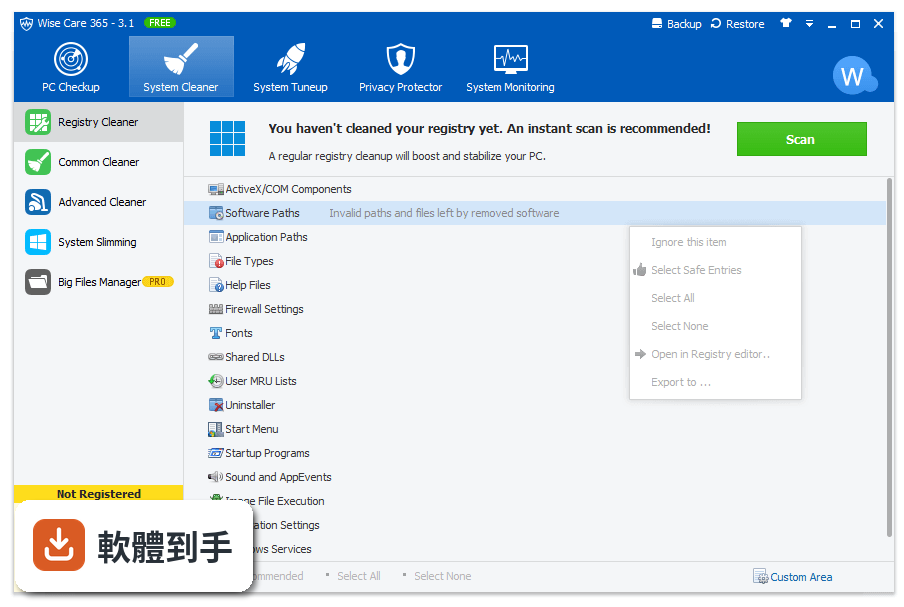
Registry Cleaner 會掃描登錄檔中的無效項目,掃完讓你自己決定要修復哪些,而且有備份和還原功能。也就是說,如果真的發生問題,可以從備份回復原狀。不過登錄檔清理本來就帶有一定風險,建議先備份再執行,不要貪心一次清太多。
04開機越來越慢,它能幫上什麼忙?
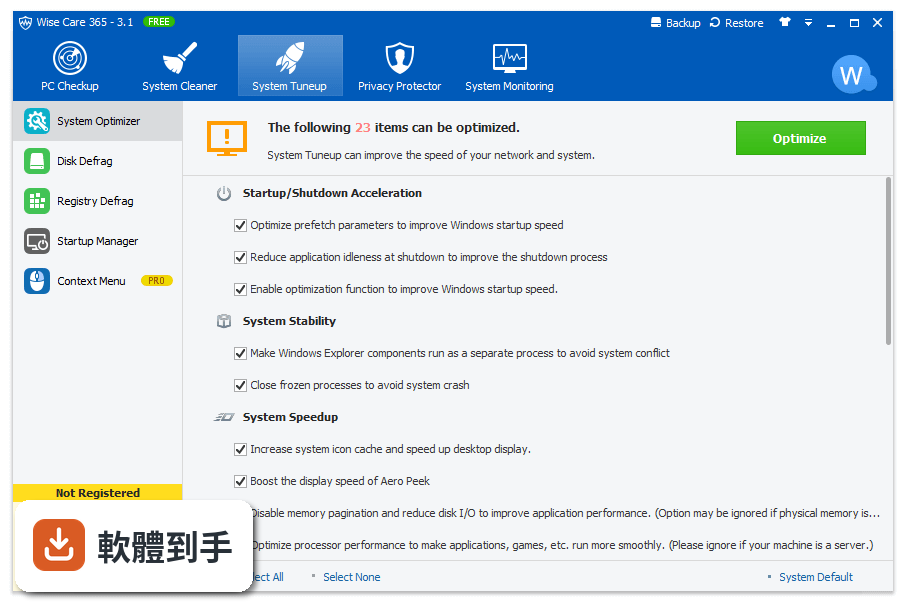
它的 Startup Manager 在 System Tuneup 分頁裡,會列出開機時自動啟動的程式,你可以直接停用不需要的項目來縮短開機時間。另外它也有 System Monitor 可以看即時的 CPU 和記憶體使用率,幫助你判斷是哪個程式在拖慢系統。
05除了清理,它還有沒有其他實用工具?
Utilities 分頁裡有幾個額外功能,包括磁碟重組、檔案復原、硬體資訊總覽。檔案復原可以救回不小心刪掉的檔案,前提是那些檔案還沒被覆寫;磁碟重組能讓硬碟讀取更順暢;硬體資訊則會顯示 CPU、記憶體、主機板等規格摘要。
06這套軟體適合什麼樣的人用?
適合不想花太多時間研究系統維護細節的人,尤其是每個禮拜想固定清一次垃圾、但又不想手動去翻暫存資料夾和登錄檔的使用者。它的操作流程就是打開軟體、按 Checkup、按 Clean,幾分鐘搞定。對於電腦新手來說,介面有清楚的分頁和圖示,不太需要記指令或路徑。
07我平常不太清電腦,偶爾想到才清一次,這樣適合嗎?
可以,它的 PC Checkup 就是設計成一鍵掃描,想到的時候打開來按一下就知道系統有哪些問題。官方建議至少一週跑一次 Checkup 和 System Cleaner,但如果你只是偶爾清一次,也比完全不清好。只是累積太久沒清,掃出來的垃圾量會比較多,清理時間也會拉長。
08這套軟體是免費的嗎?免費版和付費版差在哪?
它確實有免費版,但授權型式是 Demo,也就是說部分功能被限制。官方列出的 Pro 版多了即時系統保護、靜默模式自動清理、更快的開機速度、自動更新和技術支援,價格是 3 台電腦一年 19.97 美元。免費版能用的核心清理功能還在,但進階的即時監控和自動化就沒有。
09它的介面只有英文,我英文不好會不會看不懂?
介面語系確實只有 English,沒有中文。不過操作流程很固定,主要按鈕就是 Scan、Clean、Checkup 這幾個單字,看久就熟了。如果你完全無法接受英文介面,可以考慮其他有中文的清理工具,例如 Glary Utilities 或 CCleaner,但那些軟體的介面語言和功能細節需要自己確認。
10我電腦是 Windows 11,這套軟體能跑嗎?
可以,官方說明明確列出支援 Windows 7、8、10、11。而且它最近一次更新有針對高 DPI 螢幕做調整,支援 100% 到 200% 的縮放比例,也針對 4K 螢幕做了最佳化,在 Windows 11 的現代硬體上使用沒有問題。
11這套軟體和 CCleaner 比起來,哪個比較多人用?
以評分人數來看,Wise Care 365 Free 有 442 人評分,CCleaner 沒有列在這次的比較資料中,所以無法直接比較。不過在功能相近的清單裡,Baidu PC Faster 有 504 人評分、Wise PC 1stAid 有 442 人、Glary Utilities 有 394 人。評分人數多寡只能反映樣本數,不代表哪個比較好,建議自己裝來試用看看。
12什麼樣的情況不該選這套軟體?
如果你需要中文介面,這套只有英文,會是很大的障礙。如果你期待的是即時監控、自動清理這類功能,免費版沒有,要付費升級才有。另外它只支援 Windows,Mac 或手機使用者完全不適用。還有,如果你已經在用 CCleaner 或其他清理工具而且用得好好的,其實沒有必要換,功能重疊度很高。
下載與官方連結
WiseCare365.exe · 連結指向軟體原廠
版本紀錄
- 2026-10-23 Wise Care 365 Free 8.0.7 36.15 MB
- 2026-08-10 Wise Care 365 Free 8.0.5 36.12 MB
- 2026-06-02 Wise Care 365 Free 8.0.2 37.02 MB
再看 5 筆
- 2026-05-19 Wise Care 365 Free 8.0.1 36.34 MB
- 2026-02-09 Wise Care 365 Free 7.3.5 29.22 MB
- 2026-01-13 Wise Care 365 Free 7.3.3 30.68 MB
- 2025-11-10 Wise Care 365 Free 7.3.2 16.55 MB
- 2025-08-13 Wise Care 365 Free 7.2.8 16.57 MB
這一版改了什麼
What's new in this version:
Wise Care 365 Free 4.77
- Improved IE, Edge, Chrome, Opera and Firefox cleaning
- Improved System Slimming
- Minor GUI improvements
- Updated various translations
Wise Care 365 Free 4.76
- Improved Internet Explorer cleaning
- Improved the usability of System Slimming
- Improved some system optimization items
- Cancel the pop-up
Wise Care 365 Free 4.75
- Improved Mozilla Firefox Cache cleaning
- Improved the usability of auto optimize memory
- Minor GUI improvements
- Updated various translations
Wise Care 365 Free 4.74
- Improved the feature of renewal reminder
- Added some third-party software cleaning
- Minor GUI improvements
- Updated various translations
Wise Care 365 Free 4.73
- Improved the feature of PC Checkup
- Added Obsolete Windows Installer cleaning
- Improved Google Chrome Cache and Cookies cleaning
- Minor GUI improvements
- Updated various translations
Wise Care 365 Free 4.72
- Improved the feature of PC Checkup
- Minor GUI improvements
- Updated various translations
Wise Care 365 Free 4.71
- Improved the feature of System Protection
- Improved Windows Metro Cache cleaning
- Improved Mozilla Firefox History cleaning
- Minor GUI improvements
- Updated various translations
Wise Care 365 Free 4.69
- Improved some system optimization items
- Improved Registry Restore function
- Minor GUI improvements
- Updated various translations
Wise Care 365 Free 4.68
- Improved Google Chrome Cache and Cookies cleaning
- Improved Opera Browser Cache and Cookies cleaning
- Improved Mozilla Firefox Cache and Cookies cleaning
- Improved the feature of Disk Eraser
- Updated various translations
- Minor GUI improvements
Wise Care 365 Free 4.67
- Fixed the error which is caused by Wise Boot Assistant
- Improved the feature of Disk Eraser
- Updated various translations
- Minor GUI improvements
Wise Care 365 Free 4.66
- Improved the feature of Advanced Cleaner
- Improved the clean-up of 'Uninstaller' option
- Improved the function of 'auto back up registry'
- Updated various translations
- Minor GUI improvements
Wise Care 365 Free 4.65
- Improved the feature of Disk Eraser
- Fixed the issue of losing custom Common Cleaner configuration
- Improved schedule task. It will skip unclosed browsers
- Canceled the cleaning for the downloads folder
- Updated various translations
- Other minor improvements
Wise Care 365 Free 4.64
- Fixed the issue of some users are unable to register
Wise Care 365 Free 4.63
- Improved Microsoft Edge Cache and Cookies cleaning
- Improved Microsoft IE Cache and Cookies cleaning
- Updated various translations
- Minor bug fixes and improvements
Wise Care 365 Free 4.62
- Improved the feature of Advanced Cleaner
- Improved the register feature
- Updated various translations
- Minor bug fixes and improvements
Wise Care 365 Free 4.61
- Optimized the function of Disk Eraser
- Improved the feature of Advanced Cleaner
- Updated various translations
- Minor bug fixes and improvements
Wise Care 365 Free 4.58
- Optimized the function of registry defragmentation
- Improved the feature of System Protection
- Updated various translations
- Minor bug fixes and improvements
Wise Care 365 Free 4.57
- Fixed the issue of being unable to register/ activate it
Wise Care 365 Free 4.56
- Change log not available for this version
Wise Care 365 Free 4.55
- Improved the feature of Disk Defrag
- Improved the feature of Registry Defrag
- Updated various translations
- Minor bug fixes
- Minor GUI Improvements
Wise Care 365 Free 4.53
- Improved the feature of auto update
- Updated various translations
- Minor bug fixes
- Minor GUI Improvements
Wise Care 365 Free 4.51
- Fixed the issue in PC checkup
- Improved the stability of Wise Turbo
- Updated various translations
- Minor bug fixes
- Minor GUI Improvements
Wise Care 365 Free 4.42
- Improved the feature of Disk Defrag for SSD
- Improved the feature of the advanced cleaner
- Added the settings for WiseTurbo
- Updated various translations
- Minor bug fixes
- Minor GUI Improvements
Wise Care 365 Free 4.41
- Added multi-user option for the registry cleaner
- Improved Microsoft Edge cleaning
- Updated various translations
- Minor bug fixes
- Minor GUI Improvements
Wise Care 365 Free 4.30
- Removed Euask pop-ups
- Updated various translations
- Minor bug fixes
- Minor GUI Improvements
Wise Care 365 Free 4.29
- Fixed the issue of being unable to run properly in limited account
- Updated various translations
- Minor bug fixes
- Minor GUI Improvements
Wise Care 365 Free 4.28
- Optimized the defragmentation feature
- Improved the feature of analyzing the exclusive setting
- Optimized the algorithm of the disk defrag rate
- Updated various translations
Wise Care 365 Free 4.27
- Improved the feature of calculating the boot time
- Improved localization and language support
- Minor GUI Improvements
Wise Care 365 Free 4.26
- Improved the feature of file shredder in right-click menu
- Improved the feature of System Protection
- GUI and usability improvements
Wise Care 365 Free 4.25
- Fixed the issue of file size statistical error in system slimming
Wise Care 365 Free 4.24
- Added the feature of getting the weather information by choosing the location
- Optimized the defragmentation feature
- Improved the optimization feature for SSD hard drives
- Improved Google Chrome Cache and ABBYY Screen Reader cleaning
- Improved localization and language support
- Improved the export feature
- Minor GUI Improvements
Wise Care 365 Free 4.23
- Fixed the issue of failing to show the boot time when the system has a fast start
- Fixed some issues from the users' feedback
- Improved Google Chrome Cache and ABBYY Screen Reader cleaning
- Minor GUI improvements
Wise Care 365 Free 4.22
- Added Yandex Browser cleaning
- Added Vivaldi Browser cleaning
- Improved registry cleaning
- Updated various translations
- Minor GUI improvements
- Other minor bug fixes