
這是歷史版本頁面 — 看 Yahoo Widgets 最新版本
桌面想放時鐘天氣小工具?Yahoo Widgets 能做什麼
 Yahoo Widgets 3.1
資料更新 2006-04-12
閱讀約 6 分鐘
你剛換新電腦或重灌系統,桌面乾乾淨淨的,總覺得少了點什麼。以前用過的那種小工具——時鐘、天氣、CPU 監測——現在系統都不內建了,你想找個東西把桌面弄回以前那個方便的樣子。上網搜了半天,不是要裝一堆看不懂的設定,就是軟體肥大又拖慢開機,你只想簡單放幾個小工具,不要搞得太複雜。
系統內建的桌面小工具早就被微軟拿掉了,而一般應用程式又太笨重,為了看個時間或天氣要開一個完整視窗,實在沒必要。這類桌面 widget 平台的切入點,是提供一個輕量的容器,讓小工具獨立跑在桌面上,不佔工作列、不搶焦點,想看就瞄一眼,不想看就放著。它們通常附帶一個線上圖庫,下載新工具不用自己寫程式,拖進去就能用。
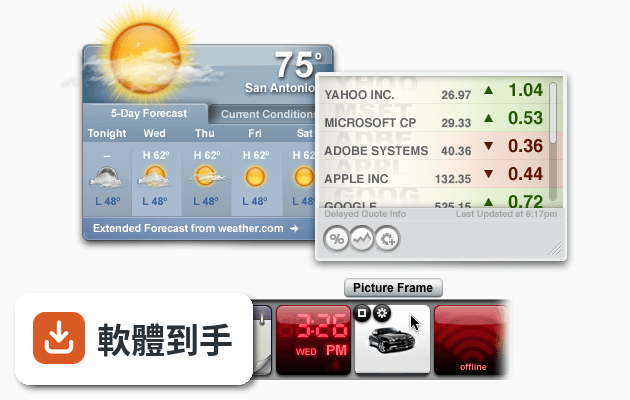
01Yahoo Widgets 能放哪些小工具在桌面上?
官方說明列出的內建種類包括類比與數位時鐘、日曆、天氣預報、Dock、啟動器、系統資訊(硬碟、CPU、記憶體、電池)、捷徑、相簿、筆記、音量、網路監測、郵件、RSS、音樂播放器、頻譜視覺化等。另外官方圖庫宣稱有超過 2200 個免費 widget 可以下載,涵蓋日期時間、天氣、系統、資訊、媒體等分類。
02它能不能自己設計小工具?
可以。它內建一個可視化的 widget 編輯器,用拖曳和設定屬性的方式就能做,不用從零寫程式。進階使用者也可以透過 JavaScript 和 API 來寫更複雜的功能。做好之後可以匯出成 XWidget 檔案分享給別人,別人也匯入就能用。
03它吃不吃資源?舊電腦跑得動嗎?
官方說法是輕量、啟動速度快、CPU 和記憶體佔用低,即使同時跑多個 widget 也能保持流暢。系統需求方面,官方列出 CPU 1GHz 以上、記憶體 512MB 以上、磁碟空間 100MB 以上,支援 Windows XP 到 11。不過實際佔用會依你放多少 widget 而定,官方數據僅供參考。
04小工具要去哪裡下載?多不多?
軟體內建線上圖庫,可以直接在程式裡瀏覽和下載,官方宣稱有超過 2200 個免費 widget,分類成日期時間、天氣、系統、資訊、媒體等。下載後用拖曳的方式就能放到桌面上,不需要手動安裝檔案。數量算多,常見的時鐘、天氣、系統監測都有。
05它跟其他桌面美化工具差在哪?
它和 Rainmeter、RocketDock 這類工具定位不同。RocketDock 主要是應用程式啟動列,Rainmeter 偏向高度自訂的資訊面板,而 Yahoo Widgets 比較像一個綜合平台,內建多種小工具,從時鐘、天氣到系統監測都有,也提供編輯器讓使用者自製。它的切入點是「什麼都有、拖進去就能用」,而不是像 Rainmeter 那樣需要花時間研究設定。
06什麼樣的人適合用這套軟體?
適合不想花時間研究設定、只想在桌面放幾個現成工具的人。安裝完從圖庫挑幾個 widget 拖到桌面就能用,不需要寫設定檔或學語法。如果你想要的是「打開電腦就有時鐘、天氣、CPU 監測在桌面上」,而且不想為了這些功能裝好幾個不同軟體,這套的整合性會比較方便。
07不會寫程式的人能用嗎?
能用。基本使用完全不需要碰程式碼,從圖庫下載、拖曳到桌面、右鍵調整大小和透明度,這些操作跟一般軟體沒兩樣。編輯器雖然有腳本功能,但那是給想自製 widget 的進階使用者用的,一般使用者跳過也沒關係。官方說明也強調拖放介面是設計給所有人用的。
08它支援哪些 Windows 版本?舊系統能用嗎?
官方說明列出支援 Windows XP、Vista、7、8、10、11,所以從很舊的 XP 到最新的 Windows 11 都在範圍內。系統需求是 CPU 1GHz 以上、記憶體 512MB 以上、磁碟空間 100MB 以上,以現代標準來看門檻很低。不過官方說法歸官方說法,實際在舊硬體上的表現還是要自己裝來測。
09介面只有英文,看不懂怎麼辦?
官方資料顯示介面語系是英文,沒有提到中文。如果你看不懂英文,操作上會有一些門檻,尤其是編輯器和設定選項。但基本功能——從圖庫下載、拖曳到桌面、右鍵調整——這些動作的圖示和位置還算直覺,不太需要讀文字。如果你連基本操作都覺得吃力,可能要考慮其他有中文介面的工具。
10它跟 Yahoo 還有關係嗎?會不會有廣告?
官方資料顯示開發商是 XWidget Software,軟體名稱叫 Yahoo Widgets,但功能說明全文都寫 XWidget,沒有提到 Yahoo 的服務或帳號整合。資料裡也沒有提到廣告或付費訂閱的內容。至於它為什麼叫 Yahoo Widgets、跟 Yahoo 公司有沒有關係,官方資料沒有說明,這點需要自行確認。
11免費版跟付費版差在哪?
官方說明提到免費版可以下載超過 2200 個免費 widget,如果要更多「更酷」的 widget 就需要升級到 PRO 版。另外在 Steam 平台上有付費選項,價格是 3.99 美元。但 PRO 版具體多了哪些 widget、付費後能拿到什麼,官方說明沒有列出細節,這部分需要到 Steam 頁面或官網確認。
12什麼情況不該選這套軟體?
如果你想要的是像 Rainmeter 那樣高度自訂的桌面——自己寫設定檔、控制每個元素的樣式和位置——這套的編輯器雖然有腳本功能,但定位偏向「現成工具直接拖」,深度不如 Rainmeter。另外它只支援 Windows,沒有 macOS 或 Linux 版本。介面只有英文,對英文不熟的人會比較吃力。評分人數只有 87 人,樣本不算多,這點也可以參考。
下載與官方連結
widgetsus.exe · 571.54 KB · 連結指向軟體原廠
版本紀錄
- 2025-10-25 XWidget 1.9.22 9.73 MB
- 2018-08-19 XWidget 1.9.16 6.92 MB
- 2018-06-25 XWidget 1.9.15 6.9 MB
再看 5 筆
- 2009-08-26 Yahoo! Widget Engine 4.5.2
- 2007-12-22 Yahoo! Widget Engine 4.5.1 14.63 MB
- 2007-11-30 Yahoo! Widget Engine 4.5 14.35 MB
- 2007-07-22 Yahoo! Widget Engine 4.0.5 12.31 MB
- 2007-05-10 Yahoo! Widget Engine 4.0.3 11.73 MB
這一版改了什麼
What's new in this version:
General Engine Changes
* Added support for a new flat file format for Widgets which permits signing or Widget code to enhance security.
* Added preference to control whether or not the Widget Engine automatically starts up when your system starts.
* Implemented importNode() from the Level 2 DOM spec.
* Implemented widget.extractFile( path ) API to allow people with flat file Widgets to extract files for use. For example, we need this internally to play sound files since we can only play sounds that are in files. This API extracts files to the 'widget data' folder. It does not extract folders. Also, this API always overwrites any other file in the widget data folder of the same name. It is up to the caller to deal with this.
* Implemented new security block. For yahooLogin() to work now, you must put the APIs you connect to in this block.
* We now warn if you have multiple preference groups with the same name defined in XML.
* Found/fixed a bug where no tags or attributes were ever being reported as unrecognized.
* Allow null parameter to be passed to Send() in XMLHttpRequest for compatibility with other browsers.
* Fixed bug in replaceChild() where we weren't properly throwing an exception if you attempted to move a node from one document to another.
* Fixed crash when calling string() in XPath.
* Modified the invalid character exception in the XML Parser to print out the hex value of the bad character to give the caller a clue what it found that it didn't like.
* Fixed problem where 'this' was not being set in a context menu's onSelect function.
* Fixed issues when garbage collecting where we might try to create objects.
* Allow -1 as a valid h/vOffset for an object. If you want true 'auto' behavior, set the offsets to null. Also, if you don't specify a h/vOffset, the Widget will return null, not -1.
* Added widget.getLocalizedString().
* By popular demand: implemented /clear in the debug window.
* Put up an alert if we encounter a Widget with no block to let the user know that the Widget will not be able to connect to Yahoo! feeds.
* Added /tracethrow to the debug window to help figure out where exceptions come from.
* Added widget.locale to get the current language/locale that a Widget is running in.
Windows Changes
* Fixed problem with COM inherited interfaces. It was impossible to call an inherited method. Also fixed problem where if we encountered a method defined to have a return value as a parameter we would barf. No more barfing. We also handle setting properties a bit better (more numeric types are supported).
* Fixed problem where animations weren't running during sleep() like they should.
* Fixed problem with missing images in prefs.
* Fixed baseline of truncated text.
* Include trailing whitespace when measuring text (this matches Mac behavior)
* Fixed problem with scroll bars where if you resized them we wouldn't recompute the thumb rect, range, etc.
* Enabled window shadows. All the same rules apply as on the Mac, e.g. if you change the content, but not the window geometry, you need to call recalcShadow().
* Restricted filesystem APIs to not allow writing into C:Windows (or whatever your 'windows' directory is). This applies to moveToTrash(), move() source and destination, copy() destination, and writeFile(). An exception is raised when you attempt to pass what we deem to be a disallowed path into those functions. The Mac has real permissions in place in the filesystem, so this is a Windows-only change.
* Fixed problem selecting the right item in preferences if multiple options started with the same sequence of characters.
* Fixed problem where the login window would not disappear.
* Don't rely on setting the current directory on open. Instead, set it as we load things.
* Fixed bug where the IME candidate window would close immediately if the cursor ever wasn't on top of it.
* Added language preference in Preference dialog.
* Fixed problem where wasn't being set for a selector preference.
* Fixed problem where initial file name wasn't being set for a selector preference (via defaultValue).
* Fixed problems with EUC-JP encoding on web pages scraped with URL.fetch, etc.
* Added a -reset switch for telling Konfabulator to clear all of its preferences and the application data folder. It does NOT remove the My Widgets folder.
* Fix crash when setting a window reference to null when inside a mouse handler.
* Fix tick marks in CPU Portal. The real issue was that the number of ticks was greater than the number of possible choices. I now pin to the max.
* Switched to use a new unzip library that does unicode properly.
* Fixed COM issue where we weren't resolving VT_USERDEFINED types properly. Should be able to connect to WMP correctly now.