
這是歷史版本頁面 — 看 Zoom Player MAX 最新版本
Windows播放器格式不全?Zoom Player MAX能補什麼
 Zoom Player MAX 15.0
資料更新 2020-02-11
閱讀約 6 分鐘
你從網路上下載了一部影片,興沖沖地雙擊檔案,播放器卻跳出「無法播放」的訊息。換了另一個播放器,畫面是出來了,但字幕跟不上、聲音斷斷續續,想調整色彩或播放速度,卻找不到對應的設定。你只是想好好看個影片,卻得在好幾個播放器之間來回切換,每個都有各自的毛病。
一般人遇到這種狀況,直覺是再裝一套免費播放器試試。但免費播放器往往為了追求簡單,把進階設定藏得很深,甚至直接拿掉;遇到冷門格式或特殊編碼,還是得自己上網找解碼包,裝完也不見得有用。這類專業播放器的切入點,是從「播放」這件事本身出發:先想辦法讓所有格式都能播,再把調整的權限完整交給使用者,讓你可以針對每一部影片、每一種使用情境,自己決定要怎麼播。
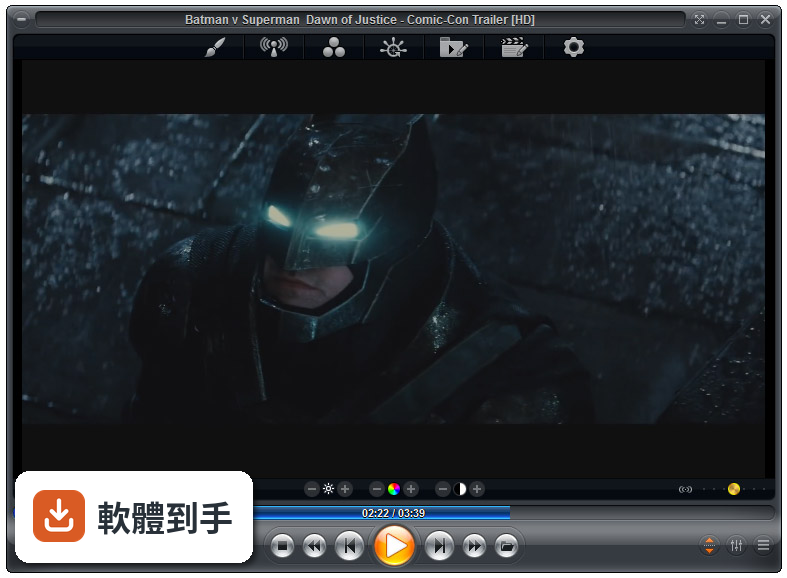
01Zoom Player MAX到底能播什麼格式?
官方列出的支援清單很長,影片涵蓋MKV、AV1、H.264、H.265、WebM、AVI、FLV、WMV、MOV、MP4、VOB、TS、MTS、3GP、Real Media、QuickTime、DV、MXF、SWF等;音訊有MP3、FLAC、AAC、WMA、OGG、OPUS、AC3、DTS、WAV、ALAC、APE等。另外也支援DVD、未加密的藍光資料夾結構,以及JPG、PNG、GIF等圖片格式。基本上常見的影音檔案都在涵蓋範圍內。
02它跟一般播放器有什麼不同?
主要差在兩點。第一是Smart Play技術,播放時會自動挑選最適合的解碼器和濾鏡,減少你手動調整的次數。第二是模組化架構,除了內建的解碼包,也允許掛載LAV Filters這類第三方解碼器,遇到特殊情況可以自己換。介面高度可自訂,支援DirectShow、libVLC、Chromium三種引擎,這在一般播放器上很少見。
03可以調整哪些播放細節?
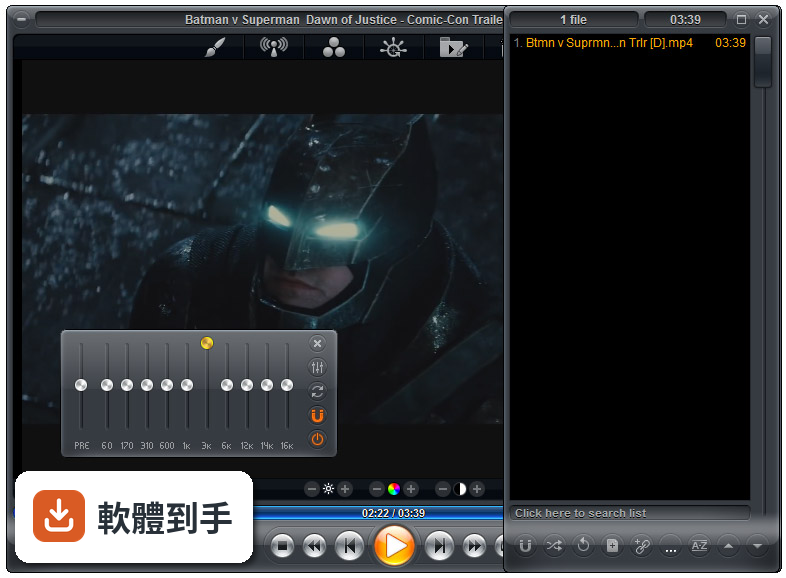
播放速度、縮放、畫面比例、色彩設定、等化器、字幕同步都可以調。音訊方面有10頻段等化器,支援S/PDIF和位元流輸出。另外還有子母畫面、多顯示器影片牆、磁吸式視窗、章節時間軸、滑鼠懸停預覽等功能。這些設定可以從右鍵選單或進階選項對話框進入,不是只有播放、暫停、快轉而已。
04能看網路影片或IPTV嗎?
可以。它支援直接輸入網址播放串流影片和音訊,也支援IPTV服務,可以透過播放清單檔案載入。YouTube串流需要額外設定才能使用。網路芳鄰(SMB/UPnP)的分享檔案也可以直接播放,另外有內建Emby、Plex、Jellyfin的支援,方便連到家裡的媒體伺服器。
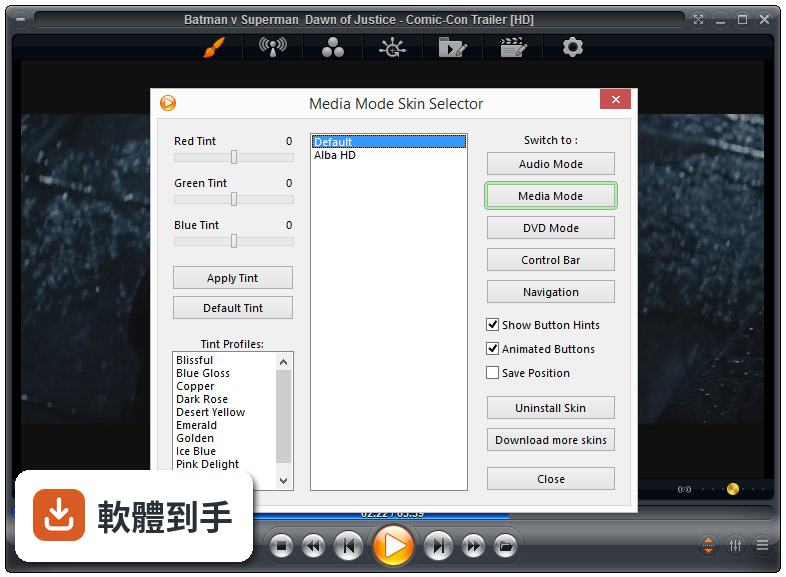
05可以自訂界面和操作嗎?
可以,而且這方面做得相當深。完整支援換膚,鍵盤、滑鼠、手勢、螢幕角落都可以自訂,也有腳本功能可以寫自動化。新版介面改成半透明的控制覆蓋層,按鈕配置、大小、字型、顏色、透明度都能調。也支援遙控器、遊戲手把,甚至可以用Android手機App控制,適合搭配電視或投影機使用。
06什麼人適合用這套?
如果你會自己調整播放設定、對畫質和音質有要求,或是常遇到別人播不了的檔案,這套會比較適合。它內建播放歷史與續播功能,會記住多個檔案的播放位置,對常看一半就關掉的人很方便。另外,如果你有HTPC(客廳電腦)的建置需求,它支援Kiosk模式和遙控器操作,可以當作家庭劇院的核心播放器。
07拿來當HTPC播放器可以嗎?
可以,官方FAQ也明確提到這點。它支援全螢幕Kiosk模式、遙控器操作、高度自訂的導覽介面,也有螢幕烙印保護、網路磁碟機保持連線、Wake-on-LAN等功能。另外可以跨電腦續播、變更解析度、關閉顯示器、設定家長鎖。如果你打算組一台專門接電視的電腦,這些功能會比一般播放器實用很多。
08數位看板或公共場所播放適合嗎?
這套有GuardDog自動重啟功能,播放程式異常時會自己恢復,也有螢幕烙印保護和Wake-on-LAN,這些都是公共播放會需要的機制。Kiosk模式可以鎖定界面,避免路人亂按。不過要注意,它畢竟是付費軟體,而且界面只有英文,如果只是要簡單輪播幾支影片,市面上有更便宜或免費的選擇。
09界面只有英文,會不會很難上手?
介面語系確實只有英文,沒有中文。如果你不習慣英文選單,初期會需要花時間摸索。不過播放器的主要操作其實很直覺——拖曳檔案進去、右鍵叫出選單——日常使用不太會卡住。但如果你要深入調整解碼器、設定腳本或自訂界面,就需要一定的英文閱讀能力,這點要自己評估。
10要付費嗎?免費版夠用嗎?
這套是付費軟體,單人授權定價約29.95美元,有升級折扣和終身授權選項。官方也提供功能較少的免費版Zoom Player FREE,但具體少了哪些功能,官方資料沒有細列。如果你只是偶爾看片,免費版可能夠用;但如果你需要進階功能,就得先付費才能用MAX版,建議先試用再決定。
11跟K-Lite Codec Pack比,哪個比較多人用?
以評分人數來看,K-Lite Codec Pack Basic有781人評分,Mega也有266人,而Zoom Player MAX只有69人,差距很明顯。K-Lite是解碼包,搭配播放器使用;Zoom Player是完整的播放器,定位不同。如果你只是缺解碼器,K-Lite的使用者基數大、討論多,遇到問題比較好找答案。Zoom Player的社群相對小很多。
12能播藍光嗎?加密的可以嗎?
可以播放藍光資料夾結構,但官方明確表示,因為授權限制,不支援加密藍光光碟。也就是說,如果你手邊是正版藍光片,這套沒辦法直接播,需要先自行處理解密。另外,4K和HDR播放需要你的硬體和系統有對應的支援,不是裝了軟體就一定跑得動,這點在購買前要先確認自己的設備。
下載與官方連結
zp1500max.exe · 31.54 MB · 連結指向軟體原廠
版本紀錄
- 2026-07-09 Zoom Player MAX 22.5 95.56 MB
- 2026-02-25 Zoom Player MAX 22.2 95.57 MB
- 2026-01-12 Zoom Player MAX 22.0.1 95.52 MB
再看 5 筆
- 2025-12-18 Zoom Player MAX 22.0.0 95.51 MB
- 2025-08-04 Zoom Player MAX 21.5.1 95.57 MB
- 2025-07-14 Zoom Player MAX 21.5 95.54 MB
- 2025-05-28 Zoom Player MAX 21.4 94.99 MB
- 2025-05-15 Zoom Player MAX 21.3 95.33 MB
這一版改了什麼
What's new in this version:
- Live YouTube stream support using the latest version of the 3DYD YouTube source and LAV Filters.
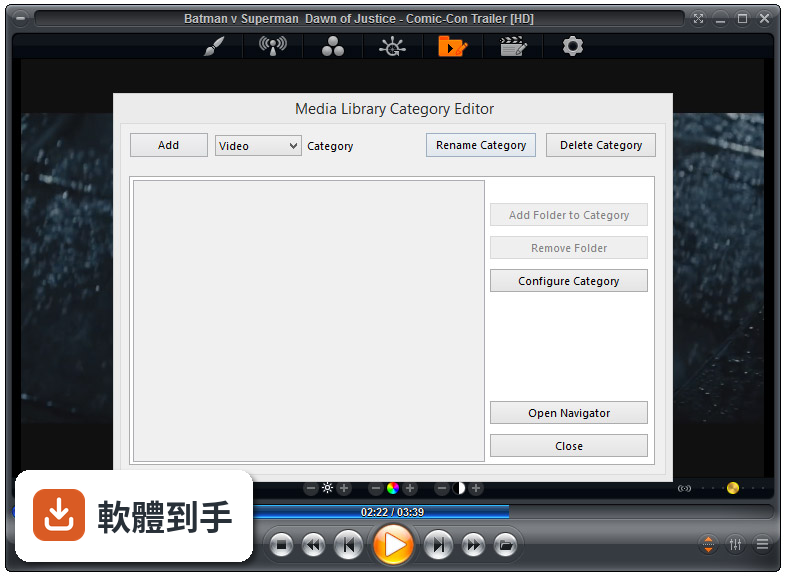
- New YouTube channel listing strategy (not enabled by default)which you can now enable through the Media Library category editor
- The new strategy works by listing videos in a channel's "Uploads"playlist. The downside to this strategy is that some videos may not be ordered by Publish date. For this reason, 50 videos are requested instead of the usual 25 and these videos are then sorted by the plugin instead of just listing them as-is. The upsideis that you get longer descriptions for the videos.
- New Setting (Adv. Options / Playback / Audio) to control whether the Equalizer and Pre-Amp controls should process DTS/Dolby audio (and their sub-formats such as DTS-HD, Dolby Atmos, E-EAC, etc)
- By default, these formats are not processed as they are intended for decoding by an external receiver over S/PDIF or BitStreaming
- However if you decode these formats on your PC, disabling thissetting will allow the Equalizer and Pre-Amp controls to function
- New Setting "Adv. Options / System" (disabled by default) to allow theCommand & Control API to remotely control the PC's mouse cursor
- New Setting (Adv. Options / Playback / Controls) that lets you specify the number of milliseconds Zoom Player should wait after closing a streaming media before resuming operations
- New setting (Adv. Options / System / Screen Saver & Capture) that controls whether playback should be paused before trying to capture a video frame. Please note that it's possible that some video renderers may not be able to capture a frame if the media is playing.
- New setting on the media library YouTube plugin to enable listing live streams. To playback live YouTube streams you must use the IFRAME player or use D3D YouTube Source filter v2 or newer
- New setting on the media library YouTube plugin to use the maximum thumbnail resolution YouTube provides (now disabled by default)
- In previous versions getting the maximum resolution thumbnail was the default behavior, however there are rare instances where the maximum resolution and extra bandwidth are merited
- Additionally, there is a YouTube bug that lists a URL for the maximum resolution thumbnail without the file actually being available, so this change works around this issue
- The media library can now display a format icon for the new AV1, DTSX and Dolby Atmos audio/video codecs.
- The Play History fullscreen navigation interface now lists the last play time (not just the date), the last play position and the full path to the currently highlighted entry
- The Favorite media fullscreen navigation interface now shows the full path to the highlighted entry
- New "Go" button on the station editor to make search practical without access to a keyboard
- New "Close on Play" checkbox on the Advanced Playlist Control dialog to control whether the dialog remains open or closed after playing a new media from the dialog
- New Smart Play profile for the "ADTS" streaming audio wrapper format
- New Smart Play profile for the ".DSF" file format
- New Smart Play profile for the "DSD" (Direct Stream Digital) codec
- Zoom Player Command & Control API has been expanded
- . New command to open a streaming URL
- . New command to Get & Set the current playlist
- sorting order (Ascending/Descending)
- . New command to sort the playlist (by name, size, date, etc)
- Zoom Player Command & Control API has been expanded with support for remotely controlling the PC's mouse cursor. For additional security, this capability requires you to enable the new "Allow remote mouse control" setting.
- New "/SHOWOSD[Text]" command line parameter used to show a pop-up OSD on an already running instance of Zoom Player.
- + Ctrl+"V" now works in the playlist editor's search box
- + The GoTo time fullscreen navigation interface has been enhanced to work more intuitively and with less clicking required to reach the desired time
- + The Media Library category editor has been restructured to make it easier to use when working with many categories
- + Changed how information (text/icons) are aligned on the right side of fullscreen navigation interfaces so the information does not shift around when the selected line is changed
- + Tweaked the list based fullscreen navigation interfaces to squeeze out a little more horizontal space
- + The Torrents download plugin has been updated to support qBitTorrent API v2, requiring qBitTorrent v4.2 or newer, please upgrade
- + You can now drag the meta-data edit window more easily by dragging from anywhere in the windows
- + Newly created YouTube media library categories will no longer show a video icon overlay by default (as all content from YouTube is video)
- + YouTube changed their text encoding scheme which caused Zoom Player to show the encoding of certain characters instead of the actual characters
- + Trying to open a navigation interface while in audio mode simply didn't do anything, now Zoom Player will automatically switch to media mode and show the navigation interface
- + Trying to seek backward/forward on a live stream with no duration will no longer show an OSD message as if a seek was performed
- + TheMovieDB scraper plugin will now scrape movies that do not contain a poster image
- + The fullscreen navigation information interface no longer closes automatically when opening a new media file
- + When safe mode is enabled, instead of completely hiding the main navigation interface's "System" sub-menu, now only the "Exit Zoom Player" entry is hidden
- + The Next/Previous frame functions are now ignored when playing audio-only content (there was no real use for it and it caused weird behavior with some decoders)
- + Hovering with the mouse cursor over the timeline no longer pops up a "0000" position hint when playing a live stream with no duration
- + To prevent instability, if Zoom Player's options dialog is open, all API/Keyboard processing (for the main window) are now disabled
- + Using the "fnTitleToClipboard" function with no media playing will now try to get the title from the currently highlighted playlist
- entry
- + The "Close Navigator when opening a new file" setting now applies to the streaming fullscreen navigation interface. Previously it would always close the interface regardless of the setting
- + Opening a streaming URL now closes the fullscreen navigation interface
- + Extended the Command & Control API message 1870 to support passing a title along with the URL to stream
- + When playing an MP3 with ID3v2 TAGs that contain multiple images, now the first embedded image is displayed instead of the last
- + Right clicking a track in the playlist editor will now select the track less than 2 other tracks are currently selected
- Rewrote the entire system that handles the currently selected audio device. Previously, if you were to disconnect an audio device (e.g. a BlueTooth headset), Zoom Player would switch to the default audio device, but when the the audio device was reconnected, Zoom Player would continue to use the default device instead of the previously selected device
- Now Zoom Player always tries to use the previously selected device and only temporarily switches to the default device if the selected device is not currently available
- A major bug that was introduced in v13.5 prevented the Equalizer and Pre-Amp controls from functioning when decoding audio using a filter that outputs the WAVE_FORMAT_EXTENSIBLE" structure (Which LAV Audio Decoder uses for most audio formats it decodes)
- Fix for a possible freeze when opening the media library
- The default 1610 skin was showing a 1px clear line to the right of the movie poster in jukebox mode
- Streaming audio with non-English characters encoded in the stream's meta-data would sometimes display the wrong characters
- Fixed an issue where pressing next track in a playlist containing an executable file would not stop playing the previous media track after executing the playlist entry, which also caused a cosmetic glitch in the playlist editor
- Furiously Clicking the mouse's right button to open the context menu while a track was loading caused multiple context menus to appear on screen and could even lead to a crash in some cases
- Under some rare conditions, Mouse Gesture actions could trigger without the left mouse button being held down
- Unchecking "Limit 'Hot Corners' to fullscreen mode" caused issues trying to move the player windows in Audio Mode
- Pressing DEL to erase the currently playing media will no longer prompt you to delete to recycle bin if the playing media is a URL
- Stopped the two settings that control automatic switching between Audio and Media mode from working while the player is in fullscreen mode Auto Switch to Audio Mode when a Media File does not contain a Video Stream Auto Switch to Media Mode when a Media File contains a Video Stream
- Deleting the active entry in the playlist editor (orange highlight when using the default onyx skin), did not reset the active entry if that track wasn't currently playing
- Using the "fnPLEditMetaData" function (for example using the command line "/funcfnPLEditMetaData" parameter) several times would cause multiple windows to appear
- The internal screen saver no longer activates if a track is currently in the process of loading or if an error dialog is currently visible
- Using the Advanced Playlist Control to move items to the top or bottom while a media was playing messed up the playlist active item display as well as the ID3/TAG on-screen information
- When the media library displayed a movie with no poster in JukeBox mode, the poster area showed random junk
- Trying to switch to Audio or DVD modes while a media was in the process of loading triggered a crash
- Trying to close the Playlist editor while a track was in the process of loading triggered a crash
- Deleting the currently playing file did not remove the file from the current playlist
- Enabling fullscreen navigation's "Safe Mode" broke the functions screen on the "Favorites" navigation interface
- Enabling fullscreen navigation's "Safe Mode" prevented access to the stream selection navigation interface
- It's no longer possible to erase files in safe mode from within the media library mini-menu
- Enabling "Force the navigation list or thumb view display to full width" or "Force the navigation list or thumb view to maximum width" settings would break the visual integrity of the information fullscreen navigation interface (and the Main navigation interface if it was used in list mode)
- The Media Library's "Run Application" plug-in did not run applications correctly if some command line parameters were used
- Fixed a freeze when using the MPC Audio Renderer combined with the "Show all filters in Stream Selection sub-menu" setting
- Fixed an issue where certain characters used in a media library's category path could corrupt the category list or prevent the afflicted category from functioning correctly
- Under some condition, the previously played media title would appear in the timeline area and invalid entries were being added to the play history
- Erasing entries from the favorite media list did not actually save the list your drive. Unless a new entry was added (which did save the list), restarting Zoom Player would restore the erased entries
- The sub-folder selection within the media scanner fullscreen navigation interface would draw outside the defined line boundaries
- The media scanner no longer allows you to add folders to plugin based categories (which are not folder based)
- The "Refresh" button on the media library category configuration dialog was accidentally left enabled for folder based categories. Clicking it would trigger a "list index out of bounds" error
- Playing a media through the Advanced Playlist Control dialog and then trying to close the dialog before the media finished loading would cause a non-fatal crash
- Removing entries from the playlist editor did not always select the current remaining track
- Rewind, Fast Forward and Slow Motion are now disabled when playing live streams with no duration (these functions were interfering with playback)
- Enabling fullscreen navigation's "Safe Mode" broke the functions screen on the "Favorites" navigation interface
- Enabling fullscreen navigation's "Safe Mode" prevented access to the stream selection navigation interface
- The chapter selection pop-up OSD appeared in the wrong screen position
- In the playlist editor, clicking the blank area under the playlist entries would select the last entry without clearing the currently
- selected entry
- Manually editing a Zoom Player ".CHP" chapter file using an external text editor could have triggered a freeze when trying to load the associated media file
- Changing the internal screen saver's slideshow path did not take affect until the next player restart if the screen saver was previously active (changing the folder didn't clear the cache)
- Streaming audio-only YouTube with visualizations would not always enable the ZP DSP Filter, causing synchronization issues between the audio and visualization
- Pressing the next-track button with the next tracks being a series of executable files would execute all files at once instead of just the first executable and pausing
- Trying to close the Install Center during an install could have resulted in a crash
- The "Trash" icon no longer shows up at the bottom of the media library fullscreen navigation mode when Safe Mode is enabled
- Since they were causing playback issues, the Fast Play, Slow Motion, Half Speed Fast-Play, Half Speed Slow Motion and Increase/Decrease Play Rate functions are no longer accessible when playing a live stream with no duration
- Using Shift+Delete to delete the currently selected playlist entries did not work properly if one of the selected entries was the currently playing media
- When Zoom Player was minimized to the taskbar, instructing Zoom Player to switch to fullscreen mode did not work as intended
- Trying to play a URL straight from the windows clipboard will no longer try playing if the clipboard does not actually contain a URL
- Opening the previously open navigation interface did not work when the previous navigation interface was the 'Favorites'
- Going back from the favorites fullscreen navigation interface to the main interface highlighted the playlist icon instead of the favorites icon
- Using the play history fullscreen navigation with safe mode enabled would trigger a crash or cosmetic glitches when trying to access the functions page
- Assigning functions that auto-execute when a secondary screen is attached or detached did not execute under some conditions
- Some functions called from command line using the "/func" or "/exfunc" parameters could have run before Zoom Player finished loading, triggering unexpected behavior
- You can no longer try to erase the "refresh" and "more" (plus) entries in the media library
- The "Scrapers file name blacklist" label disappeared under "Adv. Options / Interface / Fullscreen Navigation / Thumb View"
- TheMovieDB scraper plugin can now display information on multiple directors of one movie instead of just the first director
- In very rare cases where a corrupt media file was played and the "Continue to the next Playlist item when an invalid file is played" setting was enabled, if the next entry in the playlist was an executable, the user interface would think the previous item was still playing, leaving the player window in a sort of in-between state that didn't show some text
- The delete icon was visible in the download manager fullscreen navigation while safe mode was enabled
- The playlist editor's right-click menu's "Add Streaming URL" feature caused a visual glitch where the highlighted playlist entry was not the one actually playing
- Pressing the Enter key on the playlist editor right after running the player would play the first track instead of the last played track
- Under some rare conditions, the play history dialog could show duplicate entries of the same media
- When playing certain live feeds, right-clicking the timeline could wrongfully show a "Seeking 0 seconds" OSD
- Hovering with the mouse cursor over the timeline will no longer show the timeline position or a preview image if the playing media has no duration (e.g. when viewing a jpeg image)
- Some UTF8 encoded ".txt" files did not display anything when viewed
- Loading ".wpl" playlists that contain URLs did not load the URL entries correctly
- Using the Advanced Playlist Control's "Move to Bottom" function caused issues if the currently playing media was moved