
這是歷史版本頁面 — 看 Zortam Mp3 Media Studio 最新版本
整批整理MP3標籤與封面,Zortam Mp3 Media Studio 能做什麼
 Zortam Mp3 Media Studio 2.3
資料更新 2018-03-01
閱讀約 6 分鐘
電腦裡累積了好幾千首 MP3,有些是從 CD 轉出來的,有些是多年前從各種管道抓下來的。打開播放器一看,歌手名稱亂寫、專輯名稱空白、歌詞從來沒出現過、封面圖片東缺西缺。想動手整理,想到要一首一首改就放棄了,最後音樂越存越多,越亂越不想碰。
手動編輯 ID3 標籤不是不行,但檔案一多就完全不現實。逐首輸入歌手、專輯、年份、曲號,再另外找封面圖片一張一張貼上去,一首歌花三分鐘,一千首歌就是五十個小時。這類工具的做法是反過來:讓軟體去認音樂、去資料庫抓中繼資料,再批次寫回檔案裡,把整理工作從「逐首手工」變成「一次跑完」。
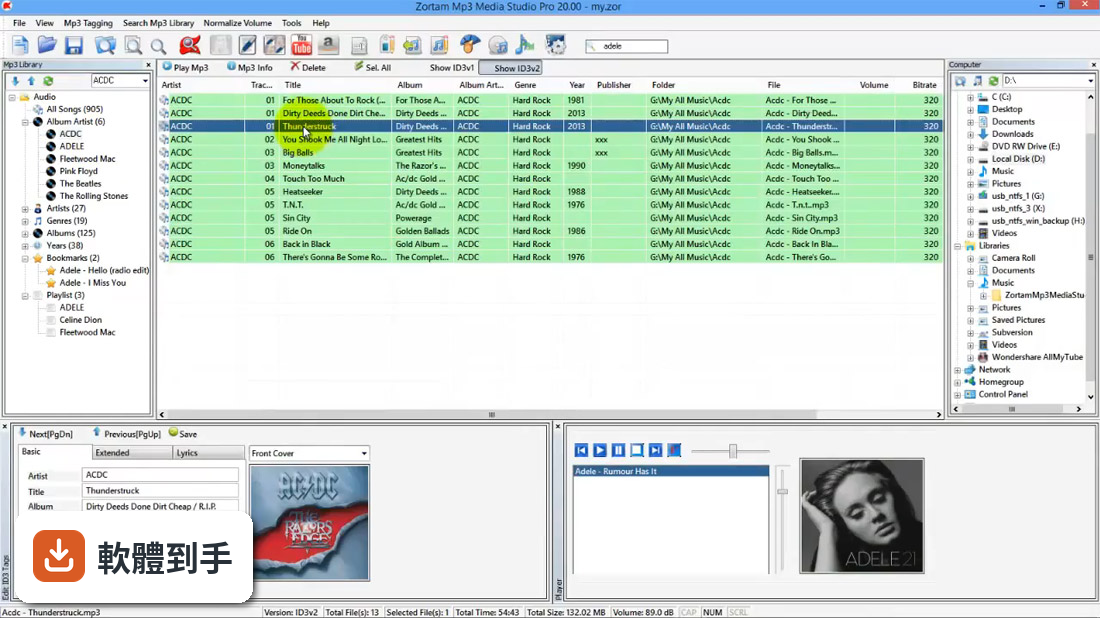
01Zortam Mp3 Media Studio 到底能幫我把音樂整理到什麼程度?
它的核心是批次處理 MP3 的 ID3 標籤。把整個資料夾丟進去,它可以自動辨識歌曲、下載封面與歌詞,再把歌手、專輯、年份、曲號等資訊寫進檔案。另外也能從檔名反推標籤、用標籤重新命名檔案、找重複的 MP3、算 BPM、調整音量,等於把整理音樂會用到的功能都包在一起。
02我有一堆歌的標籤是空的,它真的能自己認出是哪首歌嗎?
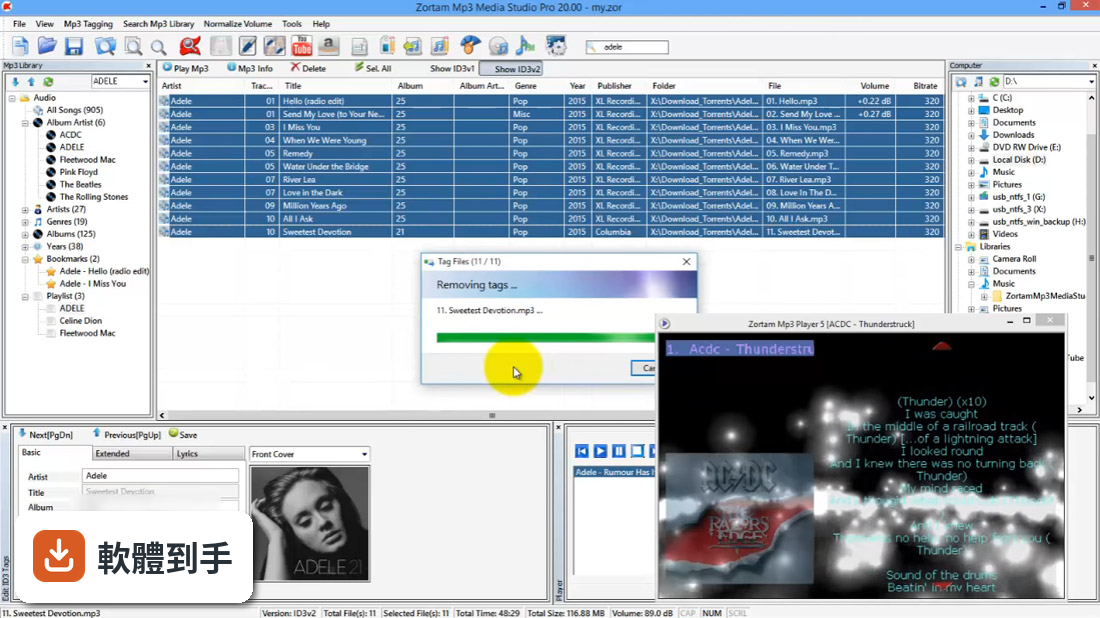
可以,它用的是數位指紋辨識技術,不是靠檔名去猜。軟體會分析音訊內容去比對內建資料庫,資料庫號稱收錄超過三千五百萬筆音樂。比對成功後,會自動下載缺少的封面、歌詞和其他欄位。不過實際比對成功率會受到歌曲冷門程度影響,太冷門或現場版的歌有可能認不出來。
03批次抓封面和歌詞是怎麼運作的?我不用一首一首自己找吧?
不用。在批次處理時,它會自動搜尋並下載缺少的專輯封面與歌詞,然後寫進 MP3 的 ID3 標籤裡。整個流程是設定好之後一次跑完,不需要逐首確認。要注意的是,試用版有功能限制,完整功能需要付費,而且它抓到的封面品質取決於資料庫來源,不一定每張都是高解析度。
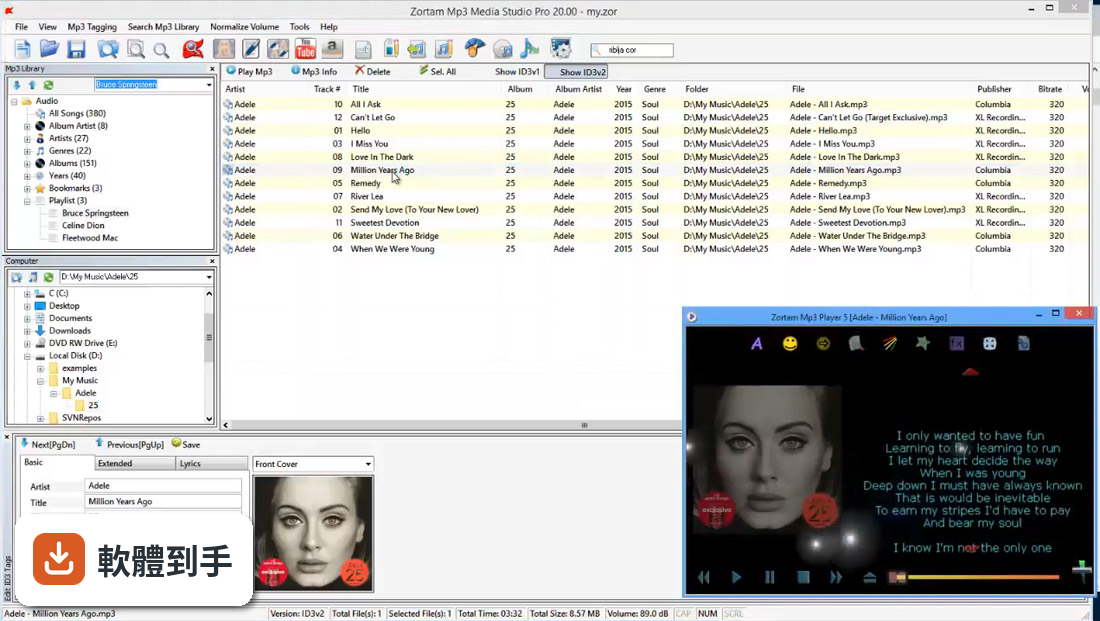
04除了自動抓資料,它能用檔名來整理標籤,或反過來用標籤改檔名嗎?
兩個方向都可以。你可以設定規則,從檔名解析出歌手、專輯、曲名等資訊寫進標籤,也可以反過來,用標籤內容把檔案重新命名成你要的格式。它支援自訂格式和預設格式,例如把「01 - 歌名.mp3」改成「歌手 - 專輯 - 曲號 - 歌名.mp3」這種結構。
05它內建的播放器、BPM 分析、音量標準化這些功能,實際用起來是怎麼回事?
這些是附加模組。播放器可以邊聽邊看歌詞;音量標準化是把不同來源的 MP3 音量調到一致,避免一下大聲一下小聲;BPM 分析會算出每首歌每分鐘拍數,對要分類運動歌單的人有用。另外它也能把 CD 轉成 MP3,或把 MP3 轉成 WAV。這些功能都包在同一套軟體裡,不用另外裝好幾支程式。
06我電腦裡有重複的 MP3,它能幫我找出來嗎?
可以,它提供重複檔案搜尋功能,可以依 ID3 標籤或檔案資訊來比對。這對整理多年累積的音樂庫很實用,能找出同一首歌的不同副本。不過要注意,比對的依據不同,結果也會有差異,用標籤比對可能漏掉標籤不同但內容相同的檔案,用檔案資訊比對則可能因為位元率不同而判斷為不同檔案。
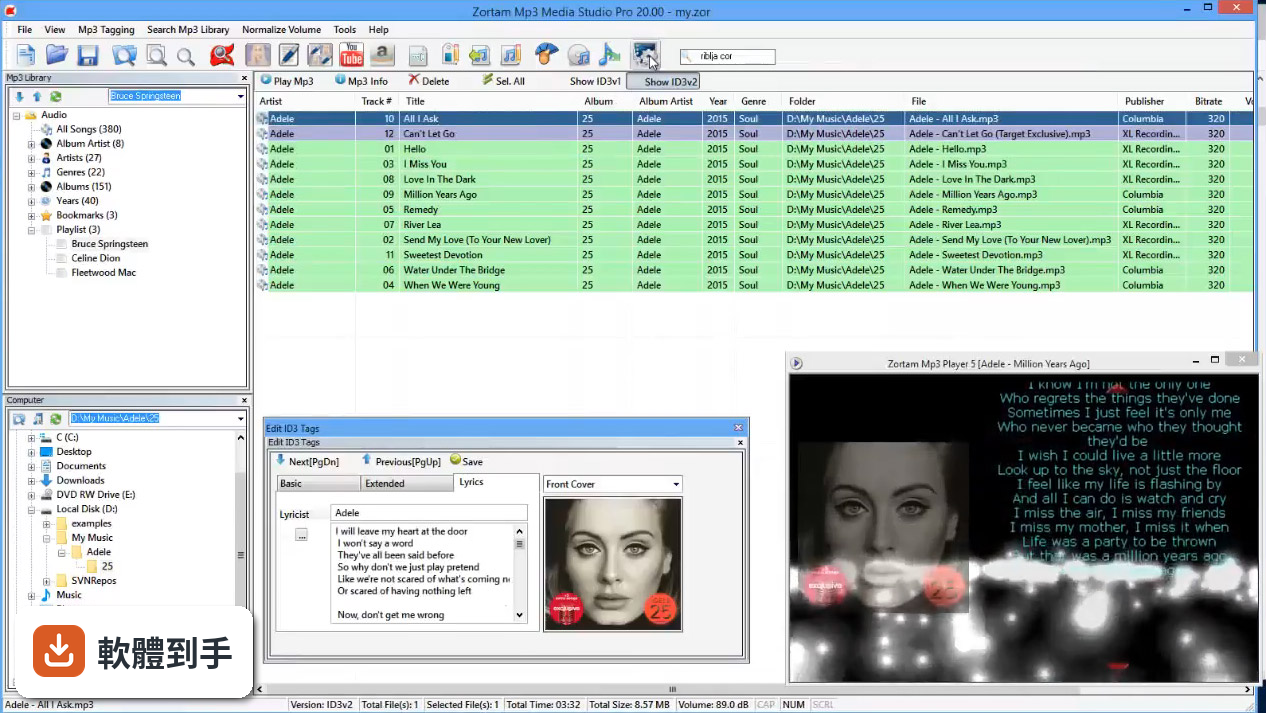
07什麼樣的人適合用這套軟體?
適合手上有大量 MP3、標籤混亂、而且不想逐首手動整理的人。如果你有上千首歌需要批次補齊封面、歌詞、歌手、專輯等資訊,它的自動化流程能省下大量時間。另外,需要把音樂庫匯出成 CSV、Excel 或 HTML 清單的人也會用到它的匯出功能,可以輸出整個或部分音樂庫的資料。
08我只想偶爾改一兩首歌的標籤,用它會太笨重嗎?
會。它的設計是給「大量、批次」的整理場景,不是給輕量使用者。如果只是偶爾改個幾首,打開這套軟體、等待載入、設定批次規則,反而比直接用任何一款簡單的標籤編輯器還麻煩。這種情況下,找個介面單純的小工具會更順手。
09它的試用版限制是什麼?我能不能先試用再決定?
官方說明是安裝後有 3 天或 100 首歌曲的試用期,期間可以使用所有 Pro 功能,超過之後就只剩有限功能。也就是說,你可以拿一小批檔案實際跑一遍,確認它認歌的準確度、封面下載的品質是否符合你的需求,再決定要不要付費。試用期很短,建議先準備好一小批有代表性的檔案再開始測。
10這套軟體適合在 Mac 上使用嗎?
不適合。它只支援 Windows 系統,從 XP 到 Windows 10 都有對應支援,但官方沒有提供 macOS 版本。如果你主要使用 Mac,這套軟體無法直接安裝,需要另外找 Mac 上可用的音樂標籤管理工具,或考慮在 Windows 虛擬機器裡面跑,但那就多了一層麻煩。
11它跟 Mp3tag 比起來,我該怎麼選?
Mp3tag 在評分人數上明顯多很多(365 人評分,而 Zortam 是 221 人),是市場上更多人使用的選擇,而且 Mp3tag 是免費軟體。Zortam 的優勢是整合了自動辨識、BPM 分析、音量標準化、CD 轉檔等更多功能,但它是付費的 Demo 授權。如果你只需要標籤編輯和批次改名,Mp3tag 可能就夠了;如果你想要一套包辦辨識、封面、歌詞、轉檔的工具,再考慮 Zortam。
12這套軟體還在持續更新嗎?我擔心買了之後沒人維護。
從版本紀錄來看,它的更新已經停滯一段時間了,收錄的最近一個版本停在 2021 年,之後就沒有再釋出更新。這代表它可能不會支援更新的 Windows 版本,或無法應對未來音樂格式的變化。如果你在意軟體的長期維護和相容性,這是一個需要考量的風險,建議先確認它在你的 Windows 版本上運作正常再決定。
下載與官方連結
Bitwig Studio 2.3.msi · 194 MB
版本紀錄
- 2021-06-22 Zortam Mp3 Media Studio 28.55
- 2021-05-07 Zortam Mp3 Media Studio 28.40
- 2021-04-25 Zortam Mp3 Media Studio 28.35
再看 5 筆
- 2021-04-11 Zortam Mp3 Media Studio 28.30
- 2021-03-23 Zortam Mp3 Media Studio 28.25
- 2021-03-12 Zortam Mp3 Media Studio 28.20
- 2021-01-04 Zortam Mp3 Media Studio 28.00
- 2020-12-15 Zortam Mp3 Media Studio 27.75 21.3 MB
這一版改了什麼
What's new in this version:
New:
- Phase-4 Synthesizer
- Instrument and FX Selector Devices
- Voice Stacking and Voice Stack Modulator
- Zplane Elastique time-stretching engines in three flavours
- Time-stretching mode: "Slice"
- Retro time-stretching mode: "Cyclic"
- Formant note expressions (time stretching modes Slice, Cyclic and Elastique Pro)
- Coloured indication of stretch amount between beat markers in audio editor (no color means neutral playback)
- Time Signature Changes
- Expanded Device View
- Preference to enable/disable updating of play-start marker from arranger selection
- Added a preference entry to reverse the direction when zoom-dragging the mouse
- Open Sound Control API for extensions
Improved:
- Updated English user guide with v2.3 features
- Oscilloscope: Trigger on Notes now follow wave cycles according to the pitch
- Add command for setting loop region to selected region (Ctrl/Cmd + L) to the menu
- Indexed Controls can now be mapped with the action "Cycle Next" and "Cycle Previous"
- Mapping an enumerated control (like a filter type or effect selector index) to a button/key will map the "Cycle Next" action by default
- Automation override gets turned on for a parameter when changing it even though there is no automation on the arranger and arranger is playing sometimes
- ControlSurfaceAPI: Device.isWindowOpen() works with BitwigStudio devices
- Added border to our windows which provide better contrast to the outside and indicate if the window has focus
- Show modulation mapping on modulation source mouse-over
- Allow to remove projects from recent projects list
- Order of collections in the package manager was random
- Remove the minimize button from any floating window
- Open/close of drum-pads and instrument/FX-layers now only require a single mouse click
- Automation is now updated when setting the play start marker of the transport (when stopped)
- Recording clips from clip launcher to arranger could sometimes record incorrectly when the start marker in the clip was not at time 0
- Preview player should stretch according to the long / short samples stretch preferences
- Add track color on the layered header when editing multiple audio layers in track view
- Add information to the manual about real time bouncing (eg when using hardware instruments and effects)
- If the audio engine has an error writing an audio file while recording show this to the user as a notification
- You can now choose between onsets and a fixed rate for stretch modes transient preservation
- ControlSurfaceAPI: add color setting
- Hold mode for the random modulator
- APC40 MKII: record toggles clip overdub and session toggles clip automation recording
Fixed:
- Recording audio on the arranger in a loop results in audio clips not having the duration of the loop
- Drum machine only has 127 slices while it could have 128
- track name in VST GUI window title not updated when moving VST to another track
- ControlSurfaceAPI: Device.hasSlot() was returning true only if the slot had chains
- Under certain circumstances an extra note will be played outside clip boundaries
- LFO phase/crushing problem when not using "retrigger"
- Send settings pre and post are lost when duplicating or copy/pasting a track
- On a retina screen, you can resize the dsp graph window bigger than available data frames
- Device that contains missing modulator causes app crash when clicking the modulator slot
- Pulse audio output not working by default on Ubuntu systems
- It should not be possible to slide the waveform under the first or last beat marker
- Activating the engine for one project while another is playing asks user and selecting no left engine spinning wheel
- ALSA audio backend may allow user to choose some buffer sizes that are not supported
- Using double height cells on the clip launcher in the mixer view caused files to be dropped to the wrong scene when dragging to a - track
- Onset analysis could fail randomly
- Selected beat markers don't appear selected while dragging
- Transpose expression zoom-scrollbar does not line up with timeline content by default in audio editor
- Run out of memory if a script writes lots of messages to the console window
- Controller API: Scrolling a bank by pages would not scroll by exactly one page if there was not a full page of items to show
- Steps Modulator doesn't work in "Loop off" mode, always loops
- MIDI Modulator has no Omni mode, which leads into trouble when used inside of a Instrument Selector Layer with MPE
- Crash when closing project while having meta clip selected
- Better timeline grid contrast
- Tags not saved when adding tag by pressing space bar instead of enter
- Controller help documentation does not open anymore for the Keylab scripts
- Default stretch mode on record remains on "Stretch"
- Scaling an audio clip by 50% or 200% could crash the engine and cause problems on undo or redo
- Program changes don't work for VST3 plugins
- 25 frames MTC only really sends 25 frames when being freshly selected
- Clicking on an invalid wav file in the browser stopped the browser preview player from being able to play any other selected files
- When editing device page for an instrument layer it is possible to map to a control in a layer chain mixer
- Regression since 2.2: Issues with the Arturia Keylab scripts
- LFO modulator in instrument selector sleeps if not being in focus
- Changing the EQ parameters using the mouse wheel creates thousands of undo steps
- Queued arranger playback jumps (scheduled by double clicking in the timeline ruler) sometimes do not fire
- A controller with no mappings should not show itself in the mapping browser
- ControlSurfaceAPI: clip notes don't show their full length
- Clips in arranger start numbering at 0 instead of 1
- Duplicating a device might not initialize polyphonic modulations properly in certain case
- Clip launcher clips could leave their loop region if the arranger loop button is on
- Crashed when hitting the escape key in the sample zone editor
- Minimizing a window may cause a crash on macOS High Sierra depending on selected display profile
- Saved scenes and clips are not played back with their configured tempo when previewing
- Arranger does not repaint a clip when it's displayed title changes
- Time selection in layered audio editor is always across all lanes when only single lanes are selected
- Deleting time in arranger note editor header area should affect clip timeline instead of clip content
- Raw mode's "Play Stop" value doesn't update in real time
- Wrong clip length for "return to arrangement" post recording action
- Timeline grid painting was slow when zoomed out and using a fixed-grid setting
- Painting of automation curves in GUI was inconsistent with engine playback
- Crash when trying to paint timeline background while closing project
- MIDI Running status was incorrect on Linux
- Various issues with MIDI Timecode
- When switching between projects while one is playing using the Jack backend unwanted audio could be output
- Jack server crashed sometimes when using Bitwig Studio
- A script that logged lots of information continuously could lock up the application
- Dragging the length of an audio event longer than the contained audio may delete parts of the following event
- Random engine crashes when switching audio system and devices in the audio preferences
- Floating windows and popup windows stopped the keyboard shortcuts for transport play, undo and redo to stop working
- When bouncing or recording audio embed time stretch information into the wav files so that they are always correctly time stretched when they are used in Bitwig Studio