
這是歷史版本頁面 — 看 Adobe Digital Editions 最新版本
圖書館借的電子書打不開?Adobe Digital Editions 能做什麼
 Adobe Digital Editions 20.1
資料更新 2020-02-11
閱讀約 6 分鐘
你從圖書館網站借了一本電子書,下載下來卻得到一個奇怪的 .acsm 檔,雙擊之後電腦跟你說沒有可以開啟的程式。你只是想看書,不是想研究檔案格式,但偏偏這本書就是打不開,而且期限一到還會自動消失,讓你連慢慢摸索的時間都沒有。
這種時候,一般人會先試著用瀏覽器直接開,或是隨便裝一個號稱「萬用」的閱讀器,結果不是被 DRM 保護擋在門外,就是畫面排版亂成一團。這類工具的切入點其實很單純:它專門處理有版權保護的電子書,負責把借閱、下載、開啟、閱讀這整條流程串起來,讓你在期限內好好把書看完。
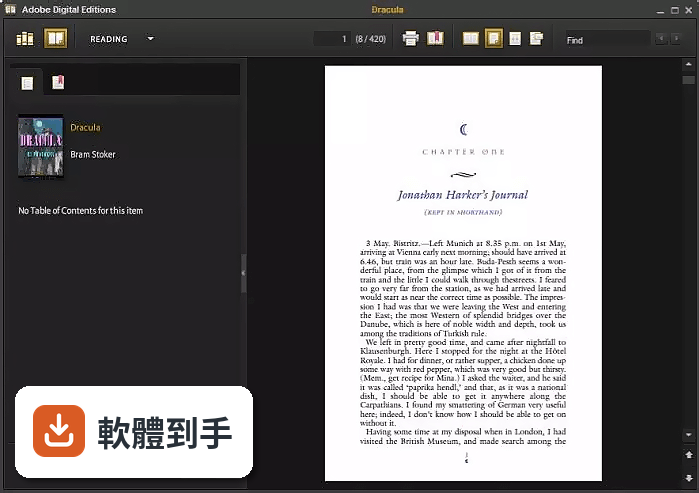
01Adobe Digital Editions 是用來做什麼的?
它是一套免費的電子書閱讀與管理軟體,主要處理 EPUB、EPUB3 和 PDF 格式的檔案。最常見的使用情境是從公共圖書館借電子書:圖書館會給你一個 .acsm 檔,用這套軟體開啟後才會真正下載到書籍內容。它也支援購買的電子書,可以離線閱讀,並在安裝了同一套軟體的不同裝置之間同步書庫與閱讀進度。
02它能不能畫重點、做筆記?
可以。閱讀時選取文字按右鍵,就能新增標註,包含螢光筆畫重點、加註解和書籤。這些標註會跟書籍檔案一起儲存,下次開啟時還在。不過要注意,出版社可以設定限制列印,但標註功能一般不會被鎖住。如果你習慣讀電子書一定要畫線,這套軟體的基本需求是夠用的。
03從圖書館借的書要怎麼弄進來?
在軟體裡選「File」→「Borrow Books from Public Library」,依照指示登入圖書館帳號,或者直接把圖書館網站下載下來的 .acsm 檔拖進軟體視窗。程式會自動向圖書館伺服器取得書籍檔案,借閱期限一到,書就會自動從你的書架上消失,不需要手動歸還。整個流程跟線上買書很像,只差沒有付款步驟。
04它支援哪些檔案格式?
官方列出的格式有 EPUB、EPUB3 和 PDF,另外也支援 .acsm 這個用來觸發下載的憑證檔。EPUB3 的支援度在 EPUBTest.org 上有不錯的評價,可以呈現影音內容、由右至左的閱讀方向、數學公式渲染,以及更好的無障礙輔助。如果你手上的書是其他格式,例如 mobi 或 txt,這套軟體就幫不上忙。
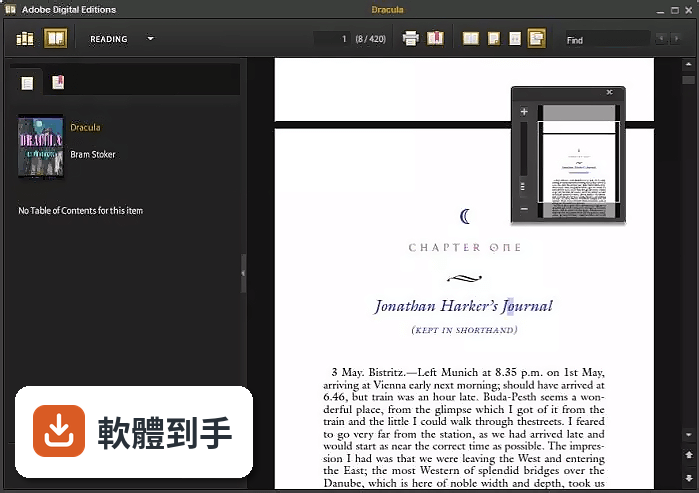
05書可以同步到手機或平板嗎?
可以,前提是那些裝置上也安裝了 Adobe Digital Editions,而且用同一個 Adobe ID 登入。你在某一台裝置上購買或下載的書,會自動出現在其他有裝這套軟體的裝置上,閱讀進度也會同步。不過要注意,這套軟體本身沒有手機版,行動裝置上需要另外找對應的 App,這部分官方資料沒有詳細說明。
06我英文不好,介面有中文嗎?
這套軟體的介面語言只有英文,安裝和操作都是英文介面。不過它閱讀的電子書內容可以支援多國語言,包括繁體中文和簡體中文,書的內容顯示不受影響。如果你對英文操作介面不熟悉,使用上會需要一些時間適應,但基本功能的位置不算太複雜,摸索一下就能上手。
07它跟一般的 PDF 閱讀器有什麼不同?
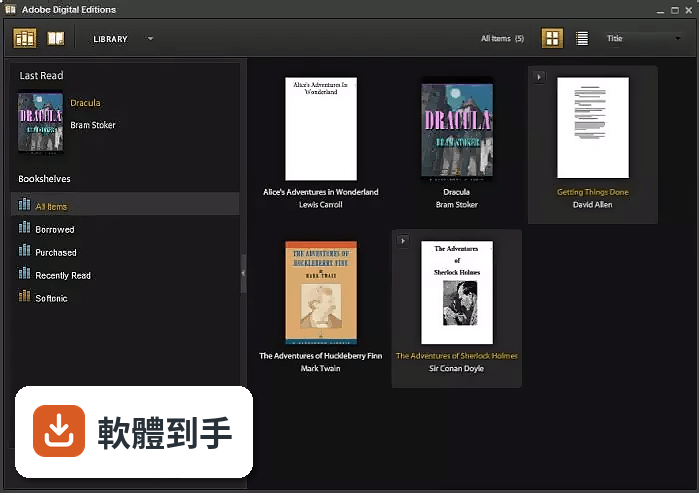
最大的差異在於 DRM 保護。一般 PDF 閱讀器只能開沒有加密的檔案,而圖書館借閱或付費購買的電子書通常帶有版權保護,必須用這套軟體才能解開。另外它也提供書籍管理功能,可以建立自訂書櫃,依書名、作者、出版社排序,這是一般 PDF 閱讀器比較少見的。如果你只看自己轉檔的 PDF,用系統內建或免費 PDF 閱讀器就夠了。
08我只有 Windows 電腦,可以用嗎?
可以。這套軟體支援 Windows 7 到 Windows 10 的 32 位元與 64 位元版本,官方資料沒有提到 Windows 11,但理論上在相容模式下應該可以執行。它也有 macOS 版本,不過官方功能說明中沒有列出 Mac 的具體系統需求,如果你用 Mac,建議先上官網確認。
09它跟 Kindle for PC 比起來,哪個比較多人用?
以評分人數來看,Kindle for PC 有 122 人評分,Adobe Digital Editions 有 55 人,IceCream Ebook Reader 有 38 人。評分人數多不代表比較好,但可以反映使用者的普及程度。兩者的定位不同:Kindle 是亞馬遜生態系的閱讀器,主要讀 Kindle 商店的書;這套軟體則是用來讀圖書館借閱和 Adobe DRM 保護的 EPUB 與 PDF。
10這套軟體適合什麼樣的人?
適合經常從公共圖書館借電子書的人,尤其是台灣的讀者如果常使用圖書館的電子書平台,很多平台提供的書就是 Adobe DRM 保護的 EPUB 或 PDF。也適合需要閱讀 EPUB3 格式、有互動內容或特殊排版書籍的人。另外,需要搭配螢幕報讀軟體(如 JAWS、NVDA)使用的視障讀者,這套軟體有支援。
11什麼情況下不該選它?
如果你只看一般沒有加密的 PDF 或 EPUB,用瀏覽器或免費閱讀器就夠了,不需要多裝一套軟體。如果你需要中文介面,這套軟體只有英文,操作門檻較高。如果你主要用 Mac 或手機閱讀,這套軟體在 Windows 上才是主力,行動裝置需要另外找 App,官方資料沒有提供完整的行動方案。另外,它長期以來更新頻率不高,如果你追求新功能,可能不是最佳選擇。
12它跟 Epubor eBook Manager 或 PDFMate PDF Converter 有什麼不同?
這幾套軟體的定位不同。Adobe Digital Editions 是免費的閱讀器,主要功能是讀取和管理有 DRM 保護的電子書。Epubor 系列的產品偏向電子書格式轉換和 DRM 移除,PDFMate 則專注在 PDF 轉檔。如果你只是想看書,用這套就夠了;如果你需要把書轉成其他格式,才需要考慮 Epubor 或 PDFMate 那類工具。
下載與官方連結
前往官方網站 下載 Adobe Digital Editions
Dreamweaver_Set-Up.exe · 2.1 MB · 連結指向軟體原廠
版本紀錄
- 2025-11-17 Adobe Digital Editions 4.5.12.112 8.6 MB
- 2020-02-11 Adobe Dreamweaver CC 2020 20.1 2.1 MB
- 2018-10-09 Adobe Digital Editions 4.5.9.184862 8.5 MB
再看 3 筆
- 2018-04-11 Adobe Digital Editions 4.5.8.182857 8.5 MB
- 2018-02-01 Adobe Digital Editions 4.5.7.181275 8.5 MB
- 2017-11-14 Adobe Digital Editions 4.5.7.179634
這一版改了什麼
What's new in this version:
Adobe Dreamweaver CC 2020 20.1
- Change log not available for this version
Adobe Dreamweaver CC 2020 20.0
Seamless live view editing:
- In the new version, you can click to edit in live view, effortlessly. Now, edit the semantic tags like and so on, enhancing your editing - experience. With auto-sync feature, any edits made in live view automatically synchronize with code view.
Japanese default font:
- Now, Japanese Dreamweaver has a new default font configuration.
Windows system supports Japanese and Unicode encodings and MAC supports EUC, ISO 2022-JP, Shift JIS and Windows DOS encodings for Japanese. All have the same font:
Win Default Fonts:
- Proportional Font: Yu Gothic (游ゴシック)
- Code View Font: Source Han Code JP N (源ノ角ゴシック Code JP N)
- Fixed Font: Source Han Code JP N (源ノ角ゴシック Code JP N)
MAC Default Fonts:
- Proportional Font: Yu Gothic (游ゴシック)
- Code View Font: Source Han Code JP N (源ノ角ゴシック Code JP N)
- Fixed Font: Source Han Code JP N (源ノ角ゴシック Code JP N)
Also, the default size of the above three fonts are modified to:
- Proportional Font: 12 pt.
- Code View Font: 11 pt.
- Fixed Font: 12 pt.
Code hinting improvements:
- In the current update, the code hints' filtering logic has been improved for PHP. Now, the hints that you are looking for are always at the top. Also, the availability of code hints for JS and PHP has been improved.
Adobe Dreamweaver CC 2019 19.2.1
- This update fixes the issue of Dreamweaver (versions 19.0 to 19.2) crashing on new Windows and Mac devices when installed using Creative Cloud Desktop App version 4.9 and later.
Adobe Dreamweaver CC 2019 19.2
- Code formatting issues with PHP documents are addressed for better experience in Dreamweaver
Adobe Dreamweaver CC 2019 19.1
- Dreamweaver now has the Bootstrap 3.4.1 and 4.3.1 versions integrated in 19.1 release
Adobe Dreamweaver CC 2019 19.0.1
- Change log not available for this version
Adobe Dreamweaver CC 2019 19.0
JavaScript refactoring:
- As a web developer, you can now intelligently rename functions and variables with scope awareness using JavaScript refactor. You can convert anonymous expression or function block to an arrow expression in a click. Create Get/Set functions for the selected identifier in context of a class/construct. You can now extract an expression as a variable in the current scope and select a piece of code and create a Try/Catch block for it.
- You can refactor code in HTML, PHP, and JavaScript document types. You can choose Refactor from the menu that appears when you right-click on the code area in Dreamweaver. Some of the useful productivity enhancements in Refactor are Rename, Extract to Variable, Extract to Function, Wrap in Try Catch, Wrap in Condition, Convert to Arrow Function, and Create Getters/Setters.
ECMAScript 6 support:
- ECMAScript 6 is the sixth edition of the ECMA-262 standard, and features major changes and improvements to the ECMAScript specification. ECMAScript is a scripting language specification standardized by ECMA international.
- Dreamweaver now supports ECMAScript 6 syntax. Web developers can now work with the latest JavaScript updates by taking advantage of ECMAScript 6 features.
- Dreamweaver also supports linting of ECMAScript code, with ESLint defaulting as JavaScript linter.
New CEF integration:
- As a web designer or web developer, when you want to extend the web by creating HTML tags or CSS properties, you require latest web development features. To view the output for latest features, Dreamweaver developers had to use Real-time Preview instead of Live view.
- Dreamweaver is now integrated with a new version of Chromium Embedded Framework (CEF). With the new CEF, Live View now renders pages designed using CSS Grid layouts. Also, you can view a better CSS grid layout with this change.
Security enhancements:
- Dreamweaver now provides multiple security enhancements enabling it to support most of the hosting providers.
- OpenSSH and OpenSSL Dreamweaver is now integrated with the new OpenSSH (version 7.6) enabling seamless SFTP connections to multiple hosting servers. OpenSSL is upgraded from the version 1.0.2 K to 1.0.2o.
- LibCURL - Dreamweaver is now integrated with the new Lib Curl version (Upgraded from 7.38 to 7.60), providing secure connectivity to users.
- Node.js version has been upgraded to 6.14.0.
- zlib version has been upgraded to 1.2.11.
Home screen:
- When you launch Dreamweaver, it now displays an improved Home screen, which includes options to:
- Open a wide range of tutorials to help you quickly learn and understand the concept, workflow, tips, and tricks
- Create a new document or open an existing document
- The contents of the Home screen are tailored based on your familiarity with Dreamweaver and your Creative Cloud membership plan.
Find and Replace:
- Previous functionality of Save and Load query in Find and Replace dialog is back again in this release. For more information, see Find and replace text, tags and attributes.
Real-time preview enhancement:
- Real-time preview now provides an option to switch to preview documents in browser.