
這是歷史版本頁面 — 看 Any Video Converter Free 最新版本
影片格式不相容?Any Video Converter Free 能幫你轉什麼
 Any Video Converter Free 6.2.1
資料更新 2017-12-20
閱讀約 6 分鐘
你從網路上下載了一段影片,想放進手機或平板裡看,結果裝置顯示「不支援的格式」。或者你有一堆不同來源的影片檔,想統一轉成同一種格式再剪接、燒錄,卻找不到一個不用付費、不用裝一堆外掛的工具。這種時候,你需要的是一個能一次處理轉檔、剪輯、下載的免費軟體。
一般人遇到格式不相容,第一個念頭是打開線上轉檔網站。但線上工具通常有檔案大小限制、要等上傳下載、一次只能轉一個檔,而且隱私疑慮難免。另一條路是找播放器硬解,但播放器只能看,不能幫你轉成裝置要的格式。這類免費轉檔工具的切入點,是讓你在本機一次處理多個檔案,順便完成剪輯、合併、下載這些周邊需求,不用在好幾個軟體之間來回切換。
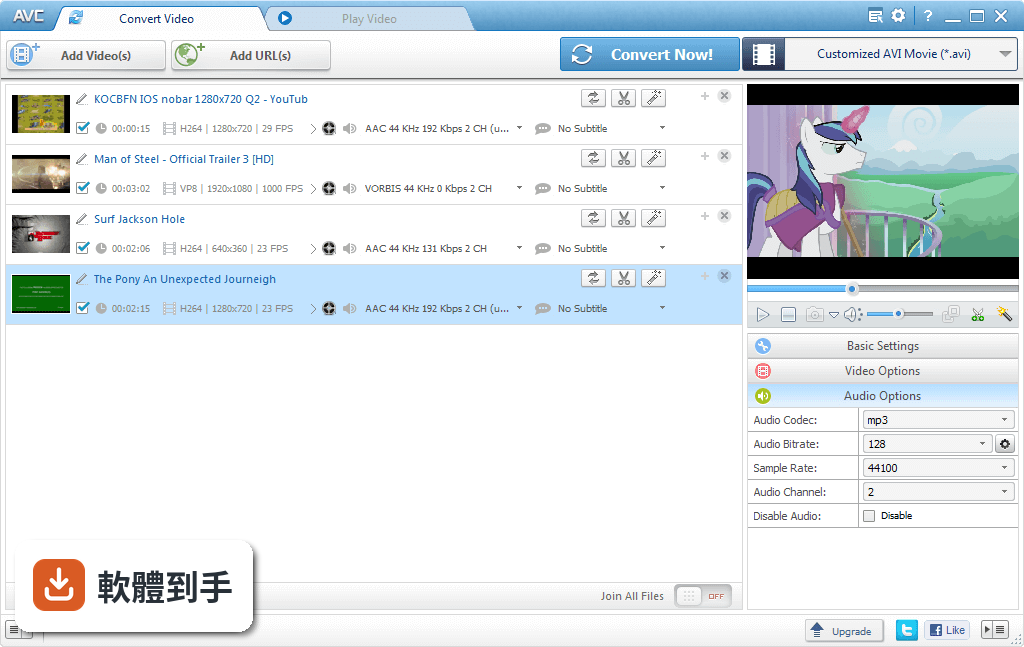
01Any Video Converter Free 可以轉哪些格式?
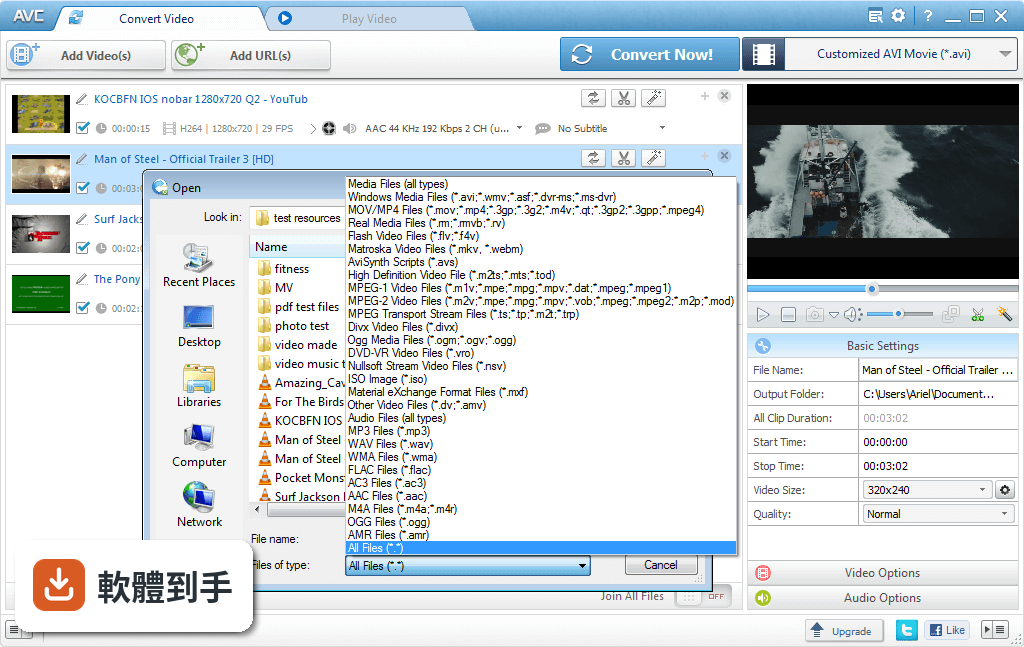
它支援超過 60 種輸入格式,包括常見的 MP4、AVI、MKV、MOV、WMV、FLV、RMVB、M2TS、WebM 等,也涵蓋 4K 影片。輸出格式有 160 多種,包含 MP4、AVI、MKV、WMV、MOV、GIF、WEBM,以及針對 iPhone、Android、PS4、Xbox 等裝置的預設格式。基本上你手邊常見的影片檔,它都能讀進來再轉出去。
02除了轉檔,它還能做什麼?
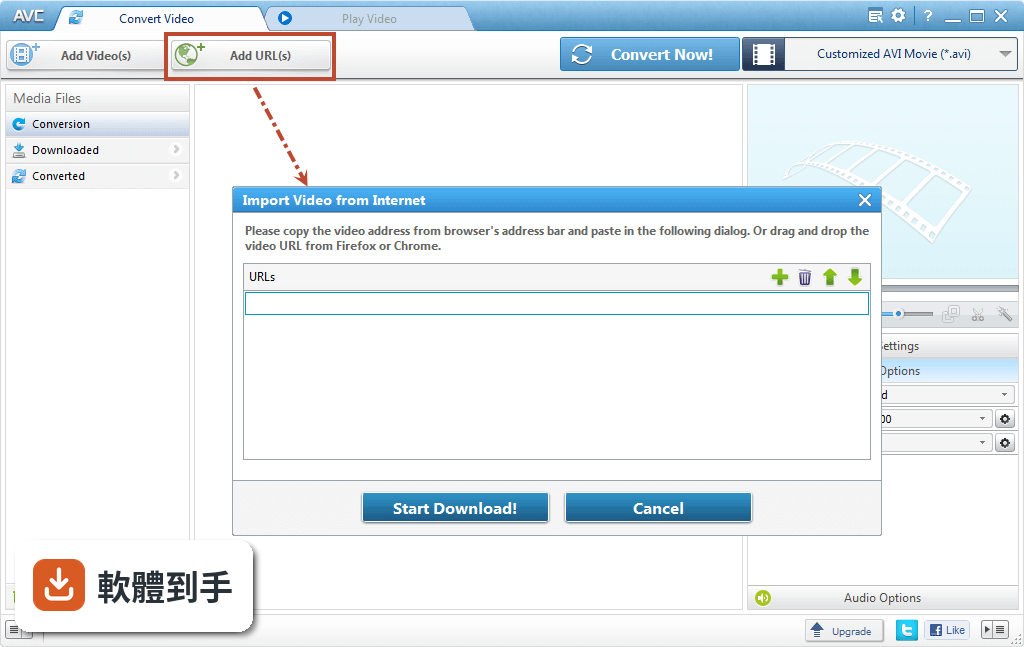
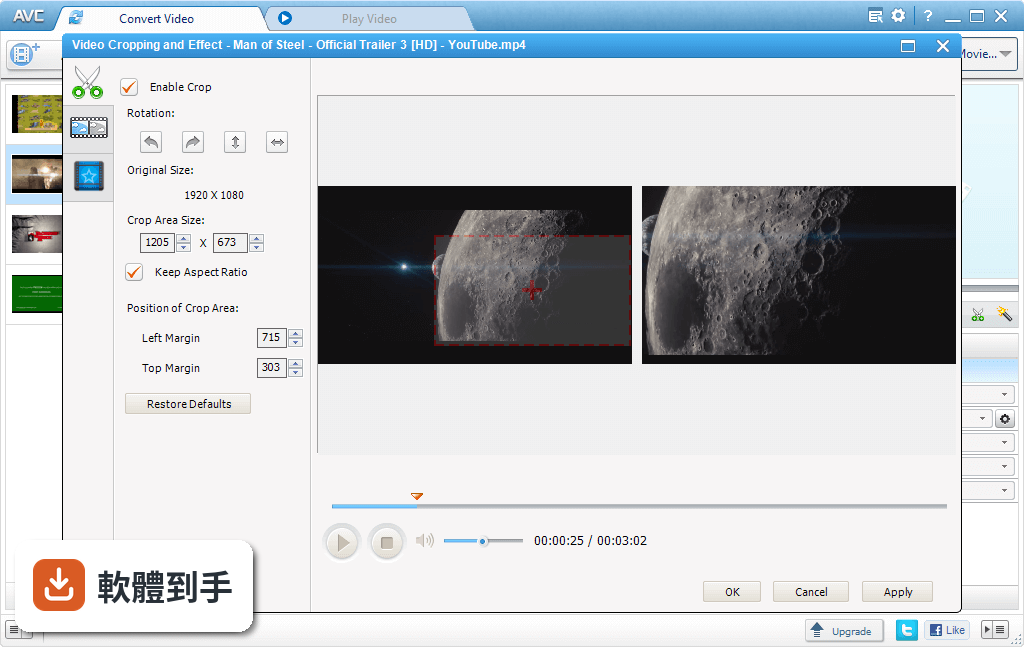
它內建影片下載功能,可以從 Nicovideo 等網站批次下載影片,再轉成你要的格式。另外還有剪輯工具,能裁剪片段、裁切畫面、旋轉、合併多個影片、加入字幕,也可以調整解析度、位元率、影格率等編碼參數。甚至能把影片燒錄成 DVD 或 Blu-ray 光碟,支援 PAL 和 NTSC 兩種電視規格。
03轉檔速度快嗎?有沒有硬體加速?
它支援 NVIDIA NVENC、AMD AMF、Intel QSV 三種硬體加速技術,轉檔時會用到顯示卡的運算能力,速度比純用 CPU 快不少。也支援批次轉換,可以一次丟多個檔案排隊處理,還有自動關機功能,轉完就自己關機。不過實際速度還是取決於你的電腦配備和影片長度。
04轉檔後畫質會變差嗎?
官方宣稱支援 100% 無損轉檔,也就是在轉換過程中不損失畫質。但實際上畫質好壞取決於你選的輸出格式、編碼器(x264、x265、XviD 等)和位元率設定。如果你把 4K 影片轉成 480p,畫質當然會下降;如果維持相同解析度和夠高的位元率,肉眼幾乎看不出差異。
05可以把影片轉成適合手機看的格式嗎?
可以。它的輸出裝置選單裡直接列出 iPhone、iPad、iPod、Android 手機、Kindle Fire HD、PS4、Xbox One、Apple TV 等裝置,選好你的裝置型號,它就會套用對應的解析度和格式設定,不用自己查規格。這對不想研究編碼參數的人來說很方便。
06我完全不懂轉檔設定,這套軟體適合我嗎?
適合。它的主介面是工具列表,點選要用的功能(轉檔、剪輯、下載、燒錄)就能進入操作畫面,不需要手動設定編碼器或位元率。預設的裝置格式選項已經幫你決定好大部分參數,你只需要選輸出格式、按開始轉換。不過介面是英文的,不熟悉英文操作介面的人需要花一點時間摸索。
07這套軟體適合大量轉檔的人用嗎?
適合。它支援批次轉換,可以一次加入多個檔案排隊處理,不用一個一個來。也支援多執行緒,轉檔時會充分利用 CPU 和 GPU 的效能。如果你經常有大量影片要轉成統一格式,或需要把不同來源的影片合併成一支,它的批次處理和合併功能可以省下不少時間。
08這套軟體有中文介面嗎?
沒有。它的介面語系只有英文,沒有繁體中文或簡體中文選項。如果你對英文介面不熟悉,操作上會需要對照翻譯或靠直覺摸索。不過它的功能名稱和選項大多是常見的電腦用語,搭配線上翻譯工具應該能克服。如果你完全無法接受英文介面,可能要考慮其他有中文的轉檔軟體。
09這套軟體適合用來剪輯影片嗎?
它內建的是基礎剪輯工具,包含裁剪、裁切、旋轉、合併、加字幕,適合處理簡單的影片調整。但如果你需要多軌編輯、轉場特效、調色、音訊混音這類進階功能,它做不到,那是專業剪輯軟體(如 Premiere、DaVinci Resolve)的範疇。它定位是轉檔為主、剪輯為輔,不要期待它能取代完整剪輯軟體。
10它支援 Mac 或手機嗎?
不支援。這套軟體只有 Windows 版本,支援 Windows 7 到 Windows 11。Mac 使用者無法安裝,手機上也沒有對應的 App。如果你用的是 Mac,需要找其他跨平台的轉檔工具。另外,它雖然能把影片轉成手機可播放的格式,但軟體本身是安裝在 Windows 電腦上運作的。
11這套軟體還在持續更新嗎?
它的更新頻率不算高,最近一年內有釋出一次更新,但過去兩年也只更新了一次。開發商 AnvSoft 仍在維護這套軟體,但更新步調偏慢。如果你在意軟體是否持續獲得新功能和安全性修補,這點需要列入考量。不過以轉檔工具來說,格式支援已經很完整,更新慢不代表不能用。
12這套軟體跟其他免費轉檔工具比起來,有什麼要注意的?
它的評分人數(689 人)明顯多於同類免費工具,例如 Miro Video Converter(37 人)、Prism Video Converter(43 人)、Total Video Converter(182 人),表示實際使用者較多,參考價值較高。但它是 Freeware,安裝時要注意是否會一併安裝其他軟體,下載時建議從官方網站取得。另外,它只有英文介面,對不熟悉英文的人來說是主要門檻。
下載與官方連結
前往官方網站 下載 Any Video Converter Free
avc-free.exe · 連結指向軟體原廠
版本紀錄
- 2026-09-30 Any Video Converter Free 9.2.6 7.4 MB
- 2026-08-01 Any Video Converter Free 9.2.5 7.4 MB
- 2020-06-04 Icecream Video Editor 2.15 62.3 MB
再看 5 筆
- 2018-10-13 Any Video Converter 6.2.7 49.7 MB
- 2018-09-10 Any Video Converter 6.2.6 49.5 MB
- 2018-07-25 Any Video Converter 6.2.5 49.4 MB
- 2018-03-24 Any Video Converter 6.2.3 49.4 MB
- 2018-02-05 Any Video Converter 6.2.2 49.4 MB
這一版改了什麼
What's new in this version:
Any Video Converter 6.2.1
- Fix the crash problem when clipping some videos
- Add the automatic shutdown option on conversion panel
- Fix the error for subtitles encoding
- Update the download engine
Any Video Converter 6.2.0
- Fix the bugs when adding external subtitles to video
- Set the lowest position value of subtitles from 0 to -20
Any Video Converter 6.1.9
- Update the download engine
Any Video Converter 6.1.8
- Update the download engine
Any Video Converter 6.1.7
- Add feature for an estimate of time left on conversion
- Fix the abnormal exit problem when deleting DVD items
- Update the download engine
Any Video Converter 6.1.6
- Update the download engine
- UI optimizing
Any Video Converter 6.1.5
- The DVD burning supports large hard disks
- Update the download engine
Any Video Converter 6.1.4
- Adware removed
Any Video Converter 6.1.3
- Change log not available for this version
Any Video Converter 6.1.2
- Fix the crash problem when the added files contain special characters
- Update the download engine
Any Video Converter 6.1.1
- Fix the crash problem when adding videos to burn DVD
Any Video Converter 6.1.0
- Fix the error on downloading online videos. Add the feature of download music files only from video URLs
- Fix the bug of incomplete thumbnail display and editing for music files
- Fix the incomplete display error when adding multiple audios and subtitles
- Update the download engine
Any Video Converter 6.0.9
- Update the download engine
Any Video Converter 6.0.8
- Fix the issue of Analysis Failed when downloading YouTube videos
Any Video Converter 6.0.7
- Fix the crash issue when converting DVD to AVI, codec with Xvid, setting video size to original
- Fix the issue of Analysis Failed when downloading YouTube videos
- Update the download engine
Any Video Converter 6.0.6
- Fix the crash issue when downloading YouTube videos
Any Video Converter 6.0.5
- Support more subtitle formats, and selecting fonts, colors, shadows, styles, etc.
- Support BD ripper
- Support HiDPI on program interface
- Update the download engine
Any Video Converter 6.0.4
- Fix the issue of long text on DVD menu after burning DVD, insteaded by two-line display and ellipsis
- Update the download engine
Any Video Converter 6.0.3
- Add output profiles for iPhone 7 and iPhone 7 Plus
- Optimize some user interface when using the skin Dark
- Fix the video downloading failure issue when output folder is in CJK language
- Update the download engine
- Fix some minor bugs
Any Video Converter 6.0.2
- Update the download engine
- Fix some minor bugs
Any Video Converter 6.0.1
- Fix "The procedure entry point InitOnceExecuteOnce could not be located in the dynamic link library KERNEL 32.dll" error when launching AVC programs on Windows XP system
- Update the download engine
Any Video Converter 6.0.0
- Fix the issue that DVD template does not support CJK output path.
- Optimize GPU acceleration.
- Fix the issue that video format can not be switched correctly when converting a particular video file.
- Fix the crash issue when full-screen playing videos via AVC program built-in video player.
Any Video Converter 5.9.9
- Add output profiles for Samsung Galaxy Note7
- Fix multiple videos conversion issue
- Fix abnormal preview issue after converting videos to HTML5 format
- Update the download engine
Any Video Converter 5.9.7
- Fix the program crash issue when converting M2TS files with subtitles to MP4 format.
- Update the download engine.
Any Video Converter 5.9.6
- Fix crash issue when converting videos.
- Fix the issue that output file is o byte when converting videos to AVCHD format.
- Fix the conversion problem when selecting the desired DVD chapters to convert.
- Add output profiles for Samsung Galaxy C5, Samsung Galaxy C7, Huawei MateBook.
Any Video Converter 5.9.5
- Fix DVD burning issue.
Any Video Converter 5.9.4
- Update the download engine.
- Add output profiles for Sony PS4 and Microsoft Xbox one.
- Fix some minor bugs.
Any Video Converter 5.9.3
- Change log not available for this version
Any Video Converter 5.9.2
- Fix DVD ripping issue
- Optimize NVIDIA NVENC acceleration
- Fix the issue that subtitle size doesn't change when increasing or decreasing scales of subtitles
- Fix videos merging problem
- Add output profiles for Samsung Galaxy S6, Samsung Galaxy S7, iPhone SE
- Fix some minor bugs
Any Video Converter 5.9.1
- Fix watermark issue when burning DVD
- Fix some minor bugs
Any Video Converter 5.9.0
- Add x265 video codec to MP4 output format
- Support NVIDIA NVENC acceleration
- Add external audio tracks and subtitles playback preview function
- Be able to read all of the videos in the ISO file
- Add 3840*2160 video size in the output video
- Fix some minor bugs
Any Video Converter 5.8.8
- Fix YouTube downloading issue
- Fix some minor bugs
Any Video Converter 5.8.7
- Fix YouTube downloading issue
- Fix some minor bugs
Any Video Converter 5.8.6
- Change log not available for this version
Any Video Converter 5.8.5
- Change log not available for this version
Any Video Converter 5.8.4
- Add output profiles for iPhone 6s, iPhone 6s Plus, iPad mini4, iPad pro
- Update the download engine
- Fix some other bugs
Any Video Converter 5.8.3
- Fix the crash issue when downloading online video
- Update the download engine
- Optimize some user interface
Any Video Converter 5.8.2
- Change log not available for this version
Any Video Converter 5.8.1
- Fix the problem that frame rate can't be customized when CUDA is enabled.
- Fix some UI problems when using the skin Dark.