
卸載軟體老是殘留?Ashampoo UnInstaller 在做什麼
 Ashampoo UnInstaller Pro 27.00.00
資料更新 2026-10-08
閱讀約 6 分鐘
你裝了一堆試用軟體,用完想刪掉,卻發現怎麼都清不乾淨。移除程式跑完了,資料夾還在,登錄檔也留著,下次開機好像又慢了一點。你只是想讓電腦回到安裝前的樣子,但每次手動刪檔案、改登錄檔都怕刪錯東西,最後只能放著不管,眼睜睜看著系統越來越亂。
Windows 內建的解除安裝只會跑軟體自己的移除程式,剩下的殘骸它不管。手動清理又太危險,登錄檔刪錯一個可能讓其他軟體出問題。這類工具的切入點是:在安裝前先記錄系統狀態,解除安裝後再比對差異,把多出來的東西一次清掉。Ashampoo UnInstaller 就是走這個路線,用快照、安裝監控和深度掃描來處理殘留問題。
01Ashampoo UnInstaller 跟 Windows 內建的解除安裝有什麼差?
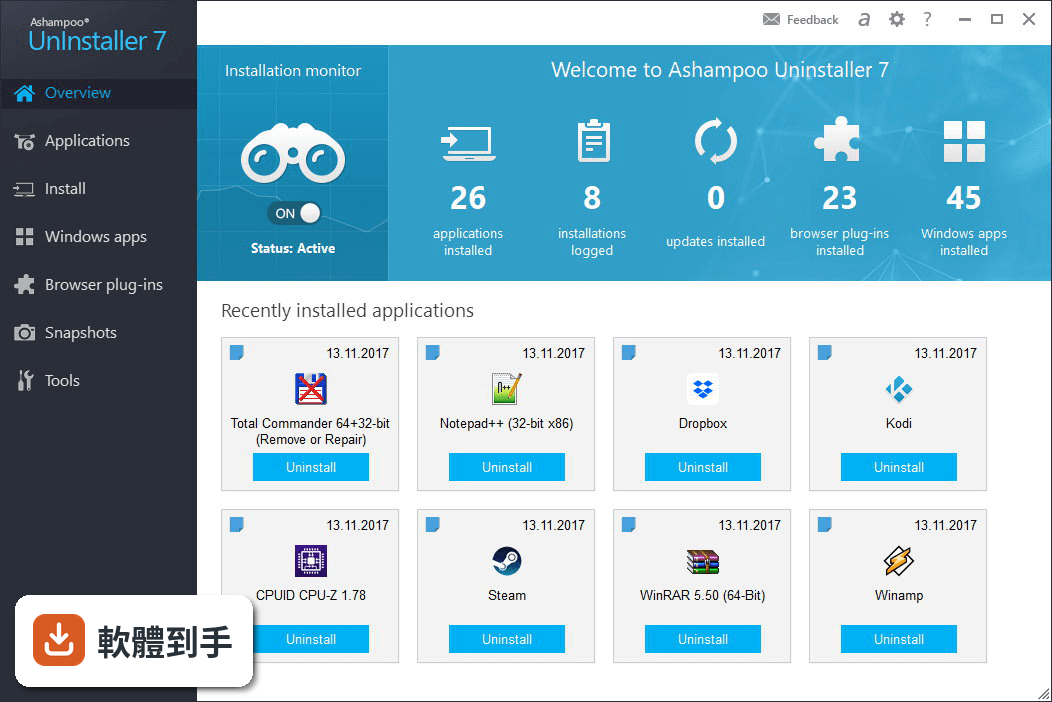
Windows 內建解除安裝只會執行軟體自己的移除程式,常常留下登錄檔、暫存檔和資料夾。這套軟體的做法是:安裝時先建立快照,記錄系統原本狀態;解除安裝後再掃描比對,找出新增的檔案和登錄機碼並刪除。它也會讀取軟體自帶的移除腳本,並套用內建的程式設定檔,四種技術疊加,目的是把殘留降到最低。
02它怎麼知道安裝時動了哪些檔案?
靠安裝監控。安裝軟體前先啟動監控,它會記錄安裝程式對檔案系統和登錄檔的所有變更,之後解除安裝時就照這份記錄反向清除。如果忘了先開監控,它也有快照功能,可以比對安裝前後的系統狀態,找出差異。另外它內建許多熱門程式的設定檔,就算沒有安裝記錄,也能靠設定檔判斷該刪哪些東西。
03卸載完真的不會留登錄檔嗎?
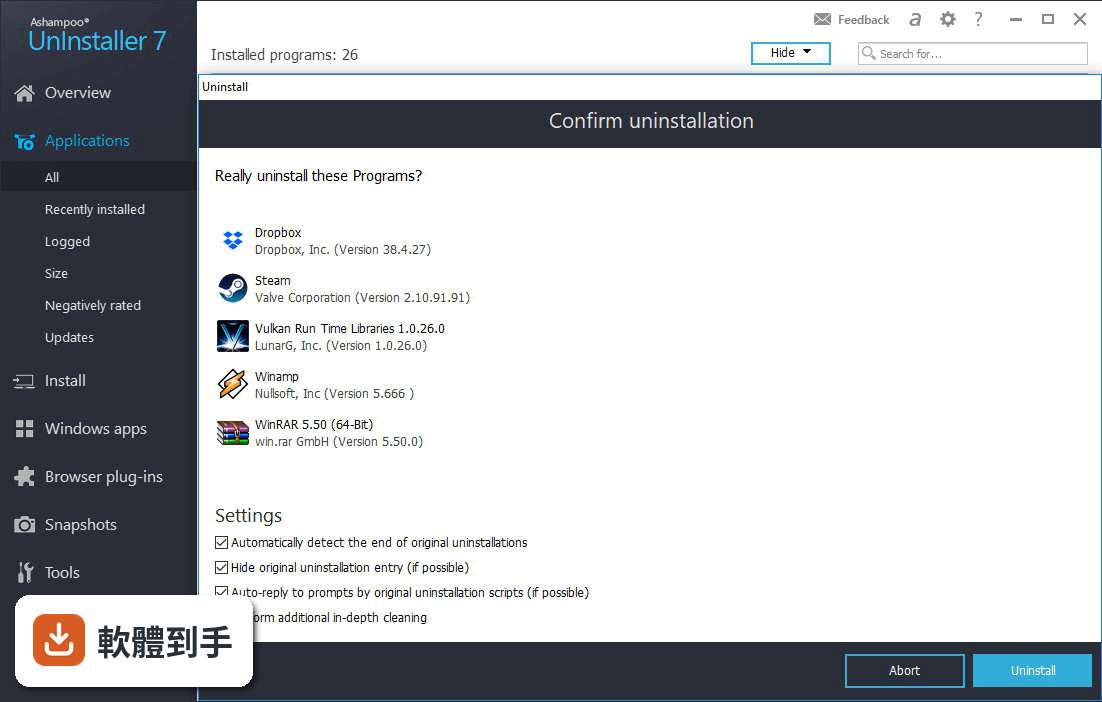
它宣稱能做到「不留痕跡」,但實際效果取決於軟體本身的安裝方式。它的做法是:先跑軟體自帶的移除程式,再用深度掃描找出殘留的登錄機碼和檔案。對於有安裝記錄的軟體,清除會比較徹底;如果完全沒有記錄,就只能靠設定檔和掃描,可能無法百分之百清除。建議卸載完自己再檢查一次。
04安裝監控要自己開嗎?
它有安裝守衛功能,會常駐在背景,自動偵測安裝程式的開始和結束,多數情況下不用手動開啟。但如果你想要更完整的記錄,可以在安裝前手動啟動監控。要注意的是,常駐功能會佔用少量系統資源,雖然官方說很輕量,但如果你在意背景程式數量,可以考慮只在需要時開啟。
05快照功能是幹嘛的?
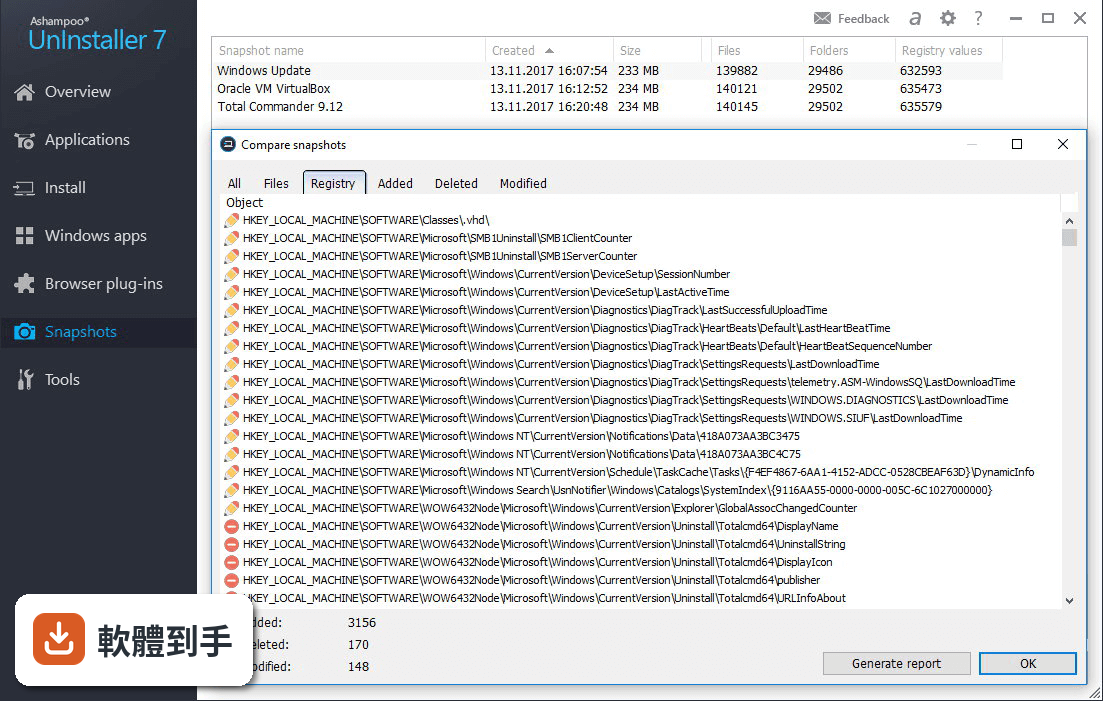
快照是在安裝軟體前,先記錄整個系統的狀態,包括檔案和登錄檔。安裝完之後再拍一張,兩張比對就能看出安裝程式動了哪些地方。這對沒有安裝記錄的軟體特別有用。它也能用來檢查其他程式在背景偷偷做了什麼變更,算是進階的系統監控工具。
06常裝軟體試用又刪掉的人適合嗎?
適合。它的核心用途就是「安裝、試用、移除」的循環。安裝監控和快照功能,讓你在試用完之後能比較乾淨地移除,減少殘留。不過要注意,它本身是付費軟體(Trial 授權),如果你只是偶爾試用軟體,免費的 Revo Uninstaller Free 或 IObit Uninstaller 可能就夠用了。
07不太懂電腦的人用得了嗎?
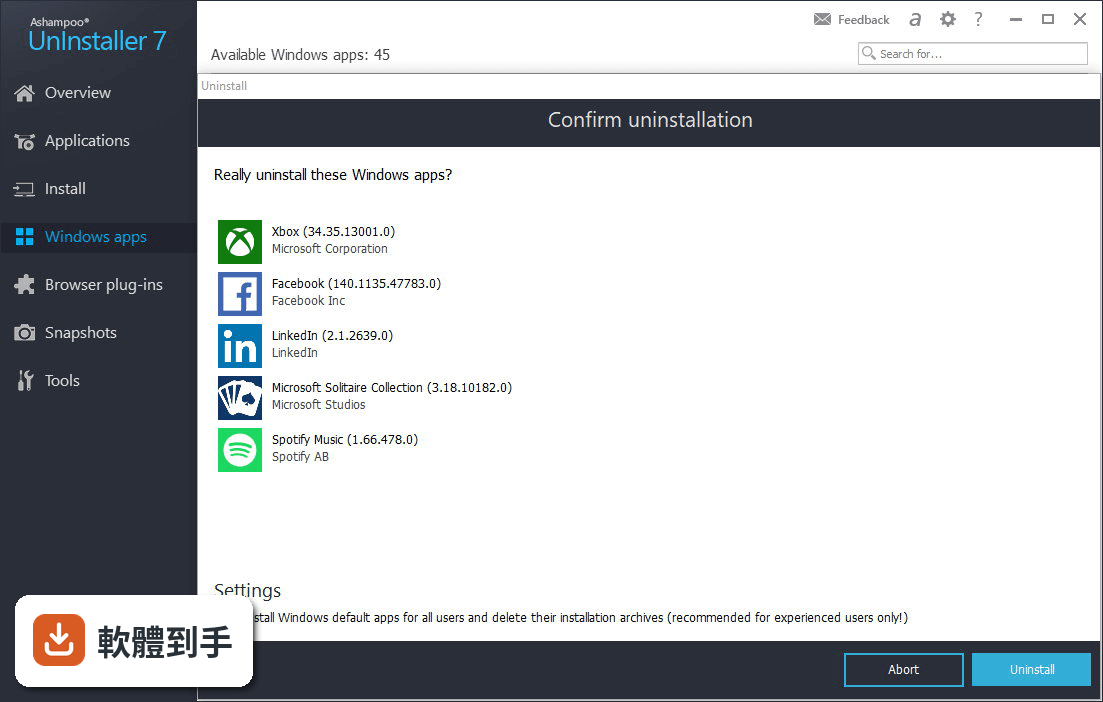
介面設計有考慮到初學者,主要功能都放在首頁,拖曳捷徑到程式圖示就能開始移除。但介面是英文的,如果看不懂英文,操作上會比較吃力。另外,進階功能如快照比對、登錄檔分析,需要一些基本概念才用得起來。如果完全不懂電腦,建議先從免費的替代品開始。
08跟 Revo Uninstaller Free 比,哪個比較多人用?
以評分人數來看,Revo Uninstaller Free 有 164 人評分,這套軟體只有 76 人。IObit Uninstaller 有 403 人評分,是這幾套裡最多的。評分人數多不代表比較好,但至少代表有更多人實際使用過。如果你在意社群回饋,可以參考這些數字,再決定要選哪套。
09介面只有英文,看不懂怎麼辦?
這套軟體目前只有英文介面,沒有中文。如果英文不好,操作上會遇到困難,尤其是進階功能。替代方案是選有中文介面的免費軟體,例如 IObit Uninstaller 有提供中文。或者,你也可以用翻譯工具輔助,但長期使用會比較麻煩。
10免費的 Revo 或 IObit 就夠用了嗎?
如果你的需求是「把軟體卸載乾淨」,免費的 Revo Uninstaller Free 和 IObit Uninstaller 都有深度掃描功能,基本需求通常夠用。這套軟體的優勢在於安裝監控、快照比對和程式設定檔,這些是免費版比較少見的。如果你只是偶爾卸載軟體,免費版就夠;如果常常安裝測試軟體,付費功能才有感。
11這套軟體更新頻率高嗎?
根據版本紀錄,近 12 個月更新 1 次,近 24 個月也是 1 次,代表大約一年更新一次。不算頻繁,但也不算完全停滯。如果你在意軟體是否持續維護,可以參考這個頻率。另外,它收錄了 20 個版本,最早在 2015 年,代表這套軟體已經發展一段時間了。
12評分只有 6.6 分,是不是不好用?
6.6/10 是 76 人評分的結果,樣本數不多,參考價值有限。評分低可能跟介面只有英文、付費授權有關,不一定代表功能不好。如果你有興趣,可以先試用看看,再決定要不要購買。另外,IObit Uninstaller 有 403 人評分,分數也比較高,可以一起比較。
下載與官方連結
前往官方網站 下載 Ashampoo UnInstaller
ashampoo_uninstaller_pro_27_27.0.0.exe · 46.8 MB · 連結指向軟體原廠
版本紀錄
- 2026-10-08 Ashampoo UnInstaller Pro 27.00.00 46.8 MB
- 2026-08-11 Ashampoo UnInstaller 16.00.00 45.7 MB
- 2023-10-24 Ashampoo UnInstaller 14.00.10
再看 5 筆
- 2023-10-24 Select Version
- 2023-08-11 Ashampoo UnInstaller 12.00.12
- 2022-07-05 Ashampoo UnInstaller 11.00.16
- 2021-11-12 Ashampoo UnInstaller 11.00.11
- 2021-11-08 Ashampoo UnInstaller 11.00.10
這一版改了什麼
- Forensic Uninstaller: Generate detailed logs for current installations
- Registry Optimizer 2: Ultra-fast and efficient registry cleanup
- Super Safe Mode: Enhanced safety for cleaning critical system areas
- Crash Analyzer: In-depth analysis of crash reports across the system
- Cleaning Modules: Up to 50% faster performance and efficiency
- Deep Cleaning: Significantly improved speed and thoroughness
- Log Export: Save uninstall reports as HTML, CSV, or TXT files
Is Ashampoo UnInstaller compatible with Windows 10 and Windows 11?
Yes, Ashampoo UnInstaller is compatible with Windows 10 and Windows 11, as well as Windows 8 and Windows 7.
Can I use Ashampoo UnInstaller to remove bloatware from my PC?
Absolutely. Ashampoo UnInstaller is effective at removing bloatware and other unwanted pre-installed software that comes with many new PCs.
Does Ashampoo UnInstaller require a subscription, or is it a one-time purchase?
It offers both options. You can purchase a one-time license, or you can subscribe to Ashampoo's software suite, which includes regular updates and additional features.
Is there a risk of accidentally deleting important system files with Ashampoo UnInstaller?
No, the program is designed to identify and remove only files and registry entries associated with the program you are uninstalling, minimizing the risk of deleting important system files.
Can I reinstall a program I've uninstalled with Ashampoo UnInstaller?
Yes, it allows you to create backups of uninstalled programs and restore them if needed.
Pricing
UnInstaller Subscription — $12 /year
- Covers up to 3 devices
- Includes all future upgrades
- Cancel anytime
- 30-day money-back guarantee
- License for 1 device
- One-time payment (no subscription)
- 30-day money-back guarantee
Alternatives
IObit Uninstaller - Known for its deep cleaning capabilities and batch uninstall, it's a popular free alternative.
Revo Uninstaller - Offers advanced scanning for leftover files and has a portable version for USB drives.
CCleaner - Besides uninstallation, CCleaner provides system optimization tools.
Geek Uninstaller - Known for its simplicity and lightweight design.
Total Uninstall - Offers in-depth analysis of program changes during installation.
System requirements
- OS: Windows 11 / Windows 10
- Processor: x86/x64 processor (ARM processors are not supported)
- Network: Internet connection required for activation and periodic license verification
- Additional Notes: Full administrator privileges required
Bulgarian, Catalan, Chinese (simplified), Chinese (traditional), Czech, Dutch, English, Finnish, French, German, Greek, Hungarian, Italian, Korean, Norwegian, Norwegian Nynorsk, Polish, Portuguese, Portuguese (Brazilian), Romanian, Russian, Slovakian, Spanish, Swedish, Turkish.
PROS
- Thorough program removal, including residual files.
- Installation monitoring for complete tracking.
- Forensic uninstaller.
- User-friendly interface.
- Snapshot technology for precise uninstallations.
- Batch uninstallation for efficiency.
- Some advanced features may require technical knowledge.
Ashampoo UnInstaller is an excellent choice for users seeking a reliable and powerful software uninstallation tool. Its ability to thoroughly remove programs, monitor installations, and manage system snapshots sets it apart from basic uninstallers. While the paid version may be on the higher side of the price spectrum, its feature set justifies the investment for those who value a clean and optimized Windows 11/10 system.
Whether you're looking to declutter your PC or ensure complete removal of unwanted software, Ashampoo UnInstaller is a valuable addition to your software toolkit.
Note: 30-day trial period.
Download Ashampoo UnInstaller Latest Version Why is this app published on FileHorse? (More info)