
這是歷史版本頁面 — 看 AutoHotkey 最新版本
重複操作做到手痠?AutoHotkey 能幫你自動化
 AutoHotkey 1.1.27.02
資料更新 2018-01-01
閱讀約 6 分鐘
每天打開電腦,總有幾件事是重複到讓人懷疑人生的:填一樣的表單、改一樣的檔名、點一樣的按鈕、把同一段文字貼來貼去。你心裡想的是「這動作我這禮拜已經做過一百次了」,手還是得乖乖再點一次。時間就這樣一點一滴漏掉,下班時才發現正事沒做多少,精力全耗在這些機械動作上。
想找現成的工具來省事,卻發現市面上的按鍵精靈、巨集軟體不是綁手綁腳,就是功能過頭、介面複雜,而且多半要付費。其實這類問題的切入點很簡單:與其到處找「剛好符合需求」的軟體,不如用一套能自己寫規則的工具,把「按下某個鍵就自動做完一串動作」這件事變成你的日常。只要肯花一點時間學基本語法,之後所有重複的鳥事都能交給電腦跑。
01AutoHotkey 到底能拿來做什麼?
它是一套在 Windows 上運作的自動化腳本工具,核心能力是模擬鍵盤按鍵和滑鼠點擊。你可以用它設定熱鍵——例如按一組組合鍵就自動輸入一串文字、開啟特定程式,或執行一連串滑鼠操作。也能把某個鍵重新對應成另一個鍵,或設定簡寫自動展開(例如打 btw 自動變成 by the way)。此外還能做出簡單的視窗介面、表單和選單,用途很廣。
02不會寫程式,這套軟體學得起來嗎?
基本用途學得起來。它內建的命令對初學者算友善,簡單的熱鍵只要幾行就能搞定,例如把某個鍵對應到另一個鍵,或設定一組快捷鍵來開啟程式。但進階功能——像是寫複雜的邏輯判斷、操作檔案或設計圖形介面——就需要理解它的語法和結構,這部分有學習曲線。官方文件寫得很詳細,社群資源也多,願意花時間查資料就學得會。
03它能不能把某個鍵改成別的鍵?例如把 CapsLock 變成別的用途?
可以,重新對應鍵盤按鍵是它的基本功能之一。你可以在腳本裡指定某個按鍵的行為,讓它觸發另一個按鍵、按鈕或組合鍵。不只鍵盤,滑鼠按鍵、搖桿按鈕也能重新定義。甚至可以把鍵盤當滑鼠用,或把搖桿當滑鼠用。設定方式很直接,幾行程式碼就能完成。
04打簡寫自動變成完整句子,它做得到嗎?
做得到,這是它內建的熱字串(hotstring)功能。你可以定義一組縮寫,例如打「@em」就自動展開成你的電子郵件信箱,或打「addr」就帶出完整地址。這對需要反覆輸入固定內容的人很實用,像是客服回覆、表單填寫、程式碼片段。設定方式跟熱鍵類似,在腳本裡寫一行對應規則就行。
05能不能用它寫出有視窗介面的小工具?
可以。它支援建立自訂的資料輸入表單、使用者介面和選單列,也能顯示對話方塊、提示訊息、氣泡通知和快顯選單。例如你可以做一個簡單的視窗,裡面放幾個輸入框和按鈕,讓使用者填資料後自動產生結果。不過這部分需要比較多的語法知識,初學者要花時間摸索,但官方文件有提供 GUI 相關的說明。
06什麼樣的人適合用這套軟體?
適合每天在 Windows 上做大量重複操作的人,例如行政人員要一直填表、編輯要一直改格式、工程師要一直跑測試指令。也適合長時間打字或操作滑鼠導致手部不適的人——它可以用鍵盤或滑鼠滾輪替代 Alt-Tab 切換視窗,減少手腕負擔。另外,喜歡自己動手解決問題、願意讀文件的人會比較能發揮它的價值。
07我只是想省時間,不想花太多時間學,這樣適合嗎?
如果你的需求很單純——例如只要一組熱鍵、一個簡寫展開——那花十分鐘看範例就能上手,值得試試。但如果你想要的是「錄下我剛剛的操作,之後自動重播」這種完全不碰程式碼的方式,它雖然有巨集錄製功能,但複雜操作還是得手寫腳本調整。願意讀一點基礎語法的人才能真的省到時間,完全不想碰腳本的人會卡住。
08介面只有英文,會不會很難用?
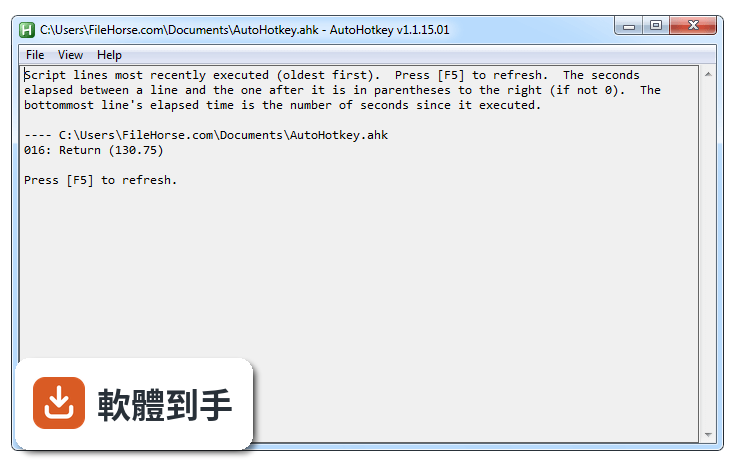
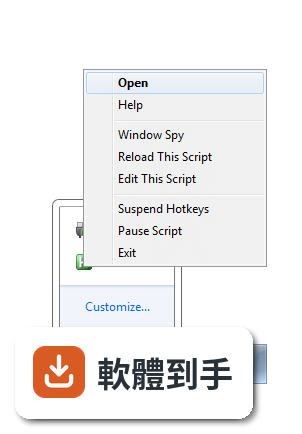
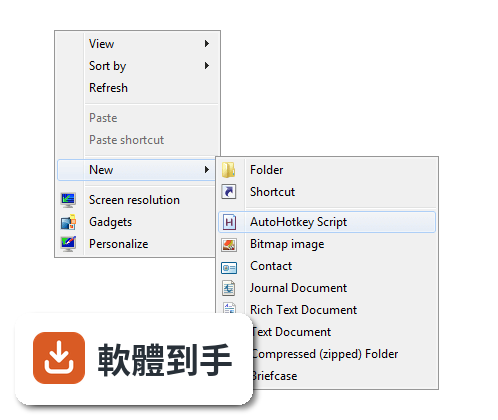
它的操作介面和官方文件都是英文,這對不習慣英文介面的人確實是個門檻。不過基本使用流程很簡單:用記事本寫一個 .ahk 檔,存檔後雙擊執行,之後從系統匣圖示管理腳本。如果你看得懂簡單的英文介面選項,日常使用不會太困難。但遇到問題要查文件時,英文閱讀能力會影響你找答案的速度。
09它跟其他類似的軟體比,用的人多嗎?
以評分人數來看,它的使用者樣本不算多——目前收錄的評分有 79 人,分數 7.1/10。功能相近的軟體中,Windows PowerShell 有 88 人評分,X-Mouse Button Control 有 69 人評分,Ellp 也是 79 人。可以看出這類工具的使用者族群本來就偏小眾,沒有哪一套有壓倒性的使用者數量。選哪套主要看你的需求符不符合它的定位。
10我想做很複雜的應用程式,用它適合嗎?
不適合。官方資料明確提到它「不適合複雜的應用程式開發」。它定位在快速原型、小型專案和桌面自動化,雖然具備完整的腳本語言能力,但拿來開發大型軟體會遇到維護困難、除錯不易的問題。如果你要寫的是正式對外發布的應用程式,應該考慮 Python、C# 等通用程式語言,而不是這套自動化工具。
11它的更新狀況如何?會不會放著不管了?
目前看起來還有在維護。收錄的版本紀錄顯示近 12 個月有 2 次更新,近 24 個月也是 2 次,代表開發者仍持續釋出修正和改版。不過更新頻率不算高,不是那種每週都有新功能的軟體。另外要注意的是,它目前有 V1 和 V2 兩種語法版本,V2 改了很多舊語法,如果你在網路上找到舊教學,要確認適用的版本。
12它安全嗎?下載來用會不會有風險?
從官方網站下載的話,核心程式本身是安全的,而且它是開源軟體(GNU GPLv2),原始碼公開可檢視。但要注意的是,因為它能模擬鍵盤和滑鼠操作,惡意人士可能寫出有害的腳本散佈在網路上。如果你拿到別人寫好的 .ahk 檔,執行前最好先打開看內容,確認沒有奇怪的指令。另外,某些防毒軟體可能對這類自動化工具發出警告,這是正常現象。
下載與官方連結
AutoHotkeyInstall.exe · 連結指向軟體原廠
版本紀錄
- 2026-10-26 AutoHotkey 2.0.31 2.9 MB
- 2026-10-10 AutoHotkey 2.0.30 2.9 MB
- 2026-10-04 AutoHotkey 2.0.29 2.9 MB
再看 5 筆
- 2026-09-13 AutoHotkey 2.0.28 2.9 MB
- 2026-08-28 AutoHotkey 2.0.27 2.9 MB
- 2026-05-04 AutoHotkey 2.0.26 2.9 MB
- 2023-07-08 AutoHotkey 1.1.37.01
- 2023-07-02 AutoHotkey 1.1.37.00
這一版改了什麼
What's new in this version:
AutoHotkey 1.1.27.02
- Change log not available for this version
AutoHotkey 1.1.27.01
- Fixed program crashes caused by ++X or --X in scripts which lack #NoEnv (broken by v1.1.27.00)
- Fixed #Warn ClassOverwrite giving an erroneous warning for ++MyClass.X
- Fixed remapping to allow custom combinations such as a & b::c
- Fixed Send/hotstrings/Input to adapt to the keyboard layout of the focused control instead of just the active window. In particular, this affects UWP apps such as Microsoft Edge
- Fixed hook hotkeys to suppress the Start menu activation which occurs when an isolated Ctrl/Shift up is received. Ctrl up may be generated by the system when switching from a keyboard layout with AltGr to one without (such as from UK to US), if Ctrl is not held down at the time. This fixes hotkeys such as $#z::WinActivate x when the change in focus causes those conditions
- Fixed Input not collecting characters when both Shift keys are down
- Fixed Input to use "sc" and "vk" for end keys in ErrorLevel rather than "Sc" and "Vk" (caused by v1.1.20)
- Fixed GetKeyName/VK/SC("vkXXscYYY") where YYY begins with A-F (broken by v1.1.26)
AutoHotkey 1.1.27.00
Changes:
- Changed a-z to mean vk41-vk5A when absent from the keyboard layout, except with Raw mode or when sending single unmodified characters. This allows hotkeys and sent keyboard shortcuts to work more intuitively on certain non-English keyboard layouts
- Changed Send on ANSI versions to use SendInput() in place of Alt+nnnnn for special characters
Replaced AU3_Spy.exe with WindowSpy.ahk:
- AU3_Spy.exe is still launched if WindowSpy.ahk is not found
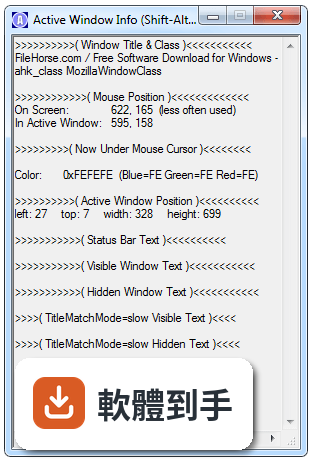
- It now follows the focused control by default, and has a checkbox for both window and control to follow the mouse
- It no longer takes over a global hotkey (Win+A). Instead, hold Ctrl or Shift to suspend updates (release them after focusing Window Spy)
- It is now possible to Alt-Tab to Window Spy on Windows 10 without the contents of the GUI changing
Changed the rules for masking Alt/Win after pressing a hook hotkey:
- Explicitly sent Alt/Win up may be masked. This fixes remappings such as AppsKey::RWin, but hotkeys which are intended to activate the Start Menu may require new workarounds
- If Alt/Win is logically but not physically down, only hotkeys which require Alt/Win (such as #a::, not *a::) cause masking. This is to allow a remapping or wildcard hotkey to send the key-up without it being masked
- Unsuppressed hotkeys such as ~#a:: no longer cause masking, because the unsuppressed keydown/keyup is sufficient to prevent a menu. However, mouse hotkeys like ~*MButton:: no longer suppress the Start Menu if combined with the Win key. It can be suppressed manually with Send {Blind}{vk07} or similar
- The keyboard hook now tracks events in relation to Alt/Win, so that the mask key does not need to be sent if Alt/Win was already masked by some other event (physical or sent)
New features:
- Added Min/Max built-in functions. [PR #84 from Ragnar-F]
- Added A_Args as an alternative to the numbered variables
- Added force-local mode for functions
- Added #Warn ClassOverwrite
- Added {Text} mode for Send and T option for hotstrings. These are like the Raw mode, but more reliable
- Added {key DownR} and changed remapping to use it, to fix issues with AppsKey::RWin and similar
Bug fixes:
- Fixed icon-loading to not default to ID 0 when the index is invalid
- Fixed VK↔SC mapping of PrintScreen. SC→VK was already correct on Vista and later
- Fixed Hotkey control returning scXXX instead of names in some cases
- Fixed ListVars crashing if a ByRef parameter refers to a variable containing an object. [PR #86 from HotKeyIt]
- Fixed some (very unlikely) memory leaks
- Fixed menu handles not being freed if only the standard items are used
- Fixed bold font not being applied to default menu item if it has a submenu and a Win32 menu handle
- Fixed Send to use the correct modifier state with Unicode chars
- Fixed ControlSend {u n}, where u is Unicode, to send n times, not just 1
- Fixed inconsistent behavior of AltGr between OS versions. Specifically, RAlt:: once again causes the system to "release" LCtrl on Windows 10, as it did prior to v1.1.26.01 (but unlike those old versions, it prevents the RAlt-up from reaching the active window). This change should not affect layouts without AltGr
- Fixed Menu Tray, Icon and SB_SetIcon to allow bitmaps
- Fixed menu items to not disappear when a cursor is set as a menu item's icon
- Improved launching of Window Spy and the help file: If AutoHotkey is installed but the current executable is in a different directory (i.e. portable), the installed file is no longer preferred as it may be the wrong version. It may still be used as a fallback; On failure to launch the file, show the error message inside the dialog, not in its titlebar
- Fixed one-line hotkeys with expressions beginning in sc or vk
- Fixed >/< hotkey modifiers incorrectly allowing both keys to be pressed. For example, <^A could erroneously be triggered by LCtrl+RCtrl+A, thereby preventing the <>^A hotkey from working
- Fixed auto-replace hotstrings inserting the literal text "{Raw}" in some cases (specifically, when the replacement contains {Raw} and the O, R and * options were not used)
- Fixed some hotkeys not using the hook when eclipsed by a wildcard hotkey, depending on the order of definition
- Fixed key-down hotkeys to revert to "reg" if they were only "k-hook" because of a corresponding key-up hotkey which has since been disabled. (Prior to v1.1.07.03 this already happened, but the key-down hotkey was never set to "k-hook" in the first place if defined after the key-up)
- Fixed hook hotkeys to ignore modifier changes made by Send !^+#{key} or when sending Unicode characters. This restores Send to how it was prior to v1.1.06 when at SendLevel 0, but keeps the v1.1.06+ behavior at SendLevel >= 1, allowing Send to trigger the right hotkeys
- Improved the odds that Send from a "reg" hotkey such as ^m::Send x will restore the modifier state if Send is being called for the very first time. This makes it less likely to produce a different (and unexpected) result the first time it is held down, such as xmmm instead of xxxx
AutoHotkey 1.1.26.01
- Fixed RegDelete (with no args) failing when A_LoopRegSubKey is blank, such as when enumerating keys directly under the root key
- Fixed RAlt/LAlt:: sometimes failing to prevent menu activation after the user alt-tabs away from a window and reactivates it
- Fixed SC → VK translation for multimedia keys, CtrlBreak, Pause, LWin and RWin, with the exception that multimedia keys and CtrlBreak are still translated incorrectly on Windows 2000 and XP
- Fixed VK → SC translation for multimedia keys, CtrlBreak and Pause
- Fixed 'Wait commands such as RunWait to log extra lines for ListLines only when necessary to show that it is still waiting; that is, after resuming from an interruption which logged other lines
AutoHotkey 1.1.26.00
- Changed the format ListVars uses to display variables containing objects. The object's class name is now shown
- Added "class" and "clsid" modes to ComObjType()
- Revised class names shown by the debugger and significantly reduced code size in the process
- Revised FileSetAttrib, FileSetTime and FileDelete to reduce code size. There should not be any changes in behaviour
- Made other minor optimizations to code size
- Fixed GetKeySC() with the key names Esc, Escape, ScrollLock and PrintScreen
- Fixed hotstring word detection of words containing nonspacing marks, such as Arabic diacritics
AutoHotkey 1.1.25.02
- Fixed GUI option strings being permanently truncated if an error is raised
- Fixed properties and class sub-variables to allow non-ASCII characters
- Fixed new operator to allow __New to throw or exit
AutoHotkey 1.1.25.01
- Fixed Send to allow other scripts to act on modifier state changes which immediately precede a special character, such as the Shift release in Send Mört
AutoHotkey 1.1.24.05
- Fixed WinSet AlwaysOnTop/Trans/TransColor to work on windows with 0 exstyle
AutoHotkey 1.1.24.04
- Fixed File.ReadNum() repeating old data if a prior File.Read() had stopped reading at the end of the buffer
- Improved buffer utilisation when File.Read() reaches the end of the buffered data
- Fixed GuiControl +Password to use the default bullet character on XP and later
- Fixed GuiControl +/-Password to redraw the control immediately
AutoHotkey 1.1.24.03
- Fixed COM exception messages to not end in `r
- Fixed {U+x} to support supplementary characters (x > 0xFFFF)
- Fixed class properties which lack get{} to return an empty value instead of the internal Property object when the class has a base which does not define a value for the property. Properties defined in baseless classes already behaved correctly
- Fixed the background color of controls on a Tab3 control when the system has visual styles disabled (i.e. Windows Classic)
- Fixed handling of thread-exit in functions which are called directly by an event (such as OnExit functions). This bug had no known effect except in the v2-alpha branch
- Fixed the debugger to detect disconnection immediately (i.e. when a client terminates without calling stop/detach)
- Fixed the debugger to treat property_get -m 0 as "unlimited", as per the DBGp spec
- Fixed the debugger to expect base64 for property_set -t integer/float, as per the DBGp spec
AutoHotkey 1.1.24.02
- Added a Run with UI Access option to the installer
- Added documentation for Tab3 autosizing
- Fixed several Tab3 bugs:
- 1. Autosizing was not being triggered by the first call to Gui Show if the AutoSize or w and h options were used
- 2. If a Tab3 control is empty when autosizing occurs, it now retains the default size instead of becoming unusable
- 3. Autosizing now occurs immediately before creating another tab control, as though Gui Tab was called
- 4. Autosizing failed if the tab control had negative screen coords
- 5. Hiding a Tab3 control with GuiControl now also hides its dialog/background
- Fixed OnMessage to pass lParam as unsigned on 32-bit
- Fixed Gui Name : to allow spaces before the colon
- Fixed identifying a Gui or GuiControl by HWND with a negative value
- Fixed ComObject to suppress any errors raised by disconnection of events after he script has released the object
- Fixed Gui Show causing the window to shrink if it had a multi-line menu bar
- Fixed LV_InsertCol(n, width) not causing ListView scrollbar to update on some OS versions
- Optimized code size of FileRecycleEmpty
AutoHotkey 1.1.24.01
- Changed Hotkey, If, Expression to raise an error if the unused third parameter is not blank
- Fixed &&, || and ternary to release any object used as the condition, as in if (a.subObject && b)
- Fixed Gui/GuiControl failing to "check" radio buttons within a Tab3 control
- Fixed FileCreateShortcut to allow relative paths for the LinkFile parameter on Windows 10
- Fixed themed Tab3 control to not override the custom text color of its controls
- Fixed debugger mishandling continuation commands in some specific cases
AutoHotkey 1.1.24.00
New features:
- Added Tab3 control type, solving a number of issues with Tab controls
Bug-fixes:
- Fixed GuiControl to update controls when adding/deleting tabs. Specifically: Selecting a new tab with || now works correctly and Deleting all tabs now hides the controls of the former tab
- Fixed +Disabled/+Hidden losing effect on controls in a tab
- Fixed disabled tab controls to ignore Ctrl+Tab
- Fixed Gui Tab without parameters to start a new radio group if applicable. Gui Tab with parameters already had this effect
AutoHotkey 1.1.23.06
- Fixed break label crashing the program if nested directly inside its target loop
AutoHotkey 1.1.23.05
- Fixed InputBox, MsgBox, FileSelectFile and FileSelectFolder sending an unwanted Alt-up if Alt is down. This was due to an error with the Ctrl/Shift workaround added in v1.1.22.01
- Improved the Ctrl/Shift workaround to avoid unnecessarily "masking" the Win key if Ctrl, Shift or Alt is also down
AutoHotkey 1.1.23.03
- Fixed __Delete meta-functions erroneously suppressing or prematurely re-throwing exceptions, when they are called during exception propagation
- Fixed load-time detection of function calls where a required parameter is blank, as in fn(x,,y)
AutoHotkey 1.1.23.02
- Fixed RegDelete deleting the entire key instead of the default value
- Code maintenance; minor code size improvement
AutoHotkey 1.1.23.01
- Fixed a theoretical issue with loading scripts from weird/very long paths
- Ahk2Exe: Fixed Unicode in compiled scripts (broken by v1.1.23.00 release)
AutoHotkey 1.1.22.09
- Added Menu Insert sub-command
- Added MenuGetHandle()
- Added MenuGetName()
- Added menu item options: Radio, Right, Break and BarBreak
- Improved the Menu command to allow identifying items by position: 1&
- Added LoadPicture()
- Added hicon/hbitmap: syntax for passing handles to commands which normally load an image from file
- Added built-in variables: A_CoordModeToolTip/Pixel/Mouse/Caret/Menu, A_DefaultGui, A_DefaultListView, A_DefaultTreeView, A_KeyDelayPlay, A_KeyDuration/Play, A_MouseDelayPlay, A_SendLevel, A_SendMode and A_StoreCapslockMode
- Added Ix Hotkey option to set the hotkey variant's input level to x
- Improved Picture control to support BackgroundTrans with icons
- Improved Picture control to reduce flicker when loading large images
- Small optimizations to the menu code and built-in var lookups
- Fixed conversion of menu items to/from separators
- Fixed A_ThisMenuItemPos to support duplicate item names
- Fixed sub-menus sometimes not being recreated after a menu is deleted
- Fixed AutoHotkeyXXX.exe to launch AutoHotkey.chm, not AutoHotkeyXXX.chm
AutoHotkey 1.1.22.09
Fixed some issues with SetTimer Delete:
- KeyHistory's timer count erroneously included deleted timers
- Calling KeyHistory within a thread started by a timer crashed the script if the timer had been deleted but not turned off
- Deleting the most recently created timer prevented subsequently created timers from working unless ALL timers were deleted
AutoHotkey 1.1.22.07
- Fixed Gui control w-1 and h-1 options failing when DPI is 150+% and the Gui has not applied -DPIScale
- Fixed ~key up hotkeys to not perform an automatic Send {key down}. This was occurring only if the hotkey was turned on after the key was pressed down.
AutoHotkey 1.1.22.06
- Fixed Input and hotstrings to catch Unicode/non-key character events
- Fixed auto-sizing of Edit controls to include the last line if blank
- Fixed handling of out-of-memory in ComObj functions
- Fixed ComObjArray to ignore excess parameters rather than crashing (only applies to dynamic calls)
- Fixed GuiControl to append--not prepend--tabs, as documented
- Fixed XP64 support
AutoHotkey 1.1.22.04
- Fixed ObjRawSet() to return nothing
- Added Windows 10 supportedOS tag to the exe manifest (avoids some issues with the Program Compatibility Assistant and similar)
- Added detection of syntax errors after ")" in a function declaration
AutoHotkey 1.1.22.03
Fixed:
- A_EndChar returning a truncated value for Unicode end chars
Small implementation changes:
- Changed A_Language to use GetSystemDefaultUILanguage()
- Refactored Window Spy/help file launching from tray menu to improve code re-use
- Optimized Gui/Menu/Hotkey/Hotstring/OnClipboard message handling (minor)
AutoHotkey 1.1.22.02
- Fixed TreeView to not raise * events for unknown notifications
- Fixed crashing/bad behaviour when a timer deletes itself
- Fixed RWin-up being masked in some rare cases where LWin-up wouldn't have been
AutoHotkey 1.1.22.01
- Fixed Text/Edit/Button control sizing to compensate for character overhang
- Fixed registry commands to allow : in the SubKey when combined with RootKey
- Fixed hotkey prioritization to take modifiers into consideration
- Refactored else/try/catch/finally handling to support hotkey::try cmd
- Added a workaround for the script's dialogs acting as though Ctrl or Shift is pressed after they are blocked by the keyboard hook
AutoHotkey 1.1.22.00
- Added SetErrorMode(SEM_FAILCRITICALERRORS) on program startup to suppress system-level error messages such as "There is no disk in the drive". Calling Drive or DriveGet no longer affects the process' error mode.
- Changed MonthCal controls to have tab-stop by default on Vista or later
- Improved ComObjConnect to use IProvideClassInfo when available
- Fixed some issues with method/property definitions following an end brace on the same line
- Fixed Text/Link control auto-sizing to compensate for the +Border (WS_BORDER) style
- Fixed Break N when Loop is used directly below If/Else/Try/Catch
AutoHotkey 1.1.21.03
- Fixed detection of naming conflicts between properties and methods
AutoHotkey 1.1.21.02
- Fixed OnMessage(msg, fnobj, 0) to do nothing if fnobj wasn't previously registered
AutoHotkey 1.1.21.01
- Fixed StrReplace() to allow ReplaceText to be omitted
- Fixed class variables to allow non-ASCII names
AutoHotkey 1.1.21.00
- Added Loop, Reg, RootKey[Key, Mode]
- Added Loop, Files, FilePattern [, Mode]
- Changed InputVar parameters to allow % expression (except with If commands)
- Revised Object methods:
- 1. Added Object.InsertAt(), Object.Push() and ObjRawSet()
- 2. Added Object.Delete(), Object.RemoveAt() and Object.Pop()
- 3. Added Object.Length()
- Added Ord() and updated Chr() to support supplementary chars (>0xFFFF)
- Added StrReplace()
- Removed the obsolete and undocumented 5-parameter mode of RegRead, which was exclusively for AutoIt v2 compatibility (the extra parameter was unused)
- Changed RegRead, RegWrite and RegDelete so that the RootKey and SubKey parameters can optionally be combined
AutoHotkey 1.1.20.03
- Change log not available for this version
AutoHotkey 1.1.20.02
- Fixed add-first mode of OnMessage
- Fixed A_OSVersion for unrecognized OSes on x64 builds
- Fixed ExitApp to unpause the script before releasing objects in case a __delete meta-function is called
- Trivial optimizations and code maintenance
AutoHotkey 1.1.20.01
- Reverted the changes made in v1.1.20.00 to saving and restoring of ErrorLevel on thread interrupt, due to unintended consequences
- ErrorLevel is not reset or cleared when a new thread starts. Instead, it retains the value it had in the interrupted thread, as in v1.1.19 and older.
- If ErrorLevel contains an object and the thread is interrupted, the object is replaced with an empty string when the thread resumes, as in v1.1.19 and older
- Re-fixed timers sometimes causing ErrorLevel to be formatted as hex
- Fixed class methods to retain a counted reference to the class
AutoHotkey 1.1.20.00
New features:
- Enhanced Hotkey, Menu, SetTimer, Gui events and Gui control events to accept a function instead of a label, if no label is found.
- Enhanced Hotkey, Menu, SetTimer and Gui control events to accept a function object. Added a Delete sub-command for SetTimer to allow the object to be released.
- Enhanced OnMessage() to allow any number of functions or function objects to monitor a single message.
- Added OnExit() and OnClipboardChange(), which accept a function name or object.
- Added capability to point hotkey labels at a function definition.
- Added U/L/T modifiers to perform case conversion with Format().
- Added the E option to the Input command, for handling end keys by character instead of keycode.
- Added ** (stderr) support to FileAppend.
- Added ObjBindMethod(obj, method, args*) and Func.Bind(args*).
Changed the default behavior when the main script file is not found:
- If no script was specified and the default script files are not found, show the new Welcome page in the help file.
- If a script was specified or the help file is missing (or is named differently to the executable), just show an error message.
- Changed WinActivate to restore the window if already active but minimized.
- Changed WinActivate to look for a visible window to activate if DetectHiddenWindows is off and the active window is hidden, instead of doing nothing.
- Changed the method used by A_CaretX/A_CaretY to retrieve the caret position.
- Returns blank in more cases where the real caret position can't be determined, instead of returning the top-left of the active window.
- Less likely to cause side-effects.
- Works in console windows.
- Changed A_OSVersion to use RtlGetVersion(), so that it can detect Windows 10 and hopefully future versions.
- Changed A_OSVersion to return a version number of the form "major.minor.build" if it doesn't have a name for the OS.
- Changed objects to support x[,y], x.y[,z] and x[](y).
- User-defined objects can utilize this by specifying default values for parameters of properties and meta-functions. For __Call, the first parameter is omitted, as in x.__Call(,y).
- COM objects invoke DISPID_VALUE if the member name is omitted. For example, x[] retrieves x's default property and fn[]() can be used to call JScript functions.
Several under-the-hood changes to fix bugs, reduce code size or improve performance, including:
- Changes to preparsing of #if and static var initializers.
- Changes to preparsing of { blocks }.
Bug-fixes:
- Fixed VK to keyname conversions for keys 'A' to 'Z' to respect layout.
- Applies to: GetKeyName, Hotkey control, A_PriorKey, KeyHistory and Input EndKey ErrorLevel (except where Shift key is required).
- All other keys, including those that produce non-ASCII letters, were already translated according to AutoHotkey's current keyboard layout.
- Fixed FileAppend to * (stdout) to respect the encoding parameter instead of always outputting ANSI text.
- Fixed auto-sizing of GUIs with only one scrollbar.
- Fixed Exception(m, n) crashing when n is too far out of bounds.
- Fixed GuiContextMenu to set A_GuiEvent correctly on x64.
- Fixed FileGetSize sometimes giving an indeterminate result if the file doesn't exist or can't be opened.
- Fixed thread interrupts to save and restore ErrorLevel more fully, which fixes:
- Strings longer than 127 chars being truncated.
- Objects being discarded.
- Interruption by a timer sometimes causing ErrorLevel to be given hexadecimal formatting.
- Fixed ControlClick Pos mode to ignore disabled controls.
- Fixed odd behaviour when Gui +MaxSize is smaller than +MinSize.
- Fixed GuiControl/Get requiring a Gui name when given a control HWND.
- Fixed meta-functions interfering with the line number reported by Exception().
AutoHotkey 1.1.19.03
- Improved remapping to allow scXXX::Y when the current keyboard layout does not map scXXX to a VK code. However, Y must still exist on the current keyboard layout.
- Fixed break n to work correctly when until is present, instead of terminating the thread
- Fixed ControlGetFocus disrupting the user's ability to double-click (thanks HotKeyIt)
- Fixed ListView to not call the control's g-label for unsupported (and previously unknown) notifications such as LVN_GETEMPTYMARKUP
- Fixed #Include *i to exit the program as intended if X has a syntax error
- Fixed for var in expression sometimes crashing the program when expression calls a script function
AutoHotkey 1.1.19.02
- Removed the 16-color icons which were used on Win9x/Win2k
- Removed the separate tray icon resources
- Improved selection of icon size when loading icons from DLL/EXE files
- In short, prefer to downscale rather than upscale. This is especially helpful on systems with 125% or 150% DPI, where the system icon sizes are 20/40 or 24/48 instead of 16/32. If all of these sizes are present in the icon resource, this change makes no difference.
- Fixed some issues with hotkey validation at load time
- Hotkeys which are never valid, like foo::, are now always treated as errors instead of giving a misleading warning about keyboard layout
- Hotkeys like ^!ä:: which are inactive because of the current keyboard layout are now allowed to have a same-line action, and the label is registered correctly (e.g. as "^!ä" and not as "^!ä:"). If the /iLib command line switch is used, the warning is suppressed.
- Remappings which are inactive because of the current keyboard layout now show two warnings instead of an unrecoverable error
- If a Wheel hotkey is used as a prefix key, there is only one error message instead of two, and it respects /ErrorStdOut
- Fixed /iLib switch to write the file even if there's a syntax error
- Fixed return/break/continue/goto in try..finally
AutoHotkey 1.1.19.00
Added:
- Added a name for Func.Call(). Func.() still works but is deprecated.
Fixed some issues with X.Y and X.Y(Z) in VBScript/JScript/C#:
- If X.__Call contained a function name, it was being returned instead of called
- When X.Y(Z) returned a value, Z was ignored. Now it acts like X.Y[Z] when X.Y is not a function
- Fixed the Hotkey command ignoring the ~ (pass-through) prefix if Label was omitted
- Fixed the Hotkey command ignoring the $ (use-hook) prefix if the hotkey variant was already created without $
- Fixed %Fn%() syntax to work with JavaScript Function objects
- Fixed EXE manifest to disable UAC installer detection heuristics (broken by v1.1.17)
- Improved the way threads are represented on the debugger's call stack
- The type of thread is shown instead of the label name, which is still available in the next stack entry. For hotkeys, the hotkey is shown instead
- The line number of the sub or function that the thread called is shown instead of the line the script was at before starting the thread
AutoHotkey 1.1.18.00
Improved IDispatch implementation for AutoHotkey objects:
- X.Y in VBScript and C# now returns X.Y if it is NOT a Func object; previously, it attempted to call X.Y() regardless of type
- X(Y) in VBScript, JScript and C# now returns X[Y] unless X is a Func object, in which case it is called as before
- X[Y] in C# now returns X[Y] if X is NOT a Func object; previously, it attempted to call X[Y]() regardless of type
- X.Y() in C# now returns X.Y if it is NOT a Func object, due to ambiguity in the C# dispatch implementation
- Unhandled exceptions are now converted to IDispatch exceptions
- Added support for creating new properties in JavaScript/IE DOM objects
- Fixed FileAppend, %VarContainingClipboardAll%, File causing crashes
AutoHotkey 1.1.17.00
New features:
- Added Format()
- FileOpen() can now be used to read from stdin or write to stdout or stderr by passing "*" or "**" as the filename. AutoHotkey.exe * can be used to execute script text piped from another process instead of read from file. For an example, see ExecScript()
- Added support for passing AutoHotkey objects to COM APIs as IDispatch
- Added support for VT_BYREF in ComObject wrappers. Use obj[] to access the referenced value.
Bug-fixes:
- Fixed blue-screening on XP SP2
- Fixed owned ComObjArrays to be returned by value, not by pointer. That is, a copy of the array is returned instead of a pointer to an array which is about to be deleted.
- Changed the URL in the sample script which is created when you first run AutoHotkey
- Fixed sc15D to map to vk5D/AppsKey (Send, GetKeyName, etc.)
- Fixed Edit controls to not treat AltGr+A as Ctrl+A
- Fixed static class vars to not act as a target for labels which immediately precede the class
AutoHotkey 1.1.16.05
- Fixed x.y/[]/{} sometimes falsely being flagged as variadic
AutoHotkey 1.1.16.04
- Fixed a crash which occurred when overwriting a non-writable property
- Fixed a crash which occurred when a RegExMatch object is created with uncaptured subpatterns during a regex callout
AutoHotkey 1.1.16.03
- Fixed some bad behaviour in Abs() and Mod() caused by a broken bug-fix in v1.1.16.01
AutoHotkey 1.1.16.02
- Fixed parser to allow #include inside a class (broken by a6ea27f)
- Fixed Clipboard returning binary CF_HDROP data in some instances
- Improved accuracy of FileGetSize on files which are still open
- Improved for-loop compatibility with COM objects
AutoHotkey 1.1.16.01
- Added syntax for defining dynamic properties in classes.
- Added x+m and y+m options for Gui control positioning.
- Added the #InputLevel of each hotkey to ListHotkeys (when non-zero).
- Optimized RegExMatch with the O (object) option; capturing part of a long string is much faster than before in some cases.
- Fixed objects to check for new methods after __Call completes (consistent with __Set and __Get).
- Fixed some undefined behaviour occurring after VarSetCapacity fails.
- Fixed FileRead to correctly report an error with files over 4GB, instead of truncating even when it wasn't requested.
- Fixed FileRead *c to null-terminate correctly when byte length is odd.
- Fixed A_EventInfo for TreeView items with negative screen coords.
- Fixed a possible ListView/TreeView message filtering issue.
- Fixed A_LineFile/A_LineNumber in #If expressions.
- Fixed #If to add itself to ListLines (though as "If").
- Fixed Abs(["-"]*) and similar crashing the program.
- Fixed } funcdef(){ globally and }} ending a method/property/class. Fixed some ClipboardAll issues and changed behaviour:
- #ClipboardTimeout is ignored for GetClipboardData(), since it never actually worked and it caused problems. This fixes timeouts and lost data when a file is on the clipboard (any file on Windows 8, or any file in a zip file or similar).
- Zero-length clipboard items are allocated 1 byte upon restoring to the clipboard, since setting a zero-length item seems to always fail.
- The presence of MSDEVColumnSelect/MSDEVLineSelect is now preserved when set by Scintilla, though any data set by VS is discarded.
- When writing ClipboardAll directly to file, it now prefers Unicode (other usages of ClipboardAll have had this behaviour since v1.1.08).
- ClipboardAll and FileRead *c on Unicode builds now round length up when odd. This increases the reported StrLen by 1, potentially avoiding truncation of the last byte.
AutoHotkey 1.1.15.04
- Fixed a performance issue with &var_containing_long_string_of_digits
- Fixed built-in variables corrupting memory when an object is assigned
- Fixed parser to disallow continue where appropriate even if the current function is defined inside a Loop
- Fixed File.Encoding := x "-RAW" breaking encoding/decoding of non-ASCII characters. The -RAW suffix is now ignored.
AutoHotkey 1.1.15.03
- Fixed meta-functions to exit the thread correctly after using Exit or Throw
- Fixed FileInstall to use A_WorkingDir when Dest is relative in a non-compiled script
AutoHotkey 1.1.15.02
- Fixed debugging negative integer keys in objects
AutoHotkey 1.1.15.01
- Changed built-in error and warning dialogs to be always-on-top
- Fixed Until not breaking out of recursive file/registry loops
AutoHotkey 1.1.15.00
- Added A_OSVersion value WIN_8.1
- Changed the Hotkey command to apply/remove passthrough behavior on existing hotkey variants depending on whether the tilde (~) prefix is present
- Changed exe manifest to allow GetVersion/GetVersionEx to detect Windows 8.1
AutoHotkey 1.1.14.04
- Fixed DllCall() crashing the script when Function is pure integer 0
- Fixed IsFunc("ComObj(") to return false instead of throwing an exception
- Fixed ControlClick to send XButton1/XButton2 correctly
AutoHotkey 1.1.14.03
- Fixed a memory leak in new X when X.__Init aborts the thread
- Fixed breakpoints shifting onto class var initializers when they are interspersed with method definitions
AutoHotkey 1.1.14.02
- Fixed x:: and x up:: both firing on key-up if the state of the modifier keys prevented x from firing on key-down. The intended behaviour as of v1.1.14 is for both hotkeys to fire on key-up if x is also used in a custom combination like x & y::.
AutoHotkey 1.1.14.01
- Fixed Try without Catch/Finally crashing if no exception was thrown
AutoHotkey 1.1.13.01
- Fixed variadic function calls with named values for required parameters
AutoHotkey 1.1.13.00
- Ported StrSplit() from v2 alpha
AutoHotkey 1.1.12.00
- Optional parameters can be omitted by writing two consecutive commas, as in InStr(a, b,, 2). Unlike previous versions, this now works for objects (including COM objects) and built-in functions. [a,,b] can be used to create a sparse array
- Object properties can now be set using variadic syntax, as in x[y*]:=z, where y contains an array of keys/indices or parameters
AutoHotkey 1.1.11.02
- Fixed GuiControl/Get to accept the ClassNN of a ComboBox's child Edit. Specifying the HWND of a ComboBox's child Edit was already supported as a means of identifying the ComboBox.
AutoHotkey 1.1.11.01
- Fixed InputBox default width/height (broken by v1.1.11.00)
- Fixed DllCall arg type validation to handle SYM_OBJECT safely, and to respect #Warn UseUnset (when var name is not a valid type)
- Changed VarSetCapacity(var) to never warn about uninitialized vars
AutoHotkey 1.1.11.00
- Added support for %A_LineFile% in #Include
- Reduced the file size of AutoHotkeySC.bin by reducing the resolution of the (rarely used) filetype icon
- Fixed class X extends Y to allow Y to be defined after X
- Developed by fincs: AutoHotkey is now DPI-aware. The Gui commands automatically compensate when DPI is not 96. See Gui -DPIScale.
AutoHotkey 1.1.10.01
- Improved RegRead to support REG_BINARY values larger than 64K
- Improved RegWrite to support REG_BINARY/REG_MULTI_SZ values larger than 64K
- Fixed Process Close (and possibly other things) on Windows XP
AutoHotkey 1.1.10.00
- Added basic support for custom Gui control types
- Revised SoundSet, SoundGet and 'WaveVolume commands to better support Windows Vista and later
- Fixed Run "" to not pass the space as part of the args
- Fixed some issues with reading from console input (CONIN$)
AutoHotkey 1.1.09.04
- Fixed Gui menu accelerator keys not working when the Gui itself (not a control) has focus
AutoHotkey 1.1.09.03
- Fixed two bugs which affected certain assignments where the target variable contains an unflushed binary number but has zero capacity
- Fixed GuiControl and GuiControlGet acting on the wrong control when given a HWND which does not belong to the current Gui. Instead, the condition is treated as an error
- Fixed OnMessage functions to set A_Gui and A_GuiControl correctly when the target Gui is a child window
AutoHotkey 1.1.09.02
- Fixed MsgBox to show an error message when given invalid Options, instead of silently exiting the thread
- Fixed syntax errors in class var initializers causing the program to crash without the proper error message
AutoHotkey 1.1.09.01
- Fixed AND/OR following a multi-statement comma, like ((x, y) and z)
- Fixed RegExReplace to support duplicate subpattern names correctly
- Fixed Object.Remove() not freeing string keys
- Fixed base.Invoke() to not depend on dynamic variable resolution
AutoHotkey 1.1.09.00
- Removed .aut file compatibility and #AllowSameLineComments
- Removed undocumented AutoIt v2 commands
Backward-compatible changes:
- Allow optional parameters to be declared with := instead of =, for consistency with variable declarations and expressions
- Allow non-ASCII characters in unquoted keys ({key: x} and obj.key)
- Changed name in version info from "AutoHotkey_L" to "AutoHotkey"
Bug-fixes:
- Fixed instability caused by warning dialogs appearing part-way through evaluation of a command's args.
- Fixed PixelSearch Fast mode treating "not found" as an error.
- Fixed ahk_exe to allow other ahk_ criteria after it.
- Fixed else continue 2 and similar requiring braces around the loop.
- Fixed RegRead indicating failure after successfully reading binary data.
- Fixed File.Length to compensate for or flush any buffered data.
- Fixed Gui sizing to account for scrollbars when present.
Debugger:
- Added support for asynchronous commands.
- Improved handling of breakpoints on lines like else foo() or { bar() so that the debugger will actually break when appropriate.
- Optimized code size, fixed several bugs and made the debugger generally more ro
AutoHotkey 1.1.08.01
- Debugger: Fixed max_depth being either half the intended limit or unlimited
AutoHotkey 1.1.08.00
- Changed the default script codepage to ANSI, as the previous behaviour was a common source of confusion. UTF-8 files must now have a byte order mark (BOM) to be recognized correctly. Notepad adds a BOM to any file saved as UTF-8.
- Changed return x to preserve formatting of numeric strings; it is now equivalent to return (x).
- Changed Gui, Name: New to set the new GUI as the default. Other changes:
- Changed ClipboardAll to prefer CF_UNICODETEXT over other text formats.
- Changed Gui Show to allow floating-point numbers.
- Changed A_OSVersion to return WIN_8 on Windows 8.
- Changed AutoHotkey.exe file description to include "ANSI/Unicode 32/64-bit".
- Changed the parser to allow lines like new MyObject() with no assignment.
- Upgraded PCRE to 8.30.
- Improved wording of some warnings and added a pointer to the documentation at the bottom of the warning dialog. Improvements to the debugger:
- Added basic support for inspecting Func, ComObject and RegExMatchObject objects.
- Fixed the "attach debugger" message being ignored in some situations. See commit 83f0a0e. New features:
- Added support for the PCRE construct (*MARK:NAME) via RegExMatchObject.Mark.
- Added support for classvar.x := y assignments in class definitions (after declaring classvar).
- Added A_Is64bitOS.
- Added SetRegView and A_RegView. Fixes:
- Fixed Func.() to merely skip the function call if mandatory parameters were omitted instead of causing the thread to silently exit.
- Fixed Object.Remove() not releasing object keys.
- Fixed key-down/key-up hotkey pairs to suppress input correctly when only one hotkey in the pair is enabled.
- Fixed #Include to not affect the working directory used by subsequent #include directives.
- Fixed objaddref() acting like ObjRelease() when called with a lower-case 'a'.
- Fixed A_AhkPath in 32-bit compiled scripts to detect 64-bit AutoHotkey installations and vice versa.
- Fixed TreeView controls with -Background option rendering incorrectly on older OSes.
- Fixed error messages shown during execution of While/Until to identify the appropriate line.
AutoHotkey 1.1.07.03
- Fixed Ctrl/Alt/Shift key-down hotkey breaking any corresponding key-up hotkey defined before it.
- Fixed key-down hotkeys to always use the hook if defined after a key-up hotkey of the same key. If the key-down hotkey used the "reg" method, the hook would block the key-down event and trigger only the key-up hotkey.
- Fixed load-time checks interpreting expressions with no derefs as raw text. For example, gosub % "foo" resolved to "foo": at load-time. Similarly, % "" was seen as invalid in various cases.
AutoHotkey 1.0.48.05
- Change log not available for this version
AutoHotkey 1.0.47.06
- Change log not available for this version
AutoHotkey 1.0.47.05
- Change log not available for this version
AutoHotkey 1.0.47.04
- Change log not available for this version
AutoHotkey 1.0.47.03
- Change log not available for this version
AutoHotkey 1.0.47.02
- Change log not available for this version
AutoHotkey 1.0.47.01
- Change log not available for this version
AutoHotkey 1.0.47.00
- Change log not available for this version
AutoHotkey 1.0.46.17
- Change log not available for this version
AutoHotkey 1.0.46.16
- Change log not available for this version
AutoHotkey 1.0.46.15
- Change log not available for this version
AutoHotkey 1.0.46.14
- Change log not available for this version
AutoHotkey 1.0.46.13
- Change log not available for this version
AutoHotkey 1.0.46.12
- Change log not available for this version
AutoHotkey 1.0.46.11
- Change log not available for this version
AutoHotkey 1.0.46.10
- Change log not available for this version
AutoHotkey 1.0.46.09
- Change log not available for this version
AutoHotkey 1.0.46.08
- Change log not available for this version
AutoHotkey 1.0.46.07
- Change log not available for this version
AutoHotkey 1.0.46.06
- Change log not available for this version
AutoHotkey 1.0.46.05
- Change log not available for this version
AutoHotkey 1.0.46.03
- Change log not available for this version
AutoHotkey 1.0.45.04
- Change log not available for this version