
這是歷史版本頁面 — 看 AxCrypt 最新版本
Windows 檔案加密用哪套?AxCrypt 能做什麼
 AxCrypt 2.1.1547
資料更新 2017-12-06
閱讀約 6 分鐘
你手上有一批檔案不想讓別人看到——可能是合約掃描檔、客戶個資、論文初稿,或是存了各種帳號密碼的記事本。你想把它們鎖起來,但想到要學一套新軟體就覺得麻煩,又怕哪天自己忘了密碼,檔案永遠打不開。你需要的不是把整顆硬碟都鎖起來的龐大方案,而是「想鎖哪個檔案就鎖哪個」的輕量工具。
一般人最直覺的做法是壓成加密壓縮檔,但每次要改內容就得解壓縮、編輯、再壓回去,來回幾次就煩了。另一種做法是整顆硬碟加密,但那只對整台電腦有效,單獨寄一個檔案給別人時還是沒保護。這類工具的切入點是:直接對單一檔案加密,右鍵按下去就完成,要開啟時雙擊輸入密碼即可,不改變你原本的工作流程。
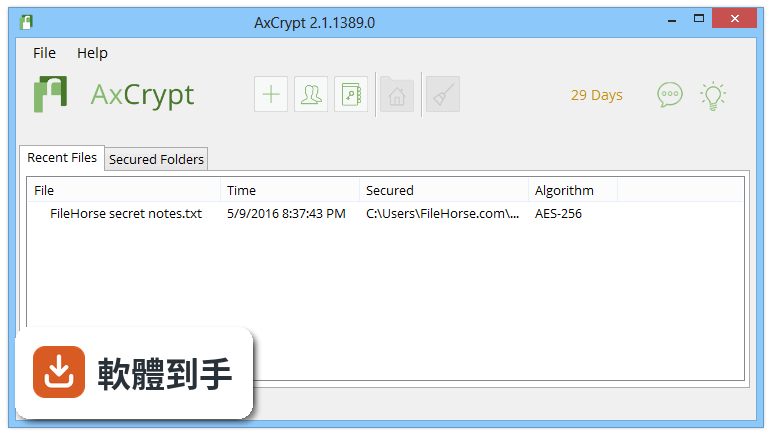
01AxCrypt 到底是做什麼用的?
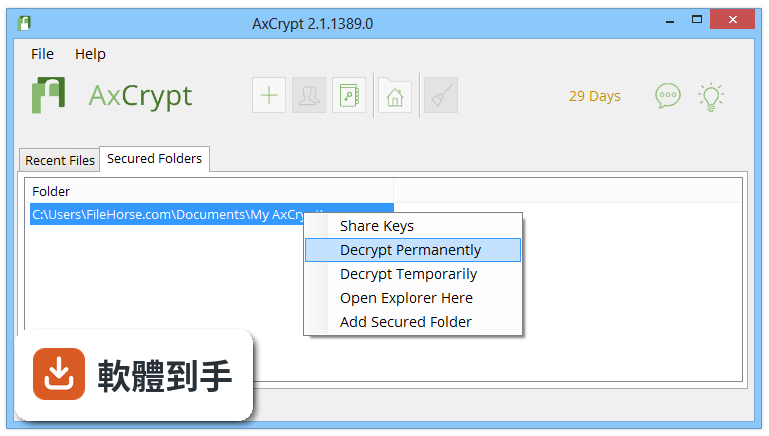
它是一套 Windows 上的單檔加密工具,用 AES 128-bit 或 256-bit 加密個別檔案。安裝後會整合進檔案總管的右鍵選單,對檔案按右鍵選「AxCrypt」就能加密,雙擊加密檔輸入密碼就能開啟編輯。也支援指定資料夾為「安全資料夾」,新放進去的檔案會自動加密。官方說明強調不需要額外設定,裝完就能用。
02右鍵加密具體是怎麼操作的?
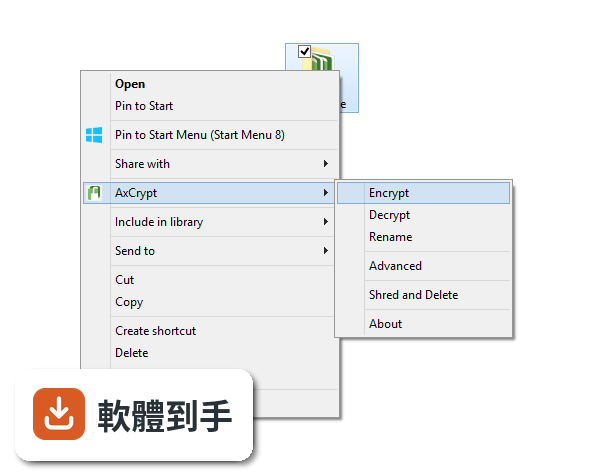
安裝過程可以選擇是否整合進檔案總管。之後對想加密的檔案按右鍵,選「AxCrypt」,可以設定哪些人能存取、要不要設到期日,再輸入你的密碼就完成。要解密時雙擊該檔案、輸入密碼即可。加密後的檔案可以正常寄給別人,對方如果沒有這套軟體,你用密碼分享給對方,對方也能解開。
03加密之後的檔案能不能寄給沒裝這套軟體的人?
可以。官方 FAQ 明確說,收件人不需要安裝 AxCrypt,你用 passphrase 分享給對方,對方用你提供的密碼就能解密。這表示加密檔可以透過 Email 或任何方式傳送,對方拿到檔案和密碼就能開啟。不過對方要能編輯檔案,還是需要安裝軟體,這點要自己確認。
04它跟雲端硬碟能不能搭配使用?
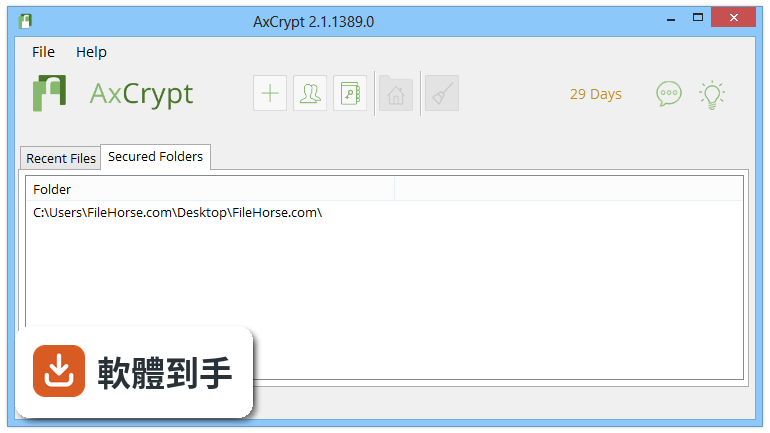
可以。官方說明提到它會自動偵測電腦上安裝的雲端儲存服務,建立一個 AxCrypt 資料夾,放進去的檔案會自動加密。官方列出的支援服務包含 Dropbox、Google Drive、Microsoft OneDrive。做法是先把檔案加密再上傳到雲端,這樣雲端上的檔案就是加密狀態,即使雲端帳號被盜,檔案內容也無法讀取。
05密碼管理功能是怎麼回事?
它現在有密碼管理功能,可以線上安全儲存所有密碼和代碼,包含信用卡資訊、安全筆記,支援產生強密碼、離線存取和匯出資料。這個功能是另外計費的,每月 1 美元或每年 0.83 美元,不限裝置數。如果你本來就在找密碼管理器,這套軟體等於一次涵蓋檔案加密和密碼管理兩種需求。
06個人使用者適合用這套嗎?
適合。它的設計就是給個人用的——右鍵加密、雙擊解密、不需要設定,這些都是為了讓非技術背景的人也能上手。付費方案 Premium 每月 5 美元,包含安全資料夾、金鑰分享、雲端整合、行動裝置加密、密碼管理等功能。免費的 VIEWER 版只能解密別人分享給你的檔案,或你自己之前加密的檔案,不能加密新檔案。
07企業管理者用這套有什麼好處?
它有一個 MasterKey 功能,讓企業管理員可以取回成員加密的檔案。員工離職或忘記密碼時,管理員可以用 MasterKey 解開檔案,避免公司檔案永久遺失。另外近期推出了群組管理功能,可以建立使用者群組、指派群組角色、用群組 MasterKey 管理檔案存取。Business 方案每人每月 12 美元,包含企業管理員 MasterKey 和企業優先支援。
08免費版夠用嗎?
免費版只能解密既有檔案,不能加密新檔案,所以如果你要拿來加密自己的檔案,免費版等於不能用。付費的 Premium 方案才有完整的加密功能。另外要注意,它沒有密碼恢復機制——官方明確說如果你忘記 passphrase,沒有任何方式可以救回加密檔案。這點在決定使用前要想清楚。
09介面只有英文,會不會很難上手?
官方資料顯示介面是英文,但官方說明提到軟體本身支援 13 種語言,包含英文、荷蘭文、法文、德文、義大利文、韓文、葡萄牙文、西班牙文、瑞典文、土耳其文、俄文、波蘭文等,沒有列出繁體中文。如果你對英文介面不習慣,操作上可能要多花一點時間摸索,但右鍵選單的加密選項位置固定,實際需要閱讀的英文不多。
10這套軟體還有在更新嗎?
收錄的版本紀錄顯示,從 2016 年到現在共收錄 37 個版本,最近一次更新在 2026 年 6 月,但近 12 個月只更新 1 次,近 24 個月也只有 1 次。更新頻率不算高,但至少還有在維護。如果你在意軟體是否持續獲得安全更新,這點需要自己衡量。
11忘了密碼的話,檔案是不是就永遠打不開了?
是。官方 FAQ 直接說明,它沒有辦法存取你的 passphrase,如果你忘記了,加密檔案就無法恢復。這是這類加密軟體的共通特性——為了確保只有你能解密,開發商自己也不留後門。建議的做法是設定密碼時就寫在安全的地方,或使用密碼管理功能來記住。
12跟 Folder Lock 或 TrueCrypt 比起來,這套有什麼不同?
資料中有列出幾套功能相近的軟體,包含 Folder Lock(287 人評分)、Remote Desktop Manager Enterprise(121 人評分)、CrococryptFile(99 人評分)、USB Secure(58 人評分)、TrueCrypt(57 人評分)。AxCrypt 的評分是 7.6/10,共 99 人評分。它的特色是單檔加密和右鍵整合,而 TrueCrypt 是整顆硬碟或磁區加密,Folder Lock 則偏向檔案保險箱和資料夾鎖定。如果你要的是「個別檔案加密、寄給別人也能開」,AxCrypt 的定位比較接近;如果你要的是整顆硬碟加密,應該看 TrueCrypt 那類工具。
下載與官方連結
axcrypt-2-setup.exe · 連結指向軟體原廠
版本紀錄
- 2026-10-15 AxCrypt 3.1.31.0 120 MB
- 2026-10-13 AxCrypt 3.1.28.0 120 MB
- 2026-09-24 AxCrypt 3.1.15.0 119 MB
再看 5 筆
- 2026-06-20 AxCrypt 3.1.5.0 118 MB
- 2023-01-23 AxCrypt 2.1.1636
- 2022-05-19 AxCrypt 2.1.1629
- 2021-06-02 AxCrypt 2.1.1618
- 2021-04-16 AxCrypt 2.1.1617
這一版改了什麼
What's new in this version:
AxCrypt 2.1.1547
- Re-encrypting files on sign in may cause downgrade to AES-128 for Premium users
- Update Code Signing Certificate
- Add support for polish language(pl-PL)
- BusinessDisplay ‘Business’ in title instead of ‘Premium’ when relevant
- Json deserialization can cause error due to missing Json settings
- Code Maintenance Change to use ObjectCreationHandling.Replace for json, and some changes required as a result
- Translations and texts maintenance Add/Update texts for AxCrypt Business
AxCrypt 2.1.1543
- Renaming a folder in a secured folder results in the the secured folder being removed
- Debugmode logging is not enabled when restarting AxCrypt
- When signing in [Local] a pop-up message should be displayed
- Translations and texts maintenance
AxCrypt 2.1.1541
- Stop Securing does not work as expected when file is open in application
- Clicking ‘OK’ in the ‘Verification’ dialog without filling in anything is possible
- IndexOutOfRangeException in wildcard match during user search
- Business: Add ‘Business’ to Axantum.AxCrypt.Api.Model.SubscriptionLevel
- Business: Check all uses of Subscription level to work with Business
- Business: Ensure app supports a license of type Business from server
- IReport exceptions are only written if program exists relatively cleanly
- Secured Folder should forbid adding forbidden folders
- Translations and texts maintenance
AxCrypt 2.1.1536
- Re-encrypted documents revert to AES-128 even if Premium under certain conditions
- Incorrect handling of blocked UI thread may cause crash
- Re-implement IMainUI to use a stack of states for enabling / disabling the UI
- When signing up, focus is not set in ‘Verification Code’ field
- Additional confirmation for passsword after signing up
- Translations and texts maintenance
AxCrypt 2.1.1534
- Auto Upgrade is asked for and possible to enable in Viewer Plan
- ArgumentNullException possible on exit
- Support device-agnostic disabling of main window for modal dialogs
- When unsharing a AES-128 bit file in Premium it’s re-encrypted with AES-128
- Optimize updating Premium information
- Key Sharing icon does not appear directly after sharing a key
- Improve Recent Files list display performance
- The share keys button does not open a file selection dialog The file selection dialog should allow multiple files
- Code changes to support features in other repositories
- Code Maintenance Move common SettingsStore functionality to abstract StreamSettingsStore
AxCrypt 2.1.1532
- Unexpected Error! Collection was modified
- Add information dialog when a file is automatically opened the first time
- Share key broken
- Illegal FileTime causes Unexpected Error
- Translations and texts maintenance
AxCrypt 2.1.1526
- Deadlock in FileLocker causes hang
- Exception during decryption causes deadlock
- Illegal FileTime causes Unexpected Error
- Add a list of user extensions to be ignored for encryption
- Add indicator of local sign in
- Inconsistent sign in state after password reset and use of original password
- Code changes to support features in other repositories
- Verify that key sharing always try to use the recipient server key, if online
- Code Maintenance
- Translations and texts maintenance
AxCrypt 2.1.1516
- Optimize notification queue, merging fulll name lists
- When opening an encrypted .TXT file with Notepad++, it cannot be edited.
- Code changes to support features in other repositories
- Translations and texts maintenance
AxCrypt 2.1.1513
- Secured folders are not watched always
- Fix FileLock so it releases resources
- Add a “Get Premium” menu choice from the Help Menu
- Sign out with an open modified document causes changes to be lost
- Improve subscription status security
- Support ‘dirty’ state for FileSystemState
- Code changes to support features in other repositories
- Add support for shared code for known folders discovery across apps and platforms
- Race condition between LogOn and WatchedFolderAdded notification
- Sign out automatically on a set time
- Code Maintenance
- Translations and texts maintenance
AxCrypt 2.1.1509
- Translations and texts maintenance
- Improve password setting dialog to communicate more clearly to the user
- The “Get Premium” link disappears
- Key sharing does not apply to subfolders in secured folders with include subfolders enabled
- Key Wrap Iteration Calculator may give lower values than expected
- “A required privilege is not held by the client” causes High CPU
- “Decrypt Temporarily” of secured folder with “Include Subfolders” ignores subfolders
AxCrypt 2.1.1502
- Translations and texts maintenance
- Reimplement FileLock and use, prepare for async friendly lock
- Add option for recursive operation
- Display a tip when the wrong password has been entered three times about password reset.
- Lavasoft causes crash in TCP stack, warn user of existence of Lavasoft Web Companion
- Add option to decrypt file even if HMAC is invalid
- Check and re-assert the “.axx” file name association
- Add support for continuous integration on the Mac
- Update Newtonsoft.Json to 10.0.2
- Update NUnit to 3.6.1
- Change internal names for subscription levels to match current terminology
- Implement request for supporting verify code without password setup.
- When three cloud providers or more are found, the clean up broom is hidden
- Add fixed fallback location for OneDrive detection
- Startup hang in Mac XWT app
- Deadlock when sharing keys
- Inconsistent use of async in view models
AxCrypt 2.1.1494
- Inconsistent text for “secure delete”
- Nothing happens when using Shred & Delete from explorer menu when not signed in
- Do not URL encode + and @ signs in path components when calling REST API
- Enabling Trial mode causes InvalidOperationException
- System.ArgumentException: Illegal characters in path
- Display Premium / Free status explicitly
- Error message stating Premium required even though Premium is active
- Add core support extracting email addresses from text
- Google Drive not always detected
- Update all content web links to https
- Remove Exit and Help buttons in signup dialog
- Add “show in folder” as right-click option to recent files list.
- Change threshold for drag and drop added to recent files
- Trial mode started after Premium payment
- ManageAccountViewModel async use in constructor causes deadlock
- Handle inaccessible key file in validation
- Check that property binding uses the correct type
AxCrypt 2.1.1489
- Include parameter in link for password manager to change message
- API-support for startup tips
- Update code signing certificate
- API Method for feedback
- Upgrade to NUnit 3
- Trim spaces from emails in key sharing dialog
- NullReferenceException if checking for updates with empty response
- Timeout and auto-offline on server requests
- Translations and texts maintenance
AxCrypt 2.1.1481
- Translations and texts maintenance
AxCrypt 2.1.1478
- Add user culture to registration API call
- Update Newtonsoft.Json (Internal)
- Import AxCrypt ID does not work
- Translations and texts maintenance
AxCrypt 2.1.1474
- Add context menu to tray icon
- Support purchase without sign in to web if signed in to app
- Update texts to reflect that the Trial period is started manually by the user
- Change “sign in” to just ask for the password
- Translations and texts maintenance
AxCrypt 2.1.1464
- Does not open document on first sign in if not previously loaded
- ‘Advanced’ when not started, signs in but starts minimized to tray
AxCrypt 2.1.1460
- SocketException: The requested service provider could not be loaded or initialized
- PasswordStrength meter is flickering
- Slow and sometimes unresponsive after sign in
- First time entry of a registered email considered ‘old’ should render an info-popup
- Activation via AxCrypt fails if already activated via Web
- Key sharing/unsharing does not work in offline mode, even with known accounts
- The AxCrypt Window should not be activated when unlocking computer
- Crash after screen saver restore
- “Try Premium” should be visible when offline and display information
- Slow startup times with network access enabled.
- Implement a ‘Find V1’ files function
- Make the sign in dialog show alone, without entire UI
- Improve the set a new password dialog to be clearer what applies
- Clarify just how Free / Premium works
- Add AxCrypt 1.x character filter to password
- Add check for updates to menu
- When attempting to add new contact offline, the email is cleared
AxCrypt 2.1.1444
- Change log not available for this version