
這是歷史版本頁面 — 看 Axialis IconWorkshop 最新版本
做 ICON 卡關?Axialis IconWorkshop 能幫你什麼
 Axialis IconWorkshop 6.10
資料更新 2007-09-03
閱讀約 5 分鐘
你正在做一個軟體或網站專案,功能都寫完了,最後卡在應用程式圖示。用繪圖軟體畫了一張圖,但輸出成 ICO 檔之後,小尺寸模糊、透明背景變黑、macOS 那邊又說格式不對。你只是想趕快把這個 256×256 的圖示搞定,卻發現光是格式轉換就夠你研究一整個下午。
一般人的直覺是用免費線上轉檔工具,但那些工具多半只能做簡單的格式轉換,沒辦法處理多尺寸預覽、Alpha 通道或不同平台的輸出規範。更別提如果之後要改個顏色,整套流程又要重跑一次。專門做圖示的工具,切入點是「把圖示當成一個完整的專案來管理」——從草稿、編輯、多尺寸預覽到輸出,都在同一個地方完成,而不是用繪圖軟體畫完再想辦法轉檔。
01Axialis IconWorkshop 到底能拿來做什麼?
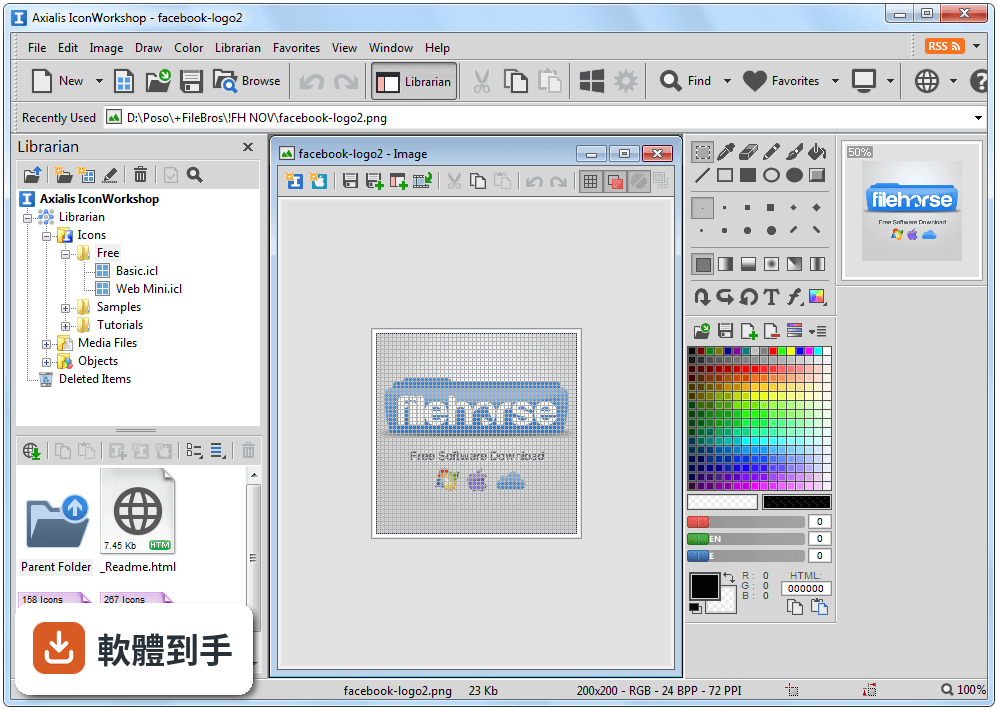
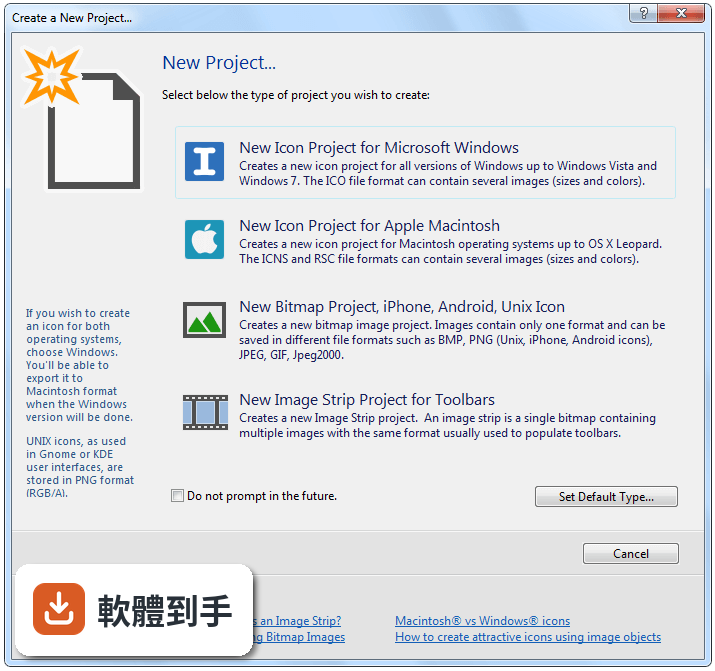
它是一套專門做圖示的編輯工具,可以建立 Windows 的 ICO、macOS 的 ICNS,以及網頁用的 PNG、SVG 格式。支援向量與點陣編輯,有類似專業繪圖軟體的精確調整工具。你可以從空白開始畫,也可以匯入圖片再加工,最後輸出成不同平台需要的格式。
02這套軟體可以一次處理很多個圖示嗎?
可以。它有批次處理功能,能同時轉換、調整尺寸或匯出多個圖示。如果你手上有一整組按鈕圖示要統一改成 48×48,或是一次要把十幾個 ICO 檔轉成 PNG,不需要一個一個手動處理,設定好規則就能一次跑完。
03我習慣用 Photoshop 畫圖,這套軟體能跟它配合嗎?
它提供 Photoshop 和 Illustrator 的外掛程式,可以把你正在編輯的圖層直接從 Adobe 工具送到 IconWorkshop 繼續處理。如果你原本的工作流程就是先用 Photoshop 畫草稿,這可以省掉「存檔、開新軟體、再匯入」的步驟。
04它支援哪些圖示格式?可以輸出 SVG 嗎?
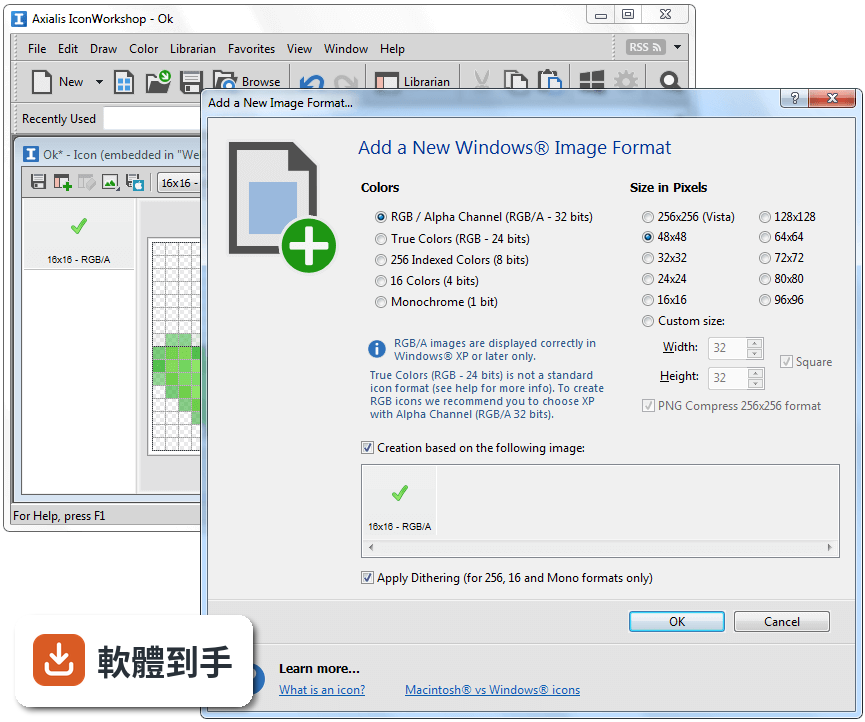
支援的格式包含 Windows 的 ICO、macOS 的 ICNS、Linux、iOS、Android 以及網頁用的 PNG 和 SVG。SVG 可以匯入也可以匯出。也就是說,同一份設計可以輸出成不同平台需要的格式,不用為了每個平台重新畫一次。
05我不太會畫圖,只有現成的圖片,這樣能用嗎?
可以匯入圖片來加工。另外它內建大量的預先設計物件庫,用拖曳的方式就能把物件組合到畫布上,快速拼出一個圖示。如果你需要的是「把一張照片變成圓角方形的 App 圖示」,這套流程可以做到,但如果你完全沒有設計基礎,還是需要花時間熟悉編輯工具。
06這套軟體適合什麼樣的人用?
適合需要頻繁產出圖示的 Windows 使用者,特別是獨立開發者或小型設計團隊。如果你同時要維護 Windows、macOS 和網頁版本的圖示,它的多格式輸出和批次處理能省下不少時間。另外,如果你已經在用 Adobe 系列工具,它的外掛整合會讓流程比較順。
07試用版跟付費版差在哪裡?我怎麼知道夠不夠用?
官方提供 30 天完整功能試用版,也就是說試用期間功能沒有鎖。單人授權價格是 69.95 美元,包含終身更新和支援。建議你先用試用版跑一個真實專案,確認輸出結果符合你的需求再決定要不要付費。
08這套軟體有 Mac 版嗎?
沒有。它目前只支援 Windows,官方明確說明沒有 macOS 版本。如果你主要使用 Mac,這套軟體不適合你。需要留意的是,它雖然可以輸出 macOS 用的 ICNS 格式,但你必須在 Windows 環境下操作。
09我是偶爾才做一個圖示的一般使用者,適合買嗎?
不適合。它的介面是專業級設計工具,官方自己也提到初學者需要一段學習曲線。如果你一年只做兩三個圖示,免費的線上轉檔工具或一般的繪圖軟體可能就夠了。這套軟體的功能和價格,是針對需要頻繁產出圖示的人設計的。
10它只有英文介面,會不會很難上手?
介面確實只有英文。如果你對繪圖軟體的操作邏輯不熟,英文介面會增加學習難度。不過它的版面是常見的 Ribbon 風格,中央畫布加上工具面板,跟主流繪圖軟體類似。官方有提供教學資源,但都是英文的,這點要納入考量。
11這套軟體跟 IcoFX 比起來,選哪個比較好?
兩者功能相近,都是 Windows 上的圖示編輯工具。IcoFX 在收錄的評分人數上略多於 IconWorkshop,但兩者的評分都不算高。IconWorkshop 的優勢在於 Adobe 外掛整合和內建物件庫,IcoFX 則有類似的編輯和轉換功能。建議把兩套的試用版都裝來跑一次你的實際工作流程,看哪一套的操作方式你比較習慣。
12它適合團隊協作用嗎?
不適合。這套軟體是單機工具,沒有雲端功能,也沒有團隊協作機制。如果團隊需要共用圖示素材庫或多人同時編輯,它幫不上忙。這種情況你可能需要搭配版本控制系統,或是考慮其他有協作功能的設計工具。
下載與官方連結
前往官方網站 下載 Axialis IconWorkshop
iconworkshop.exe · 19.1 MB · 連結指向軟體原廠
版本紀錄
- 2025-11-30 Axialis IconWorkshop 6.97 37.46 MB
- 2025-11-10 Axialis IconWorkshop 6.96 37.57 MB
- 2024-11-28 Axialis IconWorkshop 6.95 37.22 MB
再看 5 筆
- 2024-01-10 Axialis IconWorkshop 6.94 35.75 MB
- 2023-06-30 Axialis IconWorkshop 6.92
- 2016-08-10 Axialis IconWorkshop 6.91
- 2016-06-10 Axialis IconWorkshop 6.90 37.68 MB
- 2012-09-22 Axialis IconWorkshop 6.80 36.49 MB
這一版改了什麼
What's new in this version:
What's New in Version 6.10?
Compatible with Windows Vista" - Many Windows Vista" compatibility issues have been fixed in this version.
New Interface for Windows Vista" - The application automatically detects Windows Vista" and propose a new user interface compatible with the new Aero" visuals.
Make program files containing Windows Vista" compressed icon - Microsoft Visual Studio versions 6 to .NET 2005 do not support creation of executables with PNG-Compressed 256x256 icons for Windows Vista". Axialis IconWorkshop permits to compress icons directly in EXE/DLL files and use Windows Vista" icons in your software projects.
Create icons the professional way using ready-to-use Photoshop templates - 10 ready-to-use Adobe Photoshop® Templates are provided with Axialis IconWorkshop". Load templates in Photoshop® directly from IconWorkshop", draw your icons in several formats and transfer the whole work in IconWorkshop. Your icon is created in one step. You can even create your own template using an easy to use XML description file.
Support for 512x512 Macintosh icons for OSX 10.5 Leopard - Create extra large 512x512 icons for the new MacOS 10.5. Axialis IconWorkshop now fully support this size.
New Object Pack #2 for Icons (Realistic Buttons) - This pack is composed of 500 hi-res image objects which have been designed to create icons in the style of Windows Vista". Using this pack you can easily create beautiful sets of buttons to be used in your projects (websites, application GUI, toolbars, dialog boxes...). With 156 symbols included and many shape effects (circle, rounded square, octagon, triangle) you can create a large variety of icons. The full set of objects is available for download on our web site to registered customers only.
New Object Pack #3 for Icons (Quick Toolbars) - A collection of 256 image objects which permits to quickly create program toolbars. Using drag & drop, you can create in seconds icons and buttons for your toolbars by associating basic objects and overlays symbols. The objects do not contain details and have thick borders to allow the creation of small icons suitable for toolbars (32x32, 24x24, 16x16). The objects, which are provided in 256x256 format with alpha channel, permit to easily create icons containing various sizes for Windows XP®, Windows Vista" & MacOS®. The full set of objects is available for download on our web site to registered customers only.
New Object Pack #4 for Icons (Web 2.0 Icons) - This pack is composed of 601 image objects which permits to quickly create icons in the style of Web 2.0. Using drag & drop, you can create in seconds icons and buttons for your websites and applications by associating background shapes, glossy effects, shadows and various ready-to-use texts and symbols. The icons can also be saved as optimized GIF, JPEG or PNG images for inclusion in your websites. To permit you to work faster, more than 500 ready-to-use derived symbols and texts have been added to the pack, including effects like outer light glow, soft shadow, emboss and 15° rotation. The full set of objects is available for download on our web site to registered customers only.
Other enhancements and bug fixes.
Other features from previous versions
Support for compressed Windows Vista" icons - IconWorkshop now loads, creates, edits, saves Windows Vista" icons. Windows Vista" includes a new PNG compressed icon format. It permits to create icons up to 256x256 with alpha channel with smaller file size. Axialis IconWorkshop now fully supports this new format in all features: edition, automatic format creation, batch creation, batch conversion, format normalization... Don't wait and create today your icons for Windows Vista".
Object Pack for Icons (Glossy Buttons) - The first Axialis Object Pack for icons is included in IconWorkshop. It is a library of 150 image objects which will permit you to create an unlimited number of icons with various glossy effects and shapes simply using drag & drop. The images come in 256x256 high-quality PNG format. It permits to create icons containing various sizes up to 256x256 for Windows XP®, Vista® and MacOS®.
Illustrator® to IconWorkshop transfer plug-in - Now you can import vector images with transparency directly from Illustrator into IconWorkshop through memory. You don't need to create a temporary file anymore.
Full tutorial on how to use Image Objects - Creating icons from image objects is easy and produce hi-quality results. This tutorial will learn you how to create attractive icons in minutes using Image Objects.
Background floating selection - Using this command you can easily place a floating object in background of your icon. This is useful to add a shadow or a colored halo around an icon.
Copy/Paste Alpha Channels as Masks - Now you can use a grayscale mask image to apply it as Alpha Channel to an icon. Also, you can extract an alpha channel from an icon to create a grayscale mask image.
256x256 and floating Preview Window - The preview window is now adjustable (256x256 or 128x128). It can also be set as a floating window (easier to move in 256x256 mode).
Full Macintosh® icon support - Now you can create icons for the Macintosh®. You're able to make, read, convert icons and save them as ICNS, RSC and BIN (MacBinary). All icon formats are supported up to OSX 10.4 Tiger. The new 256x256 image format is also supported. This is not an export-to-mac feature but a full implementation of the Macintosh® icon format specification in all features of the product.
Batch conversion of icons from Windows® to Macintosh® - A very handy feature which will permit you to convert hundreds of Windows icons to Macintosh in minutes.
Batch creation of Macintosh® icons from images - Select several images and create associated Macintosh icons, with all formats embedded, in a few seconds.
Icon normalization - This feature permits you to create a set of icons with identical image formats embedded. This is very useful especially if you want to publish icons.
Macintosh Icontainer® libraries support - This version permits to extract icons from Macintosh Icontainer® icon libraries. Multi-state Mac icons are also supported.
Composition of icons using drag & drop - You'll create original icons from a library of symbols in minutes: Select the objects (disk, folder, screen...) in the librarian and drag them using the mouse in the icon editor window. Resize and move it using the mouse then repeat the operation to add other overlay symbols in your icon. You've done your own icon in seconds!
Real time preview in Brightness, Hue, Saturation dialogs - A very handy feature which permits you to adjust icons with precision.
Full support of JPEG 2000 - This is the future format for raster icons. It has a better compression ration than PNG (can be set with lossy compression like JPEG) and support alpha channels. It has been completely included in all features of the product (load/save/export/convert).
Full support of GIF - CompuServe GIF image format is widely used in Web pages because the majority of Web browsers recognize it. It has been completely included in all features of the product (load/save/export/convert) with Web-optimization options.
Better image quality in image resizing and blending - Now crystal clear results in all scale/blending operations!
New sample icons - Some icon artists gave us permissions to include their icons in the product as samples. You can enjoy these icons for your personal desktop use. Do not use them in products, they're copyrighted - see Sample Icons Terms of Use topic.
Enhanced Editor - The Icon Editor has been greatly enhanced. It supports 32 bits XP icons with alpha channel, smooth drawing, many image adjustments (brightness, contrast, hue, saturation, flip, scale, rotation at any angle, drop shadow, filters), import/export (Photoshop PSD with layers, transparent BMP and PNG), Smart new image format creation, new color management (RGB/HSL models, compatible with Adobe® and Jasc® palette files).
Professional Integrated Environment - The whole environment has been redesigned. Now it includes a built-in explorer with thumbnail preview which permits you to browse/search and display/import icon files from your disk drives. An Internet multi-source search engine lets you find icons and images on the Web. A built-in image viewer permits to open various image formats (Photoshop PSD with layers, 32 Bpp transparent BMP, transparent PNG, GIF, WMF, JPEG and more) and create a new multi-formats icon based on a portion of this image in just one click!
A Compiler - Using this compiler, you'll be able to create redistribuable packages of your icon libraries. It generates a compressed user-friendly install procedure. The final package is 3 times smaller than the original ICL file. At least, with the Corporate Edition, you can force the end-user to enter a Serial Code to unlock the installation. A serial code generator is provided.