
這是歷史版本頁面 — 看 Beyond Compare 最新版本
比對檔案老是眼花?Beyond Compare 能幫你對出差異
 Beyond Compare 4.2.0.22302
資料更新 2017-04-28
閱讀約 6 分鐘
打開兩個資料夾,想確認新版和舊版到底改了哪些檔案;或是在兩個文字檔之間來回切換,想找出那一行細微的差異。眼睛看久了就花掉,尤其檔案一多、內容一長,光靠人工比對根本是一場惡夢。你只是想快速知道哪裡不一樣,然後把該更新的部分處理掉,卻卡在「看不出來」這個步驟上。
一般人習慣的做法,是把兩個視窗並排,自己一格一格對。但檔案一多、內容一長,這種做法不只費時,還容易漏看。這類工具的切入點,是讓軟體自動掃描並標出差異,用顏色區分新增、刪除與修改,甚至幫你把兩邊的內容同步成一致。你只需要看結果,不用自己動手找。
01Beyond Compare 到底能拿來做什麼?
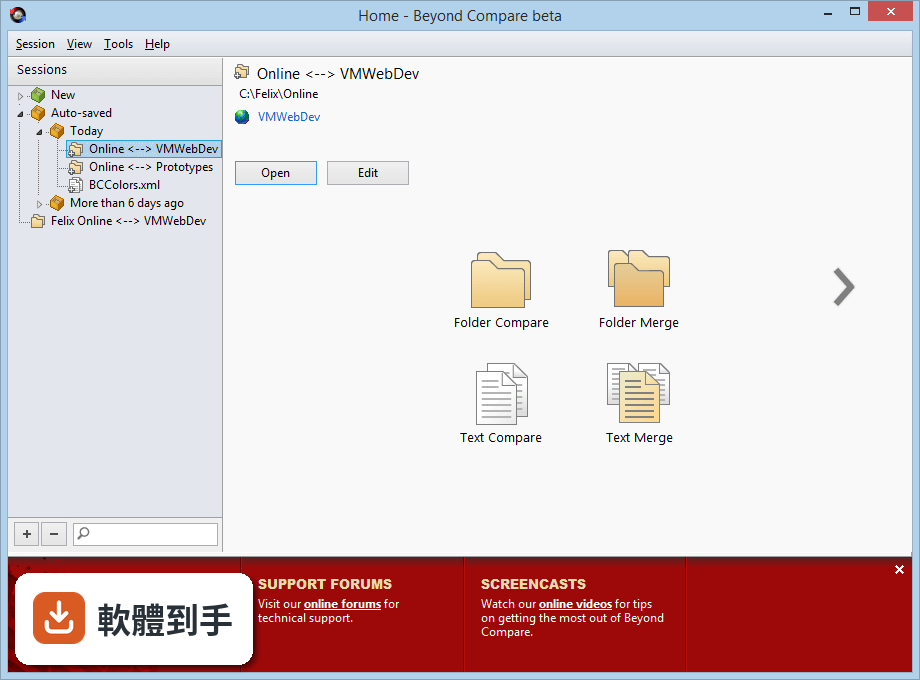
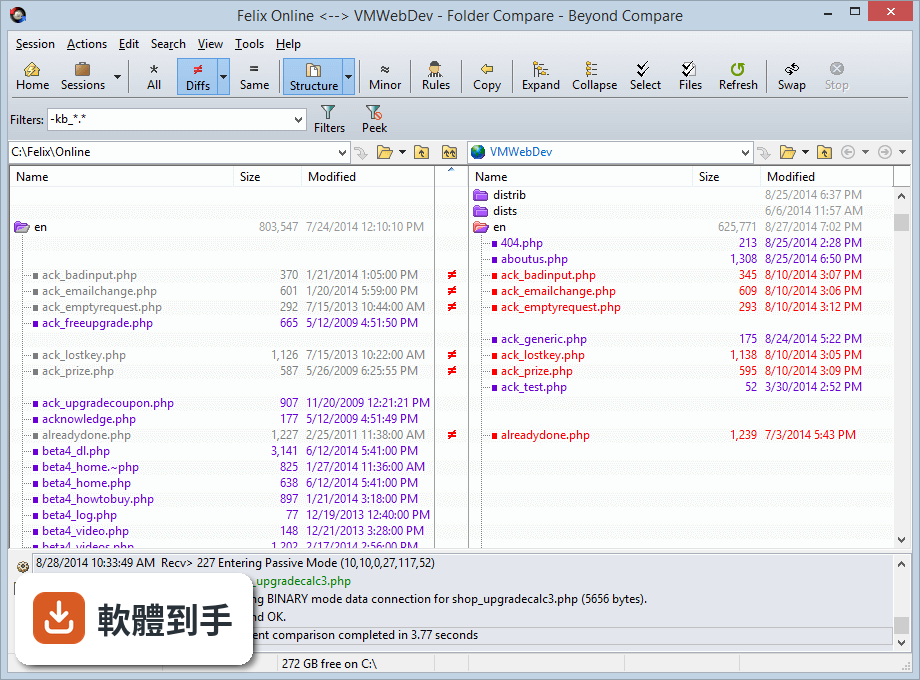
它主要做兩件事:比對與同步。比對對象可以是單一檔案,也可以是整個資料夾,甚至整顆硬碟。比對結果會用並排視窗顯示,差異處以顏色標示,一眼就能看出哪裡多了、少了、改了。同步功能則是把兩個資料夾的內容調整成一致,可以選擇單向或雙向,適合用來更新備份或整理散落的檔案。
02它能比對哪些類型的檔案?
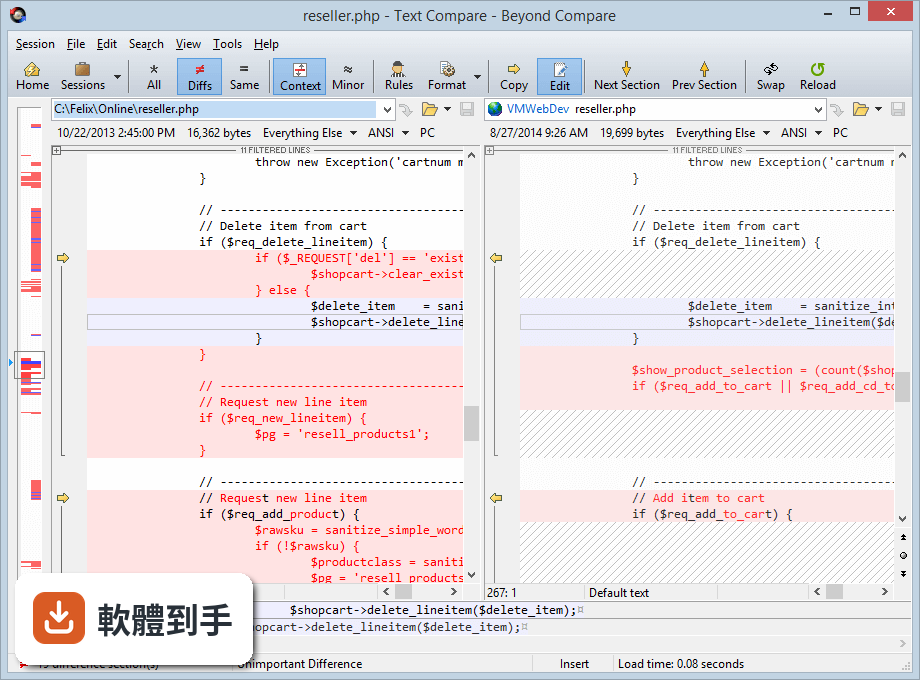
文字檔與原始碼是基本盤,會逐行標出差異,還支援語法高亮。二進位檔可以切換到十六進位模式比對,圖片則能用像素比對或重疊方式找出細微變化。另外也支援 CSV 這類結構化資料,可以直接看表格內容的差異。Word 或 PDF 沒有原生支援,但官方說可以轉成純文字後做基本分析。
03資料夾比對時,能不能只顯示我想看的檔案?
可以。比對資料夾時,可以設定過濾規則,排除特定副檔名或符合條件的檔案,例如把暫存檔、快取資料夾濾掉,只專注在真正要處理的檔案上。規則可以存成設定檔,下次比對同類型專案時直接套用,不用每次重新設定。
04它能不能自動把兩邊檔案同步成一樣?
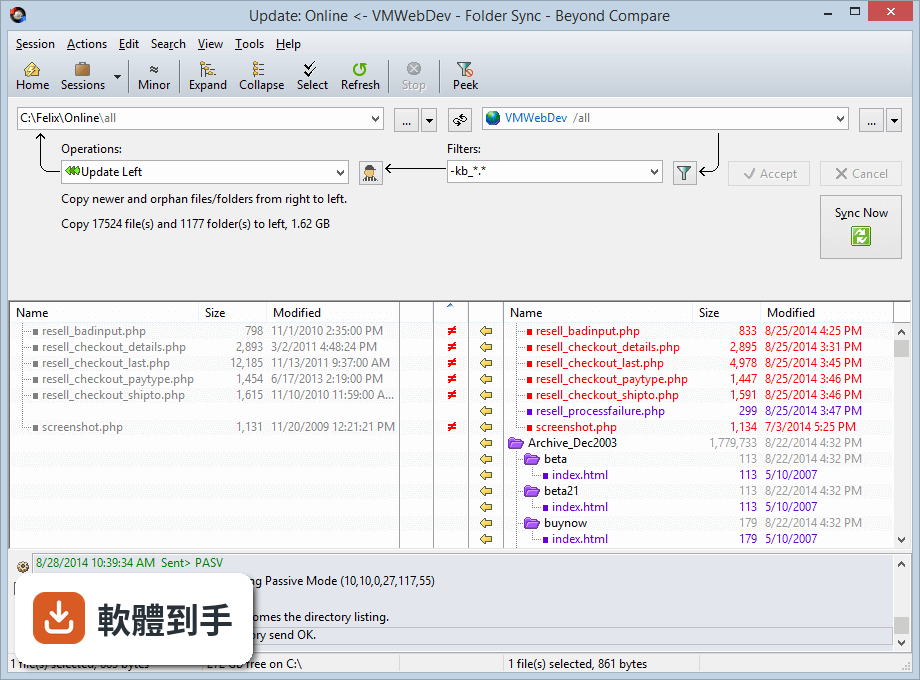
可以,用的是 Folder Sync 功能。選擇兩個資料夾後,軟體會先掃描差異,列出哪些檔案需要複製、刪除或更新,你確認後再執行。也可以設定成單向同步,例如把工作資料夾的內容複製到隨身碟或外部硬碟,讓備份流程變成幾個點擊就完成。
05除了手動比對,它能自動化處理重複的比對工作嗎?
可以。它支援腳本(script),把常用的比對或同步流程寫成指令,之後直接執行腳本就能跑完一套流程。例如每天晚上自動比對兩個資料夾並產生報告,或是固定把某個目錄同步到 FTP 伺服器。腳本可以搭配排程工具執行,適合有固定流程的使用者。
06這套軟體適合什麼樣的人用?
最常用到的是軟體開發者,拿來比對程式碼版本、合併修改內容。IT 人員可以用它比對伺服器設定檔、同步不同主機上的設定。一般使用者如果經常需要整理檔案、確認備份是否完整、比對下載的檔案是否正確,也會覺得實用。介面是英文,但操作邏輯直覺,不太需要看說明書。
07我只是一般使用者,偶爾比對一下檔案,用起來會很複雜嗎?
基本操作不複雜:開啟軟體、選 New Session、挑兩個檔案或資料夾,比對結果就出來了。顏色標示很清楚,綠色通常是相同、紅色是不同,點一下差異處就能看內容。只是它的進階功能很多,如果不去碰那些設定,單純比對檔案其實跟開個視窗差不多簡單。
08什麼情況下不該選這套軟體?
如果你只是偶爾比對一次、不想付費,那免費的 WinMerge 或 FreeFileSync 就能滿足需求,不必選它。另外它不支援直接比對 OneDrive 或 Google Drive 的雲端檔案,只能透過 FTP/SFTP 或第三方工具間接處理。如果你主要比對 Word 或 PDF 文件,它沒有原生支援,需要先轉成純文字,效果有限。
09它有沒有免費版或試用限制?
官方提供 30 天試用,試用期內功能完整,沒有閹割。試用結束後需要購買授權才能繼續使用,沒有免費版。標準版定價 35 美元,專業版 70 美元,專業版多了三方合併和 SFTP 支援。如果你只是偶爾用一次,試用期過後不續用,軟體會停止運作,不能繼續免費使用。
10它的更新頻率如何?還有人在維護嗎?
開發商 Scooter Software 持續在更新,收錄的版本紀錄顯示近一年內有多次更新,不是放著不管的軟體。介面語系只有英文,沒有官方繁體中文,但功能名稱和操作流程不算難懂。如果你需要中文介面,可能要考慮其他選項,或靠翻譯軟體輔助。
11跟 WinMerge 比起來,它有什麼差別?
WinMerge 是免費開源軟體,功能涵蓋檔案與資料夾比對,基本需求都夠用。Beyond Compare 多了三方合併、十六進位比對、圖片比對、FTP/SFTP 支援和腳本自動化,功能範圍更廣。如果你只需要純文字檔比對,WinMerge 就夠;需要處理二進位檔、遠端伺服器或自動化流程,才需要考慮付費的 Beyond Compare。
12它支援 macOS 或 Linux 嗎?
官方資料顯示除了 Windows 版本,也有 macOS 版本,Linux 也有對應版本。Windows 版本支援 Windows 7 到 11,硬體需求不高,1 GHz 處理器、2GB 記憶體、50MB 硬碟空間就能跑。如果你跨平台使用,同一套軟體在不同系統上的操作邏輯一致,不用重新學習。
下載與官方連結
BCompare-4.2.0.22302.exe · 20.6 MB · 連結指向軟體原廠
版本紀錄
- 2026-10-29 Beyond Compare 5.2.7 Build 32913 27.37 MB
- 2026-09-25 Beyond Compare 5.2.6 Build 32774 27.36 MB
- 2026-08-04 Beyond Compare 5.2.5 Build 32528 27.37 MB
再看 5 筆
- 2026-07-23 Beyond Compare 5.2.4 Build 32425 27.37 MB
- 2026-06-30 Beyond Compare 5.2.3 Build 32296 27.38 MB
- 2026-05-21 Beyond Compare 5.2.2 Build 32209 27.39 MB
- 2026-03-25 Beyond Compare 5.2.1 Build 32035 27.42 MB
- 2026-02-24 Beyond Compare 5.2.0 Build 31950 27.42 MB
這一版改了什麼
What's new in this version:
Notable Changes:
- Windows: Added clipboard monitoring app to more easily launch comparisons from text editors. Must be enabled manually in Options dialog if upgrading from 4.1 or earlier. Requires Windows Vista or later
- macOS: Added full Finder context menu extension on macOS 10.10 and above. Must be enabled manually from the Beyond Compare "Preferences" dialog or macOS System Preferences. May require a reboot
- Added support for comparing JPEG/TIFF EXIF and IPTC metadata
- Removed "Bypass disk cache during binary comparisons" option. Due to changes in hardware, operating systems, and drivers, it no longer works as originally intended
- Upgraded Dropbox support to use v2 API. Dropbox support in v4.1.9 and earlier will stop working in June 2017
- Added support for .lzma and .tar.lzma/.tlz archives and improved RAR support
- macOS: Fixed scrolling behavior on macOS 10.12 Sierra and fixed Cmd+W/Esc inserting characters in a text editor rather than closing the view
- Improved various graphics on high DPI displays and updated many icons
Archives:
- Added support for Microsoft Help 2.x archives and ext2fs/ext3fs/ext4fs disk images
- Added support for .lzma and .tar.lzma/.tlz archives
Improved RAR support:
- Added support for RAR5 archives containing symlinks/junction points
- Archives created on Unix now display Unix attributes correctly
- Fixed CRC values for files that are split across multiple RAR volumes
- macOS/Linux: Fixed support for RAR4 and RAR5 archives
- Windows: Fixed support for empty folders in archives created on Unix
- Windows: Updated UnRAR.dll to v5.40
- Windows: Fixed issue with Total Commander packer plug-ins in 64-bit builds
Cloud Services:
- Upgraded Dropbox support to use v2 API
- File last modified times can now be set
- Folder last modified times are no longer reported
- Folder listings with more than 2,000 items are now supported
- Fixed support for Amazon S3 buckets in the us-east-2 (US East Ohio), ca-central-1 (Canada Central), eu-west-2 (EU London), and ap-south-1 (Asia Pacific Mumbai) regions and removed need to explicitly support new ones
- Improved OneDrive authorization and error handling
- Deleting folders on OneDrive now deletes everything in one call instead of removing everything recursively
- Added support for connecting to Amazon S3 buckets when the requesting user doesn't have the "s3:GetBucketLocation" permission
- Added optional "Bucket" to Amazon S3 profiles to limit the profile to that bucket and to make it more obvious how to connect when the user doesn't have the ListAllBuckets permission
- Windows: Added support connecting to Amazon S3 over IPv6
Command Line:
- macOS: Fixed failure to load new comparisons from the command line after opening many previously without closing Beyond Compare
- Linux: Fixed minimized window not restoring when launching a new comparison
- Linux: Fixed main menu corruption when loading a second tab from the command line
File Formats:
- Added "JavaScript Source" text format
- Updated "Python Scripts" text format keywords
- Fixed "COBOL Source" text format's line number matching
- Windows: Fixed MS Word extraction when running on a system with the Korean locale
- Improved "SQL" text format to detect identifiers that start with "#"
File Views:
- Added font resizing via Ctrl+Shift+MouseWheel and added "Increase Display Font Size", "Decrease Display Font Size", and "Reset Display Font Size" commands
- Added support for adding/removing Unicode byte-order marks in the "Save As" dialog
- macOS: Fixed newly opened views inserting characters when using keyboard shortcuts (Esc, Cmd+W, etc)
- Fixed performance issue when the merge output file is on a slow network drive
- "Save As" now has a default filename when saving the initially empty side of an orphan comparison launched from a folder comparison if the parent folder exists
- Fixed file open permissions to prevent unexpected behavior when files are open for writing by other applications
- Fixed editors not repainting during slow saves after switching tabs
- Fixed dimmed painting of items during horizontal scrolls in MP3, Registry, and Version Compare sessions
Folder Compare:
- Removed "Bypass disk cache during binary comparisons" option. Due to changes in hardware, operating systems, and drivers, it no longer works as originally intended
- Fixed canceling a rules-based or binary comparison of a large pair of files caching incorrect CRC values and causing subsequent CRC or rules-based comparisons to report immediately matching contents
- Fixed minimum column size to take margins into account
Folder Merge:
- "Compare to Output" now preserves session settings (e.g. Name Filters)
- "Merge/Sync Base Folders" now preserves more session settings
- Fixed "Ignored" action, when merging to a separate output folder, to not copy the center file to the output
Folder Sync:
- Fixed toolbar appearing below the path edits
FTP:
- Fixed "Hide VMS versions" support for SFTP profiles
- Fixed requesting CRC32 values over SFTP
- Fixed Profiles dialog not updating controls when switching between FTP and SFTP profiles
Hex Compare:
- Added support for switching between the hex and ANSI parts of the editor using Tab and Shift+Tab
Installer:
- Windows: Start Menu icon is now just a single "Beyond Compare 4" item rather than a folder with the app, help file, and uninstaller (new installs only)
- Windows: Fixed automatic upgrades of a portable install writing values in the registry if there is also an existing "For All Users" install
- Windows: Removed UACLaunch.exe from Windows installer
Misc:
- Windows: Added clipboard monitoring app to more easily launch comparisons from text editors
- macOS: Added full Finder context menu extension on macOS 10.10 and above
- "Duplicate Tab" now preserves clipboard contents, folder session parentage
- Improved various graphics on high DPI displays and updated many icons
- Fixed various high DPI issues and tweaked minimum constraints for various dialogs
- macOS: Fixed scrolling behavior on macOS 10.12 Sierra
- Fixed filename truncation when the whole filename doesn't fit the available space
- Toolbar gradients are no longer used under high contrast themes
- macOS/Linux: Fixed "Show Differences" popup button visibility and toolbar context menu checked states
- Upgraded third party libraries
MP3 Compare:
- Improved handling for various ID3 tags
- Changed ID3v2 tag names to match their ID3v1 counterparts
- Disabled character based differencing for numeric values
- Binary tags are now shown as hex digits
- "Copy" puts binary data on the clipboard if only one item is selected and it is binary
- Added separator lines below each row of the treeview
Options:
- Improved typing into "Extra line spacing" edit on "Tweaks" page
Picture Compare:
- Added support for comparing JPEG/TIFF EXIF and IPTC metadata
- "Fit to Window" zooms to multiple of 100% for images smaller than 64x64
- Improved menus for going into and out of "Full Screen" mode
- Fixed NetPBM image handling of comments containing numbers
- Changed order of items in "Picture Compare Info" dialog
Registry Compare:
- "Copy" puts text on the clipboard unless only one item is selected and it is binary
- Added separator lines below each row of the treeview
Reports:
- File reports now include error messages
- macOS/Linux: Added mouse wheel handling to "Print Preview" dialog
- Picture Compare HTML reports now scale down large images to fit the window
Table Compare:
- Improved number handling accuracy by storing data as binary-coded decimals instead of floats
- Added "Alignment" session settings
- Improved typing scientific notation into "Numeric tolerance" edit
- Windows: Updated MS Excel support
- Fixed using regional number/date format settings, broken in 4.1.7
Text Edit:
- Added folder path of open file to dropdown for "Find in Files" folder edit
Text Views:
- macOS: Fixed Find with "Match Whole Word" always failing
Text Compare:
- macOS/Linux: Fixed thumbnail showing 1 pixel high if two comparisons are launched quickly
- Linux: Removed non-functional "Webpages" command
Text Merge:
- Changed order of items in "Text Merge Info" dialog
Version Compare:
- Added support for comparing "Dynamic Base (ALSR)" and "NX compatible (DEP)" DLL characteristics
- Disabled character based differencing for numeric values
- Binary tags are now shown as hex digits
- "Copy" puts binary data on the clipboard if only one item is selected and it is binary
- Added separator lines below each row of the treeview
View Patch:
- Added check for external file changes
Crashes:
- Fixed MP3, Registry, Version Compare crash if Ctrl+A is pressed when line details have focus and Ctrl+A isn't used as a shortcut for a menu action
- Windows: Fixed BCompareLite crash when opening/closing Options dialog
- macOS: Fixed crash on startup with invalid network printer
- macOS: Fixed hang when opening a zip file containing filenames with invalid UTF-8 sequences
- Linux: Fixed crashes or hangs when launching multiple comparisons from the command line
- macOS/Linux: Fixed crash when switching between Text Compare sessions in the Home view when the session overrides the default file format
- Fixed crashes on shutdown