
這是歷史版本頁面 — 看 BitTorrent 最新版本
BT下載老是卡在99%?BitTorrent能幫你解決什麼
 BitTorrent 7.10.0 Build 44091
資料更新 2017-10-07
閱讀約 6 分鐘
你抓一部電影或一套軟體,檔案動輒好幾GB,用瀏覽器直接下載,跑到一半就斷掉,重新來過又是幾個小時。就算運氣好下載完成,對方伺服器一關,檔案從此再也抓不回來。你需要的不是更快的網路,而是一種不靠單一來源、大家互相分享的傳檔方式。
一般習慣的做法是找免空或網盤,但免費帳號限速、限容量,熱門檔案還會被刪。另一條路是直接從官網下載,但官網頻寬有限,人一多就慢。這類工具的切入點是:把檔案拆成很多小碎片,由所有下載過的人一起提供,人越多反而越快,而且單一來源掛了也不影響。
01BitTorrent到底能做什麼?跟一般下載有什麼不同?
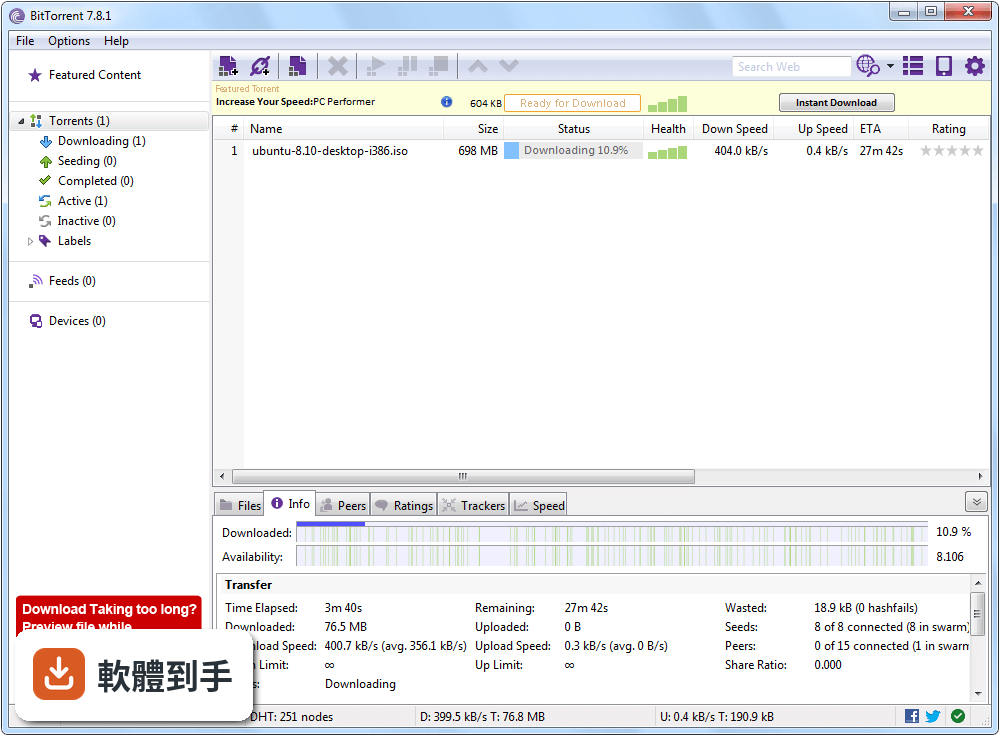
它是一套P2P檔案分享軟體,下載的同時也把已下載的碎片上傳給其他人,因此下載人數越多,速度通常越快。跟一般直接從伺服器下載不同,它不依賴單一來源,適合拿來抓電影、軟體這類大檔案。官方說明提到它支援選擇性下載、頻寬管理、內建搜尋、遠端管理與加密連線,介面有儀表板可以看上下載進度。
02下載一個大檔案,裡面有很多小檔案,可以只選我要的嗎?
可以。當你載入一個torrent檔,它會列出裡面的所有檔案,你可以勾選要下載的部分,沒勾的就不會抓。這在抓含多季影集或大量圖檔的torrent時很實用,能省下不需要的流量和硬碟空間。官方說明將「Selective File Download」列為主要功能之一,操作上在開始下載前勾選即可。
03下載的時候可以限制上傳速度嗎?怕影響其他網路使用。
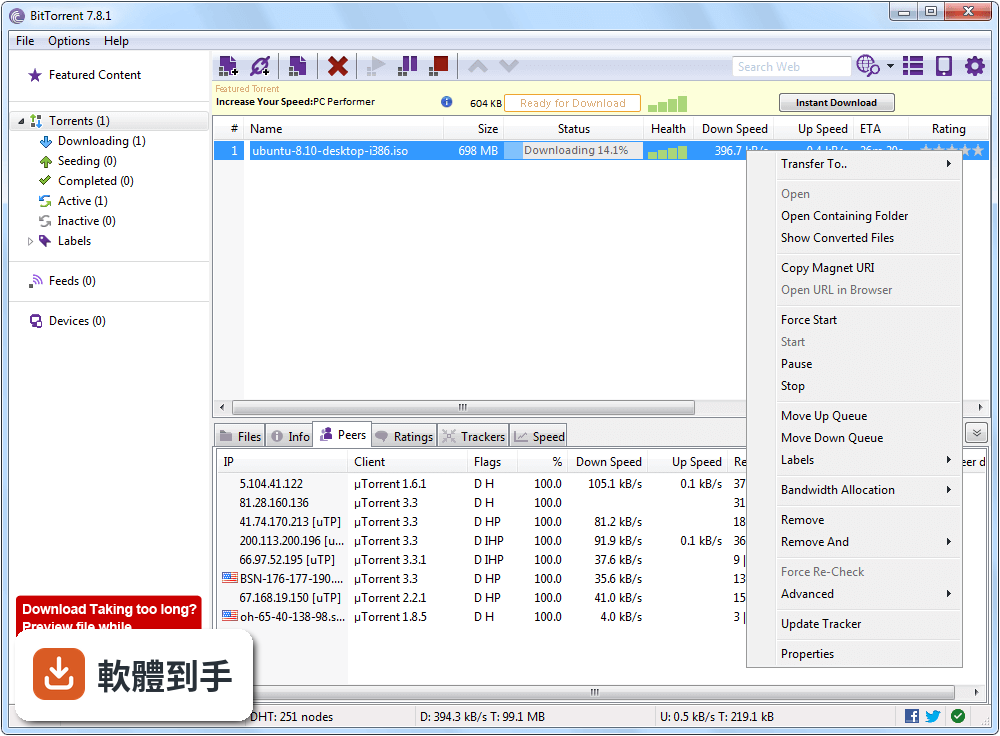
可以。官方功能說明中有「Bandwidth Management」,允許你分別設定上傳和下載的速度上限。如果你一邊下載一邊要看串流或玩遊戲,可以把上傳限低一點,避免頻寬被吃光。設定位置在軟體的偏好選項裡,可以隨時調整,不用重開下載任務。
04可以從手機遠端控制電腦的下載嗎?
可以。官方說明提到它提供「Remote Access」功能,可以透過網頁介面管理下載任務。也就是說,你人在外面用手機瀏覽器登入,就能查看下載進度、新增或暫停任務。不過官方說明沒有詳細列出設定的步驟,實際操作時需要自己確認網路環境和設定方式。
05下載完的影片可以直接在軟體裡看嗎?
可以。官方功能說明中有「Media Playback」,內建媒體播放器,下載完成後可以直接預覽影片或聽音樂,不用另外開播放軟體。這對想先確認檔案是否完整、內容是否正確的使用者來說很方便。不過它只支援預覽,如果你需要字幕、章節或進階播放功能,可能還是得用專門的播放器。
06這套軟體適合新手嗎?介面會不會很難懂?
官方說明指出它的介面「user-friendly and intuitive」,有儀表板顯示下載和上傳狀態,搜尋功能也放在明顯位置,整體乾淨有條理,適合初學者和有經驗的使用者。安裝過程可以選擇檔案存放位置和是否開機啟動,步驟簡單。不過介面語言是英文,不熟悉英文介面的人需要花一點時間適應。
07我電腦很舊,跑得動嗎?需要什麼等級的配備?
官方列出的系統需求是Windows 7以上、1GHz或更快的處理器、512MB記憶體、50MB硬碟空間。以現在的標準來看,這個需求很低,一般老電腦都能跑得動。不過實際效能還是會受到torrent種子數、同時下載任務數和網路狀態影響,如果你同時開很多任務,記憶體用量會上升。
08我偶爾才下載一次大檔案,適合用這套嗎?
如果你只是偶爾抓一次電影或軟體,免費版就夠用,不需要付費。但要注意免費版有廣告,官方說明中明確提到「Free version contains ads」。如果你不介意廣告干擾,偶爾用一次是沒問題的。如果你很在意廣告,或需要額外的防毒、檔案轉檔功能,才需要考慮付費的Pro版。
09免費版有廣告嗎?會不會很煩?
有。官方說明在「Pricing」段落提到免費版是「ad-supported」,也就是靠廣告支撐,Pro版才「No ads, no clutter」。廣告的具體形式官方沒有詳細描述,但如果你對介面整潔度很敏感,免費版的廣告可能會造成干擾。可以先用免費版試試看,受不了再考慮付費。
10我有在用私有tracker,這套軟體支援好嗎?
官方說明在「Cons」段落明確列出「Limited support for private trackers」,也就是對私有tracker的支援有限。如果你主要使用需要登入、有分享率要求的私有tracker,這套軟體可能不是最佳選擇。這種情況下,可以考慮其他對私有tracker支援較好的客戶端,例如qBittorrent,但具體支援程度需要自行確認。
11用這套軟體下載,別人看得到我的IP嗎?安全嗎?
官方FAQ提到,雖然軟體提供加密選項,但你的IP位址對網路中的其他使用者是可見的。如果你在意隱私,官方建議使用VPN來增強保護。另外,官方也提醒要從可信來源下載torrent,避免 malware 或非法內容。軟體本身有加密功能,但IP可見是P2P架構的特性,這點無法避免。
12如果我只是偶爾下載小檔案,有需要用到這套嗎?
如果你下載的檔案只有幾十MB,而且來源穩定,一般瀏覽器直接下載或網盤就夠了,不需要用到P2P軟體。這套軟體的優勢在於大檔案、多人分享的場景,檔案越大、種子越多,它的效率越明顯。如果你只是偶爾抓小東西,安裝它反而多佔系統資源,還得處理廣告。
下載與官方連結
BitTorrent.exe · 連結指向軟體原廠
版本紀錄
- 2026-09-27 BitTorrent Classic 7.11.0 Build 47255
- 2026-03-23 BitTorrent Classic 7.11.0 Build 47235
- 2020-08-14 BitTorrent Classic 7.10.5 Build 45785 4.8 MB
再看 5 筆
- 2020-06-09 BitTorrent Classic 7.10.5 Build 45665 4.6 MB
- 2020-05-05 BitTorrent 7.10.5 Build 45661 4.5 MB
- 2020-02-19 BitTorrent 7.10.5 Build 45497 4.6 MB
- 2019-12-22 BitTorrent 7.10.5 Build 45496 4.8 MB
- 2019-11-22 BitTorrent 7.10.5 Build 45416 4.7 MB
這一版改了什麼
What's new in this version:
BitTorrent 7.10.0 Build 44091
- Change log not available for this version
BitTorrent 7.10.0 Build 43917
- Change log not available for this version
BitTorrent 7.10.0 Build 43581
- Change log not available for this version
BitTorrent 7.9.9 Build 43389
- Change log not available for this version
BitTorrent 7.9.9 Build 43364
- Change log not available for this version
BitTorrent 7.9.9 Build 43296
- Change log not available for this version
BitTorrent 7.9.9 Build 43086
- Change log not available for this version
BitTorrent 7.9.9 Build 42974
- Change log not available for this version
BitTorrent 7.9.9 Build 42924
- Change log not available for this version
BitTorrent 7.9.9 Build 42607
- Change log not available for this version
BitTorrent 7.9.8 Build 42577
- Change log not available for this version
BitTorrent 7.9.8 Build 42549
- Change log not available for this version
BitTorrent 7.9.8 Build 42502
- Change log not available for this version
BitTorrent 7.9.8 Build 42450
- Change log not available for this version
BitTorrent 7.9.7 Build 42331
- Change log not available for this version
BitTorrent 7.9.6 Build 42179
- Change log not available for this version
BitTorrent 7.9.6 Build 42095
- Crash fixes
BitTorrent 7.9.5 Build 41866
- Change log not available for this version
BitTorrent 7.9.5 Build 41822
- Change log not available for this version
BitTorrent 7.9.5 Build 41802
- Change log not available for this version
BitTorrent 7.9.5 Build 41713
- Fixed crash in Advanced settings (sometimes triggered when saving)
- Fixed crash in the Devices page (sometimes triggered when adding a conversion device)
- Fixed crash in the Devices page (sometimes triggered when setting up devices page but no conversion devices are configured
- Fixed client hang (when BitTorrent was left open for 2-3 hours, sometimes Internet Explorer would trigger a client hang)
BitTorrent 7.9.5 Build 41629
- Moved code to standard containers to add stability, enable faster development, further reduce footprint
- Cleaned up code across all parts of codebase to improve stability
- Support for new ad-free premium product
- Fixed recognition of files that use HEVC codecs
- Added local memory usage test mode as part of effort to reduce footprint
- Fixed a bug that occasionally misplaced a link in the toolbar
- Fixed bug where selecting a torrent would sometimes not activate the toolbar
BitTorrent 7.9.5 Build 41373
- Better use of system resources, improvements to stability
- Improved handling of paid codecs and Antivirus activation for Pro users
- Fixed malformed response in a jsonp API
- Fixed incorrect accounting of wasted bytes when talking to peers
- Fixed memory leaks in clients
- Users were reporting a UI hang for RSS feeds (right-clicking on item)- fixed this
- Fixed Pro status page rendering
- Fixed a bug that prevented resizing of the left rail
BitTorrent 7.9.5 Build 41203
- Fixed client hang on Windows 7 32-bit
BitTorrent 7.9.5 Build 41163
- Fixed unnecessary resource usage when starting a transcode for pro users
BitTorrent 7.9.5 Build 41074
- Updated how the app handles HTML content (now out of process) for a significant (50%) improvement in stability. This is a new standard for BitTorrent's historically-low crash rates