
這是歷史版本頁面 — 看 Calibre 最新版本
電子書格式亂成一團?Calibre 能幫你整理轉檔
 Calibre 6.25.0
資料更新 2023-08-19
閱讀約 6 分鐘
你從不同管道收集電子書,有些是從網路書店買的,有些是從圖書館借的,還有一些是朋友直接傳檔案給你。打開電腦一看,EPUB、MOBI、PDF、AZW3 什麼格式都有,有些書在平板上能開,換到 Kindle 就顯示「格式不支援」。你想把書整理成一個像樣的書庫,卻發現每本書的封面、作者、出版年份亂七八糟,光靠資料夾分類根本救不回來。
一般人遇到這種狀況,會先想辦法找轉檔工具,把檔案轉成裝置能讀的格式。但轉完之後,檔案散落在不同資料夾,下次要找書還是得憑記憶翻。更麻煩的是,每換一個閱讀裝置,同樣的整理流程就要重來一次。這類工具的切入點,是先把「管理」和「轉檔」綁在一起——你只需要維護一份書庫,格式轉換、裝置同步、資料修正都從同一個地方出發,而不是每次面對單一檔案。
01Calibre 到底能拿來做什麼?
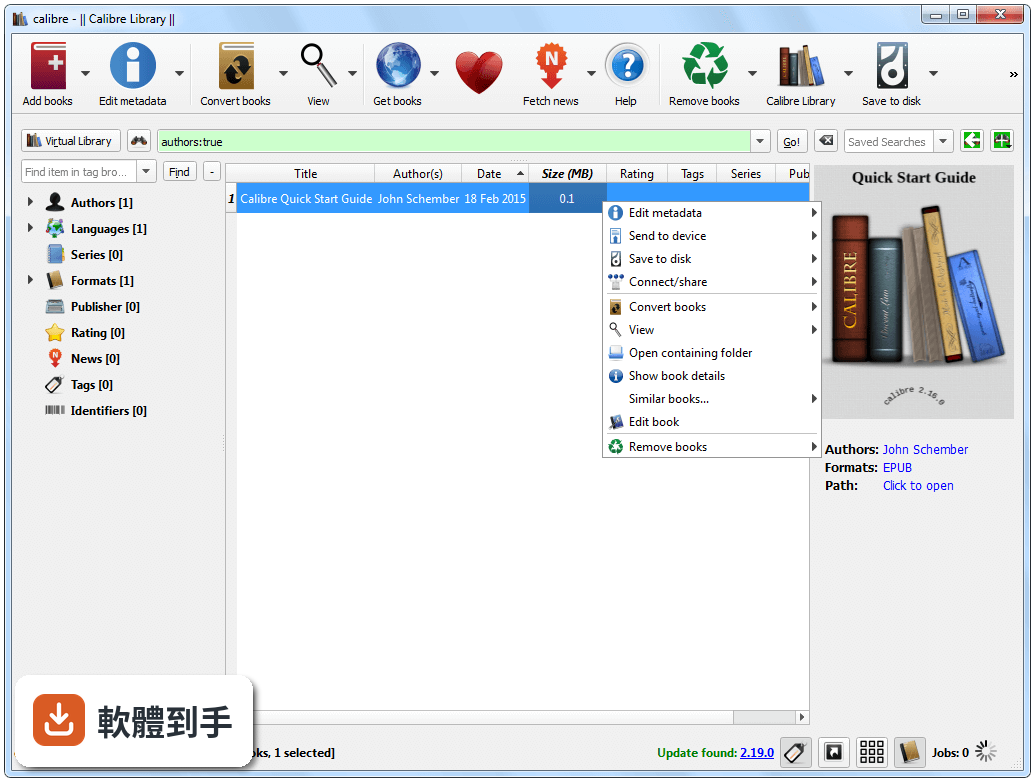
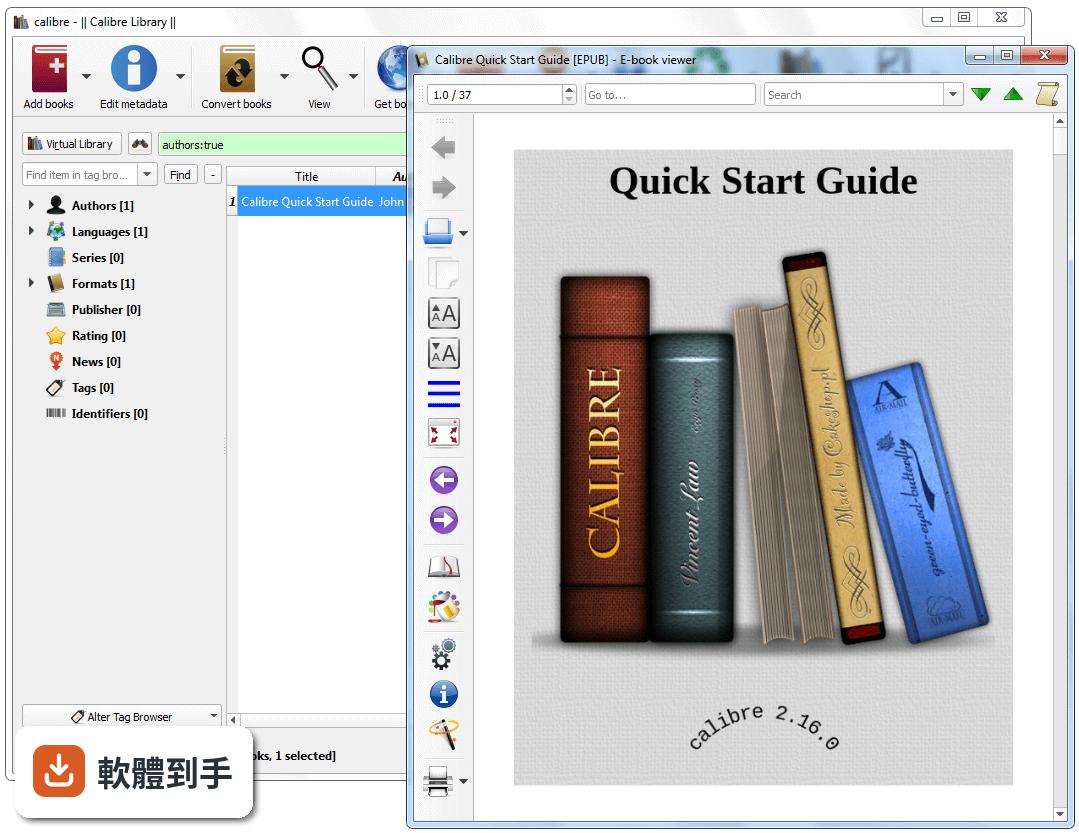
它是一套電子書管理軟體,核心功能是把散落的電子書集中成一個書庫。你可以把書拖進視窗,它會自動抓取封面、作者、簡介等資料,之後要搜尋、分類、排序都從這個書庫出發。除了管理,它也內建格式轉換、電子書編輯、閱讀器,以及把書傳到 Kindle、Kobo 等裝置的功能,等於一套軟體涵蓋整理、轉檔、同步三件事。
02它能轉換哪些電子書格式?
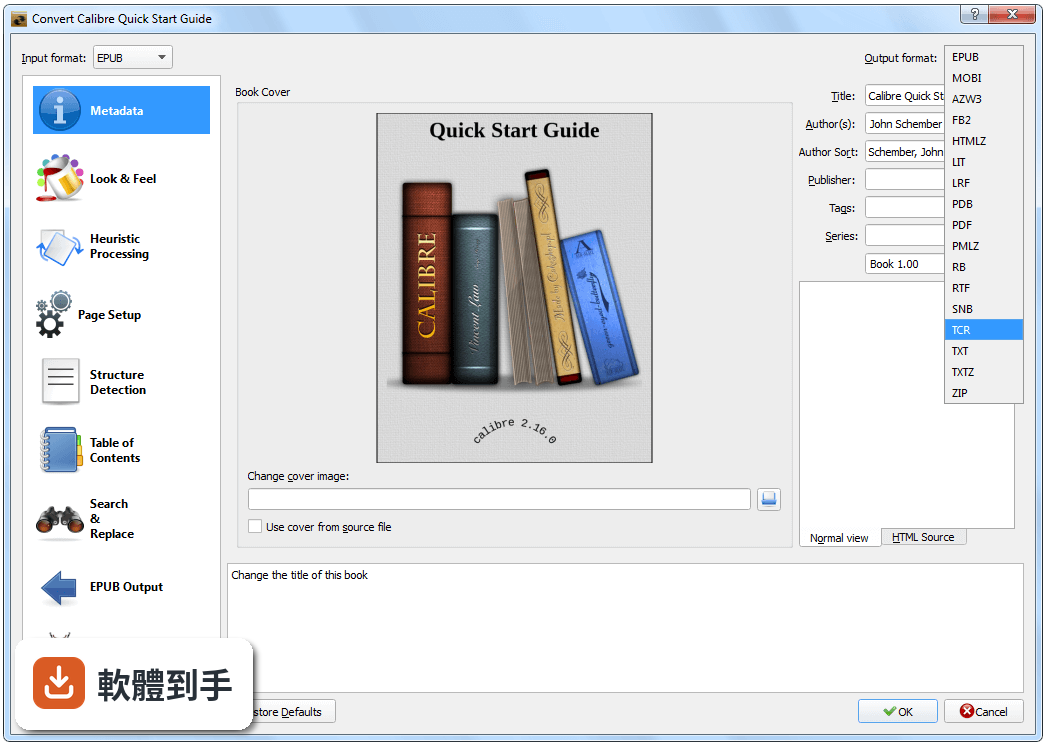
官方列出的格式包含 EPUB、MOBI、PDF、AZW3 等,涵蓋市面上常見的電子書格式。操作方式是選定一本書,點「Convert books」,再選擇目標格式和調整細部設定。要注意的是,轉檔結果會受到原始檔案品質影響,有些排版複雜的書轉出來可能跑掉,建議轉完之後用內建閱讀器檢查一下。
03可以把書直接傳到 Kindle 嗎?
可以。把 Kindle 用 USB 連上電腦,在 Calibre 裡選好書,按一下傳輸按鈕就會把書放進裝置。它支援 Kindle、Kobo、Nook 等常見閱讀器。不過官方有提醒,受 DRM 保護的檔案可能無法直接傳輸,需要另外處理。如果你主要用 Kindle,這套軟體也能當作書庫管理工具,不必每次都用 Amazon 的雲端服務。
04書的封面和作者資訊亂掉,它能修嗎?
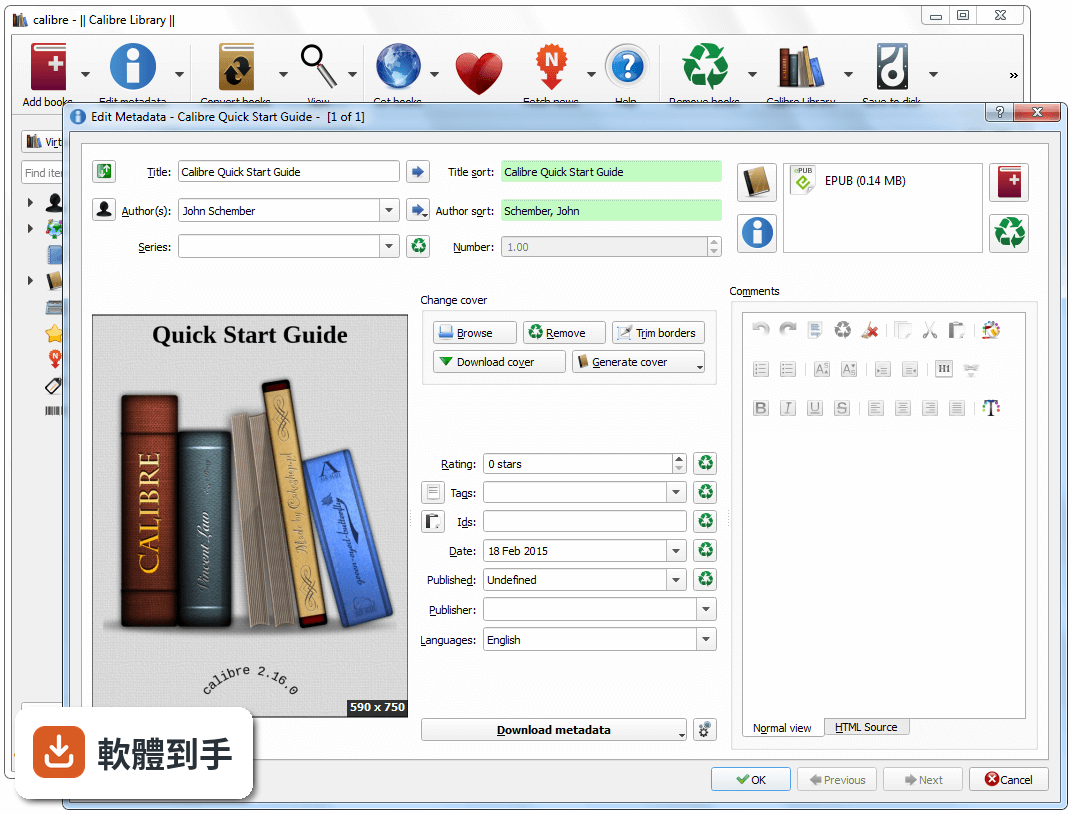
可以。它具備 metadata 編輯功能,你可以手動修改書名、作者、出版社、封面圖片等欄位,也可以讓軟體自動從網路上抓取資料。選一本書,按編輯 metadata,它會搜尋線上書庫,把封面、簡介、出版日期等資訊補齊。對於收藏大量書籍的人來說,這比一本一本手動輸入快很多。
05想在新電腦上看書,它能同步書庫嗎?
它沒有原生雲端同步功能,但提供一個「Content Server」功能,讓你在瀏覽器上遠端存取書庫。安裝在電腦上之後,開啟 Content Server,其他裝置透過瀏覽器連到同一網路就能下載書籍。如果你希望書庫自動同步到多台電腦,這套軟體沒有內建,需要自己把書庫資料夾放到雲端硬碟,或使用其他同步工具。
06收藏很多電子書的人適合用嗎?
適合。它的核心設計就是管理大量書籍,metadata 編輯、標籤、分類、排序這些功能都是為了讓書庫在書籍數量增加之後仍然好搜尋。官方建議記憶體至少 2GB,大型書庫建議 4GB,如果你的藏書超過上千本,這套軟體能派上用場。不過介面是英文的,操作上需要一些時間熟悉。
07只偶爾看一本書的人需要它嗎?
不一定。如果你只是偶爾從網路書店買一本書,看完就刪,沒有收藏和整理的需求,那這套軟體對你來說可能過於龐大。它的功能集中在管理、轉檔、同步,對輕度使用者來說,直接用手機或平板的閱讀 App 可能更簡單。但如果你手上已經累積了各種格式的檔案,即使數量不多,轉檔功能還是值得一用。
08不會英文介面的人能用嗎?
介面是英文的,沒有內建繁體中文語系。如果你對英文介面不熟悉,操作上會需要一些時間摸索,尤其是轉檔設定和 metadata 編輯這類功能,按鈕和選項都是英文。不過它的介面結構算有邏輯,主要功能都放在明顯的位置,搭配線上教學或說明文件,還是可以上手。如果完全無法接受英文介面,可能需要考慮其他有中文的電子書管理工具。
09有聲書能管理嗎?
不行。官方明確表示這套軟體是設計給電子書使用,不支援有聲書。如果你收藏了大量有聲書,想要一個工具同時管理電子書和有聲書,這套軟體無法滿足需求。你需要另外找有聲書管理工具,或接受電子書和有聲書分開管理的現實。
10有 DRM 保護的書能處理嗎?
官方說明指出,Calibre 本身沒有內建 DRM 移除功能。如果你買的書有 DRM 保護,直接轉檔或傳輸可能會失敗。官方提到第三方外掛可以協助處理,但這涉及法律和授權問題,使用前需要自行確認合法性。如果你的書庫大部分是 DRM 保護的書,這套軟體能做的事情會受到限制。
11書庫很大會跑不動嗎?
有可能。官方建議大型書庫至少 4GB 記憶體,如果你的藏書量很大,或書庫資料夾包含大量高解析度封面,軟體在啟動、搜尋、轉檔時可能會變慢。這不是軟體故障,而是資料量造成的效能瓶頸。如果你有數萬本書,可能需要考慮其他更輕量的管理方式,或接受效能上的取捨。
12想要雲端同步功能的人適合嗎?
不適合。這套軟體沒有原生雲端同步,官方提供的 Content Server 只是讓你在瀏覽器上存取書庫,不是自動同步。如果你希望書庫在多台電腦、手機、平板之間自動保持一致,這套軟體做不到。你需要自己把書庫資料夾放到雲端硬碟,或使用其他同步工具,但這樣做可能會遇到檔案衝突或同步不完整的問題。
下載與官方連結
calibre-64bit-6.25.0.msi · 連結指向軟體原廠
版本紀錄
- 2026-10-23 Calibre 9.17.0 229 MB
- 2026-10-10 Calibre 9.16.0 228 MB
- 2026-09-19 Calibre 9.15.0 216 MB
再看 5 筆
- 2026-08-29 Calibre 9.14.0 213 MB
- 2026-08-08 Calibre 9.13.0 213 MB
- 2024-02-09 Calibre 7.5.1
- 2023-11-24 Calibre 7.1.0
- 2023-10-08 Calibre 6.28.1
這一版改了什麼
What's new in this version:
Calibre 6.25.0
New features:
- Book details panel: De-emphasize titles making the actual data stand out more
- Allow using the new manage data files dialog from within the edit metadata dialog
- Trash dialog: Allow right clicking on an entry to save it to disk
- When merging books by drag-and-drop add an option to use the dragged cover instead of the cover in the target book
- Create catalog: Add buttons to easily select all/non/visible fields when creating CSV/XML catalogs
- Preferences->Add your own columns: Add buttons to show/hide all columns
Fixed:
- Fix a regression in the previous release that broke parsing of some ISO-8601 timestamps
- E-book viewer: Mouse wheel horizontal events should jump sections not internal file boundaries
- Fix Preferences->Add your own columns changing check state on moving columns
- Get books: update various Polish e-book stores for website changes
- E-book viewer: Fix CFI parsing of numbers with trailing zeros causing some bookmarks to not work
- E-book viewer: Show an error when creating a bookmark if the bookmark position is not found
- CBR Input: Fix comics with extremely long internal filenames not working on Windows
- Edit book: Saved searches: Fix incorrect import in generated source code for some builtin functions
- Data file manager: Fix errors on systems with larger font sizes
New news sources:
- The Oldie by Sophist
- Various new Russian and Ukrainian news sources by Unknown
Improved news sources:
- Bloomberg
- Focus
- Epoch Times
- Hindu
- Business Today
- NYTimes
Calibre 6.24.0
New features:
- Easily manage the extra data files associated with a book by right clicking the edit metadata button and choose "Manage data files"
- Content server: Full text search: Allow searching a restricted subset of books
- E-book viewer: Allow clicking on calibre:// URLs
- Support fuzzier searching in the Tag browser find allowing unaccented characters to match accented ones
Fixed:
- DOCX conversion: Preserve underline style and color
- Fix incorrect sorting of device view after some operations
- Fix visit content server in browser not working when the content server is configured to listen on an IPv6 interface
- Fix one hour offset in some timezones on Windows for dates before 1970
- Windows: HTML Input: Fix error when trying to add HTML files with links to other files that are invalid pathnames
- Get books: Update various Polish language book stores for website changes
New news sources:
- The New Republic Magazine by ping
- Inc42 by unkn0w7n
Improved news sources:
- Epoch Times
- Business Standard
- Tagesspiegel
- Bloomberg Business Week
- MIT Technology Review
- Live Mint
- Private Eye
Calibre 6.23.0
New features:
- PDF Output: Add an option to discard the book cover instead of inserting it as the first page of the PDF.
- Content server: Allow opening the book details page for a matches book from the Full text search results page.
Bug fixes:
- Windows: Fix empty data folder getting created in directory calibre is launched from when changing title/author for a book with an existing data folder
- LIT Output: Fix error converting anything to LIT on Windows
- Ignore failures to expire old trash during startup
- Amazon metadata download: Fix retrieval of publisher information from amazon.fr
New news sources:
- ThePressProject
Improved news sources:
- Guardian & Observer
- Washington Post
- Private Eye
- Associated Press
Calibre 6.22.0
New features:
- Kobo driver: Add support for newest firmware
- Trash bin: Allow setting removed books to be permanently deleted on library close
- Windows: Nicer error message when file/folder is locked in another program
Fixed:
- PDF Output: Fix regression that caused large slowdowns when converting books with lots of internal HTML files to PDF
- CHM Input: Fix ToC entries that use fragments not supported
- E-book viewer: Fix searching for text next to hidden text not scrolling to the match
- E-book viewer: Fix selection popup not showing for some books on some platforms when the selection is in the top line
- DOCX Output: Fix multiple SVG images in the input document causing all the SVG images in the output to be just one of the input images
- MOBI Input: Ignore another form of corruption in trailing bytes
New news sources:
- Radio Canada by quatorze
- Deutschland Funk by Armin Geller
Improved news sources:
- Foreign Affairs
- Nature
- Bloomberg
- LiveMint
- Hindu and Hindu Business Line
- Deautsche Welle
- Horizons
- Indian Express
- Psych
- Harper's Magazine
Calibre 6.21.0
New features:
- DOCX Output: Add support for SVG images
- Now the generated DOCX will contain both the rasterized version of the SVG image and the original SVG image as the preferred source, which is supported by modern versions of Word.
- E-book viewer: Allow configuring the actions triggered by touch gestures
- DOCX Input: Add support for SVG images
Fixed:
- Windows: Fix a regression in the previous release that could cause files to be deleted if one of the files/folders was open in another program while changing title/author in calibre
- macOS: Fix extra dock icons visible when doing a job using Qt WebEngine such as converting to PDF or searching in Get books
- macOS and Linux: Fix an error when changing metadata or deleting books whose files are owned by another user
- CHM Input: Yet another regression opening CHM files with missing internal files on windows
- CHM Input: Resolve absolute links to resource files from the root of the CHM file
New news sources:
- The India Forum by unkn0wn
Improved news sources:
- Guardian & Observer
- Harper's Magazine Print recipe
- Live Mint
Calibre 6.20.0
Fixed:
- CHM Input: Fix a regression in the previous release that broke conversion of CHM files
- Windows: Make moving files in the calibre library folder more robust, locking folders in addition to files, before the start of the move
- Get books: Update Barnes and Noble store plugin for website changes
- Kindle output: Only re-encode JPEG images with EXIF metadata if the metadata contains actual transpose operations
- PDF Output: Fix error when input document contains multiple instances of a font some with vertical metrics and some without
- PDF Output: Fix using CSS Multicolumns for body causing conversion to fail when header/footer is specified
- MOBI Input: Fix a crash when converting some corrupted palmdoc compressed MOBI files
- E-book viewer: Ensure CSS stylesheets are interpreted as UTF-8
New news sources:
- Prospect Magazine UK (Free) by ping
Improved news sources:
- Foreign Affairs
Calibre 6.19.1
New features:
- HTML Input: Restrict adding of resources like images to only files within the folder hierarchy starting at the parent folder of the root HTML file Can be controlled by customizing the HTML to Zip plugin in Preferences->Plugins or the --allow-local-files-outside-root option to the ebook-convert command
Fixed:
- PDF Output: Fix regression in previous release causing non-English entries to be incorrectly encoded into the PDF bookmarks
- PDF Output: Fix regression in previous release that caused blank pages when generating headers or footers
- Book list: Fix editing-in-place not pre-selecting existing text for some column types
- Amazon.de metadata download: Update for site changes
- PDF Output: Set /Creator and /Producer in /Info
- Fix row height incorrect in Manage category dialog when blank
- 6.19.1 fixes a bug in 6.19.0 that broke the edit metadata dialog
Calibre 6.18.1
New features:
- Cover download: Allowing saving alternate covers to disk or in the book's data folder by right clicking on the cover
- Content server: Allow disabling full text search via the web interface
- When sending books to the device confirm the overwrite if the book already exists on the device
- E-book viewer: Handle horizontal wheel events as section jumps in paged mode
- Comic Input: When grayscaling comic images use 16bit gray instead of 8bit for better fidelity
- When using the PNG format for images this results in larger files but with better grayscaling fidelity.
- Add a new option in Preferences->Searching to disable keyboard searching in book list (i.e. you can turn off the behavior that pressing a key will jump to the first book whose title starts with that letter)
- Manage categories dialog: Use alternating row colors and allow adjusting row height
- Allow assigning a keyboard shortcut in Preferences->Shortcuts to open the data folder of a book
- Various improvements to syntax highlighting for the Markdown long text editor
Fixed:
- Fix a regression in 6.16 that broke restoring of the database
- Tag browser: Fix using F2 to edit items not allowing completion
- Book details: Fix formatting of text when copying all book details in narrow mode
- Book details: Fix copy all not respecting line breaks in fields
- Fix a regression in previous release that broke scrolling when using the scroll_per_row tweak
- Fix a regression in the previous release that broke the category manager dialog in some situations
- 6.18.1 fixes a regression that broke setting metadata and generating PDF files in the macOS and Linux binary builds
New news sources:
- Irish Times Free by unkn0wn
- elEconomista.es and El Confidencial by Hugo Meza
Improved news sources:
- NYTimes
- Economist
- Washington Post
- Irish Independent and Irish Times
- Live Mint
- Psych
- Hindu
Calibre 6.17.0
New features:
- Font subsetting: Add support for WOFF format fonts and CID keyed fonts. Also further reduce file sizes when subsetting
- Book details: Show a link to open the data files folder when data files are present
- Template language: Add various functions to query the extra files associated with a book
- Edit book: Compress images: Support compression of images in the WEBP format as well
- Comments editor: Add buttons to create links to data files and also to folders easily when inserting a link
- Allow displaying the id, formats and path builtin columns via Preferences->Add your own columns
- Trash bin: Add a button to clear the bin
- Metadata editor: Use a dedicated editor with preview for custom columns that store markdown formatted text
Fixed:
- Fix a regression in the previous release that could result in empty author folders remaining in the library when the author of a book is changed
- Fix the data files associated with a book not being handled when using the Merge books and Copy to library functions
- Fix a regression in the previous release that broke some operations in the Manage tags/authors/etc. dialogs
- Ensure metadata.opf is always written when deleting book even if it is not sequenced for backup
Improved news sources:
- Scientific American
Calibre 6.16.0
New features:
- Allow storing extra data files with a book
- Right click the Add books button to add arbitrary files as "data files" to a book record. These are managed by calibre along with the book files, but cannot be used for conversion/viewing. Select a book and press the "O" key to view the data files in your file explorer.
- Allow undoing the deletion of books from the calibre library
- Now deleted books are stored in a calibre "Trash bin" from which they can be restored with a single click. To view the trash bin, right click the "Remove books" button.
- Kobo driver: Add support for the new Kobo Elipsa 2E
- Book details: if an item has an associated link then offer that link in the item's context menu
Fixed:
- Content server viewer: Fix end of chapter content being occasionally skipped when scrolling by screen full with multiple pages
- E-book viewer: Fix a regression that caused notes from a different highlights to be shown in some situations
- E-book viewer: Show an error if the user tries to search for only punctuation or spaces in the search modes that ignore these
- Fix custom columns not showing in Book details links from other libraries
New news sources:
- Bar and Bench by unkn0wn
- The Washington Post Print Edition by unkn0wn
Improved news sources:
- Frontline
- Outlook Magazine
Calibre 6.15.1
New features:
- Allow adding external links to tags, series, publishers, etcetera in addition to authors
- The links show up as click-able icons in the book details panel. They can be set by right clicking the author/tag/etc. in the Tag browser and choosing "Manage"
- calibre:// URL scheme: Add support for a new type of URL that pops up the metadata of the specified book in a new window
- Works even with books not in the current library. See https://manual.calibre-ebook.com/url_scheme.html#open-a-book-details-window-on-a-book-in-some-library for details
- EPUB Output: Do not shrink images to fit the screen size by default, as modern readers do this themselves well enough. Can be controlled via an option in the EPUB Output section of the conversion dialog
- Edit metadata dialog: Add buttons to pop up the category editing windows easily
- Metadata download: Allow specifying rules to transform publisher names in addition to author and tag names
- Edit metadata dialog: Use both a colored border and an icon to indicate errors in line edits
- A new tweak in Preferences->Tweaks to control what program is run when clicking on URLs in calibre
Fixed:
- E-book viewer: Fix a regression that caused incorrect highlight collision detection in some books
- E-book viewer: Fix images embedded inside SVG tags not available for viewing in a pop-up
- DOCX Input: Do not ignore images that are present as fallbacks for a word drawing object
- Comic Input: When converting grayscaled PNG images to PNG ensure output images are stored as indexed PNG
- Fix active tab not easy to distinguish in dark mode
- Content server: Fix re-opening book from home page after making progress not opening to correct last read position when a user is logged in
- Comments editor: When copying to clipboard, copy clean HTML rather than the junk Qt produces
- Version 6.15.1 fixes an issue with the new URL scheme popping up incorrect book details windows
New news sources:
- Tehelka by Areet Mahadevan
- The Wire by unkn0wn
Improved news sources:
- Saechsische Zeitung
- LA Times
- Mediapart
- Live Mint
- The Hindu
Calibre 6.15.0
New features:
- Allow adding external links to tags, series, publishers, etcetera in addition to authors
- The links show up as click-able icons in the book details panel. They can be set by right clicking the author/tag/etc. in the Tag browser and choosing "Manage"
calibre:// URL scheme: Add support for a new type of URL that pops up the metadata of the specified book in a new window
- Works even with books not in the current library. See https://manual.calibre-ebook.com/url_scheme.html#open-a-book-details-window-on-a-book-in-some-library for details
- EPUB Output: Do not shrink images to fit the screen size by default, as modern readers do this themselves well enough. Can be controlled via an option in the EPUB Output section of the conversion dialog
- Edit metadata dialog: Add buttons to pop up the category editing windows easily
- Metadata download: Allow specifying rules to transform publisher names in addition to author and tag names
- Edit metadata dialog: Use both a colored border and an icon to indicate errors in line edits
- A new tweak in Preferences->Tweaks to control what program is run when clicking on URLs in calibre
Fixed:
- E-book viewer: Fix a regression that caused incorrect highlight collision detection in some books
- E-book viewer: Fix images embedded inside SVG tags not available for viewing in a pop-up
- DOCX Input: Do not ignore images that are present as fallbacks for a word drawing object
- Comic Input: When converting grayscaled PNG images to PNG ensure output images are stored as indexed PNG
- Fix active tab not easy to distinguish in dark mode
- Content server: Fix re-opening book from home page after making progress not opening to correct last read position when a user is logged in
- Comments editor: When copying to clipboard, copy clean HTML rather than the junk Qt produces
New news sources:
- Tehelka
- The Wire
Improved news sources:
- Saechsische Zeitung
- LA Times
- Mediapart
- Live Mint
- The Hindu
Calibre 6.14.1
New features:
- Edit metadata: When setting a cover from comic files allow choosing which page to use as the cover
- Allow display of columns built from other columns as comments in Book details
- Comments editor: Add a shortcut for "Paste and match style" (Ctrl+Shift+v)
Fixed:
- macOS: ToC Editor: Fix mouse becoming unusable when trying to create a new entry
- When computing title sorts strip leading and trailing quotes, not just leading quotes
- Content server viewer: Fix searching only showing results from the current chapter onwards
- Check book: Fix some incorrect line numbers reported in a few CSS error messages
- Fix regression in 6.14.0 that caused some generated resources to be excluded from the calibre source bundle
- Fix regression in 6.14.0 that broke using paths with single quotes in them for the calibre library
- Fix ToC Editor on macOS in 6.14.0 not working inside the Edit book tool only
Improved news sources:
- Strange Horizons
- The Saturday Paper
- New Scientist
- The Mainichi
- DR Nyheder
- New York Magazine
- Bloomberg
- Deccan Herald
Calibre 6.14.0
New features:
- Edit metadata: When setting a cover from comic files allow choosing which page to use as the cover
- Allow display of columns built from other columns as comments in Book details
- Comments editor: Add a shortcut for "Paste and match style" (Ctrl+Shift+v)
Fixed:
- macOS: ToC Editor: Fix mouse becoming unusable when trying to create a new entry
- When computing title sorts strip leading and trailing quotes, not just leading quotes
- Content server viewer: Fix searching only showing results from the current chapter onwards
- Check book: Fix some incorrect line numbers reported in a few CSS error messages
Improved news sources:
- Strange Horizons
- The Saturday Paper
- New Scientist
- The Mainichi
- DR Nyheder
- New York Magazine
- Bloomberg
- Deccan Herald
Calibre 6.13.0
New features:
- Content server: E-book viewer: Long tapping on an image now causes it to be displayed in an internal popup rather than a new window as some browsers block the creation of new windows
Fixed:
- E-book viewer: Fix some adjacent highlights with nothing in between them not being displayed
- Content server: Workaround for Safari regression causing bookmarks to disappear on reload
- E-book viewer: Read aloud: Fix a regression in the previous release that caused the Read aloud controls to not reappear when Read aloud is canceled and restarted
- E-book viewer: Read aloud: Fix a regression in the previous release that caused an error when using Read aloud on a chapter with no text, such as the cover page
- E-book viewer: Fix a regression that caused a spurious error on Windows when reading out selected text
- Fix a regression in calibre 5.0 that broke sorting the device view by title if one of the books has an empty title
- Edit book: Spell Check dialog: Fix second word not getting selected when after first word is fixed
- Improve hover highlight color in tree views
New news sources:
- The Economist Espresso by unkn0wn
- Science X by unkn0wn
- Horizons by unkn0wn
- Deccan Herald by unkn0wn
- The Monthly by unkn0wn
Improved news sources:
- CNN
- Bloomberg
Calibre 6.12.0
New features:
- E-book viewer: Read aloud: On Windows switch to using the new Microsoft speech subsystem with access to more voices
- Note that this means that old voice, speed and audio devices setting will not be used so a reconfiguration might be needed.
- calibre:// URL scheme: allow specifying a Virtual library for show_book URLs
- Add by ISBN: Allow adding using identifiers other than ISBN as well
- Update bundled Qt to 6.4 this means calibre on macOS is now only supported on Big Sur and newer
- Spell check dialog: Allow up and down arrow keys to work regardless of focus
- Allow multiple Template tester dialogs
Fixed:
- Windows MTP device driver: Ignore failure to enumerate objects inside non-root folders
- There are apparently a lot of devices out there that fail in this way. So rather than aborting the scan simply ignore the folder.
- Book list: Fix a regression in the previous release that broke dragging to select multiple books
- Content server viewer: Fix reload book not actually reloading until the browser is also refreshed
- E-book viewer: Fix occasional false warning about highlight being overwritten
- E-book viewer: Fix detection of selected highlights when all text is selected
- Fix an error when embedding metadata into a large number of books
- When updating metadata in EPUB 2 files and no language is specified, do not remove the tag as this causes epubcheck to complain. Instead set the language to "und"
- Wireless device driver: Remove the timeout for initial connection
- Use an icon rather than a color to report errors in fields and the search box
- Conversion dialog: Regex builder: Workaround bug in Qt that prevented searching for non breaking spaces in the wizard used to test search expressions
- Spell check dialog: move down after correcting word, not up
- Get books: Fix Mobileread store plugin not working
New news sources:
- Boston Globe Print Edition
- Observer Reach Foundation
Improved news sources:
- Jerusalem Post
- LiveMint
- The Seattle Times
- India Today
- Outlook Magazine
- Live Mint
- Irish Independent
- Irish Times
Calibre 6.11.0
New features:
- Edit book: Check book: Allow automatic fixing of various simple CSS errors
- E-book viewer: When Read aloud is speaking, make the control bar translucent so that words under the bar are visible
- Edit book: Switch to a new library (stylelint) for find problems in CSS as the old library was no longer maintained
- Edit book: File browser: Allow using keyboard shortcuts to re-order the spine
- calibredb list: Allow specifying multiple fields for --sort-by
- Check library: Allow opening the book folder easily
Fixed:
- Fix windows not being moved onto the current monitor when they were previously visible on a removed monitor that was to the left of the current monitor
- Book list: Fix a regression in the previous release that broke drag and drop of multiple books
- Fix detection of Tolino Vision 6 on macOS/Linux
- Content server: Fix auto full screen not working when continuing to read books with user account enabled
- Edit book: Set semantics: Fix error when setting the "Notes" semantic
- HTMLZ output: Fix images referred to in CSS stylesheets not being converted
- Book details panel: Fix HTML comment tags in the comments breaking display of book details
- Content server home page: When showing recently read books from across devices hide the entries for which loading the cover fails
- Windows Text-to-speech: Dont fail to configure if one of the voices has no defined language
- Fix a regression in calibre 5 that broke using a file for the --extra-css option of ebook-convert
- Content server FTS: Fix page header bar not visible
- Content server: Fix identifiers from third party metadata download plugins not becoming clickable links on the book details page
- Edit book: Warn when saving will overwrite a read-only file
- Fix restoring geometry of maximized/fullscreen dialogs forcing them visible
- Fix a regression in the previous release that caused spurious error message when doing some out of band searches
- Fix a regression in the previous release that broke choosing new programs for the Open with function
New news sources:
- NHK News - by Richard A. Steps
- Globes in English by barakplasma
Improved news sources:
- PC World
- HNA
- Caravan Magazine
- Harvard Business Review
- Various Israeli news sources
Calibre 6.10.0
New features:
- Content server: Add support for searching the full text of books. Simply click the FTS link on the search page to start a full text search.
- Content server: When using user accounts, the homepage now shows recently read books from any device not just the current device
- Kobo driver: Bump the max supported firmware version
- Conversion: New Output profile for the Kindle Scribe
- Check library: Allow ignoring folder names as well as files names
Fixed:
- Edit book: Fix various formatting operations not inserting the tags in the correct place in the presence of non-BMP characters
- Edit book: Use instead of for strikethrough
- Edit book: Fix export saved search to search panel not preserving the wrap checkbox state
- Content server: Redirect the index page to always have trailing slash when using URL prefixes
- Book list: Workaround for change in Qt 6 behavior where clicking on an already selected row does not deselect other rows
- Windows: Fix a regression in calibre 6 causing Open With to not extract icons from EXE files
New news sources
- Fokus
- Press Information Bureau
- Himal Southasian
- Indian Express Print Edition
Improved news sources
- Indian Express
- Financial Times
- TIME Magazine
- Hindu Business Line Print Edition
- Arts and Letters Daily
- Frontline
- Sportstar
- New Yorker
Calibre 6.9.0
New features:
- E-book viewer: When exporting highlights as plain text include titles from chapters at all levels not just the first level
- Edit book: Reports: Show the number of words per file in the Files section of the report
- Windows builds: sign DLLs in addition to EXEs to make Microsoft's new "Smart App Control" tool happy
- Sending by email: When adding comments also add series
- Nook driver: Put files in NOOK/Books instead of NOOK/My Files on recent nook devices so they are all listed in one place in the NOOK UI
- calibredb list: Allow using a template as one of the returned fields
- Tag browser: Add context menu action to turn on/off sub-categorization for a category
Fixed:
- Merging books: Fix title sort not being updated when the title is updated
- Content server viewer: Fix incorrect sorting of highlights in the same paragraph
- Content server viewer: When exporting highlights as text include chapter titles
- Improve rendering of the separator handle dots introduced in the previous release
- Edit book: Fix regression in previous release causing applying any container update marking all open image editors as modified
- Fix a regression in the previous release that caused copying book details to clipboard to use unix line endings on windows
Improved news sources:
- Bloomberg
- The Globe and Mail
- Spectator Magazine
- The New York Times
- The Hindu
- MIT Technology Review
Calibre 6.8.0
New features:
- Allow customizing the buttons available to the right of the search bar in the main calibre window via Preferences->Toolbars & menus->The buttons on the searchbar
- Book details panel: Allow adjusting the space used by the cover with a splitter
- Make splitter handles more visible in the calibre UI style
- When sending by email to kindle dont include the author in the filename as amazon is currently reading the author from the file metadata but not the title
Fixed:
- Book list: Fix incorrect rendering of yes/no icons when they are configured to have only two values
- Nook driver: Send books to the NOOK folder for the 2021 Nook model as well
- Improve performance in very large libraries of various UI operations such as right clicking, marking books, etc.
- Fix edit metadata dialog not remembering its position and improve how calibre restores window position and size on multi-monitor systems
- Conversion: Fix CSS styles applied to SVG elements being discarded
- EPUB Input: Fix empty adobe page number template file causing conversion to fail
- E-book viewer: Fix rendering of comments in metadata display when using a dark color scheme
- AZW3 Input: Fix svg images that use a prefix for the SVG namespace not being recognized
- Edit book: Fix double clicking in the see what changed dialog not opening the file in the editor since calibre 6.0
- Edit book: Fix modified indicator on images not working correctly when replacing the image
- Amazon metadata download: Adapt the plugin for website changes
New news sources:
- Fifty Two by unkn0wn
- Bloomberg and Bloomberg Business Week by unkn0wn
Improved news sources:
- Army and Navy Times
- eenadu_ap
- Handelsblatt
Calibre 6.7.1
New features:
- Template language: A new "Python template mode" which allows using arbitrary Python code in templates
- Tag browser: Allow removing format from selected books by right clicking on the format in the Tag browser
- E-book viewer: Ask for confirmation when creating a highlight that will overwrite existing highlights
- Book list: Allow changing column widths via a dedicated dialog by right clicking on column headers
Fixed:
- E-book viewer: Fix a regression that broke adding of new lookup sources
- E-book viewer: Fix copy to clipboard not ignoring text from elements that are marked as non user selectable
- Content server: When adding books, run all file type plugins before reading metadata
- Edit book: Preview panel: In dark mode when all of the background/foreground/link colors are set to "No change" do not render the book using dark colors
- Version 6.7.1 fixes a regression in the previous release that broke the delete specific format from book function
Improved news sources:
- The Athletic
- der Standard
- The Economic Times India Print Edition
- Indian Express
- India Today Magazine
- Caravan Magazine
Calibre 6.6.1
New features:
- Book details: allow displaying multi-valued categories such as tags on separate lines via Preferences->Look & feel->Book details
- Tag browser: When searching the Tag browser allow also filtering the book list to show only books that match one of the categories currently shown in the Tag browser
- To use enable the two Preferences: "Preferences->Look & feel->Tag browser->Hide empty categories" and "Find shows all items that match". Then, when searching the Tag browser, press Ctrl+Alt+Shift+F to restrict the displayed books.
- Edit book: When right clicking on HTML files in EPUB 3 books, allow marking them as the Table of Contents (NAV document)
Fixed:
- EPUB Output: Fix converting a document with obfuscated fonts to EPUB 3 not working
- Edit book: Fix an error when processing books that contain comments inside unknown CSS @ rules
- Content server: Fix jumping to locations such as bookmarks not working on iPhone/iPad running iOS >= 15
- Font subsetting: Fix :first-line and :first-letter pseudo classes not being handled correctly
- Workaround for Amazon's email delivery service not reading metadata from inside ebook files
- Edit book: File list: Fix pressing Tab key while renaming a file not starting the rename of the next file
- Version 6.6.1 fixes a regression that caused the Edit metadata window to not remember its last used size. Note that you will have to resize it once after updating to 6.6.1, after which the size will be remembered.
Improved news sources:
- SCMP
- Spectator Magazine
- Spiegel Online International
- Engadget
Calibre 6.5.0
New features:
- Kobo driver: support the new Kobo Clara 2e
- When running calibre with the --with-library command line flag and calibre is already running, switch to the specified library in calibre
- E-book viewer: Ask for confirmation when deleting a custom highlight style
- Do not show the virtual libraries tab bar when no virtual libraries are present
- Tag mapper: When specifying the replacement tag allow completion from the tags in the currently open library
- Template language: New functions strcasecmp() and to_hex()
Fixed:
- Comments editor: Workaround for Qt inserting invalid font-weight when converting a paragraph to a heading
- E-book viewer: When displaying highlights dont group highlights from different chapters when the chapter titles are identical
- Tag browser: Fix error if a User category contains a reference to a deleted custom column
- When sending books by email to the Kindle and PocketBook email delivery services use random subject and filenames consisting of simple English letters to try to workaround various bugs in their email processing code
Improved news sources:
- The Wall Street Journal
- Open Magazine
- The Baffler
- Dark Reading
- New York Times
- NYTimes Cooking
- NYTimes Sports Beat
- Outlook Magazine
- Foreign Affairs
Calibre 6.4.0
New features:
- Conversion pipeline: Add support for !important when flattening CSS rules
- Content server: Use the chapter title as the base bookmark name when creating new bookmarks
- Allow changing the search order when clicking on items in the Tag browser (Preferences->Look & feel->Tag browser->Hierarchy and searching)
- Check library: Make vacuuming the full text database optional as it is very slow and memory intensive
- Tag browser: Move the preferences for controlling the order and display of categories in the Tag browser from Preferences->Tweaks to Preferences->Look & feel->Tag browser
- User category editor: Hide items not visible in the Tag browser
- Allow adding a button to show the Manage categories window to the toolbars via Preferences->Toolbars & menus
- Google metadata download: When excluding results from a web search because they don't match the specified title/author ignore diacritics, accents, etc.
Fixed:
- E-book viewer: Lookup: Google dictionary: Add some padding at the left and right margins
- E-book viewer: Lookup word in Google dictionary: Fix meanings of some words not being shown in the user's preferred language
- Fix calibredb backup_metadata --all operating only on dirty books not all books
- Do not VACUUM FTS db when exporting library as it can be very slow
- Windows: Nicer error message when attempting to run viewer/editor on machine without MediaPack installed
- Edit book: Reports: Fix rendering of images in the images report table
- Content server: Fix formatting of dates for custom columns using ISO format
New news sources:
- Brhat by Vishwas Vasuki
- Cachys Blog by Volker Heggemann
- Various Russian and Ukranian news sources by bugmen00t
Improved news sources:
- Live Law and Live Mint
- Financial Times and MIT Technology Review
- Business Standard and Indian Express
- Nautilus
- High Country News
- Outlook Business Magazine
Calibre 6.3.0
New features:
- E-book viewer: Allow searching for nearby words using a new "Nearby words" search mode
calibredb: New fts_search and fts_index commands to perform full text searching from the command line
- Image viewing popup: Allow zooming using the standard shortcuts of Ctrl+plus/minus
Fixed:
- Fix a regression in calibre 6.0 that broke remembering the previous sort order for a column
- Fix a regression in calibre 6.0 that broke processing of very high resolution images
- Full text search: Fix error when using restrict searched books and more than 900 books are present in the searched list
- E-book viewer: Fix parsing of CSS styles with @supports rules not working
- E-book viewer: Speed up initial render of books with lots of CSS in