
這是歷史版本頁面 — 看 Cheat Engine 最新版本
單機遊戲太難或太簡單?Cheat Engine 改數值
 Cheat Engine 6.5
資料更新 2015-12-31
閱讀約 5 分鐘
玩單機遊戲時,常常遇到一個關卡怎麼打都過不去,或是覺得敵人太弱、遊戲變得很無聊。你想調整血量、金錢、經驗值這些數字,讓遊戲難度符合自己的節奏,但遊戲本身沒有提供任何修改選項,只能硬著頭皮繼續刷,或是乾脆放棄不玩。這種卡在「想改卻改不了」的時刻,正是需要一個能直接動遊戲內部數值的工具。
一般人會先想到去下載別人做好的修改器,但修改器往往只對應特定版本,遊戲一更新就失效,而且不一定找得到。另一種做法是改存檔,但存檔格式複雜,改錯反而壞檔。這類工具的做法是直接掃描遊戲執行時記憶體裡的變數,找到你指定的數值並修改它,同時還附帶除錯、加速等功能。它不保證每個遊戲都能改,但提供了一套通用的方法,讓你自己動手。
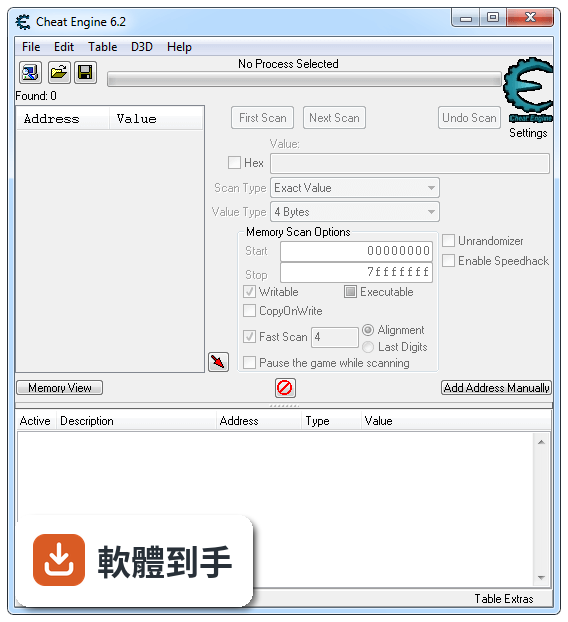
01Cheat Engine 能改哪些遊戲的數值?
官方說明指出,它主要用於修改單機遊戲,可以調整血量、金錢、經驗等變數,讓遊戲變難或變簡單。實際支援哪些遊戲沒有明確列表,因為它靠掃描記憶體來找數值,理論上多數單機遊戲都能試,但有些遊戲可能加了防護而無法修改。建議先從內建教學開始,熟悉基本操作後再套用到其他遊戲。
02它除了改數值,還能做什麼?
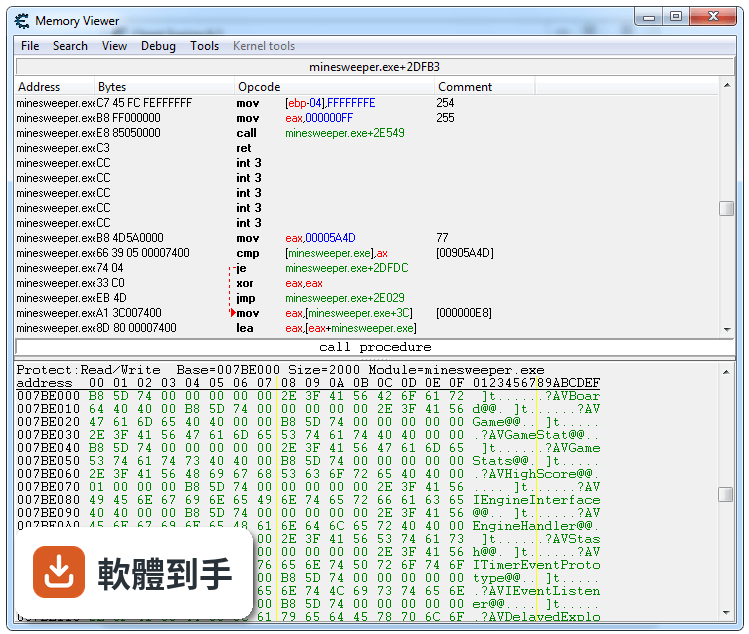
除了記憶體掃描,它還包含除錯器、反組譯器、組合語言工具、加速器、訓練器製作工具,以及 Direct3D 操作和系統檢查工具。這些功能主要給進階使用者用來分析遊戲或一般應用程式,例如找出程式邏輯、調整執行速度。對一般玩家來說,最常用到的還是改數值和加速功能。
03怎麼用記憶體掃描找到遊戲裡的數值?
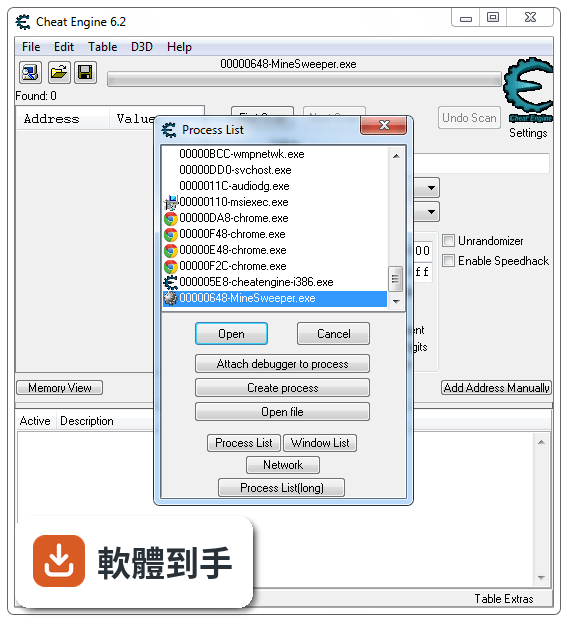
基本流程是:先開啟遊戲,記住一個數值(例如血量 100),在 Cheat Engine 中輸入 100 並掃描;接著在遊戲中讓血量改變(例如受傷變成 80),再輸入 80 掃描;重複這個動作,直到掃描結果剩下一個或少數幾個位址,就能鎖定或修改它。官方建議新手至少完成內建教學的前五個步驟,才能理解運作原理。
04它能不能改線上遊戲?
不行。官方明確說明它只支援修改單機遊戲,線上遊戲的數值通常由伺服器端控制,而且修改記憶體可能違反遊戲規則,導致帳號被封鎖。如果你主要玩線上遊戲,這套軟體不適合你,也不需要冒險嘗試。
05它有沒有教學或教學模式?
有。安裝後在程式集裡可以找到內建教學(Tutorial),它會一步步引導你練習掃描、修改、鎖定數值等操作。官方建議新手至少完成前五步,以建立基本概念。教學是英文介面,但操作步驟簡單,照著做就能學會。
06什麼樣的人適合用這套軟體?
適合喜歡玩單機遊戲、想自訂遊戲難度的人,尤其是那些遇到卡關或覺得遊戲太簡單的玩家。它也適合對程式除錯有興趣的人,因為內建除錯器和反組譯工具。不過你需要有耐心學習基本操作,如果完全不想花時間研究,只想一鍵修改,那可能不適合。
07我完全不懂程式,能用嗎?
可以,但需要先花時間照著內建教學練習。基本修改數值不需要寫程式,只要會操作掃描和鎖定功能就行。不過如果遇到遊戲有防護或數值加密,就需要進階技巧,那時可能需要一些程式概念。建議先從簡單的遊戲開始,熟悉流程後再挑戰複雜的。
08它適合用來做遊戲開發或除錯嗎?
官方提到它包含除錯器、反組譯器、組合語言工具等,可以用來除錯遊戲或一般應用程式。但這不是它的主要用途,而且介面偏工程導向,對專業開發者來說可能不如專用除錯工具完整。如果你只是偶爾想分析程式行為,可以試試;但如果是正式開發,建議使用專門的 IDE 或除錯器。
09我的系統是 Windows 10/11,能用嗎?
官方支援系統只列出 Windows XP、Vista、7、8,沒有提到 Windows 10 或 11。因此在新版系統上可能無法正常運作,或出現相容性問題。你可以嘗試以相容模式執行,但不保證成功。如果你的系統是 Windows 10 或 11,需要自行測試確認。
10它會被防毒軟體誤判嗎?
官方說明特別提到,有些防毒軟體會誤將 Cheat Engine 的部分檔案判為木馬或病毒。這是因為它修改記憶體的行為與惡意程式類似。如果你遇到誤判,可以將它加入防毒軟體的例外清單,但前提是你從官方管道下載,並確認檔案來源可靠。
11它還持續更新嗎?
根據收錄的版本紀錄,最近一次更新是在 2020 年,之後就沒有新版本,近兩年更新次數為零。這表示它長期沒有維護,可能無法支援新推出的遊戲或新的作業系統。如果你玩的遊戲很新,可能無法使用,或需要等待社群提供非官方修補。
12我只玩線上遊戲,適合嗎?
不適合。官方明確限定它只能修改單機遊戲,線上遊戲的數值由伺服器控制,修改記憶體不僅無效,還可能觸發反作弊系統導致帳號被封。如果你只玩線上遊戲,這套軟體對你沒有用處,也不需要考慮。
下載與官方連結
CheatEngine65.exe · 10.9 MB
版本紀錄
- 2020-11-04 WorkFlowy Desktop 1.3.5 109 MB
- 2020-11-04 Cheat Engine 7.2 24.2 MB
- 2020-04-22 Cheat Engine 7.1 21.9 MB
再看 5 筆
- 2019-08-21 Cheat Engine 7.0 17 MB
- 2019-08-14 WorkFlowy Desktop 1.3.4 88.4 MB
- 2019-07-28 WorkFlowy Desktop 1.3.3 88.4 MB
- 2019-06-26 WorkFlowy Desktop 1.3.2 88.4 MB
- 2019-06-13 WorkFlowy Desktop 1.3.1 87.9 MB
這一版改了什麼
What's new in this version:
Fixes:
- Fixed page exception breakpoints from not working
- Fixed the save as button in the lua script assigned to the table
- Fixed the dotnetdatacollector from not fetching parent fields
- Fixed disassembling of some instructions
- Fixed assembling some instructions
- Fixed assembling instructions that referenced address 80000000 to ffffffff in 64-bit targets
- Fixed dealing with unexpected breakpoints
- Fixed several issues with the network scanner. (symbols, scanspeed, threads, etc...)
- Fixed "going to" 64-bit registers.
- Fixed pointerstrings for 64-bit
- Fixed the addressparser in memview's hexview not handing static 64-bit addresses
- Fixed r8 and r9 looking broken in the memoryview window
- Fixed hotkeys that set a value as hexadecimal and the value is smaller than 0x10
- Fixed multiline string editing for memory records
- Fixed dragging cheat tables into CE
- Fixed VEH debug for 'Modern' apps
- Fixed several translation issues
lua:
- fixed getStructureCount, writeRegionToFile, readRegionFromFile, readInteger, ListColum.GetCount
- fixed memoryleak in MemoryStream
Several fixes to DBVM:
- added support for Windows 10
- support for more than 8 cpu's
- support for newer cpu's
- fixed issue where calling CPUID right after setting the TF flag wouldn't trigger a breakpoint after it
Additions and changes:
- Array of Byte's can now deal with nibble's. (e.g: 9* *0 90 is now a valid input- and scanstring)
- The auto assembler can now deal with some mistakes like forgetting to declare a label
- Added support to use binutils as assembler and disassembler, and a special scripting language for it
- Added support for 64-bit mono, and script support for cases where mono.dll isn't called mono.dll
- Added an option to get a list of all recently accessed memory regions. This is useful for the pointerscanner
- The pointerscanner can now use multiple snapshots (pointermaps) to do a scan. This basically lets you do a rescan during the first scan, saving your harddisk
- Made the pointerscan network scanner a bit easier to use. You can now join and leave a pointerscan session
- You can now stop pointerscans and resume them at a later time
- Pointerscan files can get converted to and from sqlite database files
- The pointerscan configuration window now has an advanced and basic mode display
- The all type now has a setting that lets you define what under "all" falls
- Custom types now also have access to the address they're being used on
- Split up the "(de)activating this (de)activates children" into two seperate options (one for activate, one for deactivate)
- Added some basic Thumb disassembling
- The xmplayer has been replaced with mikmod which supports many different module types (in lua you still call it xmplayer)
- Rightlicking on "your system supports dbvm" will let you manually load DBVM for each cpu. This is usefull if for some reason your system crashes when it's done too quickly
- In "Find what addresses this instruction accesses" you can now open the structure dissect window of your choice in case there are others. It will also fill in the base address, so no need to recalculate yourself
- AA command GlobalAlloc now has an optional 3th parameter that lets you specify the prefered region
- Added an option to record and undo writes. (Off by default, can be enabled in settings. Memview ctrl+z will undo the last edit)
- Added aobscanregion(name,startaddress,stopaddress,aob)
lua:
- switched from Lua 5.1 to 5.3
- debug_setBreakpoint can now take an OnBreakpoint parameter that lets you set a specific function just for that breakpoint
- added dbk_getPhysicalAddress(int)
- added dbk_writesIgnoreWriteProtection(bool)
- added getWindowList()
- And a bunch of other lua functions. (check out main.lua)
- Post release fixes (max 7 days after initial release *or 30 if a HUGE bug):
- Fixed structure dissect from crashing when autodestroy is on
- Fixed window position loading on multi monitor systems
- Fixed the lua customtype and
- Several minor gui fixes