
這是歷史版本頁面 — 看 Cloudevo 最新版本
多雲端帳號管理好亂?Cloudevo 把雲端硬碟合併成一個磁碟
 Cloudevo 3.1.4.17345
資料更新 2017-12-12
閱讀約 5 分鐘
你手上是不是同時有好幾個雲端硬碟帳號?Google Drive 放工作文件、Dropbox 存照片、OneDrive 裝學校作業,結果要找檔案時得一個一個登入,想同步又要開好幾個客戶端,電腦硬碟也被各家的同步資料夾占滿。明明只是想把檔案整理好,卻搞得比沒有雲端還麻煩。
一般人習慣的做法是開網頁版一個一個下載,或是裝兩三套同步軟體各管各的,但這樣只是把分散的問題變成更分散。這類工具的切入點,是把多個雲端帳號合併成一個統一空間,掛載成你電腦上的一個磁碟,之後直接當本機資料夾操作,軟體在背後處理檔案分配、加密和同步。
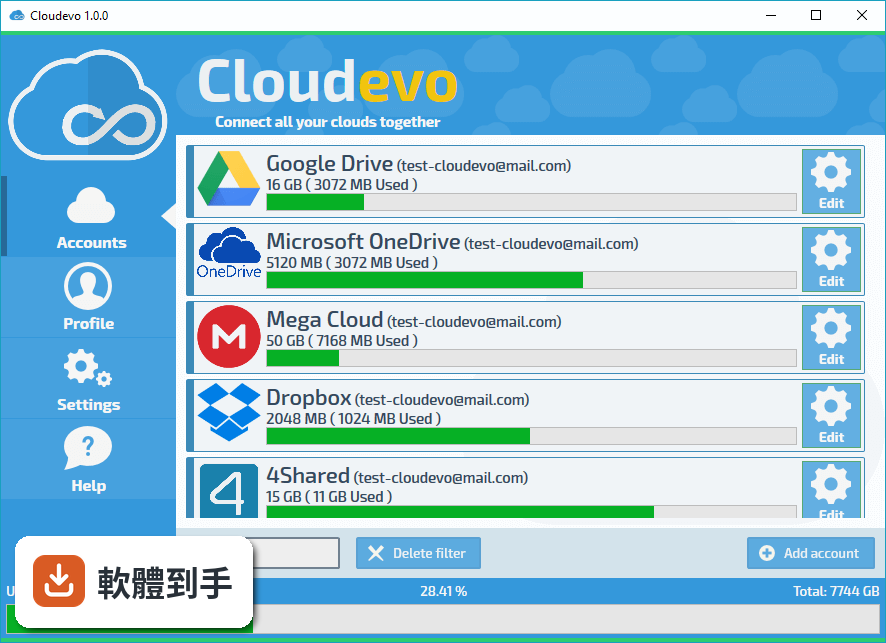
01Cloudevo 是做什麼用的?
它把多個雲端儲存帳號合併成一個統一的雲端空間,掛載成你電腦上的一個磁碟機。支援 Google Drive、Dropbox、OneDrive、Amazon S3 等常見服務。之後你不需要分別登入各家雲端,直接在這個磁碟裡操作檔案,軟體會自動把檔案分配到不同的雲端服務存放。
02它怎麼把不同雲端硬碟合併成一個?
設定時把各個雲端帳號授權給軟體,它會把這些空間整合成一個虛擬磁碟。檔案會自動分散存放,你不用管哪個檔案存在哪個雲端。如果空間不夠,再加一個雲端帳號就能擴充容量。檔案在傳輸前會先加密,再分片上傳到不同雲端服務。
03檔案加密是怎麼做的?
採用 AES-256 加密,檔案在上傳前會先加密,而且會分割成多個片段,分散上傳到不同的雲端服務。加密金鑰只有你自己持有。也就是說,就算某一家雲端服務的帳號被盜,對方拿到的也只是加密後的片段,無法拼回完整的原始檔案。
04同步功能是怎麼運作的?
可以設定同步的檔案和資料夾,支援部分同步——你可以指定哪些檔案立即同步、哪些延後、哪些完全不同步。檔案有版本紀錄,可以查看和還原之前的版本。多台裝置之間會自動同步,從其他裝置也能存取同一份資料。
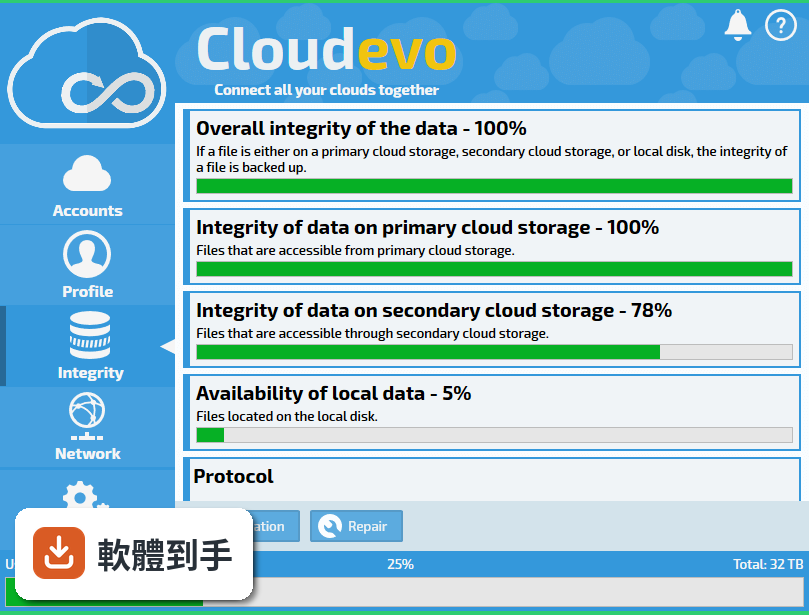
05什麼是 Data-On-Demand?
這是按需下載的機制。檔案不會全部下載到本機,只會在本機顯示為佔位符號。當你開啟某個檔案時,內容才會即時下載。這樣可以節省硬碟空間,也不會佔用不必要的網路頻寬。不常用的檔案可以完全排除在同步之外。
06什麼樣的人適合用這套軟體?
手上同時有多個雲端儲存帳號、覺得分別管理很麻煩的人。例如同時用 Google Drive 和 Dropbox 的使用者,或是有多個雲端帳號想合併空間的人。另外,對檔案加密有要求、不希望雲端服務商看到檔案內容的人,它的加密和分片機制會是考量點。
07我有很多雲端帳號,它真的能全部整合嗎?
官方說明提到支援 Google Drive、Dropbox、OneDrive、Amazon S3 等常見服務,並說「還有很多」。但具體支援哪些服務商,建議安裝前先確認官方文件或直接測試。免費和付費的雲端儲存都可以加入,擴充方式是新增雲端帳號。
08介面只有英文,對使用有影響嗎?
介面語言是英文,沒有中文。如果你習慣英文介面,操作上不會有太大問題;如果不習慣英文,可能需要花時間摸索設定選項。官方說明提到介面設計直觀,但實際使用感受因人而異,可以先安裝試用看看。
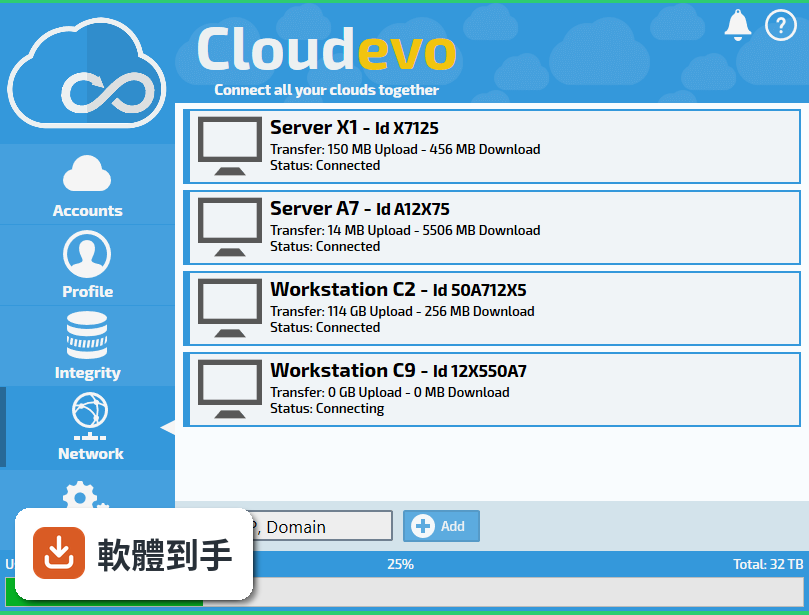
09評分人數很少,這代表什麼?
目前只有 18 人評分,樣本數不多,參考價值有限。相較之下,功能相近的 GoodSync 有 87 人評分、FreeFileSync 有 29 人評分。評分人數少不代表軟體不好,但表示使用者的回饋資料較少,遇到問題時能參考的經驗分享也比較少。
10這套軟體更新頻率如何?
從版本紀錄來看,最早版本是 2017 年,最近一次更新是 2026 年 2 月,近兩年更新了一次。官方說明提到開發持續進行,推出了新版本,改善了核心架構、同步引擎和介面。但更新頻率不算高,如果你需要頻繁更新的軟體,這點要列入考量。
11有沒有其他更多人用的替代方案?
功能相近的軟體有 GoodSync(87 人評分)、FreeFileSync(29 人評分)、NetDrive(25 人評分)等。GoodSync 的評分人數明顯較多,代表有較多使用者經驗可供參考。如果你的需求是單純的檔案同步,FreeFileSync 是免費開源選項;如果需要掛載雲端為磁碟,NetDrive 也是可以比較的對象。
12什麼情況不該選這套軟體?
如果你不習慣英文介面,或需要頻繁的軟體更新,這套可能不適合。評分人數少也代表社群支援較少,遇到問題時能找的解答有限。另外,如果你只需要單一雲端服務的同步,不需要多雲端整合,其他更簡單的同步工具可能更直接。
下載與官方連結
cloudevo-x32-setup.exe · 連結指向軟體原廠
版本紀錄
- 2026-02-17 Cloudevo 4.0.0 Beta 41.3 MB
- 2020-10-22 Cloudevo 3.5.6 11.6 MB
- 2020-02-07 Cloudevo 3.5.3 11.6 MB
再看 5 筆
- 2019-10-18 Cloudevo 3.5.2 11.5 MB
- 2019-10-09 Cloudevo 3.5.1 11.5 MB
- 2019-08-29 Cloudevo 3.5.0 7.6 MB
- 2019-07-30 Cloudevo 3.4.9 6.6 MB
- 2019-07-26 Cloudevo 3.4.8 6.6 MB
這一版改了什麼
What's new in this version:
Cloudevo 3.1.4.17345
New features and improvements:
- Upload/Download optimizations
- Adjustments in the graphical representation of toggle and switch elements
Changes and fixes:
- Cloud RAID group settings and assignments were not saved correctly
Cloudevo 3.1.3.17301
- Adaptations for improved compatibility with the web app, Android app and Windows 10 Mobile App
- Improved performance for the cloud drive
- Automatic assignment of new drive letters for the cloud drive if the allocated drive is already in use
- Changes and fixes
- Creating new Cloudevo accounts with email addresses did not produce any error, although not allowed
Cloudevo 3.1.2.17296
- Note: This version is backwards compatible with previous versions: 3.1.1 - 3.0.4
New features and improvements:
- New protocol: Connections to SMB and CIFS shares
- Reduced memory consumption
- Improved performance for the cloud drive: Files can be read faster
Cloudevo 3.1.0.17286
- Note: This version is backwards compatible with previous versions: 3.0.8 - 3.0.4
- Note: Please read the note below to encryption the local cache
- This version is not compatible with the current version of Cloudevo for Android: Logon with subaccounts is not possible. An update will follow shortly
New features and improvements:
- New: user management! Create, manage and delete user accounts
- New: User groups! Merging user accounts into groups and assigning permissions
- New: Cryptographic permissions! Setting read and write permissions for each user
- Assign storage space to each user account
- Assigning a letter to the cloud drive, taking into account the current allocation
- More reliable synchronization
- Reduced space consumption on the local hard disk drive
- Improved file share compatibility for Edge
- Freeware users can continue to access their files after exceeding the restrictions
- Protective function prevents the application from getting stuck
- Higher application stability
- Adaptations for the login in the WebApp
Changes and fixes:
- Cloud drive was occasionally not displayed because the background service did not start correctly
- The encryption of the local cache had an error in previous versions, which partially destroyed the files in the cache. Disable the encryption of the local cache before the update. Wait until decryption is complete. Only then you should install the update. After the update, check all files in the drive to see if they still contain broken files. Delete all corrupted files and then reinsert them into the cloud drive
Cloudevo 3.0.7.17275
- Kompatibilität mit dem Windows 10 Fall Creators Update
- Kompatibilität mit dem Windows 10 Preview 16299
- Higher application stability
- Anpassung an die neue Schnittstelle von Microsoft OneDrive
Cloudevo 3.0.6.17275
New features and improvements:
- Sharing files and folders for arbitrary access
- Releases can be limited in the number of downloads
- Approvals can be provided with an expiration date
- Faster and more reliable uploads (taking into account daily limits and restrictions)
- Driver update: More stable and faster
- Higher application stability
Changes and fixes:
- Correction in licensing of Pro Licenses
Cloudevo 3.0.5.17273
- Correction in licensing of Pro Licenses
Cloudevo 3.0.4.17255
- Upload/Download Optimierung für Cloud-Speicher MEGA und 4Shared
- Higher application stability
- Optimization: Higher transfer speeds
Cloudevo 3.0.3.17248
New features and improvements:
- Software now supports HTTP, SSL, Socks4 and Socks5 proxies
- Optimization: Faster mirroring of files using cloud RAID
- Optimization: Clean up cloud storage faster
- Cloud RAID now also available for free accounts
Changes and fixes:
- Cloud storage accounts were sometimes displayed without associated email addresses
Cloudevo 3.0.2.17240
New features and improvements:
- Higher application stability
- Higher transfer speeds
- Faster synchronization
- Compatibility with other platforms: Android, iOS, Windows Mobil
- Reduced work memory usage during transfer
- Cleanup routine for deleting data on cloud storage
- Cloud RAID now available for free accounts
Changes and fixes:
- Fixed bug when adding Dropbox, and Google Drive
- Faster data transfer for the MEGA cloud service
- Fault has been corrected: Data transfer temporarily suspende
- Fault has been corrected: Automatic desynchronization did not wor
- Fault has been corrected: Cloud drive was occasionally not displayed in Windows Explorer
Cloudevo 2.5.3.17171
New features and improvements:
- Higher application stability
- PowerFolder API interface update: Faster calls and higher transfer rates
- Improved error reporting on Google accounts
- Higher transfer speeds
Changes and fixes:
- Adaptations to the integrity check routine
- Uploads via WebDAV have been interrupted sporadically due to timeouts
- Intermittent interruption or stop of uploads / downloads fixed
- Fix: Occasionally freezing of Windows Explorer under Windows 7 when working in the cloud drive
- Settings for automatic synchronization were saved but not loaded correctly
- Fix: Crash of the application or disappear of the drive
Cloudevo 2.4.8.17163
New features and improvements:
- Cloud storage HiDrive can now also be used with paid user accounts
Changes and fixes:
- Cloud storage pCloud: Special characters in the password prevented correct authentication
- Adding cloud storage accounts failed when slow Internet connection
Cloudevo 2.4.7.17159
New features and improvements:
- Cloud storage MEGA again added
- Higher stability
- Notes in the program for transfer volumes and automatic backups