
這是歷史版本頁面 — 看 Cubase Pro 最新版本
Cubase Pro 功能這麼多,到底哪些是我真正用得上的
 Cubase Pro 9.5.10
資料更新 2017-12-12
閱讀約 8 分鐘
你已經會用免費或入門級的編曲軟體,也順利錄過幾軌、編過簡單的 MIDI。但最近開始覺得卡卡的:想要更細地修人聲的拍子跟音準,現有工具做不到;想要在混音時把每軌的壓縮器、EQ 一次看齊,介面卻擠成一團;甚至只是想把一段錄音的時間點拉準,就花掉你半個晚上。你開始懷疑,是不是該換一套更專業的 DAW,但又怕花大錢買了一堆用不到的功能。
一般人遇到這種情況,會先上網找免費的替代方案,或繼續硬撐著用舊軟體。但免費軟體往往在關鍵時刻缺一塊:有的 MIDI 編輯很弱,有的混音器太陽春,有的根本沒有像樣的音高修正工具。專業級 DAW 的切入點,不是「功能比較多」而已,而是把整個製作流程——錄音、編輯、混音、輸出——放在同一個工作環境裡,讓你在每個環節都不會因為工具不夠而中斷。這篇文章用問答的方式,幫你判斷這套軟體到底適不適合你。
01Cubase Pro 主要能拿來做什麼?
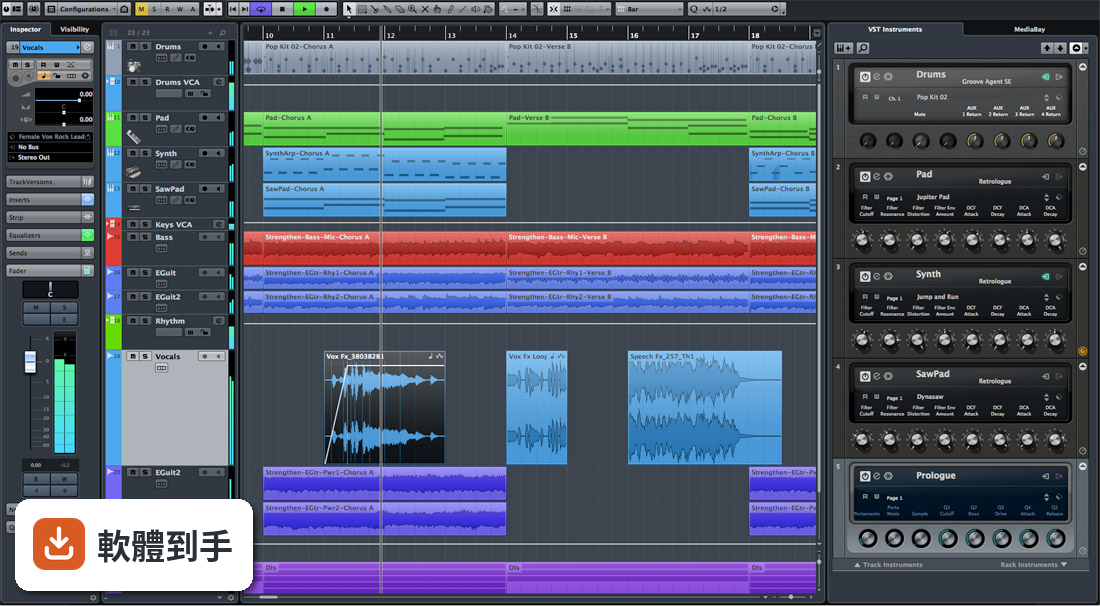
它是一套完整的數位音樂工作站,涵蓋作曲、錄音、混音、編輯四大流程。你可以用它錄多軌樂器或人聲、編 MIDI 旋律與和弦、用內建虛擬樂器做電子音樂、修人聲的音準與節拍、在 MixConsole 裡調整各軌音量與效果器,最後輸出成 WAV、MP3 或 FLAC。官方資料強調它同時具備進階的 MIDI 與音訊編輯能力,也內建樂譜編輯器,適合需要一次完成整個製作流程的人。
02它的 MIDI 編輯功能強在哪裡?
官方資料指出 Cubase Pro 在 MIDI 序列與虛擬樂器方面表現突出,是作曲家與電子音樂製作人常用的選擇。具體來說,它提供完整的 MIDI 編輯器(Key Editor),可以細調每個音符的力度、長度、位置,也支援 Chord Pads 與 Assistant 功能,幫你產生複雜的和弦進行。新版還加入 Melodic Pattern Sequencer,可以用來設計旋律節奏型態。如果你主要用 MIDI 做音樂,這套的編輯深度會比多數入門軟體完整。
03VariAudio 是做什麼用的?
VariAudio 是 Cubase Pro 內建的人聲音高與節拍修正工具。你可以把它想成是針對人聲的「音準調整器」:錄完人聲後,用 VariAudio 可以逐段調整音高、修正唱偏的音,也能調整每個字的時間點,讓歌聲對齊節拍。官方資料說它提供「進階的人聲錄音控制」,意思是除了基本修音,還能做出類似 Auto-Tune 的效果,或把一段人聲重新塑造成不同的旋律線。這對錄 vocal 的人來說是核心功能之一。
04MixConsole 能處理什麼?
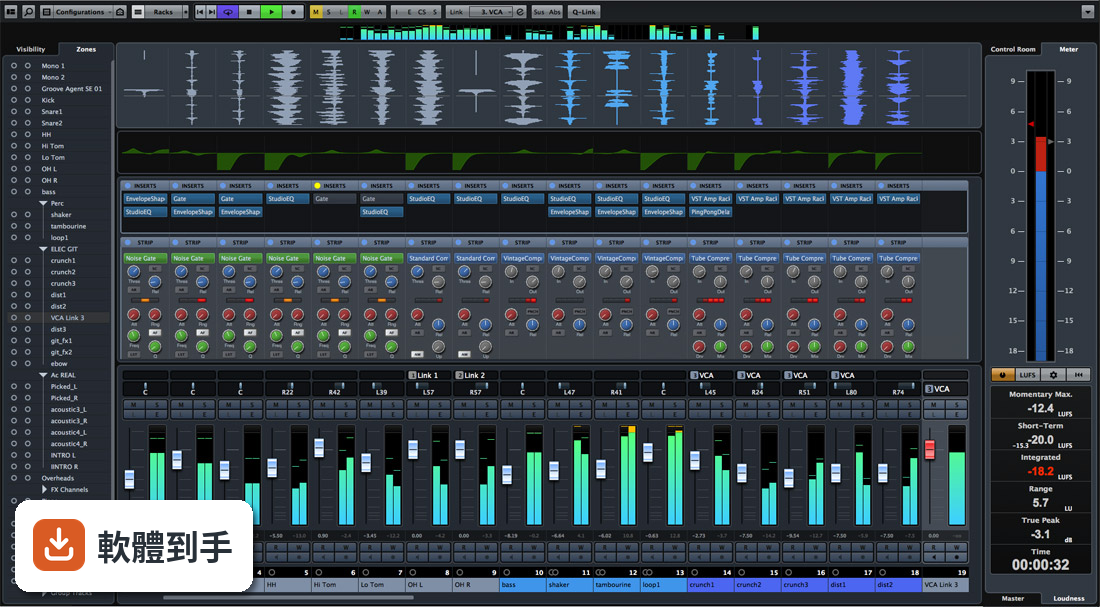
MixConsole 是 Cubase Pro 的專業混音介面,把每一軌的音量、聲像、EQ、壓縮器、效果器集中在一塊面板上操作。官方資料提到它內建高品質的 EQ、壓縮器與效果器,可以針對每軌做細部調整,也能用自動化(Automation)讓音量或效果參數隨時間變化。新版還強化了 Modulators 與 Automation Enhancements,讓動態變化更靈活。如果你習慣像在實體混音器上一樣工作,MixConsole 的設計就是朝這個方向做的。
05它支援第三方外掛嗎?
支援。官方資料明確說它相容 VST 2 與 VST 3 格式的第三方虛擬樂器和效果器,可以透過 VST Plugin Manager 管理。不過要注意,VST 2 並非官方正式支援,需要手動在 VST Plug-in Manager 裡啟用掃描器才能載入,而且 Steinberg 不提供 VST 2 相關問題的技術支援。如果你手上有很多舊的 VST 2 外掛,這點要先確認能不能正常運作。
06初學者用這套會不會太難?
官方 FAQ 的說法是:這套軟體功能豐富,一開始可能會覺得複雜,但內建教學與線上資源可以幫助新手逐步上手,而且介面設計有可調整的複雜度。實際情況是,它的學習曲線比入門軟體陡,但如果你已經有基礎 DAW 操作經驗,不會是從零開始。建議先從官方提供的專案範本開始,不要一次把所有面板都打開,慢慢熟悉錄音、編輯、混音三個主要區塊。
07電子音樂製作人適合用它嗎?
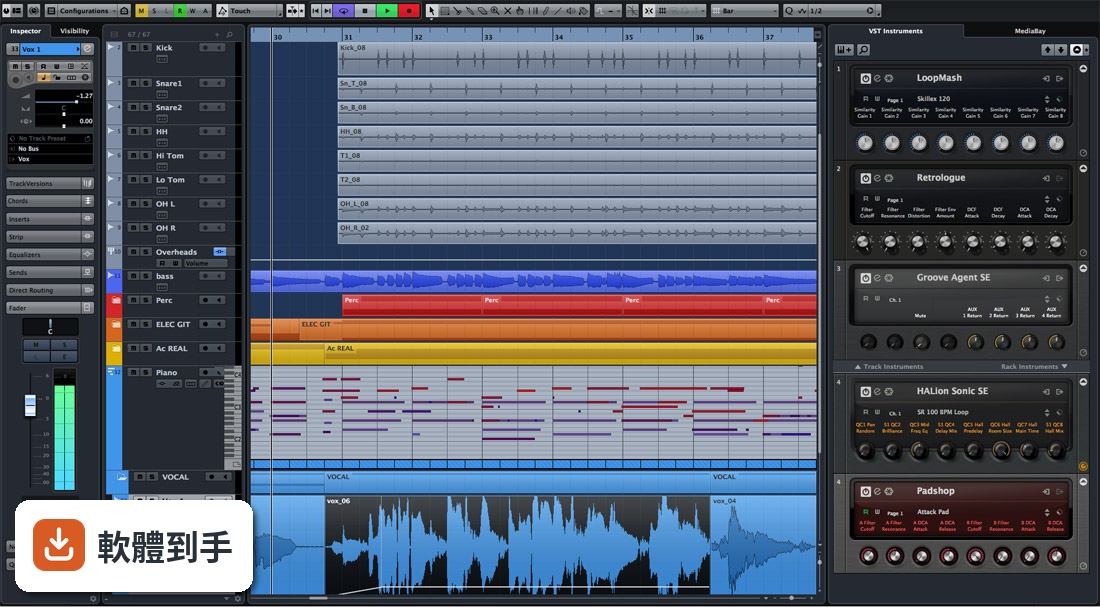
適合。官方資料特別強調 Cubase Pro 在 MIDI 序列與虛擬樂器方面的優勢,並提到 Chord Pads 可以快速產生和弦進行,Sampler Track 能拖入音訊樣本自製樂器,新版還加入 Melodic Pattern Sequencer 與 Stem Separation(分離音軌元素)。這些都是電子音樂製作常用的工具。如果你主要用 MIDI、取樣與合成器做音樂,這套的功能覆蓋範圍很完整。
08預算有限的話,該不該選它?
官方定價約 579.99 美元,而且授權型式是 Trial(試用),代表你必須先購買或下載試用版,再用 eLicenser 啟用完整授權。這個價格明顯是針對專業音樂工作者,不是給預算有限的人。如果你只是偶爾錄音、編曲,市面上有更便宜的 DAW(例如 REAPER 或 MixPad)可以滿足基本需求。Cubase Pro 的價值在於完整功能與深度,但如果你用不到那些進階工具,多花的錢不會轉換成更好的作品。
09介面只有英文,會不會很難上手?
官方資料顯示介面語系是 English,沒有提到中文或其他語言。如果你不習慣英文介面,操作上會多一層障礙,尤其是 MixConsole、VariAudio、Chord Pads 這些專業術語。不過 DAW 的介面詞彙相對固定,用一段時間後會自然記住。如果你完全無法接受英文介面,可以考慮其他有官方中文支援的 DAW(例如 Studio One 或 ACID Pro),或先下載試用版確認自己能不能適應。
10我的電腦跑得動嗎?
官方系統需求是:64 位元 Windows 10 22H2 或 Windows 11 23H2 以上,處理器需 4 核心以上,記憶體最低 8 GB(建議 16 GB),安裝需要 80 GB 可用空間(核心安裝 1 GB),螢幕解析度至少 1440 x 900,音訊介面建議使用 ASIO 相容裝置。如果你的電腦是舊款或低階筆電,可能無法順暢跑多軌專案。建議先確認硬體規格再決定,不要只看軟體功能。
11可以同時在兩台電腦上用嗎?
不行。官方資料說明授權綁定 Steinberg USB eLicenser,你可以把 eLicenser 插到任何電腦上使用,但不允許同時在多台裝置上使用。也就是說,如果你有桌上型與筆電,必須把 eLicenser 拔來拔去,不能兩台同時開著跑 Cubase Pro。這對需要在不同地點工作的人來說是個限制,購買前要考慮清楚。
12它跟 Pro Tools 比起來,哪個比較適合我?
官方資料把 Pro Tools 列為替代方案,並說它是「專業錄音室的行業標準」,而 Cubase Pro 則在 MIDI 編輯與作曲工具上更突出。如果你主要做錄音與混音、未來想進錄音室工作,Pro Tools 的產業普及度是優勢;如果你以 MIDI 編曲、電子音樂、配樂為主,Cubase Pro 的 MIDI 功能會更順手。兩者價格都不低,建議先下載試用版,用實際專案測試哪個工作流程你比較適應。
下載與官方連結
Cubase_9_Installer_win.zip · 連結指向軟體原廠
版本紀錄
- 2026-06-23 Cubase Pro 15.0.30 116 MB
- 2019-11-21 Cubase Pro 10.5 20 GB
- 2019-02-27 Cubase Pro 9.5.50 10.5 GB
再看 5 筆
- 2018-11-01 Cubase Pro 9.5.41 10.5 GB
- 2018-10-16 Cubase Pro 9.5.40 10.5 GB
- 2018-05-23 Cubase Pro 9.5.30 10.5 GB
- 2018-04-06 Cubase Pro 9.5.21 10.5 GB
- 2018-03-09 Cubase Pro 9.5.20 10.5 GB
這一版改了什麼
What's new in this version:
Zoning 2.0: Speed up your workflow:
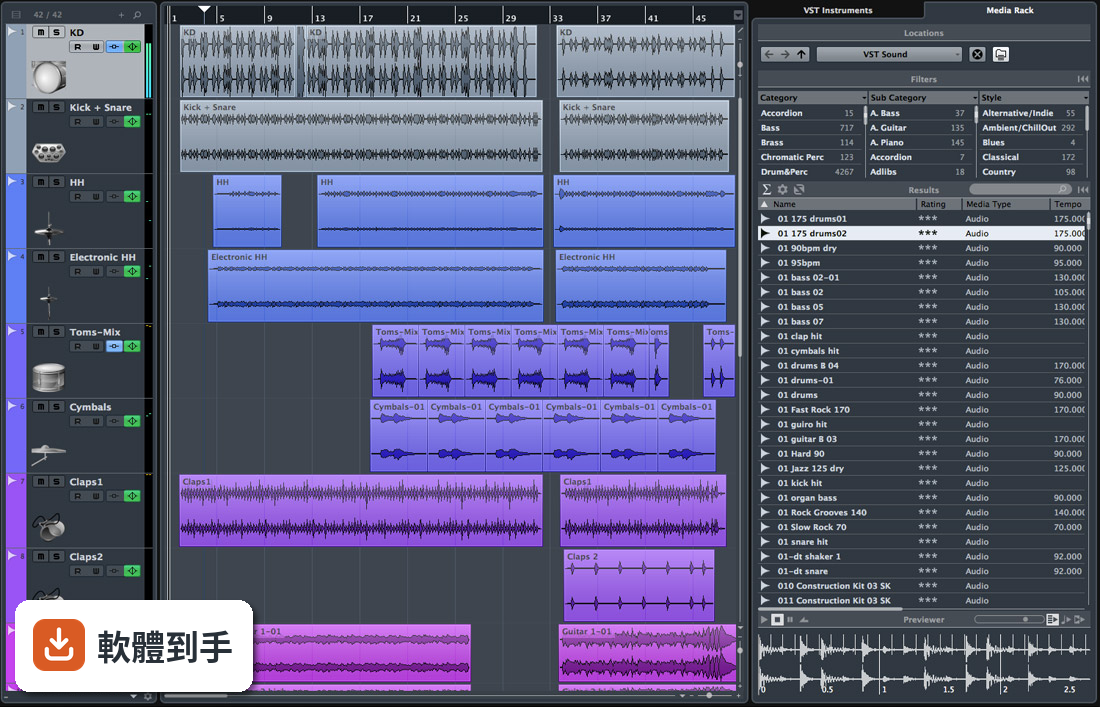
- Three new sections made their way into the right zone to enhance the flow in your work. The new file browser lets you browse, preview and import your media files in your project without leaving the window; the new metering section in the right zone shows the master and loudness meters to have a lock on your mix at any time; and then there’s the Control Room, providing direct access to your cue and monitor mixes.
Automation editing just got curves:
- Cubase 9.5 introduces ultra-precise automation curves for creating and editing smooth transitions, allowing you to go creative with musical build-ups and providing detailed automation lanes — all this while keeping mouse clicks to a minimum. One might think that a streamlined workflow possibly comes at the expense of accuracy. But no, not at all! Even the automation of tracks controlled by VCA faders will incorporate all automation data of the connected tracks and will remain 100% on target.
More Metronome:
- You want the click to follow your signature shift? The new Metronome follows your lead no matter where you’re heading! Compose custom click patterns with up to four different accent levels in the new Click Pattern Editor, and assign several different patterns to the Signature Track. Load your own click sounds or select one of the many pre-installed sounds. Every metronome helps you keep in time, but the new metronome in Cubase 9.5 does this so much more effectively.
64-bit mixing engine:
Taking your sound to new heights:
- Get your mixing down the line — with the new pristine 64-bit floating-point mixing engine you will no longer need to compromise when it comes to quality, precision and realism. The advanced audio engine calculates your summing, mixing and effects processing with double-precision accuracy, performing each task with the utmost level of detail, dynamics and transparency.
More inserts now with flexible pre/post fader:
- By doubling the number of insert slots for VST effects on each track, Cubase 9.5 expands your creative horizon, inviting you to experiment with rich effect combinations and plug-in chains. Whether you want to insert your VST effects before or after the fader, the new flexible insert section lets you dynamically adjust the position of the separator and gives you full control of your signal flow.
New looks for Vintage Compressor, Tube Compressor and Magneto III:
- Three of the most acclaimed VST processors available to Cubase have received a fresh overhaul. The Vintage Compressor, the Tube Compressor and Magneto III tape saturator shine with redesigned user interfaces and workflow-oriented improvements that bring out the best in each of them.
Direct Offline Processing:
Ideal for frequently used processes:
- Extend your creative potential with the improved workflow of event-based offline processing. Apply any kind of process offline in a VST plug-in chain for one or multiple selected event — with the feel of real-time effects — without the CPU load. This way you can keep your MixConsole clean but at the same time have paved the way for further non-destructive changes.
- HALion Sonic SE 3 feat. FLUX wavetable synth:
- The new FLUX wavetable synthesizer library for HALion Sonic SE combines top-notch sound quality and the latest HALion technology with an engaging user interface. The collection of 100 cutting-edge presets for electronic music productions includes leads, basses, pads and effects. All patches are based on a library of more than 70 exclusively designed waves that can also be used to create your own sounds and patches
Automation range tool:
- The new Range Tool lets you edit your automations faster, easier and more convenient. Create a selection on an automation lane and edit segments by simply dragging them without having to create any additional automation markers. The Range Tool adjusts the level, creates ramps and scales the automation in either absolute or relative mode — just like that!
Adapt to Zoom: A clever capability:
- New to this point update, Adapt to Zoom helps you to stay in the flow in case you should be constantly zooming in and out of your Cubase project. Zooming out decreases the grid snap level so that the editing level remains effective. Zooming in increases the grid snap level for those surgical procedures at the ground level of your project. Adapt to Zoom will always adjust the grid automatically to your zoom level, allowing you to focus on your work without distractions.
Good-bye and hello video engine:
- A new, modern video engine that bade farewell to the QuickTime technology before it was introduced to Cubase 9.5 supports the most relevant codecs, as well as external video cards. As with every new engine, certain adjustments will still have to be made, and we want to keep you posted on further developments made to the new video engine, so watch this space.
Softube Console 1 supports Cubase Available soon:
- Sweden and Germany — two countries come together to celebrate the deep integration of the Console 1 from our friends at Softube with Cubase. You can now select tracks and control various track parameters like volume, pan or sends through Softube’s beautiful hardware controller.
Sampler Track enhancements:
- The recently introduced Sampler Track has undergone some changes that will enhance your workflow significantly. Drag any MIDI part in the Sampler Control and start experimenting with the instantly rendered audio file. And experiment you may! You can compare the different settings you make with the convenient A/B mode, safe in the knowledge that its undo/redo capability will always allow you to return to safer ground.
Get inspired by Production Presets:
- Cubase 9.5 comes with Production Presets to inspire you when it’s needed and to help you finish your mix when things need to get done. Stunning new FX chain presets for all kinds of instrument and vocal tracks will lend a fresh twist to all your productions. The brand-new mastering track presets is designed for different genres and productions and can be used on the master bus or group channels to help you get your tracks to a professional level.