
這是歷史版本頁面 — 看 Curse 最新版本
遊戲模組裝到一半就亂掉?CurseForge 能做什麼
 Curse 7.5.6345.42403
資料更新 2017-05-17
閱讀約 6 分鐘
你玩 Minecraft 或 World of Warcraft,想裝幾個模組讓遊戲多點新花樣。你找到模組網站,下載壓縮檔,解壓縮,照說明把檔案丟進資料夾,結果遊戲一開就崩潰,或是模組之間互相衝突。你想找個方法把這些檔案管好,不要每次更新遊戲就全部重來一遍。
自己手動管理模組,最麻煩的是版本對不上、檔案不知道丟到哪、更新要一個一個上網查。這類工具的做法是:把模組的下載、安裝、更新集中到同一個介面,由程式幫你檢查版本和衝突,你只要負責選要裝什麼。這樣一來,你花在「讓模組能跑」的時間會少很多,多出來的時間可以真的去玩遊戲。
01CurseForge 是做什麼用的?
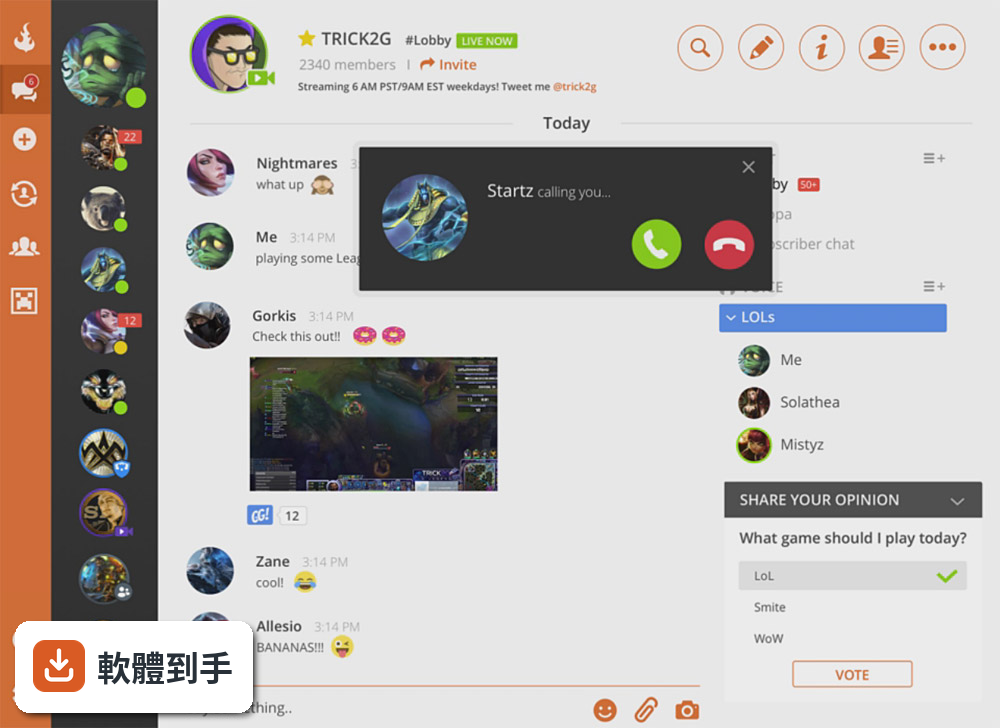
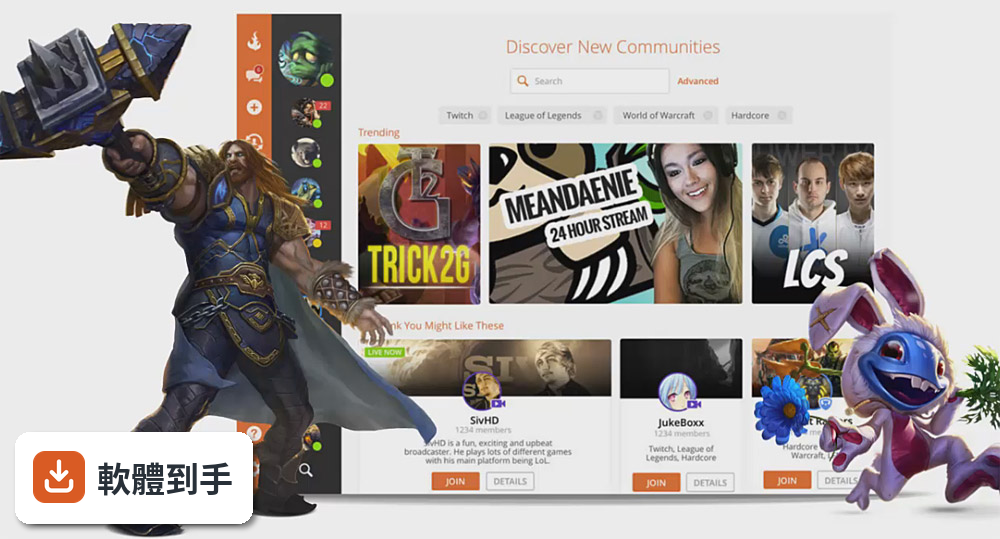
它是一套遊戲模組管理工具,主要讓使用者搜尋、下載、安裝、更新遊戲模組。官方說明指出,它收錄大量 Minecraft 和 World of Warcraft 的模組、世界地圖、材質包,也涵蓋 The Sims 4、Skyrim、Terraria 等熱門遊戲。你可以把它當成模組的集中管理介面,不用再自己上網找檔案、手動丟進遊戲資料夾。
02它能管理哪些遊戲的模組?
官方列出的支援遊戲包括 Minecraft、World of Warcraft、The Sims 4、Kerbal Space Program、Stardew Valley、Skyrim、Terraria、Starcraft II、World of Tanks 等。Minecraft 同時支援 Java 版和 Bedrock 版。如果你玩的遊戲不在這份清單上,官方網站有完整的支援列表,建議先確認再安裝。
03模組更新要怎麼處理?
它會自動檢查已安裝模組是否有新版本,有更新時會在介面中通知你,點幾下就能完成更新。官方說明也提到,它會對過期或損壞的附加元件顯示警告圖示,提醒你注意。這比你自己記住每個模組的來源網站、三不五時上去檢查有沒有新版要省事很多。
04從這裡下載的模組安不安全?
官方說法是有嚴格審核流程,上傳到資料庫的模組會先經過檢查,確保沒有廣告軟體或病毒。不過官方也提醒,要從信任的來源下載這套工具本身,例如官方網站或知名的軟體下載站。另外,就算平台有審核,安裝前看一下其他玩家的評論、確認模組跟你遊戲版本相容,還是比較保險的做法。
05可以自己上傳模組給別人用嗎?
可以。官方說明提到,你可以建立新專案、填寫詳細資料、點「Start Project」按鈕開始上傳。它支援上傳檔案、分享自訂模組包、編輯專案內容。如果你有做模組的習慣,這套工具同時也是發布管道,讓別人可以直接搜尋到下載。
06玩 Minecraft 的人適合用嗎?
如果你玩的是 Java 版或 Bedrock 版,它都支援。官方強調它是最大的 Minecraft 模組倉庫之一,有大量世界和材質包可以選。對於常裝模組、常因為版本更新而需要重裝的人來說,自動更新功能可以省下不少時間。如果你只玩原版、不裝任何模組,那這套工具對你就沒有用處。
07只玩 World of Warcraft 的人適合嗎?
適合。官方介面特別把「Classic」和「Retail」的附加元件分開顯示,也有獨立的 WoW 附加元件區塊,方便你快速找到對應版本的模組。如果你同時玩經典版和現行版,這個分類設計可以避免裝錯版本。不過要注意,介面是英文的,如果你不習慣看英文,操作上會需要多花點時間摸索。
08不太會裝模組的新手適合嗎?
它的設計就是為了簡化模組安裝流程,官方強調介面簡單乾淨、容易導覽。安裝後可以搜尋、下載、安裝一氣呵成,不用自己處理解壓縮和檔案路徑。不過介面是英文,而且需要先安裝 Overwolf 才能使用,這兩個門檻對完全沒接觸過的人來說,還是需要一點耐心適應。
09不想裝 Overwolf 的人適合嗎?
不適合。官方資料明確列出「需要安裝 Overwolf」是這套軟體的缺點之一,也就是說,你無法單獨使用 CurseForge,必須先裝 Overwolf 才能啟動它。如果你不想在電腦上多裝一個平台,或是不喜歡 Overwolf 的運作方式,那這套工具就不符合你的需求。
10玩的是沒列在支援清單裡的遊戲,適合嗎?
不適合。它雖然支援多款遊戲,但並非所有遊戲都有收錄。官方說明提到,支援的遊戲包括 Minecraft、WoW、The Sims 4、Kerbal Space Program、Stardew Valley、Skyrim、Terraria、Starcraft II、World of Tanks 等,其他遊戲需要去官方網站確認。如果你的遊戲不在清單上,這套工具對你來說就沒有用。
11介面只有英文,看不懂英文的人適合嗎?
要考慮清楚。官方資料顯示介面語系只有 English,沒有中文選項。搜尋模組名稱、閱讀模組說明、理解警告訊息都需要基本的英文閱讀能力。如果你完全看不懂英文,操作上會遇到不少障礙,可能連要找哪個按鈕都不太確定。這種情況下,可以考慮找有中文介面的替代工具。
12評分人數很少,會不會有問題?
目前這套軟體在收錄的評分資料中只有 4 個人評分,雖然分數是 9.5 分,但樣本數太少,參考價值有限。相較之下,功能相近的 Steam 有 746 人評分、Project64 有 106 人評分,能反映較多使用者的實際經驗。如果你很在意穩定性,建議多看看討論區或影音平台上的實際使用心得,再決定要不要裝。
下載與官方連結
CurseClientSetup.exe · 連結指向軟體原廠
版本紀錄
- 2025-11-07 CurseForge 2 MB
- 2017-05-17 Curse 7.5.6345.42403
這一版改了什麼
What's new in this version:
Curse 7.5.6345.42403
- Change log not available for this version
Curse 7.5.6325.40921
- Change log not available for this version
Curse 7.5.6317.666
- Change log not available for this version
Curse 7.5.6314.881
- Change log not available for this version
Curse 7.5.6310.747
- Change log not available for this version
Curse 7.1.6296.41462
- Change log not available for this version
Curse 7.1.6294.40746
- Fixed: Some users who ran into trouble after waking their computer from hibernation or sleep will no longer find it painted black
Curse 7.1.6288.5257
- Change log not available for this version
Curse 7.1.6283.6157
Improved:
- Crack open a portal to text channels in chat messages! Just use a # followed by the destination channel name
- We're now a lot better at guessing which device you prefer to use if you have something other than a default device active
Fixed:
- Fixed an issue where the app wouldn't fully close on Mac, preventing the app from launching
- Fixed a rude bug that could toss you and your unsaved settings right out of the client
Curse 7.1.6272.1730
Identity Merge:
- Merge your Curse account with your existing Twitch account, or create a new Twitch account right inside the app
- Your new Curse username will be your Twitch username. You can change your Twitch username and password after the account merge
- After merging, you can log into Twitch and Curse services with your Twitch account
- Temporary Curse accounts can be merged into Twitch accounts and gain full access to all app features
- A merged identity will be required to create new content servers and use Twitch emotes
- Never run into issues with your Twitch account becoming unlinked, and keep those Kappas and sub emotes flying
- If you have two-factor authentication set up on Twitch, you will have that added security in the app after merging accounts
Curse 7.1.6263.382
- Change log not available for this version
Curse 7.1.6251.1229
- Improved: The Twitch wizards conjured up support for embedding Twitch clips and VODs in chat
Curse 7.1.6249.2188
- Change log not available for this version
Curse 7.1.6246.42969
Improved:
- We crafted up compatibility with the latest Minecraft launcher
Fixed:
- Certain Secret World addons should now always install properly. If you had issues with an installed addon not appearing in the game, a reinstall of the addon will fix it
- Fixed a rare issue that could cause Minecraft to get stuck on the loading screen
Curse 7.1.6221.1878
Improved:
- We have a new, super sweet loading animation -- check it out before it vanishes with our faster app startup! Early game movement speed FTW
- Image and file uploads are now bundled into a single button to help optimize your APM
- The registration page has received a validation information renovation
- The Curse robots have gained self-awareness and will now ask when AddonSync is first enabled if you would like to grab your previous AddonSync profile from cloud storage or replace it with what's on your machine
- Toggles have been visually tweaked
Fixed:
- Exiting the app through the taskbar will no longer trigger an update
- You can now search for survivors (or any contact, really) while your contact list is collapsed
- Double clicking a persistent call window will resummon the app and select the call
- People will now see when you've TL;DR GG'd their really long message instead of reading it
- Servers and groups will now delete themselves from your contact list when you decide to delete them from your life and leave them
- Tapping cancel will now actually cancel message of the day edits. Really. It does
- Modpack installation errors will now tell you why they’re having a bad time via Profile Error dialog
Curse 7.1.6192.1696
- Change log not available for this version
Curse 7.1.6189.1173
- Twitch emotes and Imgur embeds have been patched up
- Video call volume should now be at the same audio level as voice calls after an arduous level grind
- Connect button is no longer sapped on servers with high populations
- Channel settings have shaken off their stun status and can be scrolled freely again
- Giveaway roll animation now actually rolls over on command
Curse 7.1.6150.557
Improved:
- Streamer mode now disables ALL sounds, including incoming call sounds
- We stopped prompting you to update your graphics driver
- We added better indication when you’re temporarily allowed into a private voice channel
- Notifications in Groups and Servers now show nicknames
- Clicking anywhere on a server channel folder will now expand and collapse channels
- We added more detail to our password checks when you change your password
- You can now copy pasta results from chat search
- When exporting a Minecraft profile, unchecking a resource pack will exclude it from the export manifest
Fixed:
- When you have a call muted, unmuting your mic from the overlay will now properly unmute the call
- The LoL Nexus link has reappeared in the League of Legends overlay
- Minecraft 1.4.7 and 1.5.2 profiles should now launch correctly
- Fixed Java not found errors when launching Minecraft profiles in Jar Launch Mode
- We added tech to fix Java issues stopping some users launching Minecraft profiles
- Joining a voice call in a channel will bump the server to the top of the recents list
- Fixed an issue which occasionally caused chat input to lose focus
Curse 7.1.6117.742
Improved:
- The persistent call window will no longer appear when joining voice channels in a server
- Added more contextual information in error popups that are encountered while organizing channels in a server, and when installing or updating WoW addons
- Improved the experience for creating and choosing folders when creating a channel for a server
- Improved onboarding experience
Fixed:
- Fixed a bug that could cause addon installs to fail
- The WoWDB profiler should no longer overwrite working copies when it is automatically installed
- Muting your mic while you are transmitting will now properly update the taskbar icon
- Fixed an issue with identity counts being incorrect on profiles
- The installed banner now properly displays when installing mods into a Minecraft profile
- Fixed an issue that could cause Minecraft profiles to incorrectly indicate there was an update available
Curse 7.1.6107.42498
- Change log not available for this version
Curse 7.2.6096.41909
- Improved: Auto-complete suggestions for emoji are now sorted in a more convenient way.
- Fixed: Fixed an issue occasionally preventing the up arrow from editing your previous message.
Curse 7.1.6084.42337
- Change log not available for this version
Curse 7.1.6082.4323
- Change log not available for this version
Curse 7.2.6067.2930
- WoW Onboarding and addon detail page have been polished
Curse 7.1.6053.2266
- Fixed an issue that caused certain features to stop working for some international users
Curse 7.1.6051.28432
New:
- Channel Folders
- Get organized! Easily group similar channels together on servers with channel folders!
- Don’t leave their junk behind when giving someone the boot! When banning a user, you can now delete their messages from specific spans of time (None, Past 24 hours, Past week, All)!
Improved:
- Loads of giveaway, poll, and admin actions are now much faster!
- You can now view the profile of a non-friend in a group
- When you are muted or deafened by a server admin, you will now see an indicator for it
Fixed:
- Fixed an issue that was preventing some users from accessing the Minecraft area of the app
- Fixed an issue where the app could display an error when the language was set to Simplified Chinese
- Mentions now work even when there is a punctuation mark at the end
- Fixed an issue where new messages wouldn't show in chat if the hardware clock was wrong
- File attachments in the 'Files' sidebar will now properly download
- Fixed a graphics glitch caused by the overlay in Robocraft for some users
Curse 7.1.6018.41463
- Fixed an issue with Minecraft 1.10
Curse 7.1.6018.3434
Improved:
- You can now rename your account once every 60 days. To rename your account go to Settings > Account and click 'Change Username'. For more information, click here.
- Emoji selector now lets you view the ones you’ve recently used.
- EZ-MODE! You can now set your preferred audio device as the system’s default device.
- Added right-click menus to the left navigation column (Connect, Settings, and Help).
- You can now disable rich embed in chat within settings.
Fixed:
- Fixed an issue with in-game overlay not showing up in SMITE.
- Fixed an issue where keybinds would not always work if a modifier key, such as Shift or Control, is pressed.
- Attached image links now embed properly when shared from another conversation.
- Switching voice channels no longer briefly shows yourself in both channels.
- Push-to-Talk cutoff setting is now grayed out when Toggle Mode is enabled.
- Tooltips for long names now show the full name.
- Fixed an issue with Java detection for Minecraft.
- GIFs are now crisp and clear.
- Bold text is now more consistent.
- New messages in a server no longer automagically close the image viewer.