
這是歷史版本頁面 — 看 DaVinci Resolve 最新版本
DaVinci Resolve 到底能幫你完成什麼剪輯工作
 DaVinci Resolve 14.2.0
資料更新 2017-12-15
閱讀約 6 分鐘
你手上有一批影片素材,可能是活動紀錄、短片創作,或是客戶交付的專案。你打開電腦,想找一套能一次搞定剪接、調色、上字幕、混音的軟體,卻發現免費工具不是陽春到連多軌都放不穩,就是專業軟體貴到下不了手。你真正需要的,是一套能從頭到尾把影片做完、而且品質拿得出手的工具。
一般人習慣先試試系統內建或免費的簡易剪輯軟體,但很快就會撞到牆:軌道數不夠、調色只能套濾鏡、音訊雜訊沒得救、輸出格式選擇少。這些工具不是不能剪,而是當你開始講究畫面質感、聲音乾淨度、或是要應付多機位素材時,它們的極限馬上顯露出來。專業級軟體的切入點,是把你所有後期需求收攏在同一個工作區裡,不用在好幾個程式之間轉檔、匯出、再匯入,省掉的不只是時間,還有素材來回轉換的品質損失。
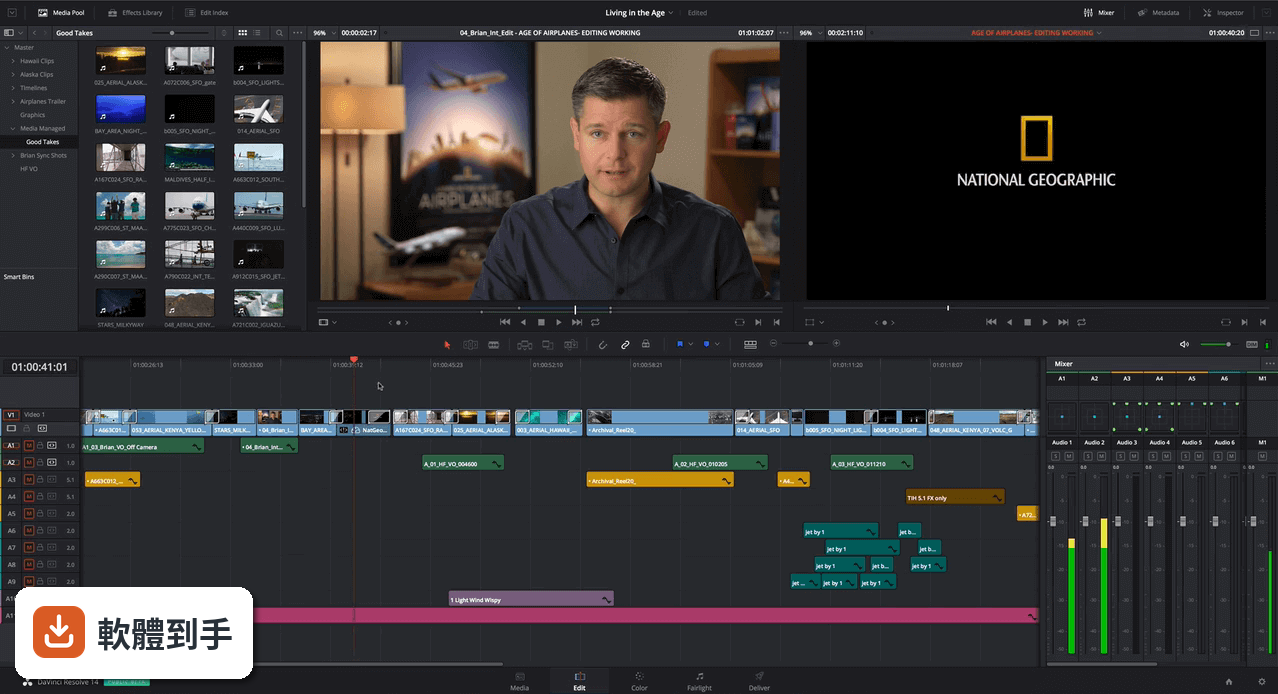
01DaVinci Resolve 這套軟體到底能拿來做什麼?
它是一套整合型的影片後期軟體,涵蓋剪輯、調色、視覺特效、音訊後製和輸出交付。官方說明指出,它把非線性剪輯和專業調色工具放在同一個系統裡,從剪接、調色、完成到交付都能在單一軟體中處理。它也被用在好萊塢電影的後期流程,代表它的功能深度足以應付高標準的製作需求。
02它跟一般免費剪輯軟體比起來,差別在哪?
主要差在整合度和工具深度。一般免費軟體通常只專注剪輯,調色或音訊處理得另外找工具。這套軟體把調色、特效(Fusion)、音訊(Fairlight)都內建在同一套程式中,而且官方說明強調它的調色工具是「業界標準」,支援 HDR、主要和次要色彩輪、內建示波器。如果你需要的是「一套做完」而不是「多套拼裝」,它的架構就是為此設計的。
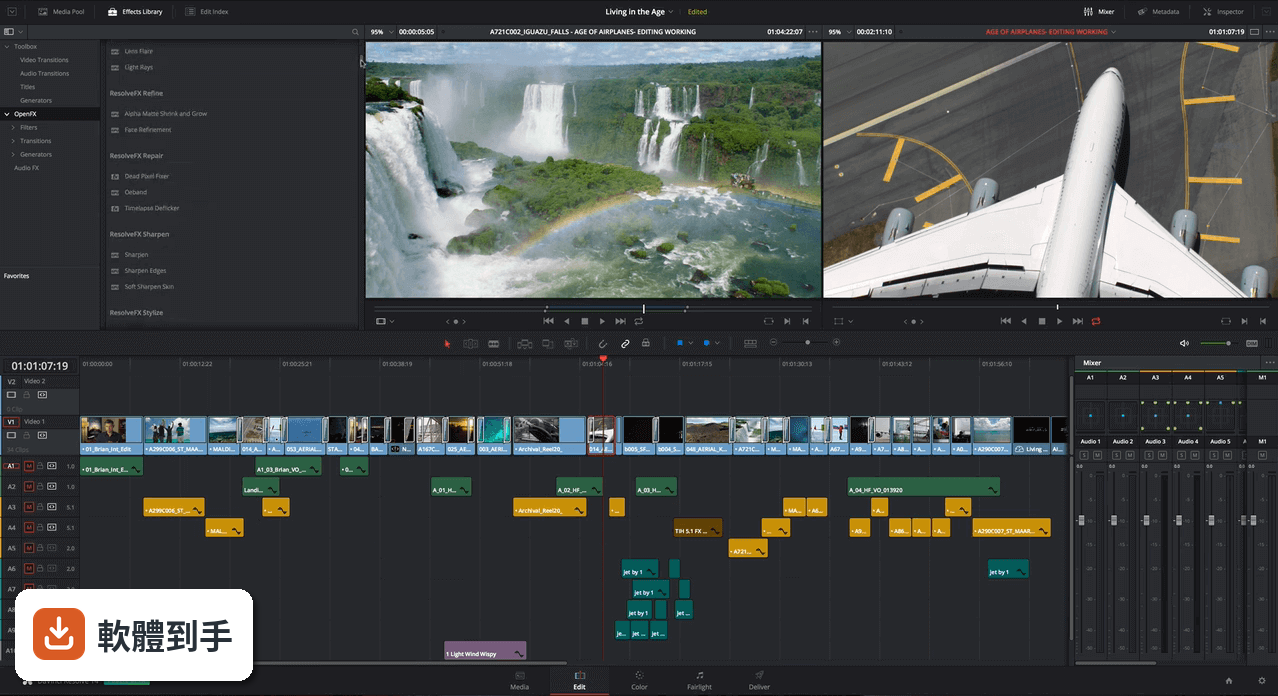
03它的調色功能是怎麼回事?跟套濾鏡有什麼不同?
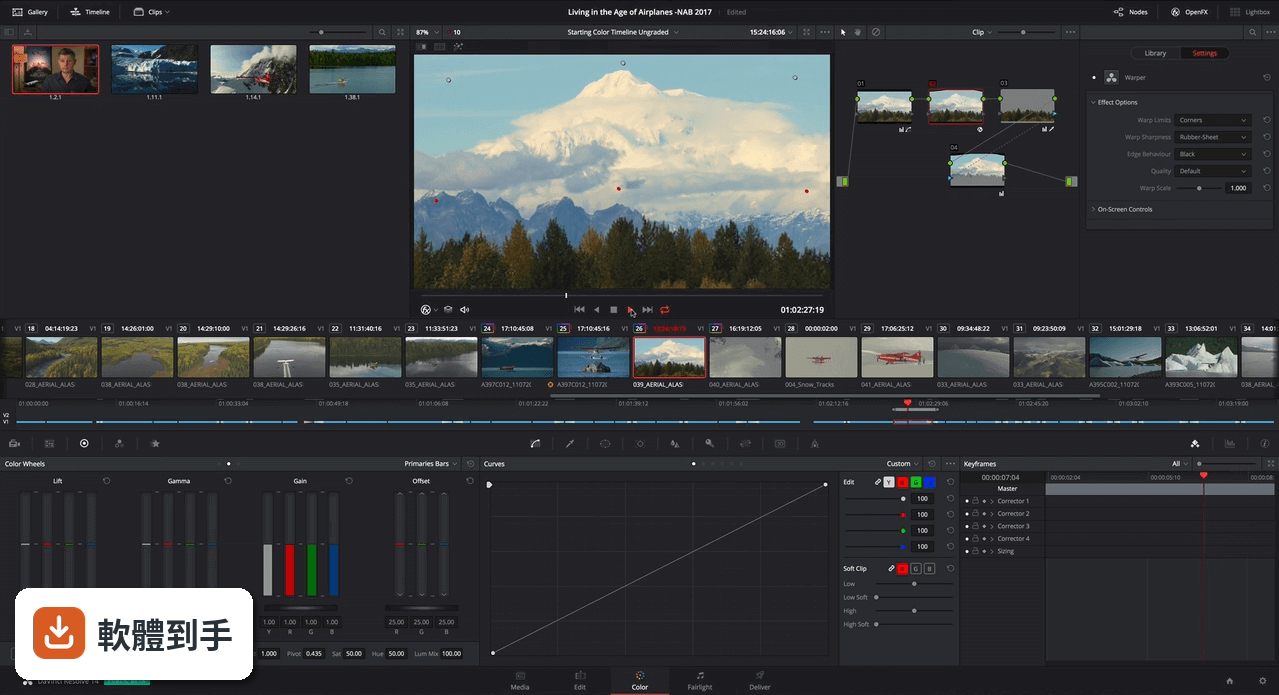
它的調色不是套濾鏡,而是用專業的色彩工具做精確控制。官方說明提到它具備業界標準的色彩校正工具,包括主要和次要色彩輪、HDR 支援、內建示波器,還有 AI 輔助的自動調色和物件追蹤。意思是你可以針對畫面中特定範圍(例如皮膚或天空)單獨調整,而不是整段影片套同一個效果。這對追求畫面質感的人來說,是關鍵差異。
04音訊處理能做到什麼程度?
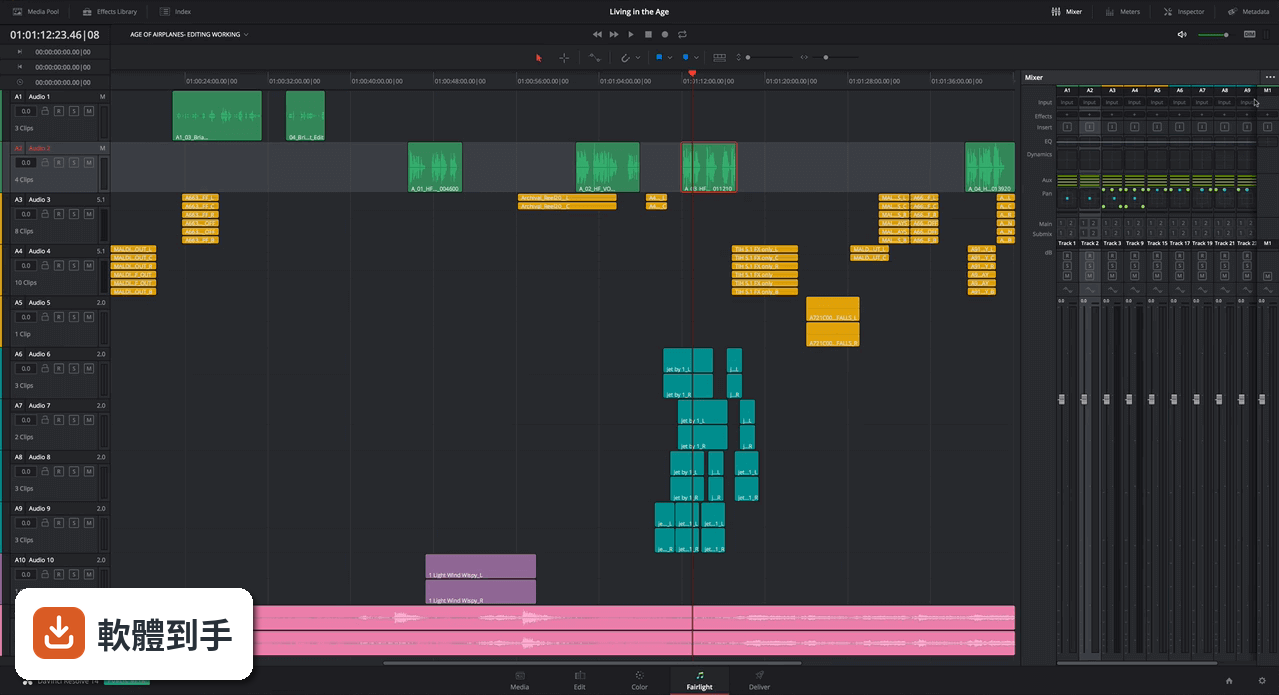
它內建完整的 Fairlight 音訊後製工具,官方說明指出可以錄音、編輯、混音、聲音美化到母帶處理,支援 3D 音訊空間和最多 1000 個聲道。還有 AI 語音隔離、噪音降低、音樂重混等功能。如果你常被影片背景噪音或人聲不清楚困擾,這些工具可以直接在剪輯流程中處理,不用另外開音訊軟體。
05多人協作是怎麼運作的?
官方說明提到它支援多用戶協作,包括 bin 鎖定、聊天和時間軸合併,讓剪輯師、調色師和音訊工程師能同時在同一個專案上工作。這對團隊製作來說很實用,因為不同角色可以平行作業,不用等前一個人完成才開始。不過這需要專案成員都熟悉這套軟體的操作,而且協作流程需要事先設定好。
06新手適合用這套軟體嗎?
它的介面分為 Media、Cut、Edit、Fusion、Color、Fairlight、Deliver 七個頁面,每個頁面負責不同工作階段,官方說明形容這個設計是「簡潔且專業」。對新手來說,學習曲線確實比簡易剪輯軟體陡峭,但它的免費版本功能已經很完整,而且介面邏輯清楚,可以一步步學。如果你願意花時間熟悉,它不會因為是免費版就砍掉關鍵功能。
07電腦配備不夠跑得動嗎?
官方說明明確指出這套軟體「很吃資源」,建議至少 16GB RAM(複雜專案要 32GB)、獨立 GPU 和多核心 CPU。如果你的電腦是文書機等級,或只有內建顯示晶片,跑起來會很吃力,甚至無法順暢預覽。安裝前最好先確認自己的硬體規格,免得裝了才發現跑不動。
08只做簡單剪輯,需要用到它嗎?
如果你的需求只是把幾段影片接起來、加個標題、輸出上傳,那它的功能對你來說確實過剩。官方說明列出的功能大多針對專業後期需求,例如 8K 即時調色、2000 軌混音、多用戶協作,這些對簡單剪輯派不上用場。這種情況下,其他更輕量的免費剪輯軟體可能更適合你,開機快、操作直覺、不需要高階硬體。
09介面只有英文,看不懂怎麼辦?
官方資料顯示它的介面語系只有 English,沒有繁體中文。如果你對英文介面不熟悉,操作上會多一層障礙,尤其是調色和音訊這種專業術語多的頁面。這點沒有官方中文化的資訊,需要自行確認是否有第三方中文化方式,或考慮其他有中文介面的剪輯軟體。
10它多久更新一次?會不會放著不管?
根據收錄的版本紀錄,這套軟體最早在 2017 年就有版本,最近一次更新在 2026 年,但近 24 個月只更新了 1 次。更新頻率不算高,不過官方說明中有提到「錯誤修正和穩定性改進」,代表開發商還是有在維護。如果你很在意軟體是否頻繁獲得新功能,這點需要納入考量。
11有其他功能相近的軟體可以比較嗎?
有。資料中列出幾套功能相近的軟體,包括 VSDC Free Video Editor(192 人評分)、Kdenlive(116 人評分)、OpenShot Video Editor(38 人評分)等。這些軟體的使用者評分人數都比 DaVinci Resolve 的 365 人少,但各有不同的介面和操作邏輯。如果你覺得這套軟體太複雜或介面語言不合適,可以從這些替代方案中找找看。
下載與官方連結
DaVinciResolve.exe · 連結指向軟體原廠
版本紀錄
- 2026-10-28 DaVinci Resolve 21.1.2
- 2026-10-02 DaVinci Resolve 21.1.1
- 2026-09-09 DaVinci Resolve 21.1
再看 5 筆
- 2026-08-05 DaVinci Resolve 21.0.4
- 2018-08-13 SUMo 5.7.2 Build 399 2.4 MB
- 2018-07-09 DaVinci Resolve 14.3.1 639 MB
- 2018-02-02 DaVinci Resolve 14.3.0 639 MB
- 2018-01-23 DaVinci Resolve 14.2.1 639 MB
這一版改了什麼
What's new in this version:
DaVinci Resolve 14.2.0
- Added support for the DeckLink 8K Pro monitoring modes
- Added support for importing audio-only AAF timelines
- Added support for rendering audio handles in ProTools round trip mode
- Added support for audio playback when performing dynamic trimming
- Added support for import and export of Final Cut Pro 10.4 XML
- Added support for automatically naming Gallery Stills using user-defined tags
- Added support for 16 and 18 fps timeline frame rates
- Added support for 95.905 fps timeline frame rate
- Added support for more fine-grained preferences for Performance Mode
- Improved support for keyframes in the Fairlight page
- Added support for listing multiple DeckLink SDI devices with unique names
- Added visual indicators for distinguishing between timeline clips without media in the Media Pool and without media on disk
- Added the ability to change the playhead position without stopping playback on the Fairlight page
- Added support for Enable 2D Timeline Scroll on the Fairlight page
- Added support for context menus for markers in the Fairlight page
- Added support for automatic creation of a timeline when dragging in an audio clip in the Fairlight page
- Addressed issues with acquiring and releasing the lock for a bin in a collaboration project
- Addressed an issue where network connectivity issues could cause unexpected results in a collaboration project
- Addressed an issue where a blank node graph would sometimes be displayed when switching between clips in collaboration mode
- Addressed an issue where two users could sometimes load a non-collaboration project in write mode without a warning
- Addressed an issue where "Update Timecode from Audio using LTC" would not work on clips starting with blank audio
- Addressed an issue where retiming an audio clip would sometimes result in audio glitches
- Addressed an issue where unlinking linked audio groups with the Pan dialog open would cause a crash
- Addressed an issue where starting or stopping playback would sometimes cause a momentary glitch in the audio on the Fairlight page
- Addressed multiple issues with fader behavior for direct track outputs in the Fairlight track mixer
- Addressed an issue where the Fairlight timeline would sometimes show an incorrect number of audio tracks
- Addressed an issue where the Fairlight control room widget would sometimes become invisible when resetting a dual-screen UI layout
- Addressed an issue where JKL playback would not honor the looped playback state on the Fairlight page
- Addressed an issue where moving an audio clip would not refresh the keyframe navigation buttons on the Fairlight inspector
- Addressed an issue where some Fairlight dial widgets would not reset their values correctly on double-click
- Addressed an issue where audio EQ band adjustments might be incorrectly saved
- Addressed an issue where stopping playback would continue audio output for a few frames on the Edit page
- Addressed an issue where LTC timecode output over SDI would not work when playing back on the Edit page
- Addressed an issue where the Mute status would not be reflected correctly in the Edit page on a track with automation
- Addressed an issue with titles where using certain fonts would result in cropped glyphs
- Addressed an issue where bypassing color grades would bypass OpenFX applied on the Edit page
- Addressed an issue where deleting a clip with an OpenFX transition would sometimes crash
- Addressed a crash when switching multicam angles if the viewer was in source mode
- Addressed an issue where reconforming multicam clips from a bin would not retain the original angle information
- Addressed an issue where performing a blade operation on asymmetric linked edits would result in incorrect linking
- Addressed an issue where previewing compound clips and timelines in the source viewer would activate the timeline audio meters
- Addressed an issue where previewing video-only clips in the source viewer would sometimes be slow on the Edit page
- Addressed an issue where importing older projects using a Sony IDT in an ACES workflow would sometimes cause a crash
- Addressed an issue with audio playback when applying clip filters on the Color page
- Addressed an issue where Color Tracing Power Windows from proxy files would result in incorrect window positions
- Addressed an issue where copying grades between clips would unnecessarily invalidate the clip source cache
- Addressed an issue where bypassing color grades on speed changed clips would disable the optical flow or frame blending
- Addressed an issue with incorrect results when stabilizing multiple edits from the same source
- Addressed an issue where switching databases would sometimes incorrectly hide the second screen in a dual screen monitor layout
- Addressed an issue where GoPro CineForm clips would decode with a watermark applied on Linux
- Addressed an issue with decoding some Sony XAVC-I clips
- Addressed an issue with incorrect cropping for certain QuickTime ARRI clips
- Addressed an issue with color shifts when decoding certain Panasonic AVC-Intra clips
- Addressed an issue where the stereo audio format of some MXF clips was not recognized correctly
- Addressed an issue with reading drop-frame timecodes for DPX clips
- Addressed an issue when decoding some QuickTime clips with large timecode values
- Addressed an issue with color shifts when rendering stereoscopic 3D clips in side-by-side mode using H.264
- General performance and stability improvements
DaVinci Resolve 14.1.1
- Addressed an issue with detecting Blackmagic Desktop Video hardware with older driver versions
- Addressed an issue when setting monitoring to PsF formats when using Desktop Video drivers newer than v10.9.3
- Addressed an issue with the detection of license dongles on MacBook Pro with Touch Bar on High Sierra
- Addressed a crash when changing audio plugins and reloading the project without saving
- Addressed a crash when opening a project with title presets in the Media Pool
- Addressed a crash during playback when Enable Video Field Processing was turned on
- Addressed a crash when connecting to an incompatible database and switching projects
- Addressed a crash when toggling Show Current Clip With Handles and loading a memory if Live Save was on
- Addressed a crash when deleting favourite transition presets
- Addressed a crash when canceling a project save and navigating to another Resolve database
- Addressed an issue where disabling a compound node would not immediately refresh the viewer
- Addressed an issue where splitting certain linked audio-video clips would not link the split components correctly
- Addressed an issue where ResolveFX Face Refinement would stop working when a clip was moved into a compound clip
- Addressed an issue where video scopes on the Edit page would sometimes show an incorrect display
- Addressed an issue where quitting Resolve would sometimes cause an incorrect shutdown on Linux
- Addressed an issue where horizontal scrolling in the timeline comparison dialog would sometimes not work as expected
- Addressed an issue in Project Server where clicking Enable Sharing may not work on some machines
- Addressed an issue where switching between large databases would take a long time to respond
- Addressed an issue where Resolve would show Media Offline frames when using RED Rocket-X to decode certain RED clips
- Addressed an issue where decoding some RED clips with CUDA in Resolve Color Management would show a black frame
- Addressed an issue where Resolve would sometimes show the Welcome dialog on successive runs
- Addressed an issue where copying audio clip keyframes would not apply it properly on the target clip
- Addressed an issue where rendering to DNxHD 36 would cause a slight shift in the red and blue channels
- Addressed a potential crash when opening floating Media Pool windows and switching pages
- Addressed an issue where the 3D qualifier would not be correctly applied for Group Pre-Clip versions
- Addressed an issue where changing master bus configuration with audio FX present would result in loss of audio output for the bus
- Addressed an issue where the display of track colors would go out of sync when deleting a track and undoing it
- Addressed an issue where dragging a clip from the Media Pool to the Fairlight timeline would sometimes show an additional track
- General performance and stability improvements
DaVinci Resolve 14.1
- Added support for a new Project Server application to manage a local PostgreSQL server on macOS and Windows
- Added support for presets for User Preferences
- Added ability to simultaneously generate cache files for multiple cache points on a clip
- Added ability to enable/disable caching of transitions in User Mode in Project Settings
- Added ability to enable/disable caching of composites in User Mode in Project Settings
- Added ability to retain the cache when moving clips with speed changes applied
- Added support for excluding individual tracks from sequence cache in User mode
- Added support for applying individual color attributes when dragging nodes from the Display Node Graph window
- Added support for a zoom slider in the Display Node Graph window
- Added support for accessing both the clip and the timeline node graph for a Still in the Display Node Graph window
- Addressed an issue where right clicking on a wiped still and selecting apply grade would not work
- Added an option in the panel settings to switch between classic DaVinci and vectorscope trackball alignment
- Added support for displaying video scopes on the Edit page
- Improved title text rendering quality
- Improved playback and rendering performance on the Radeon Pro WX 9100 GPU
- Added support for RED IPP2 color processing
- Added support for decompression and debayer options for Red Rocket cards
- Added initial Linked Group support for audio tracks
- Added the ability to drag and drop .drp project files into the Project Manager
- Added support for a project setting to switch track metering between source and post-fader
- Added the ability to update the track color of multiple selected tracks on the Fairlight page
- Surround sound audio channels are now included in the downmix to stereo buses and monitors
- Added support for a Project Setting to automatically apply convergence to windows and effects in 3D stereoscopic projects
- Added support for groups in the Color page on collaborative projects
- Added support for generating and rediscovering optimized media in collaborative projects
- Added support for viewing audio codec information in the Metadata widget
- Added support for GoPro CineForm as a caching and optimized media format
- Added support for higher resolution DNxHR formats for MXF-based Fusion Connect workflows
- ResolveFX Warper is now GPU accelerated
- Bus section in the Fairlight page meters is now scrollable
- Added support for decoding enhanced AC-3 audio on macOS and Windows
- Improved performance of viewer in Fairlight page
- Improved behavior and interactivity of timeline and track index in the Fairlight page
- Added support for 2-D scrolling on the Fairlight page
- Added support for source audio clips at any sample rate
- Added support for Dolby Vision trim on compounds clips and Fusion Connect clips
- Added ability to perform audio only insert to a tape deck
- Added ability to capture video and audio or video only from a tape deck
- Addressed an issue where the audio and video would sometimes be out of sync when capturing from a tape deck
- Addressed an issue where an incorrect frame would sometimes be inserted when performing an assemble edit on a tape deck
- Addressed an issue where recording microphone input on some tracks would not persist the recorded clip
- Addressed an issue where the length of a duration marker could not be modified on the Fairlight page
- Addressed an issue where deleting a bus that is being monitored would result in incorrect control room behavior
- Addressed an issue where Audio FX in a project would not be persisted if the the Audio FX was not installed
- Addressed an issue where moving or pasting clips in the Fairlight page would sometimes remove the associated transitions
- Addressed an issue where assigning an offline reference clip to a timeline would result in loss of audio
- Addressed an issue where switching timelines would sometimes result in loss of audio
- Addressed an issue where dynamics would not apply evenly across stereo and 5.1 tracks
- Addressed an issue where unintended audio fades would sometimes be applied
- Addressed an issue where there was sometimes a change in audio level when playing back on the Edit and Fairlight page
- Addressed an issue when duplicating a timeline with layers would result in additional layers
- Addressed an issue where layers inside a compound clip would not play the correct audio
- Addressed an issue where moving an audio clip in subframe increments would not update waveform positions
- Addressed an issue where playback of nested timeline clips would not honor the mute state of the track
- Addressed an issue where the track volume slider in the Inspector would sometimes be disabled
- Addressed an issue when using Alt/Option + click to switch multicam angles
- Addressed an issue where trimming a freeze frame clip would sometimes crash
- Addressed an issue where video only clips could sometimes not be dragged from the source viewer
- Addressed an issue where flags and markers from existing projects would not be loaded correctly
- Addressed an issue where a marker name change would sometimes not get saved
- Addressed an issue where importing FCPXML files with a subframe video edit would sometimes cause a crash
- Addressed an issue where exporting an XML from some timelines would cause a crash
- Addressed an issue where rendering a clip with synced audio in Individual Clips mode would not render the synced audio
- Addressed an issue where "Render at source resolution" would not apply ResolveFX Face Refinement correctly
- Addressed an issue where Fusion Connect clips would be rendered without temporal noise reduction applied
- Addressed an issue where saving a project would fail in certain collaboration scenarios
- Addressed an issue with saving a collaboration project when overwriting a clip in certain scenarios
- Addressed an issue in collaboration where switching clips on the Color page would sometimes not acquire a lock
- Addressed various issues with tracking of Power Windows when working in Cinemascope
- Addressed various issues with tracking of Power Windows when using Center crop with no resizing
- Addressed an issue where stabilization would sometimes not work with Edit and Input sizing applied
- Addressed an issue where the tracking would be applied incorrectly when changing the timeline resolution or the clip pixel aspect ratio
- Addressed an issue the FX tracker would sometimes not work correctly when Input or Edit sizing was applied
- Addressed issues with applying 3D LUTs when using Metal as the GPU processing mode
- Addressed an issue where some OpenFX plugins would cause flashing of grades
- Addressed a crash in certain scenarios when switching to the Key Palette on a matte node
- Addressed issue with playback performance of large projects in the Color page
- Addressed an issue where render at source resolution would not apply stabilization
- Addressed an issue where some memories would show up as blank when reloading project from disk database
- Addressed a crash when opening some stereo projects upgraded from DaVinci Resolve 12.5.6
- Addressed an issue with importing some DaVinci Resolve 12.5 projects
- Addressed an issue where easyDCP renders would cause a crash on macOS 10.13 High Sierra
- Addressed an issue where the easyDCP KDM generation would not honor the validity dates specified
- Addressed an issue where decoding certain long QuickTime clips would repeat a frame
- Addressed an issue where QuickTime ProRes 4444 clips would sometimes lose the alpha channel during playback
- Addressed a crash when trimming and copying AIFF clips using Media Management
- Addressed an issue where decoding HEVC clips at 2048x858 would sometimes result in artifacts
- Addressed an issue where certain MXF clips would show incorrect duration
- Addressed an issue when decoding certain Sony clips in an ACEScc workflow
- Addressed a performance issue when media managing a large number of clips from the same source folder
- Addressed an issue where floating Media Pool windows would not get updated correctly when performing an undo
- Addressed an issue where resizing the Media Pool would sometimes result in a crash
- Addressed an issue where a clip with a split edit would not be stored correctly in the Media Pool
- Addressed some UI issues when running Resolve in full screen mode on macOS
- Addressed a crash when opening the Effects Library when duplicate plugins are installed
- Addressed connectivity issues with the DaVinci Resolve Advanced panel on Linux
- Addressed an issue where large projects would sometimes hang during load
- General performance and stability improvements
DaVinci Resolve 14
- Change log not available for this version