
Android手機誤刪資料怎麼救?Dr.Fone Toolkit能做些什麼
 Dr.Fone Toolkit for Android 13.8.8
資料更新 2026-02-20
閱讀約 6 分鐘
手機裡的照片、聯絡人、簡訊不小心刪掉,當下真的會愣住。尤其是出遊拍的照片、客戶的對話紀錄,或是存在SD卡裡的影片,明明剛剛還在,一轉眼就消失。當下第一個念頭是上網找救援工具,但又怕下載到來路不明的軟體,更怕越弄越糟,連原本還在的資料都被蓋掉。
一般人習慣的做法是先找備份,但很多人根本沒開自動備份,或備份只涵蓋部分資料。就算有雲端同步,刪除的動作往往也同步到雲端,等於兩邊都沒了。這類工具的切入點是直接掃描手機或記憶卡內部殘留的資料痕跡,讓你先免費預覽掃描結果,確認找不回來再決定要不要付費解鎖完整還原。
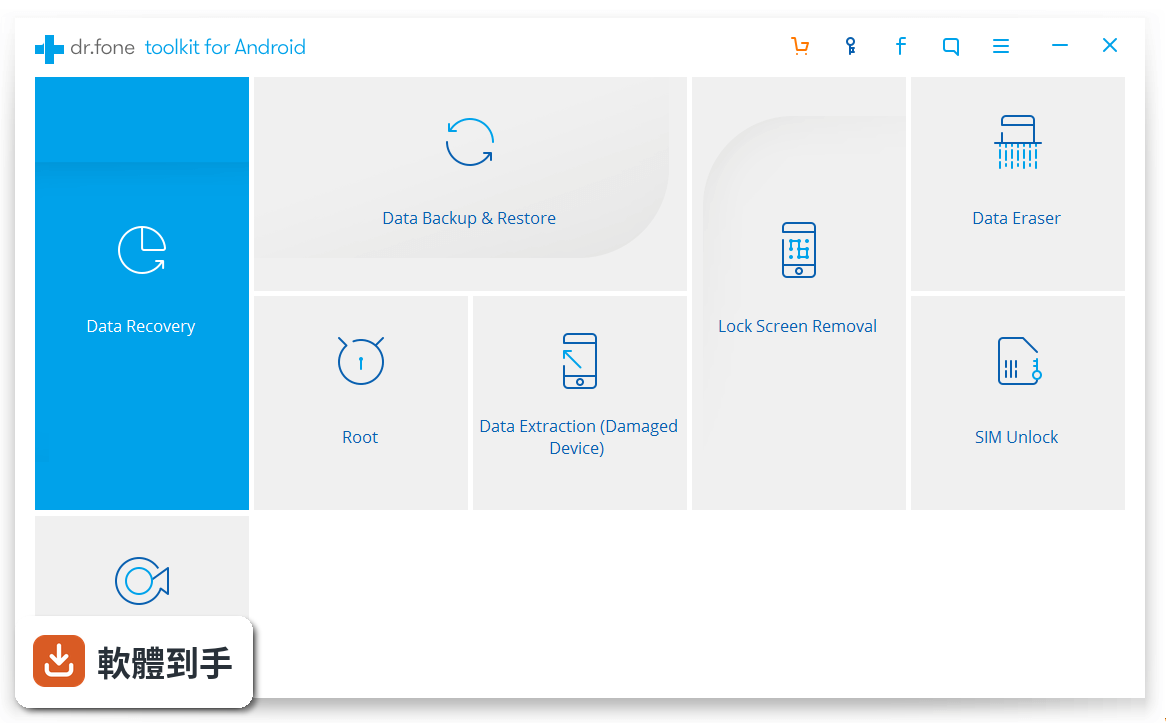
01Dr.Fone Toolkit for Android 到底能救回哪些東西?
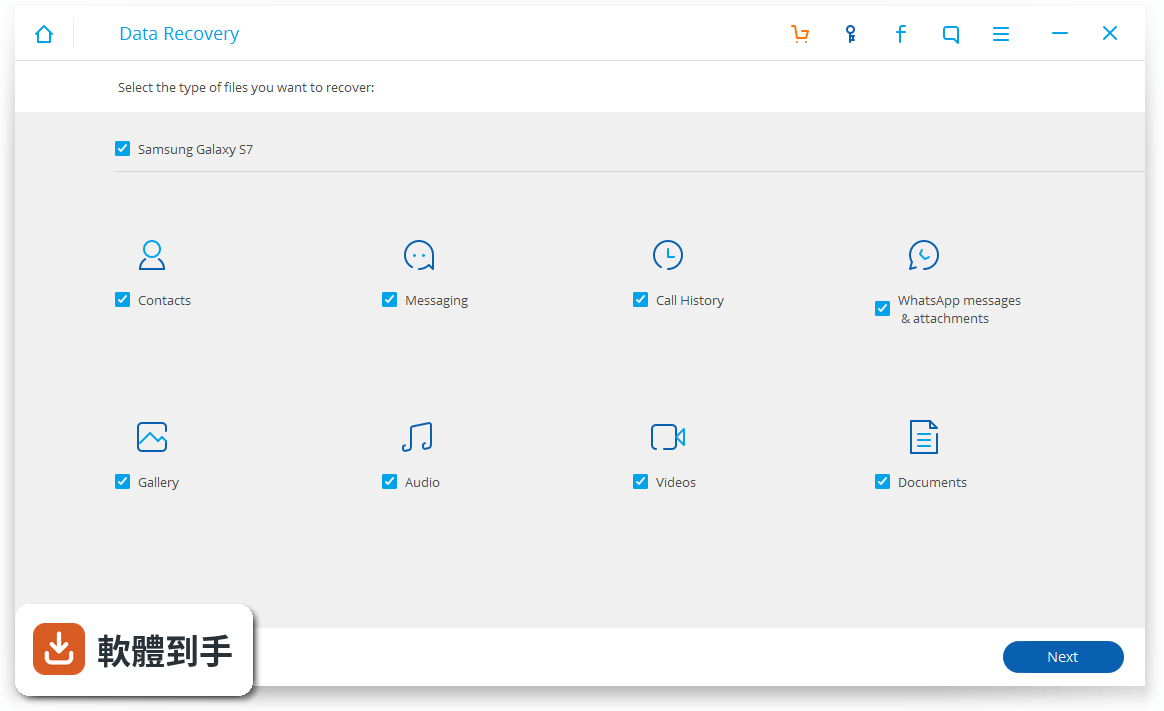
根據官方說明,它支援的檔案類型超過14種,包含聯絡人、簡訊、照片、影片、音樂、通話紀錄、文件,以及WhatsApp和WhatsApp Business的對話紀錄,連View Once限閱媒體也能處理。掃描後可以勾選特定項目匯出到電腦,不需要事先有備份。不過實際能救回多少,還是要看資料被刪除後有沒有被新資料覆蓋。
02免費版跟付費版差在哪裡?
免費版可以下載後先掃描手機,掃描完可以預覽找到的資料,確認有機會救回來再決定要不要買完整版。但免費版只能看不能匯出,要實際把檔案存回電腦,需要付費解鎖。這套軟體的授權型式是Demo,不是免費軟體,下載前要有心理準備。
03手機摔壞螢幕黑掉,還能用這套軟體救資料嗎?
官方有提到可以從損壞的Android裝置還原資料,即使螢幕無法操作也可以處理,而且不需要root或開啟USB偵錯。不過這是指軟體層面的支援,如果手機主機板或儲存晶片本身已經物理損壞,軟體就幫不上忙,這種情況需要找專業維修。
04手機沒有root可以用嗎?
可以。官方說明明確指出,這套軟體同時支援有root和沒有root的Android裝置,而且不會改變裝置的root狀態。有root的手機維持root,沒root的維持原樣。它只會讀取裝置上的資料,不會修改或寫入任何東西,所以不用擔心用了之後手機變磚或失去保固。
05支援哪些品牌和型號?
官方宣稱支援超過6000款Android手機和平板,涵蓋Samsung、HTC、LG、Sony、Motorola、ZET、Huawei等品牌,也相容最新的Android 16系統和Samsung Galaxy S25系列。不過實際支援清單會持續更新,如果你的手機比較冷門,建議先下載免費版掃描看看,掃得到就代表有機會。
06我完全不懂電腦,操作會不會很難?
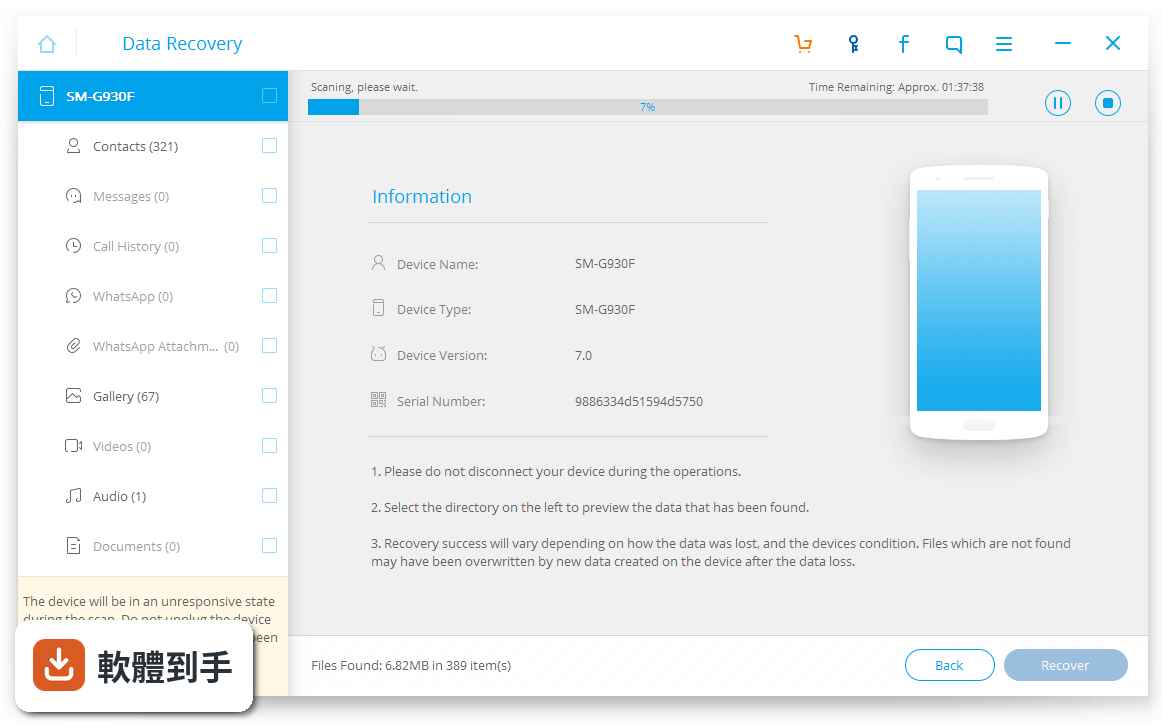
官方強調這套軟體的操作流程就是「掃描、預覽、還原」三個步驟,介面設計以簡單直覺為主,不需要專業電腦技能。但要注意介面語言是英文,如果英文閱讀有困難,操作上會多一層障礙。可以先看官方網站的操作教學,確認自己能不能接受再下載。
07這套軟體適合什麼樣的人用?
官方說法提到適合一般使用者、專業人士,甚至想保護小孩避免接觸不良資訊的家長。實際上,最適合的是「不小心刪掉重要資料、而且沒有備份習慣」的人。如果你手邊有刪掉的對話紀錄或照片急著找回,這套軟體提供免費掃描預覽,可以先確認有沒有救,再決定要不要花錢。
08這套軟體跟其他Android資料救援工具有什麼不同?
在功能相近的軟體中,MiniTool Mobile Recovery for Android Free也有類似定位,但評分人數只有78人,Dr.Fone Toolkit for Android有341人評分,樣本數較多。另外Wondershare自家也有Dr.Fone Toolkit for iOS,如果你同時有Android和iOS裝置,可以比較看看。不過不同軟體實際掃描效果有差異,建議都先用免費版測試。
09這套軟體有持續在更新嗎?
根據收錄的版本紀錄,最早版本在2017年,最近一次更新在2026年2月,近12個月更新1次,近24個月也是1次。代表它維持著一年至少一次的更新頻率,以商業軟體來說算是有在維護。如果你在意的是能不能支援最新手機型號,這個更新頻率還算可以接受。
10這套軟體有中文介面嗎?
沒有。官方列出的介面語系只有English,沒有繁體中文或簡體中文。如果你對英文介面不熟悉,操作時需要對照翻譯或教學文章。這點在購買前要考慮清楚,因為資料救援的過程有時間壓力,介面看不懂會增加操作難度。
11這套軟體跟Dr.Fone Toolkit for iOS有什麼關係?
兩套都是Wondershare出的,但一個是Android版,一個是iOS版,功能定位類似但支援的裝置和檔案類型不同。iOS版有86人評分,Android版有341人評分,Android版的評價樣本數較多。如果你同時有兩邊的裝置,需要分開購買,沒有通用授權。
12這套軟體有沒有其他替代方案?
功能相近的軟體有MiniTool Mobile Recovery for Android Free,評分人數78人,比Dr.Fone少很多,但它是免費軟體,可以先試試看。另外TunesGo for Windows有557人評分,但它的定位比較偏向檔案管理,不完全是資料救援工具。建議先用免費版掃描,確認哪一套找得到你的資料再決定。
下載與官方連結
前往官方網站 下載 Dr.Fone Toolkit for Android
drfone_full3360.exe · 421 MB · 連結指向軟體原廠
版本紀錄
- 2026-02-20 Dr.Fone Toolkit for Android 13.8.8 421 MB
- 2022-07-26 Dr.Fone Toolkit for Android 11.4.12 180.07 MB
- 2021-11-18 Dr.Fone Toolkit for Android 11.4.8
再看 4 筆
- 2021-05-09 Dr.Fone Toolkit for Android 11.2.2
- 2021-01-08 Dr.Fone Toolkit for Android 11.0.6
- 2020-08-19 Dr.Fone Toolkit for Android 9.1.0 61 MB
- 2017-08-19 Dr.Fone Toolkit for Android 8.3.3
這一版改了什麼
- Instantly restore WhatsApp and WhatsApp Business data, including previously inaccessible “View Once” media files.
- Fully compatible with the latest Android 16 and supports newly released flagship devices, including the Samsung Galaxy S25 series.
- Enhanced deep-scan algorithms for more accurate and complete data recovery.
- Recover data from damaged or inaccessible Android devices without requiring root access (where supported).
- Preview and selectively export specific files before completing the recovery process.
Installation and Setup
Installing Dr.Fone - Data Recovery (Android) is straightforward. Visit the official Wondershare website or FileHorse and download the installer for your Windows or Mac computer.
Run the installer and follow the on-screen instructions. Once installed, connect your Android device to your computer using a USB cable. You may need to enable USB debugging on your Android device. It will recognize your device, and you can proceed with the recovery process.
How to Use
- Launch the program on your computer after installation.
- Connect your Android device to your computer using a USB cable.
- Follow the on-screen instructions to enable USB debugging on your Android device if required.
- Once your device is detected, select the types of data you want to recover.
- Click "Start" to initiate the scanning process.
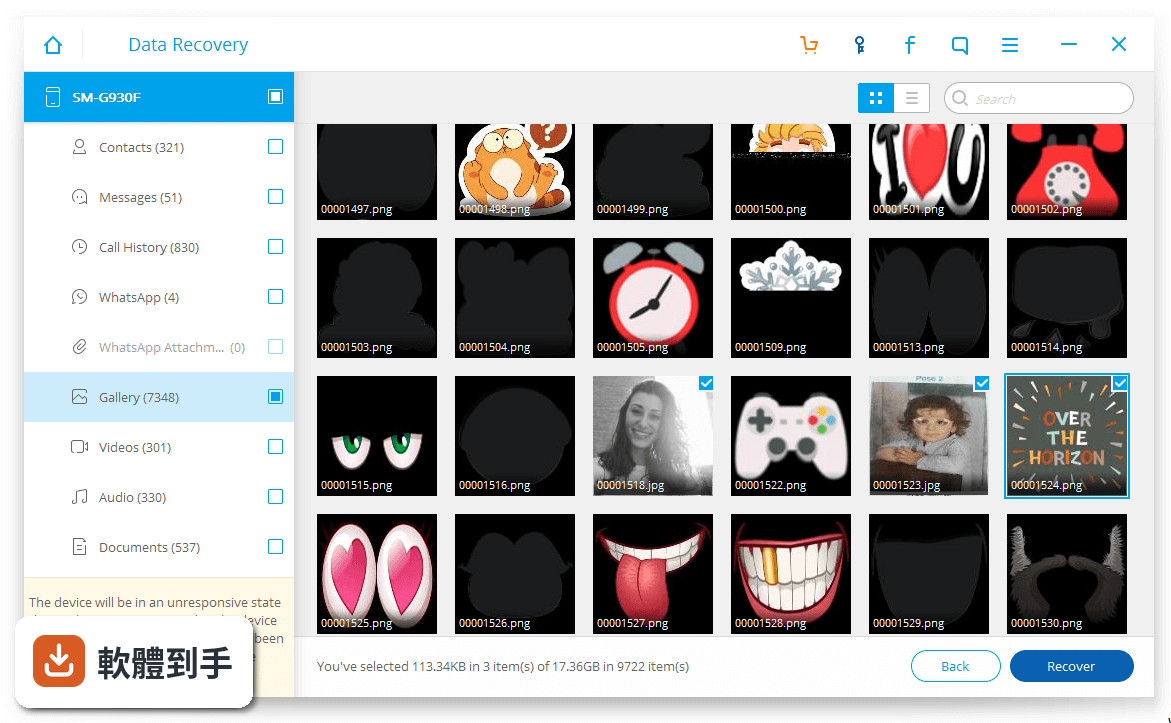
- Preview the recoverable data and select the items you want to recover.
- Click "Recover" to save the selected data to your computer or directly to your Android device.
Is Dr.Fone safe to use?
Yes, Dr.Fone is a reputable software developed by Wondershare, known for its security and reliability. It won't harm your device or data.
Can I recover data from a broken Android device?
Yes, it offers a specialized feature for recovering data from damaged or broken Android devices.
Is there a free trial available?
Yes, it provides a free trial version with limited features, allowing you to test its capabilities before purchasing the full version.
Are my recovered files guaranteed to be intact?
It employs secure recovery methods to ensure the integrity of your recovered data, minimizing the risk of corruption.
Which Android devices are supported by Dr.Fone?
It supports a wide range of Android devices from various manufacturers and Android OS versions. Check their official website for a list of compatible devices.
How can I recover deleted photos from my Android phone's internal memory?
To recover deleted photos from an Android phone's internal memory, you can follow the steps below.
- Launch the tool and select Data Recovery. Connect your Android phone to the computer using a USB cable.
- Select Photos from the supported file types and then select scan mode.
- It will start to scan the files on the Android phone's internal memory.
- Preview the found photos and recover the deleted photos successfully.
Alternatives
Tenorshare UltData for Android - Recover Deleted Photos from Android without Root!
MiniTool Mobile Recovery for Android - Best Free Android Data Recovery Software for Android Phones and Tablets.
FonePaw Android Data Recovery - Recover deleted Contacts, Messages, Photos, Videos, and Call Logs.
Pricing
It offers a variety of pricing options, including a free trial with limited features.
The full version comes with several pricing plans, ranging from single-device licenses to multi-device licenses, with prices varying based on the level of features and support required.
It's advisable to visit the official Wondershare website for the most up-to-date pricing information.
System Requirements
- Processor: 1 GHz or faster processor (Intel or AMD)
- RAM: 2 GB or more of RAM
- Disk Space: 200 MB of available hard disk space
- Computer OS: Requires Windows 11/10/8.1/8/7
- Android OS: Compatible with a wide range of Android devices and versions. Specific requirements may vary depending on the device and data recovery scenario.
PROS
- User-friendly interface suitable for both beginners and advanced users.
- Supports a wide range of Android devices and data types.
- Secure and reliable data recovery process.
- A selective recovery option to save time and storage space.
- Ability to recover data from broken or damaged Android devices.
- Free trial available for testing before purchasing.
- The full version can be somewhat expensive, depending on the chosen plan.
- The success of data recovery may vary depending on the specific device and data loss scenario.
Dr.Fone - Data Recovery (Android) is a comprehensive and user-friendly solution for Android data recovery. With its extensive feature set, compatibility with various Android devices, and secure recovery process, it stands out as a reliable choice for users looking to retrieve lost or deleted data.
The software's free trial option allows users to assess its capabilities before making a purchase. While the full version can be relatively expensive, its effectiveness and ease of use make it a valuable tool for those in need of Android data recovery solutions.
Note: In the demo version, we cannot preview full messages and cannot recover data.
Also Available: Download Dr.Fone Toolkit for Android (Mac)
Download Dr.Fone Toolkit for Android Latest Version Why is this app published on FileHorse? (More info)