
這是歷史版本頁面 — 看 Duplicate Cleaner 最新版本
硬碟空間被重複檔案塞滿?Duplicate Cleaner 能幫你找出什麼
 Duplicate Cleaner Free 4.1.0
資料更新 2017-11-21
閱讀約 5 分鐘
電腦用了一段時間,硬碟空間莫名其妙越來越少。你明明記得刪過一些舊檔案、清過資源回收筒,但磁碟容量還是亮紅燈。想整理又不知道從哪裡下手,尤其那些散落在不同資料夾的照片、音樂、下載安裝檔,總覺得好像看過同樣的檔案好幾次,但手動比對又太花時間,最後只能擱著不管。
一般人遇到這種狀況,頂多用檔案總管照日期或大小排序,一個個點開來看。但檔案一多,這種做法根本行不通,眼睛看花不說,還很容易漏掉檔名不同但內容一樣的檔案。這類工具切入的點,就是幫你自動掃描指定磁碟或資料夾,用內容比對的方式找出重複的檔案,讓你在刪除前先看清楚,避免誤刪。
01Duplicate Cleaner 到底能掃出哪些重複的東西?
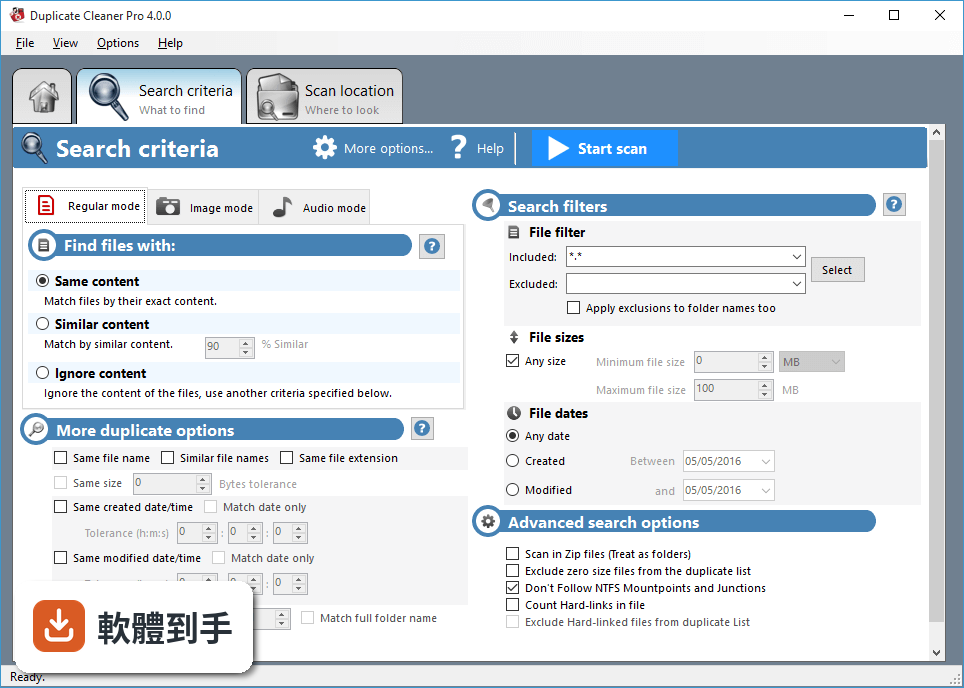
它主要掃描文件、圖片、影片和音樂這幾大類。文件部分可以依內容比對,就算檔名不同也能抓出來;圖片可以找出旋轉、翻轉、修圖過或改過格式的相似照片;音樂則支援 MP3、FLAC、WAV 等常見格式,可以依歌手、專輯或標題比對,也能忽略標籤直接比對音樂內容。
02掃描的時候能不能只針對某個資料夾,不要整顆硬碟跑一遍?
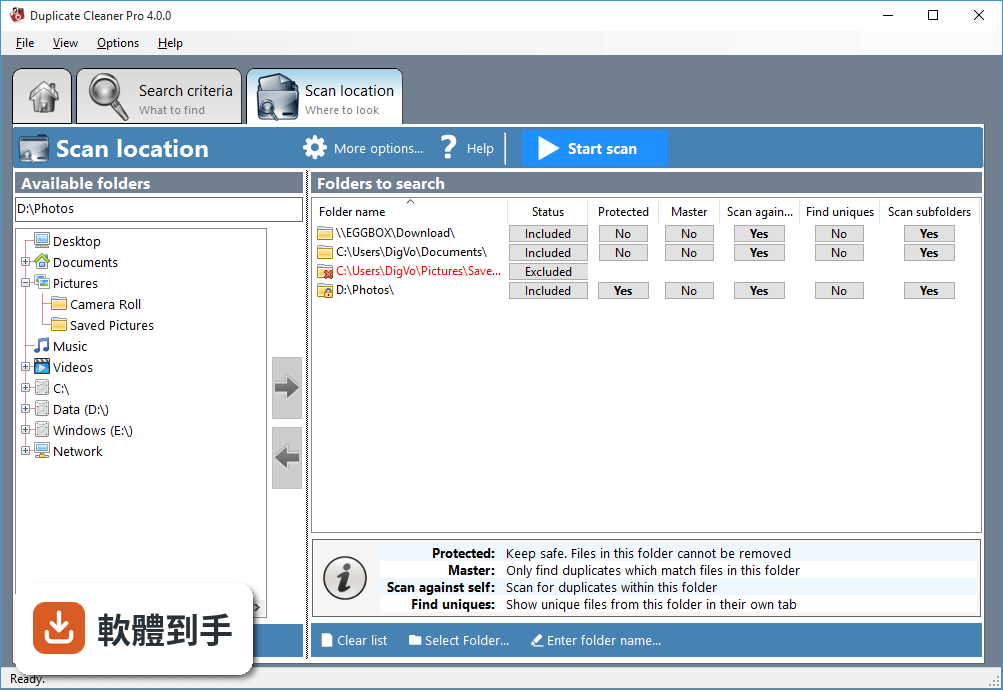
可以。啟動後先選要掃描的磁碟或資料夾,再決定比對方式,例如依檔案內容或依檔名。也能用檔案類型、大小、日期這些條件縮小範圍,甚至連 Zip 壓縮檔裡面的內容都可以掃。設定好之後按開始,它就會分析你選的那些位置。
03它找重複圖片是怎麼判斷的?我有些照片只是旋轉過或縮小過,這樣抓得出來嗎?
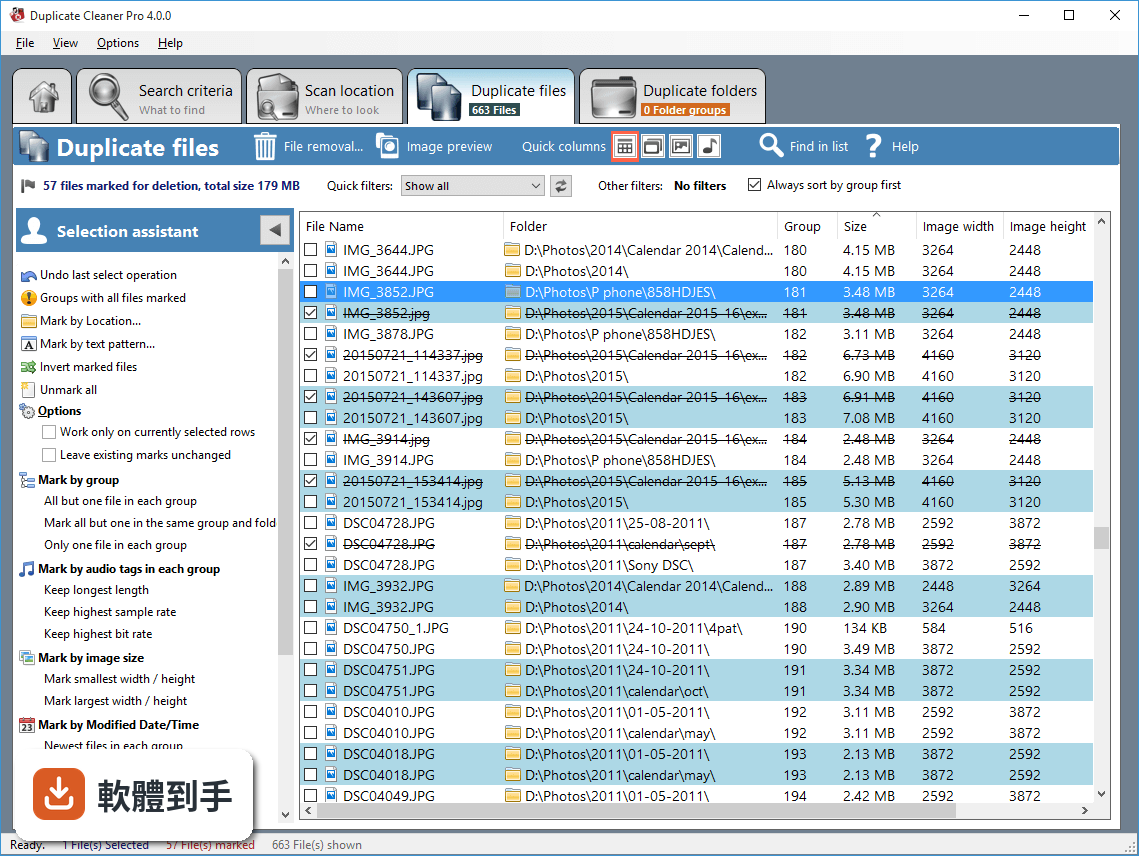
它用的是視覺比對技術,不是只看檔名或檔案大小。所以圖片旋轉、翻轉、修圖、縮小,或存成不同格式,都有機會被辨識出來。比對的精確程度可以自己調整,想要嚴格一點或寬鬆一點都行,掃完之後會列出結果讓你先看過再決定怎麼處理。
04掃出來的結果可以預覽嗎?我怕刪錯檔案。
有預覽功能。掃描結果出來之後,可以先看檔案內容再勾選要刪除的項目,確認沒問題才按下刪除。不過要注意,它沒有還原功能,刪了就刪了,所以預覽這一步建議不要跳過,尤其是檔案很多的時候,寧可多花幾分鐘檢查。
05它可以掃網路磁碟或外接硬碟嗎?
可以。除了本機的磁碟和資料夾,它也支援掃描網路磁碟和外接儲存裝置。只要這些位置有連上你的電腦,就能納入掃描範圍。這對那些把檔案分散存在不同地方的人來說,一次掃完會比手動整理省事很多。
06這套軟體適合什麼樣的人用?
適合照片和音樂收藏量很大的人,因為手動整理根本整理不完,用內容比對的方式可以快速找出重複或相似的檔案。也適合硬碟空間常常不夠、但又不確定重複檔案到底佔了多少空間的人。如果你只是偶爾想清一下,可能用不太到它的進階比對功能。
07我電腦不太熟,操作會不會很難?
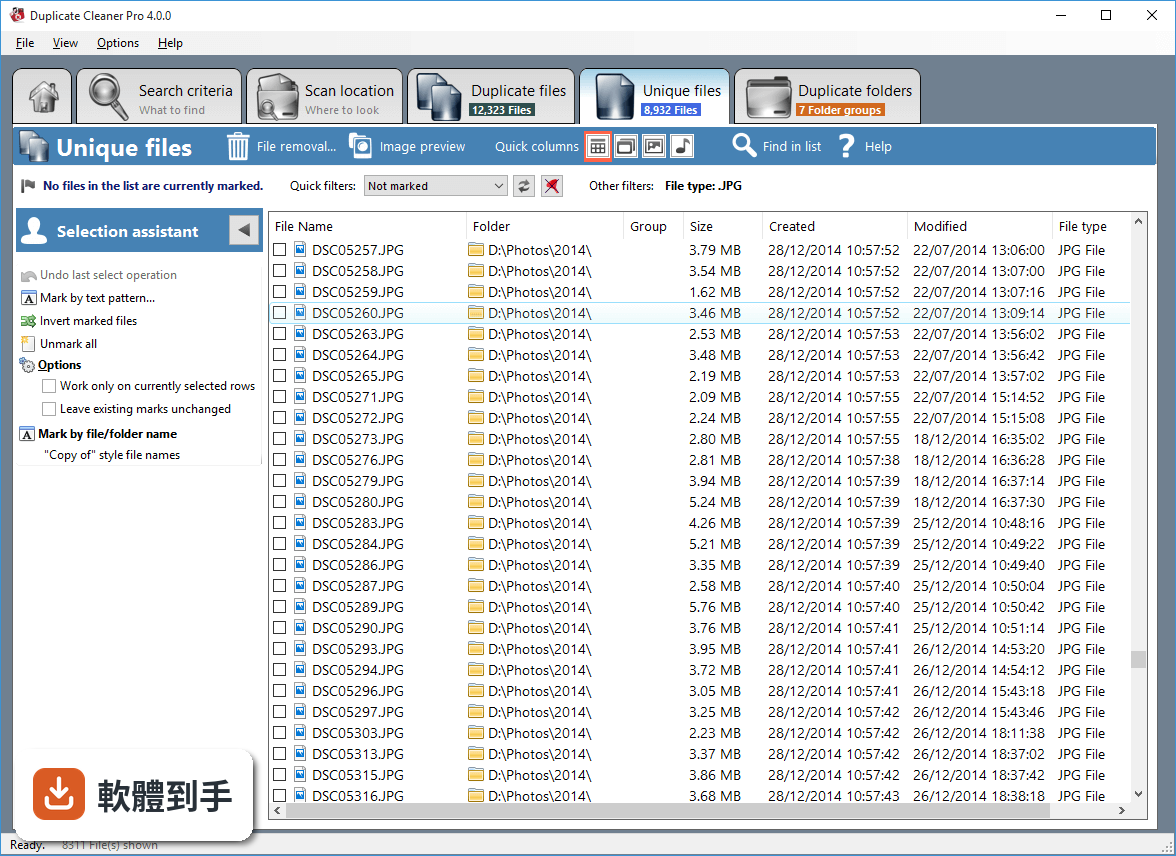
介面算直觀,主畫面就有開始掃描、檢視結果、管理檔案的選項,安裝過程也不用什麼技術背景。不過介面是英文的,如果對英文介面不熟悉,操作上會需要花一點時間適應。掃描前設定條件、掃完後勾選刪除,這幾個步驟熟悉之後就不會太困難。
08這套軟體有中文介面嗎?
沒有,官方提供的介面語系只有英文。如果你習慣看中文操作,這點要列入考慮。雖然功能不算複雜,但英文介面對於不熟悉英文的人來說,還是會增加一些使用門檻,尤其是設定掃描條件或閱讀掃描結果的時候。
09它跟 Auslogics Duplicate File Finder 比起來,哪個比較多人用?
以評分人數來看,Auslogics Duplicate File Finder 有 91 人評分,Duplicate Cleaner 是 63 人,Auslogics 的樣本數稍微多一點。兩套都是專門找重複檔案的 Windows 工具,功能也相近。如果你在意的是社群回饋數量,Auslogics 的參考資料會多一些,但實際用起來哪個順手,還是要看個人習慣。
10我預算有限,這套軟體一定要付費嗎?
它的授權型式是 Demo,官方定價是單一使用者授權 39 美元。也就是說,你可以先試用看看,但完整功能需要付費才能使用。如果你的需求只是偶爾清一次重複檔案,付費可能不太划算,可以考慮其他免費或更便宜的工具,或先確認試用版的功能夠不夠用。
11我用的不是 Windows,這套軟體可以裝嗎?
不行,它只支援 Windows 7、8、10、11,官方資料沒有提到 macOS 或 Linux 版本。如果你主要使用 Mac 或 Linux,這套軟體就不適合你,需要找其他支援你作業系統的重複檔案清理工具。
12它更新頻率如何?會不會買了之後就沒人維護?
官方資料顯示,收錄的版本從 2017 年到 2026 年都有,近 12 個月更新過 1 次,近 24 個月也是 1 次,更新頻率不算高。另外官方說明也提到,網站上已經很長一段時間沒有更新。如果你很在意軟體是否持續維護,這點需要自行斟酌。
下載與官方連結
DuplicateCleaner_setup.exe · 連結指向軟體原廠
版本紀錄
- 2026-09-20 Duplicate Cleaner Pro 5.28.0.0 59.7 MB
- 2026-05-09 Duplicate Cleaner Pro 5.27.0.0 66.1 MB
- 2021-09-10 Duplicate Cleaner Free 5.0.13
再看 2 筆
- 2018-11-09 Duplicate Cleaner Free 4.1.1 13 MB
- 2017-11-21 Duplicate Cleaner Free 4.1.0
這一版改了什麼
What's new in this version:
Duplicate Cleaner Free 4.1.0
- New comparison mode: Similar Audio
- View the Duplicate list by grouped and thumbnail views
- Unique mode improvements for drive/folder comparison projects
- Selection Assistant option: Work on unmarked groups only.
- Selection Assistant improvements for 'All but one in each group' (Utilize existing marks, prefer longer file names)
- Saved file filters can now be combined
- Improved checks to for initial folders mapping to the same location
- Duplicate folder list column widths saved
- Various other fixes
Duplicate Cleaner Free 4.0.5
- Alternative delete method added (Non-windows shell based)
- Bugfix: Crash if criteria date less than 2038 or greater than 1901
- Bugfix: Incorrect saving of font option in certain locales (Strikethru issue)
- Bugfix: Crash on some systems due to application instance checking in .NET Framework
- Bugfix: Copyitem error when attempting to move/copy deleted files
- Various other minor fixes
- Improvements made to installer/uninstaller
Duplicate Cleaner Free 4.0.4
- Image mode - 100% Exact pixels comparison mode added
- Image Preview - various improvements including selectable thumbnail size/ratio
- Overwrite/Rename option for Move/Copy function
- Improved 'Find in list' functionality : selectable search columns
- Improved layout for High-DPI/Large font/4K displays
- Improved group ordering
- Refresh list (check files) operation now background threaded
- Bugfix - Database not found when using network UNC based profile location
- Bufgix - Hard linking on read-only files leaves temp files
- Bufgix - slow down when cycling through files with Image Preview window open
- Bugfix - Removed group-related filters on unique tab
- Bugfix - List position changes when marking and current position >50000
- Other bugfixes
Duplicate Cleaner Free 4.0.3
- Drive group view in path scan list
- Hash cache improvements
Duplicate Cleaner Free 4.0.2
- Support for RAW camera image formats
- Support for High-DPI and large font displays
- Audio data only comparison mode
- Progress indicator when frontloading files to delete/move
- Bugfixes: Windows Vista crash, Windows 8/10 hardlinking, other minor fixes
Duplicate Cleaner Free 4.0.1
- Database issue fixes
- CSV import issue fixed
- Adding folders from command line issue resolved
- License issue fixes
Duplicate Cleaner Free 4.0.0
- Updated GUI
- Find unique files functionality
- Match by same file extension
- Match by same folder name (full path or to a specified depth)
- Size matching tolerance
- Date matching tolerance
- Exclude filter can now work on folder names
- Flag input folder(s) as a Master - Only files which duplicate the ones in the Master will be listed
- Flag input folder(s) as Protected - you can't mark or remove from a protected folder
- Image Mode - Match by tags (Digitised dates, comments, ImageUniqueID, etc)
- Image Mode - Match by closest distance (for geotagged images)
- Audio Mode - Match by more tags including TrackNo, year, genre, comment, AmazonID, MusicBrainzID, AcoustID, etc
- Selection Assistant - Undo last selection
- "Search within list" feature
- Hash Caching - speeds up repeat searches
- Now uses the windows file engine for deletion, etc - gives more feedback and is much faster
- NET Framework 4.5 support
- Many other fixes and optimizations
Duplicate Cleaner Free 3.2.7
- Scroll lock key support in main list.
- User-definable database location via ini file
- File discovery speed improved (Esp. NAS/Network drive)
- Send license to program via installer (-register="00000-00000-00000-00000-000000" flag)
- Bugfix: Arithmetic overflow error during scan.
- Bugfix: Crash when moving mouse over list [Tooltip]
- Bugfix: Move image preview window on back screen if outside bounds
- Bugfix: Splash screen exception if system busy.
- Other minor fixes