
這是歷史版本頁面 — 看 DVD Ripper Pro 最新版本
DVD 轉檔老是卡住?DVD Ripper Pro 能幫上什麼忙
 DVD Ripper Pro 20.0
資料更新 2022-06-08
閱讀約 6 分鐘
你手上有一疊 DVD,可能是老電影、以前錄的婚禮影片,或是整套影集。播放器越來越難找,筆電也早就沒有光碟機了,你想把這些片子轉成 MP4 存在硬碟或手機裡,但實際動手才發現問題一堆:轉檔速度慢到像在跑馬拉松、轉到一半程式當掉、遇到有防拷保護的片子直接跳錯誤訊息。你只是想趕快把片子備份起來,不是想研究影音編碼。
免費轉檔軟體不是沒有,但常常格式支援有限、不支援有保護的光碟,或者操作介面複雜到讓人放棄。更麻煩的是,有些 DVD 有區碼限制或防拷保護,一般軟體根本讀不到內容。這種時候你需要的是專門處理 DVD 轉檔的工具,它的切入點是:幫你把光碟內容解開、轉成通用格式,同時處理掉那些阻礙你備份的技術限制。
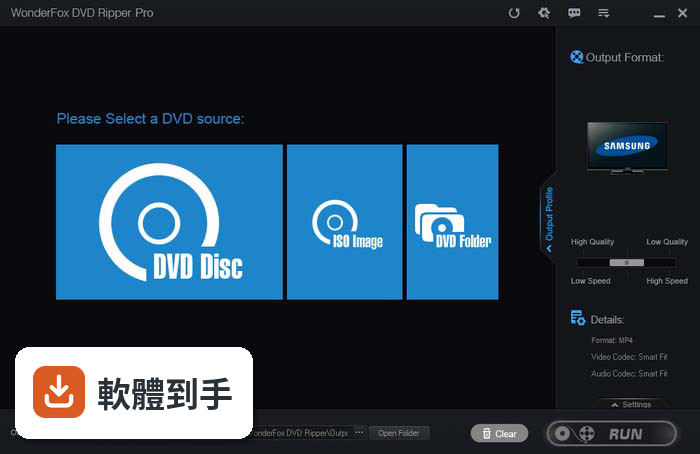
01DVD Ripper Pro 到底能拿來做什麼?
它的核心功能是把 DVD 光碟、資料夾或 ISO 映像檔轉成數位影片檔,支援的輸出格式包括 MP4、AVI、MKV、MPG、WMV、MOV 等,也能轉成 MP3 音訊。另外它內建針對 iPhone、Android 手機、智慧電視、遊戲主機的預設轉檔參數,選好裝置類型就能直接轉出適合的格式,不用自己研究解析度和編碼設定。
02我有一堆防拷保護的 DVD,這套軟體轉得動嗎?
官方說明指出它支援破解 CSS、區碼和 UOP 等常見的 DVD 防拷保護,所以一般出租店或市售的正版 DVD 大多能正常讀取轉檔。不過要注意,它不支援藍光光碟,如果你手上有的是 Blu-ray,這套軟體幫不上忙,需要另外找 WonderFox 出的藍光轉檔產品。
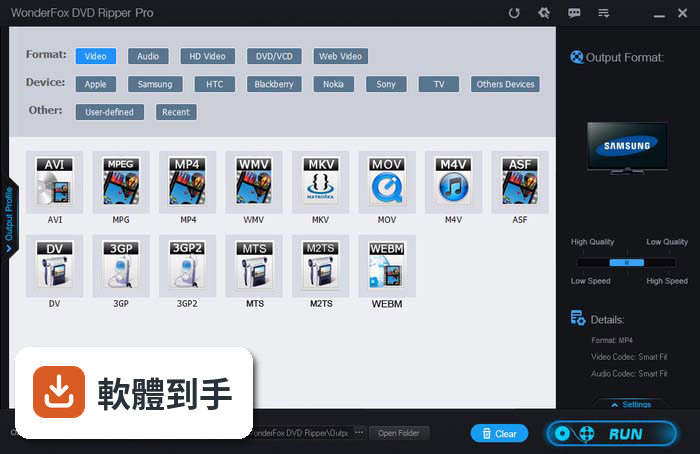
03轉檔速度真的很重要,它轉一片大概要多久?
官方提供的數據是:轉一片 150 分鐘的 DVD 成 MP4、AVI、MKV、MOV 或 WMV,大約需要 20 分鐘;如果轉成 MPG 格式,只要 5 到 10 分鐘。它採用 GPU 加速技術來縮短轉檔時間,但實際速度還是會依你的電腦硬體規格、光碟機讀取速度和輸出格式而有所不同。
04轉出來的畫質會不會變差?
官方宣稱可以做到 1:1 的 DVD 轉 MP4,保留原始畫質,不會掉關鍵影格或出現畫面重繪問題。它也能把 DVD 轉成 HD 高畫質格式,適合在大螢幕上播放。不過「無損」的實際表現還是會受到你選擇的輸出格式、解析度和位元率設定影響,建議先轉一小段測試看看。
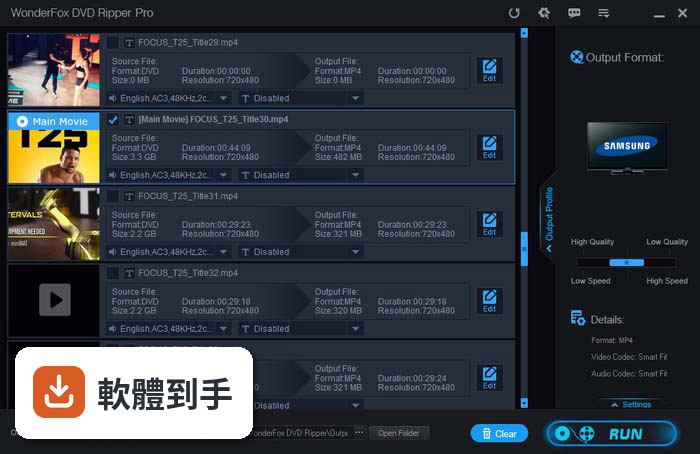
05除了轉檔,它還有什麼附加功能?
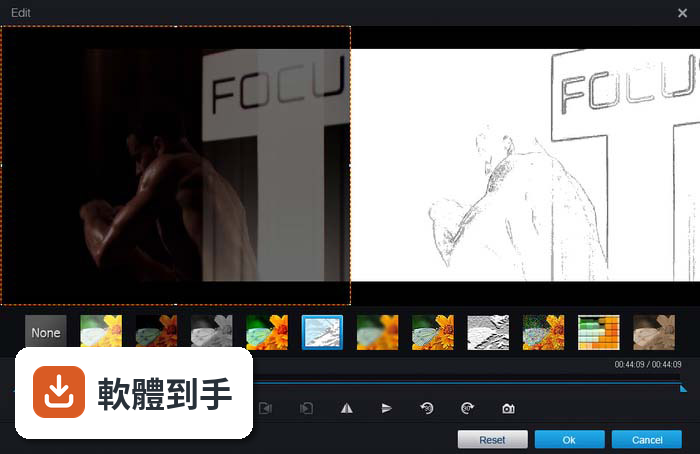
它內建簡易的影片編輯工具,可以修剪片段、裁切畫面、合併多段影片,也能加入字幕。另外它會自動偵測 DVD 的主要影片標題,跳過廣告、預告片和多餘片段,直接抓正片。批次處理功能可以一次轉多片 DVD,不用一片一片慢慢等。
06這套軟體適合什麼樣的人用?
適合手上有大量 DVD 收藏、想全部數位化備份的人,尤其是對電腦操作不熟悉、不想研究複雜編碼設定的使用者。它的介面設計比較直觀,載入 DVD 後選輸出格式、按執行就開始轉檔,學習曲線低。如果你需要轉檔給特定裝置(如 iPhone、Android 手機)播放,內建裝置預設檔也能省去手動調整的麻煩。
07我只有偶爾轉一兩片,免費試用版夠用嗎?
官方提供免費試用版,但功能有限制,包括轉檔時間受限、輸出選項較少。如果你只是偶爾轉一片,試用版可能勉強夠用,但會卡在限制上。如果轉檔需求頻繁,付費買單機授權(29.95 美元,終身使用)會比較實際。訂購後授權碼會寄到信箱,包含免費更新和技術支援。
08什麼情況不該選這套軟體?
如果你用的是 Mac,這套軟體只有 Windows 版本,直接不適用。如果你需要轉藍光光碟,它也無法處理。另外,如果你預算有限、轉檔需求很輕量,免費的 HandBrake 雖然學習曲線較陡,但功能完整,可以考慮先試試看。它的介面只有英文,不習慣英文介面的使用者操作起來會比較吃力。
09它和 WinX DVD Ripper Platinum、DVDFab 比起來,該怎麼選?
這三套功能相近,但定位略有不同。DVDFab 在評分人數(208 人)和功能完整度上明顯領先,是比較多人使用的選擇,但價格也較高。WinX DVD Ripper Platinum 有 50 人評分,和 DVD Ripper Pro(22 人評分)一樣屬於小眾工具。如果你重視社群驗證和長期維護,評分人數多的 DVDFab 會是相對穩妥的選擇;如果預算有限、需求單純,DVD Ripper Pro 的價格較低。
10這套軟體更新頻率如何?會不會買了之後沒人維護?
根據收錄的版本紀錄,它最早在 2017 年推出,最近一次更新在 2026 年 4 月,近 24 個月內有 1 次更新,顯示開發商仍持續維護,但更新頻率不算高。如果你很在意軟體能否跟上新的 Windows 版本或 DVD 防拷技術,建議多留意官方網站是否有新版釋出,或參考其他更新更頻繁的替代方案。
11它只能裝在一台電腦上嗎?
單機授權(29.95 美元)就是給一台 PC 使用,終身有效。如果家裡有多台電腦要裝,可以考慮 Family Pack(69.95 美元),包含三台電腦的授權,平均下來每台約 23 美元,比單買三套便宜。兩種方案都包含免費更新和技術支援,授權碼付款後幾分鐘內就會寄到電子郵件信箱。
下載與官方連結
dvd-ripper.exe · 連結指向軟體原廠
版本紀錄
- 2026-04-17 DVD Ripper Pro 24.3 92.7 MB
- 2022-06-08 DVD Ripper Pro 20.0
- 2019-12-07 Rocrail 07-12-2019 (64-bit) 12.7 MB
再看 2 筆
- 2018-01-31 DVD Ripper Pro 9.8 32.1 MB
- 2017-08-07 DVD Ripper Pro 9.0
這一版改了什麼
What's new in this version:
DVD Ripper Pro 20.0
- Change log not available for this version
DVD Ripper Pro 19.5
Fixed:
- conversion failure for some DVD titles
- a subtitle issue with some DVDs
- the reading time incorrect issue for some DVDs
- the issue that MP4 and MOV unable to output closed captions
- Fix the problem of converting ProRes+4K error
DVD Ripper Pro 19.3
- Fixed a crash issue when loading some SRT files
- More audio bitrate options with better compatibility with audio encoders
- Fixed MP3 bit rate issue
DVD Ripper Pro 19.2
- Change log not available for this version
DVD Ripper Pro 19.1
- Change log not available for this version
DVD Ripper Pro 19.0
- Change log not available for this version
DVD Ripper Pro 18.9
- Change log not available for this version
DVD Ripper Pro 18.8
- Corrected some inaccurate text descriptions of the Japanese interface
- Other optimizations
DVD Ripper Pro 18.7
- Fix unrecognized character issue of the Japanese interface
- Configuration and output files are now stored in a different location recommended by Microsoft
DVD Ripper Pro 18.5
Fixed:
- output video with repeated scences for some DVDs
- wrong title chosen issues
- subtitle not showing correctly
- subtitle flickering issue when previewed
- rorating effect for DVD conversion
- a DVD loading issue
- profile customizing issues
DVD Ripper Pro 18.0
- Change log not available for this version
DVD Ripper Pro 17.5
- Change log not available for this version
DVD Ripper Pro 17.0
- You can save multiple audio and subtitle tracks in output MKV, MP4, MOV now
- Other minor optimizations
DVD Ripper Pro 16.2
- Fixed an inner video player issue
- Added file log feature
- Fixed video flickering issue after cropping and editing
DVD Ripper Pro 15.6
- Added Filelog function for reporting issues
- Other minor improvements
DVD Ripper Pro 15.5
- Optimizations of conversion settings
- Improvements of software interface (language)
DVD Ripper Pro 15.2
- Change log not available for this version
DVD Ripper Pro 15.1
- This edition can intelligently identify scratched DVDs, and intelligently bypass erroneous data
- Fix the problem of multilingual DVD ripping
- Fix the interface problem of Japanese
- DVD ripping performance optimization
DVD Ripper Pro 15.0
- Change log not available for this version
DVD Ripper Pro 14.2
- Change log not available for this version
DVD Ripper Pro 14.0
- Added Japanese interface
- Function optimizations
DVD Ripper Pro 13.5
- Support encoding EAC3 for video and audio
- Optimize subtitle-related features
- Updated the online download feature
- Fixed the issue that a few ISO image files could not be loaded
DVD Ripper Pro 13.4
- Fix a error: DVD duration
- Fix a error: the main title identification for movies and TV shows
- Optimize hardware acceleration
DVD Ripper Pro 13.3
- Change log not available for this version
DVD Ripper Pro 13.1
- For security reasons, we have changed the registration system on v13.1. Please send email to [email protected] to get a new license. We apologize for the inconvenience
- Significantly improved performance, H265 conversion speed increased by 30% ~ 40, H264 conversion speed increased by 15% -25%
- Added 30+ new profiles which include iPhone 11, Samsung Fold, Samsung Note 10, HUAWEI Mate 30 Pro, etc.
- Fix a error about HEVC encoding acceleration
- Fixed issue with aspect ratio error
- Fix unexpected errors that may be caused by clicking on the software interface during the conversion process
DVD Ripper Pro 13.0
- Change log not available for this version
DVD Ripper Pro 12.1
- Change log not available for this version
DVD Ripper Pro 12.0
- Fixed an issue with VIDEO_TS ripping
- Other updates
DVD Ripper Pro 11.1
- Optimize the VOB format for output
- Accelerate DVD to video encoding
DVD Ripper Pro 11.0
- Support hardware encoding (Inter QSV, Nvidia NVENC). Up to 30X faster video conversion speed than the previous version
DVD Ripper Pro 10.1
- New feature: support forced subtitles
- Compatibility optimization: on PHILIPHS, SONY &LG DVD players
- Fix problem: audio bitrate
- Fix problem: resolution and proportion issues when convert DVD to VOB, MPG
- Fix problem: frame rate on VOB
- Fix problem: DTS audio encoder
DVD Ripper Pro 10.0
- Improve the stability of HEVC(H265)
- Fix problem: Custom resolution
- Fix problem: DV to 3GP error
- Fix problem: DVD to VOB
- New: Keep the medata information on output files
- New: MKV + H265 supported
WonderFox DVD Ripper Pro 9.8
- Support up to 8k (7680*4320) resolution
- Fix problem: Custom profile error
- Fix problem: VBR Parameter error in custom profile
- Fix problem: XviD encoder error
- Fix problem: Aspect ratio
- Fix problem: Custom profile error on Lossless Mode and Deinterlace
WonderFox DVD Ripper Pro 9.7
- Fix problem: Profile custom
- Fix problem: Embeded subtitle problem
- Fix problem: Others
WonderFox DVD Ripper Pro 9.6
- New registration system. If you have any issues on registration please contact support.
- A part of the function optimization.
WonderFox DVD Ripper Pro 9.5
- A lot of New output profiles are added: iPhone X, iPhone 8, Samsung Note 8, Huawei P10, LG V30, etc
- 1:1 quick copy a DVD to ISO image
- 1:1 quick back up a DVD to DVD Folder
- Back up the main movie of DVD to MPG video in minutes
DVD Ripper Pro 9.0
- The new DVD decryption technology is applied. You can rip any dvd with the version 9
- Support ripping ISO image directly
- 2.1X-9.9X faster dvd ripping speed has been activated in the version 9
DVD Ripper Pro 8.3
- According to user feedback, 4 features has been optimized
DVD Ripper Pro 8.2
- For security reasons, we have changed the registration system on the new version. All of paid user will enjoy our lifetime free upgrade service.
DVD Ripper Pro 8.1
Add new output profiles: iPhone 7 plus, iPhone 7, Samsung Note 7, Google Pixel, Pixel XL, Huawei Nova, Nova plus.
DVD Ripper Pro 8.0
- The new output format module, that supports up to 300 formats and devices. There are four format category you can choose: common video, common audio, web compatible video (HTML5, OGV, WEBM, YouTube, Vimeo, Facebok, Yahoo, FLV, F4V, SWF, etc.) and HD/4K high quality video. The better, we provide the optimized profiles for your devices that inculdes smart phone, tablet, TV, projector, stream media, home theater, game box, retina display, etc. And, there are over 250 optimized profiles can be used for 30+ global top brands devices, such as: Apple, Samsung, Microsoft, Google, Amazon, LG, Sony, HTC, Blackberry, Lenovo, Motorola, Huawei, Acer, Asus, NVIDIA, Nintendo, Toshiba, Panasonic, Sharp, Mitsubishi, JVC, BenQ, RCA, and so on.
- Fix problem: A error when Multiple software simultaneously reading a DVD.