
ISO檔打不開?DVDFab Virtual Drive 虛擬光碟
 DVDFab Virtual Drive 3.0.19
資料更新 2026-03-12
閱讀約 5 分鐘
你從網路上下載了一個ISO映像檔,可能是遊戲、軟體安裝檔,或是電影的藍光備份。你雙擊檔案,電腦卻跳出「無法開啟這個檔案」的視窗。你沒有光碟機,也不想把檔案燒錄成光碟,只想直接使用裡面的內容——但系統就是不理你。
一般人的做法是把ISO檔解壓縮,但有些光碟映像檔有防拷保護,解壓縮後檔案不完整,甚至根本無法執行。另一種做法是燒錄成光碟,但現在很多電腦根本沒有光碟機,燒了也沒地方讀。虛擬光碟機的切入點是:在系統裡模擬一台光碟機,把ISO檔「放進去」,讓電腦以為你真的插了一張光碟——不需要實體光碟,也不需要燒錄。
01DVDFab Virtual Drive 這套軟體是做什麼用的?
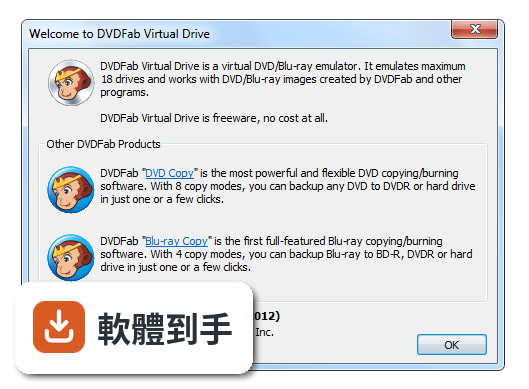
它是一套虛擬光碟機軟體,可以在Windows系統裡模擬出最多18台虛擬光碟機。你把DVD或藍光的ISO映像檔掛載到這些虛擬光碟機上,系統就會把它當成真的光碟來讀取,不需要實體光碟機,也不用燒錄光碟。它也能掛載DVDFab Blu-ray Copy產生的.miniso檔案。
02它能掛載哪些格式的映像檔?
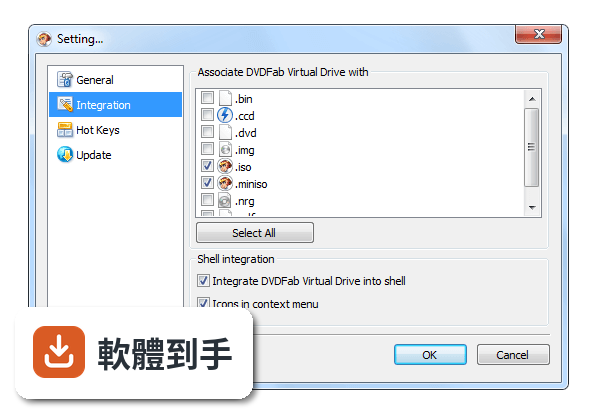
官方說明提到,它支援DVD和藍光的ISO映像檔,以及DVDFab Blu-ray Copy產生的.miniso檔案。ISO是最常見的光碟映像檔格式,其他格式如BIN、CUE、IMG等,官方沒有提到,需要自行測試或確認。
03可以同時掛載幾個映像檔?
最多可以模擬18台虛擬光碟機,也就是可以同時掛載18個映像檔。如果你需要同時讀取多張光碟的內容,例如安裝多片裝的軟體,這個數量應該很夠用。
04掛載之後要怎麼使用?
掛載後,虛擬光碟機會出現在「我的電腦」或「檔案總管」裡,就像真的插入了一張光碟。你可以直接開啟裡面的檔案、執行安裝程式,或播放影片。用完之後,可以卸載映像檔,虛擬光碟機就會變成空的。
05它和DVDFab有什麼關係?
官方說明提到「DVDFab Virtual Drive is now DVDFab」,表示這套軟體已經成為DVDFab的一部分。DVDFab是一套光碟備份和轉檔工具,Virtual Drive原本是它的附屬工具,現在可能不再獨立更新,但資料顯示近一年內仍有更新,實際狀況需要到官網確認。
06什麼樣的人會需要這套軟體?
需要掛載DVD或藍光ISO映像檔的人,特別是使用DVDFab系列軟體的人,因為.miniso檔案需要這套軟體來掛載。如果你經常下載ISO檔,又不想燒錄光碟,這套軟體可以幫你直接使用這些檔案。
07它適合不熟電腦的人用嗎?
介面只有英文,對不熟英文的人可能有點門檻,但操作本身不複雜:選取映像檔、按掛載,就能使用了。如果你看得懂基本的英文選單,應該不會太困難。如果完全看不懂英文,可能需要花點時間摸索。
08它是免費的,會不會有廣告或功能限制?
資料顯示它是免費軟體,沒有提到廣告或功能限制。不過,因為它已經併入DVDFab,未來是否維持獨立免費下載,需要自行到官網確認。目前來看,掛載ISO和.miniso的功能都是完整的。
09它只有英文介面,看不懂英文可以用嗎?
介面只有英文,沒有中文選項。如果你完全看不懂英文,操作上會比較吃力,但功能不多,主要就是掛載和卸載,可以靠翻譯工具或摸索來完成。如果真的很在意介面語言,可以考慮其他有中文介面的虛擬光碟軟體。
10它只支援Windows,Mac可以用嗎?
不支援,它只支援Windows 7到Windows 11,沒有Mac或Linux版本。如果你用的是Mac,需要找其他支援macOS的虛擬光碟軟體,例如資料中提到的其他工具,但那些也不一定支援Mac,需要自行確認。
11它和Virtual CloneDrive比起來如何?
Virtual CloneDrive有88人評分,這套有104人評分,兩者評分都算高,但樣本數都不大。功能上,Virtual CloneDrive也支援掛載ISO檔,但這套額外支援.miniso檔案。選擇哪個可以看個人偏好,或實際測試哪個比較順手。
12它已經併入DVDFab了,還值得單獨用嗎?
官方說明提到它已經成為DVDFab的一部分,但資料顯示近一年內仍有更新,表示它還在維護。如果你只需要虛擬光碟功能,單獨使用它沒有問題。如果你已經在使用DVDFab,那這套軟體可以無縫整合。未來是否繼續獨立更新,需要留意官網公告。
下載與官方連結
前往官方網站 下載 DVDFab Virtual Drive
explorerfab_online_3019.exe · 7.6 MB · 連結指向軟體原廠
版本紀錄
- 2026-03-12 DVDFab Virtual Drive 3.0.19 7.6 MB
- 2021-06-30 DVDFab Virtual Drive 2.0.0
- 2014-09-02 DVDFab Virtual Drive 1.5.1.1
再看 4 筆
- 2014-05-12 DVDFab Virtual Drive 1.5.1.0 682.05 KB
- 2013-11-13 DVDFab Virtual Drive 1.5.0.0 679.74 KB
- 2012-09-07 DVDFab Virtual Drive 1.4.0.0 686.37 KB
- 2012-09-07 DVDFab Virtual Drive 1.4.1.0 687.58 KB
這一版改了什麼
- Support the latest Windows 11
- Added support for Ultra HD Blu-ray ISO images.
- New interface for easier operation.
It has some settings for your usage habits and convenience, and enables you to go to its forum for more information with just one click. DVDFab Virtual Drive Free Download Latest Version for Windows PC. It is a full offline setup installer of DVDFab Virtual Drive.
Features and Highlights
- DVD Virtual Drive is a virtual emulator that can emulate a maximum of 18 drives.
- It can mount both DVD image files and Blu-ray image files saved on your computer. Those image files could be created by DVD Fab, and also OK by other programs.
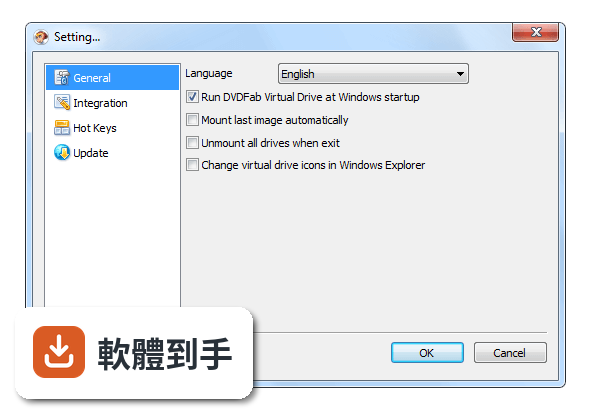
- You can select one language for this application from nearly 20 available languages.
- You can choose whether or not to run Virtual Drive automatically when windows startup.
- You can also let it mount the last image automatically, and unmount all drives when existing.
- What's more, you can freely set the number of drives from 0 to 18.
- Supported formats: DVD ISO image file, Blu-ray ISO image file
- Launch the Program – Open the software after installation to access the virtual drive interface.
- Create a Virtual Drive – Right-click on the DVDFab Virtual Drive icon in the system tray and select the number of virtual drives you need.
- Mount an ISO File – Right-click on an ISO file, select "Mount," and choose a virtual drive to load it.
- Access the Mounted Disc – Open "This PC" or "My Computer" to find and use the mounted ISO as a real disc.
- Unmount the ISO – Right-click the virtual drive and select "Unmount" to remove the loaded ISO.
- Set Auto-Mount Options – Configure the software to auto-mount ISO files upon startup if needed.
- Change Drive Letter – Modify the assigned drive letter through the settings for better organization.
- Eject Virtual Drive – Right-click on the drive and choose "Eject" to disable it when not in use.
- Exit or Disable the Software – Close the software or disable it from running in the background if not needed.
What was DVDFab Virtual Drive used for?
DVDFab Virtual Drive was a utility that allowed users to mount disc image files, such as ISO or BNI, as virtual drives on a computer. This made it possible to access the contents of optical disc images without using a physical DVD or Blu-ray drive.
Is DVDFab Virtual Drive still available?
The standalone tool is no longer distributed separately. DVDFab Virtual Drive functionality has been integrated into DVDFab, which now includes virtual drive features as part of its broader disc and media management tools.
Is DVDFab Virtual Drive useful in 2026?
Yes, the functionality remains useful for mounting disc image files, but it is now typically accessed through the DVDFab software suite rather than as a separate application.
PROS
- Easy-to-Use Interface
- Supports Multiple Formats
- Free and Lightweight
- High Compatibility
- Fast Mounting Speed
- Now is DVDFab
- Limited Advanced Features
- Occasional Bugs
- No Direct ISO Creation
- Windows Only Compatibility
Download DVDFab Virtual Drive Latest Version Why is this app published on FileHorse? (More info)