
這是歷史版本頁面 — 看 eM Client 最新版本
多個信箱好難管?eM Client 能做什麼
 eM Client 7.1.30794
資料更新 2017-07-26
閱讀約 5 分鐘
你手上可能同時有 Gmail、公司信箱、學校信箱,甚至還有 Outlook 或 Hotmail 的舊帳號。每次要收信就得開好幾個分頁或好幾個軟體,寄信前還要先確認現在登入的是哪一個帳號,一不小心就從錯的信箱寄出去。你只是想找一個能一次看完所有信的地方,不要每次都被切換帳號這件事搞得心煩。
用網頁版信箱不是不行,但功能分散,行事曆、聯絡人、待辦事項各在不同地方,而且離線時什麼都做不了。傳統的郵件軟體雖然能解決整合問題,但介面老舊、設定複雜,光是匯入舊信就讓人卻步。這類工具的切入點,是把你所有帳號、行事曆、聯絡人集中到同一個視窗,同時提供從舊軟體搬家的匯入功能,讓轉換過程不要成為另一個麻煩。
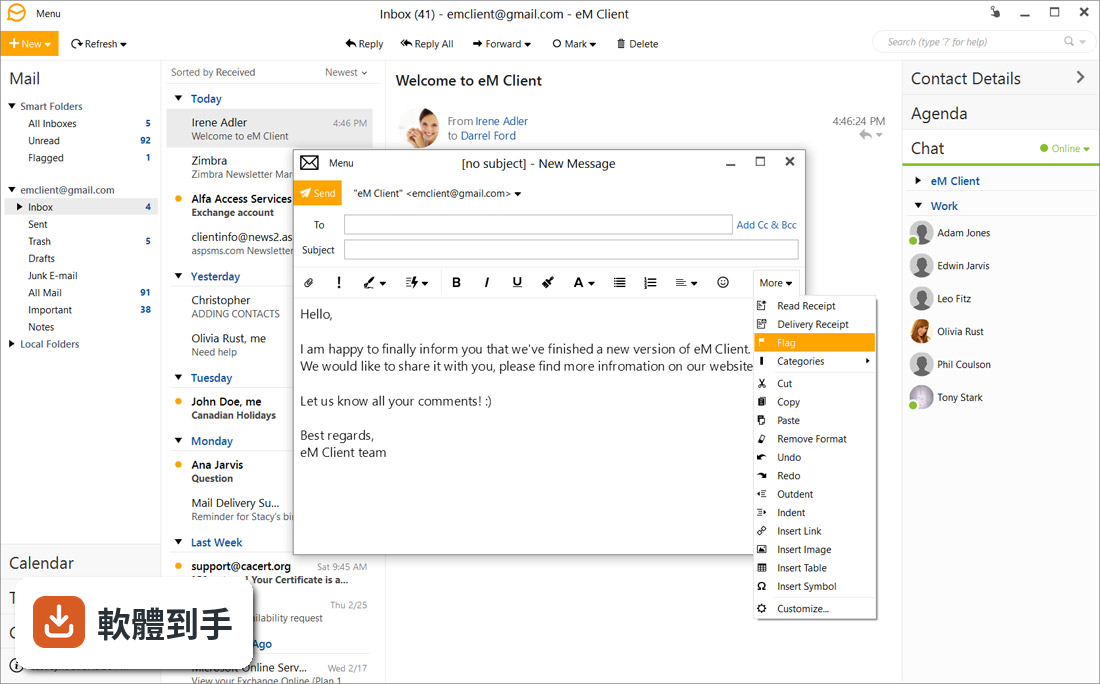
01eM Client 可以收哪些信箱的信?
它支援 POP 和 IMAP 協定,可以連 Gmail、Yahoo、Outlook、Hotmail、iCloud 這些常見服務,也支援 MS Exchange 和 Google Apps。也就是說,只要你的信箱提供 POP 或 IMAP 設定,基本上都能加進來,不用為了某個特定服務換軟體。
02我現在用 Outlook,換過去會不會很麻煩?
它可以直接從 Microsoft Outlook、Mozilla Thunderbird、The Bat、Windows Mail 匯入資料,包括信件、聯絡人和行事曆。匯入後原本的分類和郵件夾會保留,不用重新整理。另外也支援匯出成多種格式,以及建立和還原備份,搬家過程算是完整的。
03除了收信,它還能做什麼?
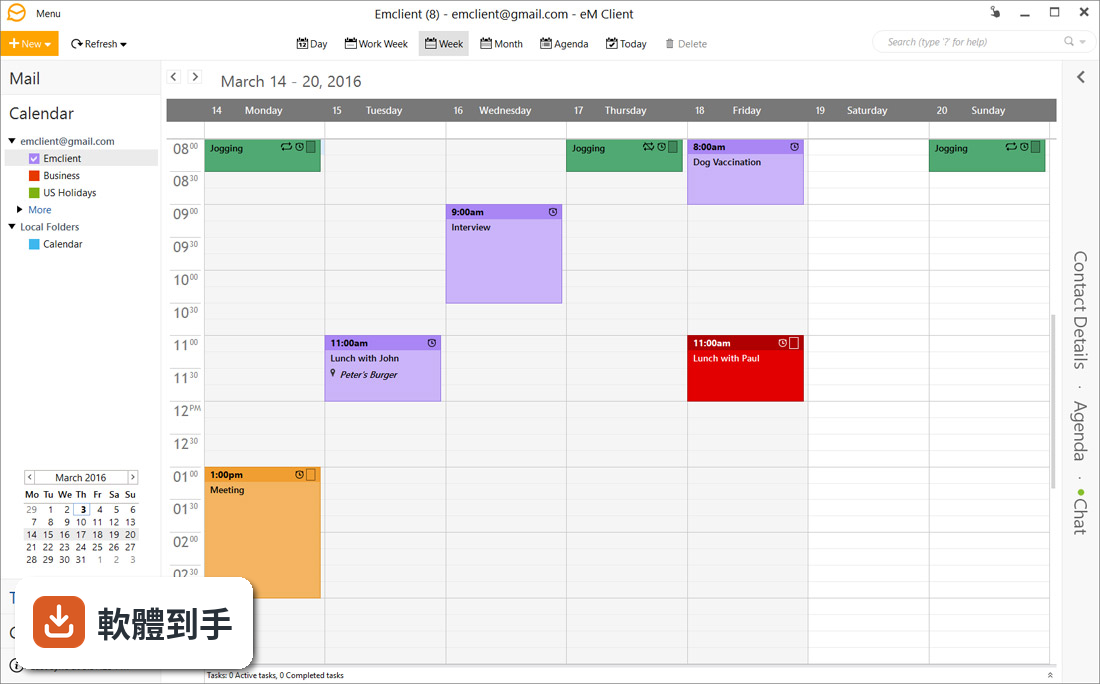
它內建行事曆、工作、聯絡人和聊天功能。行事曆可以排程會議、設提醒,也能同步 Google Calendar 和 Exchange;工作可以設定截止日並追蹤進度;聊天支援 Google Talk、Facebook 和 Jabber,還能傳檔案。等於把通訊相關的工具都收在同一個介面裡。
04免費版和付費版差在哪?
免費版限個人使用,最多只能設定兩個郵件帳戶。如果你需要超過兩個帳戶,或是要拿來做商業用途,就得買付費版本。官方資料沒有列出付費版的詳細價格和功能差異,需要的話要自己上官網確認。
05介面可以自己調整嗎?
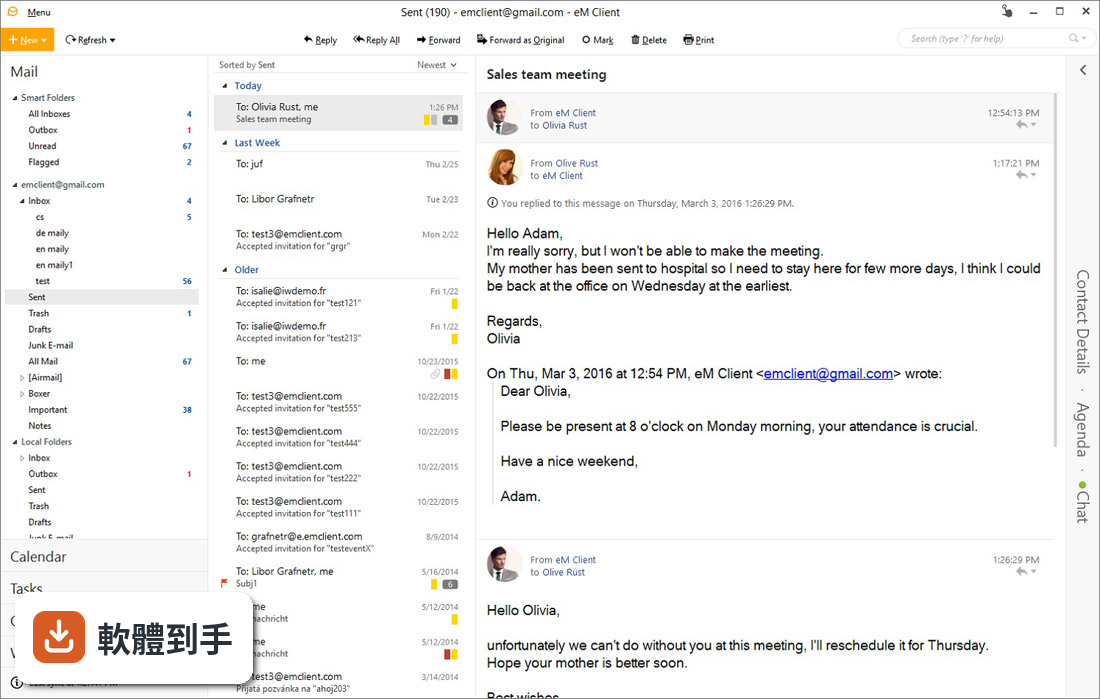
可以。它提供 19 種語言介面和 10 種色彩主題,預設的 Modern 主題之外可以依喜好更換。左側欄固定顯示郵件帳號、行事曆、工作和聯絡人,右側欄可以隱藏,用來顯示聯絡人詳細資料、行程和聊天內容。訊息面板可以放在左邊、底部或關閉,關閉後新訊息會開在新視窗。
06適合從 Thunderbird 跳過來的人嗎?
如果你覺得 Thunderbird 介面老舊、想要更現代的外觀,可以考慮。它可以直接匯入 Thunderbird 的資料,轉換門檻不高。不過要注意,它的記憶體用量比 Thunderbird 高,電腦比較舊的話要先衡量一下。
07適合需要同時管理行事曆和工作的人嗎?
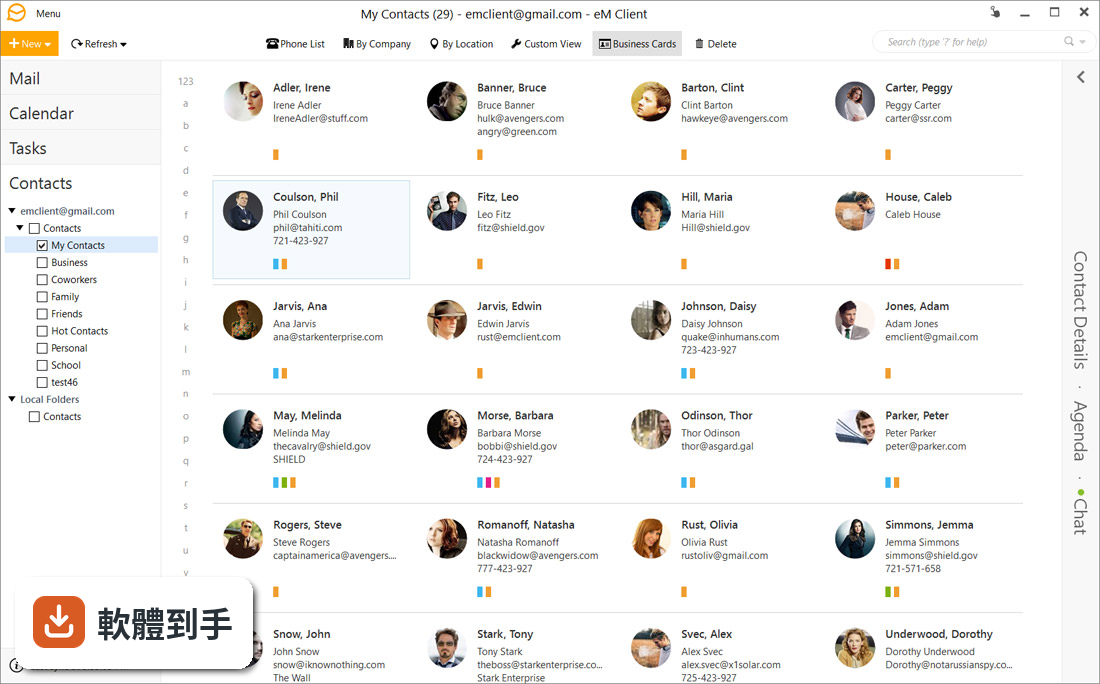
適合。它的行事曆可以建立活動、設定提醒、邀請參與者,也能同步外部行事曆;工作功能可以新增任務、設截止日並追蹤進度。聯絡人可以用標籤和備註整理。如果你習慣把行程和通訊錄跟郵件放一起,這個整合方式會比分開用兩個軟體方便。
08不熟英文的人用起來會很吃力嗎?
會。這套軟體的介面語系只有英文,雖然官方說支援 19 種語言,但這份資料顯示目前提供的是英文介面。如果你對英文介面不熟悉,操作上會需要花時間適應,尤其是設定帳號和調整選項的時候。這點在安裝前要先想清楚。
09電腦比較舊,跑得動嗎?
官方資料明確提到它的記憶體用量比 Thunderbird 高,所以老電腦或記憶體不足的機器可能會覺得卡頓。它支援 Windows 7 到 Windows 11,系統本身可以裝,但順不順暢取決於你的硬體。建議先裝免費版試跑一陣子,確認效能可以接受再決定。
10這套軟體還有在更新嗎?
根據版本紀錄,它收錄了 82 個版本,最早的版本在 2015 年,最近一次更新在 2026 年,但近 24 個月只更新了 1 次。也就是說它還在維護,但更新頻率不算高。如果你很在意軟體是否頻繁加入新功能,這點要列入考量。
11有其他更多人用的選擇嗎?
有。Thunderbird 在評分人數上比它多(90 人對 78 人),而且是開源免費、沒有帳戶數量限制。FossaMail 也有 89 人評分,但更新狀況不明。如果你需要的是免費且沒有帳戶上限的郵件軟體,Thunderbird 是更多人用過的選擇,可以兩邊都裝來比較看看。
12手機上也能用嗎?
官方資料提到 eM Client 有 iOS 和 Android 版本,功能跟電腦版一樣完整。但這份資料主要描述的是 Windows 電腦版,行動版的實際操作和限制沒有詳細說明。如果你主要用手機收信,建議先確認行動版的免費方案和帳戶限制再決定。
下載與官方連結
setup.msi · 連結指向軟體原廠
版本紀錄
- 2026-10-28 eM Client 11.0.1389.0 1 MB
- 2026-10-21 eM Client 11.0.1267.0 1 MB
- 2026-10-14 eM Client 11.0.1201.0 1 MB
再看 5 筆
- 2026-08-10 eM Client 10.4.5663 128 MB
- 2023-08-24 eM Client 9.2.2093
- 2023-08-09 eM Client 9.2.2054
- 2023-07-12 eM Client 9.2.2038
- 2023-03-18 eM Client 9.2.1713
這一版改了什麼
What's new in this version:
eM Client 7.1.30794
- Fixed touch scroll issues on some devices
- Fixed POP3 authentication issue with bt.com and a few other vendors
- Several fixes
eM Client 7.1.30777
- Change log not available for this version
eM Client 7.1.30794
- eM Client 7.1 Service Update
- Fixed touch scroll issues on some devices
- Fixed POP3 authentication issue with bt.com and a few other vendors
- Several fixes
eM Client 7.1.30761
- eM Client 7.1 Service Update
- Fixed touch scroll issues on some devices
- Fixed POP3 authentication issue with bt.com and a few other vendors
- Several fixes
eM Client 7.1.30719
- Fixed touch scroll issues on some devices
- Fixed POP3 authentication issue with bt.com and a few other vendors
- Several fixes
eM Client 7.1.30686
- Improved support of Exchange Offline Address Book
- Fixed loading of avatars from contacts
- Stability bug fixes
eM Client 7.1.30646
- Change log not available for this version
eM Client 7.1.30638
- Several bug fixes
eM Client 7.1.30632
- Change log not available for this version
eM Client 7.1.30617
- Several bug fixes
eM Client 7.1.30508
- Improved compatibility with EnigMail PGP messages
- Fixed import from Mail on Window Vista
- Fixed import from Microsoft Outlook with multiple profiles
- Fixed connection problems with SoGO CalDAV accounts
- Fixed connection problems with mail.de accounts
- Fixed startup with database located on network disk
- Various stability fixes
eM Client 7.1.30495
- Change log not available for this version
eM Client 7.1.30490
- Various stability fixes
eM Client 7.1.30480
- Change log not available for this version
eM Client 7.1.30469
- Improved compatibility with EnigMail PGP messages
- Fixed import from Mail on Window Vista
- Fixed import from Microsoft Outlook with multiple profiles
- Fixed connection problems with SoGO CalDAV accounts
- Fixed connection problems with mail.de accounts
- Fixed startup with database located on network disk
eM Client 7.1.30453
- Message encryption with PGP support
- Simplified security certificates and keys
- Live backup
- Automatic avatar downloading
- Improved print preview
- Even more customizable toolbars
- Auto-resize and formatting options for embedded pictures
- Improved table editor
- Text pasting options
- Improved calendar invites
- Customizable secondary sorting for all views
- Calendar folder sharing on MS Exchange and IceWarp servers
- GMail out of office responder support
- Preview images from hyperlinks in chat
- Tons of other improvements and fixes
eM Client 7.1.30439
- Change log not available for this version
eM Client 7.1.30437
- Message encryption with PGP support
- Simplified security certificates and keys
- Live backup
- Automatic avatar downloading
- Improved print preview
- Even more customizable toolbars
- Auto-resize and formatting options for embedded pictures
- Improved table editor
- Text pasting options
- Improved calendar invites
- Customizable secondary sorting for all views
- Calendar folder sharing on MS Exchange and IceWarp servers
- GMail out of office responder support
- Preview images from hyperlinks in chat
- Tons of other improvements and fixes
eM Client 7.0.30068
- Change log not available for this version
eM Client 7.0.27943
- Fixed some issues in deduplicator
- Several theme support improvements
- Updated localizations
eM Client 7.0.27920.0
- Change log not available for this version
eM Client 7.0.27894.0
- Change log not available for this version
eM Client 7.0.27804.0
- Exchange compatibility fixes
- Fixed several theme issues
- Fixed search conditions in search menu.
- Fixed unread count for Unread folder in conversation view
- Fixed rule order when importing from version 6
- Fixed 'Copy all addresses' and 'Add all contacts' options in contact text boxes
- Fixed undo in text boxes after pasting text
- When converting html into plain text, we now put the link into sharp brackets behind the link text
- When copying mail addresses into clipboard don't copy the "mailto:" prefix
- Added support for system scrollbars in themes (used for System and Classic theme)
- Display the original .p7m file as attachment if S/MIME decoding fails
- Localization updates
- Other bug fixes and performance improvements
eM Client 7.0.27777.0
- Exchange compatibility fixes
- Fixed search conditions in search menu
- Fixed unread count for Unread folder in conversation view
- Fixed rule order when importing from version 6
- Fixed 'Copy all addresses' and 'Add all contacts' options in contact text boxes
- Fixed undo in text boxes after pasting text
- When converting html into plain text, we now put the link into sharp brackets behind the link text
- When copying mail addresses into clipboard don't copy the "mailto:" prefix
- Added support for system scrollbars in themes (used for System and Classic theme)
- Display the original .p7m file as attachment if S/MIME decoding fails
- Localization updates
- Other bug fixes and performance improvements
eM Client 7.0.27744.0
- Exchange compatibility fixes
- Fixed search conditions in search menu.
- Fixed unread count for Unread folder in conversation view
- Fixed rule order when importing from version 6
- Fixed 'Copy all addresses' and 'Add all contacts' options in contact text boxes
- Fixed undo in text boxes after pasting text
- When converting html into plain text, we now put the link into sharp brackets behind the link text
- When copying mail addresses into clipboard don't copy the "mailto:" prefix
- Added support for system scrollbars in themes (used for System and Classic theme)
- Display the original .p7m file as attachment if S/MIME decoding fails
- Localization updates
- Other bug fixes and performance improvements
eM Client 7.0.27742.0
- Change log not available for this version
eM Client 7.0.27732.0
- Exchange compatibility fixes
- Fixed search conditions in search menu
- Fixed unread count for Unread folder in conversation view
- Fixed rule order when importing from version 6
- Fixed 'Copy all addresses' and 'Add all contacts' options in contact text boxes
- Fixed undo in text boxes after pasting text
- When converting html into plain text, we now put the link into sharp brackets behind the link text
- When copying mail addresses into clipboard don't copy the "mailto:" prefix
- Added support for system scrollbars in themes (used for System and Classic theme)
- Display the original .p7m file as attachment if S/MIME decoding fails
- Localization updates
- Other bug fixes and performance improvements
eM Client 7.0.26687.0
- Change log not available for this version
eM Client 7.0.26667.0
- New modern interface with several new themes including Dark theme
- Conversation view
- Delayed sending
- Full GMail Labels support
- Messages rendered by Chromium instead of Internet Explorer
- Translation of incoming messages
- Better support for touch devices and high-res displays
- Vacation responder
- Support for internet calendars (including Facebook calendar)
- Customizable toolbars
- And much more
eM Client 7.0.26653.0
- Change log not available for this version
eM Client 7.0.26567.0
- Change log not available for this version
eM Client 7.0.26134.0
- Change log not available for this version
eM Client 7.0.26567.0
- New modern interface with several new themes including Dark theme
- Conversation view
- Delayed sending
- Full GMail Labels support
- Messages rendered by Chromium instead of Internet Explorer
- Translation of incoming messages
- Better support for touch devices and high-res displays
- Vacation responder
- Support for internet calendars (including Facebook calendar)
- Customizable toolbars