
這是歷史版本頁面 — 看 Emsisoft Anti-Malware 最新版本
裝了防毒軟體還怕中毒?Emsisoft Anti-Malware 能補什麼
 Emsisoft Anti-Malware 10.0.0.5366
資料更新 2015-05-11
閱讀約 6 分鐘
電腦已經裝了防毒軟體,卻還是看到新聞說又有新病毒繞過防護,或者某天突然發現瀏覽器被裝了工具列、桌面多了一堆看不懂的捷徑。當下想再裝一套防毒軟體來補強,又怕兩套互相打架,讓原本就慢的電腦更卡。這種「好像有防護,又覺得不夠安心」的感覺,很多人都有。
一般人遇到這種情況,最直覺的做法是再裝一套免費防毒,但兩套防毒同時常駐,輕則拖慢開機,重則互相誤判、把對方當病毒清掉。另一種做法是上網找掃描工具,掃完就關,但這類工具多半隻能清已經中的毒,擋不住新進來的威脅。Emsisoft Anti-Malware 這類軟體的切入點是:不跟現有防毒搶工作,而是當第二道檢查,專門抓防毒軟體漏掉的東西,同時用行為監控擋下還沒被列入病毒庫的惡意程式。
01Emsisoft Anti-Malware 跟一般防毒軟體有什麼不同?
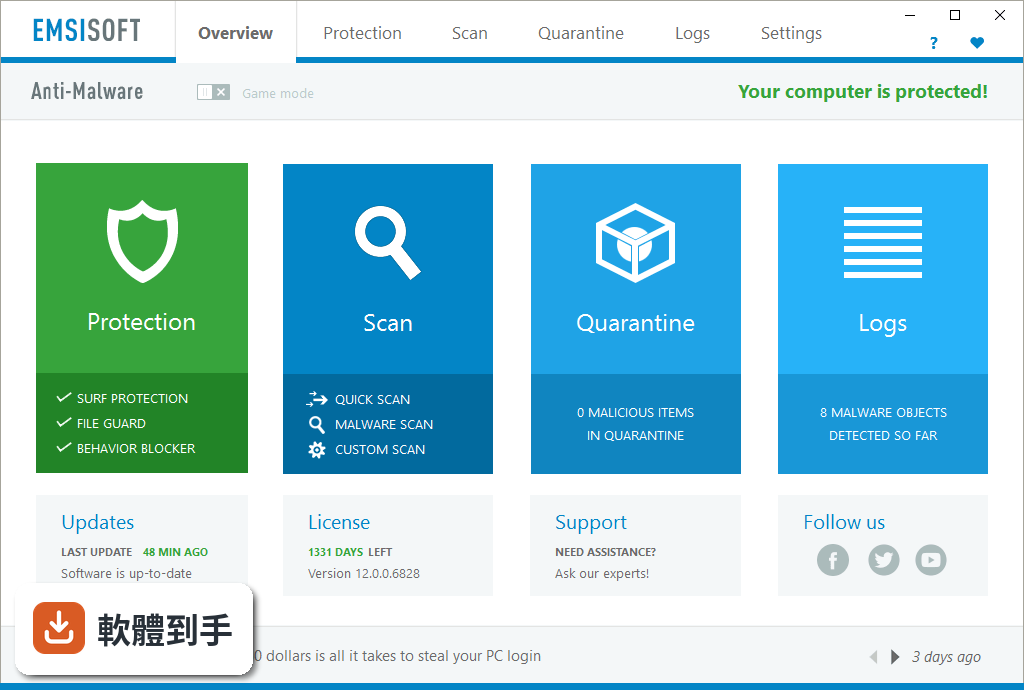
它定位成輔助用的防惡意軟體工具,核心是雙引擎掃描器,搭配行為攔截、網頁防護和反勒索功能。跟一般防毒軟體最大的差別是,官方說明它設計上可以跟其他防毒軟體共存,不會衝突,適合當作第二套掃描工具來補強,而不是取代你原本的防毒軟體。
02它能不能抓出防毒軟體漏掉的東西?
可以處理兩類東西:一是惡意軟體,包括木馬、後門、銀行竊密程式;二是潛在不需要的程式(PUP),像是瀏覽器工具列、彈窗廣告、拖慢系統的垃圾軟體。官方說雙引擎掃描加上機器學習輔助的偵測,能提高抓到這些程式的機率,但實際偵測率沒有提供具體資料,建議自己裝試用版實測看看。
03裝了它會不會跟原本的防毒軟體衝突?
官方 FAQ 明確說可以跟其他防毒軟體一起運作,不會衝突或影響效能。不過這是官方說法,實際狀況會因你原本裝的防毒軟體版本而不同。建議裝之前先看兩套軟體的相容性說明,裝完觀察幾天,確認沒有互相誤判或拖慢系統再決定要不要留。
04它對勒索病毒有沒有用?
有專門的反勒索功能,用的是行為監控,不是靠病毒庫比對。也就是說,就算勒索病毒是全新的、還沒被列入病毒庫,只要它開始做可疑動作(例如大量加密檔案),行為攔截器就會跳出警告並阻止。但官方沒有提供測試資料,實際防護效果需要自己評估。
05會不會拖慢電腦?
官方強調設計上儘量少佔資源,對系統效能影響很小。但使用者評分中有人提到在舊款或低階裝置上可能還是會有效能問題。如果你的電腦本身已經跑不太動,建議先裝試用版,觀察開機速度、開程式的反應,再決定要不要繼續用。
06電腦已經裝了防毒軟體,還需要它嗎?
如果你覺得現有防毒軟體不夠安心,或是電腦常常出現怪現象、懷疑有東西沒清乾淨,它可以當作第二道防線。它的強項是行為攔截和 PUP 清除,正好補足一般防毒軟體比較弱的地方。但如果你對現有防護已經很滿意,也沒有中毒疑慮,就不一定需要多裝一套。
07電腦很舊、跑不太動,適合用嗎?
官方說資源佔用低,但使用者評價中有人反映在舊裝置上還是會有效能影響。而且它只支援 Windows 10(64 位元)和 Windows 11,不支援更舊的系統。如果你的電腦是 Windows 7 或 8,官方系統需求雖然寫了可以,但實際支援頁面只列了 10 和 11,建議先確認自己的系統版本再裝。
08介面只有英文,會不會很難用?
介面確實是全英文,沒有中文選項。如果你不熟悉英文,操作上會有門檻,尤其是設定選項和警告訊息。不過它的介面設計算簡潔,主要功能就是掃描、隔離、清除,不太需要頻繁調整設定。如果英文閱讀有困難,可以考慮找有中文介面的替代方案。
09它跟免費的防毒軟體比,有什麼優勢?
免費防毒軟體(例如 IObit Malware Fighter Free)通常功能較陽春,而且可能夾帶推廣廣告。Emsisoft 的優勢是雙引擎掃描和行為攔截,功能比較完整,而且沒有廣告干擾。但它是試用版,只能用 30 天,之後要付費才能繼續用。如果你不想花錢,免費方案可能更符合需求。
10試用版到期後怎麼辦?
試用期 30 天,到期後如果不付費,就無法繼續使用。官方沒有提供免費版,也沒有其他替代方案。到期後你可以選擇付費購買,或是改用其他免費工具。如果只是偶爾想掃一次毒,也可以考慮同公司的 Emsisoft Emergency Kit,它是免安裝的掃描工具,但功能沒有這套完整。
11它更新頻率高嗎?會不會跟不上新病毒?
官方 FAQ 說程式每天更新多次,但實際版本紀錄顯示近 24 個月只更新了 1 次,更新頻率偏低。這代表它可能不是隨時都在更新病毒庫,對新威脅的反應速度可能不如其他防毒軟體。如果你很在意即時防護,建議先確認它的更新狀況再決定。
12這套軟體的評價如何?可以放心用嗎?
使用者評分 6.42/10,共 329 人評分,分數不算高。同型別的 IObit Malware Fighter Free 有 408 人評分,Zemana AntiMalware 有 211 人評分,可以參考這些使用者的心得。評分人數不多,代表使用者的樣本數有限,建議多看幾篇評論,瞭解實際使用經驗再決定。
下載與官方連結
前往官方網站 下載 Emsisoft Anti-Malware
EmsisoftAntiMalwareSetup.exe · 156.04 MB · 連結指向軟體原廠
版本紀錄
- 2026-02-21 Emsisoft Anti-Malware 2026.1.0.12700 3.1 MB
- 2023-09-06 Emsisoft Anti-Malware 2023.9.1.12121
- 2023-09-05 Emsisoft Anti-Malware 2023.9.0.12115
再看 5 筆
- 2023-08-01 Emsisoft Anti-Malware 2023.8.0.12074
- 2023-07-04 Emsisoft Anti-Malware 2023.7.0.12036
- 2023-06-02 Emsisoft Anti-Malware 2023.6.0.11957
- 2023-05-03 Emsisoft Anti-Malware 2023.5.0.11922
- 2023-04-04 Emsisoft Anti-Malware 2023.4.0.11891
這一版改了什麼
What's new in this version:
Significantly improved scanning speed:
- We looked hard at areas where we can take better advantage of modern hardware and where we can use limited hardware resources more efficiently, while improving the quality of detection even further. As a result, we have changed the way the dual-scan engine reads files from disk. It does not only use the full potential of fast SSD storage devices and multi-core processors, but also reads data in the most effective way for low memory usage now. On a reasonable fast PC that means: A typical scan for active infections now takes only 24 seconds where it used to take more than 13 minutes. A thorough scan of all files on a system drive now takes only six and a half minutes where it used to take half an hour before.
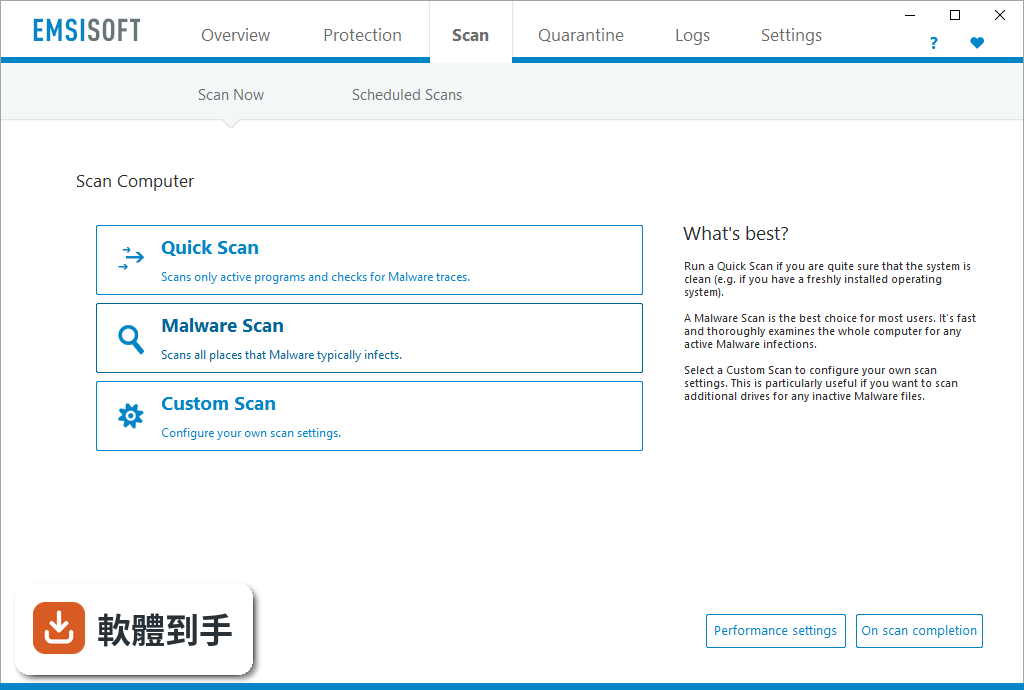
- The “SCAN” section of the software was visually improved to make it even easier and straight forward to use. The new “Malware Scan” replaces what was previously known as “Smart Scan”. The option “Detail Scan” was removed in favor for a “Custom Scan” that uses the same default settings. The new scan types are available for quick access at the overview screen too. Overhauled Scheduled Scans panel:
- Version 10 now allows you to easily configure multiple scheduled scans. Scan tasks have received a vast amount of new settings to cover all thinkable conditions. For example, say you want to scan your whole computer each Friday after work at 5 PM. In case the PC has already been shut down, you want to repeat the missed scan on Monday morning. Additionally you may want to run a quick scan after each reboot, but be sure that the latest online updates are downloaded right before the scan. All of that can be flexibly configured now. Scans can be scheduled on short intra-daily intervals, on daily/weekly/monthly intervals, or right after events like PC startup or online updates. The scan type can be flexibily chosen, including custom scan settings with specific automated cleaning settings, and scans can run silently if preferred. New Privacy settings panel:
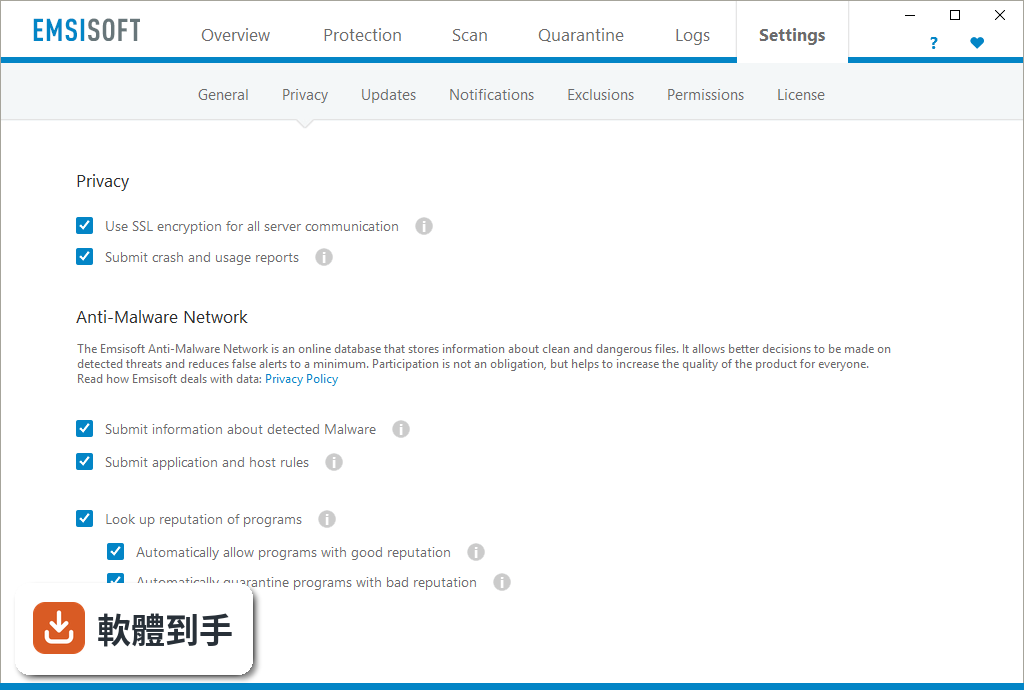
- The anti-malware testing agency AV-comparatives recently confirmed that Emsisoft is quite possible the most privacy conscious security software vendor around. While most antivirus can easily track every single website you’re visiting, Emsisoft ensures that no personal data leaves your personal computer. Version 10 goes even one step further and allows you to freely configure all settings which may have any impact on your privacy. For some useful features like the online lookup of programs during alerts to avoid false alerts it is required to submit a minimum of information in order to benefit from them, but you can always turn them off if you prefer. You can also optionally turn off the SSL-based server communication to convince yourself about the transferred information, using a http traffic logger. New Behavior Blocker panel:
- Think of a combination of the Windows Task Manager with the power of the Emsisoft Behavior Blocker. The new process list shows which programs can be trusted and which may require further investigation to be absolutely sure. Results of the online- and offline-reputation-analysis allow you quickly narrow down the number of questionable programs to just a few. Extended file properties help you to identify threats. Bad programs can be quarantined or killed with just one click. Improved online updates:
- The new version optionally lets you know every time a software update is installed in the background. The update tile at the overview screen was simplified for improved usability. Improved installation wizard:
- The initial malware scan was moved from installer to the first run of the software for better cleaning functionality. Fine tuning:
- While the visual changes of the new version are somewhat limited, we focused more on getting the best out of the already awarded software. Dozens of bigger and smaller improvements have been applied under the hood. The user interface was simplified for better handling and improved at various locations for more speed.