
這是歷史版本頁面 — 看 Emsisoft Anti-Malware 最新版本
裝了防毒軟體還怕中毒?Emsisoft Anti-Malware 能補什麼
 Emsisoft Anti-Malware 2017.12.1.8340
資料更新 2018-01-04
閱讀約 6 分鐘
電腦已經裝了防毒軟體,卻還是看到新聞說又有新病毒繞過防護,或者某天突然發現瀏覽器被裝了工具列、桌面多了一堆看不懂的捷徑。當下想再裝一套防毒軟體來補強,又怕兩套互相打架,讓原本就慢的電腦更卡。這種「好像有防護,又覺得不夠安心」的感覺,很多人都有。
一般人遇到這種情況,最直覺的做法是再裝一套免費防毒,但兩套防毒同時常駐,輕則拖慢開機,重則互相誤判、把對方當病毒清掉。另一種做法是上網找掃描工具,掃完就關,但這類工具多半隻能清已經中的毒,擋不住新進來的威脅。Emsisoft Anti-Malware 這類軟體的切入點是:不跟現有防毒搶工作,而是當第二道檢查,專門抓防毒軟體漏掉的東西,同時用行為監控擋下還沒被列入病毒庫的惡意程式。
01Emsisoft Anti-Malware 跟一般防毒軟體有什麼不同?
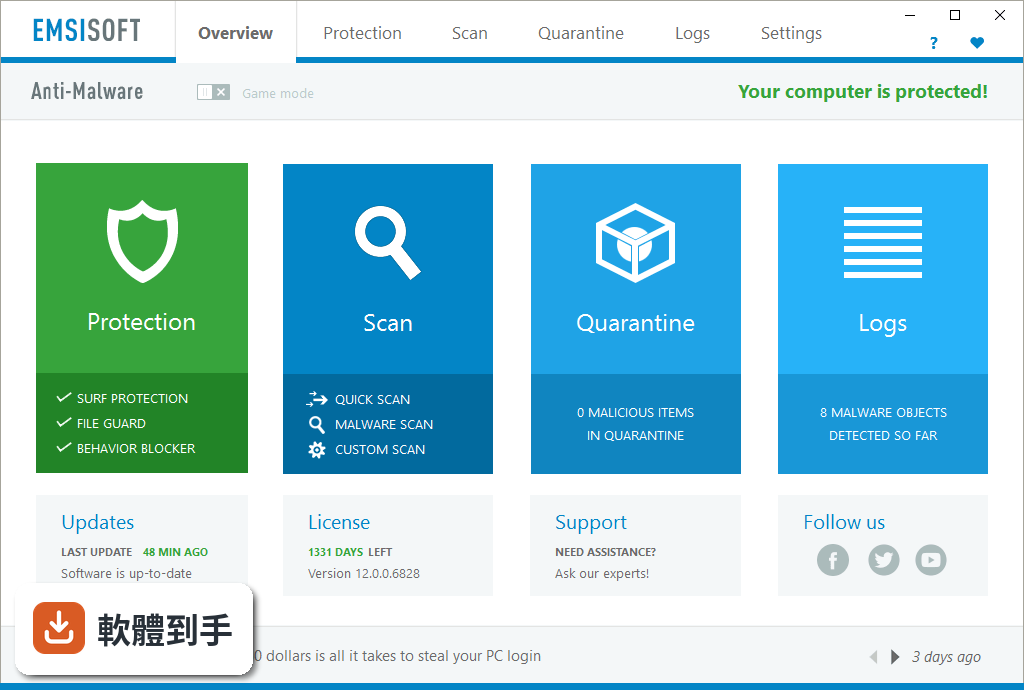
它定位成輔助用的防惡意軟體工具,核心是雙引擎掃描器,搭配行為攔截、網頁防護和反勒索功能。跟一般防毒軟體最大的差別是,官方說明它設計上可以跟其他防毒軟體共存,不會衝突,適合當作第二套掃描工具來補強,而不是取代你原本的防毒軟體。
02它能不能抓出防毒軟體漏掉的東西?
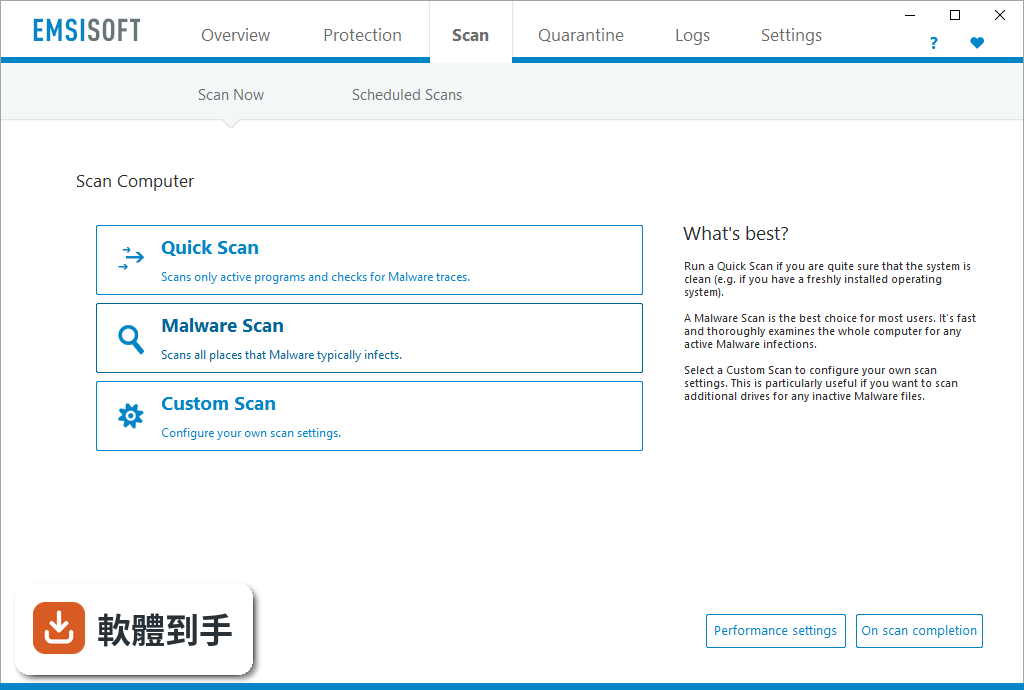
可以處理兩類東西:一是惡意軟體,包括木馬、後門、銀行竊密程式;二是潛在不需要的程式(PUP),像是瀏覽器工具列、彈窗廣告、拖慢系統的垃圾軟體。官方說雙引擎掃描加上機器學習輔助的偵測,能提高抓到這些程式的機率,但實際偵測率沒有提供具體資料,建議自己裝試用版實測看看。
03裝了它會不會跟原本的防毒軟體衝突?
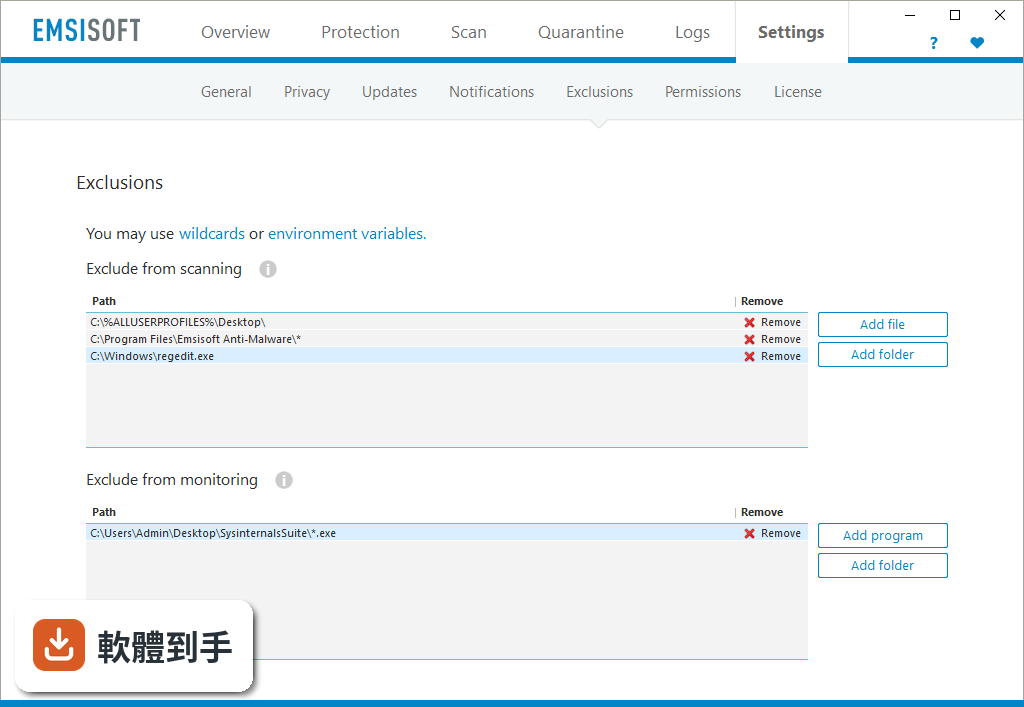
官方 FAQ 明確說可以跟其他防毒軟體一起運作,不會衝突或影響效能。不過這是官方說法,實際狀況會因你原本裝的防毒軟體版本而不同。建議裝之前先看兩套軟體的相容性說明,裝完觀察幾天,確認沒有互相誤判或拖慢系統再決定要不要留。
04它對勒索病毒有沒有用?
有專門的反勒索功能,用的是行為監控,不是靠病毒庫比對。也就是說,就算勒索病毒是全新的、還沒被列入病毒庫,只要它開始做可疑動作(例如大量加密檔案),行為攔截器就會跳出警告並阻止。但官方沒有提供測試資料,實際防護效果需要自己評估。
05會不會拖慢電腦?
官方強調設計上儘量少佔資源,對系統效能影響很小。但使用者評分中有人提到在舊款或低階裝置上可能還是會有效能問題。如果你的電腦本身已經跑不太動,建議先裝試用版,觀察開機速度、開程式的反應,再決定要不要繼續用。
06電腦已經裝了防毒軟體,還需要它嗎?
如果你覺得現有防毒軟體不夠安心,或是電腦常常出現怪現象、懷疑有東西沒清乾淨,它可以當作第二道防線。它的強項是行為攔截和 PUP 清除,正好補足一般防毒軟體比較弱的地方。但如果你對現有防護已經很滿意,也沒有中毒疑慮,就不一定需要多裝一套。
07電腦很舊、跑不太動,適合用嗎?
官方說資源佔用低,但使用者評價中有人反映在舊裝置上還是會有效能影響。而且它只支援 Windows 10(64 位元)和 Windows 11,不支援更舊的系統。如果你的電腦是 Windows 7 或 8,官方系統需求雖然寫了可以,但實際支援頁面只列了 10 和 11,建議先確認自己的系統版本再裝。
08介面只有英文,會不會很難用?
介面確實是全英文,沒有中文選項。如果你不熟悉英文,操作上會有門檻,尤其是設定選項和警告訊息。不過它的介面設計算簡潔,主要功能就是掃描、隔離、清除,不太需要頻繁調整設定。如果英文閱讀有困難,可以考慮找有中文介面的替代方案。
09它跟免費的防毒軟體比,有什麼優勢?
免費防毒軟體(例如 IObit Malware Fighter Free)通常功能較陽春,而且可能夾帶推廣廣告。Emsisoft 的優勢是雙引擎掃描和行為攔截,功能比較完整,而且沒有廣告干擾。但它是試用版,只能用 30 天,之後要付費才能繼續用。如果你不想花錢,免費方案可能更符合需求。
10試用版到期後怎麼辦?
試用期 30 天,到期後如果不付費,就無法繼續使用。官方沒有提供免費版,也沒有其他替代方案。到期後你可以選擇付費購買,或是改用其他免費工具。如果只是偶爾想掃一次毒,也可以考慮同公司的 Emsisoft Emergency Kit,它是免安裝的掃描工具,但功能沒有這套完整。
11它更新頻率高嗎?會不會跟不上新病毒?
官方 FAQ 說程式每天更新多次,但實際版本紀錄顯示近 24 個月只更新了 1 次,更新頻率偏低。這代表它可能不是隨時都在更新病毒庫,對新威脅的反應速度可能不如其他防毒軟體。如果你很在意即時防護,建議先確認它的更新狀況再決定。
12這套軟體的評價如何?可以放心用嗎?
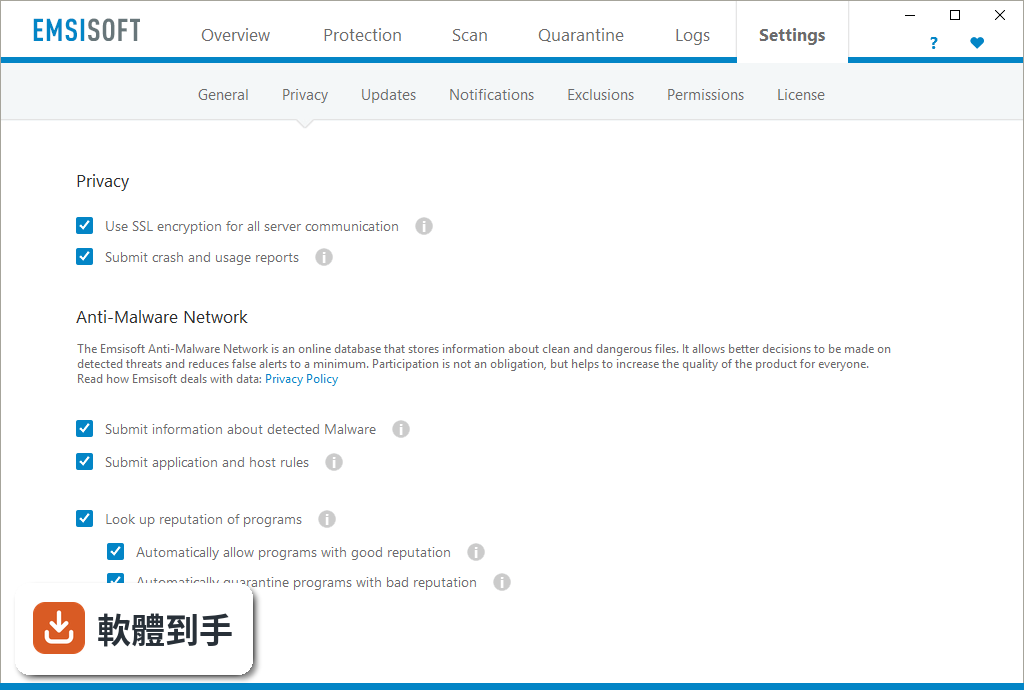
使用者評分 6.42/10,共 329 人評分,分數不算高。同型別的 IObit Malware Fighter Free 有 408 人評分,Zemana AntiMalware 有 211 人評分,可以參考這些使用者的心得。評分人數不多,代表使用者的樣本數有限,建議多看幾篇評論,瞭解實際使用經驗再決定。
下載與官方連結
前往官方網站 下載 Emsisoft Anti-Malware
EmsisoftAntiMalwareSetup.exe · 連結指向軟體原廠
版本紀錄
- 2026-02-21 Emsisoft Anti-Malware 2026.1.0.12700 3.1 MB
- 2023-09-06 Emsisoft Anti-Malware 2023.9.1.12121
- 2023-09-05 Emsisoft Anti-Malware 2023.9.0.12115
再看 5 筆
- 2023-08-01 Emsisoft Anti-Malware 2023.8.0.12074
- 2023-07-04 Emsisoft Anti-Malware 2023.7.0.12036
- 2023-06-02 Emsisoft Anti-Malware 2023.6.0.11957
- 2023-05-03 Emsisoft Anti-Malware 2023.5.0.11922
- 2023-04-04 Emsisoft Anti-Malware 2023.4.0.11891
這一版改了什麼
What's new in this version:
Emsisoft Anti-Malware 2017.12.1.8340
- Fixed: Occasional popup of the main screen after a program update
- Improved: Possible compatibility issue warning when another installed Anti-virus/Anti-malware program is detected
- Improved: Link to view the scan results in the forensics log ‘Scan finished’ details screen
Emsisoft Anti-Malware 2017.12.0.8334
- New: Automatic seat activation for multiple seat licenses
- Improved: Migration of the separate logs into Forensics
- Improved: GUI simplification: some settings have been removed for a better user experience
- Improved: Possible compatibility issue warning when another installed Anti-virus/Anti-malware program is detected
- Improved: Initial integration with Windows Security Center after being installed with MSI
- Improved: Extended possibilities to resize the main overview scree
- Fixed: Enterprise Console Connect/Disconnect buttons availability in Admin-mode
- Many minor tweaks and fixes
Emsisoft Anti-Malware 2017.11.0.8247
- Improved: Beginning of update schedule after computer start
- Improved: Extended forensics logging
- Improved: Integration with Windows Security Center
- Fixed: Missing Emsisoft Security Center icon after being deployed from Emsisoft Enterprise Console
- Fixed: Visibility of the Connect/Disconnect buttons related to Enterprise Console, in Administrator mode
- Fixed: Processing of the exclusions list for the command line scanner (A2CMD)
- Many minor tweaks and fixes
Emsisoft Anti-Malware 2017.10.2.8188
- Emsisoft Anti-Malware 2017.10.2.8188 Hotfix released. This release includes fixes, enhancements and stability improvements. This update will require an application restart. Fixed: Rare SSL connection issue with updating and activating
Emsisoft Anti-Malware 2017.10.1.8165
- Improved: Support for MSI setups for x86 and x64 Windows editions
Emsisoft Anti-Malware 2017.10.0.8157
- New: Option to enable/disable integration in Windows Security Center. Available at Settings -> General
- New: Simplified scanner performance settings. Available at Scan -> Scanner Settings, Scheduled Scans and Custom Scans
- Improved: Update process performance
- Improved: Support for Windows 10 Fall Creators Update
- Improved: Forensic logging related to connection with Emsisoft Enterprise Console
- Improved: Integration with Windows Defender Security Centre
- Fixed: Occasional issue with some Microsoft Office versions
- Several minor tweaks and fixes
Emsisoft Anti-Malware 2017.9.0.8006
- New: Feature to connect with Emsisoft Enterprise Console from client side. Available at Settings -> License
- Improved: Communication protocol with Emsisoft servers to speed-up updates and Anti-Malware Network look-ups
- Improved: Support for various languages
- Several minor tweaks and fixes
Emsisoft Anti-Malware 2017.8.0.7904
- New: Windows Firewall Fortify feature which blocks illegitimate manipulations of Windows Firewall rules
- Improved: Forensics logging
- Improved: Processing of attachment size limit in support emails
- Fixed: Rare program freezes on opening the forensics log and confirmation of surf protection notifications
- Fixed: Exclamation mark shown erroneously in the protection tile
- Fixed: Rare program freeze during malware detections
- Fixed: Empty value shown in the permissions dropdown in Settings/permissions
- Fixed:Wrong item (auto)selected after opening the language dropdown in Settings/general
- Fixed: Computer restart instead of computer shutdown executed, when set for a silent scan
Emsisoft Anti-Malware 2017.7.0.7838
- This update will require an application restart
- New: Forensic log: a condensed timeline that shows all events and user actions in an easy to read form
- New: Auto-resolve mode for behavior blocker alerts: an option that makes all decisions on its own
- New: Anti-Malware Network lookups during quarantine re-scans, to reduce the number of false positives
- New: General warning for possible compatibility issues with other already installed Anti-virus/Anti-Malware programs, during installation
- Improved: Program startup and updater performance
- Improved: Several minor tweaks and fixes
- Fixed: Issue that showed the scanner result window in scheduled scans even if silent mode was enabled
- Fixed: Application rules: ‘always block’ rules were not applied
Emsisoft Anti-Malware 2017.6.0.7681
- New: Unattended scheduled scans: Scans now run even if no user is logged on in Windows
- New: Email notifications: Setup email notifications for selected events
- Improved: Improved support for Windows Store apps.
- Fixed: List of files in Quarantine wasn’t refreshed after scan started by Emsisoft Enterprise Console (if applicable)
Emsisoft Anti-Malware 2017.5.2.7600
- Fixed: Occasional ‘Component is missing’ error during computer startup
- Fixed: Crash when trying to send an email from the support tile in the Overview screen on Windows 7 32-bit
Emsisoft Anti-Malware 2017.5.1.7567
- Fixed: ‘Emsisoft Protection is waiting for a component (service) to start..’ error on Windows 7 64-bit
- Fixed: Partly enabled debug logging, while disabled
Emsisoft Anti-Malware 2017.5.0.7538
- This update will require an application restart
- New: Anti-Ransomware component on Protection tile on overview screen
- New: Scan setting: ‘Scan in email data files’
- Improved: Reduction of false positives
- Improved: Upload of attachments when contacting customer support
- Improved: Main program windows position when the program opens outside of the visible desktop
- Improved: Quarantine screen refresh when Emsisoft Commandline Scanner or Emsisoft Enterprise Console restores files from, moves files to, or deletes files from quarantine
- Improved: Additional warning before deleting or moving scanner detections, found inside of archives, to quarantine
- Improved: More clear default folder names for export- and scan settings
- Improved: USB insertion detection which did not start the scheduled scan on some computer systems
- Improved: Processing of the installer command line parameters related to customer care settings (URL verification)
- Fixed: Occasional crash with Microsoft Word
- Fixed: Crash when importing a very large hosts list in Surf Protection
- Fixed: Address column values in the Firewall screen in Emsisoft Internet Security
- Fixed: Occasional issue wherein the Behavior Blocker monitor showed processes with an unknown reputation
Emsisoft Anti-Malware 2017.4.1.7484
Fixed:
- Main program UI popped-up every 60 seconds
- USB drive scan started after computer woke up from sleep mode
- “Scanning” tray icon didn’t show up after insertion of a USB drive for the second time
- Incorrect ‘Revert settings’ button visibility in Settings / Notifications
Improved:
- Processing of the installer command line parameters related to customer care settings
- Update progress indicator in A2CMD
Emsisoft Anti-Malware 2017.4.0.7424
New:
- Start a scheduled scan on USB insertion
- Revert settings to policy defaults, when managed by Emsisoft Enterprise Console
- Apply individual computer settings, when managed by Emsisoft Enterprise Console
Improved:
- Behavior blocker monitor now shows correct process information when the process started from a shared folder
- Proxy server support when deployed from Emsisoft Enterprise Console
- Minor UI improvements
Fixed:
- Occasional issue which blocked correct Windows 10 shutdown
Emsisoft Anti-Malware 2017.3.2.7392
- Fixed: Occasional issue with Windows user profiles
Emsisoft Anti-Malware 2017.3.1.7353
- Fixed: Unable to enter a license key in trial mode
Emsisoft Anti-Malware 2017.3.0.7336
- New: Option to scan newly connected removable drives
- Improved: Minor GUI improvements
- Fixed: Exclusions issue when connected to Emsisoft Enterprise Console (if applicable)
Emsisoft Anti-Malware 2017.2.1.7260
- Fixed: Program freeze when the computer is part of a once renamed domain and connected to Emsisoft Enterprise Console
- Fixed: Occasional issue where the permissions tab was hidden for domain administrators
Emsisoft Anti-Malware 2017.2.0.7219
New:
- Scanner settings screen which acts as a template for on demand and (new) scheduled scans
Improved:
- PUP detection in installers
- Program start-up performance
- Integration with Windows Security Center
- Minor improvements related to permissions
- Faster loading of the Behavior Blocker screen
- Minor GUI improvements
Fixed:
- Issue where missed scheduled scans were not executed
Emsisoft Anti-Malware 2017.1.1.7166
- Fixed: Issue with being disconnected from Emsisoft Enterprise Console. (if applicable)
- Fixed: A2cmd crash on 32-bit Windows
Emsisoft Anti-Malware 2017.1.0.7138
- New: Brand new permissions system which provides much easier administration of different user permissions
- Improved: Speed of scans
- Improved: Automatic Update now runs after exit of Game mode, if an update was skipped while Game mode was on
- Improved: Performance of importing hosts files for Surf Protection
- Improved: Integration with RRM partners
- Improved: Display of the Anti-Malware Network rating in alert details
- Improved: Performance of Quarantining detected threats
- Improved: Minor GUI improvements
Emsisoft Anti-Malware 12.2.0.7060
- New: Environment variables tester in the exclusions screen.
- Improved: Email validation in the false positives submit screen
- Improved: Administrator mode timeout settings
- Improved: Minor GUI improvements
- Improved: Protection paused indicator on the Overview screen
- Improved: CPU load during update process
- Improved: Behavior Blocker: correct processing of exclusions for apps that are started after an exclusion was added
- Improved: Quarantine Re-scan procedure
- Improved: Path used by the update process moved to ProgramDataEmsisoftupdates
- Improved: Pre-installation check for Kaspersky and AVG Antivirus/Internet Security due to program incompatibilities
- Fixed: Firewall application rules processing for files that are not accessible at boot time (encrypted drives) in Emsisoft Internet Security
- Fixed: Memory leak in Emsisoft Internet Security
- Fixed: Occasional ‘Internal processing error’ issue during update
- Fixed: Update log parsing issue
- Fixed: Main screen out of position
- Fixed: Occasional issue where File Guard did not start after a program restart
Emsisoft Anti-Malware 12.1.1.7014
- Improved: Reduced CPU load during scanning
- Fixed: Registry leak
- Fixed: Software vulnerability
Emsisoft Anti-Malware 12.1.0.6970
- Improved: Speed of scans
- Improved: Basic support for Terminal Server
- Improved: Status value in the ‘monitored’ column of the Behavior Blocker monitor
- Improved: Archive scan results ‘cleanup’ processing
- Improved: Application restart behavior
- Improved: Exclusions support for mapped network drives, network shares and folders
- Improved: Computer restart request behavior
- Fixed: Occasional crash during Surf Protection notification
- Fixed: Occasional application freeze during detection notification
- Fixed: Permissions for Exclusions and Notifications
- Fixed: Permission sub-menu visibility for non-admin users
- Fixed: Occasional application hang
Emsisoft Anti-Malware 12.0.1.6859
- Improved: License handling
- Fixed: Occasional hang during Windows startup
Emsisoft Anti-Malware 12.0.0.6844
- This update will require an application restart
- Improved: Behavior blocker detections
Emsisoft Anti-Malware 12.0.0.6828
- Improved: Behavior Blocker
- Improved: Scanning Engine
- Improved: Anti-Malware Network
- Revised: Whitelisting
- Revised: Notifications System
- Redesigned: User Interface
- Hundreds of detail improvements
Emsisoft Anti-Malware 11.10.1.6763
- Improved: Installation, when deployed from Emsisoft Enterprise Console
Emsisoft Anti-Malware 11.10.0.6563
- New: Options for update/scan/notification behavior during Game mode
- Improved: License key validation and mapping
- Improved: Automatic update process
- Improved: Auto game mode
- Improved: Behavior Blocker whitelist handling
- Improved: Some minor changes related to application crash handling
- Fixed: Occasional crash in the ‘Manage whitelist’ screen
Emsisoft Anti-Malware 11.9.0.6513
- New: ‘Next update’ tooltip on Last Update time indicator
- Improved: Quarantined items counter on the overview page
- Fixed: Appearance of renew license dialog after application restart
- Fixed: Issue with hosts import
- Fixed: Crash during manual submission of a quarantined file
- Fixed: Default scheduled scan performance settings applied after deploy from Emsisoft Enterprise Console
- Fixed: Main screen position after computer start
- Fixed: Occasional issue with ‘Quarantine selected’ and ‘Delete selected’ buttons
- Fixed: Firewall compatibility issues for Emsisoft Internet Security
Emsisoft Anti-Malware 11.8.0.6468
- Improved: Automatic update process.
- Improved: Automatic Game mode now not enabled in Windows ‘Locked’ state.
- Improved: Behavior blocker detections.
- Fixed: Occasional BSOD for Emsisoft Internet Security.
- Fixed: Network being accessible after a few minutes with “offline mode” enabled for Emsisoft Internet Security.
- Fixed: Surf protection for Edge browser on Windows 10.