
這是歷史版本頁面 — 看 eScan Anti-Virus 最新版本
eScan Anti-Virus 英文介面,Windows 7 到 11 能用嗎
 eScan Anti-Virus 14.0.1400.2029
資料更新 2017-08-04
閱讀約 5 分鐘
電腦開機愈來愈慢,網頁動不動跳出奇怪的廣告,甚至偶爾會跳出視窗說偵測到威脅。你想找一套防毒軟體把這些問題一次處理掉,但又不想裝那種綁手綁腳、整天跳升級通知的大型套裝。你需要的是一套能掃毒、能清垃圾、又不會太干擾日常操作的軟體,最好還能顧一下瀏覽安全。
免費版通常功能陽春,付費版又怕買到用不順手的。更麻煩的是,很多防毒軟體介面只有英文,設定選項一堆,看不懂就只好放著預設值。這類工具的切入點其實是:先確認它支援你的系統、介面你能不能接受、免費版到底夠不夠用,再決定要不要裝。搞清楚這幾件事,才不會裝了又移除、移除又重找。
01eScan Anti-Virus 到底能防什麼?
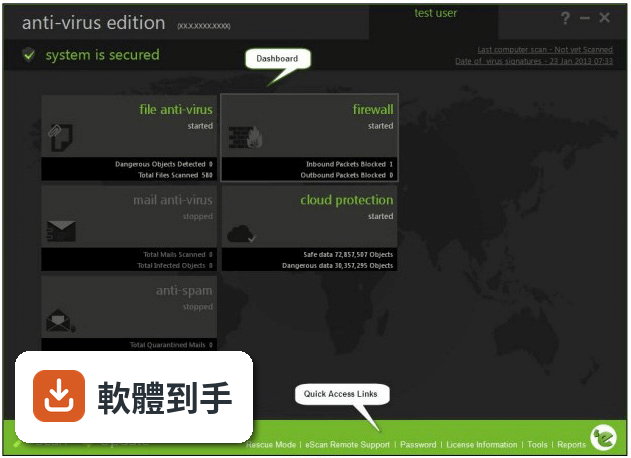
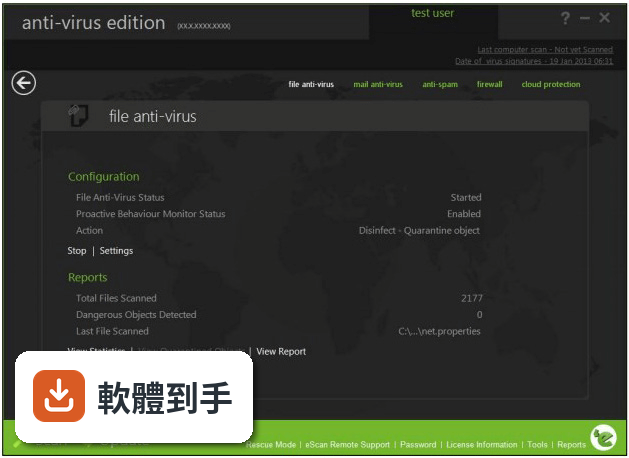
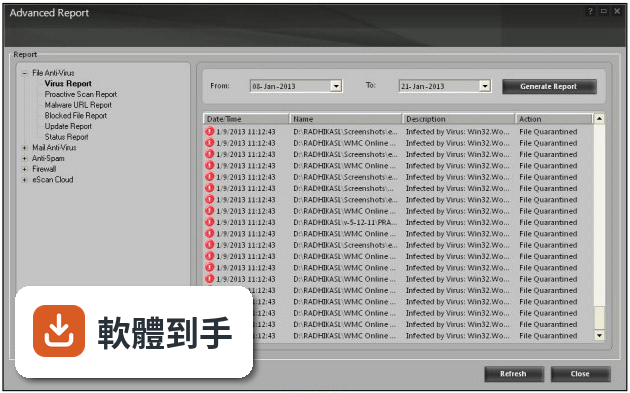
它提供即時防護,監控系統活動並阻擋病毒、惡意軟體和間諜軟體。也包含防勒索軟體功能,能在檔案被加密前攔截威脅。另外有網頁防護,會封鎖釣魚網站和不安全的下載,還有 PUA(潛在不需要的應用程式)偵測與移除,以及雲端掃描可以即時偵測最新威脅。
02除了掃毒,它還有哪些功能?
內建系統調校工具,可以清理垃圾檔案、找重複檔案、管理開機啟動項目。也有磁碟清理工具、瀏覽器管理與清理功能,能提升隱私和速度。另外提供廣告封鎖、密碼保管庫、防火牆保護,以及選配的 VPN 服務和資料外洩監測,付費方案才有完整功能。
03免費版和付費版差在哪?
免費版提供基本防護,但功能有限。付費版才有即時防護、VPN、密碼保管庫、防火牆等進階功能。官方說明提到免費版可以繼續用,但部分工具需要額外購買,而且會不時出現升級付費方案的提示。實際免費版能用到哪些功能,需要安裝後自行確認。
04它會讓電腦變慢嗎?
官方說明表示這套軟體設計上是為了優化系統效能,但即時防護本來就會占用部分系統資源。如果你的電腦是舊機種、記憶體只有 2GB,執行掃描或即時防護時可能還是會感受到延遲。建議安裝後觀察幾天,看日常使用是否受影響。
05可以裝在手機或 Mac 上嗎?
官方說明提到防護功能可涵蓋 Windows、macOS、iOS 和 Android 裝置,但取決於你購買的方案。免費版是否支援多裝置、手機版功能是否完整,官方資料沒有明確寫清楚。如果你需要跨裝置防護,安裝前要先確認方案內容。
06英文不好的人適合用嗎?
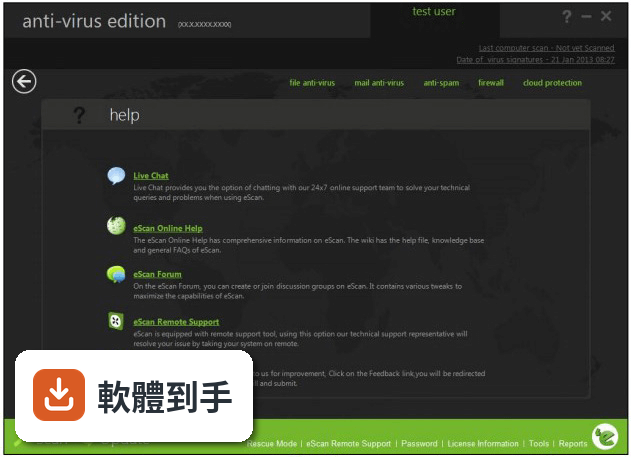
這套軟體介面只有英文,沒有中文語系。雖然官方說介面乾淨、導覽清楚,但對不習慣英文介面的人來說,設定選項和掃描報告還是會造成困擾。如果你完全看不懂英文,操作上會比較吃力,建議先看官方網站有沒有提供操作教學或截圖。
07電腦是 Windows 7 老機器,跑得動嗎?
它支援 Windows 7、8、10、11,硬體需求是 1 GHz 以上處理器、2GB 記憶體、500MB 可用磁碟空間。Windows 7 老機器只要符合這些條件就可以安裝。不過要注意,Windows 7 本身已停止支援,防毒軟體能提供的保護也有限。
08不想花錢的人適合嗎?
免費版可以安裝使用,提供基本防護,但進階功能如 VPN、密碼保管庫、防火牆都需要付費。官方說明也提到免費版功能有限,部分工具要另外購買。如果你只需要基本掃毒和即時防護,免費版或許夠用,但實際限制要安裝後才知道。
09它跟其他防毒軟體比起來如何?
在評分網站上,eScan Anti-Virus 有 298 人評分,分數 7.6 分。功能相近的 Quick Heal Total Security 有 531 人評分,G DATA Total Security 只有 42 人評分。評分人數較少代表樣本數不多,參考價值有限。建議多看使用者的實際評論,特別是關於誤判率和客服回應的部分。
10這套軟體更新頻率高嗎?
根據版本紀錄,它收錄了 8 個版本,最早是 2017 年,最近一次更新在 2026 年 2 月。但近 12 個月只更新 1 次,近 24 個月也只更新 1 次。更新頻率偏低,代表新威脅的應對速度可能不如每週或每月更新的競品。如果你很在意即時防護的更新速度,這點要列入考量。
11它適合當主力防毒軟體嗎?
它有即時防護、網頁防護、系統調校等完整功能,介面也設計得容易上手。但介面只有英文、更新頻率偏低、評分人數不多,這些都是需要考量的因素。如果你能接受英文介面,且電腦配備符合需求,可以安裝免費版試用一段時間,再決定是否值得付費升級。
下載與官方連結
awn2k3ek.exe · 連結指向軟體原廠
版本紀錄
- 2026-02-17 Total AV - Antivirus Pro 2025
- 2019-10-29 eScan Anti-Virus 14.0.1400.2228 444 MB
- 2019-04-05 eScan Anti-Virus 14.0.1400.2175 426 MB
再看 5 筆
- 2018-08-29 eScan Anti-Virus 14.0.1400.2117 425 MB
- 2018-06-22 eScan Anti-Virus 14.0.1400.2103 419 MB
- 2018-04-24 eScan Anti-Virus 14.0.1400.2091 408 MB
- 2018-03-19 eScan Anti-Virus 14.0.1400.2083 401 MB
- 2017-08-04 eScan Anti-Virus 14.0.1400.2029
這一版改了什麼
What's new in this version:
eScan Anti-Virus 14.0.1400.2029
Incremental Antivirus Signature Updates
Windows Critical Patch Management from Server (In Background).
Enhanced Web filtering.
Ransomware Protection in Endpoints.
eBackup on Local Machine (Contact Sales for enabling eBackup Network Feature).
New Policy Model - Now user can borrow individual modules from previous policies to create new policy.
Policy criteria can be set for Domain Users.
Update Agent can be set for Multiple Group(s) & Client(s), through single Configuration page.
Update Agent status information can be viewed from "Events & Computers >> Computer Selection"
File Activity added under User Activity with option to Filter and Export in various Formats.
- Export option added for Clients in respective group
- Select Column added for Clients Summary
- Temporary access to module can be given using One Time Password (OTP) added under "Client Action List"
- eScan Remote Access (RMM) over LAN and WAN. (Contact Sales for enabling this feature)
- Option to create client setup added for respective group with Offline policy. Available under "Action List"
- Option to take Action and Manage client added in Global Search Option
- Filter option added to Network Discovery in "Unmanaged Computers >> New Computers Found" Section
- New Report Templates Added "File Activity", "Asset Change (Software)", "Asset Change (Hardware)", "Computers with Critical Status", "Scan Report"
- "Violation" option added under "Events & Computer"
- Microsoft Software Report for Microsoft Office and Microsoft OS added under Asset Management
- Instant email Event Alert added under Outbreak Notification
- Customize configurable setup added for deployment (Windows/Linux)
- Asset Change added under Dashboard
- New columns added for client information in groups (E.g. Last Connected/Available User(s)/Logged in User/Local Users)
- "Export Detailed Report" added in "Asset management >> Software Report"
- "Policy Criteria Templates" added in "Managed Computers"
- "Delete All Quarantine Files" added in "Managed Computers >> Client Action List"
- Update Agent for Linux clients - Linux client machines can also take updates from windows update agent
- New feature "Use separate uninstall password" added in "Policy >> Administrator Password "
- New policy added for Linux for Uninstall Password and Schedules Updates
- New task "Sync System Time with eScan Server" added for Groups and Specific Policy
- PDF export option added in "Managed computers >> Client computers"
- "Network Speed" column added in "Asset Management >> Hardware Detail"
- "Automatic Move to Non license" added in "Events and computers >> Settings >> Events & Computers Settings >> Computer Selection >> Not connected for long time". Endpoints will be moved to Non-License, if not connected for long time
- "Import" button added in "Policy Template >> EndPoint Security >> Application Control >> Block List". User can import CSV file for block list
- "Last Month" option added in report scheduler
- "Software Version" added in software report
- Date/Time Violations added in "Events & Computers" with export facility
- "Installed date" column added in Software report
eScan Mobility Management:
Containerization added
BYOD/COD grouping added
Geo/WIFI fencing added for COD/BYOD
AD synchronization for adding new devices added
Data Usage added
Location Tracking added
Device enrollment logic improved
AV update logic improved
Change server IP from console added
Unblock device from console added
Network blocking for apps (via VPN) added
Device search option added
Email account wipe settings through policy added
Enrollment Status added to Dashboard
Minor bug fixes
eScan Anti-Virus 14.0.1400.2027
- Change log not available for this version
eScan Anti-Virus 14.0.1400.1849
- Light weight product: Low memory consumption, fast booting time, fast shutdown time and low CPU utilization
- Faster Installation: Highly optimized databases with the product to get install times to less than 1.5 mins
- Better protection: Improved URL scanning leading to higher detection percentage (touching 100%)
- Maximum features: 360 degree feature set spectrum from protection to backup
- Faster Application Loading: Fast Application loading owing to object property caching
- New Improved GUI
- New virus signatures added
- Minor bugs corrected