
這是歷史版本頁面 — 看 FortiClient 最新版本
FortiClient免費防毒加VPN,到底能不能安心用
 FortiClient 5.6.2.1117
資料更新 2017-11-21
閱讀約 6 分鐘
你下載了 FortiClient,打開以後發現介面全是英文,授權型式寫著 Demo,心裡開始猶豫:這套軟體到底能不能長期用?還是只是試用版?你原本想找一套免費防毒,順便解決連回公司網路的 VPN 需求,結果安裝完第一步就卡在「不知道該不該繼續設定下去」。
一般人遇到這種狀況,通常會先去找免費防毒軟體,但免費方案往往功能陽春,防毒和 VPN 分屬不同軟體,等於要裝兩三套才能滿足需求。FortiClient 的切入點是把防毒、VPN、網頁過濾、弱點掃描整合在同一個介面裡,由 Fortinet 這家做企業防火牆的廠商提供威脅情報,讓你在一個地方處理端點安全和遠端連線,不用東拼西湊。
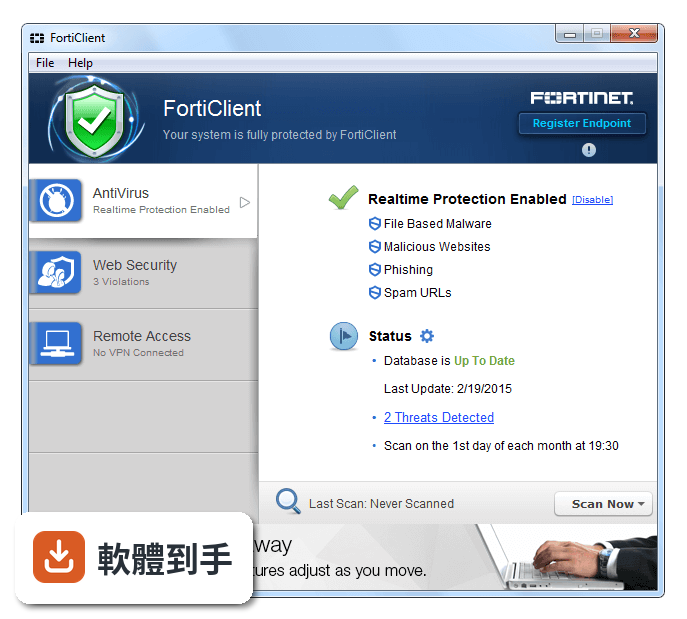
01FortiClient 的主要功能有哪些?
根據官方說明,它包含惡意軟體與病毒偵測、rootkit 清除、家長網頁控制、VPN 連線、應用程式防火牆、弱點掃描、雙重驗證。防毒引擎由 Fortinet 自家開發,拿到超過二十次 VB100 獎項,並具備主動式偵測,能攔截從未出現過的零日攻擊。VPN 支援 IPSec 和 SSL 兩種協定,可設定單一連線設定檔,快速建立遠端安全連線。
02它的 VPN 功能怎麼用?
安裝完成後,先設定 VPN 連線設定檔,選擇 IPSec 或 SSL 協定,輸入公司提供的伺服器位址和帳號密碼,就能連回組織網路。官方提到它整合 ZTNA 零信任架構,遠端工作時可依應用程式權限決定存取範圍。如果你只是要連回家裡或公司的一般 VPN,設定流程不算複雜,但介面是英文,需要一點時間熟悉。
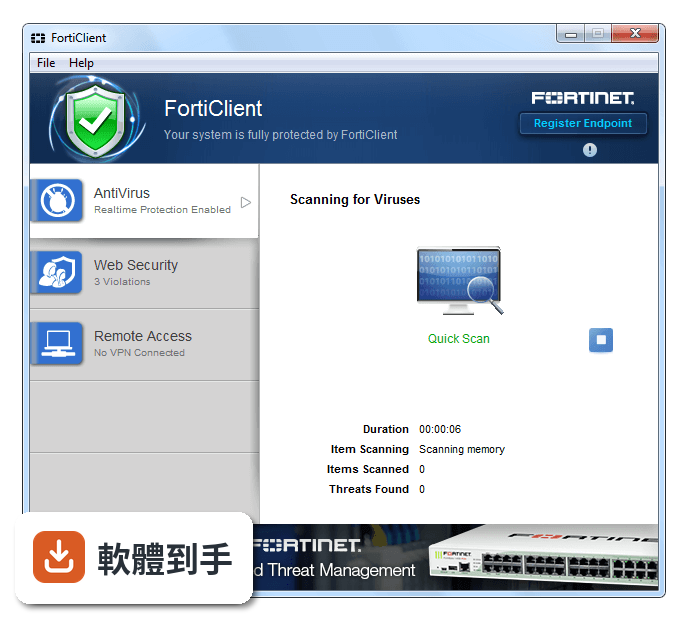
03家長控制功能可以做到什麼程度?
官方說明指出,家長控制提供簡單有效的方式封鎖惡意和成人網站,也能過濾不當內容。它不像專門的家長監控軟體那樣可以限制使用時間或追蹤社交媒體活動,主要著重在網頁層級的內容過濾。如果你需要的是阻擋特定類別網站,這功能夠用;但若要更細緻的管控,可能要搭配其他工具。
04它和 FortiGate 防火牆的整合有什麼好處?
FortiClient 可以跟 FortiGate、FortiManager、FortiAnalyzer 整合,由中央端統一派送政策、管理部署、收集日誌和報表。對企業來說,IT 人員能從單一主控台看到所有端點的狀態,包含軟體庫存、合規性檢查、隔離受感染的裝置。個人用戶沒有 FortiGate 設備的話,這些整合功能就用不到,但防毒和 VPN 本身還是可以獨立運作。
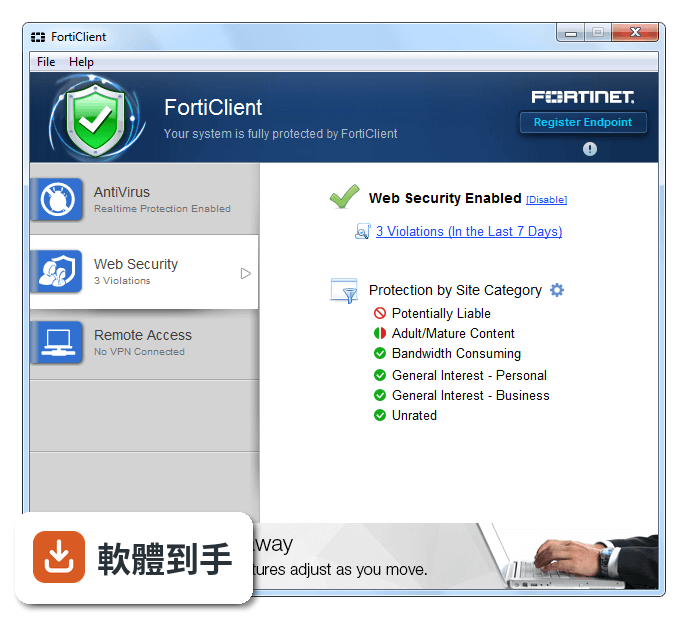
05這套軟體適合個人用戶嗎?
個人用戶可以用它來防毒和連 VPN,但要注意授權型式是 Demo,代表可能不是完整的付費版本,某些進階功能如 EDR、XDR、雲端沙箱隔離,官方列在整合威脅防護項目下,但沒有說明免費版是否包含。介面只有英文,對不習慣英文介面的人來說,操作門檻較高。如果你只需要基本防毒和 VPN,它可以勝任,但要有心理準備設定過程需要自己摸索。
06企業環境適合用 FortiClient 嗎?
官方定位它是企業級端點防護,設計給大型企業、政府機構使用,強調可擴充性和集中管理。如果公司已經有 Fortinet 的防火牆設備,整合 FortiClient 可以簡化管理,IT 團隊能透過 EMS 主控台統一派發政策、監控端點狀態。但部署和日常管理需要相關知識,官方也提供付費的培訓課程和認證,不是裝了就能立刻上手。
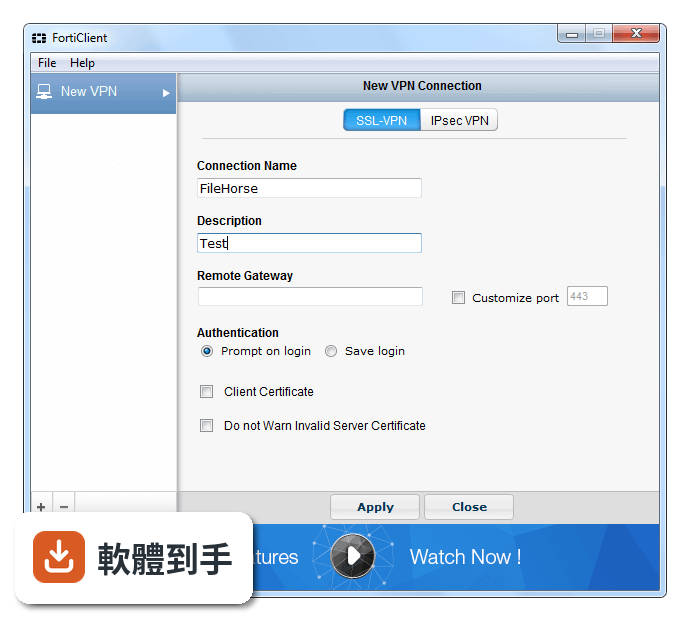
07英文不好的人能用這套軟體嗎?
介面只有英文,沒有中文語系,所以英文不好會比較吃力。安裝、設定 VPN、調整防毒選項、閱讀威脅報告,這些操作都需要看懂英文術語。官方有提供培訓課程和認證,但也是英文內容。如果你完全看不懂英文,建議找其他有中文介面的防毒軟體,或請懂英文的人協助設定。
08它的更新頻率會不會影響安全性?
這個軟體收錄的版本紀錄顯示,近十二個月只更新一次,近二十四個月也只更新一次,更新頻率偏低。防毒軟體需要頻繁更新病毒定義檔和威脅情報,才能應對新出現的惡意軟體。雖然 FortiGuard Labs 持續提供威脅情報,但軟體本身的更新節奏較慢,可能代表維護資源投入有限。如果你很在意即時防護,這點需要納入考量。
09和 BullGuard、Dr.Web 這些軟體比起來,FortiClient 有什麼不同?
從評分人數來看,BullGuard Internet Security 有 2113 人評分,Dr.Web Katana 有 2112 人評分,FortiClient 只有 195 人評分,使用者樣本數差距很大,代表實際使用者的回饋較少。功能上,FortiClient 強調整合 Fortinet 生態系和 ZTNA,而 BullGuard、Dr.Web 是傳統的防毒軟體,沒有綁定特定防火牆設備。如果你沒有 Fortinet 設備,其他軟體可能更單純。
10授權型式是 Demo,代表它不能免費長期使用嗎?
官方說明稱 FortiClient 是免費的端點防護套件,但授權型式標示為 Demo,這之間存在模糊地帶。免費版可能包含基本防毒和 VPN,但進階功能如 EDR、XDR、雲端沙箱、進階威脅防護,可能需要付費訂閱 FortiClient EMS 才能啟用。實際免費版能用哪些功能,官方沒有在說明中明確列出,建議下載後自行確認,或直接詢問 Fortinet 業務代表。
11這套軟體在 Windows 7 上還能用嗎?
支援系統列出 Windows 7 64 位元、Windows 8 64 位元、Windows 10 64 位元、Windows 11,所以 Windows 7 64 位元可以使用。但微軟早已停止支援 Windows 7,系統本身缺乏安全性更新,就算裝了防毒軟體,整體風險還是偏高。如果你還在用 Windows 7,建議優先考慮升級作業系統,而不是單靠防毒軟體保護。
下載與官方連結
FortiClientOnlineInstaller.exe · 連結指向軟體原廠
版本紀錄
- 2026-04-06 FortiClient 7.4 4.4 MB
- 2023-11-27 Select Version
- 2021-05-04 FortiClient 7.0 2.86 MB
再看 5 筆
- 2019-12-20 FortiClient 6.2.2 819.2 KB
- 2019-10-03 FortiClient 6.0.6 830.39 KB
- 2019-05-17 FortiClient 6.2.0 819.2 KB
- 2019-03-25 FortiClient 6.0.5.0209 819.2 KB
- 2018-12-26 FortiClient 6.0.4.0182 819.2 KB
這一版改了什麼
What's new in this version:
FortiClient 5.6.2.1117
- Change log not available for this version
FortiClient 5.6.0.1075
- Updated to add support for FortiSandbox 2.4.0
FortiClient 5.4.3.0870
- Change log not available for this version
FortiClient 5.4.2.0860
- Removed 389753 from Resolved Issues
- Added 389240 and 390356 to Resolved Issues
- Moved 295413 to Known Issues
- Updated description of 390265
- Added the following special notice: SSL VPN cannot connect after upgrade to FortiOS to 5.4.x on page 7
FortiClient 5.4.1.0840
- Change log not available for this version
FortiClient 5.4.0.0780
- FortiClient 5.4.0 has enhanced capabilities for the detection of Advanced Persistent Threats (APT).
- Botnets running on compromised systems usually generate outbound network traffic directed towards Command and Control (C&C) servers of their respective owners. The servers may provide updates for the botnet, or commands on actions to execute locally, or on other accessible, remote systems.
- When the new botnet feature is enabled, FortiClient monitors and compare network traffic with a list of known Command and Control servers. Any such network traffic will be blocked.
FortiSandbox Integration:
- FortiSandbox offers the capabilities to analyse new, previously unknown and undetected virus samples in real- time. Files sent to it are scanned first, using similar Antivirus (AV) engine and signatures as available on the FortiOS and FortiClient. If the file is not detected, but is an executable file, it is run (sandboxed) in a Microsoft Windows virtual machine (VM) and monitored. The file is given a rating or score based on its activities and behaviour in the VM.
- FortiClient integration with the FortiSandbox allows users to submit files to the FortiSandbox for automatic scanning. When configured, FortiClient will send supported files downloaded over the internet to FortiSandbox if they could not be detected by the local real-time scanning. Access to the downloaded file is blocked until scanning result is returned.
- As FortiSandbox receives files for scanning from various sources, it collects and generates AV signatures for such samples. FortiClient periodically downloads the latest AV signatures from the FortiSandbox, and applies them locally to all real-time, as well as on-demand, AV scanning.
- This feature requires FortiSandbox running version 2.1 or newer and is only available on FortiClient (Windows).
WEB FILTERING
Enhanced Real-Time Protection Implementation :
- The Real-Time Protection (RTP) or on-access feature in FortiClient uses a tight integration with Microsoft Windows to monitor files locally or over a network file system as they are being downloaded, saved, run, copied, renamed, opened or written to. The FortiClient driver coupling with Windows has been re-written to use modern API's provided by Microsoft. All basic features remain the same, with a few minor differences in behaviour. Some noticeable performance enhancements could be observed in various use case scenarios.
Web Filtering:
- Web Browser Usage and Duration:
- If configured, FortiClient will record detailed information about the user's web browser activities, such as: l Ahistoryofwebsitesvisitedbytheuser(asshowninregularwebbrowserhistory)
- l Anestimateofthedurationorlengthofstayonthewebsite
- These logs are sent to FortiAnalyzer, if configured. With FortiAnalyzer 5.4.0 or newer, the FortiClient logs sent
- from various endpoints may be viewed in FortiView.
- This feature requires FortiAnalyzer 5.4.0 or newer.
VPN
Authorized Machine Detection:
- For enterprises where new computers may be brought into the organisation by employees, FortiClient may be configured to check or identify the computer, before allowing it to establish IPsec VPN or SSL VPN connection to the FortiGate. The administrator may configure restrictions with one or more of the following:
- l Registrycheck:Ensureaspecificregistrypathcontainsapredeterminedvalue. l Filecheck:Verify:theexistenceofaspecificfileataspecifiedlocation.
- l Applicationcheck:Ensurethataspecificapplicationisinstalledandrunning.
- The verification criteria can be configured using advanced FortiClient XML configurations on the FortiGate or the EMS.
- This applies to FortiClient (Windows) only.
- New SSL VPN Windows Driver
- The FortiClient SSL VPN driver, pppop.sys was re-written to use the latest Microsoft Windows recommended CoNDIS WAN driver model. The new driver is selected when FortiClient is installed on Windows 7 or higher. The SSL VPN driver included in the previous versions of FortiClient will still be maintained.
- Endpoint Control What’s New in FortiClient (Windows) 5.4.0
New IPsec VPN Windows Driver:
- FortiClient IPsec VPN drivers have been updated to support Microsoft Windows NDIS 6.3 specification. The new drivers are compatible with Microsoft Windows 8.1 or higher.
Endpoint Control:
- Integration with the New Enterprise Management Server
- The Enterprise Management Server (EMS) is a new product from Fortinet for businesses to use to manage their computer endpoints. It runs on a Windows Server,so it does not require a physical Fortinet device. Administrators may use it to gain insight on the status of their endpoints. The EMS supports devices running Microsoft Windows, Mac OS X, Android and iOS.
- FortiClient Endpoint Control protocol has been updated to seamlessly integrate with the EMS. Various changes were added to support EMS features, such as:
- FortiGate Network Access Control with EMS Integration:
- When creating a FortiClient profile on EMS, the administrator can choose to configure the FortiClient to register to the same EMS or to a FortiGate. Changes in FortiClient 5.4.0 allow it to register to a FortiGate, while simultaneously, notifying the EMS of its registration status. The FortiClient EC registration to the FortiGate is required for Network Access Compliance (NAC). The administrator can configure the FortiGate to allow access to network resources only if the client is compliant with the appropriate interface EC profile.
- This feature requires FortiOS 5.4.0 or newer.
- Quarantine an Infected Endpoint from the FortiGate or EMS
- A computer endpoint that is considered to be infected may be quarantined by the FortiGate or EMS (Enterprise Management Server) administrator. FortiClient needs to be registered and online, using Endpoint Control, to the said FortiGate or EMS.
- Once quarantined, all network traffic to or from the infected endpoint will be blocked locally. This allows time for remediation actions to be taken on the endpoint, such as scan and clean the infected system, revert to a known clean system restore point or re-install the operating system.
- The Administrator may un-quarantine the endpoint in the future from the same FortiGate or EMS.
FortiClient GUI:
- This feature requires either FortiOS 5.4.0 or EMS 1.0.0.
- Importing FortiGate CA Certificate after Endpoint Control Registration
- When the FortiGate is configured to use SSL deep inspection, users visiting encrypted websites will usually receive an invalid certificate warning. The certificate signed by the FortiGate does not have a Certificate Authority (CA) at the endpoint to verify it. Users can manually import the FortiGate CA certificate to stop the error from being displayed. However, all users will have to do the same.
- When registering Endpoint Control (EC) to a FortiGate, the FortiClient will receive the FortiGate's CA certificate and install it into the system store. If Firefox is installed on the endpoint, the FortiGate's CA certificate will also be installed into Firefox certificate store. Thus, the end user will no longer receive the invalid certificate error message when visiting encrypted websites.
- The FortiGate CA certificates will be removed from the system store if FortiClient is uninstalled.
Enhancement to On-net/Off-net Configuration:
- The on-net feature requires the use of a FortiGate as the DHCP server. This is usually configured on the same FortiGate that the FortiClient will be registered. When the device on which FortiClient is running has an IP address from the FortiGate's DHCP server, it is on-net. For any other IP addresses, it is off- net.
- There is a new way to configure the on-net feature. On the FortiGate, the DHCP server can be used, or several network subnets can be provided.
FortiClient will be on-net if:
- Otherwise, it is off-net.
FortiClient GUI AntiVirus Settings Page:
- With the introduction of botnet detection and the integration with FortiSandbox, the AV settings page on the FortiClient GUI has been updated to allow configuration of the new features. The AV settings page is accessible from the FortiClient dashboard. Select the AV tab on the left pane. Then click the settings icon on Real-Time Protection in the right pane.
The following may be selected on the AV settings page:
- FortiClient (Windows) 5.4.0:
- The use of FortiSandbox requires that file scanning is enabled.
FortClient Banner Design:
- If FortiClient is running in standalone mode and not registered to a FortiGate or EMS, a single banner at the bottom of the GUI is displayed. This is true for both the FortiClient full version, as well as the VPN only version. When registered to a FortiGate or EMS, the banner is hidden by default. Similarly, when created from a FortiClient Configurator, no banner is displayed by default.
Logging:
- Enhancement to FortiClient Logs
- FortiClient will create a log entry to show just the URL visited by the user through a web browser. This is in addition to the network level logs generated by FortiClient.
FortiClient 5.2.4.0650
- FortiClient 5.2.4 supports Windows 10. If upgrading from Windows 7 or 8.1 to Windows 10, please uninstall any installed FortiClient, reboot the system, and reinstall FortiClient 5.2.4. Please note, in this scenario, using the Repair option in the Programs and Features Control Panel does not reinstall FortiClient properly.
- The OpenSSL library has been updated to the latest version 1.0.2d.
- FortiOS 5.4 offers the FortiGate administrator the ability to quarantine an endpoint. Traffic from a quarantined endpoint will be dropped by the FortiGate until the endpoint has been released from quarantine. If the endpoint is running FortiClient 5.2.4 or newer) and registered to the FortiGate using Endpoint Control, FortiClient will notify the endpoint user that it has been quarantined by the FortiGate administrator. The FortiClient GUI will change to convey the message. The GUI will remain above any other opened window and cannot be closed. Once released from quarantine the FortiClient GUI will revert to normal operations.
FortiClient 5.2.3.0633
- FortiClient may be configured to send log messages to a syslog server. The following XML configuration may be used to enable this feature. Set to faz in order to switch logging to FortiAnalyzer. This is the default. Provide the IP address of the syslog server in
- The OpenSSL library has been updated to the latest version 1.0.1k.
FortiClient 5.0.6.320
- Vulnerability Scanner (Vulnerability Scan) and firewall applications (Application Firewall) with version 5.0.4.276 and above has been removed for unmanaged clients. FortiGate administrators can enable the display of these functions (for FortiClient) for the registered FortiGate users, so that these functions are still available but are no longer free.
- Improved usability of the repackager tool
- Repackaged clients can be upgraded
- Option to drop IPv6 traffic when an IPsec VPN connection is established. IPv4 traffic is sent through the tunnel or otherwise, depending on whether split tunnel is used.