
這是歷史版本頁面 — 看 Glary Utilities 最新版本
電腦變慢想自己清垃圾,Glary Utilities 能處理什麼
 Glary Utilities 7.1.1.0
資料更新 2021-12-27
閱讀約 7 分鐘
電腦用一陣子之後,開機越來越慢,硬碟空間莫名其妙一直減少,甚至偶爾跳出錯誤訊息。你想自己動手清一清,卻不知道該從哪裡開始——登入檔不敢亂刪,暫存檔找不到位置,開機啟動的程式一大堆也不知道哪些能關。明明只是想要電腦恢復順暢,卻卡在「知道該清,但不知道怎麼清才安全」。
一般人遇到這種狀況,通常會先開內建的磁碟清理,或者手動去刪下載資料夾的檔案。但這些做法只能處理表面,登入檔的殘留、軟體解除安裝後的垃圾、重複的檔案,這些才是佔空間和拖慢速度的元兇。手動處理這些問題不是不行,只是非常花時間,而且一個不小心刪錯東西反而更麻煩。所以這類工具把十幾種清理和最佳化功能整合在一起,讓使用者用一次點選或逐項操作,就能完成原本需要分開處理的維護工作。
01Glary Utilities 到底能幫我做到哪些事?
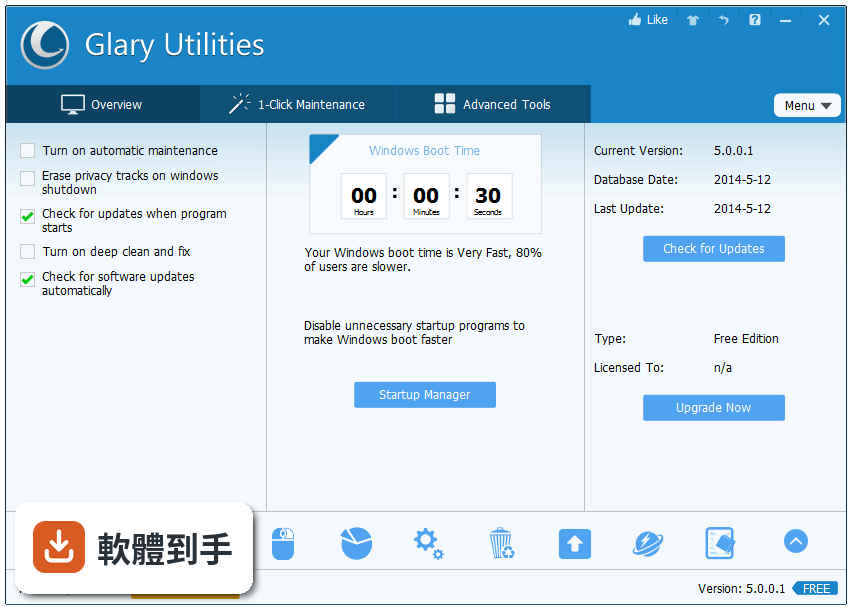
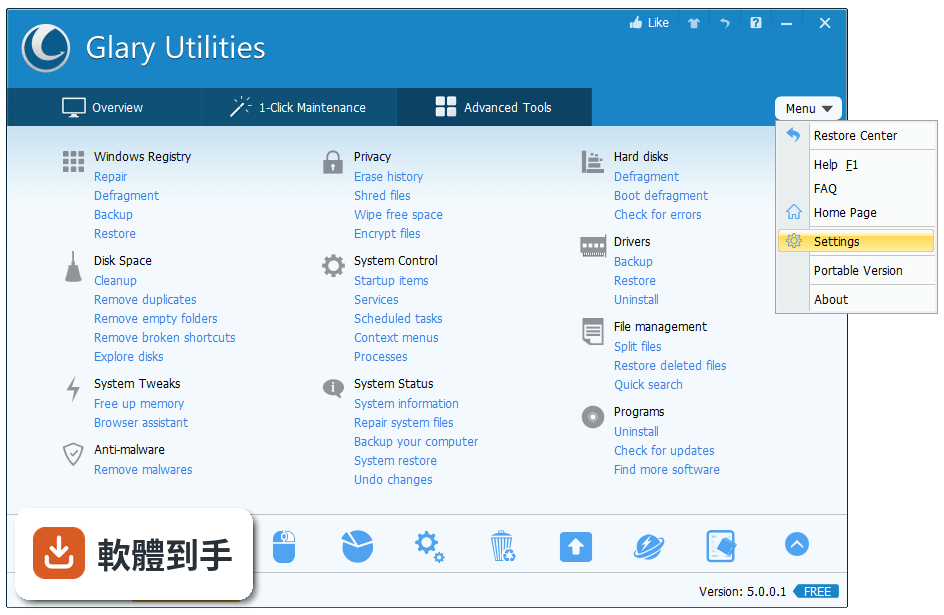
它把二十種以上的系統維護工具整合在同一個介面,主要涵蓋幾個方向:一鍵執行多項最佳化、登入檔掃描修復、磁碟暫存檔清理、開機啟動專案管理、記憶體即時釋放、軟體徹底移除、檔案安全銷毀與復原、重複檔案尋找,以及清除上網和使用紀錄。不需要分別安裝好幾套軟體,一個程式就能處理這些日常維護工作。
02一鍵維護是真的按一個按鈕就全部處理好嗎?
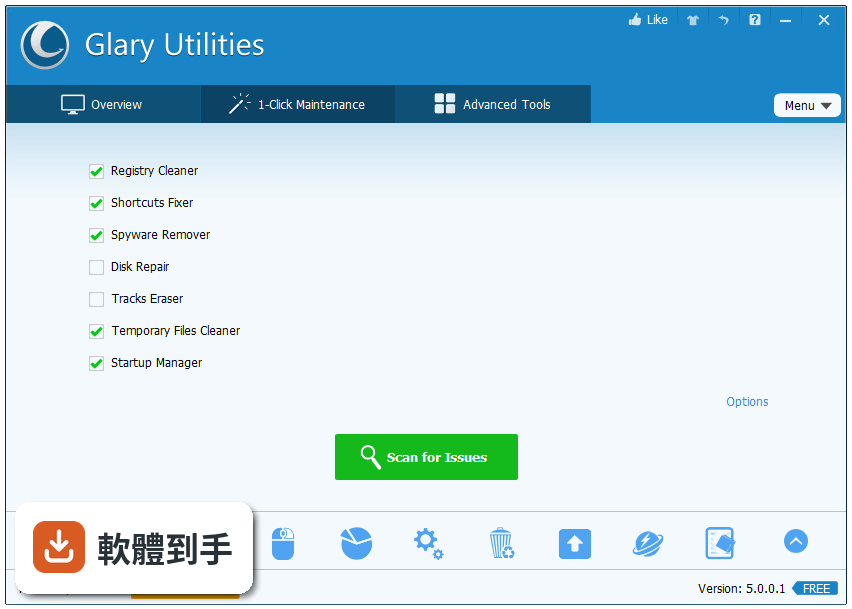
是的,介面中有獨立的「1-Click Maintenance」區塊,按下之後會自動執行多個最佳化任務,包含登入檔清理、磁碟清理、啟動專案最佳化等。這個功能是設計給不想深入細節的人,按下去之後等它跑完就行。不過它執行的是預設的清理專案,如果你想要更精細的控制,還是要進到進階工具一個一個手動操作。
03登入檔清理到底安不安全?會不會把系統弄壞?
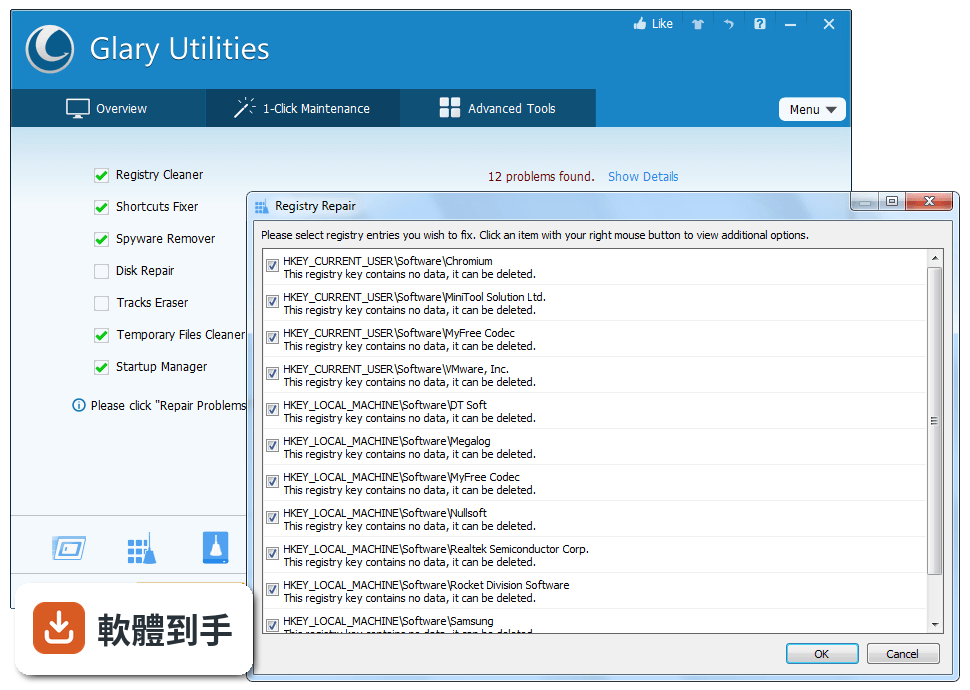
登入檔清理是這套軟體的主要功能之一,它會掃描登入檔中的錯誤和無效專案,讓使用者決定要修復哪些。任何登入檔清理工具都有風險,官方也建議在進行重大變更前先備份系統。如果你對登入檔不熟悉,可以先只用一鍵維護的預設掃描,不要手動勾選看不懂的專案,這樣出問題的機率會低很多。
04它能不能把解除安裝軟體之後留下的殘留檔案也清乾淨?
可以。它的 Uninstall Manager 不只是執行標準的解除安裝程式,還會掃描軟體移除後殘留在系統中的檔案和登入檔專案,讓你把這些殘留物一併清除。這對那些解除安裝不乾淨、常常留下大量垃圾的軟體特別有用。不過它不會偵測所有軟體的殘留,有些特別頑固的軟體可能還是需要手動處理。
05不小心刪掉的檔案還有機會救回來嗎?
它的 File Recovery 工具可以處理從資源回收筒刪除的檔案,以及格式化磁碟機之後的檔案復原。但這不表示所有刪除的檔案都能百分之百救回,復原成功率取決於檔案刪除後該磁碟空間是否被新的資料覆蓋。如果檔案很重要,刪掉之後就不要再對那個磁碟寫入任何資料,然後盡快用這個工具掃描。
06這套軟體適合什麼樣的人用?
適合不想深入學習系統細節、但希望電腦維持在良好狀態的人。它的介面按鈕大、說明簡單,分為總覽、一鍵維護、進階工具三個主要區塊,非技術背景的使用者也能看懂。如果你只是想要定期清垃圾、管理開機啟動專案、偶爾清一下登入檔,不需要理解背後原理,這套軟體的操作門檻很低。
07免費版跟付費版差在哪裡?免費版夠用嗎?
免費版包含基本的最佳化功能,日常的磁碟清理、登入檔掃描、啟動管理都能用。Pro 版多了自動更新、排程維護、更深層的清理選項,以及優先技術支援,價格是一年 39.95 美元。如果你只是每個月手動清一次,免費版的功能已經足夠;需要自動化定期維護的人才需要考慮付費。
08它的介面是英文的,看不懂英文的人能用嗎?
介面語系只有 English,沒有中文。雖然操作按鈕和說明文字都算簡單,但如果你完全看不懂英文,使用上會比較吃力,特別是在進階工具中要判斷哪些專案可以安全清理的時候。如果英文閱讀有困難,可以考慮其他有中文介面的同型別軟體,例如 Advanced SystemCare Free 或 Wise Care 365 Free。
09這套軟體跟 CCleaner 比起來,哪個比較多人用?
以評分人數來看,Advanced SystemCare Free 有 779 人評分,Wise Care 365 Free 有 442 人評分,都高於 Glary Utilities 的 394 人。CCleaner 雖然沒有列在比較名單中,但它是市場上知名度更高的同類工具。評分人數多寡不代表好壞,但可以反映使用者的普及程度。如果你在意社群討論量和資源豐富度,可以優先考慮評分人數更多的選項。
10它的更新頻率算正常嗎?會不會很久沒更新?
這套軟體收錄了 147 個版本,最早在 2009 年釋出,最近一次更新在 2026 年 8 月。近 12 個月更新 2 次,近 24 個月也是 2 次,代表它大約每半年到一年更新一次。以系統工具來說,這個更新頻率不算頻繁,但也不是完全停滯。如果你很在意軟體是否持續獲得修補和改進,可以留意這個更新節奏是否符合你的期待。
11什麼樣的情況不該選這套軟體?
如果你需要中文介面,這套軟體直接不適合。如果你希望軟體頻繁更新、快速回應新系統的變化,它的更新節奏可能偏慢。另外,它的評分只有 7.4 分(滿分 10 分),在同類工具中不算突出,而且免費版功能較基本,介面也偏老舊。如果你重視介面美觀或想要更活躍的開發維護,可以看看 Advanced SystemCare Free 或 Wise Care 365 Free。
12它跟 Advanced SystemCare Free 比起來,哪個功能更完整?
兩者都是整合型系統最佳化工具,但 Advanced SystemCare Free 的評分人數(779 人)明顯多於 Glary Utilities(394 人),表示有更多人使用和評價。功能面上,Advanced SystemCare Free 額外包含惡意軟體防護和即時監控,這是 Glary Utilities 沒有的。如果你需要的不只是清理,還希望有安全防護功能,Advanced SystemCare Free 的涵蓋範圍更廣。
下載與官方連結
viewer7.1.1.0.exe · 連結指向軟體原廠
版本紀錄
- 2026-09-21 Glary Utilities 6.49.0.53
- 2026-09-21 Glary Utilities 6.48.0.52
- 2026-08-31 Glary Utilities 6.47.0.51
再看 5 筆
- 2026-08-11 Glary Utilities 6.46.0.50
- 2021-12-27 Remote Utilities - Viewer 7.1.1.0
- 2021-12-27 Remote Utilities - Host 7.1.1.0
- 2021-07-05 Glary Utilities 5.169.0.195
- 2021-03-15 Glary Utilities 5.162.0.188
這一版改了什麼
What's new in this version:
Remote Utilities - Viewer 7.1.1.0
- A persistent connection alert window shown for trial and free license users was restricted to Internet-ID connections only. This alert is not shown for direct connections.
- Minor fixes and improvements
Remote Utilities - Viewer 7.1.0.0
- The Terminal mode has been improved—added full command line support and ability to run advanced console apps such as FAR Manager. Windows 10 and later only.
- The Wake-On-LAN command can be sent via an intermediate Host
- A new type of package—Host EXE— has been added to MSI Configurator
- You can now launch Viewer with a URI. Use our URI Generator to build a URI link with the necessary parameters
- Support for Windows 11 interface has been improved
- A new customer notification system has been implemented in Viewer. Critical alerts and messages about important updates will be delivered directly to Viewer in a non-intrusive manner. The alerts can be dismissed or turned off completely in Viewer options.
- The Online option—which produces a digitally signed Host or Agent package— in MSI Configurator is now only available for paid users
- A persistent semi-transparent connection alert is now shown at the bottom right corner of the screen for trial and free license users
- RU Server now requires registration with a valid Remote Utilities license key
- Minor fixes and improvements
Remote Utilities - Viewer 7.0.2.0
- Fixed: Issues with settings not applied properly for Agent modules built using the MSI Configurator
- Minor fixes and improvements
Remote Utilities - Viewer 7.0.1.0
Fixed:
- Some connectivity issues (hanging "worldmap" screen) caused by the screensaver with a black screen running on the remote computer
- Some issues caused by file overwrite prompts in File Transfer mode
- Modal prompts in the File Transfer mode blocking the entire application
- Some issues with the Remote execute connection mode
Improved:
- The "Do not ask for confirmation before installation" checkbox/option in the MSI Configurator has been removed. Now manual installation of the Host from a custom package always requires an explicit user consent.
- Displaying the search results when doing search in the address book
Remote Utilities - Viewer 7.0.0.3
Fixed:
- License file drag-and-drop onto the drop area in License key storage didn't work in some cases
- Minor issues when uninstalling the product
- Minor issues with Arabic and Hebrew translations
Remote Utilities - Viewer 7.0.0.2
Fixed:
- Full Control and View mode indefinitely showed the "Connecting" screen ("worldmap") in certain conditions
- The Ask user permission feature didn't work when the "Ask only if user logged on" checkbox was enabled
- Various commands in the File Transfer mode, such as Edit (F4) and Execute (F9) did not work properly. This also included issues with overwriting remove files
- The Remote Execute mode protocol has been revamped. Fixed issues with running files and programs as a given user. Both Viewer and Host must be updated for this fix to apply
- Dragging-and-dropping files onto a remote desktop did not work
- Restarting Agent as did not work in certain conditions
- The Monitors dropdown list on the Full Control mode toolbar did not work if the remote desktop was showing the Logon screen
- Simple update mechanism logging improved, plus minor fixes to the mechanism itself
- Viewer main window froze when receiving multiple notifications from RU Server (e.g. about new address books found and license keys available on the server)
- A bug with mouse cursor position when clicking
- Improved: Mouse cursor shape for mobile clients
- Added: Greek interface language
- Minor fixes to localization files
- Other fixes and improvements
Remote Utilities - Viewer 7.0.0.1
- Fixed: An issue with the Host's "Close remote session if idle" feature that caused remote connection to drop unexpectedly
Remote Utilities - Viewer 7.0.0.0
New features and improvements:
- Centralized license key management on RU Server. You can add license keys on RU Server and deploy them across connected (signed in) Viewers
- Import of Active Directory computers into RU Server address book on schedule. The server address book can be synced with Viewers using the address book sync role
- Ability to disable syncing of certain connection properties. This allows multiple techs to have unique properties for the same connections in a synced address book
- Host log can now optionally be written to Windows event log
- Program interface now fully supports high DPI resolutions. No ugly scaling on 2K/4K monitors anymore
- Added Viewer command line parameter that allows you to send username in the command line
- New blank remote screen mechanism with the ability to add custom text to the remote screen when it's blanked
- Sending emails with access credentials using the "SMTP" feature (see configurator) now supports TLS 1.
- Clipboard transfer can now be disabled in Host settings for added security/privacy
- Maximum address book thumbnail size is now 1024px instead of 250px
- Added port manager in RU Server settings that allows for more granular port settings. For example, different roles and IP filters can be set for different ports
- Signing in on a self-hosted server is now in background with the status shown in the status ba
- Viewer-to-RUServer and Host-to-RUServer authentication is now TLS 1.2-based instead of RSA, which makes authentication on the server significantly faster
- Viewer now automatically signs back in on a self-hosted server if connection is interrupted
- The "Send clipboard as keystrokes" feature has been added. This may help with entering passwords on a remote Windows welcome screen
- Host log now displays the originating IP address of the Viewer
- Overall improved Host, Agent and RU Server logging
Fixed:
- The remote File Transfer folders now open much faster. Note: this feature requires updating both Viewer and Host to the new version
- Fixed memory leak issues when running Host/Agent on certain configurations that could cause Host/Agent to freeze
- Fixed NTLM authentication issue in Viewer running on a computer with online Microsoft account
- Some issues that could make RU server freeze during custom server security authentication or when viewing active/idle connections in the Admin Console
- Fixed issue with some keys (Enter, Shift) not working on a remote computer in some circumstances
- Fixed some issues with the advanced mouse scroll
Remote Utilities - Viewer 6.10.10.0
- Fixed an issue that caused the system to crash when applying Windows updates KB4503293 and KB4501375 on some systems. It is advised to first update Remote Utilities before applying those Windows updates
- Minor fixes and improvements
Remote Utilities - Viewer 6.10.9.0
- Fixed an issue that caused connections in the address book to briefly go offline and back online even on a stable Internet connection
- Fixed Fixed an issue that sometimes caused Host service to stop after authorization
Remote Utilities - Viewer 6.10.8.0
- Synchronization of large address books via the self-hosted server (RU Server) was improved
- Keyboard input model in Viewer connection properties can now be explicitly selected on the Keyboard tab
- Fixed an issue with RU Server which would sometimes cause client authorization to drop
- Fixed an issue with email notifications not sent via SMTP when using non-Latin characters in computer name
- Minor fixes and improvements
Remote Utilities - Viewer 6.10.5.0
- Fixed an issue with certain keyboard shortucts not working after the previous program update
- Fixed an issue with blank remote screen feature not working on Windows 10 in some cases
- Minor fixes and improvements
Remote Utilities - Viewer 6.10.3.0
- Added Ability to switch to the legacy keyboard input model in Viewer connection properties
- Fixed an issue with certain Windows hotkeys and key combinations not working
Remote Utilities - Viewer 6.10.2.0
Added:
- Ability to specify your own SMTP settings in the MSI Configurator for the "Send email" feature. Note: This feature has replaced the old mechanism of sending emails via our hosted service
- Added Local cursor now takes the shape of the remote cursor. This lets the program display different remote cursor states (such as column resizing arrows) correctly
Fixed:
- Fixed Fixed an issue with some Settings protection checkboxes not saving in Host configuration window
- FixedRemote printing now works with apps such as Edge and Photos
- FixedSession video recording consumes less CPU resouces on the Viewer. Session videos now show the remote cursor
- Fixed Fixed an issue with RU Server's Auto-import feature which caused RU Server service to hang/freeze in certain conditions
- Fixed Switching to the main Viewer window is now possible even when an authorization prompt window is being displayed. The authorization prompt window is no longer modal
- Fixed Fixed a bug which would sometimes cause switching the typing focus away from the mini-chage window in Full Control connection mode
- Fixed Minor fixes and improvements
Remote Utilities - Viewer 6.9.0.4
- Added authorization methods — Single password, RU Security, Windows security and Custom Server Security — can now be enabled simultaneously using checkboxes
- Added 2-step verification has been added. You can use Google Authenticator or any other similar app to receive the security code when connecting to a remote Host
- Added The self-hosted server can now be protected with a PIN-code against unauthorized use of the Internet-ID feature by strangers who happen to find out or guess the server's address and port
- Added You can now remotely restart the Agent as administrator (provided you know the credentials) in order to perform the necessary tasks during a remote session, such as installing programs and interacting with UAC prompts
- Added The use of the self-hosted server's Internet-ID feature can now be restricted to authorized users only (i.e. permission-based use of the Internet-ID)
- Added Single-password security is now more clearly separated from Remote Utilities Security in connection properties on the Viewer side. Namely, the password and username/password can be saved separately for each of these two authorization methods
- Added Data encryption protocol has been changed to a more modern TLS 1.2
- Added Host authority is now verified automatically based on certificates. If Host certificate has been changed the Viewer receives a warning
- Added New and more streamlined Host settings interface with a Dashboard that summarizes the most important details
- Added The remote screen transfer speed of dynamically changing content (e.g. videos) over slow connections has been increased
- Added New "Log off on disconnect" option added to connection properties
- Added "Force custom server security" option can now be enabled for a user account on RU Server. This option, when enabled, forces this specific user to connect to Hosts using Custom Server Security only (provided the user is signed in on the server)
- Added Left-hand mouse support
- Fixed Remote Utilities monitor driver (the one used for blanking remote screen) now works on Windows 10 with secure boot enabled
- Fixed Data transmission protocol for the remote sound feature has been updated. The new protocol is not backward compatible with older versions
- Fixed A bug that would cause a folder in an address book to disappear when dragged onto itself
- Fixed A bug that would cause the notification panel to stay on the desktop even after remote connection was closed or terminated
- Fixed A bug that would cause the address book file to get corrupted in some cases after closing the Viewer
- Fixed A bug that would cause the Viewer to show a warning when trying to unbind hotkeys in Viewer options
- Fixed Minor fixes and improvements
Remote Utilities - Viewer 6.8.0.1
Added:
- Custom Host installers built with the MSI Configurator can now be digitally signed
Fixed:
- Minor fixes and improvements