
這是歷史版本頁面 — 看 GlassWire 最新版本
GlassWire 防火牆與網路監控,能幫你解決什麼
 GlassWire 2.0.123
資料更新 2018-06-26
閱讀約 7 分鐘
你打開工作管理員,看到一堆看不懂的程式名稱在背景執行,網路速度忽快忽慢,卻不知道是哪個程式在偷偷上傳或下載資料。你懷疑電腦是不是中了什麼東西,或者某個軟體在背後偷吃頻寬,但你就是找不到證據。這種「明明有問題卻抓不到兇手」的感覺,比電腦變慢本身更讓人不舒服。
一般人會先想到用工作管理員看,但工作管理員只顯示當下的 CPU 和記憶體使用率,對網路流量的細節幾乎幫不上忙。傳統防火牆又太技術導向,打開介面全是看不懂的規則和連接埠,設定錯誤反而讓自己斷網。這類工具的切入點是:把網路活動變成看得懂的圖表和清單,讓你知道哪個程式、哪個時段、用了多少流量,並且能直接擋掉你不想放行的連線。
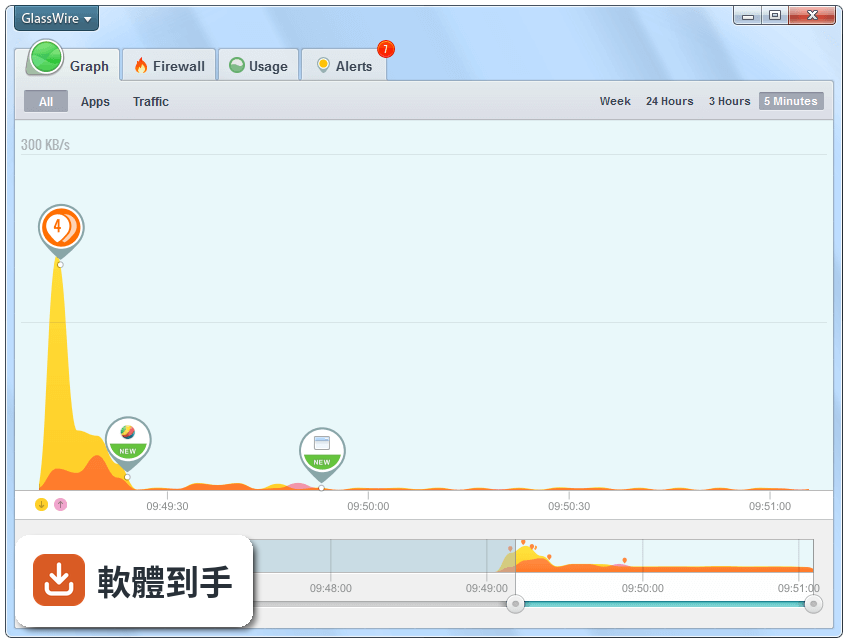
01GlassWire 到底能看什麼?我裝了之後第一眼會看到什麼?
它主要提供四種資訊:即時網路流量圖、每個程式的流量排行、每日每週每月的用量統計、以及防火牆的連線控管。打開主畫面會先看到一條即時流量曲線圖,下方有「圖表」「用量」「防火牆」「警示」四個分頁,分別對應不同功能。你可以直接從圖表看出哪個時間點流量暴衝,再點進去確認是哪個程式造成的。
02它跟 Windows 內建的防火牆差在哪?我已經有內建防火牆了,還需要它嗎?
Windows 內建防火牆只做「擋或不擋」的判斷,不會告訴你哪個程式在什麼時候嘗試連線、連到哪個 IP、傳輸了多少資料。GlassWire 把這些連線記錄變成圖表和清單,讓你可以回頭查看某個程式過去一週的網路行為。如果你只是想要「能擋就好」,內建的夠用;但如果你想「知道誰在連線、連去哪裡」,它提供的視覺化記錄是內建防火牆沒有的。
03它說可以偵測入侵和惡意軟體,這功能實際上是怎麼運作的?
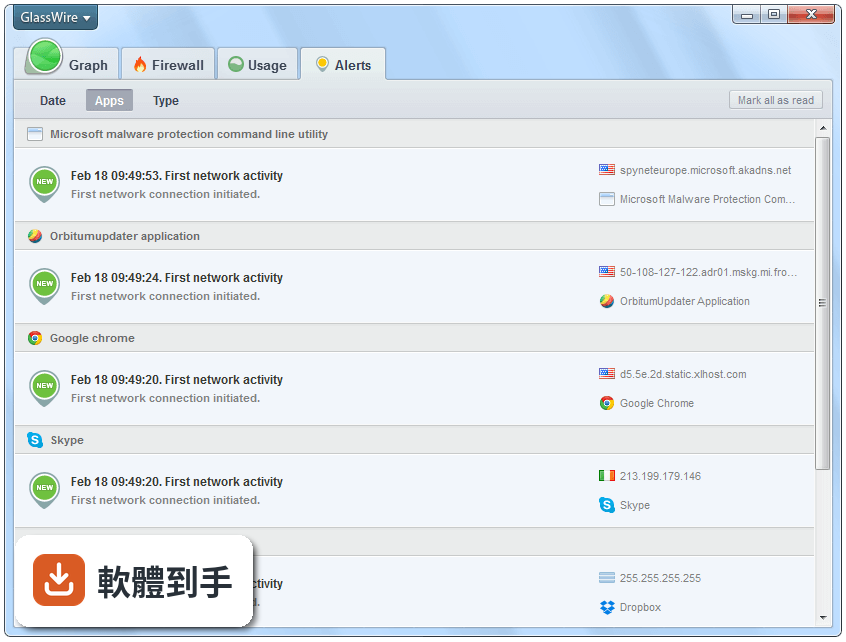
它會監控程式的連線行為,當某個程式第一次嘗試連上網路、或出現異常的大量連線時,會跳出警示通知你。它也會比對已知的惡意程式特徵,提醒你可能有間諜軟體或木馬在活動。要注意的是,它做的是「行為偵測」和「特徵比對」,不是完整的防毒軟體,不能取代防毒程式,但可以當作第二道防線,幫你發現防毒軟體沒抓到的可疑連線。
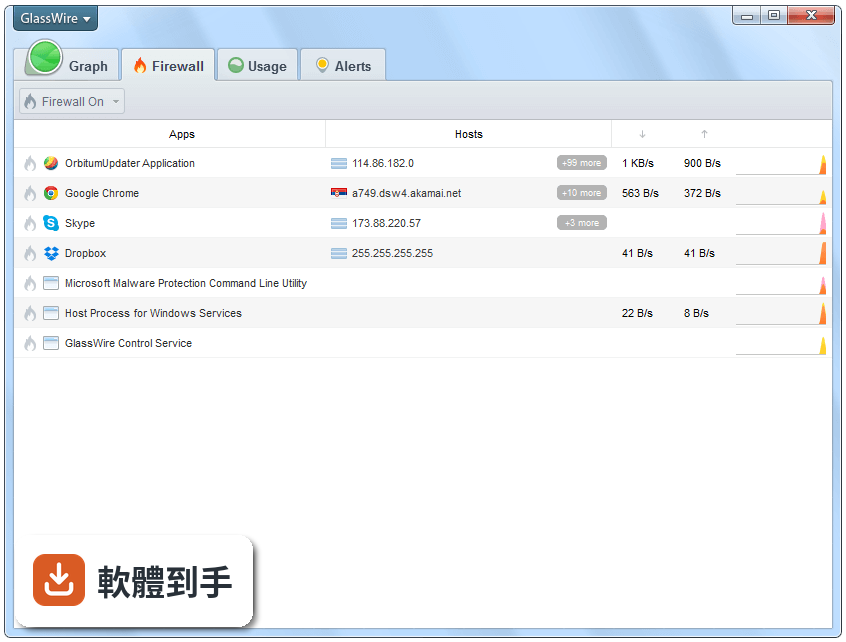
04我可以用它來限制某個程式不要連網嗎?比如某個軟體一直自動更新很煩。
可以。在防火牆分頁裡,你會看到所有嘗試連網的程式清單,每個程式旁邊有開關,直接切掉就能封鎖該程式的所有連線。你也可以選擇只封鎖特定連線,例如讓某個程式能連區域網路但不能連網際網路。設定是即時生效的,不需要重開機。不過要注意,封鎖之後如果該程式是系統必要元件,可能導致某些功能異常,封鎖前最好確認一下。
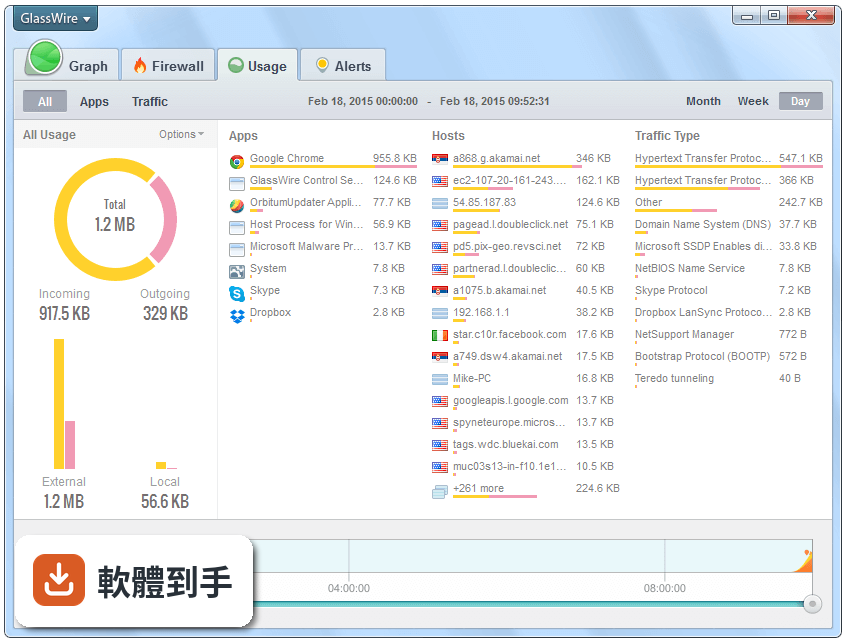
05它的流量統計是怎麼算的?我想知道每個月到底用了多少數據。
它會分別記錄每個程式的上傳和下載量,並以日、週、月為單位彙整成圖表。你可以切換時間範圍,查看某一天或某個月的總流量,也能看到單一程式在特定時段的用量。這些數據是它自己持續在背景記錄的,不是從電信商那邊抓資料,所以如果你用手機分享網路給電腦,它記錄的是電腦實際接收和傳送的數據量,不是手機的總用量。
06我電腦不太行,這套軟體跑起來會不會很佔資源?
它主要是在背景持續記錄網路連線和流量,對系統資源的消耗不算大,一般使用情況下不太會影響日常操作。不過它需要常駐在系統列才能持續監控,如果你把它完全關閉,記錄就會中斷。如果你很在意資源佔用,可以安裝後觀察幾天,看它在你電腦上的實際表現再決定要不要留著。每個人的硬體環境不同,這部分沒有絕對的答案。
07這套軟體適合什麼樣的人用?我只是一般使用者,不是專業 IT 人員。
它的介面設計對非技術使用者相對友善,主要功能都用圖表和開關呈現,不需要懂網路協定或連接埠就能操作。如果你曾經懷疑某個程式在偷吃頻寬、或想知道電腦是不是有奇怪的連線行為,它會比傳統防火牆容易上手。但它的介面是英文的,如果你對英文介面不熟悉,操作上會多一層障礙,這點要先考慮進去。
08我有多台電腦,可以一次監控全部嗎?
官方說明提到它支援在同一網路下監控多台 PC。實際做法是每台電腦都要安裝 GlassWire,然後它們會出現在同一個帳號或網路檢視底下,讓你可以從一台電腦看到其他台的使用狀況。不過這需要每台機器都安裝並保持執行,設定上會比單機使用複雜一些。如果你只有一台電腦需要監控,這個功能就用不太到。
09它跟 NetWorx 或 NetLimiter 比起來,主要差在哪?我該怎麼選?
這幾套都做網路流量監控,但側重點不同。GlassWire 的強項是視覺化圖表和防火牆整合,NetWorx 比較偏流量統計和用量報告,NetLimiter 則主打即時限速和連線控制。如果你主要想知道「誰在用流量」,GlassWire 的圖表最直觀;如果你是想「限制某個程式的最大速度」,NetLimiter 那類工具可能更符合需求。建議先想清楚你要的是監看還是控速,再決定裝哪一套。
10它是免費的嗎?還是要付費才能用完整功能?
它的授權型式是 Demo,也就是試用版。試用期間可以使用完整功能,但試用結束後部分功能會受到限制,例如歷史記錄的保留長度或某些進階設定可能無法使用。具體的試用期限和限制,官方網站上會有說明,安裝前建議先確認清楚。如果你只是短期需要監控網路,試用版可能就夠用;如果要長期使用,就要考慮付費購買授權。
11我的系統是 Windows 7,裝了會不會有問題?
官方列出的支援系統包含 Windows 7 到 Windows 11,理論上可以安裝。不過要注意,這套軟體近年更新頻率不高,近兩年只更新了兩次,對新系統的支援可能比較即時,但舊系統如果遇到問題,官方修復的速度可能不會太快。另外它的介面只有英文,Windows 7 使用者如果習慣中文介面,操作上會需要多花時間適應。
12什麼樣的情況我不該選它?有沒有哪種人用了會覺得後悔?
如果你只是想要一個「設定一次就忘記」的防火牆,它可能不是最佳選擇,因為它的核心價值在於持續監控和查看記錄,需要你偶爾打開介面看圖表才有意義。如果你完全看不懂英文介面,操作門檻會明顯提高。另外,它的使用者評分只有 6.4 分,評分人數也不多,如果你習慣參考大規模使用者回饋來決定是否安裝,這點可能讓你有疑慮。功能相近的 NetWorx 有較多評分人數,可以一併參考比較。
下載與官方連結
GlassWireSetup.exe · 33.5 MB · 連結指向軟體原廠
版本紀錄
- 2026-10-07 GlassWire 3.10.1164 82.6 MB
- 2026-09-03 GlassWire 3.10.1138 82.6 MB
- 2026-06-30 GlassWire 3.9.1102 82.6 MB
再看 5 筆
- 2022-12-23 GlassWire 3.0.484
- 2022-12-01 GlassWire 3.0.476
- 2022-08-16 GlassWire 2.3.444
- 2022-02-21 GlassWire 2.3.397
- 2021-11-17 GlassWire 2.3.367
這一版改了什麼
What's new in this version:
GlassWire 2.0.123
- Do you wish GlassWire's fonts were larger? Go to GlassWire's top left "GlassWire" menu and choose "settings" then set the font the size you prefer
- Host details are now added to the Graph/Apps popup window
- Now you can click on a graph alert and it will take you to the "Alerts" tab for more details
- Fixed a problem that caused false file change alerts for svchost.exe
- Fixed a problem that caused the GlassWire service to crash in some situations
GlassWire 2.0.115
- Have you ever seen unusual activity with an executable, but found it difficult to open up the location of that executable? Now you can click the three dot menu next to the file path to open the location of the executable within Windows
- Do you sometimes Google host names or file names to try to find more information about them? We do. Now you can choose "search online" after clicking the three dot menu that's listed after a host name (or file name to search for more information
- GlassWire's EULA and privacy policy were both updated for the GDPR. Your network activity and data usage information never leaves your device. Our company has never been able to see your network activity or app usage, and the GlassWire app does not collect your personal information
GlassWire 2.0.112
- Column sorting has finally arrived! Mouse over columns under GlassWire’s Firewall, Things, or different host and app tabs to sort between hosts, apps, and bandwidth usage
- GlassWire firewall list entries are now highlighted so it’s easy to line up file analysis results with apps under GlassWire’s Firewall tab
- It’s now very easy to remove all your inactive apps at once in the GlassWire Firewall tab. Go to your inactive apps, then mouse over the inactive apps row and click the X to delete all your inactive apps at once
- Fixed a bug that caused some customers to have trouble activating GlassWire Basic, Pro, or Elite in some unusual circumstances
- Miscellaneous other bug fixes and improvements
GlassWire 2.0.105
- Fixed a bug that caused GlassWire’s service to hang for some users in some unusual situations
GlassWire 2.0.102
- Software update notifications will now no longer appear when GlassWire's Snooze mode is on. This was requested by gamers who didn't want to see our update notification while gaming, or streaming live
- GlassWire now has a daily data usage option with its data plan feature
- There is now a VirusTotal report link to allow you to easily see more details on why an app was analyzed a certain way by VirusTotal
- The year was added for very old alerts that are from last year, or the previous year
- Windows 10 snap assist is now supported again due to requests from GlassWire fans
- GlassWire now does a better job of supporting fractional values
- Many bugs were fixed due to user feedback including a bug that could make some users crash. We also fixed a bug that caused data to appear under "usage" for apps that are chosen as hidden, we fixed some scaling issues, fixed remote host sorting order along with some other host sorting problems in other GlassWire windows. Our team also fixed a bug that caused GlassWire to crash due to unusual system time changes
GlassWire 2.0.91
- Software update notifications will now no longer appear when GlassWire's Snooze mode is on. This was requested by gamers who didn't want to see our update notification while gaming, or streaming live
- There is now more "info" when receiving a notice about a "new" application accessing the network. Click the "info" button and you can now see more details about the app and block it without having to open GlassWire
- Fixed a bug that caused GlassWire to incorrectly convert extremely large volumes of data incorrectly under its "Usage" tab. Thanks for letting us know about this in the GlassWire forum
- Microsoft Windows Defender apps are now white listed by GlassWire so they won't be blocked. This avoids Windows Defender giving GlassWire false positives
- Fixed a bug that caused scrolling on our "alerts" screen to not scroll properly with a mouse wheel, when the cursor was placed in a certain part of the window. Thanks for posting this in the forum also
- Fixed a bug that caused the GlassWire service to crash repeatedly for some GlassWire users. If you have been having this issue please try updating GlassWire. Thank you to the people who helped us test and fix this issue
- Many small fixes with typos and other small things
GlassWire 2.0.84
- Fixed a bug that caused our "Ask to connect" mode to work incorrectly for some users
- Fixed a bug that caused some users to crash when dragging GlassWire between two monitors
- Made changes to GlassWire to avoid false positives from Windows Defender
- Improved the upgrade process from GlassWire 1.X to GlassWire 2.X
- Solved a problem where some GlassWire users could not switch on the GlassWire firewall setting
- Updated the "Usage" tab so it fixes a problem that caused some GlassWire users to see incorrect usage stats
- Many other fixes and improvements
GlassWire 2.0.80
- Fixed a bug that caused some users to not have an exception for system traffic in Windows Firewall
- Removed the dependency for the wlanapi.dll for Windows Server customers
- Improved the speed of detection of changes to the Windows Hosts file
- Made changes to help avoid Windows Defender trojan false positive alerts due to firewall changes
- When the GlassWire mini viewer is clicked it will now open the main GlassWire window
- GlassWire's window position and size are now remembered between reboots
- Fixed a bug with the remote server monitor user interface left panel
GlassWire 2.0.78
- Our major GlassWire 2.0 update is finally here and there are a lot of changes and major new features
- GlassWire now has a completely new interface with high resolution monitor support
- We have improved our "Usage" screen after hearing your feedback. You can now select day, week, month, or other custom intervals easier
- Firewall Profiles! Go to the Firewall tab and choose "Firewall Profiles" to create and save a profile. You can make one profile for public WiFi, and another for home use. Make as many profiles are you need
- The GlassWire firewall is now optimized to work better with Windows, plus our firewall rules now synchronize with the Windows Firewall. GlassWire now also checks the integrity of the Windows Firewall on every startup, and can restore itself if changes were made without your knowledge
- VirusTotal API support. Go to GlassWire's settings to analyze your network-related files with VirusTotal manually, or automatically
- WiFi Evil Twin Alerts! Get notified if a known Wi-Fi access point becomes unprotected or its MAC address is changed. Help protect yourself from Wi-Fi pineapple attacks
- You can now choose between system time format and a time format for the native selected language in GlassWire's settings
- It's now possible to switch on/off GlassWire's "Things" network scanning in GlassWire's settings
- You can now establish a remote connection by hostname, instead of by IP address
- GlassWire now has a free 7 day trial of its paid software for free users! Now you can see what you're missing if you only have the free version of GlassWire
- GlassWire 2.0 is a free upgrade for 1.0 users. If you run into any activation issues please email us so we can help you get your free upgrade
GlassWire 1.2.121
- Fixed a bug with the bandwidth overage monitor that would cause it to stay on when turned off
GlassWire 1.2.120
- Fixed a bug that caused GlassWire to reset the Windows Firewall to its default settings
- The problem where the GlassWire installer would sometimes hang for some users is now fixed
- GlassWire now has an “Upgrade” button that asks you to buy our software. Please consider upgrading if you enjoy GlassWire
- Other bug fixes and improvements
GlassWire 1.2.118
- Fixed a bug that caused some GlassWire Basic, Pro, and Elite users to become deactivated in some unusual situations
- Due to requests from GlassWire fans, incognito mode now stays persistent after a restart of GlassWire, or after a reboot
- Fixed a bug that caused the mini viewer to not save its position with some dual monitor configurations
- Fixed a bug that caused some GlassWire to crash if a certain kind of audio driver was used
GlassWire 1.2.109
- Fixed a bug that caused the GlassWire Idle Monitor to crash with some OS versions in some unusual situations
- The mini viewer should now always remember its position and size for all users and OS versions
- Fixed the sorting order of the remote hosts on the Firewall tab
- Fixed a problem that caused our Mic/Webcam detection feature to stop working with some Windows 10 versions
GlassWire 1.2.102
- Fixed a problem that caused some executables to have no description in unusual situations
- IP sorting is now correct with the "Network" tab
- Other bug fixes and resource usage enhancements
GlassWire 1.2.100
- Fixed a problem that caused some users with some types of audio drivers to crash
- Fixed some typos for some languages, reported by users
- Fixed a text overlap in the Network tab
- Solved a problem where some users received false host/lmhost file change alerts
- Fixed a problem reported on HackerOne
- Stability and resource usage improvements
GlassWire 1.2.96
- You can now change firewall modes from the GlassWire Windows tray menu. Right click the GlassWire icon in the bottom right Windows tray to change modes
- The year is now added to the GlassWire network tab
- Three security upgrades were made due to HackerOne bug reports
- Fixed a problem where a network scan could cause the GlassWire service to crash
- We added protection so third party DLL files can no longer interact with GlassWire and cause it to crash
GlassWire 1.2.88
- You can now scan manually for devices under GlassWire's "Network" tab. Basic, Pro, and Elite users will have an automatic scan every 30 minutes, while free users can scan manually by pressing the "scan" button. We made this change because GlassWire was scanning so often in our previous update that some types of network hardware were giving false positives about GlassWire causing a network problem
- To disable Network auto-scanning completely create a text file called glasswire.conf and place it in the c:programdataglasswireservice folder. Add this string to the text file: enable_network_scan = false then restart the GlassWire service. We plan to add a setting for this in the future
- Fixed a bug that was causing some users to crash
GlassWire 1.2.79
- GlassWire's network tab functionality has been rewritten from scratch! GlassWire now picks up new network connected devices faster, and shows more accurate information. Give it a try and let us know what you think
- Fixed a bug where some users would click the GlassWire icon in the Windows taskbar tray and nothing would happen
- Made a change to allow GlassWire to work with some VPN services that don't allow reverse host lookups
- Many other bug fixes and resource usage improvements
GlassWire 1.2.76
- Removed an old unreliable cipher between the client and the service to improve connection security
- Changed the default listening port to port 7010 to avoid false positive scans for some security software. This means that you must install GlassWire locally and on your remote servers for this update or the connection will not work.
- Fixed a problem where some free users would see a crash when trying to start a remote connection to another PC or server
- Graph history is now more securely erased when cleared by the user
- Local traffic is detected even more accurately now
GlassWire 1.2.74
- Fixed a problem where no remote servers were selected in the list by default
- Fixed a bug with the alerts counter
- The mini viewer caption now shows "local" traffic when necessary
- The network tab would show an IP with all zeros for some users in some rare cases. This problem is now fixed
- Miscellaneous performance improvements and bug fixes.
GlassWire 1.2.72 Beta
- GlassWire is now out of beta
- Fixed a problem with incorrect IP sorting on the network tab
- Usage showed incorrect local/external traffic counting in some cases
- Fixed a problem with the usage calendar user interface
- Many minor fixes and stability improvements due to user feedback
GlassWire 1.2.71 Beta
- Fixed a bug where some users would receive a DLL integrity error
GlassWire 1.2.70 Beta
- Labels for devices are now available under the "network" tab. Mouse over the network device you want to give a custom name to, then click the "label" bubble to make a custom name
- Alerts are now automatically marked as "read" if a desktop alert pop-up is closed by the mouse
- "Sort by IP" is now working properly under the "network" tab
- Fixed some problems reported on HackerOne
- Minor bug fixes and further resource usage optimizations
GlassWire 1.2.64 Beta
- Solved a problem reported on HackerOne
- Improved data statistic accuracy along with improving local and external traffic type detection
- Fixed a bug with remote connections for specific hosts
- Fixed a bug with application path resolving
- Fixed bugs with the Usage/Apps section and improved its functionality
- Fixed a bug that caused the Usage tab to not load for some users
- Fixed a problem with Incognito mode
- Many new small fixes and improvements
GlassWire 1.2.57 Beta
- Fixed a problem where GlassWire's service would not start for some users
- Made a partial change to how the admin settings work due to a bug report on HackerOne
- Clean installs now no longer require you re-enter your activation code if you're a Basic, Pro, or Elite user
- The Polish language was added
- The Usage tab animation was updated so it looks nicer
- Fixed a bug where some user databases were corrupted on upgrade
- The process of fetching data from the service is now more efficient along with other performance improvements
GlassWire 1.2.54 Beta
- This update is a major rewrite that was done to decrease memory usage significantly for all GlassWire users
- Overall memory usage for GlassWire decreased significantly, even with very long graph histories
- Fixed a bug with "Ask to connect" mode where it did not work properly for a small number of users
- Fixed a bug with "Ask to connect" mode where SMB, LDAP, and VPN connections would not work in some cases
- Fixed a bug for Microsoft Surface users where GlassWire could sometimes cause problems when the Surface is idle
- The graph "Max" value is now replaced with the real amount of downloaded and uploaded data in that graph period to make it easier to understand
- Fixed a bug where the bandwidth overage monitor would not work correctly for some users in some cases
- Turkish language support is now available in GlassWire. Go to the top left GlassWire menu and choose Turkish as your language option
- This update also includes dozens of other bug fixes reported by users in the forum and reported to our helpdesk
GlassWire 1.1.41 Beta
- Updated our installer to avoid a potential vulnerability reported on HackerOne
- Fixed a bug where some GlassWire clients in some unusual circumstances would crash at midnight
GlassWire 1.1.40 Beta
- Change log not available for this version
GlassWire 1.1.39 Beta
- Updated our installer to avoid a potential DLL vulnerability reported on HackerOne
- The installer was released, then removed due to a false positive virus warning from a popular antivirus. GlassWire's false positive virus warning was removed after contacting the antivirus company and we then re-released the update. There were also minimal changes made to the installer to see if it might help us avoid future false positives.
GlassWire 1.1.36 Beta
- GlassWire now makes it easy to remove old apps from the Firewall tab. Click the X next to the app name to remove it. The app will re-appear in the firewall list if it accesses the network again
- Fixed a problem that caused Webcam and Mic usage to not be detected for some Windows 10 users with a specific system update
- Added upload and download bandwidth levels on the mini viewer for paid users
- Fixed a bug that caused settings under the "Usage" tab to not be saved
- GlassWire now restores the install path from the previous installation
- Many other tweaks and fixes due to user feedback
GlassWire 1.1.32 Beta
- Made a minor change to the install process to make it more efficient
GlassWire 1.1.31 Beta
- Fixed a problem that caused some GlassWire user PCs to wake from sleep under certain conditions
GlassWire 1.1.27 Beta
- Fixed a problem where webcams and mics were not detected for some users
GlassWire 1.1.26 Beta
- Go to the General settings to choose the "Keep mini viewer on top" option
- Fixed a path problem for applications running on a shared network
- Fixed a bug where "Ask to connect" and "Block all" modes would not work in a few cases for some users
- Added a new flag for geographic locations for IP addresses which are not local and do not resolve
- Fixed a bug where some devices on the network had strange characters next to their name for some users
GlassWire 1.1.21 Beta
- Inactive firewall applications are now grouped separately under the "Firewall" tab if they show no attempted network activity for 7 days
- Now get alerted about new unknown devices that join the network, instead of getting alerts about every device that joins or leaves the network. Go to GlassWire's settings then choose "Security" then click "Network device monitor"
- DNS is now resolved for local hosts
- Away intervals now appear in the "mini" graph
- Many fixes and improvements including a bug that caused GlassWire's graph not to start working for some users
GlassWire 1.1.15 Beta
- Many bugs were fixed including some problems with Ask to connect mode, Webcam/Mic usage alerts, the Internet access monitor, and we also fixed a problem where some users would lose their graph data after upgrading GlassWire
- A bug was fixed where GlassWire's service would crash for some users in some situations
- This version of GlassWire is now fully translated to all our translated languages
- The mini viewer now shows the current main graph status in its window along with the ability to make the window transparent in its settings. Mouse over the mini graph then click the small settings icon to make the mini graph transparent
- We were able to fix these problems and update our features due to your feedback and support. Thank you for all your help and thanks for supporting GlassWire
GlassWire 1.1.7 Beta
- Ask to connect mode: Allow or deny new network connections
- Block all mode: Block all network connections while you're away from your computer
- Mini graph: See a mini GlassWire graph on your desktop that's available at all times
- Webcam & Mic detection: Get alerted to any Microphone or Webcam activity that takes place with your computer and learn what application is responsible
- Who's on your WiFi or Network: See what devices are currently on your network or WiFi and get alerted when new devices join or leave
- Awesome new skins: Go to the top left GlassWire menu to see the graph with some fun new skins and colors
- Longer graph history: Get longer graph histories depending on what version of GlassWire you buy
- Multiple server monitoring: Monitor multiple servers depending on what version of GlassWire you buy
- Hide application activity: Hide certain applications where their data doesn't appear on the graph so the graph is easier to read and understand
GlassWire 1.0.45 Beta
- Certificate changes were made to add backwards compatibility with older OS versions
- Bug fixes and stability improvements
GlassWire 1.0.43 Beta
- Change log not available for this version
GlassWire 1.0.40 Beta
- Change log not available for this version
GlassWire 1.0.38 Beta
- Change log not available for this version
GlassWire 1.0.35 Beta
- Change log not available for this version
GlassWire 1.0.30 Beta
- Change log not available for this version
GlassWire 1.0.28 Beta
- Change log not available for this version
GlassWire 1.0.25 Beta
- Change log not available for this version
GlassWire 1.0.24 Beta
- Change log not available for this version
GlassWire 1.0.23 Beta
- Change log not available for this version
GlassWire 1.0.21 Beta
- Change log not available for this version