
這是歷史版本頁面 — 看 Hard Disk Sentinel 最新版本
硬碟快壞了怎麼知道?Hard Disk Sentinel 在做什麼
 Hard Disk Sentinel 4.70
資料更新 2016-01-28
閱讀約 6 分鐘
電腦用著用著開始變慢,開個資料夾要轉好幾圈,偶爾還會聽到硬碟發出咔咔聲。你想知道它是不是快壞了,但又不知道從哪裡看起——工作管理員只顯示使用率,看不出健康狀況,更別提預測什麼時候會掛掉。怕的是哪天突然開不了機,裡面的照片、文件、工作檔案全部跟著消失。
一般人的習慣是等電腦真的出問題才處理,但硬碟壞掉通常不是瞬間發生,而是慢慢惡化。問題是,Windows 內建工具給的資訊太少,你根本無從判斷「偶爾卡一下」是正常老化還是警訊。這類工具切入的角度,就是持續盯著硬碟的溫度、S.M.A.R.T. 數值、壞軌數量這些底層數據,在真正故障前先發出警報,讓你有時間備份。
01Hard Disk Sentinel 到底能幹嘛?
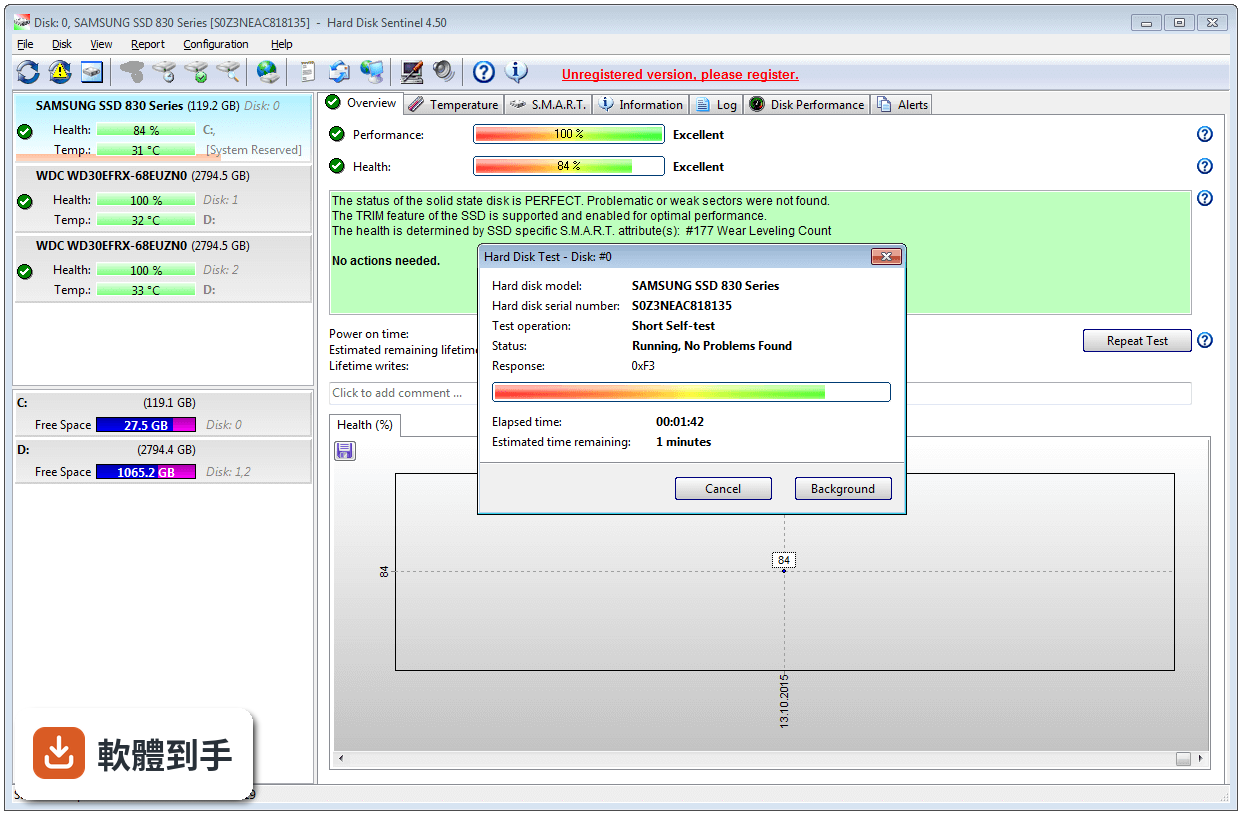
它是一套硬碟監控軟體,主要工作是盯著電腦裡或外接盒中的 HDD、SSD 健康狀況。它會即時顯示每顆硬碟的溫度、S.M.A.R.T. 數值、健康評分和效能表現,並在偵測到異常時發出警報。另外也內建磁碟表面測試和傳輸速度測量,可以用來判斷硬碟是否有實體損壞或效能衰退。
02它跟工作管理員或 Windows 內建工具差在哪?
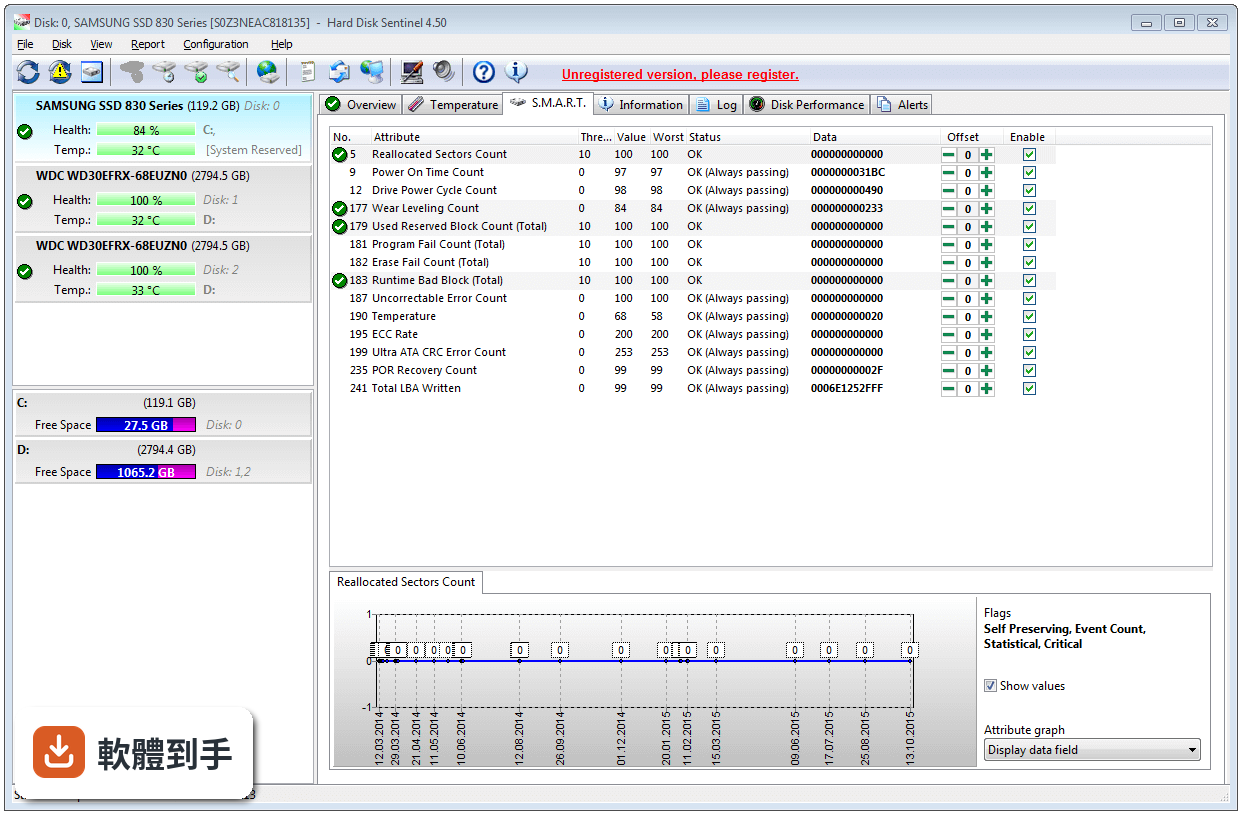
工作管理員只告訴你當下磁碟使用率,看不出硬碟的長期健康趨勢。Hard Disk Sentinel 會持續記錄每顆硬碟的 S.M.A.R.T. 數據,包含重新分配磁區數、讀寫錯誤率、通電時數等,並換算成一個健康百分比。這些資訊 Windows 內建工具不會顯示,而這些正是判斷硬碟是否快故障的關鍵指標。
03它怎麼判斷硬碟快壞了?
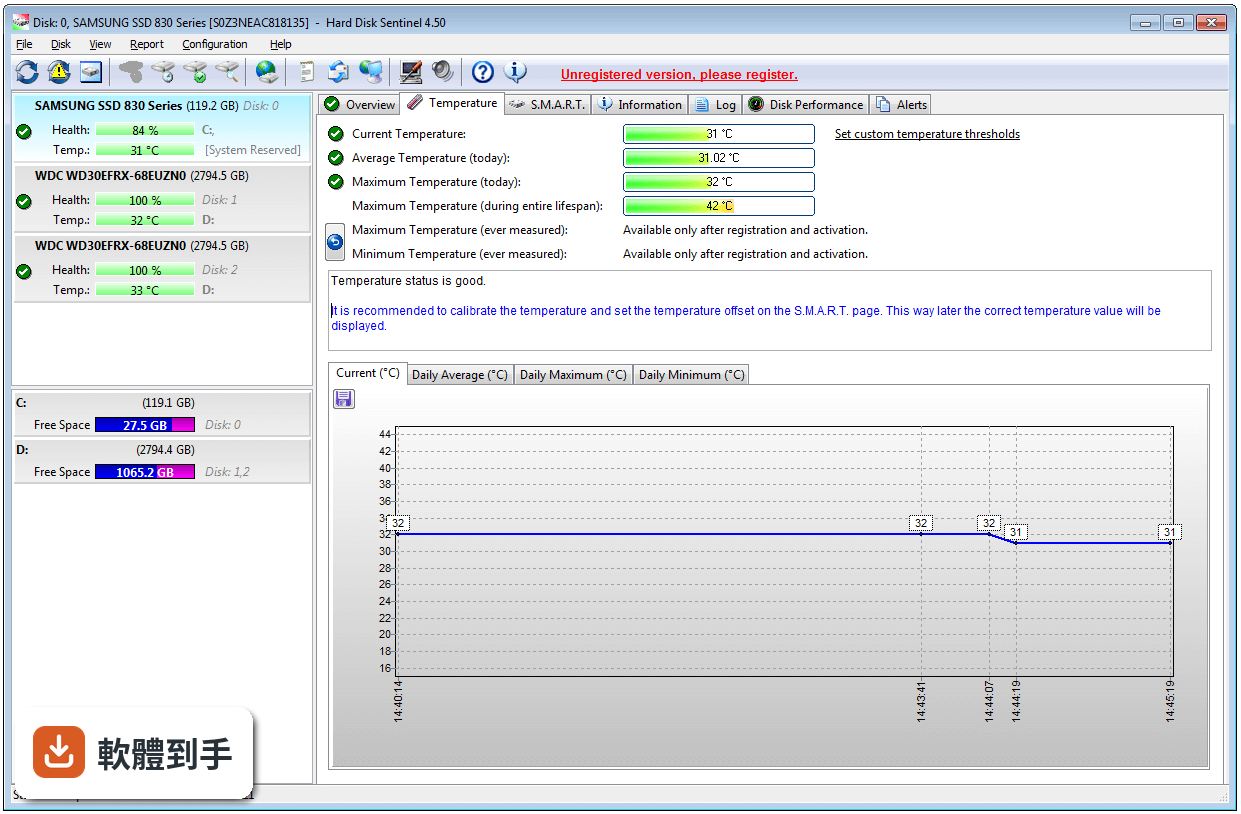
它會分析硬碟內建的 S.M.A.R.T. 數據,這套機制是硬碟自己記錄的自我監測數值。軟體把這些數值轉成健康評分,分數越低代表風險越高。同時它也監控溫度,過熱會加速硬碟老化。當某個數值異常或溫度超標,它會跳出通知或寄 email 警告你,讓你在硬碟完全掛掉前有時間備份。
04它能測硬碟速度嗎?
可以。它提供即時的磁碟傳輸速度測量,也能當作效能基準測試工具,評估硬碟目前的讀寫表現。這可以用來判斷硬碟是否出現效能衰退——例如一顆原本讀取速度有 150MB/s 的硬碟,如果現在只剩一半,可能就是老化或故障的徵兆。不過要注意,它主要測的是當前狀態,不是拿來跟其他硬碟做詳細比較的專業跑分軟體。
05它能修壞軌嗎?
它能「偵測」壞軌,透過磁碟表面測試掃描整顆硬碟找出實體損壞的區域,但「修復」不是它的主要功能。官方說明提到它能診斷和協助處理硬碟問題,但對於已經出現的壞軌,最實際的處理方式是盡快把資料備份出來,然後更換硬碟。別指望軟體能把壞軌修好,那只會讓你誤判風險。
06什麼樣的人需要裝這種軟體?
如果你電腦裡有多顆硬碟或 SSD,或是使用外接硬碟、筆電、伺服器,而且裡面的資料不見了會很麻煩,那你就需要這類工具。特別是那些硬碟已經用了一兩年以上、又沒有定期備份習慣的人,裝一套監控軟體至少能在硬碟壞掉前收到警告,爭取時間把檔案複製出來。
07筆電使用者需要嗎?
需要,而且筆電使用者比桌機更該注意。筆電的硬碟通常更緊湊、散熱條件較差,而且整台機器帶著走,震動和碰撞的風險比桌機高。Hard Disk Sentinel 支援筆電常見的 S-ATA、NVMe 介面,也能監控溫度。如果你的筆電硬碟已經用了很久,裝一套來盯健康狀況是合理的預防措施。
08外接硬碟也監控得到嗎?
可以。官方說明明確提到支援 USB 和 e-SATA 外接盒中的硬碟,也支援 USB-NVMe 轉接器、擴充座和外接多槽 RAID 盒。不過要注意,部分外接盒或轉接器可能無法完整傳遞 S.M.A.R.T. 數據,實際能讀到多少資訊,取決於你的外接裝置和硬碟型號,建議裝了之後先確認是否顯示完整數值。
09免費的 CrystalDiskInfo 就夠用了嗎?
如果你只需要看基本的 S.M.A.R.T. 健康狀態和溫度,CrystalDiskInfo 確實是很多人用的免費選擇,而且它的評分人數(227 人)比 Hard Disk Sentinel(189 人)還多。但 Hard Disk Sentinel 多了磁碟表面測試、即時傳輸速度測量、更詳細的警報設定,以及專業版的自動備份功能。如果你只是想知道「硬碟還能不能用」,免費工具就夠;如果你要更完整的監控和測試,再考慮付費。
10它只有英文介面,看不懂怎麼辦?
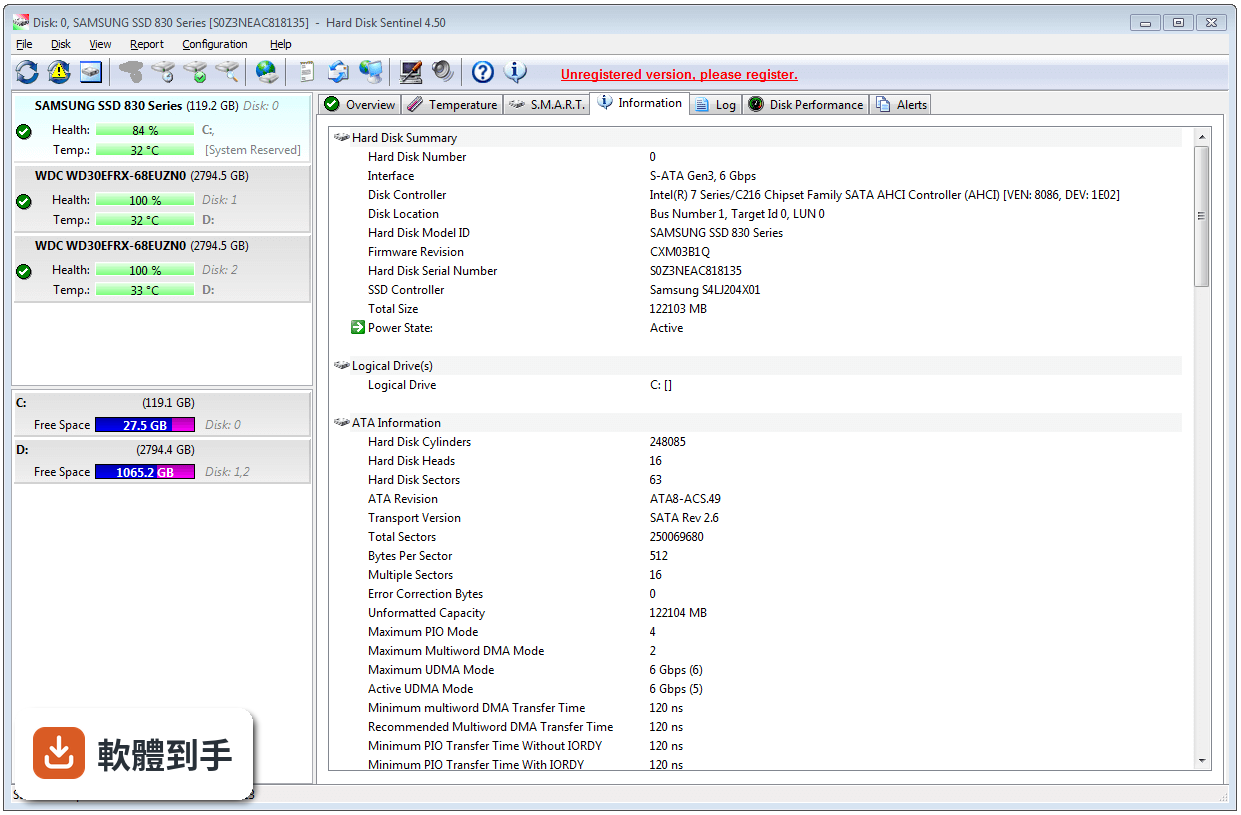
這套軟體目前介面只有英文,官方說明中提到的語言更新是新增了葡萄牙語,沒有提到繁體中文。如果你英文閱讀沒問題,操作上還算直觀,主畫面就是每顆硬碟的健康狀態、溫度和效能圖示。但如果看不懂英文,你可能會誤判某些警報訊息,這種情況下用有中文介面的 CrystalDiskInfo 會比較安全。
11試用版跟付費版差在哪?
它是 Trial 授權,代表可以試用,但功能可能受限。官方說明提到 Professional 版本有排程和自動備份功能,可以在偵測到問題時自動備份資料,這在試用版中不一定有。另外,試用版可能無法使用所有進階功能,或是有使用天數限制。具體的試用期限和功能限制,官方網站上才有詳細說明,安裝前建議先確認。
12這套軟體適合伺服器或 NAS 嗎?
官方說明提到它支援伺服器環境,也支援 RAID 設定和 NVMe 硬碟,並改善了 Intel VROC、Broadcom 控制器等 RAID 組態的偵測。不過要注意,伺服器通常需要長時間穩定運作,這類監控軟體如果設定不當,可能干擾系統效能。而且伺服器環境通常有更專業的監控方案,如果你只是管理一台家用伺服器,這套軟體夠用;如果是企業等級,建議先確認是否支援你的硬體控制器。
下載與官方連結
hdsentinel_setup.zip · 20.03 MB · 連結指向軟體原廠
版本紀錄
- 2026-03-24 Hard Disk Sentinel 6.40 40.43 MB
- 2025-03-18 Hard Disk Sentinel 6.30 38.31 MB
- 2024-05-08 Hard Disk Sentinel 6.20 38.27 MB
再看 5 筆
- 2023-05-18 Hard Disk Sentinel 6.10 34.9 MB
- 2022-03-15 Hard Disk Sentinel 6.01
- 2022-03-10 Hard Disk Sentinel 6.00
- 2021-01-19 Hard Disk Sentinel 5.70
- 2020-05-05 Hard Disk Sentinel 5.61 32.21 MB
這一版改了什麼
What's new in this version:
Improvements and new features:
- double click on the Health bar to configure custom health threshold for any hard disk / SSD (registered version only)
- File menu -> Drive connection/Removal event log displays drive connection / removal events (registered version only)
- detailed text description upon different problems (for example communication errors) and links to further details
- determine file stored in any sector of the hard disk drive / SSD: to get information about possible damaged files on unreadable sectors. (works on NTFS/FAT32/FAT16/FAT12 volumes, hard disks, SSDs, removable drives, pendrives, memory cards)
- Disk menu -> Surface test -> View -> Click on a sector to view the sector contents and then on the bottom click on "Detect file information for sector"
- new option: automatically detect and report all possible damaged files at the end of the complete surface scan.
- To enable, select Disk menu -> Surface test and in the new window, select Configuration tab, then on the bottom enable "Detect file information for sectors with errors"
- double click on the "power on time" label or value to show in years / days / hours format (when the device is older than 1 year)
- automatically re-adjust hard disk features (Advanced Power Management, Acoustic Management, Free Fall Sensor sensitivity) after hot-plug of the drive, without re-start (if the option enabled)
- detection of compatibility problems causing possible data corruption / data loss: Hard disk case: Capacity is not correct
- added option to save the contents of the Log page of each hard disks to reports (enable at Configuration -> Message settings -> Detailed report components)
- added option to detect and report System Management BIOS information to reports (enable at Configuration -> Message settings -> Detailed report components)
- improved "low disk space" alerts
- display of Seagate external USB hard disk enclosure model and serial number for warranty purposes
Improved hardware support:
- added support of Samsung 950, 951 NVMe SSDs: detection of complete status including power on time, temperature, read/write statistics, wearout, etc.
- Requires installation of Samsung NVMe driver from Driver Zone page.
- added support of Samsung 950 NVMe Pro M.2 SSD: detection of complete status including power on time, temperature, read/write statistics, wearout, etc.
- Detection with both standard NVMe driver and Samsung NVMe driver from Driver Zone page.
- added support of Intel NVMe SSDs, Intel 750 SSD, INTEL SSDPEDMW400G4, INTEL SSDPEDMW012T4: detecting temperature, health, features, complete self-monitoring S.M.A.R.T. data
- Requires installation of Intel NVMe driver from Driver Zone page.
- added support of Dawicontrol RAID controllers: detect and display complete disk status information about hard disks / SSDs managed by Dawicontrol RAID controllers when the drives used in RAID configuration or standalone mode. Supported controllers: Dawicontrol DC133, DC150, DC154, DC300e/310e, DC324e, DC3410, DC4300/4320, DC600e/610e, DC622e, DC624e.
- Requires installation of latest Dawicontrol driver from Driver Zone page.
- added support of Marvell 9220/9230/9235 hardware RAID controller: detection of hard disk status when RAID/Hyperduo/standalone configuration of hard disks. Tested with Marvell 9230.
- added support of Intel RMS3CC080 SAS/SATA RAID controller: detect hard disk status when drives configured as RAID
- added support of JMicron JMS56X hardware RAID controller: detection of hard disk status when RAID/JBOD/standalone configuration of hard disks
- added support of RAIDON GR2660-B3 dual bay external RAID enclosure: detect and display both hard disks in the RAID configuration
- added support of RAIDON GR3630 2S SB2+ Raid device: detect and display both hard disks in the RAID configuration
- added support of RAIDON iH1010: detect and display both hard disks
- added support of Startech S32SAT3R Internal Drive Mounted Dual SATA RAID Adapter
- added support of Lenovo 720ix SATA/SAS RAID controllers: detection of complete hard disk / SSD information about drives configured as RAID
- added support of Lenovo MR9340-8i RAID controller (ThinkStation FLEX RAID Adapter): detection of complete hard disk / SSD information about drives configured as RAID
- added support of AMD Bolton chipset: detect and report complete status and S.M.A.R.T. information of hard disks / SSDs configured as RAID
- added support for USB 3.1 devices (controllers, enclosures, SATA->USB converters)
- important update for newer Sandisk SSD models, Kingston HyperX Predator
- improved detection and reporting of various SSDs (AData, Crucial, Micron, Kingston, OCZ, Phison, Patriot, Sandisk, Samsung)
- improved support of LSI / Avago controllers in general and when Cachecade feature used
- improves support of Intel RAID controllers, Intel C602 chipset
- improved compatibility with Toshiba external USB 3.0 hard disks
- improved USB attached SCSI (UASP) support
- improved support for SAS SSDs (lifetime and wearout statistics), SAS hard disks
- improved Adaptec RAID controller support, important update for Adaptec controllers
- improved compatibility and support of HP Smart Array SCSI RAID controllers (HP Smart Array 6i, HP Smart Array 6400)
- improved support of Seagate external SSDs
- improved reporting of Lenovo SSHD health and text description
- improved support of Promise 8760 SAS RAID controller
- improved support of Rosewill USB 3.0 RX200R-APU3-25B
- fixed: random seek test frozen on some external USB drives with 4K physical sectors
- fixed: Disk menu -> Surface test -> Disk contents inspector could not show sector contents on some external USB drives with 4K physical sectors
- fixed: real time performance monitoring may stopped after wake up
- fixed: disk surface test may not work on HP tablet PCs to diagnose eMMC card
Bug fixes, further modifications:
- added Korean language support, thanks to pCsOrI for the translation
- improved multi-language support, fixes for Czech and Japanese languages
- fixed surface test window display when German, Dansk, Dutch languages selected
- user interface fixes, corrections
- improved system disk drive icon handling, real-time performance monitoring
- improved power on time calculation
- improved menu display and readability on dark Windows themes
- improved sending network message with NET SEND, longer message with detailed information (on newer Windows OSes, WinSent tool can be used to receive messages/alerts)
- fixed text/HTML/XML report: system memory size may be incorrect on systems with 8 GB or more physical memory
- fixed text/HTML/XML report: last system startup time was incorrect
- fixed problem when exporting S.M.A.R.T. attributes
- minor changes/modifications in e-mail and report generation