
這是歷史版本頁面 — 看 Hard Disk Sentinel 最新版本
硬碟快壞了怎麼知道?Hard Disk Sentinel 在做什麼
 Hard Disk Sentinel 6.00
資料更新 2022-03-10
閱讀約 6 分鐘
電腦用著用著開始變慢,開個資料夾要轉好幾圈,偶爾還會聽到硬碟發出咔咔聲。你想知道它是不是快壞了,但又不知道從哪裡看起——工作管理員只顯示使用率,看不出健康狀況,更別提預測什麼時候會掛掉。怕的是哪天突然開不了機,裡面的照片、文件、工作檔案全部跟著消失。
一般人的習慣是等電腦真的出問題才處理,但硬碟壞掉通常不是瞬間發生,而是慢慢惡化。問題是,Windows 內建工具給的資訊太少,你根本無從判斷「偶爾卡一下」是正常老化還是警訊。這類工具切入的角度,就是持續盯著硬碟的溫度、S.M.A.R.T. 數值、壞軌數量這些底層數據,在真正故障前先發出警報,讓你有時間備份。
01Hard Disk Sentinel 到底能幹嘛?
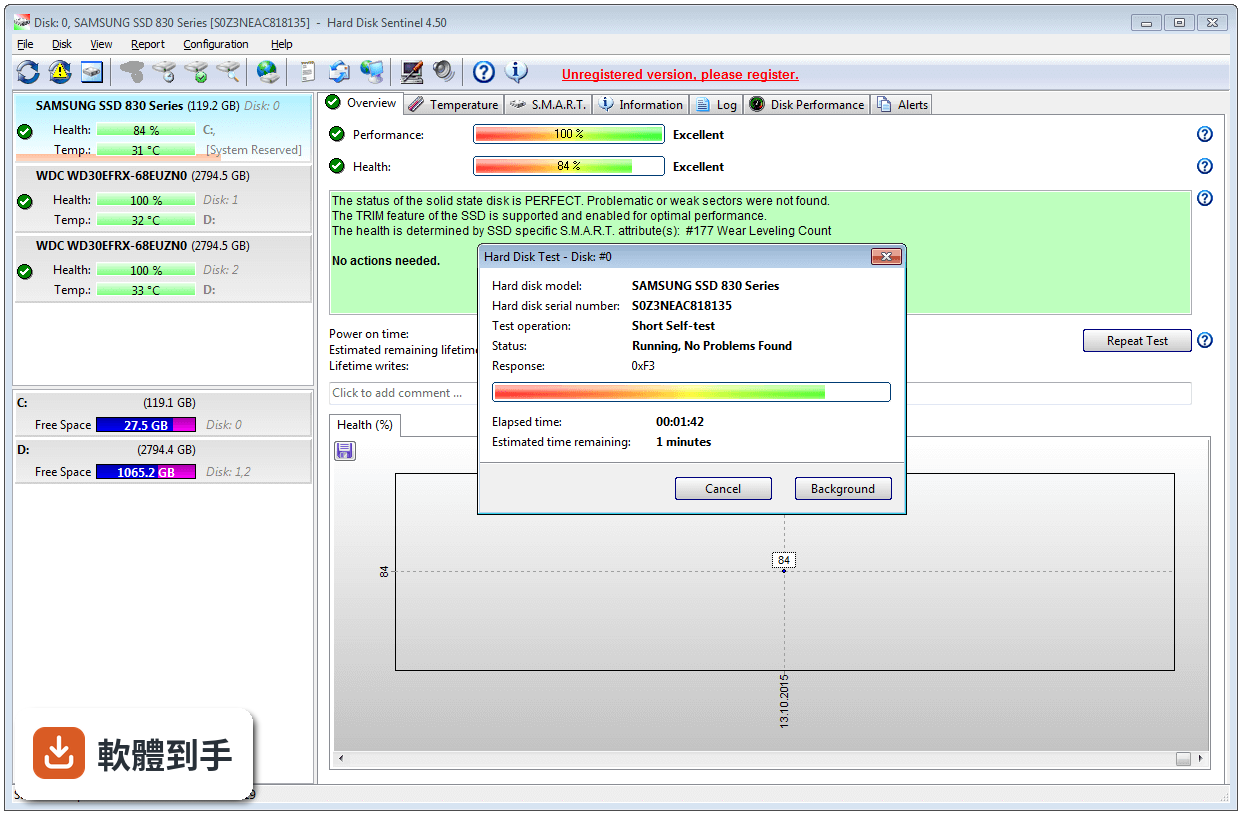
它是一套硬碟監控軟體,主要工作是盯著電腦裡或外接盒中的 HDD、SSD 健康狀況。它會即時顯示每顆硬碟的溫度、S.M.A.R.T. 數值、健康評分和效能表現,並在偵測到異常時發出警報。另外也內建磁碟表面測試和傳輸速度測量,可以用來判斷硬碟是否有實體損壞或效能衰退。
02它跟工作管理員或 Windows 內建工具差在哪?
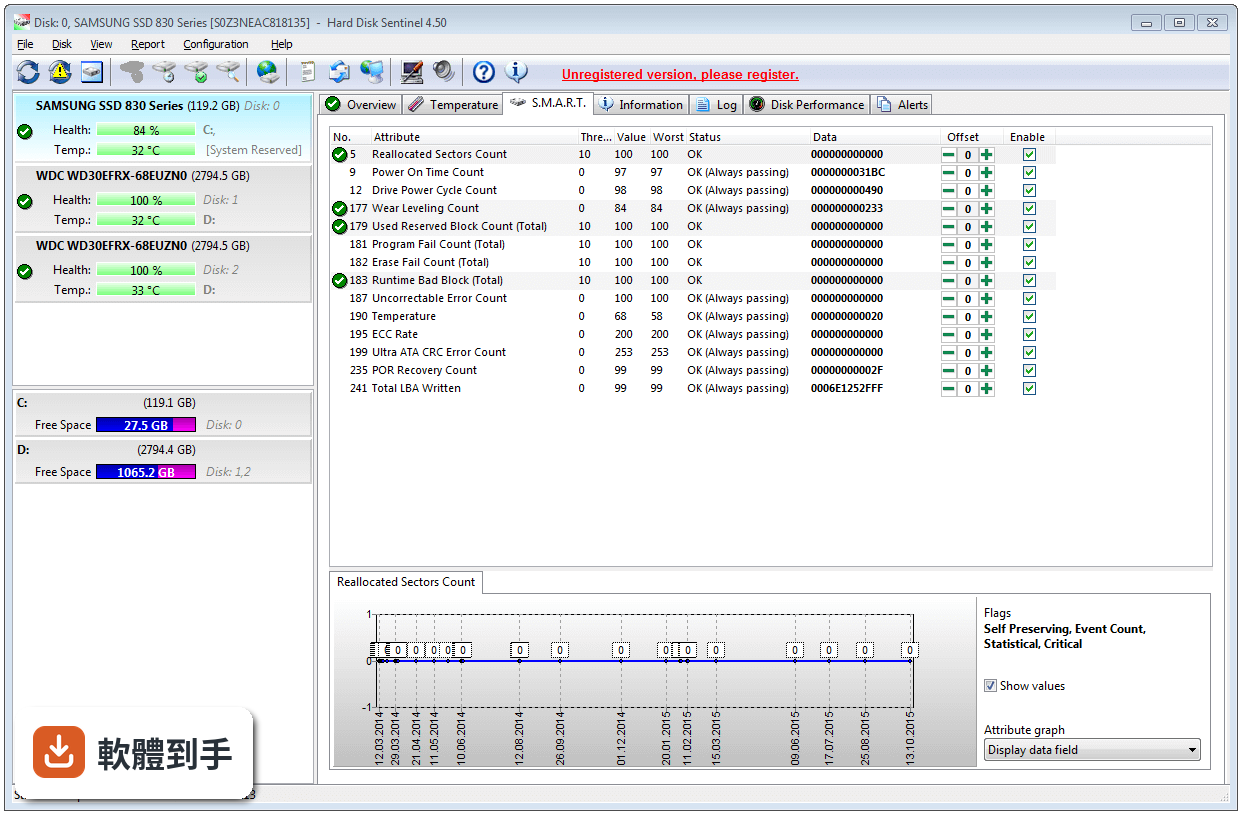
工作管理員只告訴你當下磁碟使用率,看不出硬碟的長期健康趨勢。Hard Disk Sentinel 會持續記錄每顆硬碟的 S.M.A.R.T. 數據,包含重新分配磁區數、讀寫錯誤率、通電時數等,並換算成一個健康百分比。這些資訊 Windows 內建工具不會顯示,而這些正是判斷硬碟是否快故障的關鍵指標。
03它怎麼判斷硬碟快壞了?
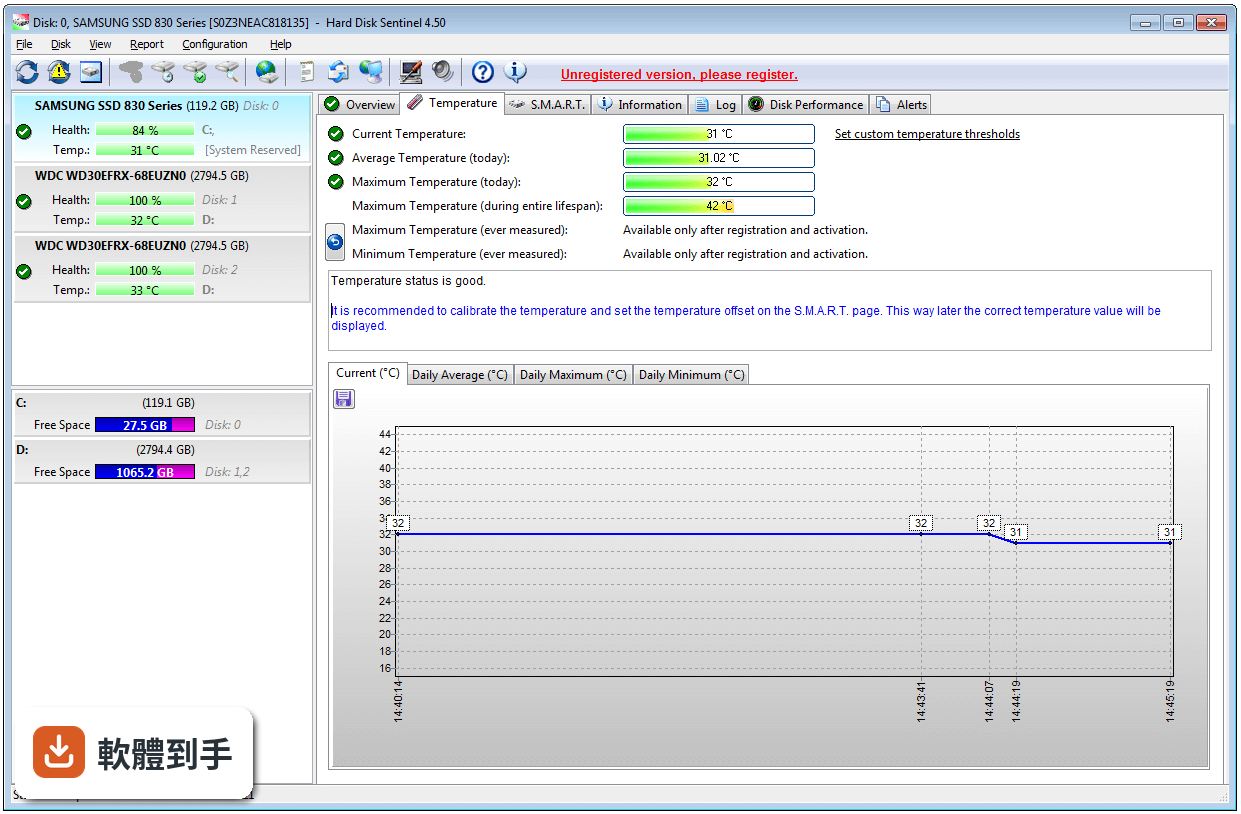
它會分析硬碟內建的 S.M.A.R.T. 數據,這套機制是硬碟自己記錄的自我監測數值。軟體把這些數值轉成健康評分,分數越低代表風險越高。同時它也監控溫度,過熱會加速硬碟老化。當某個數值異常或溫度超標,它會跳出通知或寄 email 警告你,讓你在硬碟完全掛掉前有時間備份。
04它能測硬碟速度嗎?
可以。它提供即時的磁碟傳輸速度測量,也能當作效能基準測試工具,評估硬碟目前的讀寫表現。這可以用來判斷硬碟是否出現效能衰退——例如一顆原本讀取速度有 150MB/s 的硬碟,如果現在只剩一半,可能就是老化或故障的徵兆。不過要注意,它主要測的是當前狀態,不是拿來跟其他硬碟做詳細比較的專業跑分軟體。
05它能修壞軌嗎?
它能「偵測」壞軌,透過磁碟表面測試掃描整顆硬碟找出實體損壞的區域,但「修復」不是它的主要功能。官方說明提到它能診斷和協助處理硬碟問題,但對於已經出現的壞軌,最實際的處理方式是盡快把資料備份出來,然後更換硬碟。別指望軟體能把壞軌修好,那只會讓你誤判風險。
06什麼樣的人需要裝這種軟體?
如果你電腦裡有多顆硬碟或 SSD,或是使用外接硬碟、筆電、伺服器,而且裡面的資料不見了會很麻煩,那你就需要這類工具。特別是那些硬碟已經用了一兩年以上、又沒有定期備份習慣的人,裝一套監控軟體至少能在硬碟壞掉前收到警告,爭取時間把檔案複製出來。
07筆電使用者需要嗎?
需要,而且筆電使用者比桌機更該注意。筆電的硬碟通常更緊湊、散熱條件較差,而且整台機器帶著走,震動和碰撞的風險比桌機高。Hard Disk Sentinel 支援筆電常見的 S-ATA、NVMe 介面,也能監控溫度。如果你的筆電硬碟已經用了很久,裝一套來盯健康狀況是合理的預防措施。
08外接硬碟也監控得到嗎?
可以。官方說明明確提到支援 USB 和 e-SATA 外接盒中的硬碟,也支援 USB-NVMe 轉接器、擴充座和外接多槽 RAID 盒。不過要注意,部分外接盒或轉接器可能無法完整傳遞 S.M.A.R.T. 數據,實際能讀到多少資訊,取決於你的外接裝置和硬碟型號,建議裝了之後先確認是否顯示完整數值。
09免費的 CrystalDiskInfo 就夠用了嗎?
如果你只需要看基本的 S.M.A.R.T. 健康狀態和溫度,CrystalDiskInfo 確實是很多人用的免費選擇,而且它的評分人數(227 人)比 Hard Disk Sentinel(189 人)還多。但 Hard Disk Sentinel 多了磁碟表面測試、即時傳輸速度測量、更詳細的警報設定,以及專業版的自動備份功能。如果你只是想知道「硬碟還能不能用」,免費工具就夠;如果你要更完整的監控和測試,再考慮付費。
10它只有英文介面,看不懂怎麼辦?
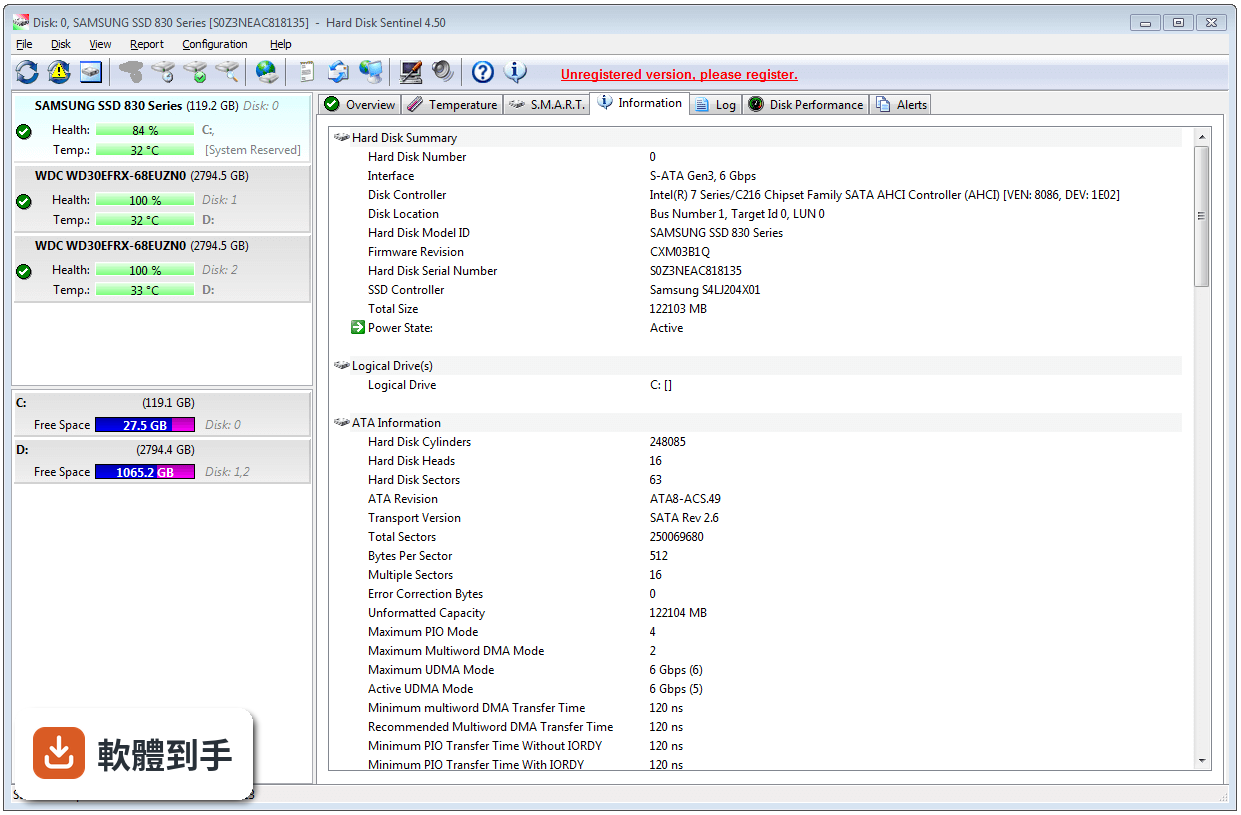
這套軟體目前介面只有英文,官方說明中提到的語言更新是新增了葡萄牙語,沒有提到繁體中文。如果你英文閱讀沒問題,操作上還算直觀,主畫面就是每顆硬碟的健康狀態、溫度和效能圖示。但如果看不懂英文,你可能會誤判某些警報訊息,這種情況下用有中文介面的 CrystalDiskInfo 會比較安全。
11試用版跟付費版差在哪?
它是 Trial 授權,代表可以試用,但功能可能受限。官方說明提到 Professional 版本有排程和自動備份功能,可以在偵測到問題時自動備份資料,這在試用版中不一定有。另外,試用版可能無法使用所有進階功能,或是有使用天數限制。具體的試用期限和功能限制,官方網站上才有詳細說明,安裝前建議先確認。
12這套軟體適合伺服器或 NAS 嗎?
官方說明提到它支援伺服器環境,也支援 RAID 設定和 NVMe 硬碟,並改善了 Intel VROC、Broadcom 控制器等 RAID 組態的偵測。不過要注意,伺服器通常需要長時間穩定運作,這類監控軟體如果設定不當,可能干擾系統效能。而且伺服器環境通常有更專業的監控方案,如果你只是管理一台家用伺服器,這套軟體夠用;如果是企業等級,建議先確認是否支援你的硬體控制器。
下載與官方連結
hdsentinel_setup.zip · 連結指向軟體原廠
版本紀錄
- 2026-03-24 Hard Disk Sentinel 6.40 40.43 MB
- 2025-03-18 Hard Disk Sentinel 6.30 38.31 MB
- 2024-05-08 Hard Disk Sentinel 6.20 38.27 MB
再看 5 筆
- 2023-05-18 Hard Disk Sentinel 6.10 34.9 MB
- 2022-03-15 Hard Disk Sentinel 6.01
- 2022-03-10 Hard Disk Sentinel 6.00
- 2021-01-19 Hard Disk Sentinel 5.70
- 2020-05-05 Hard Disk Sentinel 5.61 32.21 MB
這一版改了什麼
What's new in this version:
Improvements and new features:
- New function: Disk menu -> Surface test -> Quick Fix (targeted repair of problematic sectors)
- Verify which area(s) of the disk drive reported problems and written recently then diagnose, repair specifically those (and nearby) sectors and critical system areas. The test forces the disk drive to repair any problematic (pending, weak) sectors: restore the status to good or reallocate (replace from spare area) if required to prevent further use of the original sector (Pro version only)
New function for advanced users (PRO version only): Disk menu -> Device Specific Information to detect and display additional details including:
- Power on time when last error detected/logged by the hard disk/SSD (registered version only)
- Time since last error detected/logged by the hard disk/SSD (registered version only)
- Sector(s) where errors happened previously and their location by block number on the disk surface map (registered version only)
- ATA error log: last known errors, their description, registers, error details, last commands before error
- ATA self test log: last disk self tests, self test results and details (registered version only)
- ATA drive statistics: lifetime details, errors, temperature statistics
- ATA drive statistics: rotating media statistics (hard disk drives) or solid state device statistics (SSDs)
- ATA drive disk utilization and absolute limits for amount of reads/writes and temperature limits (if defined by the manufacturer)
- ATA drive temperature statistics, last known recorded temperature values
- ATA drive additional features and functionality supported by the hard disk drive/SSD
- NVMe error log
- NVMe self test log: last disk self tests, test results and possible error details (registered version only)
- SCSI/SAS defect list information
- SCSI/SAS background scan status information, protocol specific port information
- Device Specific Information recorded and can be re-loaded to review previous statistics
- Device Specific Information automatically shows the changes of most important values compared to previous data (registered version only)
- Extended S.M.A.R.T. detection: detect additional details / information for more accurate status/health reporting by detection of Ext. S.M.A.R.T. attributes
Added option to perform hardware self test on NVMe SSDs (if supported):
- Disk menu -> Short Self Test, Disk menu -> Extended Self Test functions can be used on NVMe SSDs when available.
- The Information page confirms if Device Self Test feature is supported by the SSD.
- NVMe self test is possible with
- Windows Standard NVMe controller driver (may prevent too frequent self tests)
- Intel NVMe controller driver or Intel Volume Management Device NVMe RAID controller driver
- Samsung NVMe controller driver
- Micron NVMe controller driver
- JMicron USB-NVMe adapters/external NVMe-USB enclosures with JMicron chipsets
- Option to schedule short / extended self test on NVMe SSDs too (registered Hard Disk Sentinel Pro version)
- New buttons in the button bar to open Windows Disk Management and Windows Device Manager
- Display Windows Drive Index (Physicaldriveindex) on the Information page if RAID array(s) present
- Display/report NVMe Maximum Power use in mW units on the Information page
- Improved disk surface test performance for NVMe SSDs: much faster Disk menu -> Read test possible on NVMe SSDs (in memoriam Neduddki)
- Improved Disk Repair test: counts and displays the amount of sectors successfully repaired and failed to repair
- Amount of disk status history increased to allow logging and check back additional of historical status/health/temperature statistics
- Improved write disk testing, Disk Contents Inspector and general support of SAS drives with 520 or 528 bytes/sector sizes
Improved hardware support:
- Added support of AMD NVMe RAID solution: detect the status (health, temperature, lifetime writes, complete self-monitoring details) of NVMe M.2 PCIe SSDs managed by AMD RAID (both standalone and RAID configurations)
- Requires AMD RAID driver 9.3.0-00266 or newer version.
- Note: if the detection does not seem working immediately, a reboot / power cycle may be required
- Added support of Adaptec SmartRAID 3102E-8i controller: detect status information about hard disks / SSDs in RAID or standalone configuration
- Added detection of hard disks / SSDs configured as RAID on LSI LIBERATOR (LSI 9750-8i) controller, detect complete disk information / S.M.A.R.T. status of SATA / SAS hard disks / SSDs
- Added support of LSI MegaRAID (MegaSR) / Intel Embedded Server RAID Technology II SATA RAID controller: detect status information of SATA disk drives in RAID configuration (if possible by the driver)
- Added support of Apricorn Fortress L3 and Padlock 3 external hard disk drives and Apricorn ASK3 or ASK3z Secure Key pendrives: in addition to the robust design and security functions the hard disk drives and pendrives supported by Hard Disk Sentinel: complete health, temperature, self-monitoring S.M.A.R.T. status detected and displayed.
- Added support of SSK USB 3.1 / 3.2 Gen 2 (10 Gbps) NVMe adapter: detect NVMe SSD status
- Added support of Kingston XS2000 SSD, Goodram CX400 G2, Zadak SSD
- Improved support of some Acer SSDs, Sandisk SSDs, Lite-on SSDs
- Improved status reporting with FreeCom Public-disk external hard disk drives
- Improved detection with Intel Optane configurations
- Improved compatibility with Intel VROC NVMe SSD RAID
- Improved health detection and reporting of various Sandisk and Crucial SSDs
- Added support of Kingston Design-In SSDs (OMSP0S3, OM4P0S3, OM8P0S3, OCP0S3)
- Improved compatibility and disk status reporting with Orico NS500RU3 3.5 inch 5 Bay USB 3.0 Hard Drive Enclosure
- Improved health/status reporting for PNY SATA SSDs
- Improved display of power on time, health, status of newer WD / Hitachi SAS hard disk drives
- Improved compatibility with LSI controller with multiple arrays and higher number of hard disks / SSDs configured
- Improved compatibility with Promise Supertrak 8350 SATA RAID controller
- Improved compatibility with older SD/micro SD card readers
- Improved compatibility with some Kingston, Toshiba, Micron SSDs
- Improved text description of NVMe SSDs upon different problems / error conditions
- Adjusted calculation and reporting lower health on failing / problematic NVMe SSDs
- Improved detection with ASMEDIA ASM236x series USB-NVMe adapters
- Improved detection with Adaptec / Microsemi SAS RAID controllers and HBAs
- Improved detection with LSI / IBM / Intel SAS RAID controllers, improved dedicated hot spare reporting
- Improved support of Seagate Firecuda drives
- Improved support of Crucial CT2000MX500SSD1 SSD, Patriot P200 SSD, Micron SSDs, WDC PC SA530 SSDs
- Improved power on time display for SAS hard disk drives, SAS SSDs
- Improved display of stored file at a sector during disk surface test
- Improved Disk menu -> Surface test -> Disk Repair test
- Improved support of Sandisk X600 SSDs, Transcend SSDs, MemKing SSDs
- Improved compatibility and detection with LSI/Avago/Broadcom 9400 series SAS HBA
- Improved support of HP SATA/SAS HBA controllers
- Improved support of some Micron SATA SSDs, Plextor SATA SSDs, Kingston SATA SSDs
- Improved disk surface test performance log
- Added support of DELL SD1-U0250 SSD, YGC-SA3-128G SSD, Netac SSD, Sandisk SD8SBBU480G1122,
- Added support of ProGrade PG05.5 CFExpress memory card reader
- Added support of Crucial X6 SSD: detect temperature, self-monitoring status, health, S.M.A.R.T. details
- Added support of Patriot Supersonic Rage Prime pendrive: detect temperature, self-monitoring status, health, S.M.A.R.T. details
- Added support of Team Group TC21231TBB01 pendrive: detect temperature, self-monitoring status, health, S.M.A.R.T. details
- Added support of Swissbit U-50n, U-56n series industrial pendrives: detect temperature, self-monitoring status, health, and extended S.M.A.R.T. data
- Improved support/compatibility with Intel SSDPE2MD400G4
- Added/improved support of some HIKVISION SSDs
- Improved database saving and option to re-load last known status of offline disks
- Improved support of some Micron/Crucial SATA SSDs
- Added support of Kingston SDCIT2 industrial (micro) SD cards
- Added support of i-tec MySafe 2x2.5" USB 3.1 enclosure: detect S.M.A.R.T. status of both drives in RAID0/RAID1/JBOD mode
- Added support of Walram SATA SSD
- Improved detection of RAID / Hot spare drive(s) with older Intel RST drivers
- Improved support of some Kingston, Sandisk, Patriot SSDs
- Improvements for ADATA SD Express cards
- Improvements for AMD RAID with high number of SATA hard disks/SSDs and NVMe SSDs
Bug fixes, further modifications:
- Minor improvements on non-English languages
- Service mode improvements
- Improved WMI functionality support
- Minor changes for Windows 11