
這是歷史版本頁面 — 看 HD Video Converter Factory Pro 最新版本
HD Video Converter Factory Pro 能轉什麼?Demo 版限制要先知道
 HD Video Converter Factory Pro 14.1
資料更新 2017-12-14
閱讀約 5 分鐘
你手上有一批高畫質影片,可能是從相機、手機或網路下載的,想轉成其他格式放到不同裝置上看。打開常見的免費轉檔工具,不是格式支援不全,就是轉出來的畫質明顯變差,不然就是轉到一半卡住。你只是想趕快把影片轉好,卻發現每個工具都差那麼一點。
免費工具功能陽春,線上轉檔網站又要把檔案上傳下載,大檔根本跑不動。下載 YouTube 影片的軟體,很多還夾帶廣告或來路不明的安裝程式。這類工具的切入點,是把「轉檔」和「下載」整合在一起,在本機直接處理,不經過雲端,同時利用電腦硬體加速來縮短等待時間。
01HD Video Converter Factory Pro 到底能轉哪些格式?
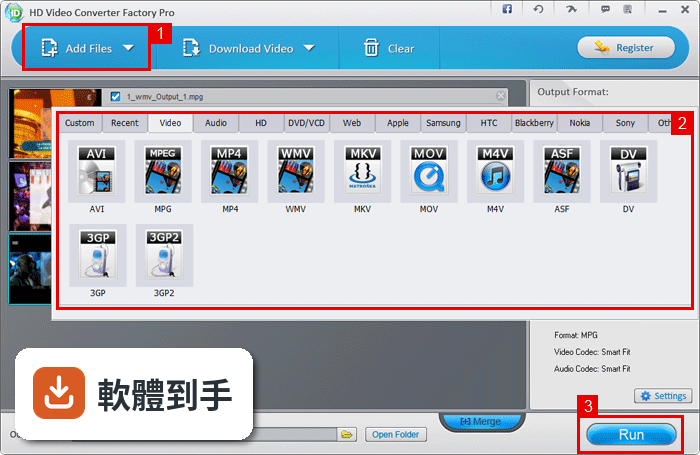
官方說明指出,它支援將 HD 影片轉成 MP4、MKV、AVI、WMV、MOV、TS、ASF 等常見格式,也支援 4K、H265、VP9 這類高畫質編碼的影片。來源格式和目標格式都可以涵蓋這些類型。不過官方沒有列出完整的格式清單,實際支援的格式數量,需要安裝後自行確認。
02它下載 YouTube 影片是怎麼運作的?
官方說明提到,它可以批次下載 YouTube 影片、頻道和播放清單,最多同時下載 5 個項目,並可選擇 360p 到 12K 的解析度。下載時可以保留原始畫質,也能在過程中直接轉成你需要的格式。但官方沒有說明是否支援其他影音平台,這部分需要自行測試。
03批次轉檔可以一次處理多少檔案?
官方說明指出,批次轉換模式一次最多可以加入 10 個影片同時處理。另外,程式也支援多工處理,可以在同一個介面中管理多個轉檔任務。如果你有大量影片要轉,這個數量限制需要先知道,超過 10 個就要分批處理。
04轉檔速度真的會比較快嗎?
官方說明表示,它支援 Multi-CPU 和 Hyper Threading 技術,可以提高 CPU 在影片轉換過程中的使用率。這代表在硬體允許的條件下,轉檔速度有機會比純軟體運算快。但實際速度取決於你的 CPU 型號、影片長度和解析度,官方沒有提供具體的效能數據。
05轉出來的檔案畫質和大小可以兼顧嗎?
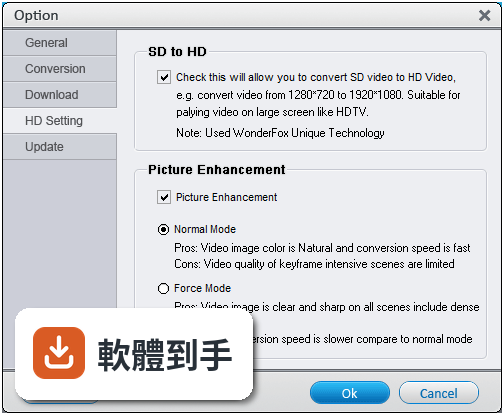
官方說明提到,它可以在縮小輸出檔案大小的同時,盡量保留原始高畫質,並針對 Retina 顯示器做最佳化。另外也支援 60 fps 的轉換,讓輸出影片更流暢。不過「畫質好又檔案小」的平衡點,會因原始影片內容和設定的參數而不同,需要自己調整測試。
06這套軟體適合什麼樣的人用?
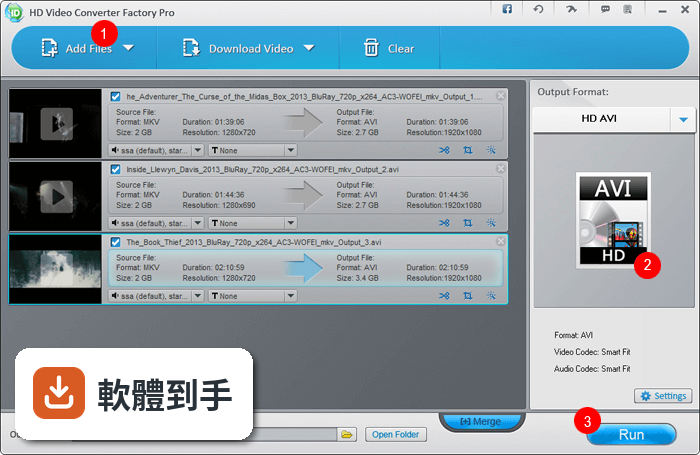
適合需要在本機大量轉檔、且電腦是 Windows 系統的使用者。它的介面是英文,但操作流程是「加入檔案、選格式、開始轉換」,不太需要閱讀大量文字。如果你常下載 YouTube 影片並轉成其他格式,或需要批次處理多個影片,這套軟體的功能設計會對應到你的需求。
07我電腦配備很舊,跑得動嗎?
官方列出的系統需求是:Windows 7 以上、處理器 1.5 GHz 以上、記憶體 1 GB 以上、硬碟空間 300 MB、螢幕解析度 1200×768。這個門檻不算高,但要注意它只支援 Windows,Mac 無法使用。如果你的電腦低於這些規格,安裝後可能無法順暢運作。
08它的 Demo 版有什麼限制?
官方說明中明確指出,Demo 版只能轉換檔案的前 5 分鐘,且功能有限。這代表你無法用免費版完成整個影片的轉檔,只能用來測試轉檔效果和操作流程。如果你需要轉完整影片,就必須付費購買授權,價格在官方網站上才有資訊。
09這套軟體適合當作長期主力工具嗎?
需要考慮兩點:第一,它的介面只有英文,如果你不習慣英文操作環境,每次使用都會有障礙。第二,它的更新頻率偏低,近兩年只更新了一次,代表新格式或新平台的支援速度可能較慢。如果你需要持續應對新的影音格式,這點要納入考量。
10有沒有其他更多人用的選擇?
在評分人數上,Total Video Converter 有 182 人評分,比這套的 109 人多。另外,官方資料中也提到 HandBrake 是開放原始碼的免費轉檔軟體,功能相近且不需要付費。如果你不想受限於 Demo 版的 5 分鐘限制,或希望有更活躍的開發更新,可以考慮這些替代方案。
下載與官方連結
前往官方網站 下載 HD Video Converter Factory Pro
hd-video-converter-pro.exe · 連結指向軟體原廠
版本紀錄
- 2026-04-16 HD Video Converter Factory Pro 28.9 172 MB
- 2023-02-25 HD Video Converter Factory Pro 26.2
- 2022-12-23 HD Video Converter Factory Pro 26.0
再看 5 筆
- 2022-10-17 HD Video Converter Factory Pro 25.6
- 2022-09-19 HD Video Converter Factory Pro 25.5
- 2022-06-08 HD Video Converter Factory Pro 25.0
- 2021-12-19 HD Video Converter Factory Pro 24.6
- 2021-11-25 HD Video Converter Factory Pro 24.4
這一版改了什麼
What's new in this version:
HD Video Converter Factory Pro 14.1
- Important: Because of security reasons, we have changed the registration system. If you have any issus on registration please contact support.
- A part of the function optimization
HD Video Converter Factory Pro 14.0
- More than 50 output profiles have been updated, include iPhone X, iPhone 8, Samsung Note 8, etc.
Optimize / fix a series of questions based on user feedbacks. See details below:
- Optimize 720P/1080P parameter
- Fix a problem on volume setting
- Fix no audio problem for MPG format
- Fix a problem on TS embedded subtitles
- The new version can convert a part of damaged TS video files without problem
- Fix the aspect ratio problem when converting TS to MKV
HD Video Converter Factory Pro 13.2
- Fix an error on merging videos
- Fix an error on converting 4k videos in batch
- Fix an error on file size when download video from YouTube
HD Video Converter Factory Pro 13.0
- Download YouTube 1080p (1920*1080), 2k (2560*1440), 4k (3840*2160) videos
- Fix problem: Merging error
- Fix problem: Video rotating error
- Fix problem: output file name
HD Video Converter Factory Pro 12.5
- YouTube download update. Support download all neweast YouTube videos
- Fix a problem on converting mobile videos
- Fix problem: "MKV duration error"
HD Video Converter Factory Pro 12.0
New:
- Supports custom frame rates up to 160 fps
- Added lossless mode to make high quality video
- Lossless Mode will intelligently convert your video to an ideal quality level, on the basis of original video quality
- HiFi audio and video:Maintains a quality rate of more than 99.5% of input video file
- Mainly works for converting video of very high quality
- It may take more time to complete the conversion
Bug fixed:
- Fix problem on downloading YouTube music video
- Estimated size is more accurate
- Optimize the output file name
HD Video Converter Factory Pro 11.2
- Keep the cover image when you convert audio file
- Improve VBR converting feature
- Optimize the picture quality on 4k, 5k display
- Fix some problem on YouTube video download
- Optimize SRT subtitle
HD Video Converter Factory Pro 11.0
- The new feature for downloading online video. Supports 100+ popular video websites that includes: YouTube, Vimeo, Facebook Video, Amazon Video, Dailymotion, Instagram Video, Twitter Video, Veoh, Metacafe, Break, Vevo, Hulu, Break, Myspace, BuzzNet, LiveLeak, Lulu, etc.
- For security reasons, we have changed the registration system on the new version. All of paid user will enjoy our lifetime free upgrade servic
HD Video Converter Factory Pro 9.4
- Fixed a "Waiting Error" when downloading YouTube video
- About 1.1X~1.4X speed up YouTube video/music download
HD Video Converter Factory Pro 9.3
- Add new output profile iPhone 6s, 6S plus, iPhone ringtone, iPad Pro, Apple TV 3 and iTunes video
- Add new output profile Samsung Galaxy S6 edge+, Galaxy Note edge, Galaxy Note 5, Galaxy A series, Galaxy On serise, Samsung 4K curved TV, Samsung 4K UHD TV, Samsung 1080P full HD TV
- Add new output profile for various brands of TVs, like Android smart TV(optimized for stream media), 8k/4k UHD TV, 8k/4k curved UHD TV
- Add new output profile Surface Book, Surface 4
HD Video Converter Factory Pro 9.2
- Add the latest pictue enhancement technology(code=wf2.31)
- Support downloading 1080P, 4K, 8K video from YouTube
HD Video Converter Factory Pro 9.1
- Fix a bug "Time format error!"
- Fix a bug "Audio only" when download video from Yo
HD Video Converter Factory Pro 9.0
- Compatible with Windows 10 perfectly
- NEW FEATURE: WonderFox Ringtone Studio has been embedded. (Design for iOS& Android)
- Add new output profile Samsung: Galaxy Note edge, Galaxy S6, Galaxy S6 edge, Galaxy A7, HTC: One M9, Desire 826
- Support removing license key
- Fix a bug on effect
- Fix a bug on YouTube download
- Fix a bug on 4K/H265/VP9 conversion