
防毒軟體擋不住的新型攻擊,Heimdal PRO 能補上嗎
 Heimdal PRO (Thor Free) 2.5.354
資料更新 2021-07-02
閱讀約 6 分鐘
開場第一段:你裝了防毒軟體,自認平常上網也算小心,但某天突然發現帳號被登入、檔案被加密,或者銀行網頁被導到假網站。你以為防毒軟體會擋下這些,事後才發現它根本沒反應——因為這些攻擊不是傳統病毒,而是繞過掃描引擎、直接藏在網路流量裡的惡意程式。當下你只想找一個能補在防毒軟體旁邊的工具,而不是再換一套防毒。
開場第二段:一般人遇到這種狀況,直覺是換一套更貴的防毒軟體,但問題往往不在防毒引擎不夠強,而在於它只檢查檔案、不檢查網路連線。於是有人開始找「流量掃描」類的工具,讓軟體在惡意封包到達電腦之前就先攔掉。這類工具的切入點不是取代防毒,而是補上防毒軟體看不見的那一層——你連到哪裡、下載了什麼、有沒有程式偷偷在傳資料出去。
01Heimdal PRO 跟一般防毒軟體有什麼不同?
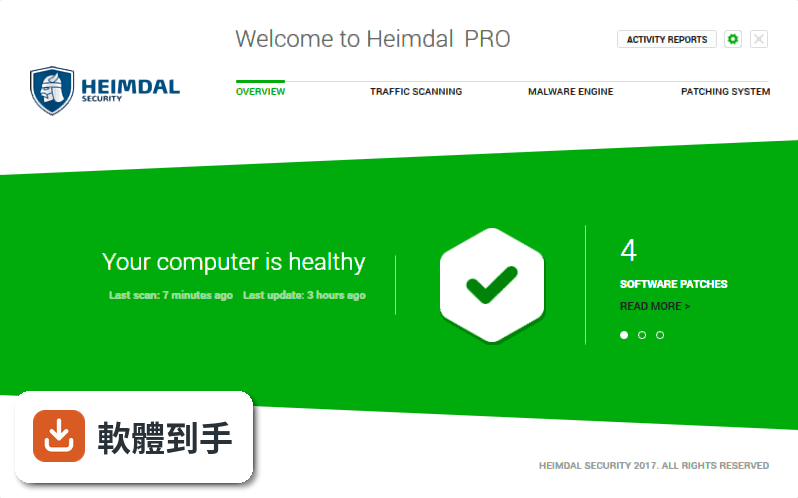
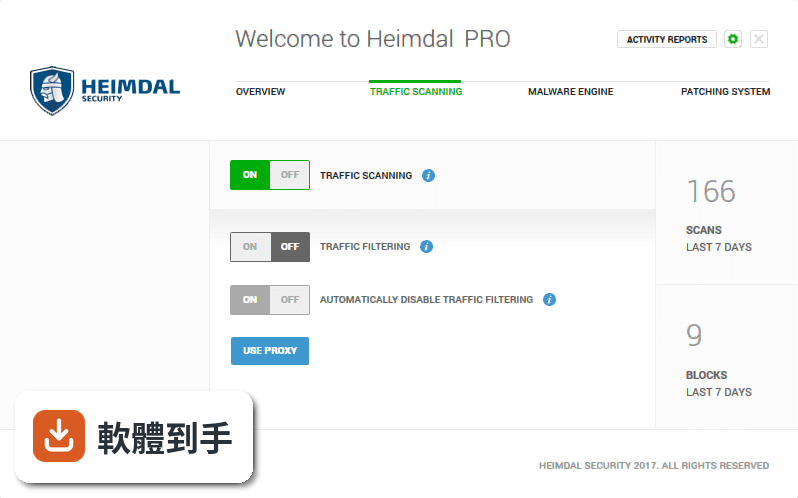
它主要不是掃描硬碟裡的檔案,而是攔截網路流量。官方說明指出,它針對的是防毒軟體資料庫裡沒有的新型攻擊,像是勒索病毒、金融木馬、竊取資料的惡意程式。做法是過濾你上網時的流量,在惡意內容到達電腦前就擋掉,同時也偵測程式有沒有偷偷把資料傳出去。
02它宣稱能防勒索病毒,是怎麼做到的?
勒索病毒通常透過惡意網址、漏洞攻擊或釣魚信件進入電腦。Heimdal PRO 的做法是掃描網路流量,在連到惡意網站或下載到含毒檔案時就阻斷連線,而不是等檔案執行後才靠防毒引擎去辨識。另外它也有漏洞屏蔽功能,針對系統和軟體已知漏洞先做防護,減少被攻擊的入口。
03自動更新軟體跟安全有什麼關係?
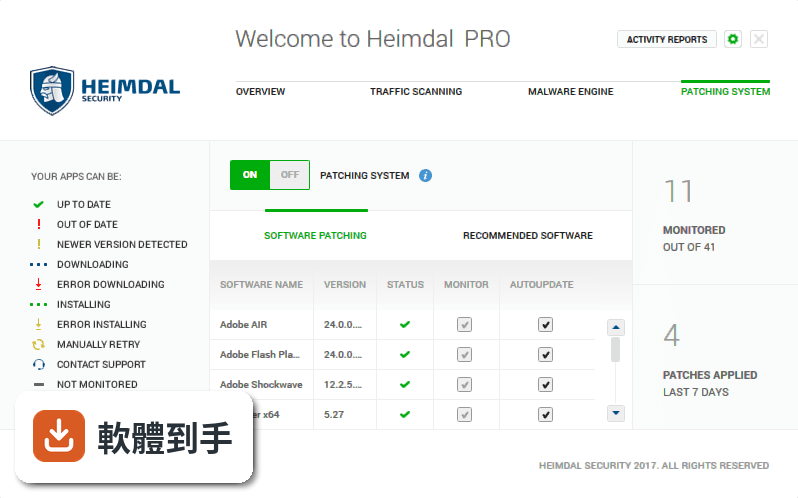
官方說法指出,更新軟體可以擋掉約 85% 的網路攻擊角度,因為很多攻擊是利用已知漏洞,而廠商釋出更新就是為了補這些洞。Heimdal PRO 的自動更新功能是幫你排程更新常用軟體,不用自己記得去檢查。如果你平常懶得更新或常常忽略更新通知,這個功能等於幫你補上這個缺口。
04免費版跟付費版功能差在哪?
根據官方說明,免費版只有漏洞掃描功能,流量掃描和惡意軟體引擎模組是關閉的。也就是說,免費版能看你的系統有哪些漏洞沒補,但不會幫你攔網路流量。要完整的流量過濾、銀行交易保護、自動更新這些功能,需要付費版。如果你主要是想攔惡意流量,免費版幫不上忙。
05它能不能取代我現在用的防毒軟體?
官方定位不是取代防毒,而是補防毒軟體抓不到的部分。它的說明強調「防毒軟體擋不住的攻擊」,意思是它跟防毒軟體是搭配使用,不是替代關係。如果你目前沒有裝任何防毒,單靠這套軟體可能不夠,因為它不做傳統的檔案掃描。建議把它視為防毒之外的第二層防護。
06這套軟體適合什麼樣的人?
適合已經有防毒軟體,但常擔心釣魚網站、惡意廣告、銀行帳號被盜的人。尤其是你常網購、用網路銀行,或者工作環境需要處理敏感資料,而你又不想自己手動更新每一套軟體,它的流量掃描和自動更新會比較有用。另外,如果你常收到可疑信件或點到奇怪連結,它也能多一層攔截。
07電腦效能不好的人適合用嗎?
官方說明強調安裝和設定只要一兩分鐘,而且標榜「上網速度跟之前一樣快」,意思是流量掃描不會明顯拖慢網路。但實際上會不會影響效能,官方資料沒有提供具體數據,建議你自己安裝試用版跑看看。如果你的電腦已經是舊機種,記憶體不足或硬碟很慢,還是先確認系統需求再裝。
08它支援哪些系統?我的電腦能用嗎?
官方列出的支援系統是 Windows 7、Windows 8、Windows 10,沒有提到 Windows 11。如果你是 Windows 11 使用者,官方資料沒有明確說支援,需要自行確認。另外它需要 .NET Framework 才能運作,安裝前要先確認系統有沒有裝這個元件。舊電腦如果還在用 Windows 7,這套軟體倒是可以用。
09它的評分很低,是不是代表不好用?
目前看到的使用者評分是 5.58/10,而且只有 26 個人評分,樣本數很少,參考價值有限。另外它的版本紀錄顯示近兩年都沒有更新,這對安全軟體來說是比較需要擔心的點——因為新的攻擊手法一直出現,長期不更新代表可能無法應付最新的威脅。如果你在意這點,可以看看其他更新較頻繁的替代方案。
10有沒有其他功能相近的軟體可以比較?
官方資料列出的相近軟體包括 Anvi Smart Defender、Panda Antivirus Pro、F-Secure Antivirus、aswMBR、Quick Heal Total Security。其中 Quick Heal Total Security 有 531 人評分,樣本數明顯比 Heimdal PRO 多,評價的參考價值較高。如果你不確定要選哪套,可以從評分人數多、更新頻率正常的軟體開始看。
11它的介面有中文嗎?
官方資料沒有提到介面語言,只有英文的功能說明。如果你不習慣英文介面,安裝前可以先確認有沒有中文語系,或者看看網路上的使用教學。這類安全軟體設定項目不少,如果介面語言看不懂,可能會影響你正確設定功能。
12什麼樣的情況不建議選它?
如果你用的是 Windows 11,官方沒列支援,先不要裝。如果你只想要免費方案,免費版功能被閹割,等於只有漏洞掃描,不如找其他免費防毒。另外,如果你在意軟體更新頻率,它近兩年沒更新,對安全工具來說是警訊。最後,如果你需要的是傳統的防毒掃描,它不是你要的工具,請繼續用防毒軟體。
下載與官方連結
Heimdal.SetupLauncher.exe
版本紀錄
- 2021-07-02 Heimdal PRO (Thor Free) 2.5.354
- 2021-03-11 Heimdal PRO (Thor Free) 2.5.314
- 2019-10-23 Rocrail 23-10-2019 (64-bit) 12.7 MB
再看 5 筆
- 2019-05-20 Rocrail 15421 (64-bit) 17.4 MB
- 2019-05-19 Rocrail 15417 (64-bit) 17.6 MB
- 2019-05-17 Rocrail 15415 (64-bit) 17.4 MB
- 2019-05-15 Rocrail 15411 (64-bit) 17.4 MB
- 2019-05-14 Rocrail 15404 (64-bit) 17.4 MB
這一版改了什麼
What's new in this version:
Heimdal PRO (Thor Free) 2.5.354
- Change log not available for this version
Heimdal PRO (Thor Free) 2.5.314
New features:
Heimdal™ Dashboard:
- Granular filter for the dashboard time frame
- The timeframe selector now has 2 additional fields for selecting Hour and Minutes to the specific timeframe. Once a custom time is selected, the dashboard results will be filtered accordingly. A default time is applied for each selector- 00:00 for start date and 23:59 for end date.
- Device filter available in DLG/VectorN/Vigilance/Admin Privilege views
- Depending on the availability of the module on each OS, a device filter was added in DLG, VectorN, Vigilance and Admin Privilege views. The filters are Android, Mac OS and Windows devices.
- DnsInfo added Active Clients verbose CSV
- Microsoft Updates per Group Policy information added in API
- Added the MD5 column for Vigilance
Agent:
- Agent info logged in fixed registry key
- This feature is meant to allow the user (only CORP users) to see which modules of the Heimdal product suite are installed and running on the customers' endpoints, which version of the agent is installed on the endpoints and which group policy it belongs to (GP).
The registries are found here:
- HKEY_LOCAL_MACHINESOFTWAREWOW6432NodeHeimdalSecurityInfo or HKEY_LOCAL_MACHINESOFTWARE HeimdalSecurityInfo (based on Windows version 64 or 32)
DarkLayer Guard:
- Added “Force NCSI fix” option
- A new checkbox was added in group policy > DLG module, “Force NCSI fix”.
- When enabled, this functionality will fix the Network Connectivity Status Indicator that causes the not connected globe in the tray menu, when running alongside DarkLayer Guard.
Firewall:
- Added isolation exclusions profiles
- This feature adds the functionality of adding some specific rules for firewall only if the computer is isolated. Those rules come as a specific profile that adds some rules for a certain program (ex: TeamViewer, ISL Online). Those rules will be deleted when the pc will not be isolated.
- New isolation profiles can be added, please send this request to the Support team.
Heimdal™ Privileged Access Management:
- Elevation request availability period
- A new option was added in Admin Privilege Group policy, “Accepted requests availability time”. When enabled, the user is able to select a custom time to live for elevation request, between 1 and 24 hours. If the option is disabled, all elevation requests will expire after the default 24 hours
Privileges and APP Control:
- Application Control is a module created to better control which applications can be executed on client machines and how they are executed. You can define rules which describe what is allowed or blocked on machines using application details like paths, publisher and executable MD5, as well as how the application should run (it can automatically elevate the application if so configured) and how we handle child processes (we can allow all processes spawned by the application defined by the rule).
- The group policy tab has been split into 2 subsections. “Privilege Access Management” tab will include previous options for Privilege Access Management and the second tab. “Application Control” will include new settings for App Control module.
Heimdal™ Email Fraud Prevention:
- Group policy option to disable Outlook suspicious activity warnings
- In Dashboard GP settings will appear a new checkbox on MailSentry tab that will disable/enable the outlook suspicious activity warnings.
- On Agent a registry key will be modified for this with the values (2 -> disable, 0 -> enable). This registry key value can be found at the following path in regedit: ComputerHKEY_LOCAL_MACHINESOFTWAREMicrosoftOffice16.0OutlookSecurity
- On this path a new key will be created if not exists called “ObjectModelGuard” and this will
Heimdal™ Email Security:
- Added minute and daily limits for sent emails
- A default minute limit of 300 emails and a daily limit of 10.000 emails was added. The limit change be lowered from the Perimeter settings, the Limits section.
- Option to customize the header and footer of the Quarantine Report
- In Perimeter, Quarantine settings options, a new button is available “View and Edit Template”. When clicking this button, a model that allows the user to edit the header and footer of the Quarantine Report is displayed.
Other changes:
- Communication between Backed to Agent – “Enable realtime communication” checkbox added in GP (admin only); When enabled the communication between agent and backend should be faster, GP changes are visible in agent in around 1 min.
- Target update control system – section added in admin; option to add a version to be targeted in agent for auto update. AllowNewer - if set to true, must change the core service will retrieve the latest available version of Heimdal rather than the targeted one, if the latest available version is newer than the targeted one. Works from 2.5.320 onward only.
Heimdal PRO (Thor Free) 2.5.303
- Change log not available for this version
Heimdal PRO (Thor Free) 2.5.297
- Change log not available for this version
Heimdal PRO (Thor Free) 2.5.256
- Change log not available for this version
Heimdal PRO (Thor Free) 2.5.223
- Change log not available for this version
Heimdal PRO (Thor Free) 2.5.222
- Change log not available for this version
Heimdal PRO (Thor Free) 2.5.213
- Change log not available for this version
Heimdal PRO (Thor Free) 2.5.201
- Change log not available for this version
Heimdal PRO (Thor Free) 2.5.191
- Change log not available for this version
Heimdal PRO (Thor Free) 2.5.173
- Change log not available for this version
Heimdal PRO 2.5.111
- Change log not available for this version
Heimdal PRO 2.5.110
- Change log not available for this version
Heimdal PRO 2.2.190
- Change log not available for this version
Heimdal PRO 2.2.185
- Change log not available for this version
Heimdal PRO 2.2.170
- Change log not available for this version
Heimdal PRO 2.2.163
- Change log not available for this version
Heimdal PRO 2.2.151
- Change log not available for this version
Heimdal PRO 2.2.14
- Change log not available for this version